Posts in news

Audio Hijack Gains Beta Audio Transcription Feature

I’ve been playing around a lot with OpenAI’s Whisper speech-to-text engine this year. Whisper isn’t perfect, but it does a remarkably good job, substantially lowering the effort and cost of generating transcripts.

There are dedicated apps to transcribe using Whisper like MacWhisper by Jordi Brun and Transcriptionist from the makers of Ferrite, both of which I’ve tried. However, the most promising option so far is a new Transcribe block released today as part of Audio Hijack by Rogue Amoeba.

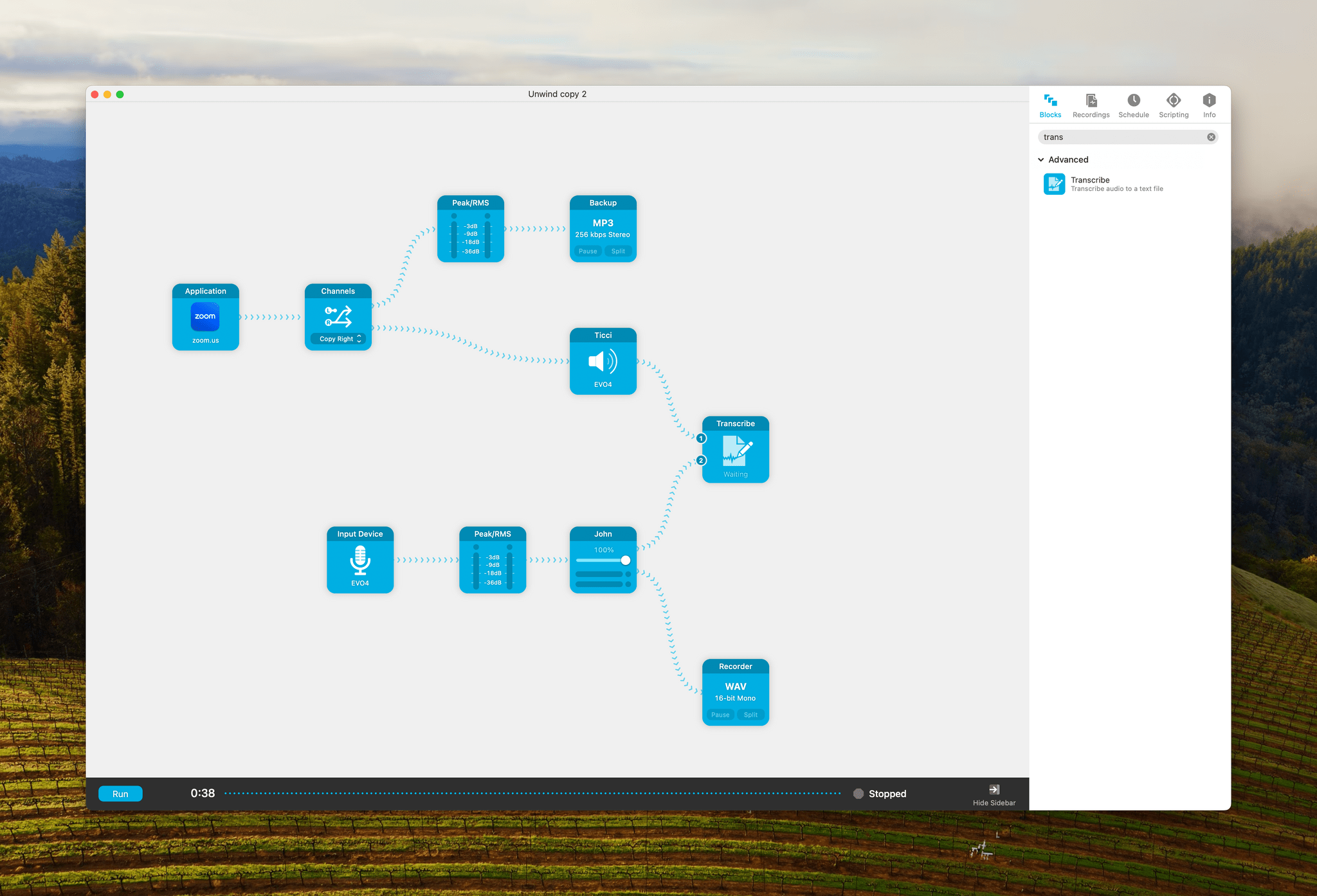
The new block is a beta feature that Rogue Amoeba’s Paul Kafasis says the company will continue to refine. It’s using the same underlying Whisper technology as other apps, but by reducing transcription to part of your existing recording flow, it’s possible to transcribe on the fly as you record and identify speakers whose audio is coming from separate channels.

We weren’t recording any shows today, so to test the new feature, I copied our MacStories Unwind recording session and used the Zoom audio settings as a stand-in for Federico. I spoke into my microphone, which was one source, and used the piano music from Zoom’s settings as the other source. Audio Hijack recorded both and started transcribing the audio as I was still recording. Here are the results:
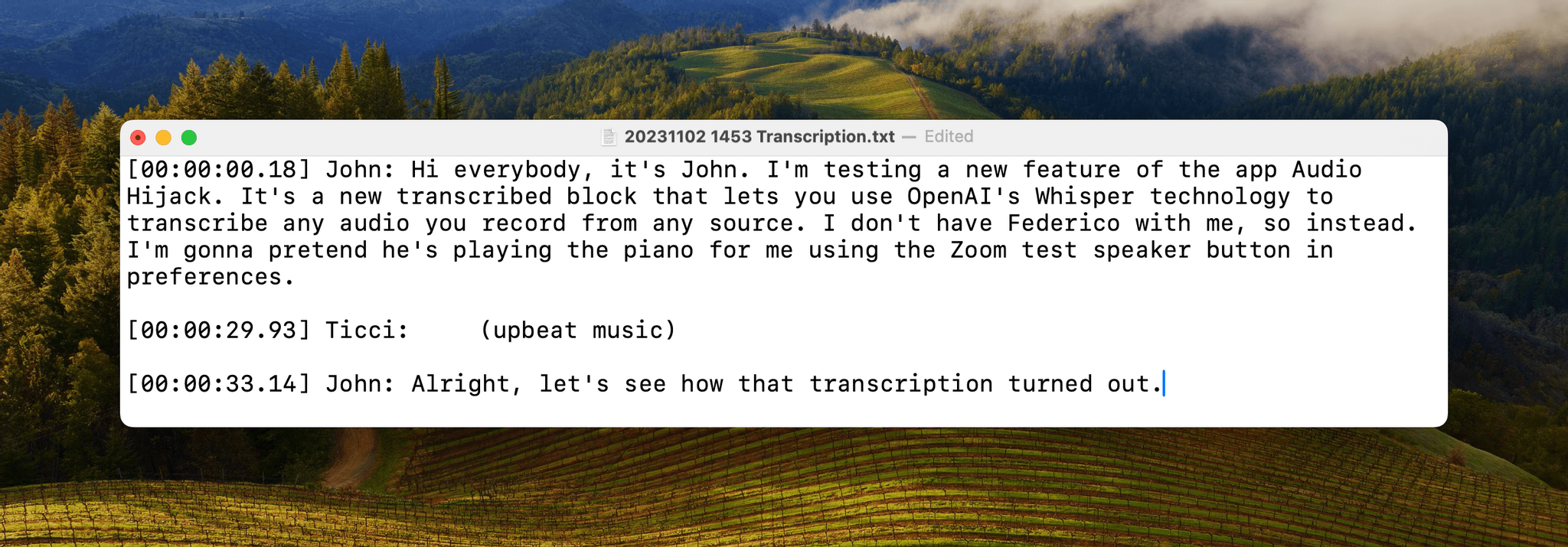
This was a very limited test. It remains to be seen how the app does with a longer recording session, but the ease with which I set this up has me excited. By renaming the sources fed into the Transcribe block, I was able to create a real-time transcript complete with timestamps and our names.

Still, as impressive as the results are, I don’t publish what I record in Audio Hijack. It still needs to be edited, at which point the transcript created with this session would diverge from the released audio. Nonetheless, for a newly released beta feature, I’m impressed and looking forward to seeing where Rogue Amoeba takes this.

Access Extra Content and Perks

Founded in 2015, Club MacStories has delivered exclusive content every week for nearly a decade.

What started with weekly and monthly email newsletters has blossomed into a family of memberships designed for every MacStories fan.

Learn more here and from our Club FAQs.

Club MacStories: Weekly and monthly newsletters via email and the web that are brimming with apps, tips, automation workflows, longform writing, early access to the MacStories Unwind podcast, periodic giveaways, and more;

Club MacStories+: Everything that Club MacStories offers, plus an active Discord community, advanced search and custom RSS features for exploring the Club’s entire back catalog, bonus columns, and dozens of app discounts;

Club Premier: All of the above and AppStories+, an extended version of our flagship podcast that’s delivered early, ad-free, and in high-bitrate audio.

Learn more here and from our Club FAQs.


Apple’s October 2023 Scary Fast Event: All The Small Things

Apple’s presentation moved fast this evening, and since the event concluded, more details have emerged about everything announced. We’ve been combing Apple’s product pages, social media, and other sources to learn more about everything announced, which we’ve collected below:

  • The 13” MacBook Pro with Touch Bar has been officially discontinued and is no longer available for sale, marking the end of the Touch Bar era at Apple.
  • None of the desktop accessories for the iMac – Magic Mouse, Magic Trackpad, and Magic Keyboard – were updated with a USB-C connector (or any other features).
  • The new ‘Space Black’ color of the 14” and 16” MacBook Pros with M3 Pro and M3 Max chips is apparently not so black, based on first impressions from people who saw it in person already.

  • Speaking of the color black, Apple now sells a 2-meter, black USB-C to MagSafe cable.

  • As it turns out, ‘Scary Fast’ was applicable not only to the new M3 series chips unveiled today but also the unusually short runtime of the event, which clocked in at 30:32, judging from the presentation’s YouTube video.

  • The event video was shot on an iPhone 15 Pro Max and edited on a Mac.

Not a very long list this time around, but at just over 30 minutes and no new accessories, there weren’t many tidbits surrounding this event I’m afraid.


You can follow all of our October 2023 Apple event coverage through our October 2023 Apple event hub or subscribe to the dedicated October 2023 Apple event RSS feed.

Access Extra Content and Perks

Founded in 2015, Club MacStories has delivered exclusive content every week for nearly a decade.

What started with weekly and monthly email newsletters has blossomed into a family of memberships designed for every MacStories fan.

Learn more here and from our Club FAQs.

Club MacStories: Weekly and monthly newsletters via email and the web that are brimming with apps, tips, automation workflows, longform writing, early access to the MacStories Unwind podcast, periodic giveaways, and more;

Club MacStories+: Everything that Club MacStories offers, plus an active Discord community, advanced search and custom RSS features for exploring the Club’s entire back catalog, bonus columns, and dozens of app discounts;

Club Premier: All of the above and AppStories+, an extended version of our flagship podcast that’s delivered early, ad-free, and in high-bitrate audio.

Learn more here and from our Club FAQs.


Apple’s October 2023 Scary Fast Event: By the Numbers

Today’s Scary Fast online Apple event was packed with facts, figures, and statistics throughout the presentation and elsewhere. We’ve pulled together the highlights.

M3, M3 Pro, and M3 Max Chips

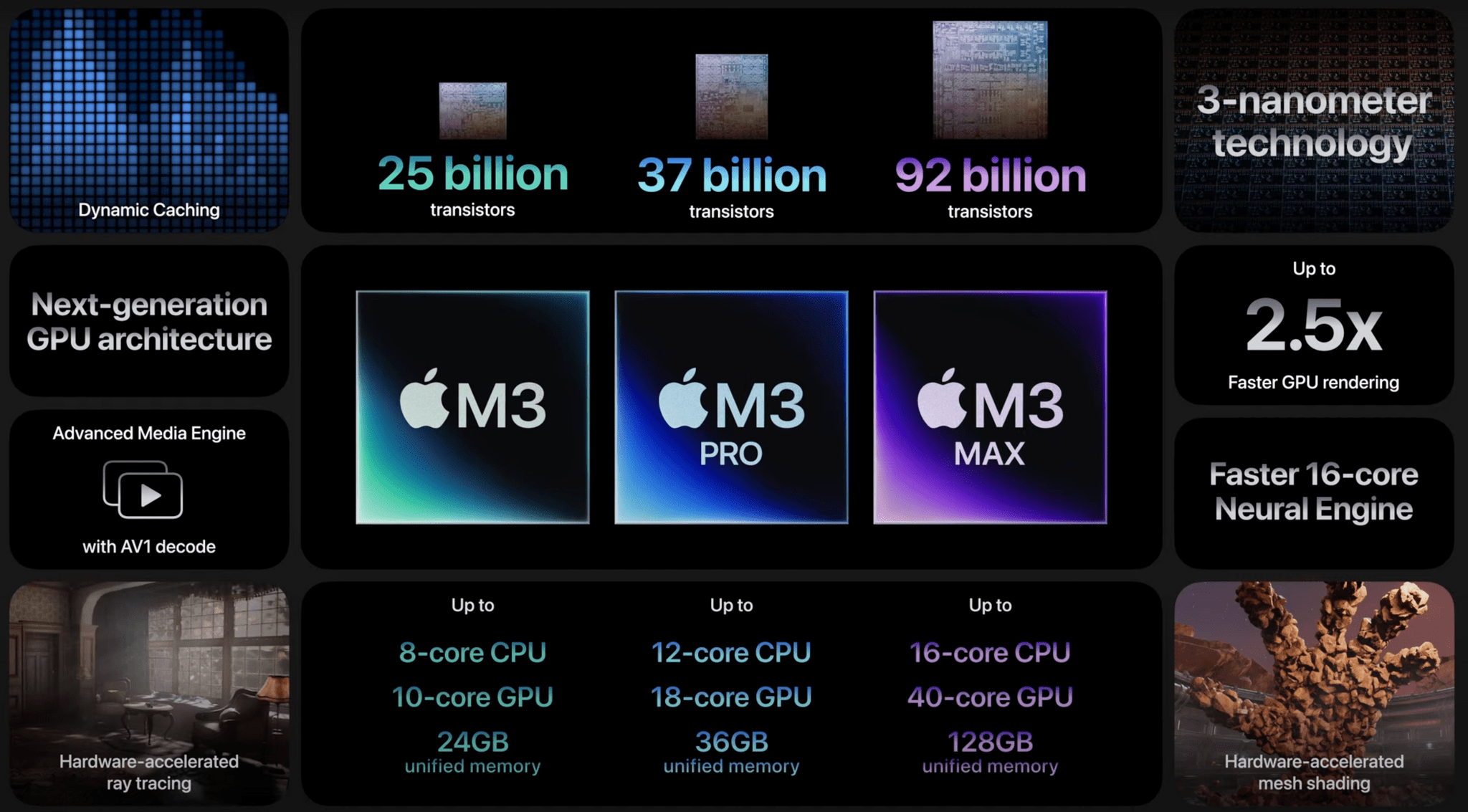
  • These are the first chips built on a 3-nanometer process.
  • This process can fit up to 2 million transistors in the cross-section of a human hair.
  • The M3 architecture grants up to 2.5x faster performance than the M1 generation.
  • The M3 CPU’s performance cores are 30% faster than M1 and 15% faster than M2; the efficiency cores are 50% faster than M1.
  • The Neural Engine is faster and more efficient in M3 as well. Specifically, it’s 60% faster than M1 and 15% faster than M2.
  • The M3 Max chip is up to 80% faster than the M1 Max.
  • The M3 has 25 billion transistors, while the M3 Pro has 37 billion, and the M3 Max has 92 billion.

MacBook Pro

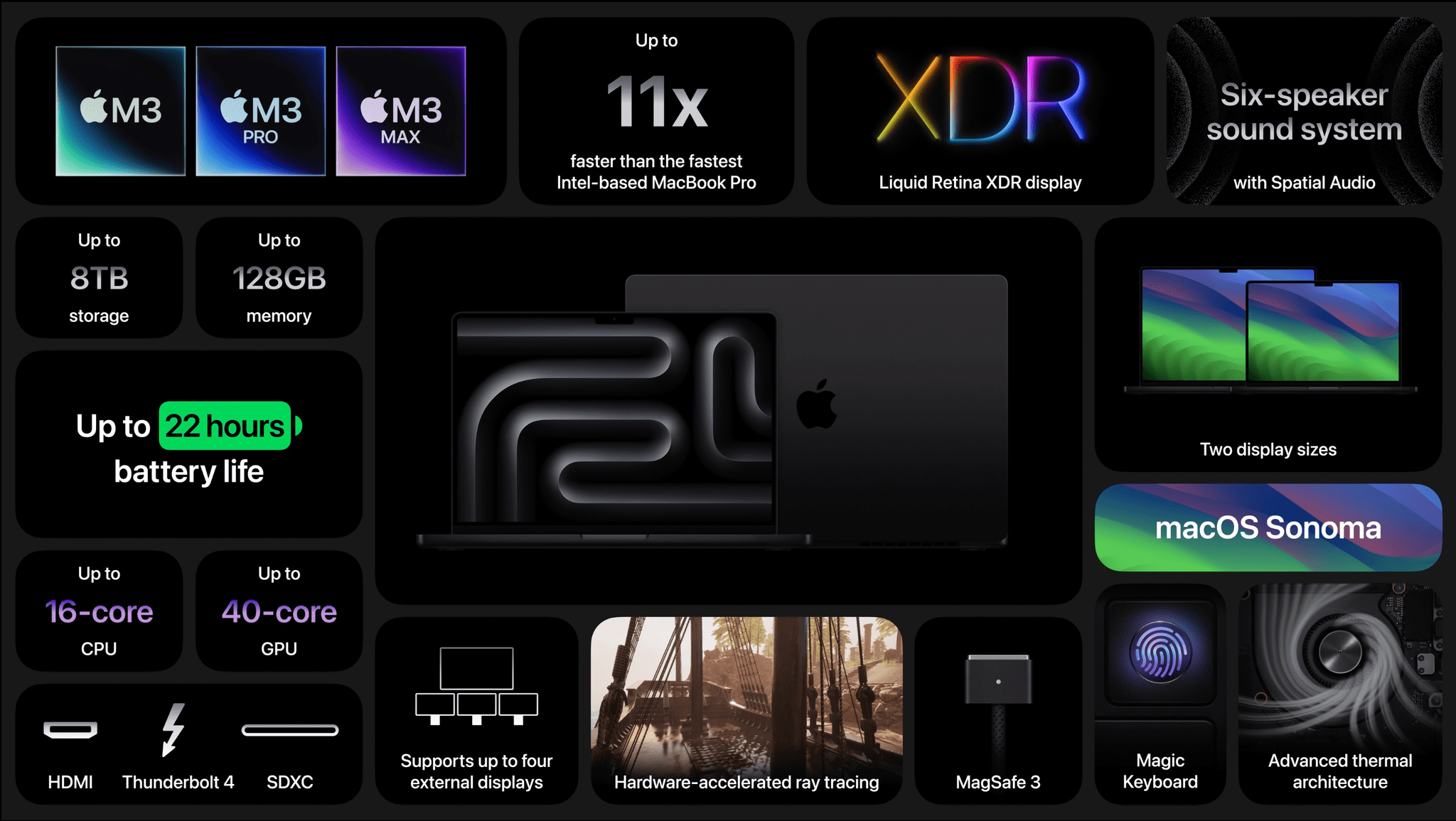
  • The M3 Max MacBook Pro supports up to 128 GB of unified memory and 8 TB of storage, with a maximum 16-core CPU and 40-core GPU.
  • The M3 MacBook Pro can run for up to 22 hours on one charge, playing movies using the Apple TV app.
  • The new MacBook Pros are up to 11x faster than the last Intel-based models.

iMac

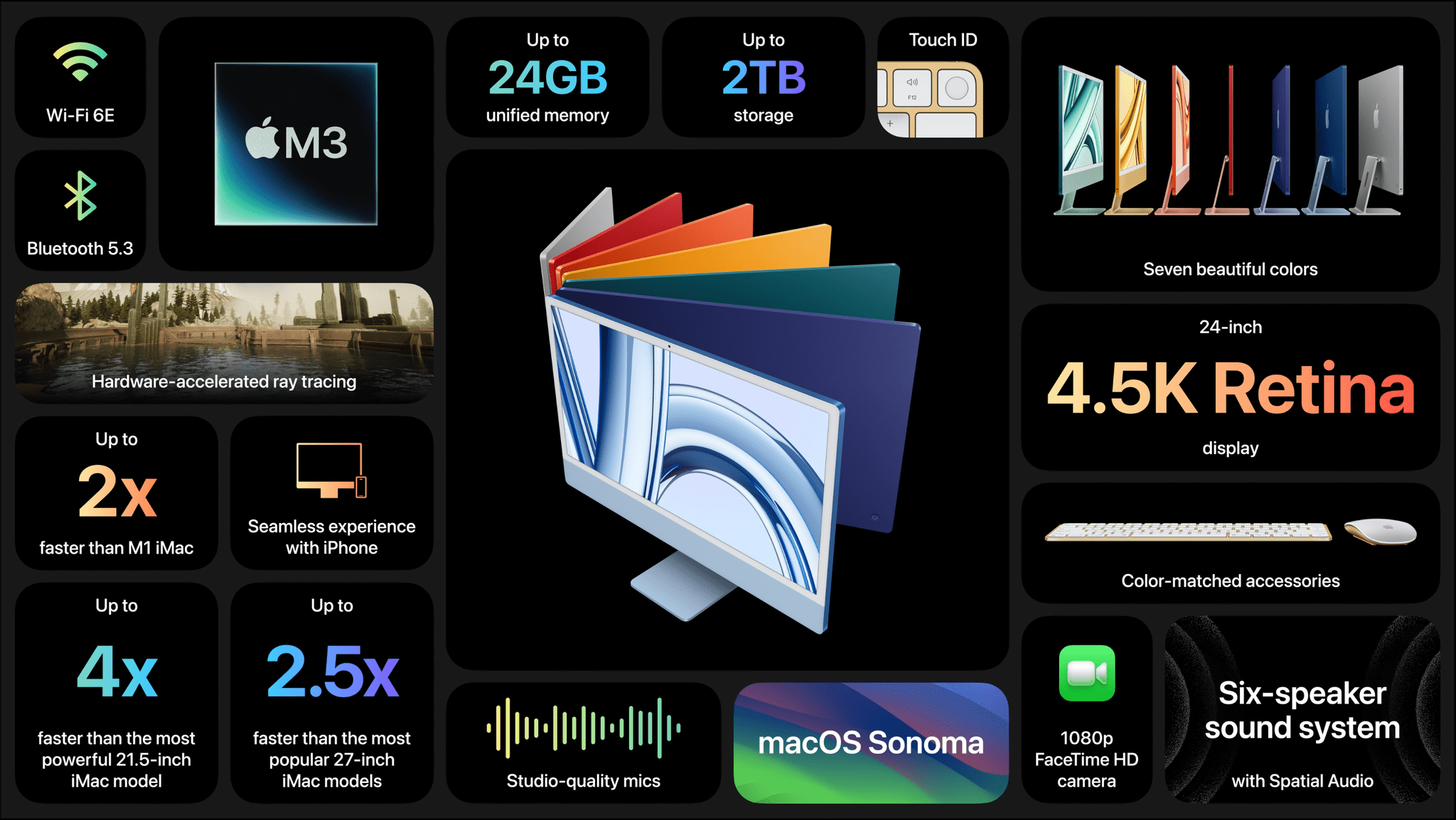
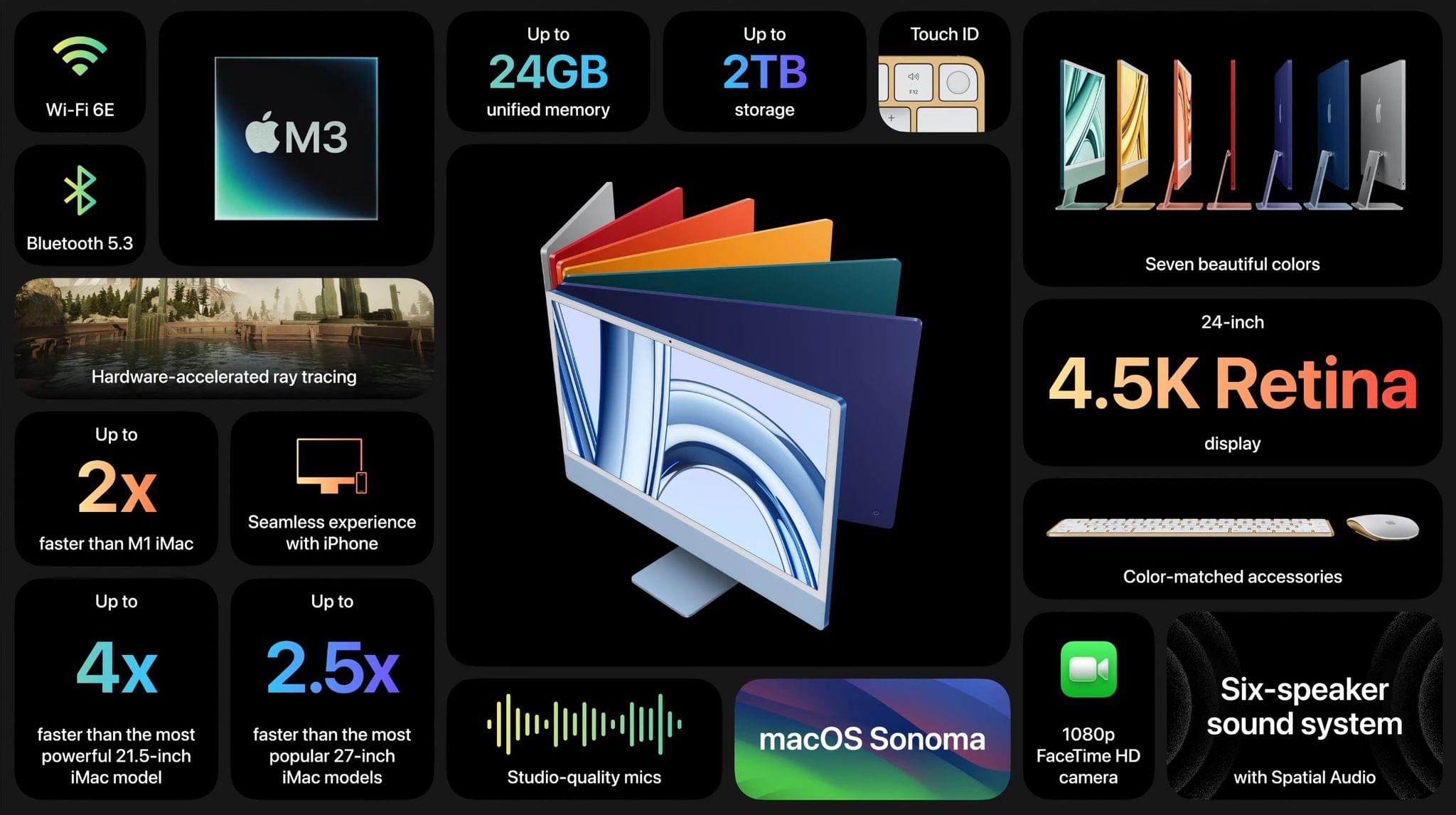
  • The M3 iMac is 2x faster than the M1 model, 2.5x faster than the 27-inch Intel model, and 4x faster than the 21.5-inch Intel-based iMac.
  • The M3 iMac has a 4.5K Retina display and features a 6-speaker sound system.
  • Apple offers up to 24 GB of unified memory and 2 TB of storage in the M3 iMac.

You can follow all of our October 2023 Apple event coverage through our October 2023 Apple event hub or subscribe to the dedicated October 2023 Apple event RSS feed.

Access Extra Content and Perks

Founded in 2015, Club MacStories has delivered exclusive content every week for nearly a decade.

What started with weekly and monthly email newsletters has blossomed into a family of memberships designed for every MacStories fan.

Learn more here and from our Club FAQs.

Club MacStories: Weekly and monthly newsletters via email and the web that are brimming with apps, tips, automation workflows, longform writing, early access to the MacStories Unwind podcast, periodic giveaways, and more;

Club MacStories+: Everything that Club MacStories offers, plus an active Discord community, advanced search and custom RSS features for exploring the Club’s entire back catalog, bonus columns, and dozens of app discounts;

Club Premier: All of the above and AppStories+, an extended version of our flagship podcast that’s delivered early, ad-free, and in high-bitrate audio.

Learn more here and from our Club FAQs.


Apple Introduces the New MacBook Pro in Three M3 Chip Configurations

Source: Apple.

Source: Apple.

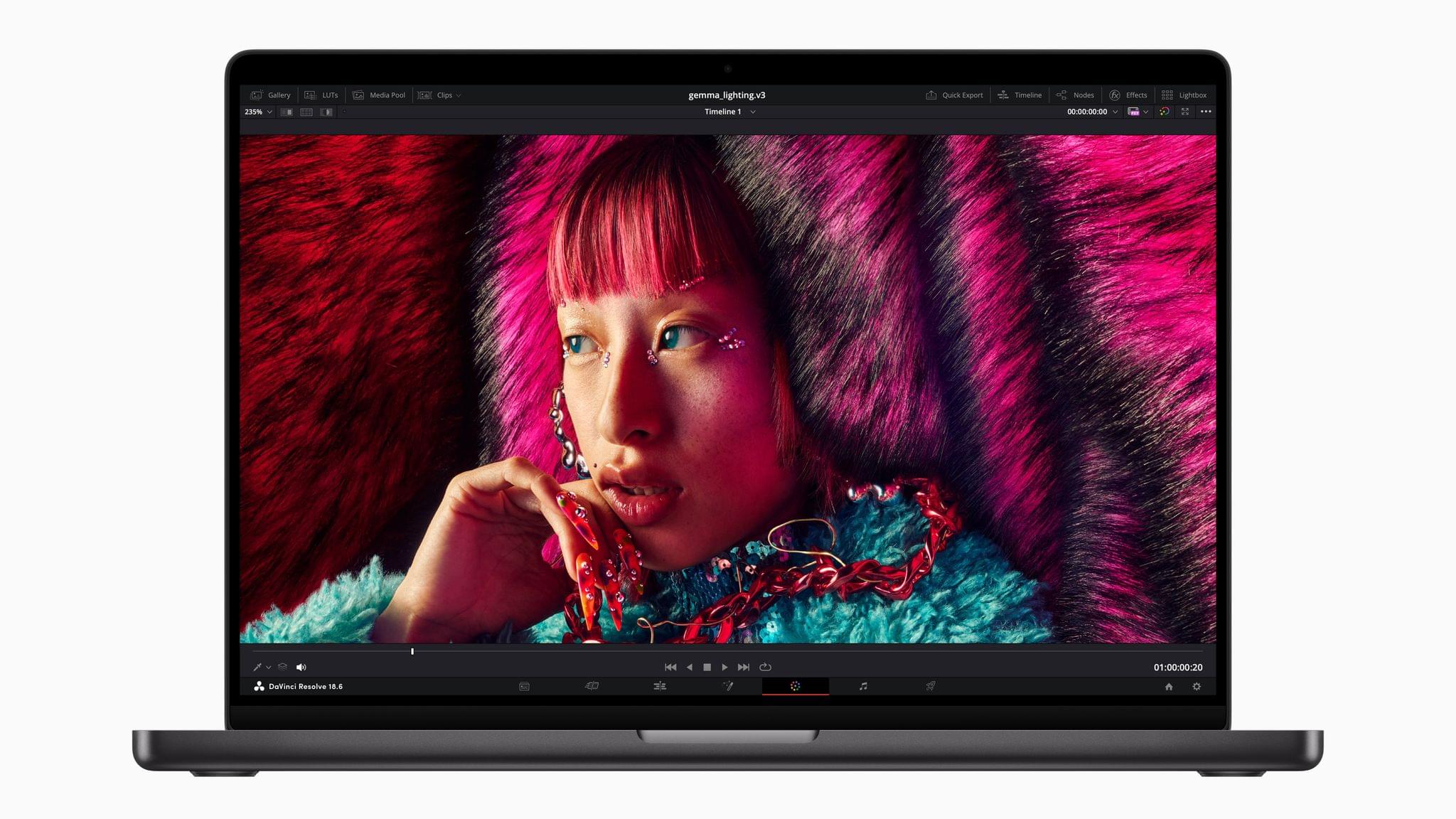
One of the things I’ve enjoyed about the rollout of Apple silicon Macs is that the old rules don’t apply, and the new ones are still being written. The cadence of releases is still settling in, and today, in the face of speculation that Apple was struggling to release M3 Macs, Apple made it clear that not one, but three 3 nanometer process-based chips are ready to ship. Along with the M3 iMac, the company refreshed its entire lineup of MacBook Pros, computers that gained the M2 chip less than a year ago.

Read more

Access Extra Content and Perks

Founded in 2015, Club MacStories has delivered exclusive content every week for nearly a decade.

What started with weekly and monthly email newsletters has blossomed into a family of memberships designed for every MacStories fan.

Learn more here and from our Club FAQs.

Club MacStories: Weekly and monthly newsletters via email and the web that are brimming with apps, tips, automation workflows, longform writing, early access to the MacStories Unwind podcast, periodic giveaways, and more;

Club MacStories+: Everything that Club MacStories offers, plus an active Discord community, advanced search and custom RSS features for exploring the Club’s entire back catalog, bonus columns, and dozens of app discounts;

Club Premier: All of the above and AppStories+, an extended version of our flagship podcast that’s delivered early, ad-free, and in high-bitrate audio.

Learn more here and from our Club FAQs.


Apple Reveals New M3 iMac

The new iMac.

The new iMac.

Just over two years ago, I spent the summer with a 24” M1 iMac on my desk and loved it. The elegant simplicity of an all-in-one Mac with just a couple of cables trailing off the back side of the computer is wonderful. The all-in-one design of the M1 iMac wasn’t new, but it was a stunning departure from its predecessor, with a slim, flat design that wasn’t possible in the Intel era. Plus, it came in a variety of vibrant, fun colors, which is all too rare in Apple’s product lineup.

Today, Apple announced the successor to that iMac that features an all-new M3 chip that, by Apple’s account, is ‘scary fast.’ Just how fast the new iMac is compared to other models will require hands-on testing, but from the specs alone, the new iMac is impressive.

Let’s take a look.

Read more

Access Extra Content and Perks

Founded in 2015, Club MacStories has delivered exclusive content every week for nearly a decade.

What started with weekly and monthly email newsletters has blossomed into a family of memberships designed for every MacStories fan.

Learn more here and from our Club FAQs.

Club MacStories: Weekly and monthly newsletters via email and the web that are brimming with apps, tips, automation workflows, longform writing, early access to the MacStories Unwind podcast, periodic giveaways, and more;

Club MacStories+: Everything that Club MacStories offers, plus an active Discord community, advanced search and custom RSS features for exploring the Club’s entire back catalog, bonus columns, and dozens of app discounts;

Club Premier: All of the above and AppStories+, an extended version of our flagship podcast that’s delivered early, ad-free, and in high-bitrate audio.

Learn more here and from our Club FAQs.


Apple Announces Pricing and Availability Dates for New MacBook Pros and iMac with M3 Chips

Spooky Ternus.

Spooky Ternus.

At this evening’s ‘Scary Fast’ Apple event, the company announced the new generation of M3 chips – M3, M3 Pro, and M3 Max – that will power three new models of MacBook Pro and the updated iMac, which is getting a refresh for the first time since its redesign featuring the M1 chip was introduced in 2021.

We’ll have more detailed overviews of the new computers up on MacStories soon, but in the meantime, here’s a breakdown of when you can expect to be able to get your hands on these new machines:

Read more

Access Extra Content and Perks

Founded in 2015, Club MacStories has delivered exclusive content every week for nearly a decade.

What started with weekly and monthly email newsletters has blossomed into a family of memberships designed for every MacStories fan.

Learn more here and from our Club FAQs.

Club MacStories: Weekly and monthly newsletters via email and the web that are brimming with apps, tips, automation workflows, longform writing, early access to the MacStories Unwind podcast, periodic giveaways, and more;

Club MacStories+: Everything that Club MacStories offers, plus an active Discord community, advanced search and custom RSS features for exploring the Club’s entire back catalog, bonus columns, and dozens of app discounts;

Club Premier: All of the above and AppStories+, an extended version of our flagship podcast that’s delivered early, ad-free, and in high-bitrate audio.

Learn more here and from our Club FAQs.


Apple’s October 2023 Scary Fast Event: Replay Today’s Keynote

If you didn’t follow the livestream of today’s ‘Scary Fast’ Apple event, you can replay it on Apple’s Events site or YouTube.

The keynote video can be streamed here and on the Apple TV using the TV app. A high-quality version will also be available through Apple Podcasts as a video and audio podcast. An American Sign Language version of the event keynote is available on the Apple Events page too.

You can watch the videos for the new MacBook Pros and ‘You Think That’s Hard Work?’ opening sequence after the break.

Read more

Access Extra Content and Perks

Founded in 2015, Club MacStories has delivered exclusive content every week for nearly a decade.

What started with weekly and monthly email newsletters has blossomed into a family of memberships designed for every MacStories fan.

Learn more here and from our Club FAQs.

Club MacStories: Weekly and monthly newsletters via email and the web that are brimming with apps, tips, automation workflows, longform writing, early access to the MacStories Unwind podcast, periodic giveaways, and more;

Club MacStories+: Everything that Club MacStories offers, plus an active Discord community, advanced search and custom RSS features for exploring the Club’s entire back catalog, bonus columns, and dozens of app discounts;

Club Premier: All of the above and AppStories+, an extended version of our flagship podcast that’s delivered early, ad-free, and in high-bitrate audio.

Learn more here and from our Club FAQs.


MacStories Unwind: Don’t Bend the Fiber

AppStories+ Deeper into the world of apps
0:00
19:19

AppStories+ Deeper into the world of apps


This week on MacStories Unwind, Federico and I discuss the Ecobee HomeKit doorbell, an obscure USB-C adapter Federico discovered, and BBQ. Plus, with my Internet out for part of the week, we learn that my Internet service Plan B is rather ordinary compared to Federico’s, which involves a picnic table and getaway car.

Gadgets

Food

We deliver MacStories Unwind+ to Club MacStories subscribers ad-free and early with high bitrate audio every week.

To learn more about the benefits of a Club MacStories subscription, visit our Plans page.

Access Extra Content and Perks

Founded in 2015, Club MacStories has delivered exclusive content every week for nearly a decade.

What started with weekly and monthly email newsletters has blossomed into a family of memberships designed for every MacStories fan.

Learn more here and from our Club FAQs.

Club MacStories: Weekly and monthly newsletters via email and the web that are brimming with apps, tips, automation workflows, longform writing, early access to the MacStories Unwind podcast, periodic giveaways, and more;

Club MacStories+: Everything that Club MacStories offers, plus an active Discord community, advanced search and custom RSS features for exploring the Club’s entire back catalog, bonus columns, and dozens of app discounts;

Club Premier: All of the above and AppStories+, an extended version of our flagship podcast that’s delivered early, ad-free, and in high-bitrate audio.

Learn more here and from our Club FAQs.


Shazam Introduces Dedicated In-App Concerts Section

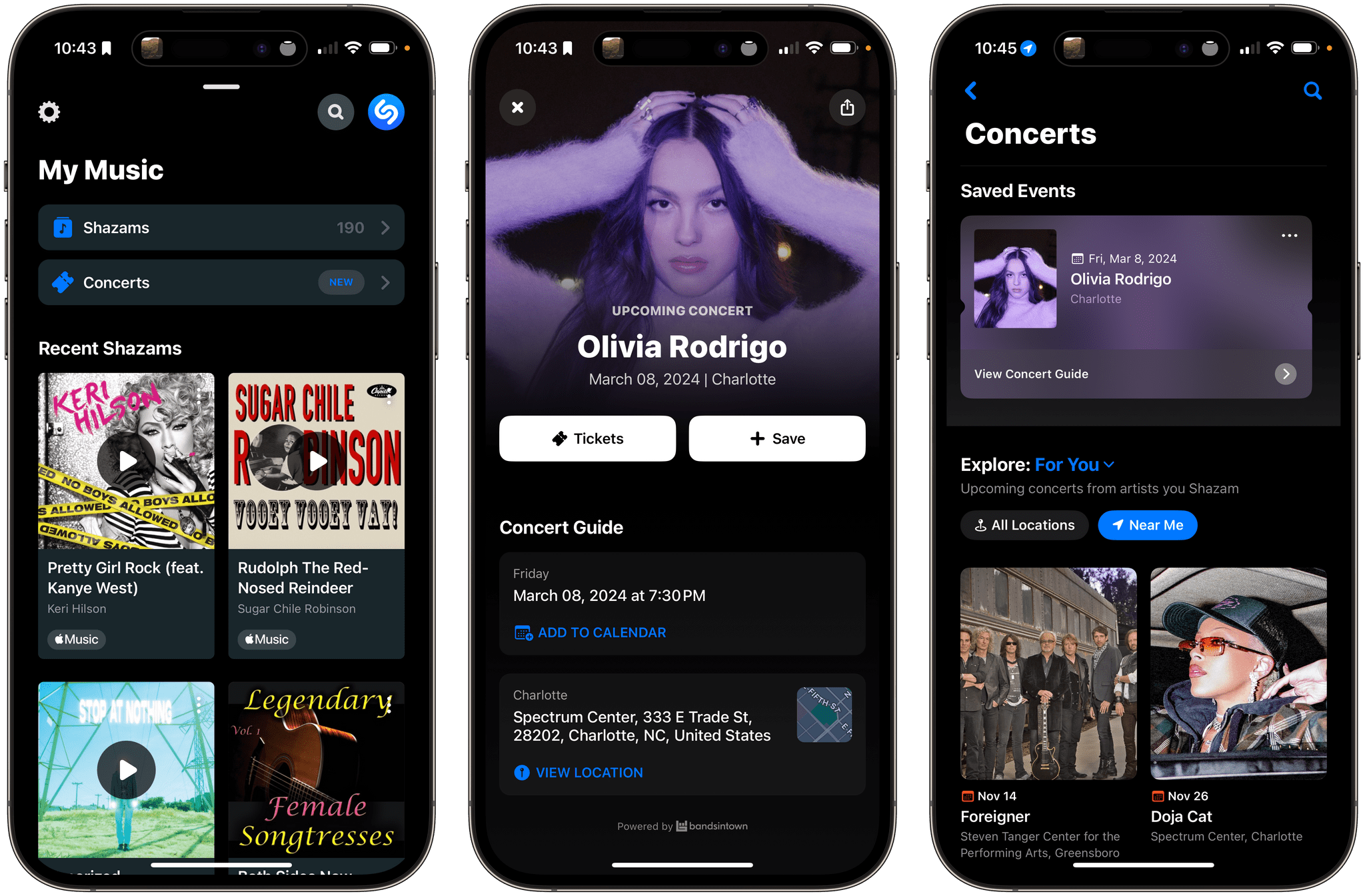
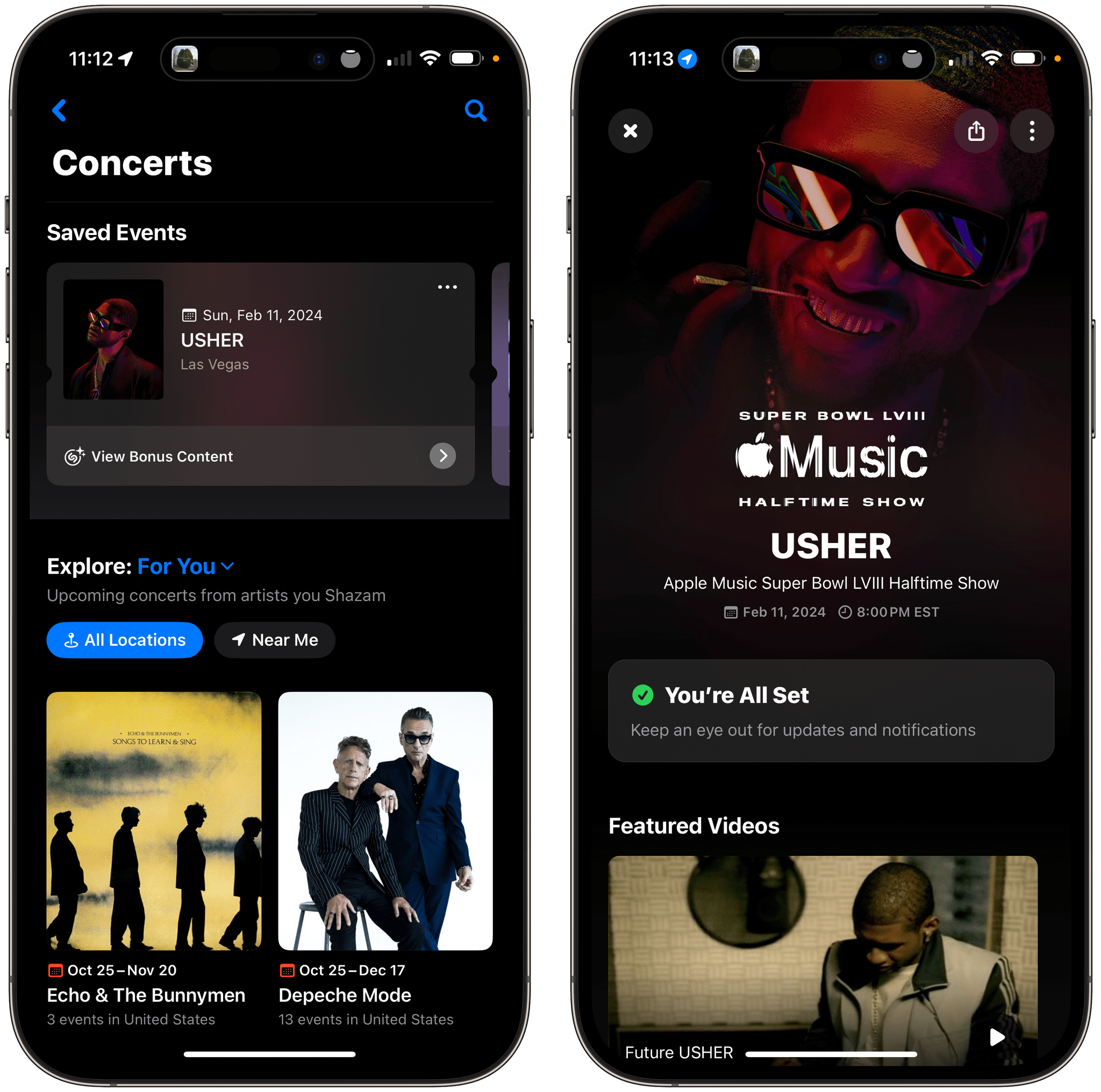
Today, Shazam introduced a dedicated Concerts section in its music discovery app that lets you explore upcoming shows that are recommended based on your Shazam history. Users can look at all recommended shows or narrow recommendations to those that are scheduled nearby. There’s also an option to display popular shows irrespective of your listening history.

When you find an artist’s show that you want to learn more about, tapping on the event listing offers additional options to:

  • Buy tickets via Ticketmaster or BandsInTown
  • Save the show for later, which moves it to the top of the Concerts section
  • Add the show to your calendar
  • View a map of the venue in Apple Maps
  • Access playlists, albums, singles, and music videos in Apple Music
  • View additional tour dates on a dedicated Concert Guide screen

Apple says other perks will be available too:

Shazam now also gives users the ability to save and revisit events, set reminders about upcoming shows, view tickets and unlock concert exclusives from select artists, which include brand new Watch faces and wallpapers available for download, behind the scenes video, tour photos, show set lists and more.

An example of bonus content for an USHER's upcoming Super Bowl show.

An example of bonus content for an USHER’s upcoming Super Bowl show.

For example, USHER’s Super Bowl concert in Las Vegas next February includes bonus content that links to information about his appearance, which is sponsored by Apple Music.

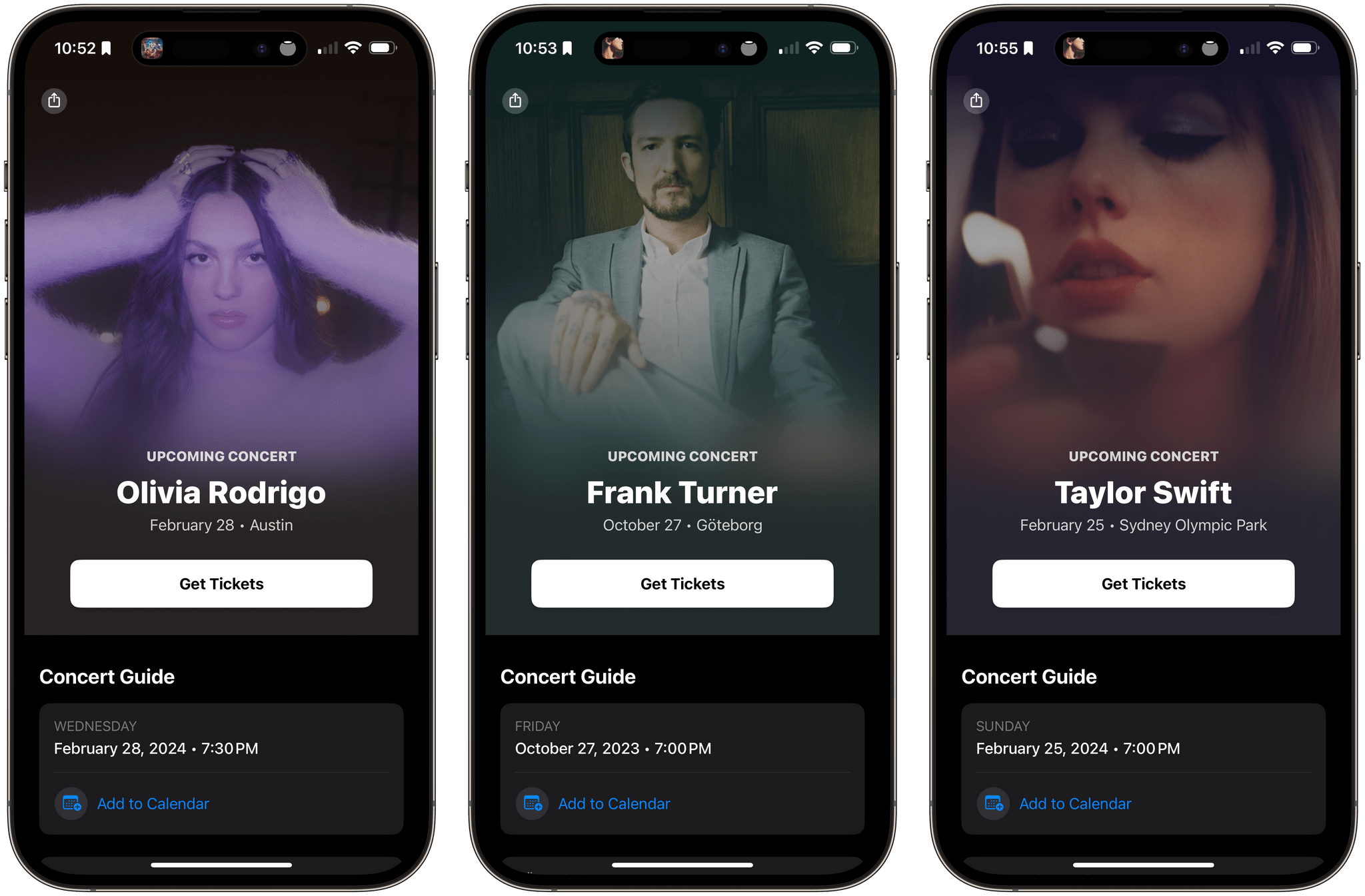
Events can be shared via the share sheet and accessed via Spotlight Search, too.

Examples of the dedicated artist pages available via Spotlight Search.

Examples of the dedicated artist pages available via Spotlight Search.

Some of the functionality found in Shazam’s Concerts section was previously added to the app. However, it’s great to see concerts get a dedicated space in the app. The update will make it easier for fans to discover upcoming shows and learn more about newly-discovered artists.

The Shazam update is available now for iOS and iPadOS users and will be released in the Android version of the app soon.

Access Extra Content and Perks

Founded in 2015, Club MacStories has delivered exclusive content every week for nearly a decade.

What started with weekly and monthly email newsletters has blossomed into a family of memberships designed for every MacStories fan.

Learn more here and from our Club FAQs.

Club MacStories: Weekly and monthly newsletters via email and the web that are brimming with apps, tips, automation workflows, longform writing, early access to the MacStories Unwind podcast, periodic giveaways, and more;

Club MacStories+: Everything that Club MacStories offers, plus an active Discord community, advanced search and custom RSS features for exploring the Club’s entire back catalog, bonus columns, and dozens of app discounts;

Club Premier: All of the above and AppStories+, an extended version of our flagship podcast that’s delivered early, ad-free, and in high-bitrate audio.

Learn more here and from our Club FAQs.