This Week's Sponsor:

Halide

Unlock Your iPhone Camera


Posts in news

Kickstarter Project: Red Pop - A Big, Red, Juicy Camera Button For Your iPhone

We love iPhoneography at MacStories. Accessories, apps, pictures of our pets, you name it, we’ve probably seen it or tried it. Until now. Beep Industries was created in early 2011 by Brendan Dawes and Lou Cordwell in Manchester, UK. Lou and Bren decided to form this new product focused company, along with 2 others, and they design their own original products which they make and sell.

Their newest product is called Red Pop, an iPhone accessory that adds a physical shutter button and grip to your iPhone 4 - simply plug the iPhone 4 into the 30-pin dock connector. Beep created the Red Pop because they believe the experience of using the iPhone 4 as a camera could be improved. It’s not perfect: it’s very flat and there’s no physical shutter button to give you that feel of a traditional camera. Sometimes it’s nearly impossible to tap the on screen button without looking so Beep thought they would bring the button back.

See the promo video and more pictures after the break. Read more


Apple Seals the Deal with Universal Music for iCloud

Greg Sandoval on CNet reports that Apple has sealed the deal with Universal Music Group this afternoon, which gives the Apple the biggest selection of content from their previous deals. With Universal on board, Apple now has all four of the major record labels including EMISony and WMG,  available for its upcoming iCloud service, and all that’s left is to pull the trigger on the upcoming service. Universal Music contains many popular artists such as Kanye West and Lady Gaga, and while Apple still has some work to do when it comes to publishers, they’re all but guaranteed to be offering a huge music selection in the cloud. As Peter Kafka explained earlier, publishers own various compositions, and require different terms and payment in terms of online distribution.

[via CNet]


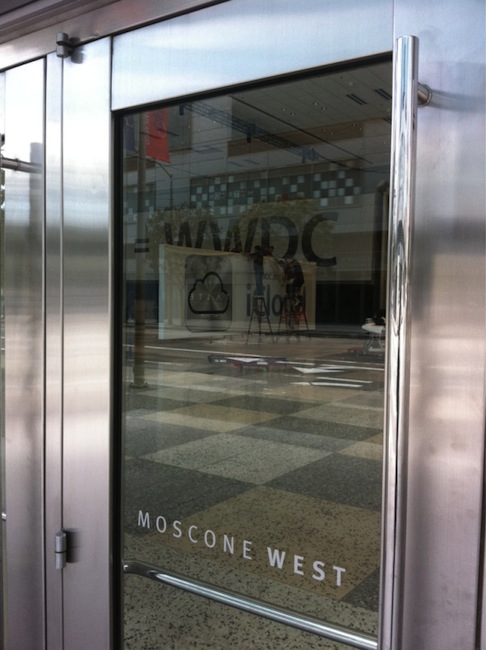
iCloud Logo Spotted at Moscone Center


Apple started the WWDC 2011 preparations at the Moscone Center a few days ago – we tweeted pictures of the Apple logo and outside banners going up, though we weren’t able to see what Apple was working on inside the conference building. As tweeted by @stop, the photo above shows the official logo / icon of iCloud that Apple will unveil at the WWDC keynote on Monday.

What do you think? Judging from a first photo, it looks like iCloud is going to replace MobileMe entirely – several rumors in the past weeks claimed iCloud would be a service within MobileMe, but from the looks of the icon it appears iCloud will simply replace Apple’s previous cloud offering.

We should receive more photos from Moscone Center later today and we’ll update this story with the new shots. Look past the break for more updates!

Read more


App Stores and iTunes Showing Trouble Worldwide [Update: Back Online!]

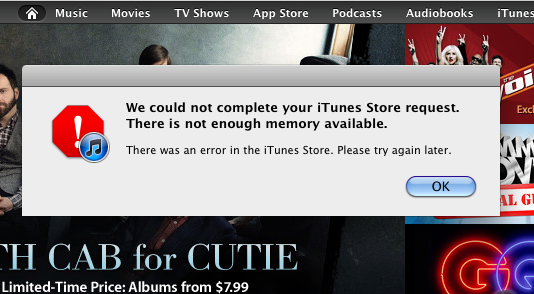
If you wanted to download Angry Birds, take a gander at Apple’s new WWDC app, or download Lady Gaga’s newest album, you may have noticed that iTunes and the App Store ecosystems are failing to download or accept purchases worldwide. While content may still be accessible to browse, Engadget first noticed that the podcast section of iTunes has gone offline, followed by failure by many to download apps from the iOS and Mac App Stores. The most common issue right now is that users can’t download apps from the iPhone or iPad, with symptoms of slow loading times, download failures, and general errors popping up in several countries worldwide. Several users are reporting problems, so either Apple is working on the backend (perhaps this service disruption as something to do with iCloud), or a server or two have decided to bite the dust at the wrong time. Apple Discussion forums such as this one are starting to crop up during this moment of inconvenience, and we’ll keep you updated as the afternoon progresses.

[Updating…]

Read more


Apple Releases Official WWDC 2011 App

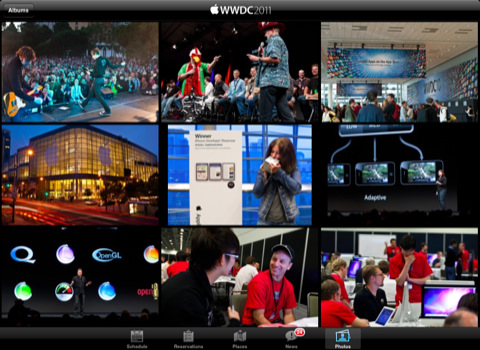
Apple has just released the free, official WWDC app on the App Store – the app is propagating now in iTunes and should be available here. Unlike last year, this year’s WWDC app works both on the iPhone and iPad with a native interface. The WWDC app allows you to check on the conference’s schedule, view floor diagrams of the Moscone Center and create your own schedule of labs, sessions and events you’re planning on attending. The app also comes with a News section to stay on top of the latest announcements made at WWDC throughout the week.

Apple says a new photo gallery will be updated daily with the latest photos from the show floor, labs and events, and the Favorites tab in the bottom toolbar will offer a way to organize sessions you want to attend. The new map feature will allow attendees to tap on a specific session or lab to find the specific level or location they need to go.

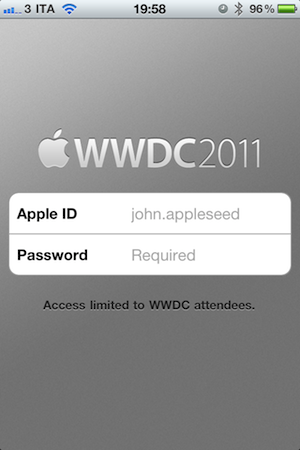
Access to the app is limited to WWDC attendees only – developers who purchased a ticket to WWDC ‘11 can use the app.

From the iTunes description:

Reserve Time at the Labs
The WWDC 2011 app allows you to make a reservation at the User Interface, App Review, iTunes Connect, Program Support, or Developer Publication lab. Once you make a lab reservation, it will appear in the schedule section of the app when you filter your view by Favorites.

Sessions and Labs Schedule
View the daily conference schedule including lunchtime and evening events. Filter your view to search by technology, platform, sessions, or labs.

Create Your WWDC Schedule
Tap on the detail view of any session, lab, or event. Then tap “Add to Favorites”. Your selections will be added to the Favorites section of the app and can be updated on-the-go.

Locate Sessions and Labs
Easily find your way around Moscone West with detailed floor maps. You can also tap on a specific session or lab for the level and location where you need to go.

The WWDC ‘11 schedule has also been posted online but it’s only available to owners of a WWDC ticket. Check out more screenshots of the app below. Read more


Pulse.me Saves Your Favorite Stories on iPad, iPhone, and Web

RSS users who live inside the Pulse ecosystem are getting a boost this afternoon in collecting articles to read later. Pulse has unveiled Pulse.me, which is a brand new web component that allows you to save a story from Pulse on your iPhone or iPad, then read it later at your office desk or during a coffee break. I love the idea of not extending the read-it-later schema off of Pulse: you simply have to star the article to continue reading it later.

Pulse.me integrates with your Pulse account or Facebook login, making sign-up relatively painless. Because stories are saved on the web, you can return to your reading list on your iPhone, your iPad, your Android smartphone or tablet, and even your desktop for a consistent experience. If you choose not to use Pulse, they’ve included Instapaper, Read It Later, Google Reader integration, and Evernote support so stories can be read in multiple places. These services work simultaneously with Pulse, meaning if you star an article for Pulse.me, it will star the article in your Google Reader account as well.

Pulse is a free download from the App Store for the iPhone and the iPad.


New Time Capsule To Cache Software Updates, iCloud Media?

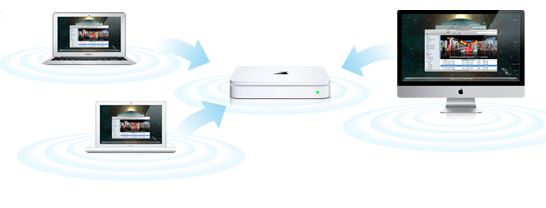
Following last night’s reports on AirPort Express, AirPort Extreme and Time Capsule stock running low at several Apple retail store locations in the United States, speculation has arisen claiming that Apple may either discontinue the line, or refresh it altogether bringing major new functionalities that integrate with iCloud and allow iOS devices and Macs to access content stored in the cloud faster. 9to5mac has received word that Apple has been internally testing a new version of the Time Capsule which is capable of downloading software updates for connected iPhones, iPads and Macs in the background, and distributing them locally once they’ve been downloaded from the Internet. According to the report, the Time Capsule would recognize devices owned by a user that are connected to the local network, automatically find and download software updates in the background, keep them in its cache, and send them quickly to a device once it’s ready for the upgrade without having to force a user to wait for the download process.

What we do know is that Apple has been internally testing Time Capsules to cache Software Updates for both Mac and iOS devices. The way we’ve heard it works is that the new Time Capsule learns which devices connect to it via Wifi. It then goes out to Apple’s servers and downloads Software Updates for those products.

When the user wants to install the software update, the Time Capsule, which is also the router, routes you to the locally stored update, rather than downloading the whole thing over the Internet. This works for iOS updates as well, though the updating still happened via the Mac.

This new smart technology would know which devices are connected to the local network and, unlike Mac OS X Server, (which can download software updates for clients but it’s not as smart as the proposed solution above) it would be capable of precisely knowing which devices need or can install what kind of software update. Imagine a system that based on user’s behavior always downloads updates related to iPhoto for Mac, but asks with a popup box whether you want to grab the latest OS X version. The possibility offered by a “smart router” with local caching functionalities are practically endless when combined with Apple’s fast pace of weekly software updates.

9to5mac also speculates the new Time Capsule could be used to cache content stored on Apple’s iCloud – such as music or movies and TV shows – so that iOS devices with limited Flash storage would be able to quickly start streaming without having to wait for an Internet connection. If the rumors are true and Apple is building a service to backup music collections to the cloud or simply mirror existing songs after a scanning process, Apple might come up with a solution to keep most consumed content in a local cache for when you’re listening to music or watching a movie on your iPad from the couch. Another idea is that Apple could store snippets of media locally (as a patent suggested), and let iOS devices start playing back music instantly. Or then again, the opposite may be true: instead of acting as a bridge between the cloud and iOS devices to provide content, the Time Capsule could back up content and settings from Macs and iOS devices to the cloud.

Update: John Gruber suggests the rumored new Time Capsule could handle iOS updates without tethering an iOS device to a computer – that certainly sounds like a possibility, and something a lot of people have been wondering about on Twitter today.

There might be something to this. What if this is a way for iOS devices to do software updates without being tethered to a Mac or PC?

rumor in May claimed iOS 5 would finally introduce over-the-air updates on a carrier’s network – considering iPhone and iPad owners are used to updating their devices at home, with their desktop computers, Apple could simply update the Time Capsule to make sure new OS updates are downloaded in the background on a local network (not a slow 3G connection), bypassing the need of iTunes.



Tim Cook: Tablets To Outsell PCs Over The Next Several Years

In a report by Goldman Sachs analyst Bill Shope, Tim Cook speaks some pretty bold words about the future of the tablet market and the PC market. Speaking with Shope, he says “he sees no reason why the tablet market shouldn’t eclipse the PC market over the next several years”.

Shope notes that Apple, in the statement is more “overtly optimistic” on the long-term prospects of the platform than they have in the past. In the report itself, Shope suggests that Apple will sell 8.1 million iPads in the June quarter, compared to last year it would be 72% increase.

Apple executives were also touting the fact the iPhone is now officially available from 200 carriers worldwide, and that ten years since opening, its retail stores are doing well.

[Via BusinessInsider]


New 2011 MacBook Pros Shipping with SATA 3.0 Connectivity in Optical Bay

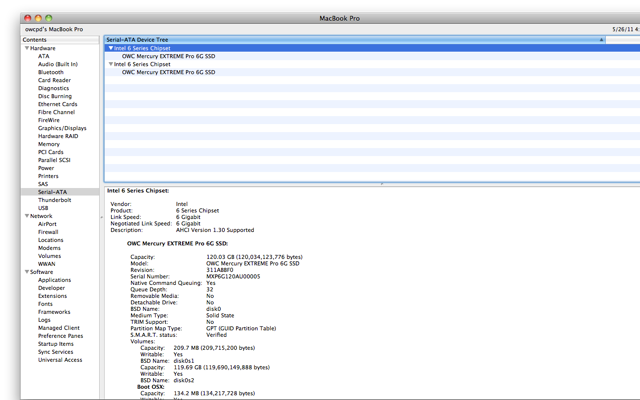
If you were quick to purchase a new 2011 MacBook Pro with a Thunderbolt interface, you may be out of luck when it comes to your Optical Bay connection. With the first shipments of 2011 MacBook Pros, OWC has seen a silent update in consecutive shipments with a connectivity bump from SATA 2.0 to SATA 3.0, effectively changing the transfer rate from 3 Gbps to 6 Gbps to and from the optical bay. Multiple purchases of a 17” MacBook Pro by OWC revealed that not all of the new Macs were created equal as the possibility of getting a model that features a 6 Gbps optical baby connection is by chance (though more probable with a more recent purchase). Apple doesn’t include the spec upon purchase, which is understandable considering your CDs and DVDs should just work. The speed bump is important if you eventually want to scrap the optical bay for a second internal drive.

To check the connection on your optical bay, you simply need to open the System Profiler in your Utilities folder under Applications, and select Serial-ATA from the sidebar. You can check whether you do in fact have the speedier connection, and if not there’s certainly nothing to fret about unless you’re going to run two SSDs in RAID 0. OWC reported they got up to 1000 MB/s sustained from two of their 6G SSDs with the dual 6 Gb/s connections. Talk about fast! Although these tests were successful with 13” and 15” MacBook Pros, OWC does say that the 17” models didn’t always work in this configuration.

9 to 5 Mac’s Chris Zibreg writes that members on the Hardmac forum have reported similar findings, and it was unclear whether SATA 3 SSDs worked in optical bay interface. The Mac Performance Guide also notes that the 17” MacBook Pro may possibly have firmware issues with an additional 6G SSD in the optical bay as the negotiated speeds were dampened to 3 Gbps, but the next update to OS X could fix the issue in question. It’s suggested the recent OS X 10.6.8 beta solves the problem on 17” MacBooks, so those with the monster laptops may simply have to wait for the next update for a simple fix.

If you’ve purchased a new MacBook Pro, let us know in the comments what optical bay connection you have, and whether you’ll be taking advantage of an additional 6G SSD for a performance bump.

[via 9 to 5 Mac]
image via OWC