Posts in news

Gmail Mobile Web App Gets Multiple Sign-In

In the past months, Google has released a series of updates to improve the overall experience of the Gmail mobile web app, which works on iOS devices such as the iPhone and iPad, as well as other smartphones and tablets. Google made the mobile web app more accessible and usable with notifications, undo bar, Retina graphics and “pull to refresh”, and today they’ve announced another update that brings Preferences and multiple sign-in to the service when viewed from mobile devices.

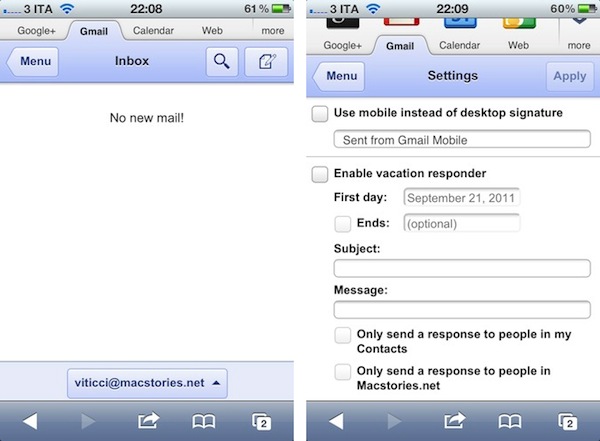
Multiple sign-in has been around in the Gmail desktop website for quite some time, and it’s a useful shortcut to quickly switch between multiple Google accounts (and thus Gmail inboxes or Google+ profiles). Starting today, a new sign-in button will appear at the bottom of the iOS web app, allowing you to jump to another account, which will automatically load its Gmail inbox. The feature is already live in Mobile Safari (tested on an iPhone 4 running the latest iOS 5 beta).

Furthermore, Google is now allowing users to set Preferences directly from the mobile web app. The company is highlighting the possibility to create a mobile-only signature, so your friends will associate typos to a smartphone’s keyboard. Also, the Preferences come with vacation auto-responder settings, and a few more options.

We know that autocorrect and other mobile spell-checks can be frustrating as you are typing on the go. Let your friends know that you are responding via your mobile phone so that they understand why you might have sent a message that you are meeting for “monitors” and not “mojitos”. It’s an easy way to make them understand why your message might be short or have a few typos. To create a mobile signature, from the menu view, press the new settings icon, choose your signature, and then check the box that tells us you want to activate it. If you ever want to disable the mobile signature, you can uncheck the box and we will use your desktop signature instead.

Google notes that each Gmail account can have a separate bookmark. On iOS devices, you can save a Gmail shortcut to the Home screen by tapping on the Action icon in Mobile Safari, and then Add to Home Screen (Gmail’s webclip icon has been optimized for the Retina Display as well).

Apple’s Next Keynote Scheduled for October 4?

According to AllThingsD, Apple’s next media event – where the company is set to officially unveil the next-generation iPhone – will be held on Tuesday, October 4th.

That’s the day Apple is currently expected to hold its next big media event, according to sources close to the situation, where the tech giant will unveil the next iteration of its popular iPhone.

AllThingsD previously claimed the new iPhone would be announced in mid-October, and whilst Apple hasn’t publicly disclosed plans of any new iPhone or device in any time frame, the timeline seems likely at this point. Apple usually sends invites to the press a week ahead of the event, and multiple rumors are suggesting iOS 5 – which the iPhone 5 will likely run out of the box, like new Macs come with Lion pre-installed – is approaching the GM status by the end of this week.

AllThingsD also claims newly-appointed CEO Tim Cook will preside over the event, and that the plan is to release the iPhone 5 a few weeks after the announcement. Previous rumors pointed at the next iPhone being available on AT&T, Verizon, and Sprint in the United States in mid-October.

Update: The Loop’s Jim Dalrymple, who has a solid track record when it comes to Apple news and rumors, has commented on AllThingsD’s article with a single “Yep”, suggesting that the original report is indeed accurate.


In-App Purchase Revenue Growing as Developers Adopt “Freemium” Model

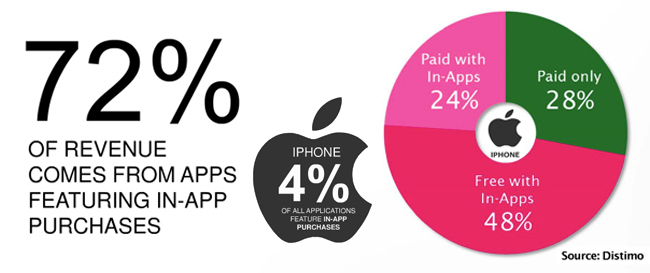
Many developers build iOS software hoping that their app will be the next Angry Birds, but they struggle at what price to sell it. A free app can bring downloads but your pockets are still empty. Maybe you should consider adding in-app purchases to your app, no matter the base price. Distimo has released a new report that suggests that in-app purchases are the way to go if you want to make money in the App Store. In-app purchases account for 72% of revenue, improving from 28% at this time last year. Here’s another stunning number, only 4% of apps in the App Store even offer in-app purchases.

Freemium apps (free to download, but require an in-app purchase to expand the app) are growing particularly faster in the in-app purchasing paradise. Free app downloads have increased by 34% since 2010 while paid downloads only grew 7% in the same time frame. Distimo’s research only covered the Top 200 in each category, but that’s a strong selection of the App Store’s money makers.

Freemium apps made up 48% of total App Store revenue while paid apps with in-app purchases accounted for 24%; the remaining 28% came from paid apps. If you look at the top grossing apps for the iPhone (iPod Touch) and iPad App Stores, freemium games take up several spots. Freemium apps also account for 65% of the Top 100 grossing games in the US App Store.

Besides games offering in-app purchases, comic apps are also making waves, especially in the iPad App Store. Magazines are one more category that is taking advantage of the freemium pricing model.

GigaOM didn’t envision this exactly back in February when Apple let in-app subscriptions into the stores. “Essentially, it looks like more and more developers are embracing the idea that making recurring payments an attractive option for App Store shoppers is the key to coming up with a sustainable business model. Apple’s isn’t the only store where developers are figuring that out, either. In-app purchases are already in use by 68 percent of the 25 top grossing Android apps, despite only being introduced in March of this year.”

Could we possibly see the day when there aren’t “regular” paid apps in the Top 300 grossing list? What do you prefer as a user – a one-time fee to buy the entire app, or having to keep putting quarters into your Apple arcade machine? [via GigaOM]


Apple Releases Updated ProApps QuickTime Codecs

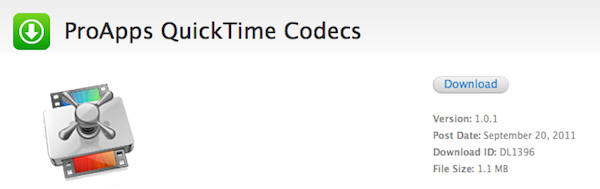
Following the release of Final Cut Pro 10.0.1, Motion 5.0.1 and Compressor 4.0.1 earlier today on the Mac App Store, Apple has pushed a separate update for ProApps QuickTime Codecs. This download is recommended for all users of Final Cut Pro X, Motion 5, or Compressor 4, and it adds the following codecs to QuickTime-based apps:

  • Apple Intermediate Codec
  • Apple ProRes
  • AVC-Intra
  • DVCPRO HD
  • HDV
  • XDCAM HD / EX / HD422
  • MPEG IMX
  • Uncompressed 4:2:2

The update is available now through Apple’s Downloads website. Updates to FCP X, Motion and Compressor are available now on the Mac App Store.

ProApps QuickTime Codecs (1.1 MB)


Mophie Unveils New iOS External Batteries, Pulse for iPod touch

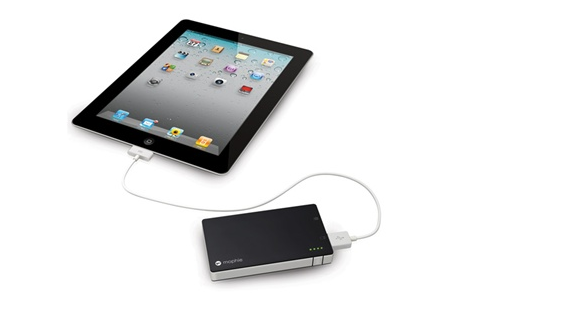
With a series of tweets posted on the company’s official account earlier today, accessory maker Mophie has unveiled a new line of external batteries for iOS devices, as well as Pulse, a gaming accessory for the iPod touch we first covered in July. The new line of external batteries is showcased on Mophie’s website here, with all the items available for pre-order today. The redesigned Juice Pack Universal line includes:

Juice Pack Reserve: Small battery pack that’s lightweight and portable. Charges an iPhone or iPod with no cables (it connects through a device’s dock) with a 700 mAh battery (twice as fast as 500 mAh batteries). Shipping September 30th. $34.95.

Juice Pack Boost: External battery for iPhone and iPod that doubles as a stand, and features a 2000 mAh high output battery. An integrated LED indicator lets you track battery status, and the ultra slim design make sure the unit is extremely portable, too. Shipping September 30th. $49.95.

Juice Pack Powerstation: 4000 mAh external battery that can charge iPhones, iPods, and iPads, as well as “virtually” any USB device. The Powerstation is also compatible with several Android and BlackBerry handsets – a full list is available on Mophie’s website. Shipping September 30th. $79.95.

Today, Mophie has also confirmed the availability of Pulse, a gaming grip for the iPod touch 4G that brings enhanced sounds and feedback to the device. Gaming feedback is provided by ViviTouch Technology, and Mophie claims the Pulse will increase usability of all kinds of apps, not just games. It’s difficult to imagine how a gaming grip would enhance, say, a note-taking app, but we applaud Mophie for the effort nonetheless.

Demo video is available here. The Pulse is $99.95 on Mophie’s website.


Canon Announces AirPrint Support for PIXMA Printers

With a press release posted earlier today, Canon has announced initial support for Apple’s AirPrint technology in three PIXMA printers: the PIXMA MG8220, MG6220 and MG5320 Wireless Photo All-In-One will support iOS’ AirPrint with a firmware update. Canon has also announced that, going forward, AirPrint support will be enabled in most PIXMA printers.

Canon U.S.A., Inc., a leader in digital imaging, today announced that the PIXMA MG8220, MG6220 and MG5320 Wireless Photo All-In-One inkjet photo printers will now support AirPrint1 wireless printing for iPad, iPhone and iPod touch. AirPrint allows users to wirelessly print photos, emails, web pages and other documents without the need to install device drivers, saving time and making for a seamless user experience.

AirPrint will be supported by the majority of Canon PIXMA inkjet printers launched from this point forward. AirPrint works with iPad, iPad 2, iPhone 3GS, iPhone 4 and iPod touch (3rd generation and later) using iOS 4.2 or later.

Canon has launched a dedicated mini-site to better highlight the features of AirPrint and detail the necessary firmware update process. AirPrint was introduced back in November 2010 with iOS 4.2, allowing users to wirelessly print documents, photos and webpages from their iPhones and iPads. Apple had initially announced AirPrint would support any shared printer on OS X, but that feature was later removed from the public version of 10.6.5. AirPrint launched with third-party support from HP, which rolled out wireless printing support to 8 more devices earlier this summer.


Apple Releases First Final Cut Pro X Update, Free 30-Day Trial

As reported by Jim Dalrymple at The Loop, Apple is releasing the first update to Final Cut Pro X on the Mac App Store today, alongside a demo version so customers interested in switching to FCP X will be able to try out the new features for free. Following the much criticized launch of Final Cut Pro X in June – a major update to Apple’s video editing suite – the company posted an online FAQ detailing why some old features of Final Cut didn’t make it to the new version, promising that they would listen to users’ feedback and re-implement the most requested functionalities in order to provide video professionals with a complete and revolutionary suite for video editing.

According to The Loop, version 10.0.1 focuses on re-implementing the most requested features.

We got a lot of feedback from our professional users,” Richard Townhill, Apple’s senior director applications marketing, told The Loop. “We listened to the pros and have taken their top feature requests and put them in this update.

The new version includes Xsan support, rich XML import and export, and more. Macworld has a list of changes in this Final Cut Pro X update (such as “intelligent stem export from project timelines” with a new Roles feature, GPU-accelerated export, and full-screen mode in Lion), and Apple says more functionalities such as multicam editing and broadcast-quality video monitoring will be delivered through another update in 2012. At the moment of writing this the 10.0.1 update is still not available on the Mac App Store. Apple said that despite heavy criticism, they haven’t seen video professionals abandoning the Final Cut Pro X platform in the past months. To ease the transition process to FCP X, Apple made the old version available through tele-sales again. Today, Apple is also releasing a free demo version of FCP X:

We are giving people the opportunity to see for themselves how powerful, amazing and revolutionary Final Cut Pro is,” said Thornhill. “No app takes advantage of Lion and the Mac the way Final Cut Pro X does.

Macworld reports the free 30-day trial will be available from Apple’s website later today:

The large differences between Final Cut Pro X and its predecessor, Final Cut Studio, have put many editors off, making them wary of dropping $300 on a program that’s more rewrite than update. As such, Apple has decided to offer these editors an olive branch, and provide a free, fully-functional 30-day trial of the software, which should be available for download later on Tuesday from the company’s website. If you have Final Cut Studio installed, the FCPX trial can peacefully co-exist alongside it—no need to create a separate partition.

Final Cut Pro X is available at $299 on the Mac App Store. Read more


Epic Games Brings Unreal Engine 3 To The Mac

Epic Games yesterday announced that the Unreal Engine 3 can now run on Macs with the arrival of the free Unreal Development Kit to OS X. Joystiq does note, however, that it arrives four years after Epic announced Gears of War and Unreal Tournament for OS X, but failed to deliver.

Every UDK game’s potential user base has increased dramatically yet again.

Unreal Engine 3 now supporting Macs comes after Epic introduced the Unreal Development Kit for iOS last year. Since then a number of iOS games build on the UDK have been released, including Epic Citadel (the beautiful tech demo of the UDK), Infinity Blade and Rage HD. LucasArts and Gameloft have also signed multi-year deals with Epic to produce games using the UDK.

[Epic Games via Joystiq]


Apple Releases Thunderbolt Display Firmware Update

Apple’s Thunderbolt Display started arriving to customers last week, and earlier today Apple changed the display’s shipping times to 3-5 days, signaling a clear change in retail and online availability. Apple has now released a firmware update for the Thunderbolt Display. The update requires OS X  10.6.8, or “10.7.1 or later”.

This update improves the stability of the Apple Thunderbolt Display.

The updater application will be installed in the Utilities folder inside the Application folder and will be launched automatically when you close this installer. Please follow the instructions in the updater application to complete the update process.

The Thunderbolt Display Firmware Update is available from Apple’s Downloads website now.