Posts in news

Apple Store App Updated with Personal Pickup and EasyPay

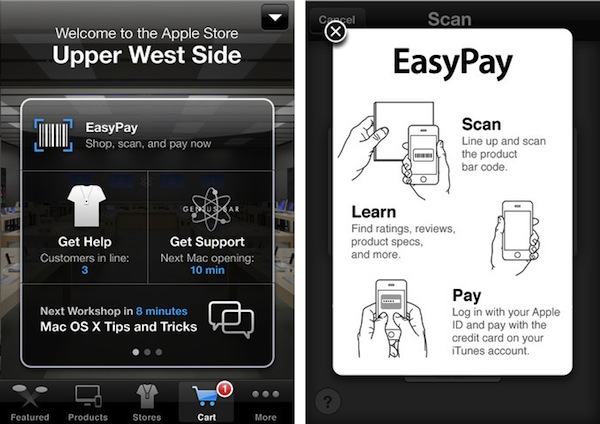
Two weeks ago Apple began rolling out a new initiative that allowed customers to order products through the online Apple Store and go to a retail store to collect them. Apple quickly trialled the initiative for three San Francisco stores before rolling it out to the rest of the Apple Stores in the Bay Area and New York City. Following speculation that suggested Apple could release an updated Apple Store app last Thursday, and then on Friday alongside the Fifth Avenue Apple Store renovations, the company has released Apple Store 2.0 in the App Store last night, enabling a number of functionalities such as Personal Pickup and EasyPay.

Personal Pickup lets customers decide to order an item online and pick it up at a local retail store. Apple says most products will be available within an hour in the US, although rumors claimed customers would be able to walk into sa store within 12 minutes after the purchase, skip lines and pick up their order. There’s no confirmation of this except that the feature is US-only for most in-stock orders.

Another new feature is EasyPay, a built-in functionality of the app that lets customers complete an in-store transaction for select accessories by quickly scanning a barcode with the iPhone’s camera. The feature is US-only and it requires the iPhone 4 or iPhone 4S, and an Apple ID with iTunes credit will be used to complete transactions.

Last, the updated Apple Store app comes with a new order status section in the More tab to track current and previous orders.

This 2.0 update largely falls in line with rumors from the past weeks, focusing on self-checkout and in-store pickups as the main new features for customers and Apple retail employees. These new features are, apparently, something Apple is heavily betting on to facilitate the shopping experience at its retail stores, and they are available now in the free update from the App Store.
Screenshots Show “Panorama Mode” Enabled On iOS 5

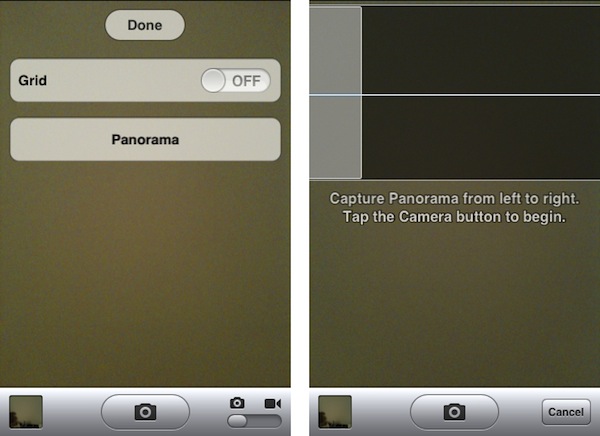
Shortly after the first beta of iOS 5 was seeded to developers in June, a series of code strings suggested the company could implement a panoramic photo-taking feature in the OS, allowing users to shoot wider photos with a Panorama functionality allegedly similar to what third-party apps like 360 Panorama and Pano are already offering. As Apple kept seeding more betas and eventually released iOS 5 to the public, Panorama was nowhere to be found in iOS, suggesting Apple wasn’t ready to debut the feature yet.

A series of screenshots posted by programmer and iPhone hacker Conrad Kramer earlier today, however, show the interface and options for what could have been Panorama in iOS 5. In particular, the screenshots show a very simplified UI to take multiple shots in a single camera session “from left to right”. It is unclear whether the design of the functionality was final but Apple decided to save it for a future version of iOS, or if the company decided Panorama wasn’t simply good enough for iOS 5. While Kramer seems to promise a Cydia tweak will be released to easily activate the feature on jailbroken phones, developers can play around with Panorama by manually changing a key on their devices. The resulting image of an iOS Panorama has also been posted on Dropbox showing a far from perfect output, although we can’t speculate on how the picture was taken, or the stability of unofficial, hidden iOS 5 functionalities.

As we mentioned above, those willing to check out panoramic photos on iOS right now should check out Occipital’s 360, which we reviewed here and here. Apple is working on an iOS 5.0 update that will introduce security fixes, better battery life and gestures on the original iPad, but Panorama wasn’t mentioned in the release notes for the new beta software.

Update: Cydia developer @chpwn has already submitted a tweak called “Firebreak” to Cydia to enable panorama mode on iOS devices.


Security Researcher Demoes Bug To Execute Unsigned Code on iOS Devices

Security researcher Charlie Miller, former NSA analyst now working for consultancy firm Accuvant, plans to publicly demonstrate a new security hole that could allow regular App Store apps to download and execute unsigned code on any iOS device. As Forbes reports, Miller, who isn’t new to the Mac and iOS hacking and security scene, plans to detail his discoveries at the SysCan conference in Taiwan next week.

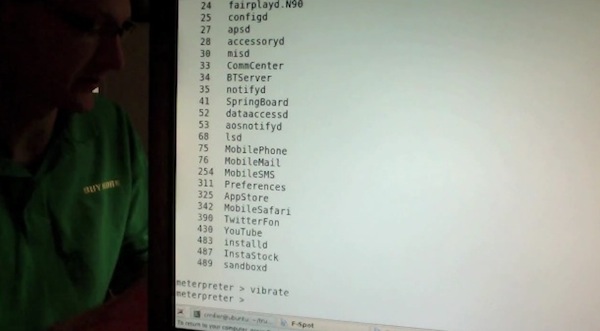
Full details of the security hole aren’t available – Miller is apparently saving the presentation for next week to give Apple time to fix the issue, and the company is indeed already working on an iOS 5.0.1 update – but Miller had a “stealth app” approved by Apple in the App Store to record a video of the hidden “functionality”. The app was called Instastock, and it behaved as a regular stock monitoring app until Miller recorded a video of his iPhone being subject to malicious attacks through the app, which has since been pulled. Apparently, since Apple found out about Miller’s app and YouTube video, he’s also been removed from the iOS Developer Program.

As you can see in the video, the app gets downloaded from the App Store as any other free or paid app. The first time Miller runs it on his iPhone, nothing happens and the app performs as advertised. But as soon as Miller activates the hidden functionalities on his web server, somehow connected to the iOS app, the app “phones home” and starts downloading and executing unsigned code. As per Apple’s technical rules and guidelines, App Store apps can only execute code approved by Apple. Yet with Instastock, Miller managed to make the iPhone vibrate remotely, open a YouTube video, and even download the device’s entire Address Book remotely. The app is seen exposing parts of the iOS filesystem, listing installed apps, and presumably giving access to a user’s documents, photos and more. In the video – which we’ve embedded below – you can also watch Miller execute commands remotely (from his computer to iPhone) using a command line interface.

Apparently, the hack has been made possible by a flaw in Apple’s JavaScript engine Nitro, introduced with iOS 4.3, that makes a series of system exceptions for Mobile Safari to render web pages faster. Forbes quotes Miller as saying “Apple runs all these checks to make sure only the browser can use the exception,” he says. “But in this one weird little corner case, it’s possible. And then you don’t have to worry about code-signing any more at all.”

Instastock has already been pulled from the App Store, and it’s unlikely that anyone else will figure out the exact bug that Miller has discovered before Apple releases iOS 5.0.1, which has reached beta 2 status and has been reported to introduce security fixes for iOS devices. Apple will likely include a fix for Miller’s discovery in iOS 5.0.1, but  in the meantime you can check out the interesting demo after the break.
Read more


Apple Releases iOS 5.0.1 Beta 2

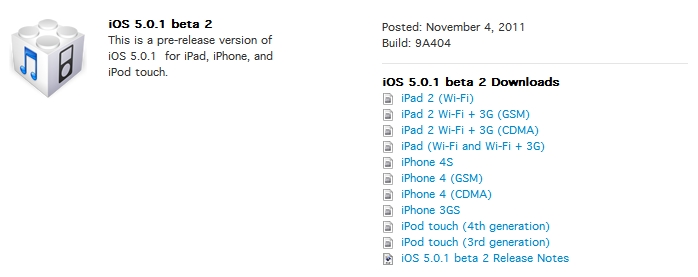
Just 2 days after seeding iOS 5.0.1 beta 1 to developers, beta 2 of 5.0.1 is now available in Apple’s Dev Center. The build number is 9A404 and is available over-the-air (800MB for iPhone 4S, 45MB for iPad 2) for users with the previous iOS 5.0.1 beta 1 installed. To download updates OTA, open the Settings.app > General > Software Update. The original beta build apparently suffered from some bugs related to failed activations. Beyond these bug fixes, it doesn’t appear that iOS 5.0.1 beta 2 contains anything more.

iOS 5.0.1 beta 2 is available now in the iOS Dev Center.

UPDATE: It looks like the iOS 5.0.1 beta 2 OTA update for the iPhone 4S is not a delta update, 800MB is too large.


Apple’s Fifth Avenue Store Re-Opens Today With Its Redesigned Glass Cube

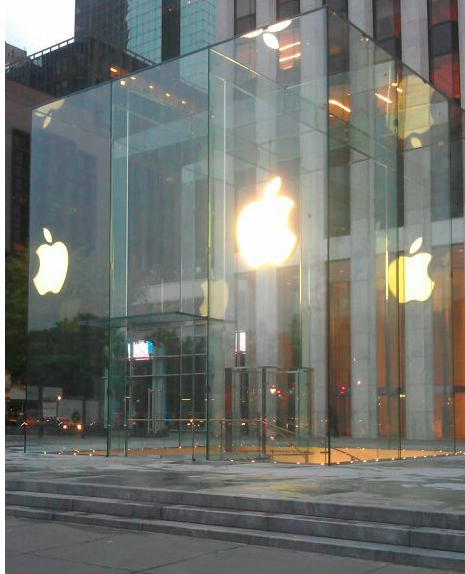
In just a short few hours, at 10 AM local time, Apple’s flagship retail store at 5th Avenue in New York City will have a grand re-opening after its glass cube was renovated and re-created. As you can see above though, Apple has spent the night removing all the barriers and plastic wrapping and the new design is bare for all to see. The new design has just three tall glass panes on all sides of the cube, coming to a total of just 15 panes — compare that number to the old design which had 90 panes.

Jump the break to view a picture before the plastic wrapping came off, to have a look at renderings of what the store was designed to look like and what the old cube (with its 90 panes) looked like.

We will update this post as more pictures come in and the grand re-opening begins.

[Image via 9to5 Mac]

Update: MacRumors shares more pictures of the redesigned cube, showing the new “seamless” design that eliminates most of the hardware that kept the old 90 glass panels together.

Update #2: View of the redesigned cube via @andinieffendi.

Read more


Kickstarter: i+Case - Machined Aluminum Bumper Case for the iPhone 4S

Most people accessorize their iPhones with cases, bumpers, stickers, etc. to make their device unique and individual. I like a minimal case that adds some protection around the device but without distractions. The i+Case by Jason Valalik and Chungming Ying is a sleek, beautiful aluminum bumper-style case that is machined out of a single block of aluminum. Sound familiar? Apple uses the same process to make their MacBook Pros. After the case is machined, it goes through an anodization process increasing durability and resistance to corrosion. Installation is simple and requires four stainless steel screws and an included screwdriver.

The i+Case Features:

  • Slim metal profile showcases more of your iPhone 4S and 4.
  • Minimalist, form-fit feature covers corners and protects better than plastic cases.
  • Minimal assembly required, tool kit with mini-screw driver, screws and aluminum buttons (Volume, On/Off, Mute) included.
  • Access to all ports and functions.
  • Weight: 16 grams.

Video after the break. Read more


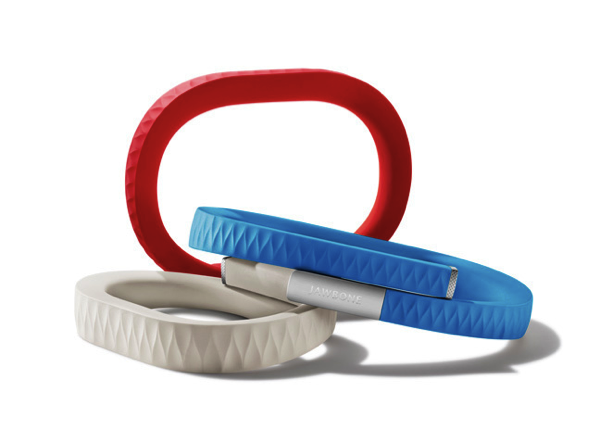
UP by Jawbone: The Health Band that’s Not Just Another Fitness Gadget

UP by Jawbone

UP by Jawbone

If you haven’t heard of it, you’ll want to familiarize yourself with the Quantified Self, a growing trend that seeks to utilize technology to give us better insight into our health, mood, and state of mind. The purpose of technologies like this isn’t to dictate how you live, but to better make you aware of your unique characteristics and nutritional needs. No two persons are built the same, and technology always finds ways to highlight facets we tend to overlook.

The UP launched late last night with much fanfare from an excited Twitter fan-base, an excellent introductory post from The Verge, and shortly after Kara Swisher, whom published an interview with its creators. Shaky cam! The UP certainly isn’t the newest contestant in the field; The Fitbit is a trick pedometer that nudges wearers to be more active, while Basis is a customizable watch module that tracks everything from body temperature to perspiration. Practical for many, Withings Wi-Fi Body Scale and Blood Pressure Monitor quantify and automate data metrics we’re already used to looking at. Websites like Fitocracy aim to gamify our health, creating social challenges that open up avenues of online collaboration and motivation with peers. Being healthy is a big avenue of interest for new startups and consumer alike.

Read more


Customize The Launchpad, Mission Control And Login Screen Backgrounds With Lion Designer

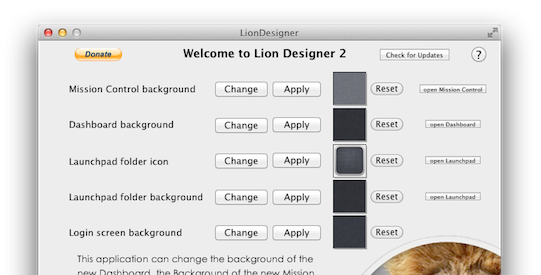
Since Lion launched we’ve covered a few hacks that describe how you can change Mission Control’s and Dashboard’s background, as well as how to change the background of folders in Launchpad - but most of them have required some level of manual file editing and replacement. Fortunately, developer Moritz Wette has made it a whole lot simpler to customize the look of Lion with his app, Lion Designer.

Lion Designer lets you customize the Mission Control, Dashboard, Launchpad folder and the login screen background as well as the Launchpad folder icon. The developer suggests using PNG images that are at the resolution of your screen or are images that can tile - otherwise you’ll end up with something that looks messy. Though if you don’t like how something looks after you’ve changed it, or something has gone wrong, you can easily click the reset button and Lion Designer will return it to the stock look. I gave the app a quick spin and found it worked fine, with my Dashboard now displaying the familiar and soothing linen pattern. Lion Designer is available for free, but be sure to send over a small donation to Wette if you find the app useful to you.

If you’re looking for some other apps to tweak and customise OS X Lion, have a look at these apps that we have covered in the past:

  • Lion Tweaks - Lets you turn various features in Lion on or off, examples include removing the system Window animation, disable spelling correction, enable permanent scrollbars and many more.
  • Launchpad-Control - Hide any app you want from being displayed in Launchpad
  • LaunchpadCleaner 2 - Also allows you to hide apps from Launchpad as well as some more in-depth features.

[Via TUAW]


Apple Pushes Back Mac App Store Sandboxing Requirement To March 2012

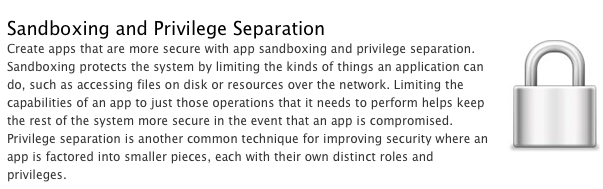
In an email to developers today obtained by iClarified, Apple has informed them that all apps submitted to the Mac App Store must implement sandboxing by March 1st, 2012. Originally Apple had told developers that the sandboxing requirement would take place this month. It isn’t entirely clear why Apple has delayed the introduction of this requirement but it does give developers a few more precious months to implement the restriction and resolve all issues that it might cause for their app.

In the email Apple notes; “Sandboxing your app is a great way to protect systems and users by limiting the resources apps can access and making it more difficult for malicious software to compromise users’ systems”. For those who aren’t familiar with the technical ‘feature’, John Siracusa has a great (and in-depth) discussion of the feature in his Mac OS X 10.7 Lion review on Ars Technica. In short, sandboxing restricts the number of actions that an app can do so that if the software is compromised, the amount of damage it can do is greatly minimised.

In Lion, the sandbox security model has been greatly enhanced, and Apple is finally promoting it for use by third-party applications. A sandboxed application must now include a list of “entitlements” describing exactly what resources it needs in order to do its job. Lion supports about 30 different entitlements which range from basic things like the ability to create a network connection or to listen for incoming network connections (two separate entitlements) to sophisticated tasks like capturing video or still images from a built-in camera.

In its email to developers, Apple also notes that if an app requires access to “sandboxed system resources”, the developer must also include justification for why it needs those entitlements when submitting the app to the Mac App Store. Finally, Apple notes that it is willing to offer developers additional, temporary, entitlements if the app is being re-engineered for sandboxing - but only on a short-term basis.

[Via iClarified, Image via Apple]