Posts in news

An Experiment with Comics, iBooks 2.0 and iBooks Author

Last week, Apple unveiled its iBooks Textbooks initiative alongside a new desktop application for OS X, iBooks Author, aimed at offering a single solution for authors willing to edit and design iBooks for the iBookstore or manual distribution through exporting options. Some limitations of iBooks Author have sparked a debate that we’ve covered extensively on MacStories last week, also through articles in our Reading List.

Proprietary file format controversies aside, it was already clear that iBooks Author would undoubtedly facilitate the creation of textbooks and eBooks heavily relying on graphics with its easy-to-use align tools and familiar interface.

Today, cartoon and t-shirt designer Richard Stevens has published an iBooks adaptation of its popular webcomic series that’s been entirely converted and tweaked using iBooks Author as an initial experiment.

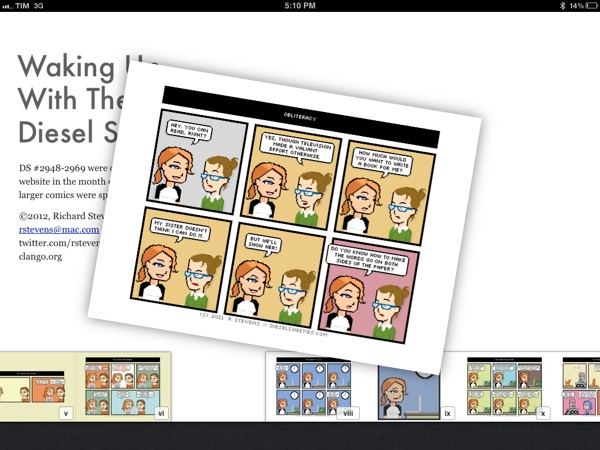
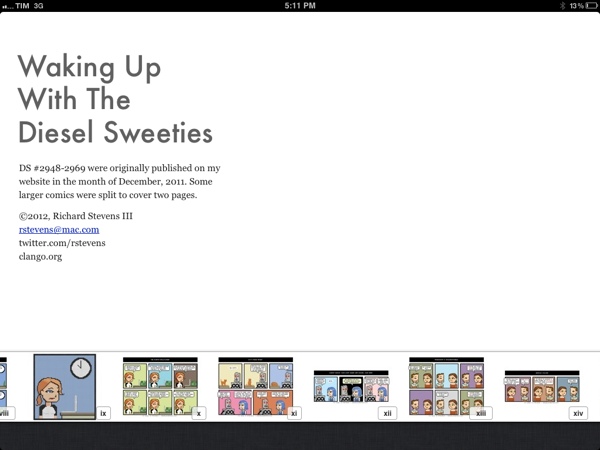
Waking Up With the Diesel Sweeties is a tiny little free ebook for the iPad. It contains all my comics from last month with a few tweaks, formatted in iBooks Author. This version only works on the iPad. It’s not in the iBookstore, so you’ll need to download the file and sync it to your iPad.

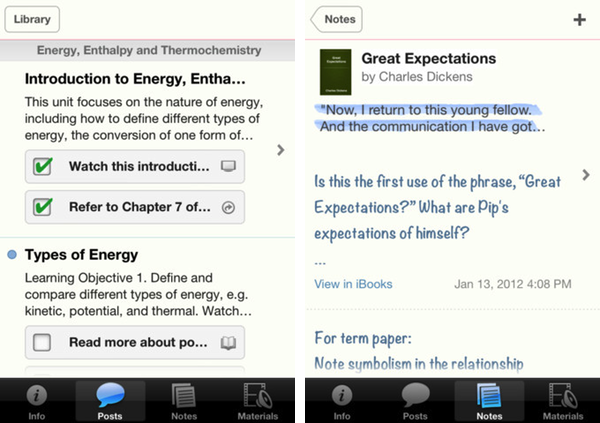
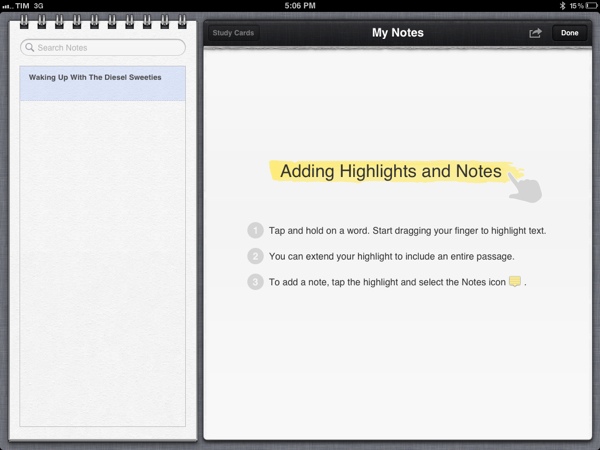
The eBook is available for download through Dropbox, and it can be installed on an iPad running iBooks 2. You can manually sync the file from iTunes to your iPad, or use an app like GoodReader to download it directly on your device and open it in iBooks. Whilst Stevens’ first iBook is an experiment, it shows the possibilities opened by iBooks 2 and iBooks Author: the book fully supports iBooks’ new annotations, highlights and study cards, and you can pinch on pages to access iBooks’ new navigation with thumbnails displayed at the bottom of the screen.
I wrote last week that I wouldn’t be surprised to see iBooks Author-based eBooks be used for something else other than regular books – for instance, I’ve heard more than one developer say that they’d be interested in using the software to create interactive manuals and help tools for their apps, among other things. iBooks Author may have been criticized and there’s still a lot of features Apple has to clarify and implement (especially for independent authors and publishers), but the interactivity and WebKit-based functionalities offered by the format look more promising every day.

A5 Jailbreak for iPhone 4S and iPad 2 Released

The long-awaited jailbreak for the iPhone 4S and iPad 2, both devices running Apple’s A5 processor, has been released. As posted by hacker p0sixninja a few minutes ago on Twitter – p0sixninja and other developers including Cydia’s Saurik contributed to the release of the latest jailbreak tool – users can head over greenpois0n.com to download the OS X version. A Windows version is said to be “coming soon” and, at the moment of writing this, greenpois0n seems to be down/very slow.

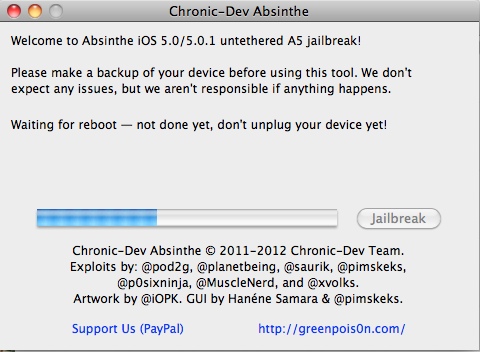
The A5 jailbreak, teased in the past weeks, comes with a graphical user interface called “Absinthe” that guides users through the process of jailbreaking A5 devices running iOS 5.0 and iOS 5.0.1. Absinthe has been developed by the Chronic Dev Team, whereas the iPhone Dev Team has created a CLI (command line interface) for more advanced users and diagnostic purposes. As usual with jailbreak releases, a backup of your data is advised and you should probably wait a few hours before rushing in to jailbreak your devices, so that any possible bugs left will be fixed.

The A5 jailbreak is available now, it is an “untethered jailbreak” and it’s currently out for OS X users on greenpois0n.com. [image via]


Apple Releases iTunes 10.5.3

Following iBooks 2.0, iBooks Author and iTunes U for iOS, Apple just released a new version of iTunes, 10.5.3. We’re downloading the update to get our hands on a proper changelog but it’s likely that this new version will simply bring support for textbooks and, perhaps, manual syncing of books created through iBooks Author.

Update: iTunes 10.5.3 does indeed enable textbook syncing to iPads.

iTunes 10.5.3 allows you to sync interactive iBooks textbooks to your iPad. These Multi-Touch textbooks are available for purchase from the iTunes Store on your Mac or from the iBookstore included with iBooks 2 on your iPad.

iBooks textbooks are created with iBooks Author — now available as a free download on the Mac App Store.

iTunes 10.5.3 should hit Software Update shortly; a direct download is available on Apple’s website here.


Apple Releases An iTunes U App

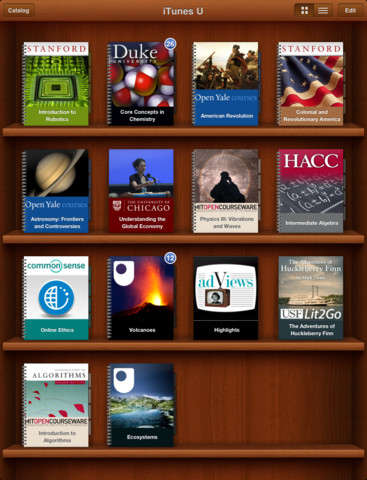
Apple has just announced and released the iTunes U App for iPhone and iPad. It’s a new app that lets teachers manage their iTunes U course and an app that helps students track all the content, assignments and messages from the courses that they study. iTunes U gives teachers the ability to customise their topics that they teach, give students information about office hours, post messages to their class and give students assignments.

The all-new iTunes U app enables students anywhere to tap into entire courses from the world’s most prestigious universities. -Eddy Cue

Effectively this new iTunes U app is similar to the various content management systems that are available for universities and other educational institutions. It’s fully featured with all the various video lectures, documents, apps and books available from within the app along with messages from teachers, the syllabus and even iBooks integration. In effect, it could be a great companion for any teacher or student. Over 100 courses have currently been created with the new iTunes U app from various universities and colleges across the US and further to that iTunes U is now available for K-12 institutions as well.

With the iTunes U app for iPad, iPhone and iPod touch, those barriers no longer exist. Students anywhere can take an entire course with complete access to all course materials right at their fingertips. With the iTunes U app, students are able to access new books right from within the app, and any notes taken in iBooks® are consolidated for easy reviewing.

Jump the break to view Apple’s press release on iTunes U for iOS. iTunes U for iOS is available here.

Read more


iBooks 2.0 Now Available

Following the announcement at the media event in New York City, Apple just released a major new version of iBooks, iBooks 2.0. As we detailed in our overview, iBooks 2.0 is mainly focused on enabling textbook support - Apple has cut deals with a series of publishers to bring iBookstore-based textbooks to the United States, and iBooks 2.0 brings full support for books created through the new Mac app, also coming today, iBooks Author.

From the changelog:

  • Experience gorgeous Multi-Touch textbooks designed for iPad
  • iBooks textbooks are filled with interactive features, diagrams, photos, and videos
  • Tap to dive into images with interactive captions, rotate 3D objects, swipe through image galleries, watch videos in full screen, and more
  • Use a finger as a highlighter when swiping over text in a textbook
  • Take advantage of Study Cards to help you memorize important highlights, notes, and glossary terms
  • Tap glossary terms to see definitions of key topics and concepts without leaving the page

It doesn’t look like iBooks’ original book and PDF reading functionalities have gone through any changes in this version. Textbooks downloaded from the iBookstore are placed in the same “Books” collection as regular titles; upon downloading a textbook on iBooks 1.5, the app will ask you to update to the latest version. Read more


Apple Announces “iBooks Author” Mac App, Available For Free Today

At its education media event in New York, Apple’s Phil Schiller just announced iBooks Author, a new Mac app for authoring books. From an intuitive interface that takes advantage of the desktop’s real screen estate, authors will be able to create and manage interactive books to use in the new iBooks 2, also announced and released today.

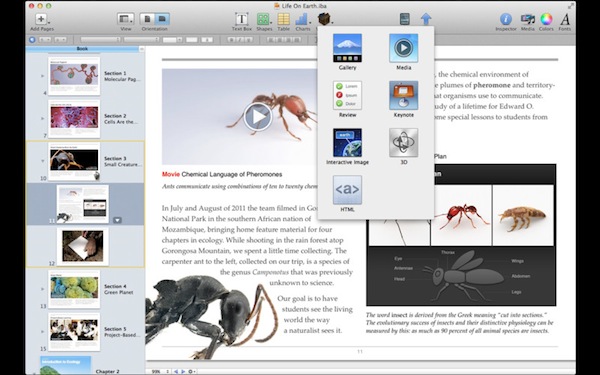
iBooks Author falls in line with previous speculation on a “GarageBand for eBooks”, and we’ll update this story with more details as we get them. From a demo offered on stage at the Guggenheim Museum, iBooks Author looked fairly impressive. Described by attendees as a “WYSIWYG application for building eBooks”, iBooks Author comes with a template chooser that makes it easy to get started on a new book project. Authors will then get access to a variety of tools in an interface that resembles Pages and Keynote with various controls to manage media, lay out text with drag & drop controls, and more. The automatic lay out of text seemed especially reliable from the first demo, with Apple noting that the experience they formed in making interactive animations in Keynote served as a foundation for making beautiful, interactive books without programming. Those in audience noted a few similarities to Push Pop Press’ one and only eBook experiment, released earlier this year on the iPad.

Now anyone can create stunning iBooks textbooks, cookbooks, history books, picture books, and more for iPad. All you need is an idea and a Mac. Start with one of the Apple-designed templates that feature a wide variety of page layouts. Add your own text and images with drag-and-drop ease. Use Multi-Touch widgets to include interactive photo galleries, movies, Keynote presentations, 3D objects, and more. Preview your book on your iPad at any time. Then submit your finished work to the iBookstore with a few simple steps. And before you know it, you’re a published author.

iBooks Author is rich on content. Authors can drag & drop Keynote presentations onto the main window and have the animation load inline, or embed web content via HTML5 and JavaScript. With glossaries, images, video and an overall focus on clean, easy-to-use management of interactive content, Apple described iBooks Author as a “miracle” compared to old eBook authoring tools. iBooks Author even iBookstore support built-in, and a preview function to quickly send a work-in-progress file to an iPad for instant preview. Read more


Apple Unveils iBooks 2.0 and iBooks Textbooks

Apple has just announced iBooks 2 at its education themed event in New York. It’s the next evolution of eBooks for the iPad that Phil Schiller calls “amazing — graphic, fun, engaging”. Apple also announced iBooks Textbooks, a new initiative to bring digital textbooks to students thanks to content deals with publishers, starting with the United States.

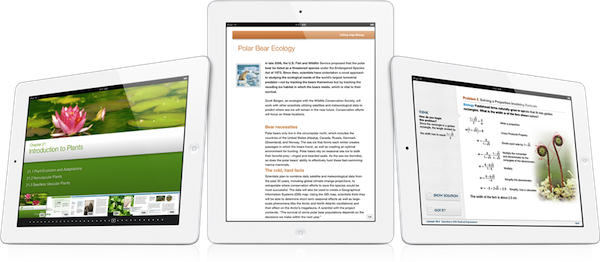
The new iBooks will support multitouch gestures to move throughout an iBook which can be full of “rich, engaging interactive experiences” — even featuring 3D models so a student can see, for example, inside a cell. In the demo iBook, switching the iPad to portrait re-orientated the content so that the student could focus on reading the text. That way, books can have two completely different experiences, simply by re-orientating the iPad.

As you can see, authors have total freedom in terms of laying out text and graphics.

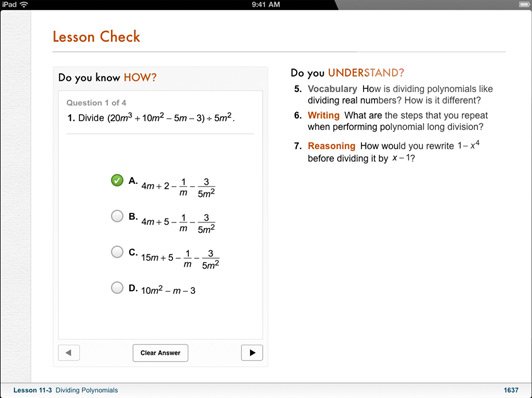
The iBooks can also bring up definitions that can include images; there is search within the book, links between pages, pages can have slideshows and more. As for those end of chapter review questions that are so common in textbooks, iBooks can now feature ”visual, interactive Q&A sections” that are much more engaging than the typical, long list of unengaging questions.

Note Taking

Another super critical study tool is highlighting and notetaking — your finger is always a highlighter. You just swipe. You can change the color. If you want to leave a note just tap.

With iBooks 2.0, Apple has brought a range of note taking features to help students with their study routine. There is everything from the traditional highlighting (just drag your finger over the desired text) to adding notes by tapping and then typing. An awesome feature here is that iBooks automatically takes all of your notes and highlights, chucks in any glossary terms and creates some study cards for revision.

I don’t think there’s ever been a textbook that made it this easy to be a good student.


Textbook Section in the iBookstore

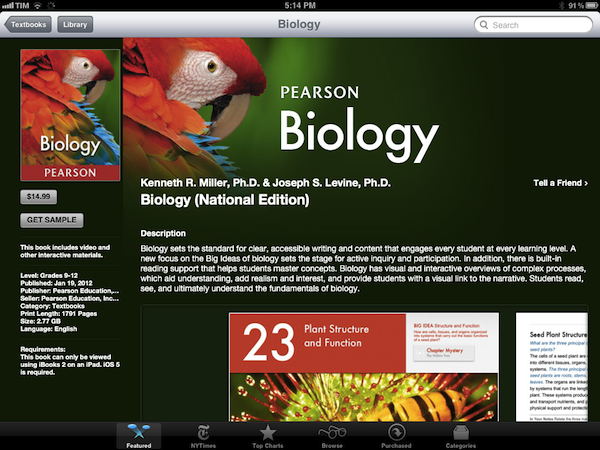
These new textbook iBooks are now all available in a new ‘Textbook’ section that is on the iBookstore - all collated in one section. As is standard with iBooks, you can even get a free sample to see what the textbook is like.

These are stunning books. They take full advantage of what can be created.

Apple has worked with some partners and has brought some high school textbooks to the iBookstore and they’ll be available for $14.99 or less. Some of the publishers that have begun creating textbook iBooks includes Pearson, McGrawHill and Houghton Mifflin Harcourt - the three publishers that make 90% of textbooks. DK Publishing is also on board with four iBooks – they’re publishers of educational books for younger children. Finally, the E.O. Wilson Foundation is also on board, bringing the book ‘Life on Earth’ exclusively to the iBookstore - the first two chapters are available for free with the rest coming as they are completed for a “reasonable price”.

Of course, the authors can make these books and keep them up to date. But what’s most exciting is that it’s their book, for students. They keep it.


iBooks 2.0 will be available as a free update to the iBooks app today. Jump the break for Apple’s full Press Release.

Read more


Reddit Client Alien Blue for iPhone Updated To 2.5

Alien Blue, my favorite iPhone app to access Reddit and see what the Internet has been up to, was updated to version 2.5 a few minutes ago. I have been beta testing the new version, and users of Alien Blue (which also comes in a separate “HD” version for iPad) will be pleased to know that several old annoyances have been fixed, and new features introduced to make browsing Reddit from an iPhone a much more pleasant experience.

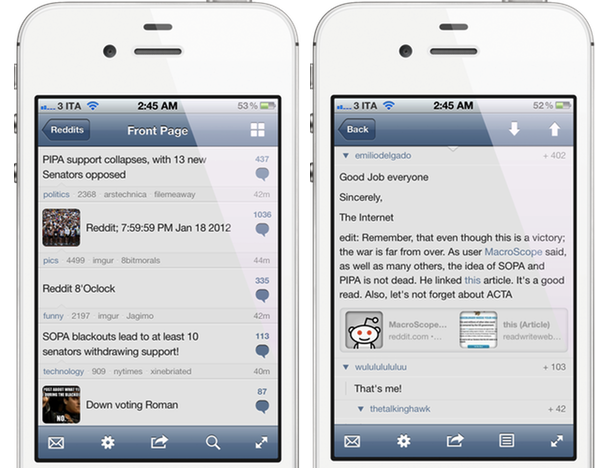
Alien Blue, developed by Jason Morrissey, comes with a $1.99 in-app purchase that unlocks additional functionalities of the app including Canvas, a way to browse images posted on Reddit with a thumbnail-based interface optimized for touch. In Alien Blue 2.5, users who will unlock the Pro edition will also get access to sharper “retina thumbnails” on Retina Display devices (iPhone 4/4S, iPod touch) and comment link previews. If you usually “lurk” on Reddit just to check on the latest meme or #AdviceAnimal, being able to preview thumbnails at high definition should be a welcome addition for your Retina displays – sharper thumbnails also fit well in the app’s interface, and I’d recommend the upgrade just to avoid fuzzy images in the main list. With the same concept, any link posted in a comment thread will get a nice visual preview through the Pro upgrade – this can be quite useful to instantly know what you’re about to open from the comments, thus possibly skipping yet another Redditor’s Wife picture.

Alien Blue’s design has received a series of improvements in this update. Both the Posts and Comments screen have been revised, but I believe the sweetest “little touch” in AB 2.5 is the new “pull to refresh” animation, which I’ll let you check out by yourself without spoiling all the fun.

Alongside bug fixes, here are some of the minor improvements officially reported in the changelog:

  • Updated launch image
  • Ability to jump to subreddit directly from a post
  • Ability to jump to submitter’s details directly from a post
  • Auto-link shortening when sharing with Twitter
  • Voting status now reflects in the colour of the score

Alien Blue remains, in my opinion, the best way to check on Reddit from the iPhone and iPod touch, and I look forward to the changes introduced in this version to find their way onto the iPad as well. Alien Blue for iPhone is free (which is a great deal considering the features you’re getting anyway without paying), with a $1.99 purchase available in-app. As a side note, it appears the Mac version of Alien Blue, announced last year, is still “coming soon” according to the developer’s website.

Top image generated with iMeme for Mac.


Apple’s Education Event To Focus on iPad, K-12, “Teaching Tools” for Self-Publishers

Less than 24 hours away from Apple’s “education announcement” in New York City, Bloomberg weighs in reporting that the event, set to begin at 10 AM EST at the Guggenheim Museum, will be focused on iPad, digital textbooks for students from kindergarten to 12th grade (K-12) and self-publishers. Initially rumored to be about “textbooks” as suggested by Steve Jobs in the authorized biography by Walter Isaacson, speculation leading up to the even has seen different sources claiming Apple will have a broader set of announcements with textbooks, but also a strong iPad presence and new tools to create eBooks on the desktop. Specifically, Ars Technica referred to these tools as GarageBand for eBooks.

Bloomberg now claims Apple’s educational plans will be primarily focused on showing the potential of digital textbooks and iPads in schools:

The plans, to be unveiled by Apple Internet software chief Eddy Cue, are aimed at broadening the educational materials available for the iPad, especially for students in kindergarten to 12th grade, the people said. By setting its sights on the $10 billion-a-year textbook industry, Apple is using the tablet to encourage students to shun costly tomes that weigh down backpacks in favor of less-expensive, interactive digital books that can be updated anywhere via the Web.

According to Bloomberg, there will be announcements for both publishers and authors. Authors will be able to create new digital editions of their works using a modified version of ePub, a file format that is already used in the publishing industry. Bigger publishers will be able to create digital textbooks with embedded graphics and video, suggesting that rumors of a simple interface similar to GarageBand for managing media and content within an eBook might be correct after all. It is unclear whether Apple is preparing one or more “digital tools” for independent authors and large publishing companies, although Bloomberg noted:

Apple also wants to empower “self-publishers” to create new kinds of teaching tools, said the people. Teachers could use it to design materials for that week’s lesson. Scientists, historians and other authors could publish professional-looking content without a deal with a publisher.

If true, this would suggest the company has created an improved eBook creation tool atop of the ePub standard with different options for independent authors and publishers to distribute their creations digitally through iTunes, or, for instance, locally in a classroom. Teachers willing to collaborate with students on a week’s lesson clearly wouldn’t need the App Store or the iBookstore for distribution, which may lead to some interesting speculation about “textbook sharing” and a possible iCloud implementation, too.

Highly anticipated then quickly dismissed as “over-hyped”, Apple’s education event is shaping up to be an interesting milestone for the company in the field of education. The iPad has become Apple’s second best-selling device behind the iPhone, with the company expected to report record sales for the holiday quarter next week. In spite of the iPad and iTunes offering a variety of educational content in the form of apps, eBooks and iTunes U content, in two years of iPad Apple has yet to officially commit to education and schools as a viable market for the device. Schools and universities have adopted iPads with independent programs and initiatives; now Apple has a chance to unify its educational offerings with publishers deals, a clear policy for independent authors, new tools for eBook creation, and perhaps simpler distribution methods that don’t require iTunes in the classroom and will allow for educational discounts on volume purchases (which Apple is already doing).

We’ll be covering the news from tomorrow’s Apple event starting at 10 AM EST (7 AM Pacific time) here on MacStories.