Posts in news

Apple’s White MacBook Reaches “End Of Life”, Educational Sales To Stop

Several months after halting sales of the white MacBook to consumers, Apple is now completely stopping sales of the MacBook. When it stopped selling the entry-level MacBook to consumers back in July of last year, Apple continued to offer it to educational institutions, but it has now notified resellers that it has now classified the MacBook as “End of Life”.

With that MacBook now discontinued entirely, Apple’s laptop lines include just the  MacBook Pro and MacBook Air models. It isn’t known when Apple stopped manufacturing of the MacBook, but it was likely a few weeks ago, with Apple just waiting for final supplies to dwindle down.

[via MacRumors]


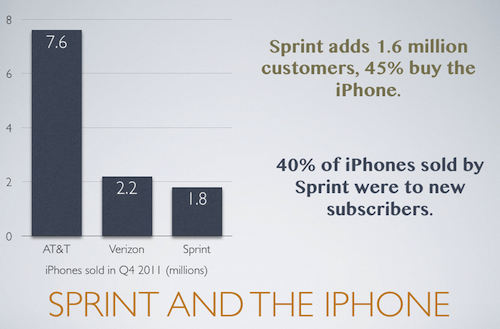
Sprint Q4 2011 Results: 1.8 Million iPhones Sold, 45% Of New Customers Bought iPhone

Sprint has just announced their Q4 2011 financial results, revealing that they sold 1.8 million iPhones. 40% of those iPhones sold were to new Sprint customers, a high percentage and one that was needed for Sprint. After continued losses, Sprint needed to add more customers to its network and in Q4 it achieved 1.6 million new users - meaning 45% of those new subscribers signed up with an iPhone.

“Our strong fourth quarter performance illustrates the power of matching iconic devices like the iPhone with our simple, unlimited plans and industry-leading customer experience,” said Dan Hesse, Sprint CEO

It follows the financial results from Verizon and AT&T a few weeks ago where it was revealed that Verizon sold 2.2 million iPhones and AT&T sold 7.6 million iPhones.

View the full Sprint press release after the break.

Read more


Evernote For iOS Gets Some Nice Improvements In 4.1.8 Update

The Evernote iOS app today got a little bit better with 4.1.8 update, bringing some nice additions and improvements. We’re big fans of Evernote here at MacStories, but their iOS app isn’t as good as it could or should be. Thankfully today’s update (although minor) directly addresses some of my complaints which makes me optimistic that the team is hard at work on making Evernote for iOS a truly great app.

Perhaps the best improvement for me is the “better editing, copying, pasting and more”, which translates to faster editing and improved preservation of styles. I’ve been plagued with some weird lag issues when editing large notes, particularly when copying and pasting, so this is much appreciated on my part.

Also new is “predictive note titles” which means Evernote now uses contextual information to create a more appropriate title if you leave the field blank - so no more “Untitled Notes”. Instead it will look at calendar events, location, note contents and other info to create a contextual title that is far more useful and informative. Similarly handy is the new, easier method of sharing a notebook on the iOS app. Now you just need to go to the notebook list, tap on the desired notebook and you’ll see a share icon in the top right corner of the screen.

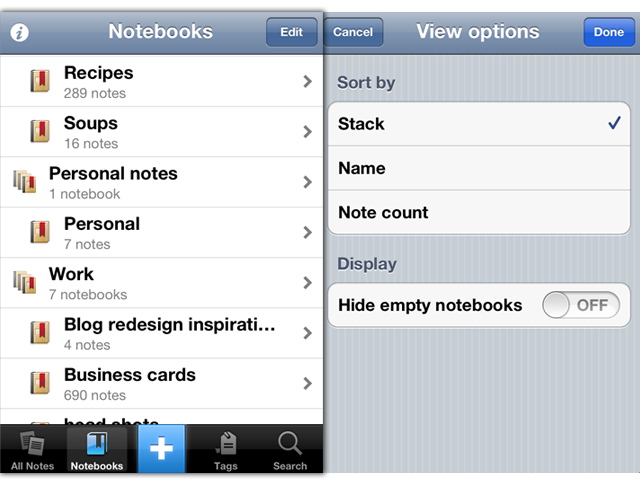
Notebook Stacks, which work well on the desktop are now better represented on the iPhone. They have existed but were hard to enable, now, viewing notebooks will use the Notebook Stacks view as default. Finally this update also includes the standard bunch of bug fixes and also improved stability - including faster and more reliable synchronisation. Now, if only we could get a new design for the iPad app…

For more information the Evernote Blog covers all these new features and improvements to the app in a little more detail.


MacBook Air, iMac, MacBook Pro EFI Firmware Updated With Internet Recovery Support for 2010 Models

Earlier today Apple published two EFI Firmware updates for its iMac, MacBook Air, and MacBook Pro lines. The updates, available through Software Update or Apple’s website, bring Lion Internet Recovery to more Mac models from 2010 – the mid 2010 iMac, late 2010 MacBook Air, and early 2010 MacBook Pro.

This update enables Lion Recovery from an Internet connection on iMac (Mid 2010) models.

MacBook Air EFI Firmware Update 2.3

This update enables Lion Recovery from an Internet connection on MacBook Air (Late 2010) models and addresses an issue where the system could restart if the power button is pressed immediately after waking from deep sleep.

MacBook Pro EFI Firmware Update 2.6

This update enables Lion Recovery from an Internet connection on MacBook Pro (Early 2010) models.

Lion Internet Recovery was first released last summer alongside OS X 10.7, allowing users to re-download the OS directly from Apple’s servers without the Mac App Store. The feature was initially only available on Mac models refreshed during the summer, but eventually found its way to older models through software updates.


Twelve South Wants To Elevate Your iPad with HoverBar

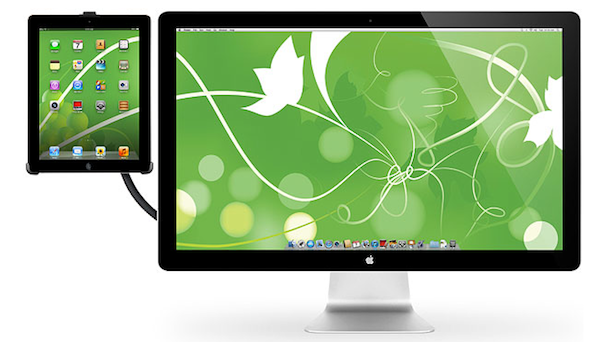
Those who have been Mac users long enough to remember the good old lampshade iMac and happen to have made the transition to newer, slicker aluminum models from the past few years might want to take a look at Twelve South’s latest product, the HoverBar. Meant to be used on an iMac-powered desk and available today at $79.99, the HoverBar is a flexible L-shaped arm that connects your iMac to an iPad; you’ll be able to turn your tablet into a secondary screen with iOS apps that support Lion’s multiple displays, a touch-based dashboard for your Twitter feed or RSS, or just about anything else you can come up with thanks to the plethora of apps available on the App Store.

HoverBar can be used with an iPad 2, iMac, or an Apple external display, and Twelve South says it can also be installed independently as, for instance, a kitchen mount. Obviously, the silicone lined clamp of HoverBar will work best when directly attached to an iMac, as it seems like Twelve South really wanted to place this product as a desktop Mac companion to achieve an iOS/OS X workstation worth of Apple’s design polish.

HoverBar turns iPad into the ultimate sidecar for an iMac or Apple display, presenting more ways to use iPad more often. Connect HoverBar to your Mac, snap iPad 2 into the secure clip and you now have one powerful dual-computer work setup. Having iPad floating next to your Mac allows you to monitor your Twitter stream, stocks and local weather – or run FaceTime on your iPad while you email, edit a file, or cut a video on your Mac. There is no reason to leave iPad in your computer bag when you have a HoverBar. This accessory expands the way you use and interact with iPad 2.

The HoverBar’s flexible arm allows you to place the iPad both in portrait and landscape orientation, and whilst some might argue that reaching out with your arm to touch an iPad can be uncomfortable over time, I actually believe there is a market for iOS desktop accessories that enable you to enjoy the rich selection of iPad apps when using a Mac at your desk. Plus, Twelve South’s promo video (which we have embedded after the break), shows some interesting additional usage scenarios for the HoverBar, such as attaching it to a desk and use it with AirPlay Mirroring to an Apple TV, or mounted on a bed for hands-free reading. I look forward to getting one of these things and see if it’ll turn out to be weird, or incredibly useful. Either way, it’s a very interesting product decision from Twelve South.

The HoverBar is available at $79.99 from Twelve South’s website. Read more


Details Of Adobe Creative Cloud Revealed: $49.99 Per Month, Includes CS6, Lightroom 4 & 20 GB Cloud Storage

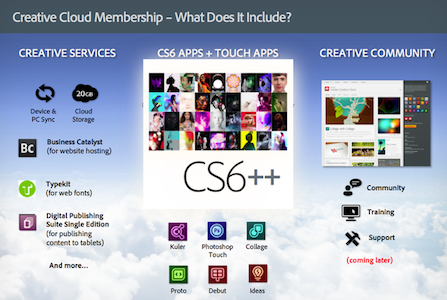
Adobe today announced details of its new Creative Cloud service that will launch in a few months time alongside the Creative Suite 6 release. Priced at $49.99 per month, when signed up for a year’s subscription, the service offers users the full Creative Suite 6 bundle of applications along with 20 GB of cloud storage for device and desktop syncing of documents. The price may seem high, but for those who use Adobe’s Creative Suite and like to be on the latest version, $600 per year may be a good price. Particularly when the alternative is the $2000 up-front cost of each major version, which typically hit every second year.

Adobe Creative Cloud will be available worldwide in the first half of 2012. While traditional licenses of CS software will still be offered, a membership to Creative Cloud provides more benefits than simply owning desktop software. You’ll get all the CS tools, Adobe Touch Apps, and services, plus new features, products, and services as soon as they are released — meaning immediate access to the latest Adobe innovations at no extra cost.

The Adobe Creative Cloud will also include all of Adobe’s touch apps, the Business Catalyst, TypeKit and the Digital Publishing Suite. Lightroom 4 and new web-authoring apps Muse and Edge will also be included in the service’s offerings once they launch. Users will be able to download all the apps individually and on up to two different machines.

Adobe is promising to deliver major new feature updates to their CS6 apps after they launch, many of which will be exclusive to the Creative Cloud service - they blame subscription accounting issues as the reason why it won’t also be delivered to up-front customers of CS6. For businesses, Adobe is set to also introduce a team option that will include additional collaboration and security features for the service - that will set companies back $69.99 per user.

[via The Verge]


Apple Warns Developers Against Using Services That Manipulate App Store Rankings

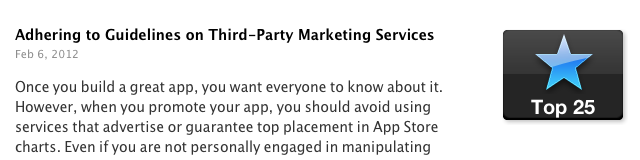
Apple has today posted a reminder to developers, warning them not to manipulate App Store chart rankings or face potential loss of their Apple Developer Program membership. The warning follows recent publicity surrounding services that have been offering the ability to artificially boost free app rankings in the top charts.

Adhering to Guidelines on Third-Party Marketing Services

Feb 6, 2012

Once you build a great app, you want everyone to know about it. However, when you promote your app, you should avoid using services that advertise or guarantee top placement in App Store charts. Even if you are not personally engaged in manipulating App Store chart rankings or user reviews, employing services that do so on your behalf may result in the loss of your Apple Developer Program membership. Get helpful tips and resources on marketing your apps the right way from the App Store Resource Center.

Yesterday, PocketGamer noted that one company was offering a service for $5000 where they would utilise bots to download an app repeatedly until it breaks into the top 25 charts. That report followed on from a TouchArcade post, where users warned others from using such fraudulent app promotion services which use automated scripts or bots.

[iClarified via MacRumors]


Grand Central Terminal Restaurant Sees Boost In Customers Since Apple Store Opened

Since the opening of Apple’s Grand Central Terminal store, at least one fellow tenant is seeing a 7 percent increase in sales. That tenant is Michael Jordan’s The Steak House, located across the terminal from the new Apple Store and its co-owner, Peter Glazier says the restaurant has seen the boost of sales since the Apple Store opened 7 weeks ago in December.

Glazier makes sure to point out that the boost isn’t due to Apple simply replacing another restaurant (the Apple Store is located where the Metrazur restaurant used to preside). He says “the jump only happened after Apple opened” - not during the months whilst the space was being renovated for Apple.

So far it seems that the “sweetheart deal” that the New York City’s Metropolitan Transportation Authority’s worked out with Apple is paying dividends — despite initial criticism of the deal. That deal saw Apple agree to a $60-per-square-foot lease agreement, with no revenue sharing agreement. The MTA made the argument that such a flagship store would bring in more customers, benefitting other tenants, so far, it seems that argument has been reflected in reality.

[Crains New York via MacRumors]


Favs: An App For Your Internet Favorites

A few weeks ago, I tweeted I’d like to see some sort of Twitter client with its only focus being on Favorites – I keep Twitter open all day, and I save a lot of links. Prior to ending up in my Evernote or Pinboard accounts, the tweets I want to “save for later” are marked as favorites, which, I believe, provide an easy way to use a built-in Twitter functionality for general-purpose “bookmarks” that I may or may not consider for a post or more serious bookmarking in a second service. As you can see, I have a lot of favorites. The same is true for other services I use on a daily basis, such as Google Reader, Vimeo, YouTube, or Instagram: I like to be able to “star”, “like” and mark things as favorite so a) the service knows the stuff I’m interested in and perhaps will leverage this data sometimes in the future or b) perhaps other apps will. And while I’m still waiting for the ultimate app that looks at your Internet favorites and delivers content intelligently to you every day (albeit Zite is on the right path), it turns out someone has built a functional and nice-looking desktop aggregator called Favs.

Favs for Mac is in beta, so don’t expect a full review now – the developers are still polishing the interface and adding features, and it wouldn’t make sense to give a final verdict whilst the app is still being worked on. But the underlying concept is there, and it’s one of those things I’ve been looking for: a single app that collects favorites from a variety of services.

Currently, Favs lets you fetch favorite items from:

  • Delicious
  • Dribbble
  • Facebook
  • Flattr
  • Flickr
  • Github
  • Google Reader
  • Instagram
  • Pinboard
  • Stackoverflow
  • Twitter
  • Vimeo
  • YouTube
  • Zootool

The list is pretty impressive already, and I assume it can only grow before the final release. I don’t know what else I’d add to that list (multiple accounts are already supported) as most of the services I use are already covered – perhaps some kind of Evernote and Instapaper integration, though I honestly can’t imagine how Evernote could work with Favs. Right now, I’m just happy Favs is shipping with a solid selection of services, and I like how the developers also implemented a unified inbox for all your favorites.

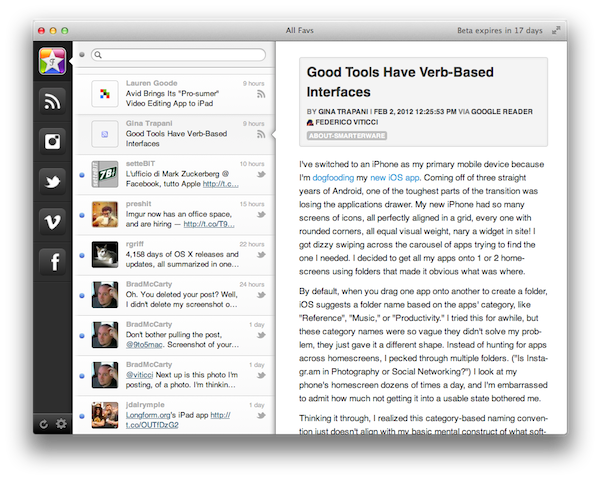
Favs, in fact, uses the old Tweetie-like interface with narrow sidebar + right panels (the one we’ve already seen in a multitude of Mac apps such as Sparrow and Reeder) to lay out service icons, unified inbox, and controls to manage settings and refresh all services. The app supports Lion’s full-screen mode, which is probably a good choice considering you’ll want to run Favs as a standalone app that is not your main Twitter or Google Reader client, as it’s focused on letting you view items that you wanted to save for later. Obviously one could easily dismiss this interface approach as “easy” or not innovative, but I believe this design can work for an application like Favs where you’re supposed to quickly switch between sections (sidebar), take a peek at headlines (mid panel) and read the actual content (right panel). As I’ve said this is a first public beta, which means features like keyboard navigation, sharing and contextual menus haven’t been implemented or refined yet. I was able to test Favs with my huge collection of Twitter favorites and it reliably loaded items from 500+ days ago without a single slowdown. I can only imagine things will get even better come the final release.

To me, Favs is a web nerd’s dream come true already. It’s got my Twitter favorites, my Google Reader stars, the stuff I like on Instagram, and it even lets me add multiple accounts if I really want to keep tabs on everything I save online. I look forward to reviewing a final version in the future, and I hope the developers are at least considering an iPad version for this.

For now, you can download the Favs public beta for free here.