Posts in news

Kindle for iOS Updated To 3.2 with Adjustable Margins

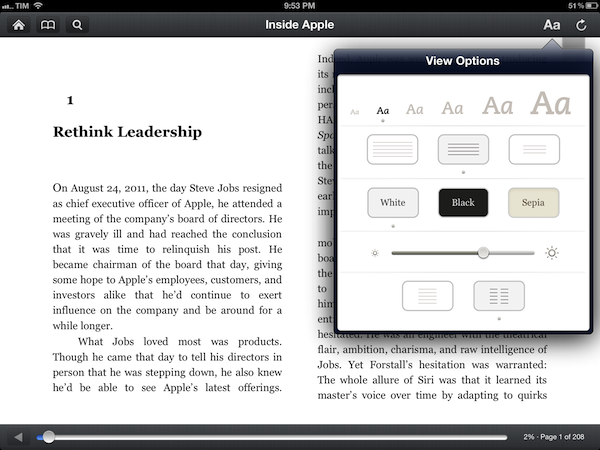
The official Kindle app for iOS has been updated to version 3.2. Following the redesign introduced with version 3.0 last March, the app was heavily criticized for its implementation of wide margins, which was eventually fixed with an update earlier this summer. Now, the app has been updated with a new setting to control “adjustable margins”. You can choose between three different layout options, as pictured above. The option is available on the iPad from the View Options menu, which also includes settings for font size, brightness, and background color.

Speaking of brightness, Amazon says the control slider has been updated to be more responsive and optimized for “better viewing”. The app’s changelog also focuses on “rapid highlights”, a way to mark important passages of a book for future reference that had been implemented by almost any other eBook reader or PDF viewer on the App Store. This option is available under “My Notes & Marks” in the Go To menu.

Among other changes for Print Replica Textbooks, Kindle 3.2 looks like a solid update that addresses a common annoyance of the app. You can find the update on the App Store.


Buying a New iPad or iPhone? Have an Apple Specialist Walk You Through the Latest Features over the Internet.

Apple’s 375 Apple Retail Stores have drawn 3 million customers so far during this past fiscal year, serving upwards of 50,000 people at Genius Bars everyday around the world according to The Loop. Apple’s Retail Stores, which accounted for 14 billion in sales the last fiscal quarter, are Apple’s nexus to the consumer. Every store gives customers the opportunity to interact with Apple’s products, talk with (in my experience pleasant) Specialists who can answer questions, and get support for their products at the Genius Bar at the back of the store. While Apple Support already extends beyond the store by phone and through company’s website via online experts, FAQs, documents, tutorials, and e-mail (just to name a few), getting hands-on with a product before it’s purchased is more challenging. While Apple’s product pages — well designed and often showcasing the product’s features through slides, animated images, and galleries — give customers a sense of what they’re buying, there’s nothing like actually seeing how a real person is using the product (and you wonder why there are so many homemade reviews on YouTube).

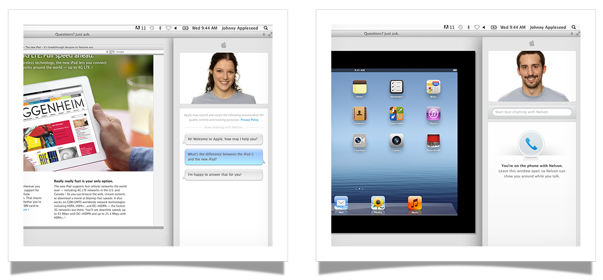
Apple’s Specialists are now online and ready to answer a customer’s pending questions about their next iPhone or iPad, at least in a few countries as of this morning. According to The Next Web and Pocket-lint, online shoppers who browse Apple’s Online Store in Brazil, Germany, Spain, and the United Kingdom now have access to a personalized shopping experience for the iPad and iPhone. The new online service is expected to roll out to more countries soon.

Visit the iPad or iPhone pages on the Apple Online Store, then click the Ask Now button to see your options for contacting a trained Apple Specialist.

For customers shopping for an iPad or an iPhone who might not have an Apple Retail Store nearby or who don’t have the time to stop by a store, an online Apple Specialist can show you how the product works in real time via screen sharing. You’ll be able to ask Specialists questions in a chat panel, then get a demonstration of how a feature works via video. Apple’s goal is to help you make the right purchasing decision, then if desired, schedule an appointment to help you set up the device as you follow along with a Specialist in real time.

Always on the bleeding edge of retail, Apple continues to innovate and improve upon their shopping experience by going the extra mile and putting customers above the product. For Apple, it’s not just about making the sale, but about making connections with people and providing customers with a convenient shopping experience. If you thought Apple turned the idea of personal shopping on its head with EasyPay, delivering online screen sharing demonstrations by real people (at scale!) is equally, if not more, impressive. For an early look at the new service, visit Apple’s UK page for more information.

[Pocket-lint via The Next Web]


Tweet Marker Plus Relaunches As Watermark, Adds Support For App.net

Manton Reece’s Tweet Marker Plus, a service to index Twitter and provide filtering and search tools, has been relaunched as Watermark. As explained by Reece in a post on his personal blog, the new name wants to reflect the “gradual move away from Twitter and syncing”. Initially launched as a free service, Tweet Marker has been integrated as a syncing solution in dozens of Twitter clients such as Tweetbot and Twitterrific. The Plus version, launched in April, built on the success of Tweet Marker to offer a web interface for Twitter timelines, fully indexed by day and searchable outside of the Twitter platform. I wrote:

The most visible feature of Plus, the web timeline, is very straightforward, but I believe it’ll prove to be a worthy addition for, say, those users who rely on iOS and Mac apps at home, but who are forced to stay on Windows environments at work. Tweet Marker’s web timeline can pick up from where you last left off on another connected client, and it’s got a “scroll to marker” option to manually load your last-seen tweet. On the timeline itself you can reply, retweet, mark as favorite and check out a tweet’s unique URL, but these actions will simply forward you to a dedicated page on Twitter.com. Tweet Marker’s Plus timeline isn’t meant to be a full-featured client: rather, it is a basic way to rely on your existing sync position if nothing else is available.

With the Watermark rebranding, Reece is gradually shifting away from Twitter following the controversy that has arisen in the past months in regards to the service’s API changest and relationship with third-party developers. Keeping the same infrastructure, monthly fee, and core functionalities, Watermark is a new “client and archive tool”, independent of the free Tweet Marker sync service, which will keep working as usual with Twitter apps that support it.

Watermark’s new focus on providing a platform that goes beyond Twitter is represented in this initial version by its support for App.net, Dalton Caldwell’s rising real-time communication service that costs $50 per year. Reece writes:

As part of the relaunch it immediately gains a new feature: App.net posts. You can now add an App.net account and it will download any posts from your friends, making them available for search. Watermark is already storing tens of millions of tweets, and I’m excited to start adding App.net posts to that archive as well.

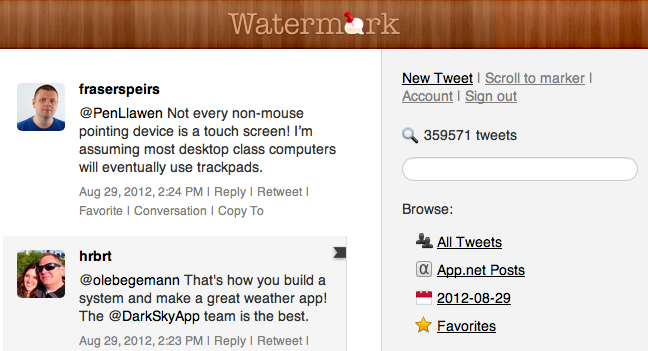
While still heavily Twitter-based from an interface standpoint, the new Watermark sports an App.net option in the section on the right, where users can browse “all tweets”, favorites, and load past tweets by day with a calendar menu.

Clicking on App.net Posts in Watermark will open a web based timeline; right now, there are no further options available for App.net posts (the service only downloads posts from friends and adds them to the search archive) as App.net doesn’t even have an official search functionality yet. Manton says there’s still “plenty to improve” for App.net support, and that he’s also evaluating timeline position sync for App.net accounts – indeed one of the hallmark features of Tweet Marker.

Tweet Marker Plus was one of my favorite services to provide the kind of Twitter functionalities that Twitter the company always ignored: powerful search and filtering tools, collections, and additional browsing options. Like Cue, Tweet Marker Plus has proven to be a worthy addition to my workflow to retrieve tweets and leverage the information shared on the platform every day. As Twitter becomes more hostile towards third-party developers and apps that take data out of Twitter, it’s great to see Tweet Marker Plus expanding to new platforms. I find App.net very promising in its intent to sell an API as a product to its users, and Watermark can build on the success of Tweet Marker Plus to perfectly integrate with the service, free of the restrictions and “requirements” of Twitter.

Watermark is $5 per month.


Session Videos From The One More Thing Conference Now Available For Purchase

For those of you who weren’t able to go to the ‘One More Thing’ conference back in May, the full sessions have been put together in video format and are now available for $49. It includes sessions from both days and for every one of the 17 iOS developers that spoke at the conference, including Raphael Schaad of Flipboard, Shaun Inman, Justin Williams of Second Gear, Loren Brichter of Atebits, Neven Mrgan of Panic and a whole slew of other, excellent, speakers:

  • Winter Wong - Quoord Systems
  • Lee Armtrong - Pinkfroot
  • Julian Lepinski - Debacle Software
  • Matt Rix - Magicule
  • Adam Kirk - Mysterious Trousers
  • Igor Pušenjak - Lima Sky
  • Kepa Auwae - Rocketcat Games
  • Dave Howell - Avatron Software
  • Karl von Randow - Tap Tap Tap
  • Layton Duncan - Polar Bear Farm
  • Jeff Broderick
  • Sebastiaan de With - Double Twist

For everyone who told us they wished they could come to the conference but couldn’t make it – this is for you. We’re making the full videos from both days of the One More Thing 2012 Conference available for download! It’s only $49, and you can come back to watch or download the videos again at any time up until the next conference. They’re all 720p, H.264 and encoded for most iOS devices.

If you want a taste of what the conference was like, the Q&A session of the main conference is also available for free.


Jury Finds Mostly Against Samsung, Apple Entitled To Damages Of $1.049 Billion

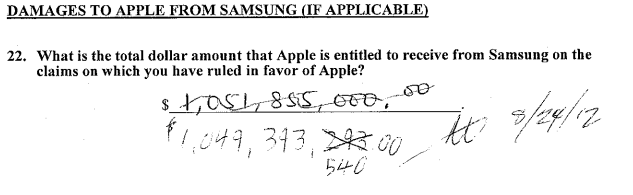
The jury sitting on the Apple and Samsung trial in California has largely found Samsung guilty of infringing on Apple’s intellectual property. The nine jurors unanimously came to agreement, largely finding in Apple’s favour and thus awarding Apple $1.049 billion in damages.

Apple was succesful on a number of claims it put to the jury, but not necessarily against all the phones and tablets that Apple claimed to infringe. One such claim that Apple was particularly succesful in claiming ingringement was the notorious ‘bounce-back’ patent in which the jury found every one of the accused devices infringed on - similarly with Apple’s scrolling and two finger gestures, the jury agreed that nearly all the devices did infringe the patent.

But Apple certainly wasn’t succesful on every front, and one notable area in which the jury did not agree with Apple was in regards to the claim that Samsung’s patents were invalid. In fact the jury didn’t find a single patent, on either side, was invalid.

When the verdict was read, there was minor mistake in the damages calculation that lead the jury to go back and reconsider the decision. It had arisen when Samsung pointed out that the jury had awarded damages for some devices that the jury had said didn’t infringe.

[via AllThingsD, The Verge]

Next: Injunction Hearings

Now that the jury’s verdict has been handed down, the next step will be a preliminary hearing on injunctions. Apple will have to file its requests by August 27th (this coming Monday), at which point Samsung will have two weeks to respond. The actual hearing will be held on September 20th.

[via The Verge]

Samsung Responds To Verdict

Today’s verdict should not be viewed as a win for Apple, but as a loss for the American consumer. It will lead to fewer choices, less innovation, and potentially higher prices. It is unfortunate that patent law can be manipulated to give one company a monopoly over rectangles with rounded corners, or technology that is being improved every day by Samsung and other companies. Consumers have the right to choices, and they know what they are buying when they purchase Samsung products. This is not the final word in this case or in battles being waged in courts and tribunals around the world, some of which have already rejected many of Apple’s claims. Samsung will continue to innovate and offer choices for the consumer.

[via The Verge]

Apple Responds To Verdict

We are grateful to the jury for their service and for investing the time to listen to our story and we were thrilled to be able to finally tell it. The mountain of evidence presented during the trial showed that Samsung’s copying went far deeper than even we knew. The lawsuits between Apple and Samsung were about much more than patents or money. They were about values. At Apple, we value originality and innovation and pour our lives into making the best products on earth. We make these products to delight our customers, not for our competitors to flagrantly copy. We applaud the court for finding Samsung’s behavior willful and for sending a loud and clear message that stealing isn’t right.

[via AllThingsD]

Tim Cook Emails Apple Employees

Today was an important day for Apple and for innovators everywhere.
Many of you have been closely following the trial against Samsung in San Jose for the past few weeks. We chose legal action very reluctantly and only after repeatedly asking Samsung to stop copying our work. For us this lawsuit has always been about something much more important than patents or money. It’s about values. We value originality and innovation and pour our lives into making the best products on earth. And we do this to delight our customers, not for competitors to flagrantly copy.
We owe a debt of gratitude to the jury who invested their time in listening to our story. We were thrilled to finally have the opportunity to tell it. The mountain of evidence presented during the trial showed that Samsung’s copying went far deeper than we knew.
The jury has now spoken. We applaud them for finding Samsung’s behavior willful and for sending a loud and clear message that stealing isn’t right.
I am very proud of the work that each of you do.
Today, values have won and I hope the whole world listens.
Tim

[via 9to5 Mac]

Microsoft Responds To Verdict?


[via The Verge]


OS X Mountain Lion Updated to 10.8.1

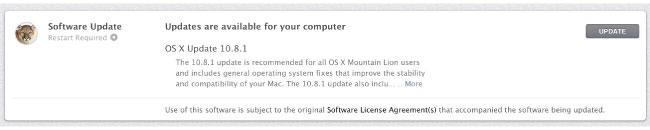
Apple just released OS X 10.8.1, maybe your Mac already told you via Notification Center, but Mountain Lion’s first public update is out. The update includes general operating system fixes that improve the stability and compatibility of your Mac. The delta update appears to be less than 8MB is size.

• Resolve an issue that may cause Migration Assistant to unexpectedly quit
• Improve compatibility when connecting to a Microsoft Exchange server in Mail
• Address an issue playing audio through a Thunderbolt display
• Resolve an issue that prevents iMessages from being sent
• Resolve an issue when connecting to SMB servers with long names
• Address an issue that may cause the system to become unresponsive when using Pinyin input

If you still haven’t updated to OS X Mountain Lion, now would be an excellent time since the first ‘bug fix’ update is out. You can download it here via the Mac App Store.

UPDATE: Apple has released the support document for the update with more details.You can find it here.


Growl 2.0 SDK Gives Developers Access to Mountain Lion’s Notification Center

While applications like Hiss have enabled users to route Growl notifications to Mountain Lion’s Notification Center, the stopgap should become an unnecessary appendage provided that developers take advantage of Growl’s new SDK. From Chris Forsythe on Growl’s Posterous blog, the Growl 2.0 SDK will give developers the ability to use the Notification Center if their apps are already using Growl to show alerts on the desktop. While Growl won’t necessarily be supplanted by the new features in Mountain Lion, the Growl team has acted quickly to provide a way for Growl apps to transition into Apple’s new notification system.

The Growl team wants to give developers the ability to “transition from Growl to Notification Center on their own terms,” responsibly embracing Apple’s latest features while helping developers answer the needs of their users. The team also makes the case that users who will remain on older operating systems can still get notifications on their own terms — theming, frequency of notifications, and what apps send notifications are all still definable in Growl’s preference pane and are still accessible without the Notification Center. And as mentioned back in June, Growl plans to supplement the Notification Center for those with Mountain Lion by handling actions and visual notifications separately.

Developers can download the Growl 2.0 SDK from Growl’s downloads page.

[Growl 2.0 SDK via The Verge]


Pixelmator 2.1: Retina Graphics, Mountain Lion Ready, iCloud Support and Great New Features

Back in October 2011, we wrote about the release of Pixelmator 2.0, a hugely popular and award winning image editing application for the Mac. New features to version 2 gave us new drawing tools, shape settings, new heal and retouching tools, an improved type tool and more. Pixelmator was one of the first major success stories of the Mac App Store with $1,000,000 in sales for the first 20 days.

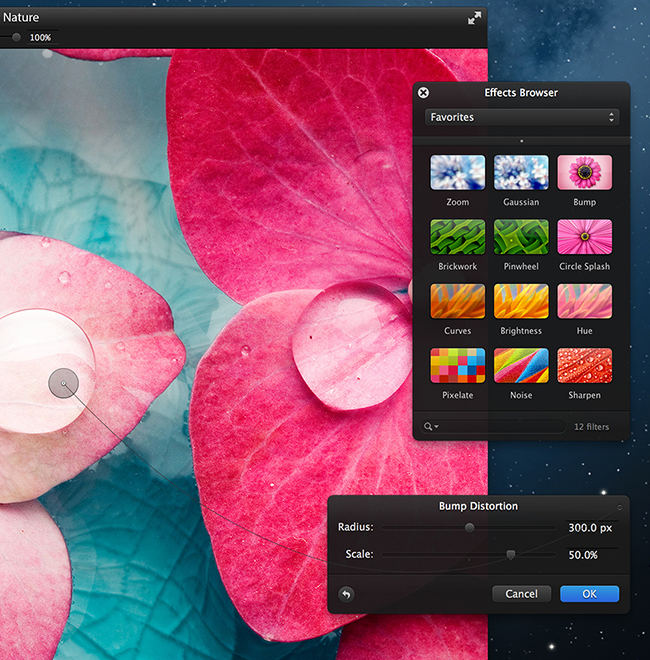
The retina-ready Pixelmator 2.1, code named Cherry, was released this morning with even more new features. Version 2.1 adds a new Effects Browser, several new effects like vintage and miniaturize, a new smart Alignment Guide system and more.

Pixelmator has always been great at helping everyone access the benefits of image editing, said Saulius Dailide of the Pixelmator Team. And now, with all the amazing new features, as well as Retina Display, Mountain Lion and iCloud support and the app’s affordability, Pixelmator 2.1 is definitely the best way to tap into creativity.

New Features

  • Retina-Ready: Pixelmator’s friendly user interface is now fully Retina-ready.
  • Built-in Support for iCloud: iCloud automatically stores images edited with Pixelmator and seamlessly makes them available on all of a user’s Macs.
  • New Effects Browser: The best and most enjoyable way to browse: instantly preview and quickly apply special effects and color adjustments to any image. Over 160 different breathtaking effects to play with. Tag and access favorite effects instantly in one place. Combine different effects for unique, near-effortless artistic creations. See stunning results in real time.
  • New Effects Added: The new Vintage, Miniaturize, Black and White, Rain, and Snow effects help quickly transform any image into something dramatically unique.
  • Smart Alignment Guides: The new smart Alignment Guides let users quickly position, align, and lay out objects evenly in Pixelmator compositions.
  • OS X Mountain Lion Support
  • Much more: Optimized image editing engine support for the new Retina display on the MacBook Pro. Built-in Mountain Lion sharing to iPhoto, Aperture, Facebook, Flickr, Airdrop – all right from Pixelmator. Easy way to access Color Adjustments from the Effects Browser. Enhanced to take advantage of the latest OS X Mountain Lion technologies.

The new Effects Browser is slick; the palette works in a way that as you move your mouse over a selected effect, there’s a vertical line that animates and shows the effect’s intensity inside the Effects Browser. It’s a lot like the way Apple does it with iPhoto groups and iMovie clips. There are some excellent effect presets in here too and they can all be combined to give you great results. The guides work a lot like InDesign CS6 in that they show centers, alignment measurements and more. The share menu works exactly as advertised and feels very much at home running on OS X Mountain Lion. iCloud support will be very handy for editing on multiple Macs, working on one machine then having the ability to reopen it on another. Version 2.1 runs very well on my 2007 iMac running Mountain Lion, I haven’t had any issues.

Pricing and Availability

Pixelmator 2.1 is available exclusively from the Mac App Store for a limited-time price of $14.99, a great savings off the usual price of $59. It is also available as a free update for existing users who have purchased it from the Mac App Store. If you’ve been thinking about buying this great app, $14.99 is a great price and an excellent update to the already great app.

For more information on Pixelmator 2.1, head over to the Pixelmator website. If you want to be a better Pixelmator user, they have a wonderful tutorial site as well.


Starbucks Signs Up For Square

Announced just a short time ago, it has been revealed that Starbucks has partnered with Square, who will process all US credit and debit card transactions by this fall across their 7,000 locations. Additionally, Starbucks will be integrating “Square Directory” into its own “apps and digital network, unlocking other Square merchants to Starbucks patrons new and old to Square” as TechCrunch reports.

In a letter by Jack Dorsey (co-founder and CEO of Square), he drew parallels between the small and humble beginnings of both Square and Starbucks. But Dorsey assured other Square merchants that this big deal with Starbucks won’t change Square’s dedication to building “simple, affordable, and fast tools that level the playing field for everyone”.

Square began with a really simple idea: everyone should be able to accept credit cards. It should be easy and free to get set up, it should use simple technology people already own, and, most importantly, it should instantly adapt to any size business—from the person chasing a dream to the largest organization on the planet. By embracing Square, Starbucks has validated these ideas as powerful tools—not just for small businesses, but for smart businesses.

TechCrunch also reports that Starbucks is investing $25 million in Square with CEO Howard Schultz also joing Square’s Board of Directors. You can view the full letter from Jack Dorsey below the break.

Read more