Posts in news

Notifications Scripting Lets AppleScript Display User Notifications in Mountain Lion

Notifications Scripting Lets AppleScript Display User Notifications in Mountain Lion

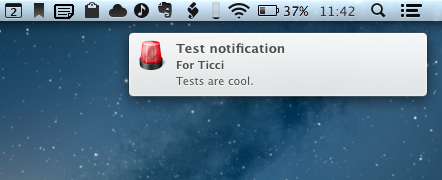
In the past months, a few ways to enable AppleScript to display user notifications in Mountain Lion have surfaced online. Our own Don Southard wrote a test app using AppleScriptObjC; Ben Waldie put together an Automator action for Notification Center; terminal-notifier lets you send user notifications from the command line.

Notifications Scripting (via MOSX Tumbelog) is a new entry in this scene, and it looks like a simple yet powerful addition that could be easily integrated into other AppleScripts.

Notifications Scripting is a GUI-less application that can be only used with AppleScript. This application allows AppleScript scripts to display user notifications in OS X Mountain Lion and handle the user interactions with these notifications.

The best part of Notifications Scripting is its dictionary. It contains definitions for the notification messages of course, but also for notifications that have been delivered and activated. In the code sample provided by the developers, a dialog is displayed in the Finder following a user notification. You can imagine how this tool could be integrated with scripts that prompt users for input or allow for multiple choices from a set of actions.

You can download Notifications Scripting here.

Permalink

Lockitron Will Let You Unlock Your Door Using An iPhone

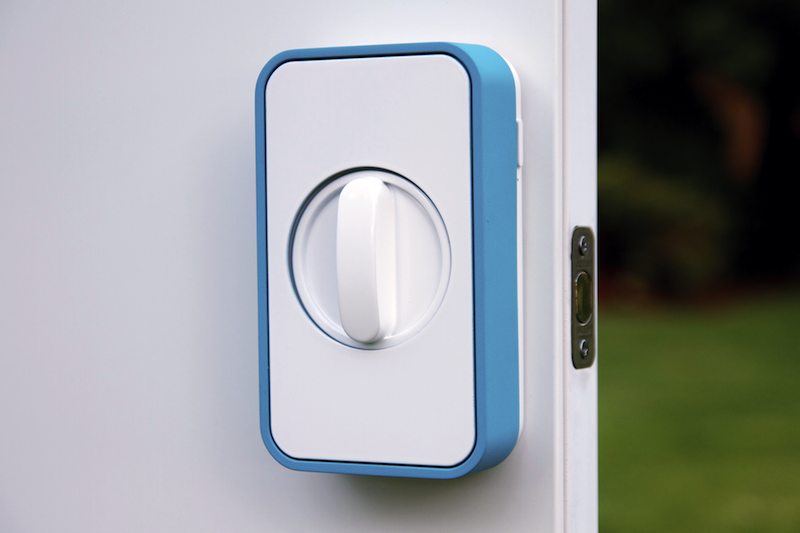
Lockitron has today announced a new product that promises to let you unlock and lock your house door using only an iPhone. The new Lockitron is available now for pre-order at $149, and the first batch will ship in March 2013.

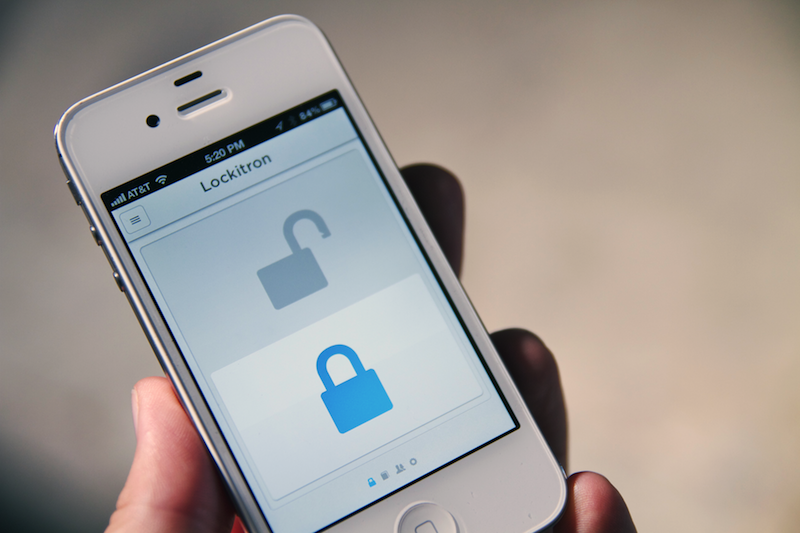
The Lockitron is essentially an add-on for your door and an app for iOS and Android. The Lockitron device attaches (through a quick installation process) to most through-hole and cylindrical deadbolts, although the company also says it’ll be possible to install a Lockitron on interconnected deadbolts and mortise locks. Once installed, the Lockitron is able to communicate with your local WiFi network, allowing you to set up your account for remote control and wireless access. With your credentials up and running on the device, you’ll be able to lock or unlock your door using an app that talks to the Lockitron using WiFi. The Lockitron will simply unlock the door after you tap on the “unlock” icon in the app.

Because it transforms a deadbolt lock in an interconnected device, the Lockitron turns your door into a piece of software that has all the advantages that apps have to offer. For instance, you can “invite” friends to be able to unlock your door using the app; you can receive push notifications for door unlocks; and in a co-working space, you can assign colleagues to unlock the office’s door using the app and manage them from a web interface. If you don’t have a smartphone to run the Lockitron app, the company says the service will also work with SMS.

Lockitron runs on AA batteries that, according to its creators, last for one year; when they run low, Lockitron will send you a message. What happens when the Lockitron runs out of power (either because of batteries or for a power failure that cuts WiFi access) is interesting. If you can’t use the Lockitron, regular keys can still be used as the front part of the lock remains unaffected. However, if you have a device with Bluetooth 4.0 – such as the iPhone 4S and iPhone 5 – you can unlock the Lockitron by simply walking next to it. Lockitron says they’re considering adding NFC support on Android as well for WiFi-free access.

If you lose your phone, you can prevent people from using the Lockitron app by disabling your account remotely.

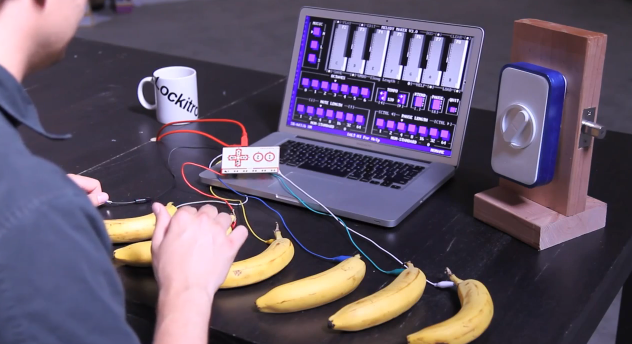
Last, Lockitron features an Arduino-compatible controller that, with some programming skills, will allow you to build custom patterns to unlock your door. For instance, in the promo video embedded below you can see a guy unlocking the device by tapping on bananas connected to a controller to play a specific melody. That’s pretty cool.

Personally, I’m a big fan of home-automation and digital improvement systems that leverage software to make the places we live in more connected. However, like the Nest thermostat, I’m worried about compatibility. The Lockitron seems like a very US-oriented product, and I doubt I’ll be able to make it work with my door.

You can read more details about the Lockitron at the official website. Check out the promo videos below.
Read more


Apple Announces Q4 2012 Conference Call for October 25

Quarter 4 2012 Banner

Quarter 4 2012 Banner

Apple’s fourth quarter earnings report and conference call will take place on October 25th, 2012, according to an Investor Relations update on Apple’s website. At the time of the event, Apple will broadcast the call online.

Apple plans to conduct a conference call to discuss financial results of its fourth fiscal quarter on Thursday, October 25, 2012 at 2:00 p.m. PT / 5:00 p.m. ET.

For the third quarter, ending on July 24th, Apple earned $35 billion in revenue, a net profit of $8.8 billion, with earnings of $9.32 per diluted share. Comparatively, the year ago quarter for Apple’s Q4 2011 conference call brought Apple revenue of $24.98 billion, a net profit of $6.62 million, and earnings of $7.02 per diluted share. For this fiscal quarter, Apple expects revenue of $34 billion and diluted earnings per share of $7.65.

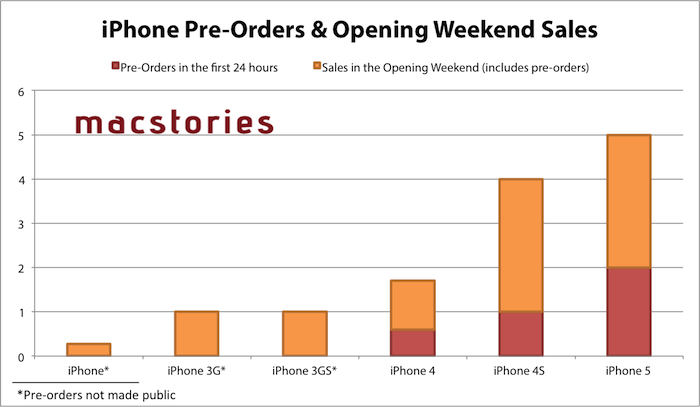
The iPhone 5 was a significant launch this quarter, with over 5 million units sold during the first three days of sale, which does not include the iPhone 5’s launch in 22 additional countries a week later (and 100 more countries by the end of the year). As was the case with the iPhone 4S for Q1 2012, the iPhone 5’s complete sales numbers should be available at the end of the first fiscal quarter for 2013. While the iPhone 5 should prove to be immensely popular, iPod sales will be worth paying attention to as well thanks to refreshed iPod nanos and iPod touches.

We will provide live updates from the conference call on our site’s homepage on October 25th starting at 2 PM PT.


Tim Cook Writes Open Letter To Customers, Apologizes For Maps ‘Frustration’

Apple has just posted on its website a letter from Tim Cook to Apple’s customers, apologizing for not delivering the best experience with its new iOS 6 Maps. In the letter, prominently link to from the front page of Apple.com,  Cook describes how Apple “strives” to make products the “deliver the best experience possible”, but that the new Maps app has fallen short of this standard, frustrating millions of customers.

He re-emphasises the previous Apple statement on Maps, by saying that as time goes on and more people use Maps (there have already been nearly half a billion location searches), that the Maps app will get better. But in the mean time, Cook suggests that users try alternative map apps, and actually names some third-party apps available in the App Store such as “Bing, MapQuest and Waze” or alternatively to use “use Google or Nokia maps by going to their websites and creating an icon on your home screen to their web app”. Whilst that is certainly far from ideal, it’s quite extraordinary to see Cook actively name and recommend third party mapping solutions.

Cook explains that since they first shipped the original iPhone, they’ve been wanting to add new features such as “turn-by-turn directions, voice integration, Flyover and vector-based maps”. Cook claims that they had to create a new version “from the ground-up” to achieve these - there is no mention of Google’s role in the letter.

Tim Cook’s full letter to customers:

To our customers,

At Apple, we strive to make world-class products that deliver the best experience possible to our customers. With the launch of our new Maps last week, we fell short on this commitment. We are extremely sorry for the frustration this has caused our customers and we are doing everything we can to make Maps better.

We launched Maps initially with the first version of iOS. As time progressed, we wanted to provide our customers with even better Maps including features such as turn-by-turn directions, voice integration, Flyover and vector-based maps. In order to do this, we had to create a new version of Maps from the ground up.

There are already more than 100 million iOS devices using the new Apple Maps, with more and more joining us every day. In just over a week, iOS users with the new Maps have already searched for nearly half a billion locations. The more our customers use our Maps the better it will get and we greatly appreciate all of the feedback we have received from you.

While we’re improving Maps, you can try alternatives by downloading map apps from the App Store like Bing, MapQuest and Waze, or use Google or Nokia maps by going to their websites and creating an icon on your home screen to their web app.

Everything we do at Apple is aimed at making our products the best in the world. We know that you expect that from us, and we will keep working non-stop until Maps lives up to the same incredibly high standard.

Tim Cook
Apple’s CEO


Bad Piggies Is Now Available For Download On iPhone, iPad and Mac

Bad Piggies, the latest game from Rovio, is now available for download on iPhone, iPad, Android and Mac. This latest Rovio game is a twist on the infamous Angry Birds series in which you now control the pigs and must pilot them safely to the bird eggs. Unlike the simple mechanic featured in Angry Birds in which you simply slingshot the birds into the pigs and their structures, Bad Piggies requires you to make “the ultimate flying machine” and steer them through the levels.

With more than 60 levels, and free updates coming up, you have hours and hours of pig-crashing, exploding, and flying fun! Get three stars on every level to unlock 30 more puzzles! HINT: Sometimes you need to play the level several times to achieve all the objectives – try building a new device or steering in a different way to earn all the stars!

The game currently features 60 levels, with another 30 unlockable by getting three-stars on levels and will, like Angry Birds, receive free updates that add levels. There’s also 4 sandbox levels in which you can really have fun with making some awesome flying contraptions with various fans, wings, motors, balloons and other objects. If you’re interested in reading a review, check out this one by Polygon’s Chris Plante:

Bad Piggies’ levels aren’t nearly as fast as Angry Birds. They require attention and patience as the pig slowly travels from one end to the other. Unlike Angry Birds, it’s not as easy to play on a subway or during a coffee break. The main game is a fine distraction, something to do with your hands while watching sitcoms or talking on the phone.

Download links:

Jump the break to watch the Bad Piggies trailer.

Read more


Latest Dropbox Beta Brings Redesigned Menu

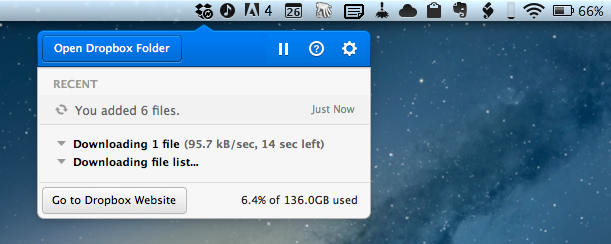
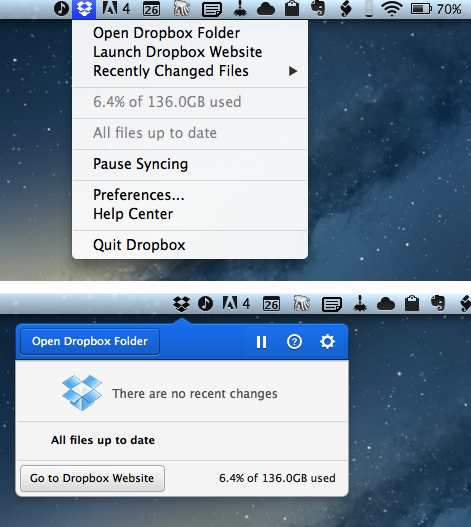
Announced last night on the public forums, the latest beta of Dropbox 1.5 for Mac brings a completely redesigned popup menu, support for Mountain Lion’s Notification Center, a new installer, and better performance.

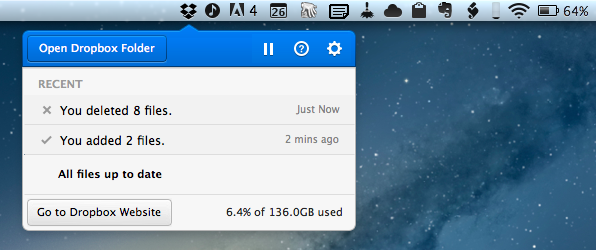
Sporting a new modern look, the redesigned popup menu is reminiscent of “popovers” that have become extremely popular among iOS developers. The new menu takes a more visual approach at displaying changes in your Dropbox, with icons for added or deleted files (that you can click to quickly go to Dropbox), a play/pause button for sync, and a large “Open Dropbox folder” to launch a Finder window at the “root” of your Dropbox.

This new popup combines all the functionality from the older tray menu with a new view of your Dropbox’s event stream, letting you see your (or other people’s) latest changes. In addition, you can use the events to easily view, share, or restore files.

Alongside the new appearance of Dropbox in the menubar, the team also says version 1.5 will bring full Notification Center support and a new, simpler installer for Mac users. The new installer works as advertised: you can simply double-click the icon for Dropbox to “update” itself to a new version. Unfortunately, while enabled in Notification Center, I haven’t been able to test the new notifications on the desktop, as I assume the functionality isn’t quite ready yet in this beta.

Personally, I think what Dropbox is showing in this experimental build is very promising. The popup menu was in need of a serious upgrade, and I’m looking forward to seeing how it will evolve throughout the next betas.

To download the latest Dropbox experimental build (and send feedback to the developers), you can head over the Dropbox forums.


Twelve South Launches “HiRise” Stand and Desk Storage System

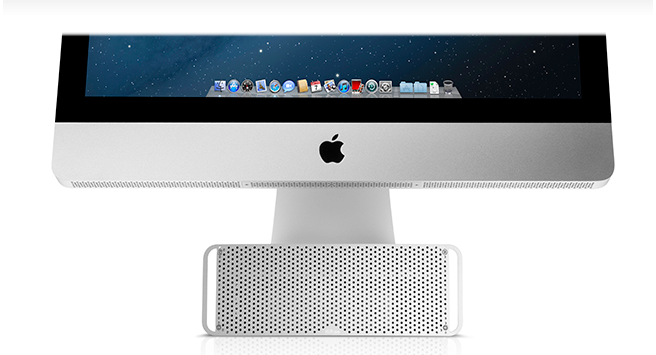
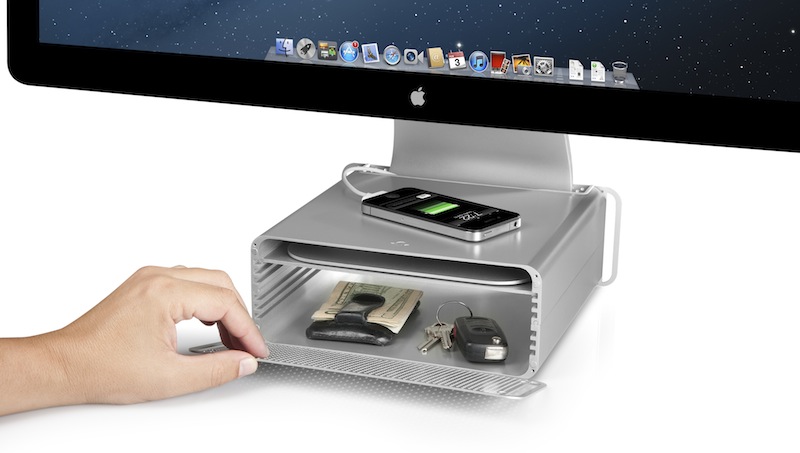
Twelve South, makers of fine accessories for Macs and iOS devices, have announced today the latest entry in their family of add-ons for iMacs and Apple displays: the HiRise. Made of aluminum and stamped steel, the HiRise is a height-adjustable stand that doubles as a storage system for your desk, so you won’t end up cluttering your workspace with keys, your wallet, or USB drives anymore.

The main purpose of the HiRise is to elevate the base of an iMac or Apple display to a more comfortable position for your preferred viewing angle. By using an internal metal “shelf”, you can adjust the height of an iMac depending on your viewing position, and, alternatively, you can use the HiRise to place an iMac and Apple display already on your desk at the same height (a minor detail that has annoyed owners of multiple displays for a long time).

It’s time to do better than a phone book!” said Andrew Green, Creative Director of Twelve South. “We see Mac users prop their beautiful hardware up on reams of copy paper and cringe. Many agree that just a few extra inches of height makes their Mac tremendously more comfortable to use. Enter HiRise for iMac. It raises your Mac to six different positions. It hides connected hard drives and keys inside. But coolest of all, its design integrates with your Mac to look like nothing else you’ve ever seen.

With a perforated, Mac Pro-like metal front plate that attaches magnetically, the HiRise can also work as a hidden, classy storage space for your desk. According to Twelve South, HiRise fits all Apple iMacs, Apple Thunderbolt Displays “and Apple Cinema Displays with metal L-shaped desk stand”.

While the main purpose of this accessory could easily be replicated with some quick DIY skills (case in point: an iPad box), Twelve South’s typical attention to detail should ensure a premium-quality product with a grade of finish and “Apple feel” that should be difficult to find in other solutions. However, the price may be a little steep depending on just how much you’d value such an accessory: the HiRise will set you back $79.99 from Twelve South’s website.

Check out more photos of the HiRise here, and a video below.
Read more


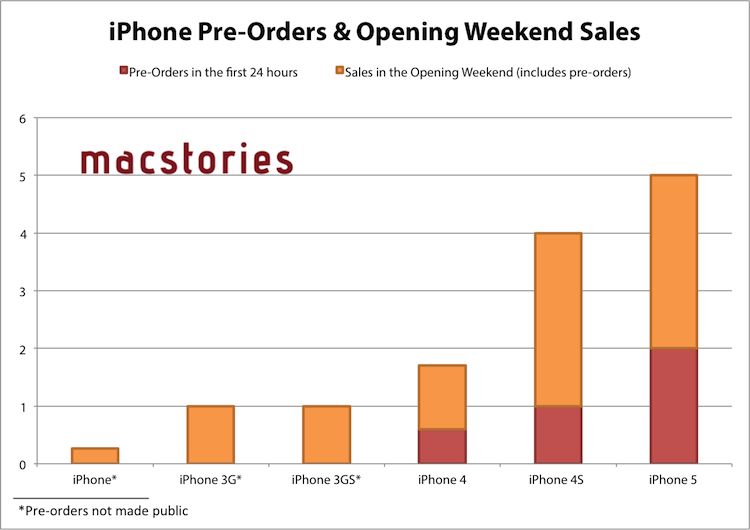
Apple: iPhone 5 Sales Top Five Million Over Opening Weekend, 100 Million iOS Devices Updated To iOS 6

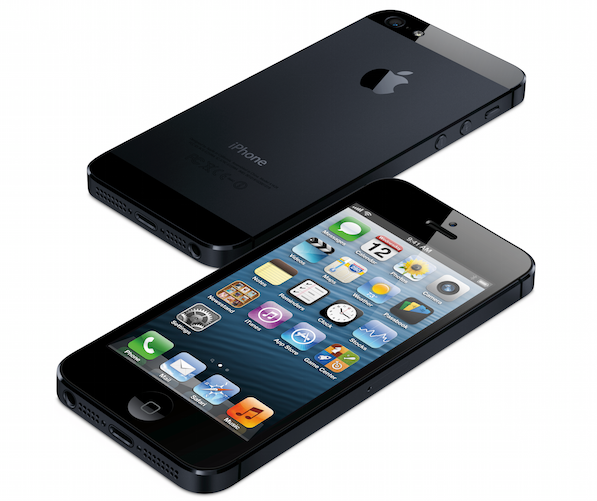
Apple has just issued a press release announcing that the iPhone 5 has sold more than five million units in its first three days of sales after launching on Friday in the US, Australia, Canada, France, Germany, Hong Kong, Japan, Singapore and the UK. Apple previously revealed that in the first 24 hours pre-orders of the iPhone 5 topped two million.

“Demand for iPhone 5 has been incredible and we are working hard to get an iPhone 5 into the hands of every customer who wants one as quickly as possible,” said Tim Cook, Apple’s CEO. “While we have sold out of our initial supply, stores continue to receive iPhone 5 shipments regularly and customers can continue to order online and receive an estimated delivery date. We appreciate everyone’s patience and are working hard to build enough iPhone 5s for everyone.”

Apple also announced in the press release that since iOS 6 launched mid-last week, over 100 million iOS devices are now running iOS 6. The latest iOS release removed Google Maps in favour of Apple’s own mapping app which has been receiving strong criticism, a new Passbook app, Facebook integration and a bounty of other more minor new features and adjustments. Our own Federico reviewed iOS 6 and you can find all our iOS 6 coverage here.

The second ‘round’ of the iPhone 5 launch will occur this Friday on September 28th, going on sale in the following countries: Austria, Belgium, Czech Republic, Denmark, Estonia, Finland, Hungary, Ireland, Italy, Liechtenstein, Lithuania, Luxembourg, Netherlands, New Zealand, Norway, Poland, Portugal, Slovakia, Slovenia, Spain, Sweden and Switzerland.


Jump the break for the full press release from Apple.

Read more


iOS 6: Messages Now Automatically Selects Last-Used International Keyboard For Each Contact

I like to think that sometimes Apple takes a look at the crazy ideas people share about iOS and OS X on Twitter, and picks a couple that they think could be neat additions to the OSes.

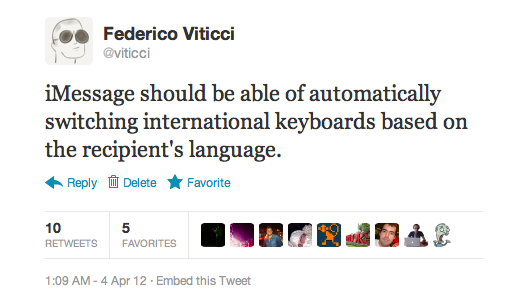
In April, I tweeted the following idea:

iMessage should be able of automatically switching international keyboards based on the recipient’s language.

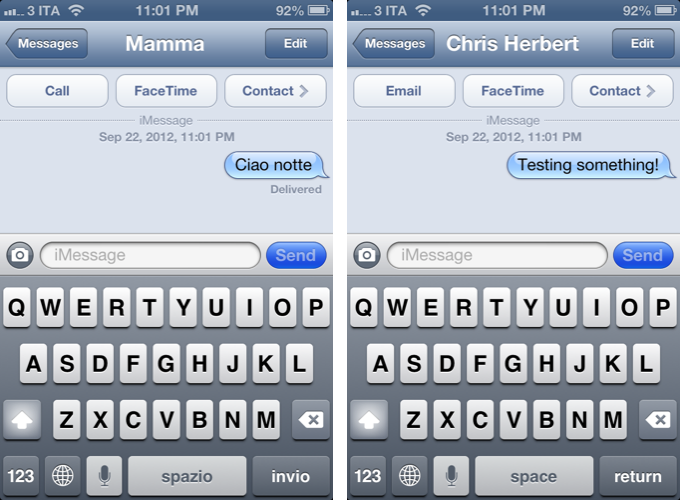
The idea came from the fact that I’m constantly switching between the Italian and English keyboards on my devices. For most of my online communications, I use the English keyboard; for my Italian friends, family members, and acquaintances, I obviously use the Italian one. Wouldn’t it be neat if iOS could remember the last keyboard used with a contact, so that you wouldn’t have to switch keyboards every time?

Like I said, I like to think sometimes Apple listens. As @SiVola told me earlier today on Twitter, the Messages app of iOS 6 is now capable of automatically selecting an international keyboard based on the last one you used in a conversation. So, for instance, when I open a conversation with Chris, the English keyboard will be the active one; when I text my girlfriend, the Italian one will be automatically selected. No need to switch using the “globe” icon.

I tested this with various keyboards on iOS 6, and I can confirm it works. I tested on the latest version of iOS 5 to make sure as well – this is new to iOS 6 (and I hope it’s not a bug!); in my tests, it took 1-2 sent messages for iOS to “remember” the correct keyboard to use. Furthermore, Apple implemented this functionality in a way that it won’t affect the keyboard you have selected at a system-wide level: after I’ve sent a text to my girlfriend, I can open Tweetbot, and the keyboard will be in English just like I left it.

Of all the minor additions and refinements of iOS 6, this is now my favorite one. It’s the kind of detail that, to me, makes the experience more natural and fast without complicating my workflow with new menus or options to learn.

Perhaps Apple didn’t read my tweet. Or maybe someone did. Whatever the story is – thanks for this feature, iOS team.