Posts in news

Twelve South Launches “HiRise” Stand and Desk Storage System

Twelve South, makers of fine accessories for Macs and iOS devices, have announced today the latest entry in their family of add-ons for iMacs and Apple displays: the HiRise. Made of aluminum and stamped steel, the HiRise is a height-adjustable stand that doubles as a storage system for your desk, so you won’t end up cluttering your workspace with keys, your wallet, or USB drives anymore.

The main purpose of the HiRise is to elevate the base of an iMac or Apple display to a more comfortable position for your preferred viewing angle. By using an internal metal “shelf”, you can adjust the height of an iMac depending on your viewing position, and, alternatively, you can use the HiRise to place an iMac and Apple display already on your desk at the same height (a minor detail that has annoyed owners of multiple displays for a long time).

It’s time to do better than a phone book!” said Andrew Green, Creative Director of Twelve South. “We see Mac users prop their beautiful hardware up on reams of copy paper and cringe. Many agree that just a few extra inches of height makes their Mac tremendously more comfortable to use. Enter HiRise for iMac. It raises your Mac to six different positions. It hides connected hard drives and keys inside. But coolest of all, its design integrates with your Mac to look like nothing else you’ve ever seen.
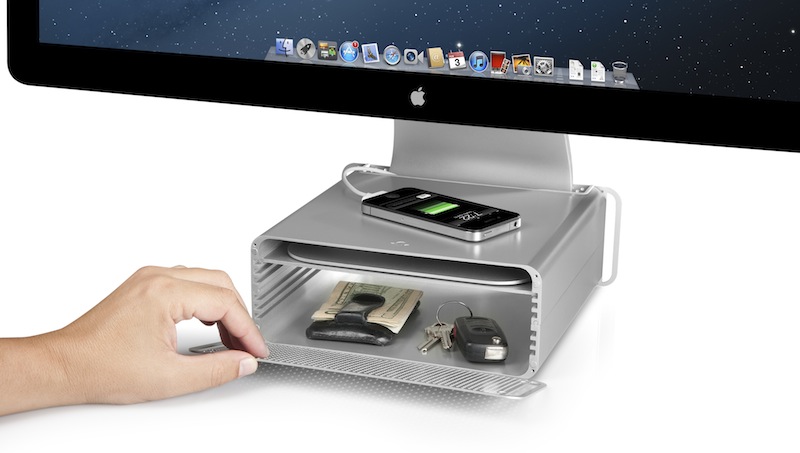
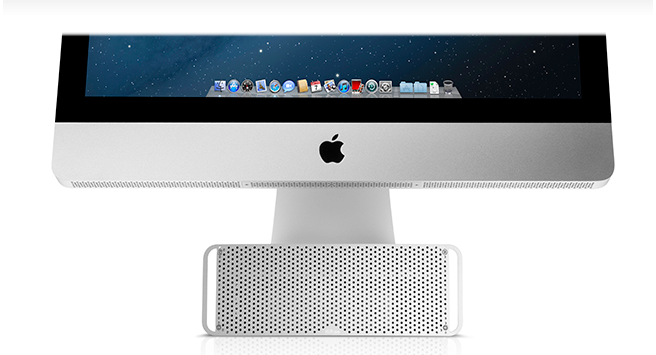
With a perforated, Mac Pro-like metal front plate that attaches magnetically, the HiRise can also work as a hidden, classy storage space for your desk. According to Twelve South, HiRise fits all Apple iMacs, Apple Thunderbolt Displays “and Apple Cinema Displays with metal L-shaped desk stand”.

While the main purpose of this accessory could easily be replicated with some quick DIY skills (case in point: an iPad box), Twelve South’s typical attention to detail should ensure a premium-quality product with a grade of finish and “Apple feel” that should be difficult to find in other solutions. However, the price may be a little steep depending on just how much you’d value such an accessory: the HiRise will set you back $79.99 from Twelve South’s website.

Check out more photos of the HiRise here, and a video below.
Read more

Apple: iPhone 5 Sales Top Five Million Over Opening Weekend, 100 Million iOS Devices Updated To iOS 6

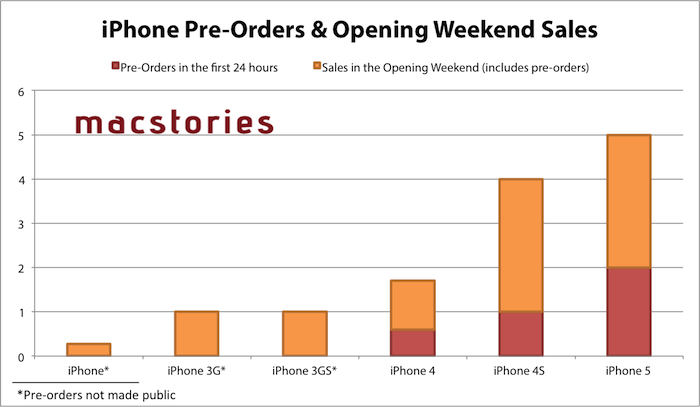
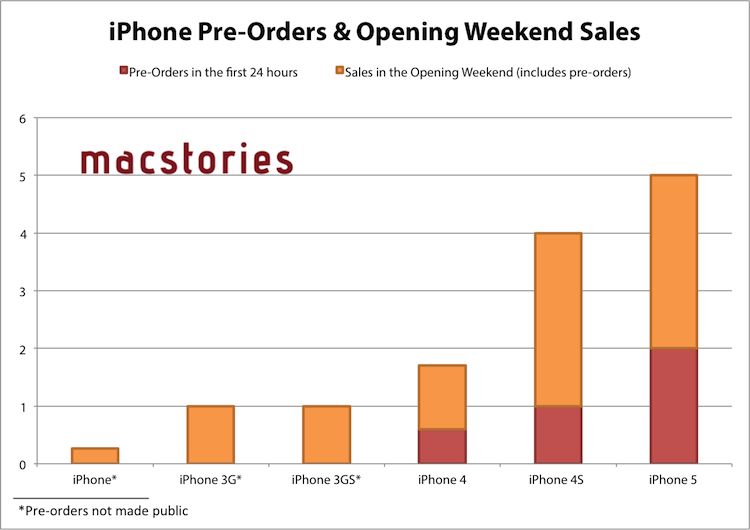
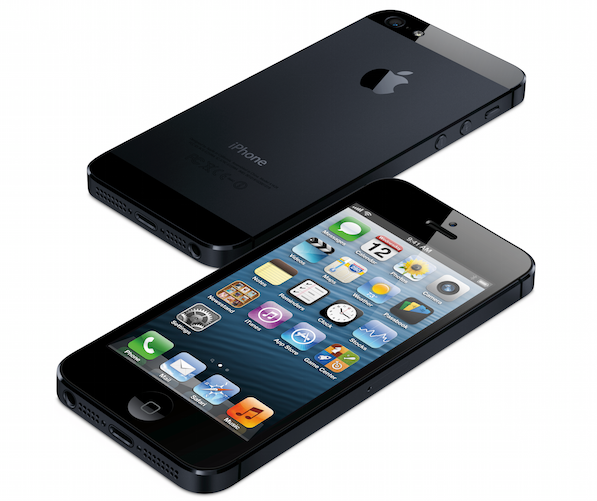
Apple has just issued a press release announcing that the iPhone 5 has sold more than five million units in its first three days of sales after launching on Friday in the US, Australia, Canada, France, Germany, Hong Kong, Japan, Singapore and the UK. Apple previously revealed that in the first 24 hours pre-orders of the iPhone 5 topped two million.

“Demand for iPhone 5 has been incredible and we are working hard to get an iPhone 5 into the hands of every customer who wants one as quickly as possible,” said Tim Cook, Apple’s CEO. “While we have sold out of our initial supply, stores continue to receive iPhone 5 shipments regularly and customers can continue to order online and receive an estimated delivery date. We appreciate everyone’s patience and are working hard to build enough iPhone 5s for everyone.”

Apple also announced in the press release that since iOS 6 launched mid-last week, over 100 million iOS devices are now running iOS 6. The latest iOS release removed Google Maps in favour of Apple’s own mapping app which has been receiving strong criticism, a new Passbook app, Facebook integration and a bounty of other more minor new features and adjustments. Our own Federico reviewed iOS 6 and you can find all our iOS 6 coverage here.

The second ‘round’ of the iPhone 5 launch will occur this Friday on September 28th, going on sale in the following countries: Austria, Belgium, Czech Republic, Denmark, Estonia, Finland, Hungary, Ireland, Italy, Liechtenstein, Lithuania, Luxembourg, Netherlands, New Zealand, Norway, Poland, Portugal, Slovakia, Slovenia, Spain, Sweden and Switzerland.


Jump the break for the full press release from Apple.

Read more


iOS 6: Messages Now Automatically Selects Last-Used International Keyboard For Each Contact

I like to think that sometimes Apple takes a look at the crazy ideas people share about iOS and OS X on Twitter, and picks a couple that they think could be neat additions to the OSes.

In April, I tweeted the following idea:

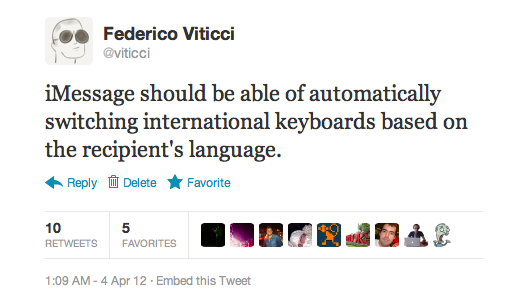
iMessage should be able of automatically switching international keyboards based on the recipient’s language.

The idea came from the fact that I’m constantly switching between the Italian and English keyboards on my devices. For most of my online communications, I use the English keyboard; for my Italian friends, family members, and acquaintances, I obviously use the Italian one. Wouldn’t it be neat if iOS could remember the last keyboard used with a contact, so that you wouldn’t have to switch keyboards every time?

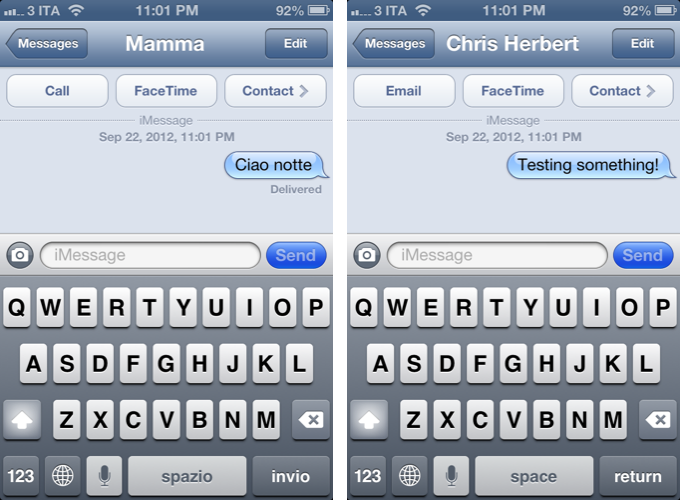
Like I said, I like to think sometimes Apple listens. As @SiVola told me earlier today on Twitter, the Messages app of iOS 6 is now capable of automatically selecting an international keyboard based on the last one you used in a conversation. So, for instance, when I open a conversation with Chris, the English keyboard will be the active one; when I text my girlfriend, the Italian one will be automatically selected. No need to switch using the “globe” icon.

I tested this with various keyboards on iOS 6, and I can confirm it works. I tested on the latest version of iOS 5 to make sure as well – this is new to iOS 6 (and I hope it’s not a bug!); in my tests, it took 1-2 sent messages for iOS to “remember” the correct keyboard to use. Furthermore, Apple implemented this functionality in a way that it won’t affect the keyboard you have selected at a system-wide level: after I’ve sent a text to my girlfriend, I can open Tweetbot, and the keyboard will be in English just like I left it.

Of all the minor additions and refinements of iOS 6, this is now my favorite one. It’s the kind of detail that, to me, makes the experience more natural and fast without complicating my workflow with new menus or options to learn.

Perhaps Apple didn’t read my tweet. Or maybe someone did. Whatever the story is – thanks for this feature, iOS team.


Apple Airs First iPhone 5 TV Ads: “Physics”, “Cheese”, “Thumb” - Plus “Ears”

Today, Apple aired the first official iPhone 5 commercials. Available both on YouTube and Apple’s website, the TV ads focus on some of the marquee features of the iPhone 5.

“Physics” focuses on the design of the iPhone. It asks how’s it possible that the iPhone can be bigger, but also smaller – referring to the bigger screen of the device and its thinner form factor.

There are laws to physics, right? So explain this, how can something get bigger, and smaller? There’s more of it, and less of it. Well, I guess the laws of physics are more like, general guidelines.

“Cheese” is about Panorama. The ad shows a man trying to take a picture of a group of kids in costumes, using the iPhone’s Panorama functionality (which is not exclusive to the iPhone 5) to capture the whole group.

Every picture tells a story, of course some stories are bigger than others.

OK, guys here we go, everybody say Cheeeeeeeeeeeeeee…[breathes in]…eeeeeeeessssseee.

Got it!

The last one, “Thumb” is, again, about the iPhone’s screen, but this time from a user’s perspective. It tries to convey the message that, in spite of the taller screen, the iPhone’s display is still usable with one thumb, because Apple used “common sense” to make it bigger, but not too big.

Your thumb, it goes from here, to here. This bigger screen goes from here, to here. Now that’s either a, an amazing coincidence, or b, a dazzling display of common sense. Pretty sure its the common sense thing.

The three ads are available on Apple’s website and YouTube channel. We have embedded the YouTube versions below.

Update: Apple also posted an additional “Ears” ad for the new EarPods. The ad repeats the same message Apple explained at the iPhone 5 keynote – human ears are all different, and headphones should consider these differences.

Ears are weird. I dunno what shape that is, but its not round. So why would headphones be round? They should be shaped like this. Ear shaped. You know, so they fit in your ears.

According to initial speculation on Twitter, it appears the voiceover for the ads was done by Jeff Daniels, currently starring in the HBO show “The Newsroom”.
Read more


iPhone 5 Lines Around The World

As the iPhone 5 begins its international rollout, lines have begun forming at Apple retail stores in preparation of tomorrow’s launch.

The iPhone 5, announced at a media event on September 12, will go on sale tomorrow at 8 am in nine countries: US, Canada, UK, France, Germany, Australia, Japan, Hong Kong, and Singapore. The iPhone 5 is a major upgrade from the iPhone 4S: it features a taller, 4-inch screen, a faster processor, an improved camera, better audio, and a thinner, lighter design with an aluminum back and glass inlays. Apple launched online pre-orders for the device last Friday, and in the first 24 hours the iPhone 5 topped two million pre-orders.

As we’ve done for every recent Apple product launch, we’re collecting some of the best photos and videos of customers waiting in line at their Apple stores. We’ll be updating this post throughout the next 24 hours; come back later for the latest updates and photos from around the globe.

If you want to send us photos or videos from your local Apple store, send us an email at: tips at macstories.net

Read more


iOS 6 Spotlight Concept

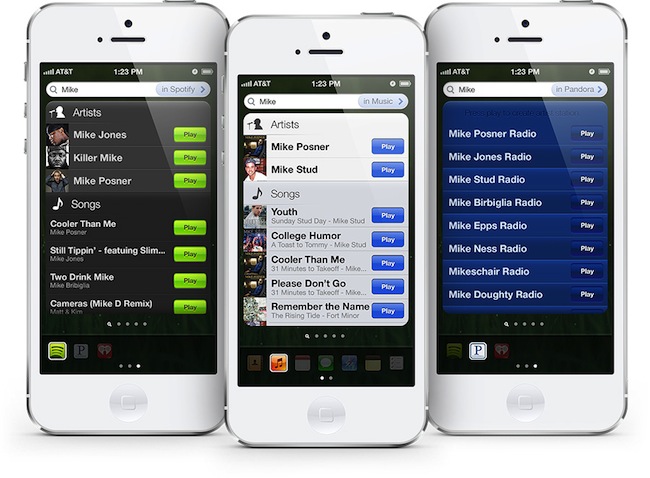
Last week, designer Cody Sanfilippo shared (via TUAW) an interesting concept of what Spotlight on iOS could be like. Drawing inspiration from Siri’s results, widgets, and some third-party apps that already enable similar functionalities, I find Cody’s concept worth of a deeper discussion. Particularly following the release of iOS 6 yesterday and the many refinements it brings to several areas of the OS, I think Spotlight is one of the stock functionalities that could use an overhaul in the future.

Cody’s proposed design essentially breaks down Spotlight by filters, and makes it play nicer with third-party apps and their content. It is aimed at reducing taps required to perform some actions such as calling a contact, or playing a song, and, overall, it takes some of the functionalities of Siri and translates them into a text-based input.

With this new system in place, you are capable of doing things a lot quicker. For example, tap phone numbers to call from Contact results. Tap their email addresses to email them. Tap “play” on a music result to play the song without ever entering the Music app. Check calendar events, or notes, or reminders instantly. You get all this information at a glance, without ever opening the applications. Of course, tapping the entry (the arrow in Contacts, entire clipping in Notes, etc) will bring you into that application.

In Cody’s vision, Spotlight could gain “filters” to display as buttons at the bottom. So rather than searching for a string of text across your entire operating system, you’d gain the option to refine your results by restricting them to a certain application, like Contacts. Looking for “Mike” in the current Spotlight, for instance, would bring up results from your Address Book, Music, Mail, Messages, and more. If you know you just want to view Mike’s contact card, though, you could enable a Contacts filter, and display a Siri-like card with phone number, Twitter username, and email addresses you can tap on.

Perhaps contacts aren’t the best way to illustrate how such concept could help users save time (though I’m a fan of Cody’s design idea for this). Say you want to play a song: with “Spotlight 2.0”, you could hit Play directly from a search result, saving you the time to open the Music app, view the playback screen, etc. Sanfilippo thought of various implementations for this concept for several built-in apps.

In my opinion, however, the really forward-thinking idea is the possible third-party app integration. You know how Spotlight can look at the contents of your Mail messages? Imagine if it’d be able to return songs from Rdio or Spotify, or tasks from OmniFocus without opening those apps.

That’s a very powerful concept, and one that is not too dissimilar from the Siri API many developers have been expecting since last year. Such an idea – a system that can “look into apps” for certain types of content it understands and returns as results – would probably require major changes by developers to their apps, although, as we’ve seen in the past week, developers who are truly committed to their apps will always update them with support for the latest technologies and devices.

If you’re interested in Cody Sanfilippo’s concept for a better Spotlight, I suggest you head over his website, where you can find a detailed explanation of his ideas, a UI breakdown, and some thoughts on the implications of a different Spotlight. If you’re interested in reading more on the subject, I also recommend this article by Rene Ritchie, which touched upon many similar points back in June.

You can check out the concept video below. Read more


Growl 2.0 Now Available with Notification Center Support

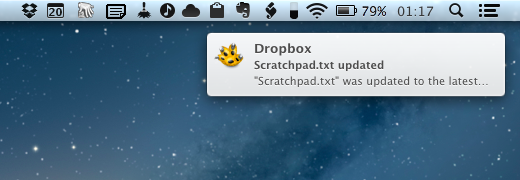
Previously announced by its developers, a major update to Growl – a third-party notification system for OS X – has been released today with official Notification Center integration. Among various bug fixes, improvements to the display of some built-in themes, and separation of Action displays from Visual ones, Growl 2.0 also brings Prowl and Boxcar support.

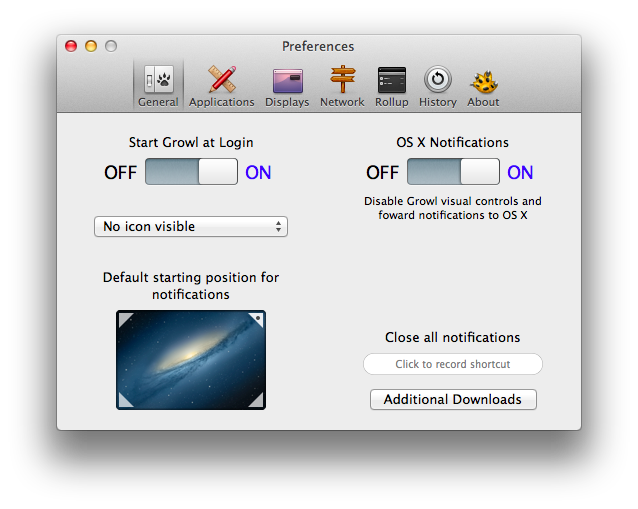
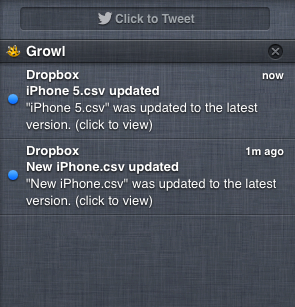
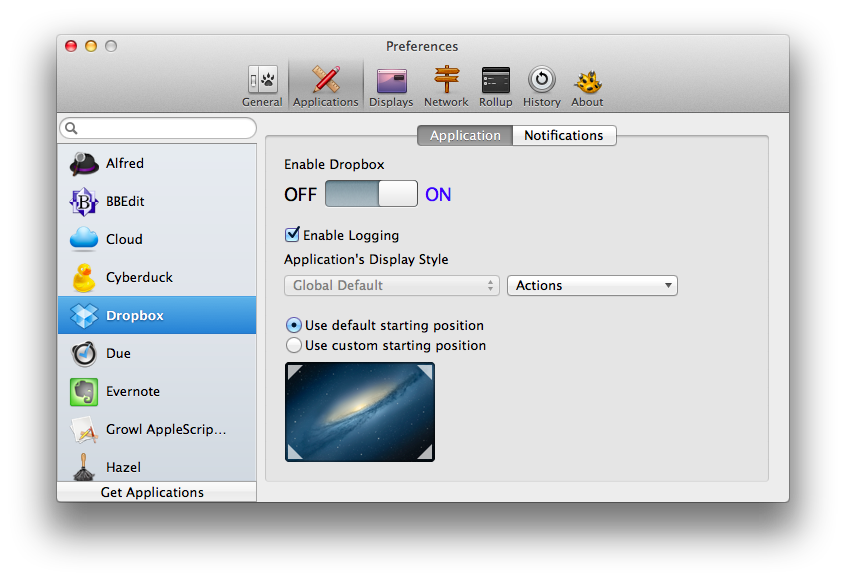
The biggest news in this update is support for Notification Center on Mountain Lion. How it works is rather straightforward, too. If users decide they want to keep using Growl while consolidating the Visual displays in Apple’s Notification Center, they can open Growl’s Preferences, and set “OS X Notifications” to “On” under General. This will add Growl to the apps listed under Notifications in System Preferences, and it’ll effectively use Growl as a bridge between third-party apps and Notification Center.

In my tests, it worked reliably: as soon as an app with Growl support triggered a notification, that was forwarded to Notification Center immediately. The obvious downside is that, because of Apple’s restrictions, Growl won’t be able to apply its custom themes to Notification Center, or use third-party app icons for banners. So every Growl notification will carry Growl’s icon, not the one from the third-party app that triggered the original notification.

Update: For apps to show their own icons, they will need to support the Growl 2.0 SDK.

Another important addition to Growl 2.0 is the separate handling of Visual and Action displays. For instance, you can set, say, Dropbox to trigger a Smoke display (or Notification Center banner) and the MailMe or Prowl action at the same time. This is a powerful new feature that should allow for deeper customization of Growl notifications, which are handled on an app-by-app basis in Growl’s Applications tab.

Developers of Growl-enabled apps can find several technical details over the the official Growl blog. Growl 2.0 is available on the Mac App Store for $3.99.


Apple Releases Several Updates To iOS Apps

After iOS 6 and an update to Mountain Lion, Apple today proceeded to release updates to some of its iOS applications. We’ve collected them all in this post, so you can have an easily digestible list of every update released today.

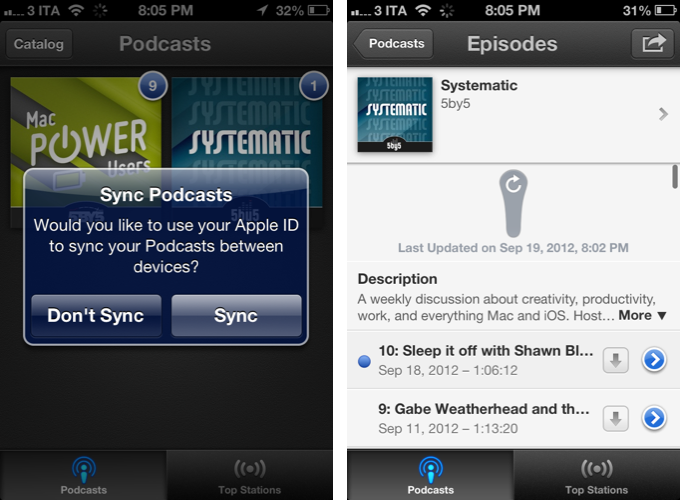
Apple’s Podcasts app (our original review) got a big update today. Version 1.1 brings iOS 6 support, and subscription syncing across devices with iCloud. There’s a new setting to choose to download new episodes automatically on WiFi, and pull to refresh for iOS 6. To enable sync, you’ll be asked if you want to keep subscriptions in sync through your Apple ID.

From my tests, I have noticed the app keeps the subscription list in sync, but not other podcast information, like Downcast does.

Podcasts 1.1

  • Automatically keep your podcast subscriptions up-to-date between devices using iCloud
  • A new setting to choose to automatically download new episodes only when on Wi-Fi
  • A new setting to choose whether to play episodes by oldest to newest or newest to oldest
  • Pull to refresh a subscription to check for new episodes on iOS 6
  • Additional performance and stability improvements

Read more


Apple Releases OS X 10.8.2

Following the release of iOS 6, Apple just pushed an update to OS X Mountain Lion as well, which reaches version 10.8.2. Available for download on the Mac App Store, 10.8.2 brings Facebook integration to OS X, working similarly to Facebook in iOS 6, and various stability improvements. Like in iOS 6, Facebook is now available as a social service to log in from the System Preferences, and there are options to update contact information and pictures through Facebook as well as system-wide sharing menus.

On the feature set side, Facebook is now also integrated in Game Center (for friend recommendations and like buttons for games), Power Nap is now supported on the late 2010 MacBook Air, and iMessage introduces support for phone numbers alongside email addresses, just like on iOS 6.

You can find the full changelog after the break. We’ll update this post with direct links as soon as they’re available.+

Update — You’ll find the direct downloads below:

Read more