Posts in news

The Brand New Apple Services, Stores, and iCloud System Status Page

The Brand New Apple Services, Stores, and iCloud System Status Page

On Thursday afternoon, Apple updated their System Status page for Apple Services, Stores, and iCloud. In an effort to be more transparent with customers, each of Apple’s main services has been broken down into categories that gives an overview of the products that are currently online or experiencing issues. Below the status board, a detailed timeline explains any issues experienced and when they have been resolved. In short, iOS users troubleshooting problems with Mail for example will no longer be left wondering if issues are on their end or Apple’s.

Via The Next Web

Permalink

Apple Posts “Best Of App Store 2012” Lists

In today’s weekly refresh of the App Store, Apple posted a list called “Best of 2012”, highlighting the apps they “loved the most” this year. Day One, a journaling apps we reviewed on MacStories several times, wins as “Mac App of the Year”; “Deus Ex: Human Revolution” wins as “Game of the Year”. The Mac section is also viewable on the web here. On the iOS side, Paper for iPad and Action Movie FX win as Apps of the Year; Rayman Jungle Run and The Room win as Games of the Year for iPhone and iPad, respectively.

Over the past year, the Mac App Store was packed with impressive new apps and games. Some were dazzling debuts, while others were existing apps updated to leverage new features in OS X Mountain Lion or to take advantage of the Retina display of the new MacBook Pro. Browse the apps and games we loved most in 2012.

The list is organized in Runners-Up, Best Apps of 2012, and Best Games of 2012. Below, the full list, recompiled from the Mac App Store, iPhone App Store, and iPad App Store. My personal congratulations to the Day One team, an app that has completely changed the way I archive my memories on iOS and OS X.

Other notable winners in iTunes categories include:

Read more


Google Releases Maps App For iPhone

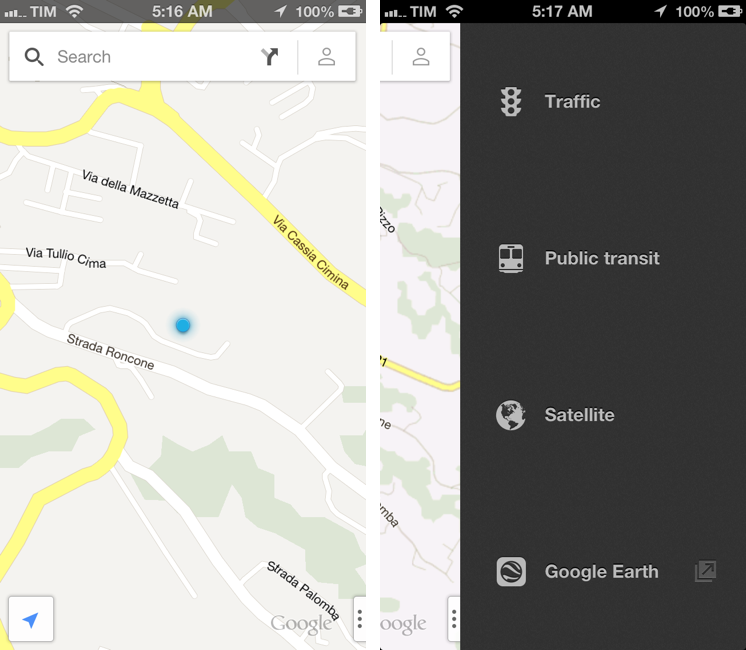
In spite of “sources at Google” claiming that Apple wouldn’t accept a Google Maps app in the App Store, Google has today released its official Maps application for iPhone. The app just went live on the App Store, and it’s available as a free download here.

Following Apple’s debacle with their Maps software for iOS 6, Google was rumored to be preparing a third-party version of Google Maps for iOS devices. We haven’t been able to test this yet, and we’ll post our impressions of the software on MacStories once we’re able to properly use the app. Read more


Shazam 5.5 With Better Offline Support

Shazam is, for me, one of those solutions made possible by our mobile era that, alongside Twitter and Rdio, I’d miss the most if I had to switch to a “dumbphone”. Shazam released today version 5.5 of their iPhone app, which I own in the Encore variation, and it’s got a few changes I really like.

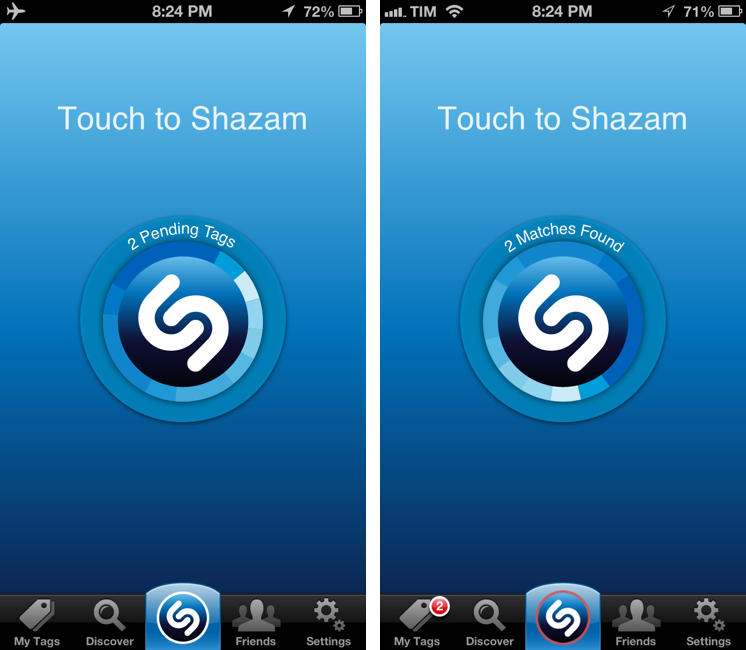
The new icon was a bit of Home screen shock at first, but it plays nicely with the updated “listening dial” that animates and responds in real-time to audio captured by a device’s mic. It’s a nice touch. There are also other improvements such as better VoiceOver support, Google+ sharing (for Robert Scoble), and search for tagged songs. I don’t know exactly when this happened, but Shazam now properly opens tagged songs in the Rdio app, ready for listening.

The best feature of Shazam 5.5 is how the app handles offline devices or songs tagged in areas with poor reception. If unable to contact the Shazam servers, the app will queue tags, showing a count in the animated dial. When the Internet comes back, the app will automatically start tagging all previously queued item, display whether or not it has found matches, and highlight results in the My Tags screen and with a badge on the tab bar.

I’ve tagged songs using Shazam in the past, only to find out I didn’t have a 3G connection to get results immediately. This is a better solution, and judging from some first tests, it works as advertised. Shazam 5.5 is available on the App Store.


Angry Birds Turns 3.0

Angry Birds Turns 3.0

To celebrate the third anniversary of Angry Birds 1.0, which was released on December 10, 2009, Rovio has today released Angry Birds 3.0, a major update to the original game that, after three years, is still sold at $0.99 on the App Store.

Angry Birds 3.0 comes with a new “pink bird”, 15 new “Birdday levels” and other 15 Bad Piggies-themed levels. On top of that, Rovio has updated the game for the iPhone 5’s Retina display as well; the update is also available in the HD version for the iPad. Rovio isn’t new to releasing free updates to an existing game that users only purchased years ago; in fact, many have argued that one of the points of Rovio’s main strategy is creating “brand loyalty” through free updates that add new levels, features, and, for those interested, in-app purchases.

Just over a year ago we charted Angry Birds’ road to half a billion downloads; since then, Rovio has released a different game, Amazing Alex, and more entries in the Angry Birds franchise, including the popular Star Wars tie-in and a different take on the typical Angry Birds gameplay, Bad Piggies.

Angry Birds 3.0 is now available on the App Store.

Permalink

Instagram 3.2 Brings Better Camera

Instagram 3.2 Brings Better Camera

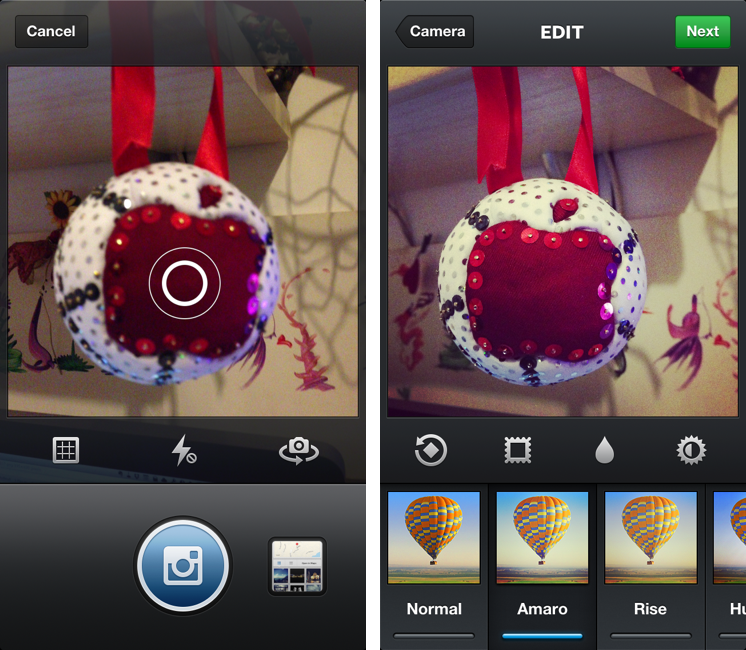
Following the recent launch of web profiles, Instagram has today updated its iPhone app to version 3.2, bringing a new camera experience, a new filter, better tilt-shift, and various UI improvements for filter selection and photo browsing. The Verge has a nice overview of the changes; the Instagram blog has detailed release notes, which include an explanation of tilt-shift:

In the past, there had been vast differences in the effective strength of the blur between the preview screen and the output in your feed and camera roll. With this update the blur you see is now the blur you’ll get! We’ve also completely overhauled the blur algorithm to increase quality and accuracy. Tilt-shift now gives a vastly more realistic rendering of depth of field because of these improvements and subtle tweaks to how we render the image.

I’m particularly fond of the UI changes brought by Tim Van Damme: aside from cleaner photo grids and infinite scrolling on pages, Instagram 3.2 comes with a gorgeous Welcome screen and a refreshed camera view that puts the focus on a large shutter button, while also giving access – to iPhone 5 owners – to a “last photo taken” button. I wouldn’t underestimate how Instagram is taking advantage of the taller screen: on the iPhone 4S, tapping the last-image selector opens a standard iOS photo picker; on the iPhone 5, the app gently slides over to an embedded Camera Roll view reminiscent of Facebook’s Camera app. On the iPhone 5, you can swipe up to reveal more Camera Roll photos without leaving the Scale & Crop view – essential to make sure your existing photos will look good on Instagram.

Mostly though, I believe Instagram 3.2 feels more polished thanks to various details implemented by Van Damme, Ryan Gomba, and team: the aforementioned animation to switch from Camera to Scale & Crop; the opening/closing animation of the custom shutter; the blue highlight on selected photos; the custom, animated tap to focus that is incredibly fun to look at and try out. I also like the shortcut to quickly access the Camera Roll: anywhere in the app, tap & hold the camera button in the tab bar to open the Camera Roll.

Instagram 3.2 is now available on the App Store.

Permalink

Sponsor: Orbicule

My thanks to Orbicule for sponsoring MacStories this week.

Undercover is Find My Mac done right. After a very simple installation, Undercover will run in the background, constantly monitoring the location of your Mac. If your Mac gets stolen, in addition to tracking location Undercover will also snap mugshots through the computer’s built-in camera and capture keystrokes.

I personally use Undercover 5 because I like its web-based interface better than Apple’s Find My Mac. If you’re looking for a more powerful Find My Mac, I highly recommend Undercover 5.

Find out more about Undercover here.


Pinbook 1.2 Gets iPad Support, Editing, Title Auto-Complete

Pinbook by Collin Donnell is my favorite iOS app for Pinboard. From my previous review of version 1.0:

I think there are several additions the developer could make to Pinbook to make it a more complete app with a faster workflow. Firstly, I’d like to have a bookmarklet that sends a page’s URL and title to Pinbook; for as much as Launch Center support is handy, it doesn’t allow me to copy two arguments simultaneously to the iOS clipboard. The great thing about the Pinboard bookmarklet is that it grabs a link’s URL and title automatically, and then offers suggested tags with auto-completion: Pinbook should do the same.

An iPad version and more navigation options would also be welcome. Like I said, I don’t just use Pinboard to add new bookmarks, but also to discover new ones added by someone else. Access to Popular page and user profiles would be a start.

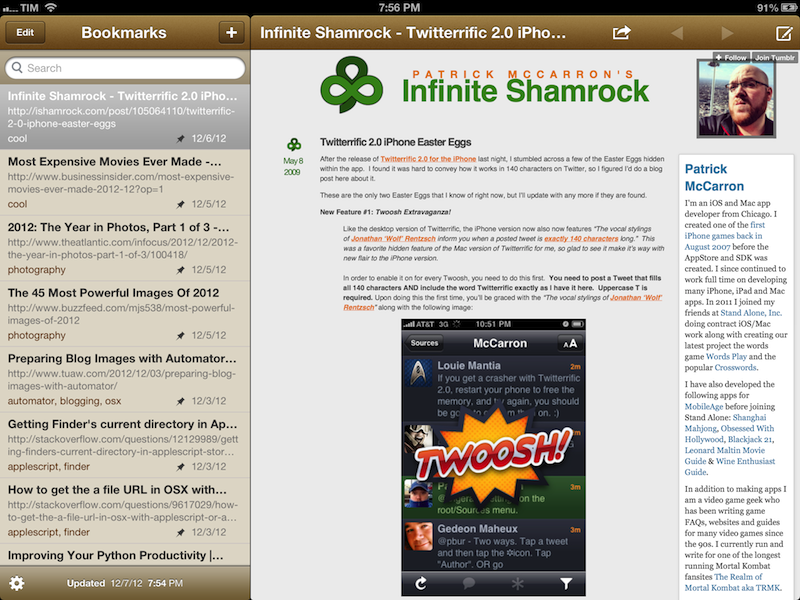
Today, Pinbook has been updated to version 1.2, which introduces a native iPad app and some new features that I really like. The iPad version features a standard Mail-like layout with a sidebar for bookmarks on the left, and website previews on the right. I find Pinbook for iPad to be a much more pleasant experience to sit back and check on saved bookmarks without switching back and forth between lists and multiple views. On the iPad, Pinbook retains the speed and interface polish that led me to write a positive review of version 1.0: the app takes less than 3 seconds to fetch over 500 bookmarks from my account.

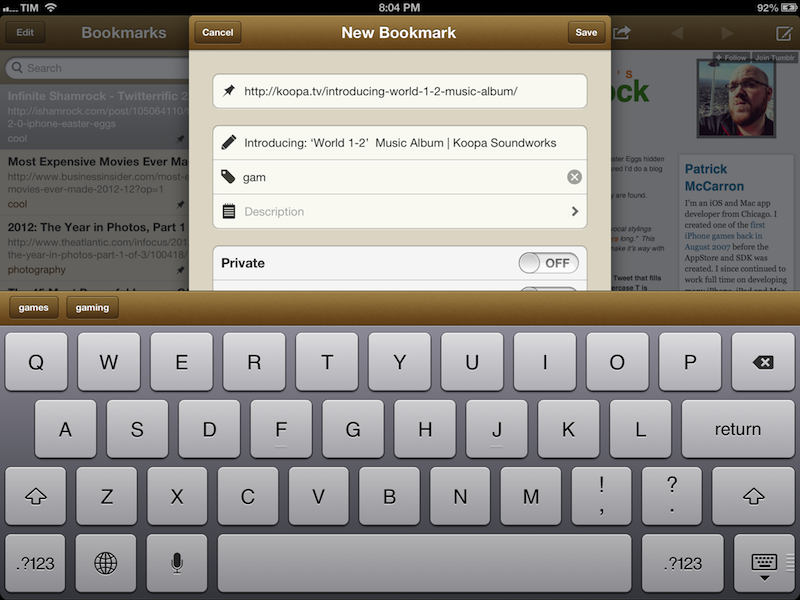
The experience of adding new bookmarks has been improved as well. Aside from the tag suggestions of version 1.1, Pinbook can now also auto-complete titles: independently from the way you send a bookmark (from Launch Center Pro, bookmarklet, or by simply pasting a URL), Pinbook will now automatically fetch the title of the webpage and insert it in the Title field of the Add Bookmark screen.

Personally, I either save bookmarks by pasting a URL saved from somewhere else (usually Tweetbot) or by sending directly to Pinbook. I used to rely on a Pythonista script to save items to Pinboard, but now that Pinbook runs on the iPad and has a more reliable URL scheme I prefer to use this rather than Python. Here’s a bookmarklet to send the current page from Safari to Pinbook:

javascript:window.location='pinbook:///add?url='+encodeURIComponent(location.href)

Last, while Pinbook still doesn’t have any social/discovery features for Pinboard – I am not sure whether the API allows this – it does come with bookmark editing now. Simply open a bookmark and tap on the compose button in the toolbar to start editing.

Pinbook 1.2 is available on the App Store, and I recommend it to every Pinboard user looking for a native and great-looking iOS app.


Kotaku’s “Everything You Should Know” Primer on Baldur’s Gate: Enhanced Edition

Kotaku’s “Everything You Should Know” Primer on Baldur’s Gate: Enhanced Edition

Released through Beamdog on the PC last week and developed by their gaming division Overhaul Games, BioWare’s 1998 classic RPG Baldur’s Gate makes its return as an Enhanced Edition that includes the Tales of the Sword Coast expansion pack, a new adventure, and a few new characters. Now available on the App Store for iPads running iOS 6, I’d recommend reading through Kotaku’s explainer of the isometric remake, as well as Mike Fahey’s 13-year-old review of the original game.

If you ask me, Baldur’s Gate: Enhanced Edition should be played traditionally with a keyboard and mouse. I’d recommend waiting for Baldur’s Gate: Enhanced Edition to arrive on the Mac — expected later this month. But if you’re so inclined to play on a touchscreen, I’d wait for a proper review (say, from the folks at Touch Arcade) before embarking on your next adventure in the Forgotten Realms.

Permalink