This Week's Sponsor:

Copilot Money

The Apple Editor’s Choice App for Managing Your Money


Posts in Linked

Connected, Episode 266: What Are You, an Accountant?

On this week’s episode of Connected:

Stephen got into an eBay bidding war with someone he knows and Federico helps his friends with Catalina, before coming clean about his new iPhone case. The group also considers Apple’s expanding line of audio products and Myke reviews the iMac Pro.

You can listen below (and find the show notes here).

0:00
01:30:46

Connected, Episode 266

Sponsored by:

  • PDFpen, from Smile : The ultimate tool for editing PDFs on the Mac.
  • Pingdom: Start monitoring your website performance and availability today, and get instant alerts when an outage occurs or a site transaction fails. Use offer code CONNECTED to get 30% off.
  • Freshbooks: Online invoicing made easy.
Permalink

AppStories, Episode 135 – Mac Catalyst with James Thomson Plus Federico’s iPhone 11 Pro Camera Story

On this week’s episode of AppStories, we interview James Thomson, the creator of PCalc and Dice, for a developer’s perspective on Mac Catalyst and go behind the scenes of Federico’s iPhone 11 Pro camera story, Eternal City, Modern Photography: The iPhone 11 Pro in Rome.

Sponsored by:

  • Linode - High-performance SSD Linux servers for all of your infrastructure needs. Get a $20 credit.
  • Zapier - The easiest way to automate your work. Start your 14-day free trial today.
  • Kolide - User focused security for teams that Slack. Try it free for 30 days.

Permalink


Connected, Episode 265: What Are You, a Dictionary?

On this week’s episode of Connected:

Apple has revealed its new emoji set, so it is time for Federico to guess their names as Stephen and Myke listen and keep score. After that, Myke shares his thoughts about his Galaxy Fold.

You can listen below (and find the show notes here).

0:00
01:45:42

Connected, Episode 265

Sponsored by:

  • Squarespace: Make your next move. Enter offer code CONNECTED at checkout to get 10% off your first purchase.
  • Freshbooks: Online invoicing made easy.
  • Hover: Make a name for yourself. Get 10% off any domain name.
Permalink

Roku Devices Gaining Apple TV App Today

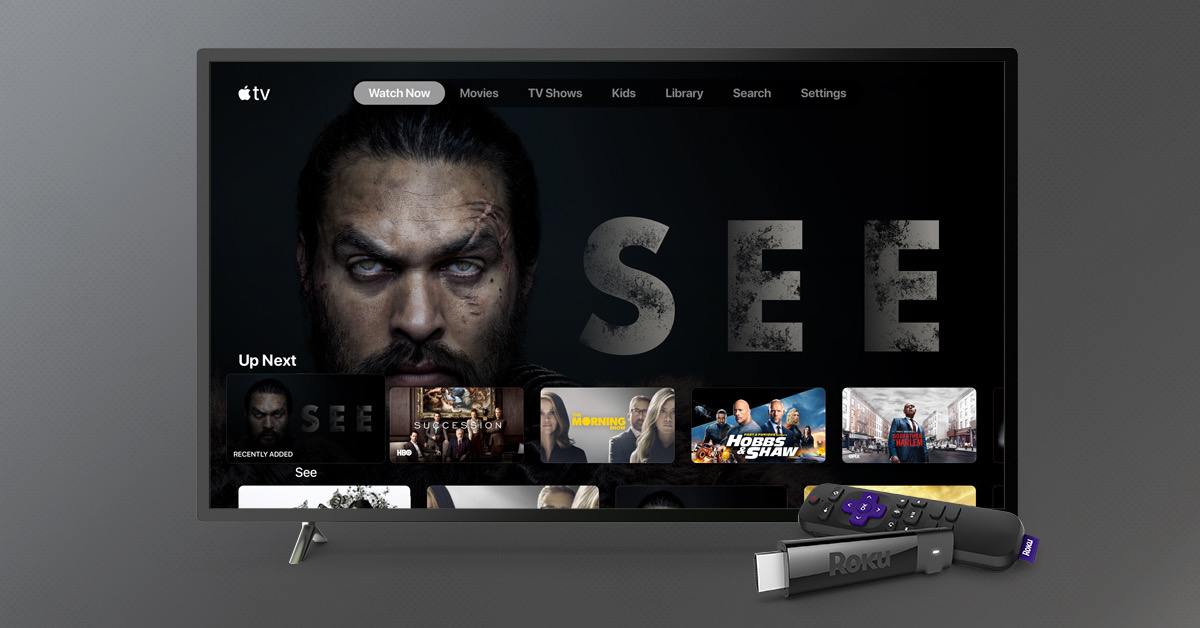
Roku announced in a press release that the Apple TV app would be available on its streaming devices starting today:

For the first time ever, Roku users can add the Apple TV app via the Roku Channel Store to discover and watch movies, TV shows and more, including accessing their iTunes video library and subscribing to Apple TV channels directly on Roku devices. Starting November 1, Apple TV+, Apple’s home for all-original shows and movies from the world’s greatest storytellers, will be available on the Apple TV app on the Roku platform.

Like the TV app on Samsung smart TV sets, the Roku version of the app offers access to all iTunes movie and TV show content, as well as all Apple TV channels options, such as HBO, CBS All-Access, and soon Apple TV+. However, content from non-channels like Hulu or Amazon Prime Video, which are accessible on iOS and tvOS devices, will not be present on the Roku version of the TV app because it lacks third-party app integrations. Moving forward though, I expect that all of Apple’s new content partners with the TV app will be full-on channels rather than legacy app integrations.

Earlier this year Apple announced that the TV app would also be arriving on Amazon Fire TV devices and TV sets from more manufacturers, so as we get closer to the November 1 launch of Apple TV+, I expect we’ll see those other vendors all follow Roku’s lead.

Permalink

AppStories, Episode 134 – Mac Catalyst and the First Wave of Apps Built with It

On this week’s episode of AppStories, we discuss Mac Catalyst, the technology for bringing iPad apps to the Mac, and round up some of our favorite Mac Catalyst apps that have been released so far.

Sponsored by:

  • Kolide – User focused security for teams that Slack. Try it free for 30 days.
  • Direct Mail – Create and send great looking email newsletters with Direct Mail, an easy-to-use email marketing app designed exclusively for the Mac.
  • UpHabit: – The app that makes connecting with people you care about part of your routine. Try it for free or take advantage of 60% off for new subscribers

Permalink

The Important Role Design Plays in Building a Mac Catalyst App

There’s more to migrating an iPad app to the Mac than simply checking a box in Xcode. Although developers need to resort to AppKit APIs used to build Mac apps for some functionality, thoughtful design that respects the interaction model of the Mac is a significant part of the process too.

Vidit Bhargava is the designer behind the dictionary app LookUp and the cofounder of Squircle Apps. Bhargava, who we interviewed in the most recent issue of MacStories Weekly for Club MacStories, has written an in-depth look at how much of the process of bringing LookUp’s iPad app to the Mac was about design. As he explains:

I’m sharing this design document to highlight some of the design considerations I made for bringing LookUp’s iOS App to macOS. And while I did use fall backs to AppKit in certain situations (Even though I had no prior knowledge to AppKit, the APIs were relatively easy to get to), I still feel that a lot of apps can design a good experience without having to use them.

We’ve covered the iOS and iPadOS version of LookUp before and love it. On the Mac, there are dozens of little touches implemented throughout the app that make LookUp one of the best examples of an excellent Mac Catalyst app. What I find most fascinating is how familiar but also unmistakably Mac-like LookUp’s Mac design is, which is why it was one of a handful of apps that I spotlighted in my macOS Catalina review.

Bhargava’s full post is worth a read because it’s fully-illustrated with examples of the differences between the iPad and Mac designs, early prototypes, and the evolution of the app’s design.

Permalink

Connected, Episode 264: Trash Forever

On this week’s episode of Connected:

Federico has iCloud issues and Myke has a new phone, but no new computer. Stephen has reviewed macOS Catalina.

You can listen below (and find the show notes here).

0:00
01:34:10

Connected, Episode 264

Sponsored by:

  • ExpressVPN: High-Speed, Secure & Anonymous VPN Service. Get 3 months free with a 1-year package.
  • Freshbooks: Online invoicing made easy.
  • Bombas: Refresh your sock drawer. Use this link for 20% off.
Permalink

Project Geneva: David Smith’s New Approach to Third-Party Watch Faces

Developer David Smith has often expressed a desire to design third-party faces for the Apple Watch, a feature that many users wish Apple offered. But recently, after launching his latest Watch app Geneva Moon (formerly known as Moon++), Smith realized he could take a different view of face customization, inspired by his newest app.

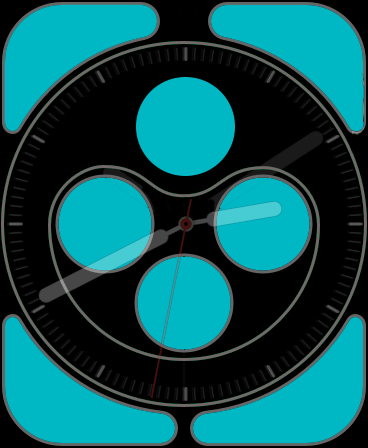
Geneva Moon exists mainly to provide a complication which displays an astronomically accurate representation of the moon. It takes advantage of the new ability in watchOS 6 for Watch apps to be offered independently of iOS counterparts, so you can download Geneva Moon directly from the Watch’s App Store and then install its complication on your watch face. Smith’s experience with this app inspired him to shift his focus from the aspects of watch faces that Apple doesn’t let developers customize, to the extensive areas that they can. He writes:

The Infograph face's customizable areas. (Source: david-smith.org)

The Infograph face’s customizable areas. (Source: david-smith.org)

I have extensive control over what is shown here and for many of the watch faces, this area makes up the vast majority of the screen. Other than the design of the watch hands or appearance of the digital time numerals, I can do a whole lot with the complication tools I already have.

To that end, I’m starting a journey I’m calling Project Geneva, in which I’m going to see just how far I can push customizability and design of complications for the Apple Watch.

Though Apple doesn’t permit the distribution of third-party watch faces, by focusing on creating new complications that can be used across a variety of different first-party faces, Smith will provide users more flexibility in crafting each existing face to their own preferences and needs.

To a degree, third-party faces are already here. An entire watch face can’t be customized, but for those faces which are largely populated by complications – which many are – there exists enormous freedom for developers and users alike to craft their ideal watch face.

I can’t wait to see what new complications are spawned by Project Geneva, and hope other developers may take inspiration from Smith’s new initiative themselves.

Permalink