Posts in news

Firefox Receives Speed Bump and Design Refresh

I was an original supporter of Firefox in 2004. At the time, the Internet was in desperate need of change. The web browser market was dominated by Microsoft’s Internet Explorer, which was clunky and becoming an increasingly closed, proprietary system. Firefox found immediate success because it was fast and had an extension system for extending its functionality. Over time though, Firefox lost its speed advantage and fell out of favor.

Now, Firefox is back with a new and improved version called Firefox Quantum that focuses on speed and a fresh design. According to the Mozilla Foundation:

Firefox Quantum is over twice as fast as Firefox from 6 months ago, built on a completely overhauled core engine with brand new technology stolen from our advanced research group, and graced with a beautiful new look designed to get out of the way and let you do what you do best: surf a ton of pages, open a zillion tabs, all guilt free because Firefox Quantum uses less memory than the competition.

I haven’t had an opportunity to thoroughly test Firefox on my Mac, but even after opening 50 tabs on a fresh install of the browser, many of which were notoriously heavy sites, Firefox remained responsive. In addition to being twice as fast as the previous version of the app, Mozilla says Firefox Quantum uses 30% less memory than Google Chrome.

The under-the-hood improvements are coupled with a refreshed user interface that’s designed to scale from mobile devices to large screens. The redesign includes the incorporation of Pocket article recommendations. When you open a new tab, you get three article recommendations from Pocket, which was acquired by Mozilla earlier this year, along with links to popular Pocket article categories.
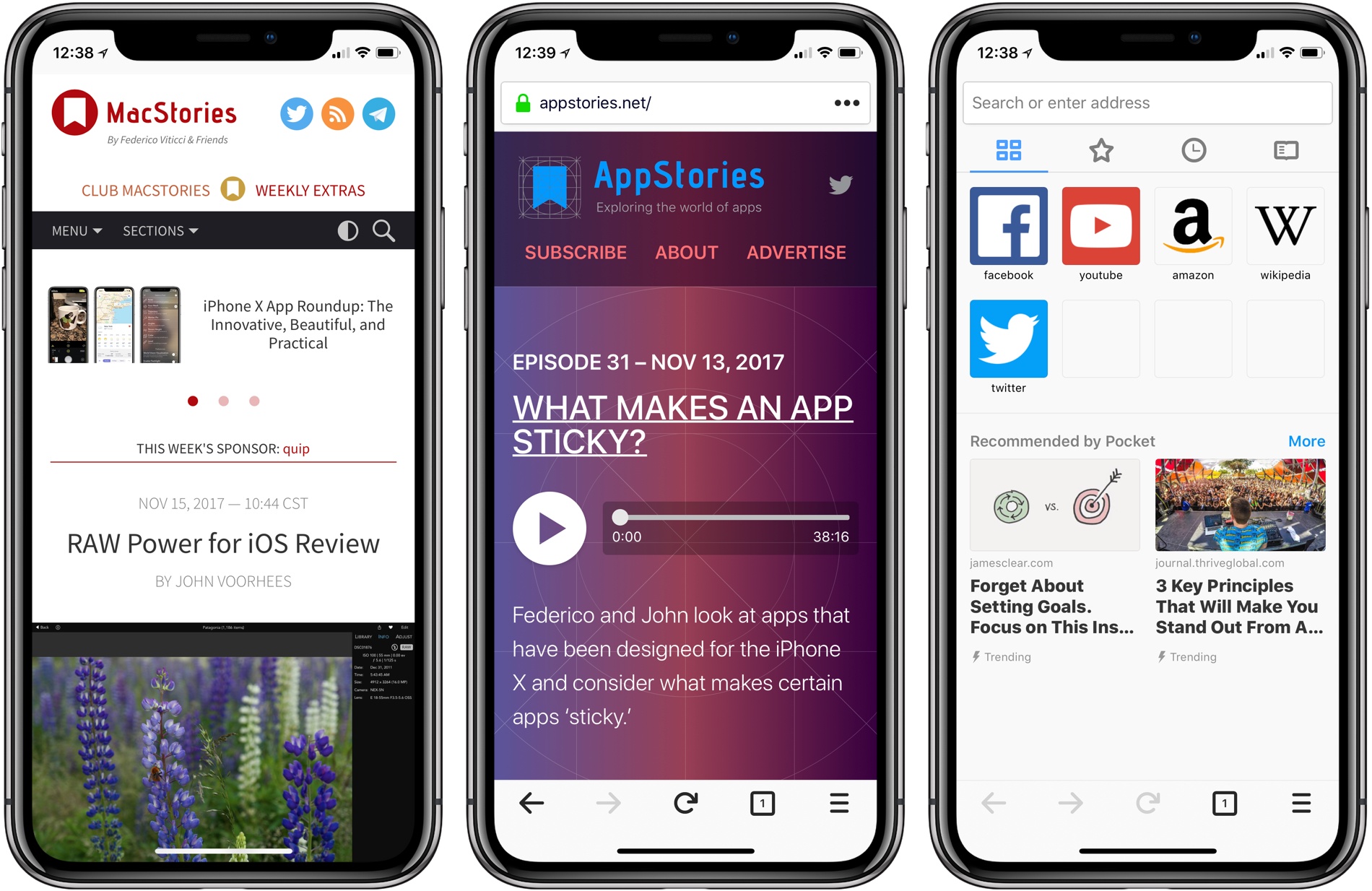
The update to Firefox for macOS is coupled with a similar design refresh on iOS. Version 10.1 of Firefox brings Firefox’s new design to iOS, including Pocket recommendations. The iOS version of the browser also has a ‘no image’ mode that uses less data and loads faster.

Firefox for macOS is available directly from the Mozilla Foundation. The iOS version of the browser is available on the App Store.


Stranded Kitesurfer Used His Apple Watch to Call for Help

John Zilles, a 49-year-old who has been kiteboarding for 20 years, recently found himself stuck at sea after crashing about a mile off the coast of Ventura, California, an area known for great white sharks. Zilles told his story to the Daily Mail:

’I started thinking about all the great white shark sightings in our area, and although I realised I could probably swim in, I couldn’t stop thinking about sharks - it was a real mind bender.

’I realized I had my watch - so called the Ventura Harbor Patrol, explained my situation and asked for help.’

The harbor patrol sent a boat, and Zilles spotted it, but the boat was heading in the wrong direction. Another quick call on his Apple Watch and Zilles was in the boat heading back to safety.

Permalink

Quip: Care for Your Teeth [Sponsor]

Behind the elegant design of the quip electric toothbrush is a mission to care for your teeth. Fixing bad habits makes a big impact on oral health, but too often, it’s ignored and glossed over by oral care products and services. The quip toothbrush changes that.

The quip brush has a beautiful slim design that makes other electric toothbrushes look like power tools by comparison. The slender body of the quip brush also makes it easy to take on the go when you travel.

There’s more to quip than its sleek looks though. The brush has sensitive vibrating bristles with 30-second pulses that guide you through a 2-minute brushing routine. There’s also a wire-free, suction-based wall mount that doubles as a carrying case for when you travel. Best of all, quip is affordable.

Brush heads wear out and if they’re used too long become unhygienic and ineffective. That’s why quip also offers a subscription plan that delivers a new brush head to your home every three months along with a AAA battery to keep it powered. For added convenience, you can even add a tube of quip toothpaste to your subscription. Subscribing is an effortless way to start a good habit by putting brush head replacement on autopilot.

We have a special deal just for MacStories readers. You can get your first brush head refill from quip for free by using this link. Start a good habit and take care of your teeth today with quip.

Our thanks to quip for sponsoring MacStories this week.


The App Store Adds Weekend Deals Feature

Apple has introduced a new feature in the Today tab of the App Store called ‘This Weekend Only.’ Each Thursday, one app will offer an exclusive deal to users that lasts through Sunday.

The new feature is being kicked off with five deals instead of one:

The new promotion strikes me as a good way to help drive traffic to the App Store on weekends, which are slow sales days for many developers. It also makes sense to kick off the App Store’s new feature with apps from relatively large companies with broad appeal, but I hope that in the long run, smaller independent development shops are included too.


SuperDuper! Updated for macOS High Sierra and APFS

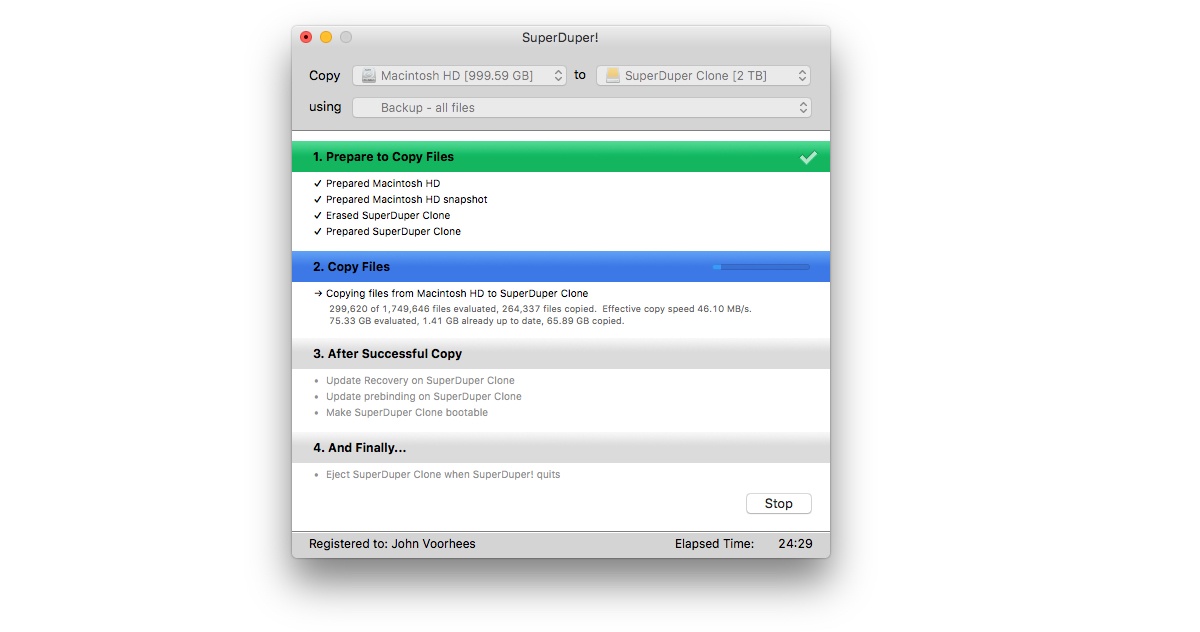
High Sierra introduced APFS, Apple’s first entirely new file system on the Mac in decades. Today, Shirt Pocket Software announced an update to its backup utility SuperDuper! that is compatible with APFS. In fact, the app can create a bootable clone for any Mac running Mac OS X 10.9 and later.

Supporting a brand new file system is a tall order. As Dave Nanian explains on the Shirt Pocket blog, APFS volumes are handled differently by macOS than HFS+ ones were. That complicated the update of SuperDuper!, but as with earlier OS updates, Shirt Pocket has solved the issues and is ready with an update that works with Apple’s latest version of macOS.

If you’re not already making a bootable backup of your Mac’s drive, the update to SuperDuper! is the perfect time to download the app and get started.


Tweetbot for iOS Adds 280-Character Tweet Support

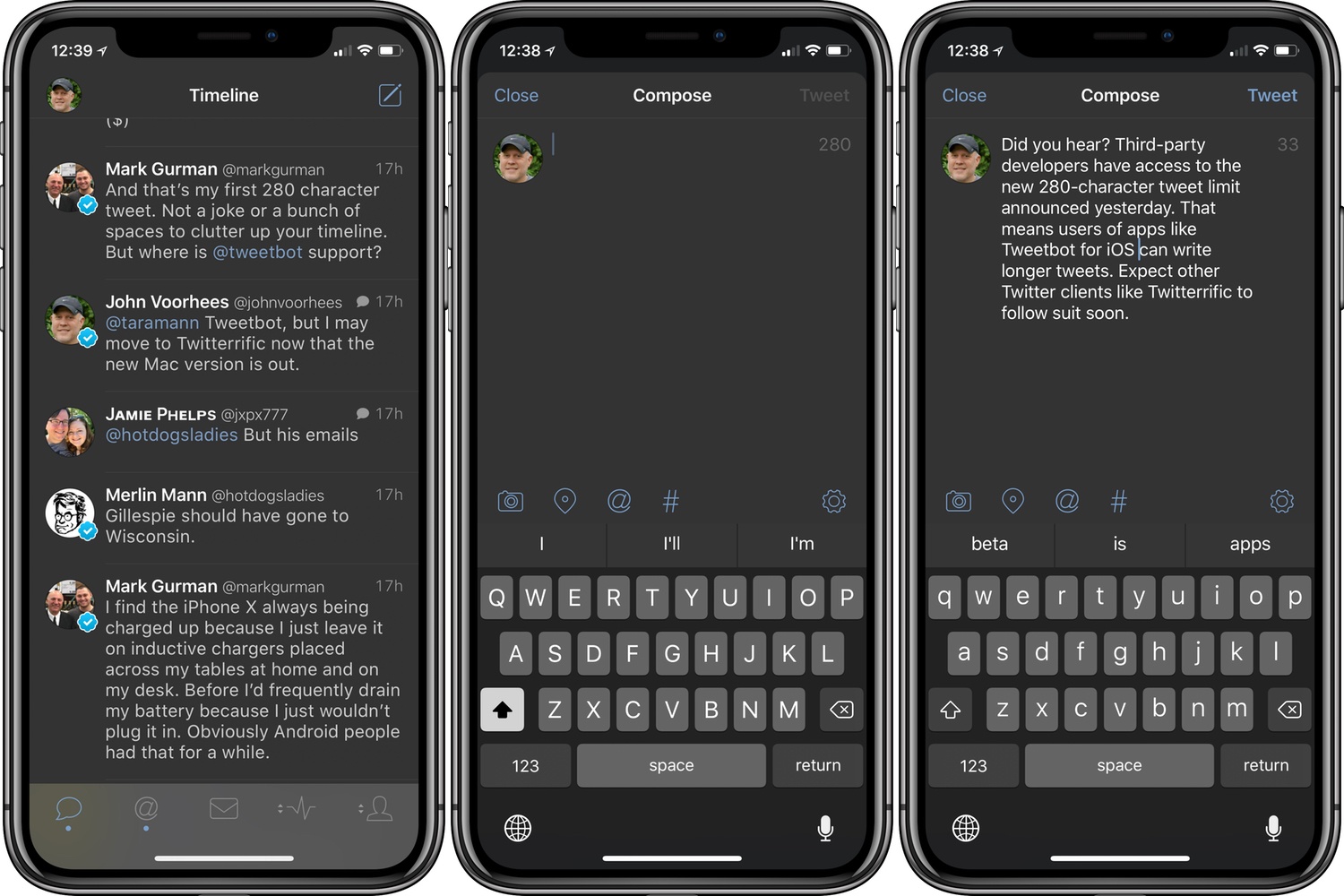
Yesterday, Twitter extended the character limit of tweets to 280. Unlike some features, Twitter has made the new tweet length available to all third-party developers.

First out of the gate is Tweetbot by Tapbots. Less than 24 hours after Twitter’s announcement, Tweetbot users can use a full 280 characters in tweets. I expect we’ll see additional updates from other Twitter client developers soon.

Tweetbot is available on the App Store.


Twitterrific for macOS Adds Poll Support and Other Refinements

The Iconfactory is on a tear with Twitterrific for macOS updates. Version 5.0, the crowdfunded rebirth of the app, launched less than a month ago. A couple of weeks later, Twitterrific 5.1 added muffles and mutes, which we discussed on AppStories this week. Then yesterday, Twitterrific 5.2 dropped, with support for polls and and an enhancement of its user search functionality.

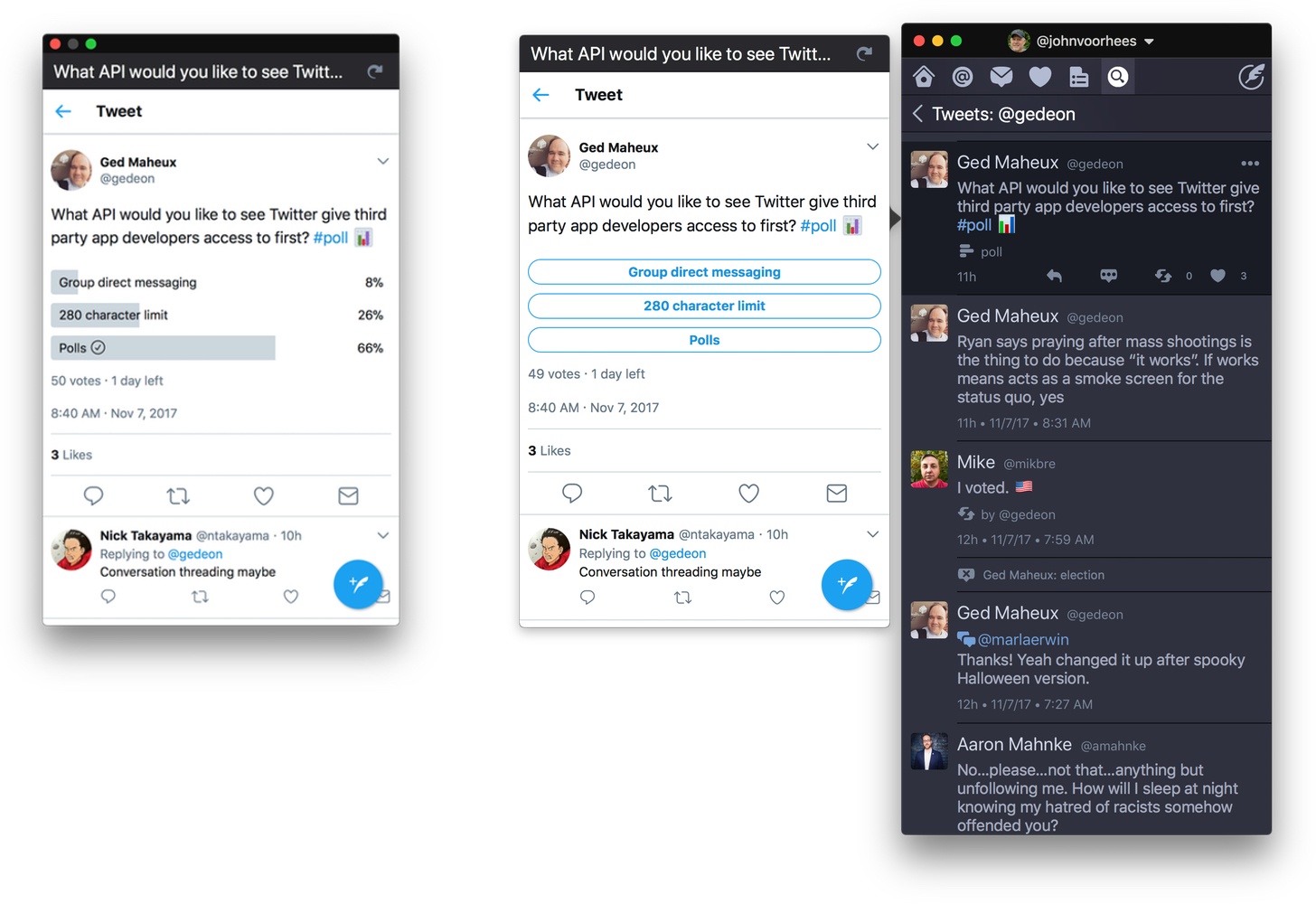
Poll support is notable because third-party developers don’t have access to Twitter’s polling APIs. Instead, users of third-party Twitter clients have had to go to the official Twitter client or the web to vote in polls, which I rarely bothered to do. Lack of API support hasn’t stopped The Iconfactory from implementing a workaround to make polls available to its users though. The feature isn’t perfect, but in my preliminary testing, I’ve been impressed with how well it works.

Twitterrific detects tweets that include polls by looking for clues like whether ‘#poll’ or the graph or ballot box emoji are used. The app also looks at the format of the question posed. If a tweet looks like a poll, Twitterrific displays a button below the text of the tweet. When the poll button is clicked, a popover with a mini-browser opens the poll so you can vote and see the results. If you want to monitor a poll, drag the popover away from your timeline to transform it into a standalone window that will stay put and can be refreshed with the latest results.

Poll creation still requires Twitter’s app or website, which cannot be avoided. Nonetheless, I can already tell that being able to open a poll, vote, and view results all from Twitterrific is going to increase my participation in them. For now, the feature is available on macOS only, but it is under consideration for the iOS app depending on how well it is received by users on the Mac.

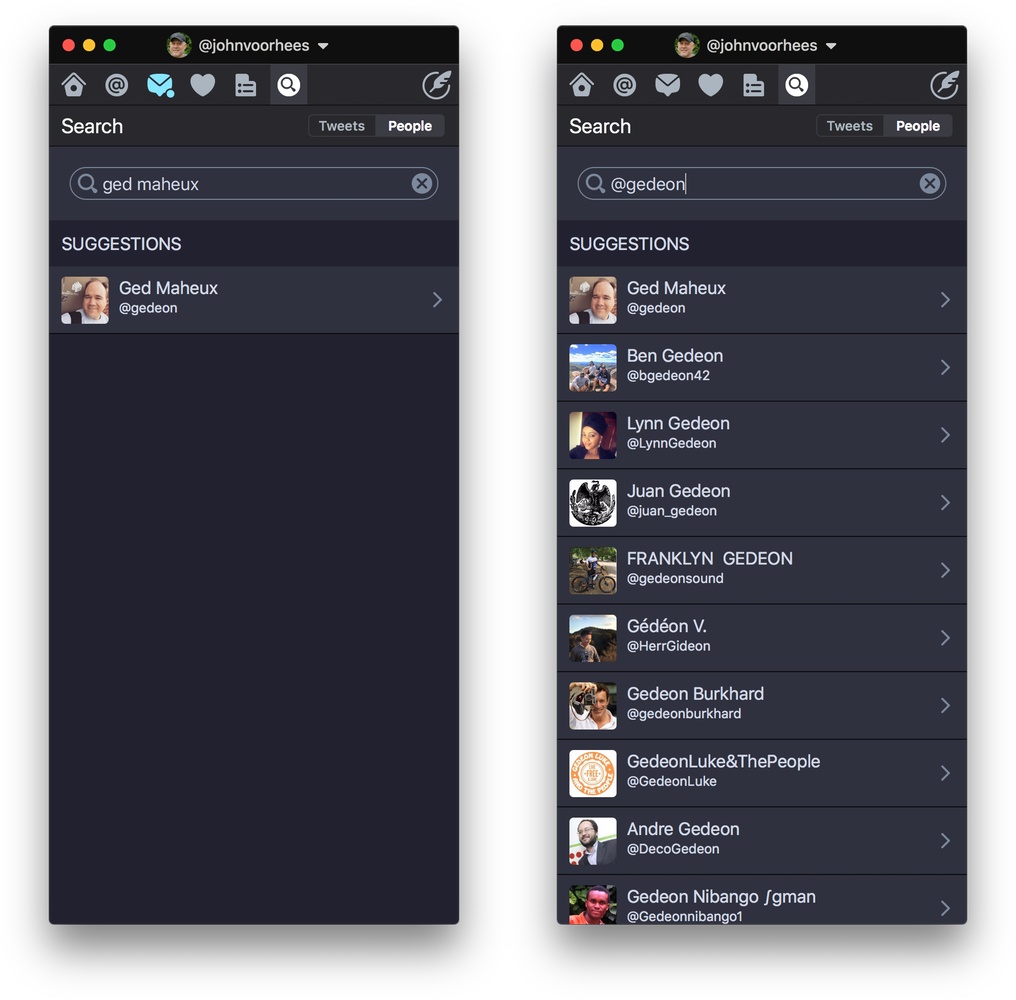
Use the Cmd+U keyboard shortcut to search for a Twitter user quickly.

Use the Cmd+U keyboard shortcut to search for a Twitter user quickly.

Twitterrific also added fast user searching via the Cmd+U keyboard shortcut and has improved syncing of your timeline position between iOS and macOS. Next up for both versions of the app is support for Twitter’s new 280-character tweet limit, which, unlike polls, is available to third-party developers.

If you’re interested in trying a new Twitter client, Twitterrific is an excellent choice. The handful of gaps in the macOS version’s original feature set are being addressed rapidly and innovative approaches to things like polls set it apart from its competitors.

Twitterrific 5.2 is available on the Mac App Store.


Twitter Adopts 280-Character Tweet Limit

Twitter extended the 140-character limit of tweets to 280 characters for a test group of users in September. In a blog post today, Twitter’s Aliza Rosen proclaimed the test a success noting that the additional characters have been used where needed, but that most tweets remain under the previous 140-character limit.

As a result, Twitter has begun to roll out the new feature worldwide for every language where ‘cramming’ was an issue. The company describes cramming as:

the deviation of the actual length distribution from the theoretical log-normal distribution near the character limit — “cramming,” as it likely reflects people’s attempts to “cram” their Tweets within the character limit.

In plain English, cramming is when your tweet is just a little long, and you spend time editing it to fit into 140 characters. According to Rosen:

Historically, 9% of Tweets in English hit the character limit. This reflects the challenge of fitting a thought into a Tweet, often resulting in lots of time spent editing and even at times abandoning Tweets before sending. With the expanded character count, this problem was massively reduced – that number dropped to only 1% of Tweets running up against the limit. Since we saw Tweets hit the character limit less often, we believe people spent less time editing their Tweets in the composer. This shows that more space makes it easier for people to fit thoughts in a Tweet, so they could say what they want to say, and send Tweets faster than before.

Cramming is a bigger problem for some languages than others. At the other end of the spectrum are languages like Chinese, Japanese, and Korean, which can express more in fewer characters and will continue to have 140-character limits.

The new tweet length limit is still rolling out to users. If you don’t have 280 characters to work with yet, check the official Twitter again later because it will undoubtedly take a while to propagate to all users.