This Week's Sponsor:

Dropzone 5

Improve your Drag-and-Drop Workflow


Posts in iPhone

SoPhone: The King of Fake iPhones

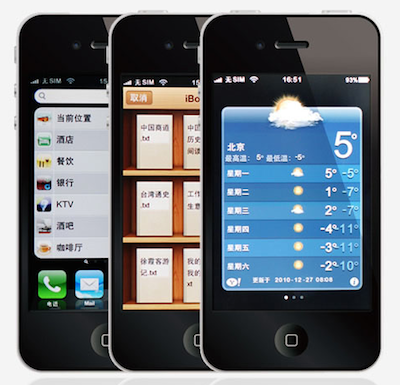
I can’t believe I’m about to say this, but: this Chinese knockoff almost looks as good as the original iPhone 4. The SoPhone is, without a doubt, the closest thing to an Apple iPhone 4 I’ve seen so far – not just because of the strikingly similar exterior design. First off, the SoPhone looks just like an iPhone 4, has the same size (115.2×58.6×9.3mm) and fits in any case produced for the real thing. As long as the “glass sandwich” appearance is concerned, the SoPhone seems a success. We can’t comment on the actual build quality, but judging from the video – it’s an iPhone 4.

Problems arise when the average user willing to buy a SoPhone (example: my dad) wants to go deeper and asks about the operating system and internal specs. This thing of course doesn’t run iOS, but the average user might think it does. I mean, look at the video: it’s a well-done iOS skin (probably built on top of Android 2.2?) that’s got Apple’s icons, menus – even the Cover Flow. Guess what’s missing? The smoothness, the scrolling, the refinements – exactly what the “average dude” won’t notice on first sight. This is best shown in the comparison video shot by MIC Gadget. The SoPhone has got an Apple logo on boot, folders (slow), Spotlight and Springboard pages. It’s a fake iOS running on a fake iPhone 4. From what I can see, I believe multitasking’s in there, too. As for the specs, as you would expect this is nowhere near the iPhone 4: 2 MP cameras, no Retina Display, 4 GB of flash storage and a MTK6235 chipset.

The final price for a SoPhone unit? Around $200. Not bad for a well-done ripoff, but still – you won’t have an iPhone. You’ll only get close (closer than any other Chinese knockoff, that’s it) to it. If you’re on the edge, check out the hands-on video below. Unlike the reviewer says, I’m not sure the SoPhone is “very fast” though. Read more

Say “Cheers” With IKEA’s iPhone App

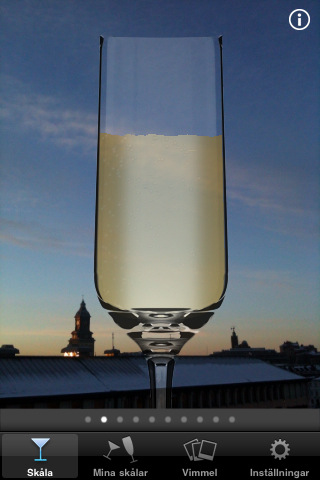
Feeling a little bit old with all that wooden furniture and lack of digital goodness, IKEA decided to develop apps for the iPhone. That’s right, but Swedish retail chain’s first attempt to enter the App Store market is far from being a furniture catalogue app. Instead, the developers at IKEA created an app to have a toast with someone and share the moment on Twitter, Facebook and the service’s online gallery.

The app, called IKEA Skal! (which stands for “Cheers”) lets you choose between different glasses (perhaps sold at IKEA?) and a drink you’d like to toast with (beer, wine, champagne). On screen, you’ll see the glass and the background captured by your iPhone’s camera – Skal works well with the iPhone 4 but it’s a little slow on the 3GS. As you’re ready with your glass and you like the background for your toast, find someone to share the moment with and toast with your phones. The app will play the sound of glasses, exchange contact information automatically and even snap a picture of the toast as it happens. You can then share the pic on Facebook and Twitter, send it to IKEA’s photo gallery and even browse other people’s toasts.

See? IKEA can make pretty cool apps. Skal is available for free here. Check out the promo video below. Read more


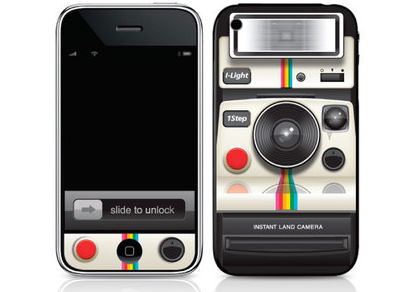
Turn Your iPhone Into A Vintage Polaroid

If your iPhone, besides being a phone, also happens to have become your best camera and you fancy some old-style gadgetry in your pockets, perhaps you’d like to consider Ryan Astle’s Photoroid skins.

Available in iPhone, iPad, Blackberry and Evo models, the skin costs $15 for the iPhone and $20 for the tablet. It’s made of 2 pieces of art for the front and back of the iPhone, it really resembles an old Polaroid camera and, personally, I think it’s got something that reminds me of the Instagram icon as well.

With all these apps that apply vintage effects to your photos (and videos, too), the Photoroid skin seems appropriate. [Gizmodo via Infectious]


MacStories’ 2010 Roundup: Top 8 Apps for Kids

Welcome to another MacStories’ 2010 Roundup! In this new series, we collect the best apps released in 2010 for the Mac, iPhone and iPad — apps we have or will feature here on MacStories. Only the best apps, both free and paid. Apps you shouldn’t miss.

Do your kids often ask you do play with your iPads or iPhones? I know my 3.5 year old son does, he’s always asking me! Entertain your little ones with these iOS apps and games, great for toddlers, preschoolers, and big kids at heart.

Why 8? Because we tried and tried to narrow it down to 5 but we couldn’t do it! So, we have collected our top 8 apps for kids released this year. We think they are great apps you should go install right now. We could have included more, but we wanted to bring some of the best to your attention, not just the “pretty good” ones.

So jump after the break, and check our Top 8 list of kid’s apps for iOS.

Read more


The iPhone Heart Monitor

Modern technology has changed so much in just the last few years; everything has gotten smaller, cheaper and better. It’s really amazing, when I was a child in the 80s, everything was still analog, big and had square edges. A 2 foot by 1 foot ‘ghetto blaster’ was considered portable music and a portable TV was black and white and weighed 20 pounds.

The future is here now and Apple’s iPhone is the flux capacitor to the future, or at least in this case an Electrocardiography device (ECG). This is by far one of the coolest implementations of an iPhone and a third party accessory. For one thing, it’s not just for the medical world, it will also be a consumer accessory as well; the iphonECG is going to officially be announced ay CES next week. Attach the iphonECG case, open the monitoring app, and place the contacts against your chest (heart). Remember when I said everything gets “smaller, cheaper and better”? Here’s one of the first ECG devices ever created.

Welcome to 2011: A Tech Odyssey.

[via MobileCrunch]


Life Size Designer iPhone Cookie A Huge Success In Japan

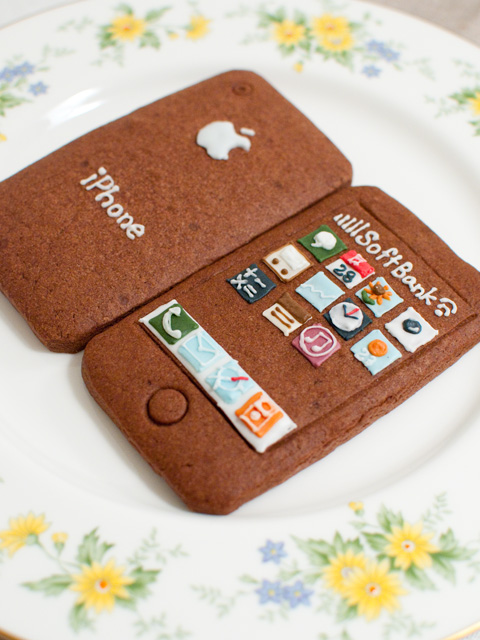
While I can bake some mean snickerdoodles when Christmas comes around, I hate to admit than anything even related to frosting is a bit of a sore point in my baking expertise. Which means I probably could never work for the Green Gables bakery in Japan, whose intricate artwork on their iPhone cookie look-a-likes has become a popular hit. Individually packaged as to not damage the cookie, presentation is everything – the creator wishes that you’ll admire this tasty piece of art before indulging yourself to the unique tasty treat. The cookies have been around for a while, and pictures shared on the Internet fueled everyone’s inner geek to buy these one of a kind cookies that Apple Inc. themselves could have baked. I can imagine Johnny Ive in an apron mixing the dough and baking batches of these things.

My request is that Apple themselves import these cookies overseas and sell them at the mothership if possible, but even Cupertino might have trouble since there’s a 2 month waiting period. Just look at this way: that iPhone cookie has a wait time as long as the real iPhone when it first came out!

[Cult of Mac via blog.livedoor.jp (Green Gables)]


Synchronicity 2.0 Released, One Day iTunes Sync Will Work Like This

Synchronicity for iPhone and iPad is one of the best jailbreak tweaks released in 2010. We first reviewed it in August, and I haven’t stopped using it since then: Synchronicity allows you to keep using your device even while it’s syncing with iTunes. Typical scenario: you’re reading stuff in Instapaper but you need to install Rage HD or Infinity Blade on your iPhone. You don’t want to stop reading because iTunes will take 15 minutes to install the app on your device. Synchronicity comes in handy in these situations, when you want to update your device to the latest changes in your iTunes library but you don’t want to be forced to staring at the “Sync in Progress” screen for more than 20 seconds.

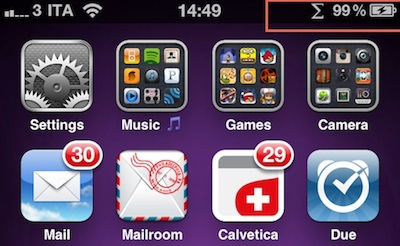
The best part of Synchronicity is that it’s lightweight and so unobtrusive you’ll quickly get addicted to it and forget about it being a Cydia hack. One day iTunes will work like this, with changes happening in the background, perhaps over-the-air. A major update to the tweak was released last night: Synchronicity 2.0 gets rid of the red tethering-like bar that appeared on top during sync and put a greek “Sigma” icon in the menubar to inform that an iTunes sync is occurring. The tweak has also been updated with performance improvements and bug fixes; it works really well both on my iPhone 4 and iPad.

Synchronicity is a $2 purchase in the Cydia Store. If you have a jailbroken device, I don’t see why you shouldn’t use this.