Posts in iPad

iPad 2 To Look Like an iPod touch?

When the iPad was announced, many quickly dismissed it as a “giant iPod touch”. According to the information posted by Japanese blog Macotakara, it looks like the next generation iPad will indeed look more similar to an iPod touch than it does in its current version. Basically, Macotakara analyzed the iPad 2 cases that have been floating around these weeks and concluded that they are designed for a device with a flat back and “tapered sides”, as reported by MacRumors. The new sides and back will presumably force Apple to relocate the speaker and adjust the position of the volume buttons as well.

The volume buttons on the side of the next-generation iPad appear to be of the split style with an oblong form factor as seen on the current iPod touch, as opposed to the rocker buttons used on the current iPad and the round split buttons used on the iPhone 4.

The current iPad 1st gen comes with a curved back and flat sides. The next gen one might be the exact opposite, although I don’t know much a flat back design would make it comfortable for users to pick up the device from a table or desk.

Macotakara also seems to think the iPad 2 will offer a rear camera as big as the iPhone 4’s one, capable of snapping high-resolution pictures. It is still unknown, however, whether these cases that have been posted on the internet are produced by people actually in the know of the next gen iPad 2 or just to generate traffic towards the promo websites.

Video below. Read more

Access Extra Content and Perks

Founded in 2015, Club MacStories has delivered exclusive content every week for nearly a decade.

What started with weekly and monthly email newsletters has blossomed into a family of memberships designed for every MacStories fan.

Learn more here and from our Club FAQs.

Club MacStories: Weekly and monthly newsletters via email and the web that are brimming with apps, tips, automation workflows, longform writing, early access to the MacStories Unwind podcast, periodic giveaways, and more;

Club MacStories+: Everything that Club MacStories offers, plus an active Discord community, advanced search and custom RSS features for exploring the Club’s entire back catalog, bonus columns, and dozens of app discounts;

Club Premier: All of the above and AppStories+, an extended version of our flagship podcast that’s delivered early, ad-free, and in high-bitrate audio.

Learn more here and from our Club FAQs.


#MacStoriesDeals - Monday

iOS deals should be repopulated again tomorrow. Here’s some great deals for today on iOS & Mac apps that are on sale for a limited time, so get ‘em while they’re hot!

Read more

Access Extra Content and Perks

Founded in 2015, Club MacStories has delivered exclusive content every week for nearly a decade.

What started with weekly and monthly email newsletters has blossomed into a family of memberships designed for every MacStories fan.

Learn more here and from our Club FAQs.

Club MacStories: Weekly and monthly newsletters via email and the web that are brimming with apps, tips, automation workflows, longform writing, early access to the MacStories Unwind podcast, periodic giveaways, and more;

Club MacStories+: Everything that Club MacStories offers, plus an active Discord community, advanced search and custom RSS features for exploring the Club’s entire back catalog, bonus columns, and dozens of app discounts;

Club Premier: All of the above and AppStories+, an extended version of our flagship podcast that’s delivered early, ad-free, and in high-bitrate audio.

Learn more here and from our Club FAQs.


Did You Install Facebook for iOS for Christmas? Apparently Over One Million Others Did.

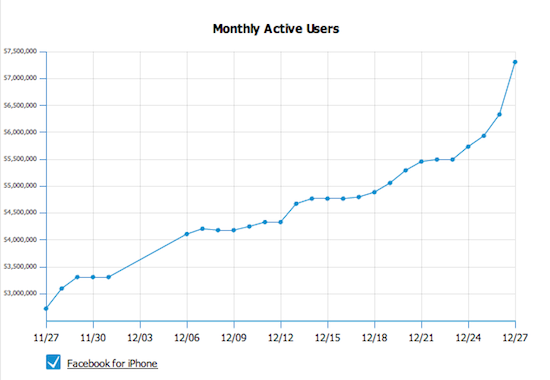
According to this graph from AllFacebook, one million new people installed Facebook for iOS - phenomenal. Just goes to show you how many devices such as the iPad, iPhone and the iPod Touch were given as Christmakwanzakah gifts this year; were you one of them? Stevie Claus must be happy!

[via Daring Fireball]

Access Extra Content and Perks

Founded in 2015, Club MacStories has delivered exclusive content every week for nearly a decade.

What started with weekly and monthly email newsletters has blossomed into a family of memberships designed for every MacStories fan.

Learn more here and from our Club FAQs.

Club MacStories: Weekly and monthly newsletters via email and the web that are brimming with apps, tips, automation workflows, longform writing, early access to the MacStories Unwind podcast, periodic giveaways, and more;

Club MacStories+: Everything that Club MacStories offers, plus an active Discord community, advanced search and custom RSS features for exploring the Club’s entire back catalog, bonus columns, and dozens of app discounts;

Club Premier: All of the above and AppStories+, an extended version of our flagship podcast that’s delivered early, ad-free, and in high-bitrate audio.

Learn more here and from our Club FAQs.


Father Develops iPad App to Help Disabled Son Communicate

This is one of the stories that best shows what it’s possible to do with modern technologies, some basic development skills and the real need for something a consumer-oriented product like the iPad doesn’t ship with by default. Victor Pauca is a 5-year-old boy who has a very rare genetic disorder that prevents him from developing skills like speech and the overall ability to communicate with others. To help him, his father created an iPad app that turns the touch screen into an easy to understand communication tool.

The app, called VerbalVictor, will be released later this week in the App Store at around $10. Read more

Access Extra Content and Perks

Founded in 2015, Club MacStories has delivered exclusive content every week for nearly a decade.

What started with weekly and monthly email newsletters has blossomed into a family of memberships designed for every MacStories fan.

Learn more here and from our Club FAQs.

Club MacStories: Weekly and monthly newsletters via email and the web that are brimming with apps, tips, automation workflows, longform writing, early access to the MacStories Unwind podcast, periodic giveaways, and more;

Club MacStories+: Everything that Club MacStories offers, plus an active Discord community, advanced search and custom RSS features for exploring the Club’s entire back catalog, bonus columns, and dozens of app discounts;

Club Premier: All of the above and AppStories+, an extended version of our flagship podcast that’s delivered early, ad-free, and in high-bitrate audio.

Learn more here and from our Club FAQs.


Traktor, X1 Controller and iPad Make A Decent DJ Setup [Video]

We know the iPad makes for an interesting DJ accessory, there are hundreds of music apps available and Rana June Sobhany proved it is possible to set up great live performances using only Apple’s tablet. Perhaps it doesn’t provide the tactile feeling of vinyl and the powerful feature set of the most complicated turntable, still a touchscreen is an interesting addition to the usual DJ setup.

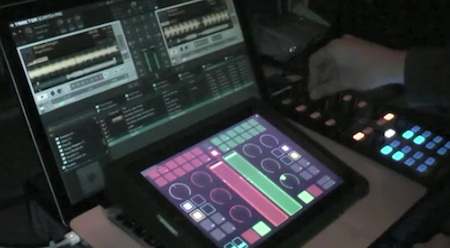
In the following video, Youtube user djkutski demoes a Traktor Pro controlled by the X1 controller and an iPad running TouchOSC, an app that can display sound interfaces on screen. While the non-DJ folks won’t probably understand what’s going on with all those buttons, sliders and colors, it’s still an impressive demo of what passionate and skilled users can achieve with a bit of creativity, cash and hacking.

Check out the video below. [TUAW via Youtube] Read more

Access Extra Content and Perks

Founded in 2015, Club MacStories has delivered exclusive content every week for nearly a decade.

What started with weekly and monthly email newsletters has blossomed into a family of memberships designed for every MacStories fan.

Learn more here and from our Club FAQs.

Club MacStories: Weekly and monthly newsletters via email and the web that are brimming with apps, tips, automation workflows, longform writing, early access to the MacStories Unwind podcast, periodic giveaways, and more;

Club MacStories+: Everything that Club MacStories offers, plus an active Discord community, advanced search and custom RSS features for exploring the Club’s entire back catalog, bonus columns, and dozens of app discounts;

Club Premier: All of the above and AppStories+, an extended version of our flagship podcast that’s delivered early, ad-free, and in high-bitrate audio.

Learn more here and from our Club FAQs.


Mossberg Declares iPad “Best Product of 2010”

WSJ tech journalist Walt Mossberg thinks Apple’s iPad is the best product of 2010. The iPad is “amazing” and thanks to the new iOS 4.2 and huge selection of apps available, it “continues to stay ahead of the competition”. Competition that saw devices like the Dell Streak released in 2010, which Mossberg calls a “tweener” that’s “too big to be a phone yet too small to be a tablet”. The Samsung Galaxy S and iPhone 4 both ranked third in Mossberg’s chart of best products.

As for the second place:

High-speed 4G networks in the United States took the second spot. As the world goes more mobile, the availability of faster networks is critical. Today, 3G networks are bursting at the seams, and the promise of these networks will be something to watch closely in 2011.

We might argue on the relevance of 4G networks in 2010, as they seem more “promising” than actually available right now. There’s no doubt, though, that better and faster mobile networks will expand in 2011. We look forward to seeing what Mossberg’s “best & worst” chart will look like in 2011.

Access Extra Content and Perks

Founded in 2015, Club MacStories has delivered exclusive content every week for nearly a decade.

What started with weekly and monthly email newsletters has blossomed into a family of memberships designed for every MacStories fan.

Learn more here and from our Club FAQs.

Club MacStories: Weekly and monthly newsletters via email and the web that are brimming with apps, tips, automation workflows, longform writing, early access to the MacStories Unwind podcast, periodic giveaways, and more;

Club MacStories+: Everything that Club MacStories offers, plus an active Discord community, advanced search and custom RSS features for exploring the Club’s entire back catalog, bonus columns, and dozens of app discounts;

Club Premier: All of the above and AppStories+, an extended version of our flagship podcast that’s delivered early, ad-free, and in high-bitrate audio.

Learn more here and from our Club FAQs.


RetinaPad Enables Retina Graphics for iPhone Apps in 2x Mode

The iPad can run iPhone apps in compatibility mode, and we all know Apple implemented this feature to allow iPad owners to access a huge catalogue of apps on day one. The fact that the iPad App Store got to more than 40,000 apps in a few months is a different story. What is not great about iPhone compatibility mode is that, when an iPhone app is blown up to 2x mode, the graphics become fuzzy. Even if you’ve installed on your iPad an app that’s got Retina Display-ready graphics on the iPhone, you’ll get the pixelated graphics.

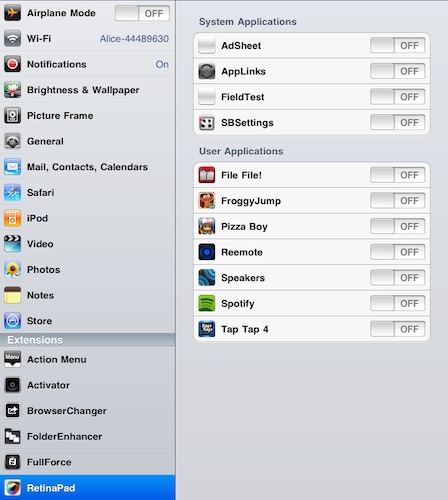
RetinaPad, a new Cydia tweak by Ryan Petrich, fixes this problem, and it works great with basically any app or game that’s got Retina graphics. Once installed, you’ll have to choose the iPhone apps that you’d like to run with the new 2x mode. Fire up the app, tap on 2x and you’ll notice that the iPad will display clean graphics without pixelation. If the iPhone app has been updated for the Retina Display, it most likely works with RetinaPad out of the box. It’s really neat.

I’ve been able to successfully run in the 2x mode Spotify, Voices 2, Calvetica – they all look great on the iPad now. RetinaPad is available at $2.99 in the Cydia Store. More screenshots below. Read more

Access Extra Content and Perks

Founded in 2015, Club MacStories has delivered exclusive content every week for nearly a decade.

What started with weekly and monthly email newsletters has blossomed into a family of memberships designed for every MacStories fan.

Learn more here and from our Club FAQs.

Club MacStories: Weekly and monthly newsletters via email and the web that are brimming with apps, tips, automation workflows, longform writing, early access to the MacStories Unwind podcast, periodic giveaways, and more;

Club MacStories+: Everything that Club MacStories offers, plus an active Discord community, advanced search and custom RSS features for exploring the Club’s entire back catalog, bonus columns, and dozens of app discounts;

Club Premier: All of the above and AppStories+, an extended version of our flagship podcast that’s delivered early, ad-free, and in high-bitrate audio.

Learn more here and from our Club FAQs.


The iToiletstand Is Exactly What You Think

Some ideas are just plain wrong. Yet, you have to admit sometimes you’ve thought about these wrong and silly ideas as some sort of a geek dream you don’t want the world to know about. Like iOS gadgets for the toilet. You know, this is especially true for the iPad, which is a great device for reading.

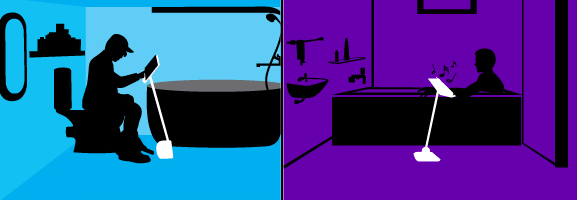
It looks like your prayers for a comfortable iPad stand to use you-know-where have been answered: the Angled Stand is an “adjustable, angled stand for iPads, tablets & other electronic devices”.

What are the features: top is adjustable, pole can be moved back & forth, easily tightened at various angles making it flexible & user friendly. Pole has an adjustable height between 26-46 inches which is starting from around your knees on up. Pole angle various to around 45 degrees. Top is just a bit wider and taller than an ipad and device is foldable.

The product is coming in early 2011 and, bath and toilet aside, can be used a stand for when you’re in bed, by the barbecue, in the kitchen, in hospital…wherever you think it’d be nice to have an iPad following you by on a stand.

I guess Steve Jobs is already using something like this for his iPad 2 in his home office. [CultofMac via iToiletstand]

Access Extra Content and Perks

Founded in 2015, Club MacStories has delivered exclusive content every week for nearly a decade.

What started with weekly and monthly email newsletters has blossomed into a family of memberships designed for every MacStories fan.

Learn more here and from our Club FAQs.

Club MacStories: Weekly and monthly newsletters via email and the web that are brimming with apps, tips, automation workflows, longform writing, early access to the MacStories Unwind podcast, periodic giveaways, and more;

Club MacStories+: Everything that Club MacStories offers, plus an active Discord community, advanced search and custom RSS features for exploring the Club’s entire back catalog, bonus columns, and dozens of app discounts;

Club Premier: All of the above and AppStories+, an extended version of our flagship podcast that’s delivered early, ad-free, and in high-bitrate audio.

Learn more here and from our Club FAQs.


Gorillaz iPad Album Now Available for Streaming

As announced by Damon Albarn in November, the new Gorillaz album “The Fall” is now available online for streaming and will be released as digital download tomorrow, December 25th. What’s so special about The Fall that we’re covering it on MacStories? It was entirely recorded on an iPad.

Albarn first told the NME:

I’ve made it on an iPad – I hope I’ll be making the first record on an iPad. I fell in love with my iPad as soon as I got it, so I’ve made a completely different kind of record.

The Fall contains 14 new songs and it was recorded using apps such as SoundyThingie, AmpliTube, iOrgel HD and iElectribe. Full list of songs and apps used in the album is embedded below. You can stream the record for free now by hitting this link, which requires you to subscribe to the band’s mailing list. From a first listen, it all sounds pretty…digital and electronic. Perhaps different from previous Gorillaz records, but interesting nonetheless considering the setup being used to produce it. Check out the video of “Phoner to Arizona” below.


Read more

Access Extra Content and Perks

Founded in 2015, Club MacStories has delivered exclusive content every week for nearly a decade.

What started with weekly and monthly email newsletters has blossomed into a family of memberships designed for every MacStories fan.

Learn more here and from our Club FAQs.

Club MacStories: Weekly and monthly newsletters via email and the web that are brimming with apps, tips, automation workflows, longform writing, early access to the MacStories Unwind podcast, periodic giveaways, and more;

Club MacStories+: Everything that Club MacStories offers, plus an active Discord community, advanced search and custom RSS features for exploring the Club’s entire back catalog, bonus columns, and dozens of app discounts;

Club Premier: All of the above and AppStories+, an extended version of our flagship podcast that’s delivered early, ad-free, and in high-bitrate audio.

Learn more here and from our Club FAQs.