
ZOMG! Now we’ve seen it all. Walt Disney would roll in his own grave if he wasn’t already a zombie. This Snow White only eats Apple Fan Boy hearts! A creepy twist on a popular genre and look at the scary detail on this thing! But in all seriousness, this is creepy cool - just peel and stick this die-cut vinyl decal on your iPad. It’s from Etsy for $15 and also available for MacBooks and iPhones.
Posts in iPad
Zombie + Snow White = Etsy iPad Sticker


Access Extra Content and Perks
Founded in 2015, Club MacStories has delivered exclusive content every week for nearly a decade.
What started with weekly and monthly email newsletters has blossomed into a family of memberships designed for every MacStories fan.
Club MacStories: Weekly and monthly newsletters via email and the web that are brimming with apps, tips, automation workflows, longform writing, early access to the MacStories Unwind podcast, periodic giveaways, and more;
Club MacStories+: Everything that Club MacStories offers, plus an active Discord community, advanced search and custom RSS features for exploring the Club’s entire back catalog, bonus columns, and dozens of app discounts;
Club Premier: All of the above and AppStories+, an extended version of our flagship podcast that’s delivered early, ad-free, and in high-bitrate audio.
Gorillaz Will Release Their iPad Album For Free On Christmas

Remember when Damon Albarn announced the upcoming Gorillaz album had been entirely recorded and produced on his iPad? Well, he wasn’t joking. Not at all. The Blur & “The Good, the Bad & the Queen” frontman, cartoon band Gorillaz all-star and, you guessed it, producer and songwriter told the Courier Mail that the album is real, it’s coming out for free on Christmas, and a music video will be released on Christmas Eve.
Seems like Gorillaz fans are going to have a great time come Christmas this year: Albarn wanted to make sure that people knew the album was entirely recorded on the tablet, with no studio equipment being used to realize it. We do wonder, though, how mixing and mastering was done on the iPad.
I wanted to make sure that it came out at the end of the tour because I don’t want anyone to think I’d tampered with it.
We believe you, Damon. We’ll be waiting for the album to show up on our MacBooks under the Christmas tree. And if the results will be poor and not as great as Plastic Beach, hey – you still have a Country House to spend your retirement days hiding from the angry fans. [via]
Access Extra Content and Perks
Founded in 2015, Club MacStories has delivered exclusive content every week for nearly a decade.
What started with weekly and monthly email newsletters has blossomed into a family of memberships designed for every MacStories fan.
Club MacStories: Weekly and monthly newsletters via email and the web that are brimming with apps, tips, automation workflows, longform writing, early access to the MacStories Unwind podcast, periodic giveaways, and more;
Club MacStories+: Everything that Club MacStories offers, plus an active Discord community, advanced search and custom RSS features for exploring the Club’s entire back catalog, bonus columns, and dozens of app discounts;
Club Premier: All of the above and AppStories+, an extended version of our flagship podcast that’s delivered early, ad-free, and in high-bitrate audio.
Google Docs Desktop Editing Comes To The iPad
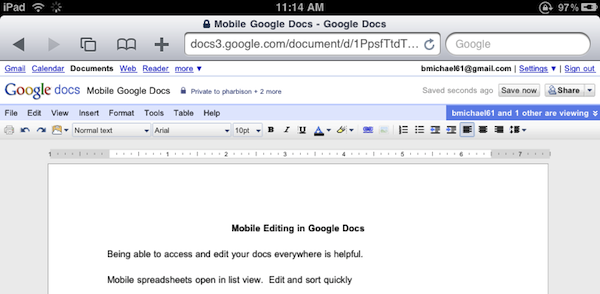
Great news for Google Docs users and iPad owners this evening: Google has announced that they have extended compatibility of the Docs desktop editor to include support for iPad. If you’re running an iPad, you can now switch from the mobile version to the desktop one with just a tap.
The desktop editor is the Google Docs you know and love, allowing you to modify fonts and alignments, paragraphs and font styles. It’s the usual Google Docs, running on a tablet.
As simple as it sounds, Google just made a great move towards ensuring millions of iPad users out there a desktop-class Docs experience without the need of a dedicated mobile client. Google announced a Docs Viewer in June, and released a mobile version for iOS and Android users with editing enabled a few weeks ago.
Once again, Mobile Safari wins.
Access Extra Content and Perks
Founded in 2015, Club MacStories has delivered exclusive content every week for nearly a decade.
What started with weekly and monthly email newsletters has blossomed into a family of memberships designed for every MacStories fan.
Club MacStories: Weekly and monthly newsletters via email and the web that are brimming with apps, tips, automation workflows, longform writing, early access to the MacStories Unwind podcast, periodic giveaways, and more;
Club MacStories+: Everything that Club MacStories offers, plus an active Discord community, advanced search and custom RSS features for exploring the Club’s entire back catalog, bonus columns, and dozens of app discounts;
Club Premier: All of the above and AppStories+, an extended version of our flagship podcast that’s delivered early, ad-free, and in high-bitrate audio.
Is This The First iPad 2 Case? With A Rear Camera?

Just in time for today’s iPad 2 rumors, iLounge is reporting of what appears to be the first case the second-generation iPad. Produced by Chinese manufacturer Shenzhen MacTop Electronics, the case shows a slightly more curved design and a hole in the upper left corner for a rear camera. Just like on the iPhone 4 and iPod Touch 4th generation.
The Crystal Case for iPad 2nd Generation also sports a much bigger speaker opening. There have been rumors recently about the “iPad 2” coming out in less than 100 days, and there also have been rumors about Apple willing to implement features such as FaceTime camera, Retina Display and a USB port on it. But a rear camera? That’d be new to the rumor mill. Read more
Access Extra Content and Perks
Founded in 2015, Club MacStories has delivered exclusive content every week for nearly a decade.
What started with weekly and monthly email newsletters has blossomed into a family of memberships designed for every MacStories fan.
Club MacStories: Weekly and monthly newsletters via email and the web that are brimming with apps, tips, automation workflows, longform writing, early access to the MacStories Unwind podcast, periodic giveaways, and more;
Club MacStories+: Everything that Club MacStories offers, plus an active Discord community, advanced search and custom RSS features for exploring the Club’s entire back catalog, bonus columns, and dozens of app discounts;
Club Premier: All of the above and AppStories+, an extended version of our flagship podcast that’s delivered early, ad-free, and in high-bitrate audio.
Shocker: iPad 2 Won’t Use AMOLED
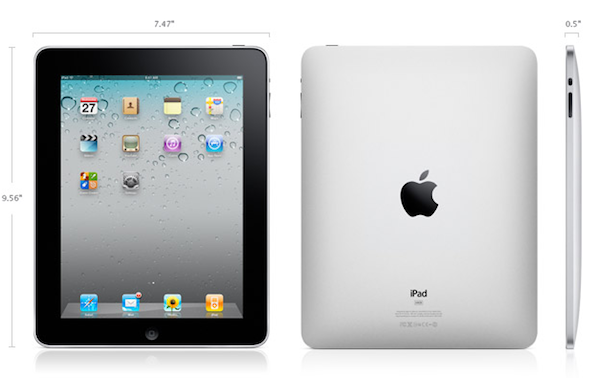
As noted by 9to5mac, Digitimes published yet another report last night about the next generation iPad – or, “iPad 2” – claiming that Taiwan-based company Coretronic has been selected to supply the backlight units (BLUs) for the new device to Chimei Innolux and LG Display.
The second generation iPad is expected to hit the market at the end of the first quarter of 2011 and suppliers in the supply chain are estimated to start shipments in the first quarter.
It is understood that Coretronic is the only BLU supplier of CMI for iPad 2, while LG Display is getting iPad 2 BLUs from Coretronic and Radiant Opto-Electronics.
So according to this new report, the next iPad won’t use the popular AMOLED screens (well, at least popular on Android devices thanks to Samsung’s “Super AMOLED” units) but will keep relying on standard LCDs instead.
Surprised, huh? Don’t be: Apple never really liked AMOLED screens, and with the iPhone 4 they decided to deploy their own LCD solution with extremely high resolution and call it “Retina Display”. The iPad also comes with IPS (in-plane switching) technology, which allows for improved viewing angles and picture quality.
The real question is: will the iPad 2 have some sort of Retina resolution?
Access Extra Content and Perks
Founded in 2015, Club MacStories has delivered exclusive content every week for nearly a decade.
What started with weekly and monthly email newsletters has blossomed into a family of memberships designed for every MacStories fan.
Club MacStories: Weekly and monthly newsletters via email and the web that are brimming with apps, tips, automation workflows, longform writing, early access to the MacStories Unwind podcast, periodic giveaways, and more;
Club MacStories+: Everything that Club MacStories offers, plus an active Discord community, advanced search and custom RSS features for exploring the Club’s entire back catalog, bonus columns, and dozens of app discounts;
Club Premier: All of the above and AppStories+, an extended version of our flagship podcast that’s delivered early, ad-free, and in high-bitrate audio.
Infinity Blade Now Available In The App Store - Not The U.S. One Yet
Infinity Blade is one of the most anticipated games for iPhone and iPad to hit the App Store this holiday season. Demoed on stage at Apple’s event back in September and released as a tech demo known as Epic Citadel back then, the game is built on top of the Unreal Engine 3 for iOS devices and it shows impressive graphics and animations. Apparently, Steve Jobs couldn’t believe the game was running on an iPhone when he first saw it either.
As previously confirmed in November, the game changed its name from Project Sword to Infinity Blade and was set to come out in December. TouchArcade also revealed that the app would be released on December 9th at $5.99, but we just took a look inside the New Zealand App Store and found out that, as usual, iTunes started propagating the app on its own due to time zone differences.
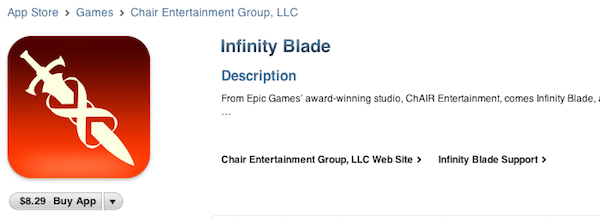
Infinity Blade is available at $8.29 over there, and you can take a look at the screenshots and full description from iTunes below. The app isn’t available in other stores for now, but we believe it’ll start propagating in European ones in 10 hours. The app is universal and runs on iPhone 3GS, iPhone 4, iPad, iPod Touch 3, or iPod Touch 4 – with Retina Display-ready graphics optimized for the iPhone 4. From what we can read in iTunes, it seems like there will be customization possibilities, a “dynamic single player campaign” and support for Game Center leaderboards and achievements.
We’ll take a deeper look at the game once it becomes available in the U.S. Store. Read more
Access Extra Content and Perks
Founded in 2015, Club MacStories has delivered exclusive content every week for nearly a decade.
What started with weekly and monthly email newsletters has blossomed into a family of memberships designed for every MacStories fan.
Club MacStories: Weekly and monthly newsletters via email and the web that are brimming with apps, tips, automation workflows, longform writing, early access to the MacStories Unwind podcast, periodic giveaways, and more;
Club MacStories+: Everything that Club MacStories offers, plus an active Discord community, advanced search and custom RSS features for exploring the Club’s entire back catalog, bonus columns, and dozens of app discounts;
Club Premier: All of the above and AppStories+, an extended version of our flagship podcast that’s delivered early, ad-free, and in high-bitrate audio.
Ego for iPad Updated for iOS 4.2 Multitasking, Now Available at $2.99
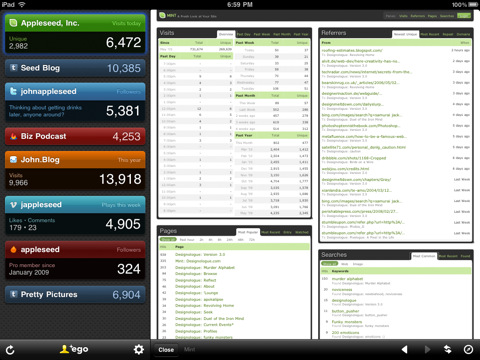
Ego is the best iOS app to check on stats coming from Mint, Twitter, RSS, Vimeo and a variety of other online services. By representing stats as small widgets on a dark background, Ego has managed to become one of my most launched apps both on the iPhone and ipad.
An update to the iPad version (our review) was released a few minutes ago. Version 1.0.6 includes iOS 4.2 compatibility and support for multi-tasking (fast app switching), plus various bug fixes to address Twitter auto-login issues and the detail view on iOS 4.2.
But what’s really cool about this update is that Ego for iPad is now available at $2.99 in the App Store. It’s not a sale, it’s the new price. Go buy it now.
Access Extra Content and Perks
Founded in 2015, Club MacStories has delivered exclusive content every week for nearly a decade.
What started with weekly and monthly email newsletters has blossomed into a family of memberships designed for every MacStories fan.
Club MacStories: Weekly and monthly newsletters via email and the web that are brimming with apps, tips, automation workflows, longform writing, early access to the MacStories Unwind podcast, periodic giveaways, and more;
Club MacStories+: Everything that Club MacStories offers, plus an active Discord community, advanced search and custom RSS features for exploring the Club’s entire back catalog, bonus columns, and dozens of app discounts;
Club Premier: All of the above and AppStories+, an extended version of our flagship podcast that’s delivered early, ad-free, and in high-bitrate audio.
Creepy Guy Destroys iPad, Delivers It To Steve Jobs [Video]

I don’t know what’s going on with mysterious website SayHiToSpace.com. Sure, there’s a countdown in there and even links to email and Twitter, but it’s their Youtube channel that creeps me out. Basically, the first video from SayHiToSpace went viral as it featured a creepy guy finding out that the iPad lacked a camera, then destroying it making a hole in the middle of the device with a water jet.
Here’s the first video:
Access Extra Content and Perks
Founded in 2015, Club MacStories has delivered exclusive content every week for nearly a decade.
What started with weekly and monthly email newsletters has blossomed into a family of memberships designed for every MacStories fan.
Club MacStories: Weekly and monthly newsletters via email and the web that are brimming with apps, tips, automation workflows, longform writing, early access to the MacStories Unwind podcast, periodic giveaways, and more;
Club MacStories+: Everything that Club MacStories offers, plus an active Discord community, advanced search and custom RSS features for exploring the Club’s entire back catalog, bonus columns, and dozens of app discounts;
Club Premier: All of the above and AppStories+, an extended version of our flagship podcast that’s delivered early, ad-free, and in high-bitrate audio.
AutoCAD WS Updated with Retina Graphics, Offline Editing and Email Support
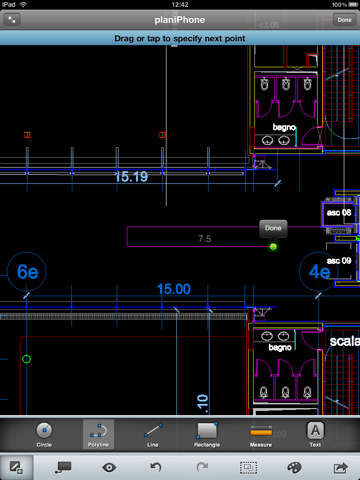
AutoCAD WS for iPhone and iPad was released in late September and it quickly became one of the most popular apps in the App Store – mainly thanks to the huge AutoCAD userbase that was looking forward to being able to edit and share DWG files on mobile devices. The app allows you to preview and annotate drawings using iOS’ multi-touch gestures and save your edits to the AutoCAD WS online workspace.
The 1.1 update, released a few hours ago, brings several new features and optimizations to WS – and it’s going to be an update AutoCAD users will love. First off, offline editing: by activating the option in your online AutoCAD account, you’ll be able to sync an offline copy of a document to the iPhone and iPad, edit it without a 3G or WiFi connection, sync it back to the account once you’re back online. Perfect for iPad WiFi users who carry their tablets around and don’t happen to have an internet connection available all the time.
AutoCAD WS can now also open email attachments: if you receive a DWG or DXF account via email, you can copy it to AutoCAD WS –but you’ll need an internet connection to upload it right after the import process. Among other changes, Retina Display-ready graphics and improved connectivity.
AutoCAD WS is available for free here. Check out the official video detailing offline support in AutoCAD WS below. Read more
Access Extra Content and Perks
Founded in 2015, Club MacStories has delivered exclusive content every week for nearly a decade.
What started with weekly and monthly email newsletters has blossomed into a family of memberships designed for every MacStories fan.
Club MacStories: Weekly and monthly newsletters via email and the web that are brimming with apps, tips, automation workflows, longform writing, early access to the MacStories Unwind podcast, periodic giveaways, and more;
Club MacStories+: Everything that Club MacStories offers, plus an active Discord community, advanced search and custom RSS features for exploring the Club’s entire back catalog, bonus columns, and dozens of app discounts;
Club Premier: All of the above and AppStories+, an extended version of our flagship podcast that’s delivered early, ad-free, and in high-bitrate audio.