This Week's Sponsor:

Dropzone 5

Improve your Drag-and-Drop Workflow


Posts in iPad

Apple iDevices Dominate Encoded Web Video

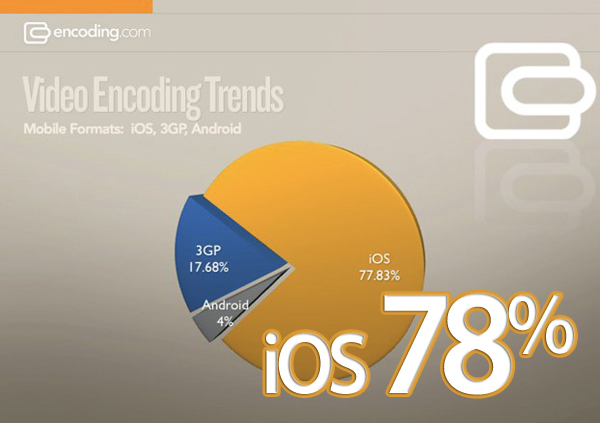
More than ever people are watching videos on mobile devices these days. So, when a website encodes their videos, they must decide which devices to support and encode their video to play on different smart phones and tablets. According to Encoding.com is reporting that, nearly 78 percent of its customers (MTV to PBS) encode mobile video to play on Apple’s iDevices, and only 4 percent specifically for Android devices. 18 percent encode for 3GP format, which is used by feature phones.

This data is based on which preset options Encoding’s customers choose. It doesn’t mean that only 4 percent of videos will play on Android devices (which after all support Flash, MPEG-4, and 3GP), but that only 4 percent of Encoding’s customers bother to select the Android preset, which provides the optimal viewing experience on those devices. Whereas choosing the Apple presets is pretty much the default right now, and as noted earlier, iOS was embraced rather quickly. Encoding’s 1,400 customers are fairly representative of video producers across the Web, spanning media, advertising, retailers, and developers.

Read more

Access Extra Content and Perks

Founded in 2015, Club MacStories has delivered exclusive content every week for nearly a decade.

What started with weekly and monthly email newsletters has blossomed into a family of memberships designed for every MacStories fan.

Learn more here and from our Club FAQs.

Club MacStories: Weekly and monthly newsletters via email and the web that are brimming with apps, tips, automation workflows, longform writing, early access to the MacStories Unwind podcast, periodic giveaways, and more;

Club MacStories+: Everything that Club MacStories offers, plus an active Discord community, advanced search and custom RSS features for exploring the Club’s entire back catalog, bonus columns, and dozens of app discounts;

Club Premier: All of the above and AppStories+, an extended version of our flagship podcast that’s delivered early, ad-free, and in high-bitrate audio.

Learn more here and from our Club FAQs.


Multi-User iPad Concept

If the iPad feels like a communal device to you (it sure does for me), then I guess multi-user login is something you’re hoping for Apple to add in iOS 5. Think about it: every member of your family, or one of your friends, could grab the iPad, and log in with his credentials. That means he’s going to have his apps, settings, photos and music in there. He or she won’t have to see your secret Facebook messages in Mobile Safari anymore.

While multi-user browsing could be easily accomplished with an app such as Switch, what we have here is a concept showcasing a built-in multi-account feature for the iPad. Yes, it’s got 4 unlock menus in the lockscreen. Yes, we do think it could be implemented a lot better.

But hey, it’s a concept. The idea is cool, the overall design could use some refinements. Still, this is exactly what I need. [via Kottke]

Access Extra Content and Perks

Founded in 2015, Club MacStories has delivered exclusive content every week for nearly a decade.

What started with weekly and monthly email newsletters has blossomed into a family of memberships designed for every MacStories fan.

Learn more here and from our Club FAQs.

Club MacStories: Weekly and monthly newsletters via email and the web that are brimming with apps, tips, automation workflows, longform writing, early access to the MacStories Unwind podcast, periodic giveaways, and more;

Club MacStories+: Everything that Club MacStories offers, plus an active Discord community, advanced search and custom RSS features for exploring the Club’s entire back catalog, bonus columns, and dozens of app discounts;

Club Premier: All of the above and AppStories+, an extended version of our flagship podcast that’s delivered early, ad-free, and in high-bitrate audio.

Learn more here and from our Club FAQs.


Star Walk Updated: AirPrint, Christmas Edition

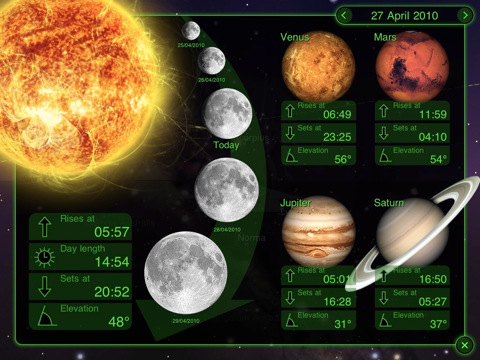
Star Walk, the award-winning app by Vito Technology, was updated yesterday to include lots of new features…and a Christmas edition. That’s right folks, you have to find the hidden Santa in the night sky. I’m not kidding:

As you would assume, he is somewhere in the sky. Find out exactly where Santa is right now.

I’m sure he is somewhere, but I thought he was somewhere on Earth. Still, the 5.1 version (both for iPhone and iPad) also comes with AirPrint support to let you print stars and constellations wirelessly. That’s pretty cool, better than Santa support on my opinion. Or maybe I’m wrong and I’ll spend 3 hours tonight trying to find the man in red. New stars have been added to the app’s catalog – we’re talking about exoplanets and big stars with more info about spectral class and distance from Earth. Last, additional satellites info and tons of big fixes.

Star Walk for iPad is available at $4.99 in the App Store. The iPhone version is available at $1.99 here.

Access Extra Content and Perks

Founded in 2015, Club MacStories has delivered exclusive content every week for nearly a decade.

What started with weekly and monthly email newsletters has blossomed into a family of memberships designed for every MacStories fan.

Learn more here and from our Club FAQs.

Club MacStories: Weekly and monthly newsletters via email and the web that are brimming with apps, tips, automation workflows, longform writing, early access to the MacStories Unwind podcast, periodic giveaways, and more;

Club MacStories+: Everything that Club MacStories offers, plus an active Discord community, advanced search and custom RSS features for exploring the Club’s entire back catalog, bonus columns, and dozens of app discounts;

Club Premier: All of the above and AppStories+, an extended version of our flagship podcast that’s delivered early, ad-free, and in high-bitrate audio.

Learn more here and from our Club FAQs.


#MacStoriesDeals - Wednesday

Here’s some great deals for today on iOS & Mac apps that are on sale for a limited time, so get ‘em while they’re hot!

Read more

Access Extra Content and Perks

Founded in 2015, Club MacStories has delivered exclusive content every week for nearly a decade.

What started with weekly and monthly email newsletters has blossomed into a family of memberships designed for every MacStories fan.

Learn more here and from our Club FAQs.

Club MacStories: Weekly and monthly newsletters via email and the web that are brimming with apps, tips, automation workflows, longform writing, early access to the MacStories Unwind podcast, periodic giveaways, and more;

Club MacStories+: Everything that Club MacStories offers, plus an active Discord community, advanced search and custom RSS features for exploring the Club’s entire back catalog, bonus columns, and dozens of app discounts;

Club Premier: All of the above and AppStories+, an extended version of our flagship podcast that’s delivered early, ad-free, and in high-bitrate audio.

Learn more here and from our Club FAQs.


Bust A Gut With CollegeHumor For The iPad

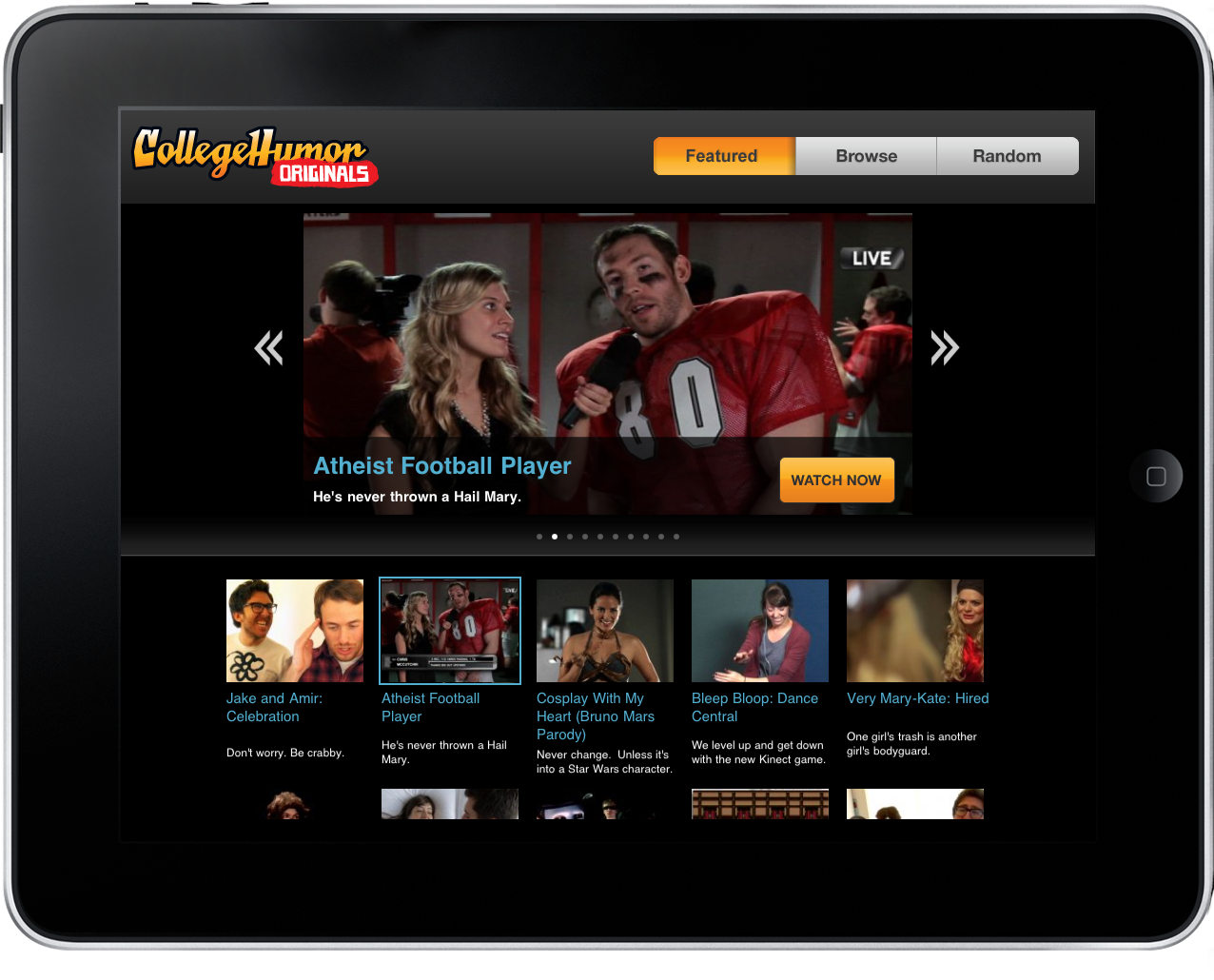
When I’m not in my boxer shorts watching Unboxing Porn on Revision3 after the sun goes down, I’m relaxing in my boxer shorts browsing CollegeHumor. Thanks to the iPad, that awkward relationship you have with Jake and Amir is now much more intimate and down right multi-touchy.

Read more

Access Extra Content and Perks

Founded in 2015, Club MacStories has delivered exclusive content every week for nearly a decade.

What started with weekly and monthly email newsletters has blossomed into a family of memberships designed for every MacStories fan.

Learn more here and from our Club FAQs.

Club MacStories: Weekly and monthly newsletters via email and the web that are brimming with apps, tips, automation workflows, longform writing, early access to the MacStories Unwind podcast, periodic giveaways, and more;

Club MacStories+: Everything that Club MacStories offers, plus an active Discord community, advanced search and custom RSS features for exploring the Club’s entire back catalog, bonus columns, and dozens of app discounts;

Club Premier: All of the above and AppStories+, an extended version of our flagship podcast that’s delivered early, ad-free, and in high-bitrate audio.

Learn more here and from our Club FAQs.


USB, SD and Micro SD In A Single iPad Camera Connection Kit

Feeling a little disconnected from your iPad lately? Do you think you could use some extra gadgets to make sure your favorite tablet can communicate with any other device in your room?

Give this 3-in-1 camera connection kit for iPad a try: it features USB, SD and Micro SD connection in a single (and unofficial) dongle that can be yours for just $25 from M.I.C. Gadget. Too bad it’ll be available “soon”.

While the idea sounds definitely interesting, I do wonder how many devices will be able to work with the connection kit on iOS 4.2. Granted, Apple doesn’t want you to use keyboards and Guitar Hero mics with the Camera Connection Kit, but I bought one yesterday and a simple 8GB USB key is not working on it thanks to iOS 4.2. Perhaps hackers will find a way to beam more power to the Camera Connection Kit soon. [via Gizmodo]

Access Extra Content and Perks

Founded in 2015, Club MacStories has delivered exclusive content every week for nearly a decade.

What started with weekly and monthly email newsletters has blossomed into a family of memberships designed for every MacStories fan.

Learn more here and from our Club FAQs.

Club MacStories: Weekly and monthly newsletters via email and the web that are brimming with apps, tips, automation workflows, longform writing, early access to the MacStories Unwind podcast, periodic giveaways, and more;

Club MacStories+: Everything that Club MacStories offers, plus an active Discord community, advanced search and custom RSS features for exploring the Club’s entire back catalog, bonus columns, and dozens of app discounts;

Club Premier: All of the above and AppStories+, an extended version of our flagship podcast that’s delivered early, ad-free, and in high-bitrate audio.

Learn more here and from our Club FAQs.


#MacStoriesDeals - Tuesday

In case you missed our announcement yesterday, we started another new feature, and it’s called #MacStoriesDeals. We’ll try our best to update the list throughout each day.

Here’s some great deals for today on iOS & Mac apps that are on sale for a limited time, so get ‘em while they’re hot!

Read more

Access Extra Content and Perks

Founded in 2015, Club MacStories has delivered exclusive content every week for nearly a decade.

What started with weekly and monthly email newsletters has blossomed into a family of memberships designed for every MacStories fan.

Learn more here and from our Club FAQs.

Club MacStories: Weekly and monthly newsletters via email and the web that are brimming with apps, tips, automation workflows, longform writing, early access to the MacStories Unwind podcast, periodic giveaways, and more;

Club MacStories+: Everything that Club MacStories offers, plus an active Discord community, advanced search and custom RSS features for exploring the Club’s entire back catalog, bonus columns, and dozens of app discounts;

Club Premier: All of the above and AppStories+, an extended version of our flagship podcast that’s delivered early, ad-free, and in high-bitrate audio.

Learn more here and from our Club FAQs.


The First iAd for iPad Is Coming This Afternoon [Update: Screenshots]

According to AdAge, Apple will launch its first iAd for the iPad later today. The iAd will feature Disney’s blockbuster movie “Tron Legacy” and, according to an Apple spokesperson, it’ll be the only iAd to appear on the tablet this year.

The format, designed to maximize the ad potential of Apple’s tablet computer, will be launched widely in early 2011 when other ads start flowing onto the platform.

Like its iPhone and iPod Touch predecessors, the first iPad iAd is chock-full of the rich graphics, touch navigation and video native to apps.

The full-screen ad will allow users to enjoy 10 minutes of footage, use a theater locator to check on where they can go see Tron: Legacy, preview the soundtrack in-ad with the possibility to directly download it from iTunes – again, without leaving the ad. The preview should go live in a few hours in apps such as TV Guide which was updated on November 30th to vaguely include support for iOS 4.2. I just fired up the app and the iAd isn’t showing up yet.

In November, Apple announced that it would bring iPhone’s iAds to Europe starting with an exclusive Renault campaign to showcase the Twizy car. Apple has also teamed up with brand agency Dentsu to bring iAd to Japan in 2011.

Update: Screenshots of the Tron: Legacy iAd below. Read more

Access Extra Content and Perks

Founded in 2015, Club MacStories has delivered exclusive content every week for nearly a decade.

What started with weekly and monthly email newsletters has blossomed into a family of memberships designed for every MacStories fan.

Learn more here and from our Club FAQs.

Club MacStories: Weekly and monthly newsletters via email and the web that are brimming with apps, tips, automation workflows, longform writing, early access to the MacStories Unwind podcast, periodic giveaways, and more;

Club MacStories+: Everything that Club MacStories offers, plus an active Discord community, advanced search and custom RSS features for exploring the Club’s entire back catalog, bonus columns, and dozens of app discounts;

Club Premier: All of the above and AppStories+, an extended version of our flagship podcast that’s delivered early, ad-free, and in high-bitrate audio.

Learn more here and from our Club FAQs.


Google Voice App Now Works On The iPad and iPod Touch

One month after the release of the official Google Voice app in the App Store, here comes an updated version that works both on the iPad and iPod Touch. Announced by Google a few minutes ago, the new Google Voice app has been updated to work on non-iPhone devices allowing you to send and receive text messages. As you can guess, no – you can’t make cellular calls on the iPod Touch.

Still, the Google Voice team introduced a new functionality called Click2Call which lets you initiate calls with your phones. On your iPad or iPod Touch, tap on the “call” button and select which phone you want to ring. It’s a very easy way to let Google Voice call your phone and then connect the call to a contact’s number.

Among other improvements and bug fixes, text forwarding is now disabled by default when you activate push notifications so you don’t get multiple and annoying dialogue boxes. You can now set a “Do Not Disturb” status in the settings, access you Address Book contacts from a built-in Contacts tab, tap & hold on inbox messages to delete or archive. Nice. I’m pretty sure MacStories’ own Cody Fink (who’s a die-hard iPod Touch user) is going to love this.

Google Voice app is, as usual, free in the App Store.

Access Extra Content and Perks

Founded in 2015, Club MacStories has delivered exclusive content every week for nearly a decade.

What started with weekly and monthly email newsletters has blossomed into a family of memberships designed for every MacStories fan.

Learn more here and from our Club FAQs.

Club MacStories: Weekly and monthly newsletters via email and the web that are brimming with apps, tips, automation workflows, longform writing, early access to the MacStories Unwind podcast, periodic giveaways, and more;

Club MacStories+: Everything that Club MacStories offers, plus an active Discord community, advanced search and custom RSS features for exploring the Club’s entire back catalog, bonus columns, and dozens of app discounts;

Club Premier: All of the above and AppStories+, an extended version of our flagship podcast that’s delivered early, ad-free, and in high-bitrate audio.

Learn more here and from our Club FAQs.