


Here are today’s @MacStoriesDeals on iOS, Mac, and Mac App Store apps that are on sale for a limited time, so get them before they end!
Posts in iPhone
#MacStoriesDeals - Monday
Apple Facing Regulatory Scrutiny In South Korea Over Location Log File
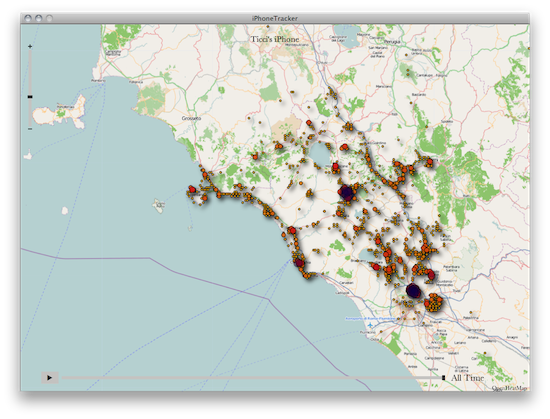
The commotion over that iOS log file, which can to some extent, track the movements of your iPhone or 3G iPad is definitally not fading away. Bloomberg, is today reporting that South Korea’s communication regulator is investigating the issue to see whether or not Apple is breaking South Korean law.
The Korea Communications Commission has issued Apple a series of questions over what information is collected and saved and whether users have a choice over whether it is saved or deleted. Furthermore it has asked Apple to clarify why such data exists and whether it is at all stored on the company’s servers. The Commission has also been formed to investigate how to increase privacy protection for smartphone users.
Earlier today we reported on an email from Steve Jobs in which he said of the issue “We don’t track anyone. The info circulating around is false.” It comes after US Senator Al Franken last week called for an explanation for the file, saying, “it raises serious privacy concerns”. The researchers who discovered the file demonstrated that the log file in question records an approximate location of an iPhone or 3G iPad based on cellular tower vicinity and is presumed to exist either for battery performance or as a reference for the device. Many believe that it is either a bug or oversight that the device does not periodically delete the log file.
[Via Bloomberg]
Steve Jobs on iPhone Location Tracking: “We Don’t Track Anyone”

When security researchers Alasdair Allan and Pete Warden revealed a file in the iPhone’s backup history that contained time and location data, the media broke into a frenzy as Apple, Android, and smartphones became a target of scrutiny for privacy. It’s believed that Apple’s location data exists to reduce the time it has to look for cellular towers and GPS data by caching your known location. The data is accurate but not pinpoint accurate, and Apple has taken significant strides to increase battery life by regulating wireless services on the device. Quite simply, this file is simply for reference and is stored locally, used by the phone to preserve battery life and connect to known wireless “hubs” faster depending on your location. The issue, however, is that the file is likely “leftovers,” meaning cache was accidentally saved as a persistent file. This morning, MacRumors reports that one of their readers reached out to Steve Jobs on the issue, and got a response.
Q: Steve,
Could you please explain the necessity of the passive location-tracking tool embedded in my iPhone? It’s kind of unnerving knowing that my exact location is being recorded at all times. Maybe you could shed some light on this for me before I switch to a Droid. They don’t track me.
A: Oh yes they do. We don’t track anyone. The info circulating around is false.
Sent from my iPhone
Steve Jobs slams Android (claiming Google tracks users while Apple doesn’t), and it’s possible a future update from Apple could fix the issue in question (permanent storage of temporary cache). While Jobs has likely started a firestorm this week over Android’s integrity (think antennagate all over again), there’s nothing to be worried about here and this issue has been overblown. You can always turn off your iPhone’s GPS services if you feel compelled, but the evidence suggests that Apple has nothing to hide.
[via MacRumors]
#MacStoriesDeals - Friday!

Here are today’s @MacStoriesDeals on iOS, Mac, and Mac App Store apps that are on sale for a limited time, so get ‘em while they’re hot!
QR Code Reader Scan for iOS is Fast

If I have to pull out my mobile device to read QR codes, I want an app that’s fast, locks on, and scans codes quickly without any fuss. While there’s a plethora of QR code scanners on the App Store, one in particular I’ve fallen in love with is Scan. Maybe it’s because Barcode Scanner on the Android Marketplace is so damn slow (I’m tired of how long it takes the camera to focus), and I was blown away by how fast Scan was… on an iPod touch (which comparatively has a pretty crappy camera). As soon as I opened the app, I simply placed the QR code inside of the sights and just as instantly it opened a web page in its own browser. If it can’t scan a QR code (which is rare), Scan won’t complain. Just relocate your device or find a higher quality image: how painless Scan is to use is fantastic. Plus, it saves a history of everything you scanned in a simple list that’s perfect for how often I use it. Sure there are other apps that let you generate QR codes or offer a lot more features, but for sheer simplicity and fast scanning, Scan has become the mainstay reader on my device. You can download it for free on the App Store.
Robick: Visual Audio iPhone App for Learning Music By Ear

Previously, we’ve covered the Capo range of apps for the iPhone, iPad, and desktop that help students learn music by ear via setting repeating segments, altering the tempo & pitch, and giving students the ability to adjust an equalizer. When we previously covered these apps, the Capo mobile applications were more limited in some respects compared to it’s older desktop sibling - not a bad thing, but it would be nice to bring over the ability to adjust highs and lows for example instead of just only pitch and tempo. Robick is an alternative take on plugging in tracks from your iPod’s library, and altering them in such a way that helps you learn parts of a song. The developer noted to me it was primarily designed for learning Jazz (I’m assuming for Japanese students), and the interface reflects a modern edge and a shifting paradigm that’s quite neat.
Twitterrific 4.1 for iPhone & iPad Unifies Mac, iOS Experience
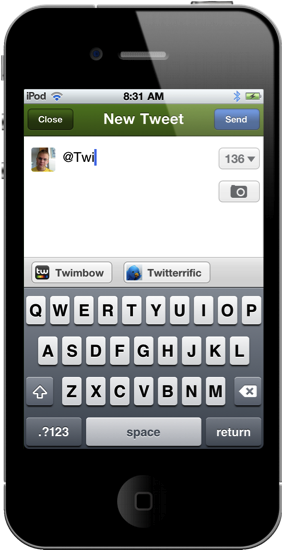
Launching late last night, Twitterrific 4.1 is now available in the App Store for immediate consumption! I’d consider this a milestone update for the iOS version of Twitterrific, as it greatly improves usability on the iPhone and continues the march towards feature parity with the desktop app. I’d say now, Twitterrific has unified their ecosystem such as that replies for example are now handled similarly. This change is most noticeable on the iPhone, where users are no longer taken to the single tweet view to perform actions. Quite frankly, that change alone should address the main complaint many had when wanting to perform simple actions: what used to take three taps now only takes two. 4.1 is a significant update and brings much requested features into the spotlight.
#MacStoriesDeals - Thursday

Here are today’s @MacStoriesDeals on iOS, Mac, and Mac App Store apps that are on sale for a limited time, so get ‘em while they’re hot!
Verizon CFO Fran Shammo Hints At Global iPhone 5
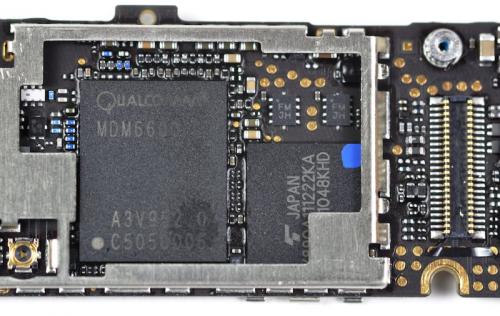
When iFixit tore down the Verizon iPhone 4 back in February, they found a Qualcomm Gobi that’s dual-mode GSM/CDMA capable, which indicates to us that the next iPhone on the CDMA spectrum would go global. During yesterday’s conference call, Verizon CFO Fran Shammo indicated that the next iPhone to be released on the network would be a global phone, allowing the next iPhone to become a world-phone as GSM capabilities are enabled. From Barron’s,
Verizon CFO Fran Shammo, asked about the sluggishness of the company’s ARPU growth in Q1, when the iPhone was introduced — growth was just 2.2%, compared to 2.5% in Q4, remarked:
The fluctuation, I believe, will come when a new device from Apple is launched, whenever that may be, and that we will be, on the first time, on equal footing with our competitors on a new phone hitting the market, which will also be a global device.
While Verizon could be poised to obtain an iPhone that was world-phone enabled, it might be a good time to rehash the universal SIM. Previously, Bloomberg reported that Apple is working on the ability to toggle between CDMA and GSM networks with a single SIM that would allow customers to willfully switch between CDMA and quad-band GSM. The iPhone 5 is also rumored to have a bigger display, NFC capabilities, but otherwise is expected to utilize a similar design to the iPhone 4 as a product refresh amongst other reports of an aluminum design with an internal antenna.