Posts in Featured

Sparrow 1.1 Is Out: IMAP Support, Priority Inbox and More

Since its release date weeks ago, Sparrow for Mac has quickly become many people’s favorite way to access Gmail from the desktop. With an intuitive user interface resembling the original Tweetie for Mac and support for several Gmail functions like labels and archive, Sparrow has sold thousands of copies in the Mac App Store enabling the developers to focus on bringing additional features to the app.

With the release of version 1.1 today, Sparrow is once again redefining the rules of Mail clients for OS X: Sparrow 1.1 contains several bug fixes and stability improvements, but most of all it adds general IMAP compatibility, MobileMe support and lots more features like Gmail’s Priority Inbox.

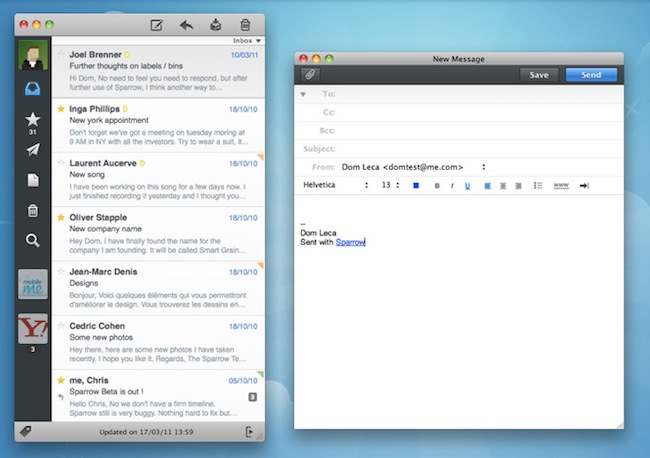
If you’re a Gmail user, Sparrow now lets you switch between the regular inbox, the Priority one and unread items from a dropdown menu under the top toolbar. The feature is very convenient as it further integrates Gmail with the desktop in a way no other apps did before. Switching between different types of inboxes is effortless and takes seconds. Another Gmail improvement is a fix for archive’s synchronization, which was pretty slow on version 1.0.

Gmail aside, Sparrow 1.1 is a complete revamp of the application. In the redesigned preferences panel, you can now set a signature for each of your aliases, and a signature can be made default with the click of a button; a format bar in the compose windows lets you choose fonts, sizes and styles without opening an external window or the system’s default font picker. The “minimal mode” – available in the Preferences – is another new option that lets users hide the message preview in the main window – quite handy if you don’t want to see a preview of the message while scrolling the list. On a related note, scrolling performances have been improved as well and now Sparrow feels much more responsive.

Sparrow 1.1 is a huge update that contains many other improvements like better HTML and CSS rendering, contact grouping options and Gravatar support, multitouch gestures (I love the three-finger swipe to open a message in its dedicated panel) and a “mark as spam” shortcut. The app is available in the App Store at $9.99, and it’s a powerful alternative to Mail.app – now with IMAP support and deeper Gmail compatibility. More screenshots below. Read more
Access Extra Content and Perks

Founded in 2015, Club MacStories has delivered exclusive content every week for nearly a decade.

What started with weekly and monthly email newsletters has blossomed into a family of memberships designed for every MacStories fan.

Learn more here and from our Club FAQs.

Club MacStories: Weekly and monthly newsletters via email and the web that are brimming with apps, tips, automation workflows, longform writing, early access to the MacStories Unwind podcast, periodic giveaways, and more;

Club MacStories+: Everything that Club MacStories offers, plus an active Discord community, advanced search and custom RSS features for exploring the Club’s entire back catalog, bonus columns, and dozens of app discounts;

Club Premier: All of the above and AppStories+, an extended version of our flagship podcast that’s delivered early, ad-free, and in high-bitrate audio.

Learn more here and from our Club FAQs.


Giveaway: Mix Music While Mobile With djay For iPhone or iPod touch

djay for iPhone

djay for iPhone

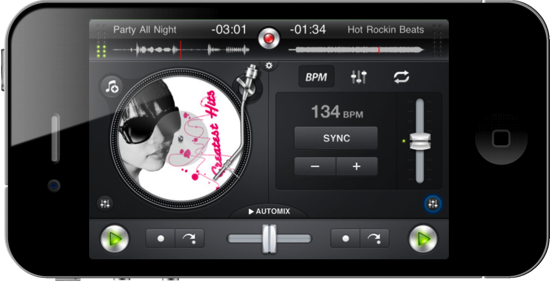
What would you spin with mobile DJ software that integrates directly with your iPhone or iPod music library? Scratch vinyls and interleave music with djay, your personal pocket mixer which loops tracks, fades music, and records live performance right from the palm of your hand. With nothing but a thumb or a free finger, you have precise controls over all of your music thanks to landscape and portrait orientation toggles which give you unhindered access to EQ and Automix controls. Let djay take over your playlist or pre-cue tracks thanks to the polished interface, scrub tracks, and pipe your tunes over Airplay for the ultimate in wireless beats. For only $9.99 in the App Store, it’s like having your own personal studio right in your pocket. Don’t forget about the iPad version, perfect your latest iPad 2 at only $19.99. You can also taste tracks with the Mac thanks to the version found in the Mac App Store, which can be accompanied by a wireless remote for BBQ and scratch synching. We’ve taken a look at the iPad and iPhone versions of djay previously, and we guys could get your groove on with the iPhone version. Past the break, we’re giving away two copies so you can jam wherever your travels take you.

Read more

Access Extra Content and Perks

Founded in 2015, Club MacStories has delivered exclusive content every week for nearly a decade.

What started with weekly and monthly email newsletters has blossomed into a family of memberships designed for every MacStories fan.

Learn more here and from our Club FAQs.

Club MacStories: Weekly and monthly newsletters via email and the web that are brimming with apps, tips, automation workflows, longform writing, early access to the MacStories Unwind podcast, periodic giveaways, and more;

Club MacStories+: Everything that Club MacStories offers, plus an active Discord community, advanced search and custom RSS features for exploring the Club’s entire back catalog, bonus columns, and dozens of app discounts;

Club Premier: All of the above and AppStories+, an extended version of our flagship podcast that’s delivered early, ad-free, and in high-bitrate audio.

Learn more here and from our Club FAQs.


Watchlater: iPad App That’s Like Instapaper For Video

Instapaper is one of my favorite apps ever made for iOS: it allows me to save any article for later, and enjoy it in an uncluttered view on the iPhone or iPad without the stress of the web browser. Offline access makes sure I can read everything even when an Internet connection is nowhere to be found, and the recently introduced social sharing capabilities enable me to stay up to date with items liked by people I read and trust. Instapaper is a great tool, but it works for text. And besides text, I happen to consume a lot of online video, too.

The idea of an Instapaper for video always came back to me as an intriguing experiment someone had to try: just like Instapaper, you hit a bookmarklet and the video is saved in your online account. You fire up an iOS app, the videos are automatically retrieved and cached, and you can watch them whenever you like. Without the anxiety factor offered by Youtube’s website design or, again, the information overload of the desktop browser. Just video.

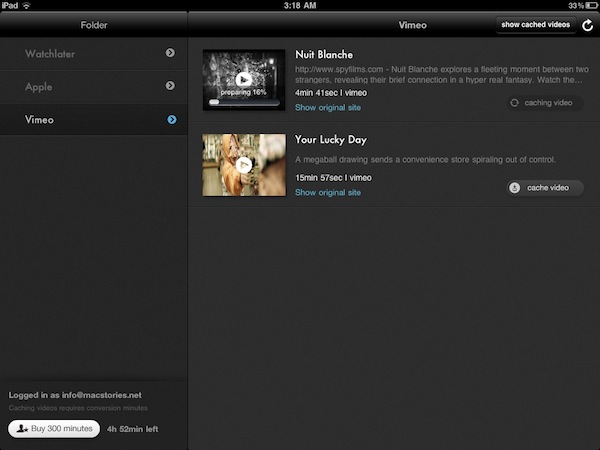
Watchlater, a new iPad app available at $2.99 in the App Store, wants to become the “Instapaper for video” on iOS, and admittedly it’s a pretty neat application. I’ve tested the app over the past months, it’s got lots of potentialities and still a few issues to fix / missing features. But it is available now, and allows you to collect videos from Youtube and Vimeo in a single place. Read more

Access Extra Content and Perks

Founded in 2015, Club MacStories has delivered exclusive content every week for nearly a decade.

What started with weekly and monthly email newsletters has blossomed into a family of memberships designed for every MacStories fan.

Learn more here and from our Club FAQs.

Club MacStories: Weekly and monthly newsletters via email and the web that are brimming with apps, tips, automation workflows, longform writing, early access to the MacStories Unwind podcast, periodic giveaways, and more;

Club MacStories+: Everything that Club MacStories offers, plus an active Discord community, advanced search and custom RSS features for exploring the Club’s entire back catalog, bonus columns, and dozens of app discounts;

Club Premier: All of the above and AppStories+, an extended version of our flagship podcast that’s delivered early, ad-free, and in high-bitrate audio.

Learn more here and from our Club FAQs.


iPad 2 First Impressions: Is This The iPad I Was Waiting For?

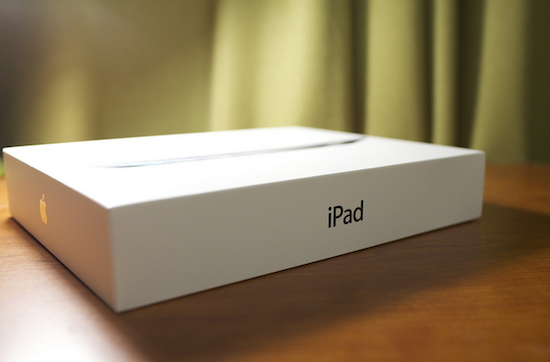
Today I got my iPad 2. A WiFi 16 GB Black model, bought in the United States and shipped through UPS’ Worldwide Saver Express. After a bit of trouble with the Italian customs (luckily, I didn’t pay additional clearance fees) and a missed delivery because I didn’t wake up in time this morning (hey, I stayed up until 6 AM last night reading Instapaper), I finally managed to get my hands on the iPad 2.

Before I share my thoughts: this is not a review. I’ve had the device for less than 6 hours and I’m just getting started with it. Rather, this is a collection of thoughts from a blogger who waited 10 days for the shipment of a device he had to write about regardless of the lack of availability in his country. I watched the unboxing videos, read Cody’s articles, saved dozens of reviews in my Instapaper queue. But getting one, in spite of the fact that I basically knew everything about it, is different. Read more

Access Extra Content and Perks

Founded in 2015, Club MacStories has delivered exclusive content every week for nearly a decade.

What started with weekly and monthly email newsletters has blossomed into a family of memberships designed for every MacStories fan.

Learn more here and from our Club FAQs.

Club MacStories: Weekly and monthly newsletters via email and the web that are brimming with apps, tips, automation workflows, longform writing, early access to the MacStories Unwind podcast, periodic giveaways, and more;

Club MacStories+: Everything that Club MacStories offers, plus an active Discord community, advanced search and custom RSS features for exploring the Club’s entire back catalog, bonus columns, and dozens of app discounts;

Club Premier: All of the above and AppStories+, an extended version of our flagship podcast that’s delivered early, ad-free, and in high-bitrate audio.

Learn more here and from our Club FAQs.


Google Latitude for iPhone Gains Check-In Capabilities

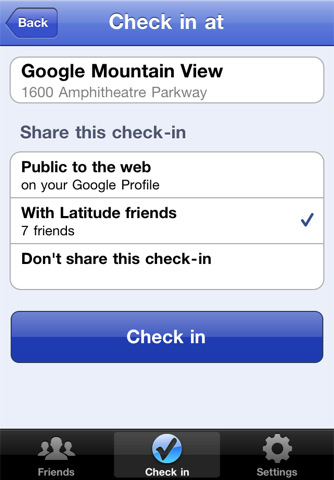
With an official announcement on the company’s blog, Google unveiled a few minutes ago a new version of Latitude for iPhone. Google Latitude, also available for Android devices, uses the iPhone’s GPS functionality to display your current location on a map and allows you to see what your friends are up to. The new 2.1 version, available here, lets you “check in” places and automatically be checked out if Latitude is set to update your location in the background. In this way, your friends will not only see your location, but know exactly what you’re doing – say drinking coffee at a nearby Starbucks. A huge Check In button in the app makes the process easy, and privacy settings let you share the check in with everyone, your friends only, or make it entirely private.

Tap the “Check in” button to start checking in at nearby places. Keep checking in every time you visit your favorite places to start gaining special status there. You’ll not only progress to become a Regular, VIP, and then Guru at your favorite places, but if you’re near Austin, Texas, gaining status lets you unlock check-in offers at over 60 places.

Just like with sharing your location, you can control your Latitude check-in privacy. Checking in is 100% opt-in, and you can choose to share any check-in with your friends on Latitude, publicly on the web and your Google profile, or just yourself.

With this update Google is clearly trying to create an alternative to popular check-in services like Facebook Places and Foursquare, which have become the de-facto standards for sharing your location and earn points or badges. We don’t know whether the new Google Latitude will take off or not, but you can check out the app here and tell us what you think. It’s a free download.

Access Extra Content and Perks

Founded in 2015, Club MacStories has delivered exclusive content every week for nearly a decade.

What started with weekly and monthly email newsletters has blossomed into a family of memberships designed for every MacStories fan.

Learn more here and from our Club FAQs.

Club MacStories: Weekly and monthly newsletters via email and the web that are brimming with apps, tips, automation workflows, longform writing, early access to the MacStories Unwind podcast, periodic giveaways, and more;

Club MacStories+: Everything that Club MacStories offers, plus an active Discord community, advanced search and custom RSS features for exploring the Club’s entire back catalog, bonus columns, and dozens of app discounts;

Club Premier: All of the above and AppStories+, an extended version of our flagship podcast that’s delivered early, ad-free, and in high-bitrate audio.

Learn more here and from our Club FAQs.


TweetMag 1.1 Released: Faster, Full Readability Integration

When I first reviewed TweetMag back in December, I called it the “most beautiful Twitter app” for the iPad. Lots of things have changed since then, but I stand by my statement: the iPad 2 is now available and Flipboard went under a major update that refined the UI and added Instagram integration, yet TweetMag still holds up as a gorgeous way to consume Twitter as a magazine specifically built for the tablet. There are some similarities with the iPad app of the year 2010, Flipboard, but with the recent 1.1 update TweetMag takes another important step to become the most beautiful alternative Twitter app.

TweetMag 1.1 is faster. The backend was entirely rewritten, and you can immediately tell the difference in speed – especially on an iPad 2. Images load faster, tweets are parsed in seconds, content appears within moments after choosing a magazine from the top “rack”. The speed issues encountered by several users in the first version have been fixed, and rarely did I stumble upon wrong headlines or non-loaded images in TweetMag 1.1. There are still some minor issues here and there (1.1.1 update coming soon?), but this thing is simply faster now. The new system that powers TweetMag definitely shows its capabilities.

Two new features in TweetMag 1.1 allow you to create a magazine out of your favorite tweets (and consequently add tweets to Favorites directly within the app) and link to your Readability account to create a Read Later mag. We’re big fans of Readability here at MacStories, and full integration with the service is more than welcome. You can add articles to your reading queue or simply head over to the rack to check out your Read Later mag – made of articles you have saved in your online Readability account. Instapaper support is gone, but it might be coming back in a future update. We appreciate the developers’ choice to support publishers by adding Readability right into TweetMag – which still grabs links off any Twitter timeline to present articles in a uncluttered layout with great-looking typography.

Other new features in 1.1 include a Featured section with the top publications worth following, and the possibility to add or remove friends from the app. TweetMag is a $2.99 purchase in the App Store for a limited time, and it’s still the most beautiful Twitter app, now with a faster engine. Recommended.

Access Extra Content and Perks

Founded in 2015, Club MacStories has delivered exclusive content every week for nearly a decade.

What started with weekly and monthly email newsletters has blossomed into a family of memberships designed for every MacStories fan.

Learn more here and from our Club FAQs.

Club MacStories: Weekly and monthly newsletters via email and the web that are brimming with apps, tips, automation workflows, longform writing, early access to the MacStories Unwind podcast, periodic giveaways, and more;

Club MacStories+: Everything that Club MacStories offers, plus an active Discord community, advanced search and custom RSS features for exploring the Club’s entire back catalog, bonus columns, and dozens of app discounts;

Club Premier: All of the above and AppStories+, an extended version of our flagship podcast that’s delivered early, ad-free, and in high-bitrate audio.

Learn more here and from our Club FAQs.


How To Use A Smart Cover With The iPad 1

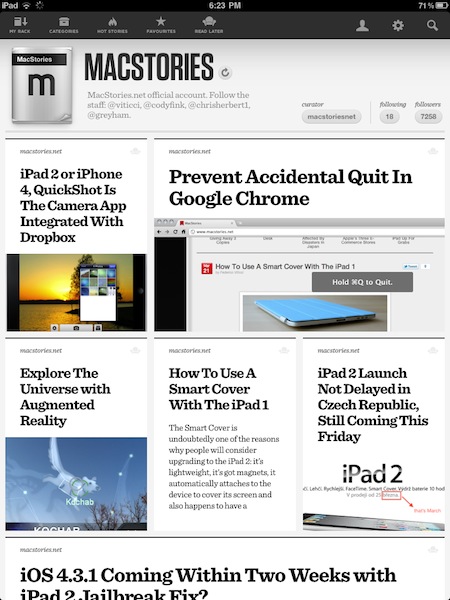
The Smart Cover is undoubtedly one of the reasons why people will consider upgrading to the iPad 2: it’s lightweight, it’s got magnets, it automatically attaches to the device to cover its screen and also happens to have a microfiber cloth for cleaning purposes. It doubles as a stand to prop your iPad for typing or movie watching, and thanks to the hardware implemented by Apple it can wake or put the iPad’s display to sleep. It’s genius.

Those people who don’t want to upgrade to the iPad 2 just yet, however, might be out of luck when trying to “retrofit” the Smart Cover for the iPad 1. The original iPad doesn’t have magnets, nor does it come with a system to automatically recognize whether or not a cover is lifted off the screen. Plus, it’s slightly heavier and it’s got a different design lacking tapered edges. Many thought it would be impossible to use a Smart Cover with the iPad 1.

It turns out though, with a bit of hacking and custom magnets it is possible to “install” the Smart Cover on the iPad 1. By placing a series of magnets on the iPad 1’s flat side so the Smart Cover’s hinge can fit, the guys at The Russians Used A Pencil managed to make it all work together. Sure, the iPad doesn’t automatically wake from sleep and the stand functionality is a little bit off because of the old design, but it works.

To place the magnets, I stuck them first to the magnetized hinge of the Smart Cover. I slid them around until they became locked into a position. This ended being asymmetrical, but I didn’t mind. I then lined up the cover with the iPad and used masking tape to mark where the magnets should be placed. I wanted this to be a somewhat permanent solution, so I used super glue to affix the magnets to the iPad. If you are not so daring, or want to test it out to make sure you like it, just use transparent tape. Even though the super glue keeps the magnets secure and in place, they are actually pretty easy to remove by just “chipping” them off with a flathead screwdriver and a very light tap of the hammer.

You’ll need glue to attach the magnets to the iPad, and I’m pretty sure the whole “automatic aligning process” isn’t as magical as Apple’s implementation in the iPad 2. Still, check out the video below if you, too, want to have a Smart Cover on your original 2010 iPad. [via The Brooks Review]
Read more

Access Extra Content and Perks

Founded in 2015, Club MacStories has delivered exclusive content every week for nearly a decade.

What started with weekly and monthly email newsletters has blossomed into a family of memberships designed for every MacStories fan.

Learn more here and from our Club FAQs.

Club MacStories: Weekly and monthly newsletters via email and the web that are brimming with apps, tips, automation workflows, longform writing, early access to the MacStories Unwind podcast, periodic giveaways, and more;

Club MacStories+: Everything that Club MacStories offers, plus an active Discord community, advanced search and custom RSS features for exploring the Club’s entire back catalog, bonus columns, and dozens of app discounts;

Club Premier: All of the above and AppStories+, an extended version of our flagship podcast that’s delivered early, ad-free, and in high-bitrate audio.

Learn more here and from our Club FAQs.


Courier Updated With Facebook Support: We’re Giving Away 3 Copies

Courier 1.1.2 Facebook

Courier 1.1.2 Facebook

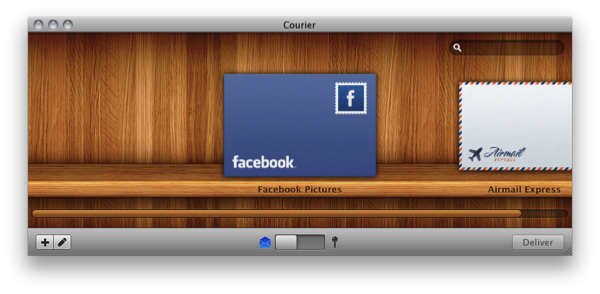
Courier is a smashing Mac app to have if you’re uploading files to Flickr, Youtube, or MobileMe, and some big changes have come along recently to those begging for Facebook support. With the latest update to version 1.1.2, Courier is bringing the ability to upload pictures to your Facebook Pages, and video to your Facebook accounts. With a simple drag and drop after adding your Facebook account, you can deliver files over the Internet in style. Right from the envelope’s stamp, you can easily select which album you’d like to upload photos to, then drag in a bundle of photos right before delivering them straight to your Facebook profile. Courier keeps getting better and better, and it was the first app I purchased on the Mac App Store. For $9.99, Courier is a beautiful app that allows you upload media to your favorite websites. To celebrate the latest inclusion for Facebook albums and video, we’re giving away three copies – just follow the rules below for your chance to win.

Read more

Access Extra Content and Perks

Founded in 2015, Club MacStories has delivered exclusive content every week for nearly a decade.

What started with weekly and monthly email newsletters has blossomed into a family of memberships designed for every MacStories fan.

Learn more here and from our Club FAQs.

Club MacStories: Weekly and monthly newsletters via email and the web that are brimming with apps, tips, automation workflows, longform writing, early access to the MacStories Unwind podcast, periodic giveaways, and more;

Club MacStories+: Everything that Club MacStories offers, plus an active Discord community, advanced search and custom RSS features for exploring the Club’s entire back catalog, bonus columns, and dozens of app discounts;

Club Premier: All of the above and AppStories+, an extended version of our flagship podcast that’s delivered early, ad-free, and in high-bitrate audio.

Learn more here and from our Club FAQs.


I Want This Tetris-like Stand For iOS Devices On My Desk

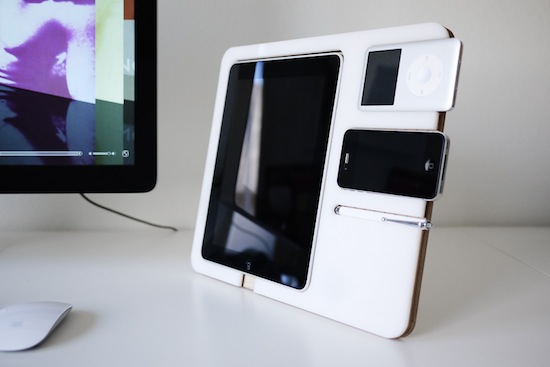
This product will likely never see the light of day on retail stores’ shelves, but it’d be so perfect on my home desk next to my iMac. The Polyply is a multi-device stand designed by Andrew Kim, and it’s made out of acrylic plastic and birch plywood. Realized as a two-week project by Kim to see how such an accessory would fit on an Apple’s fan desk, all parts were cut on a laser cutter. The Polyply could easily keep in place an iPad, an iPhone, and iPod and a stylus. It’s got room to plug in your Apple 30-pin dock connector and it even lowers for a better typing angle.

The design is simple and clean and, in spite of the times, it’d be just right for my desk that is daily cluttered by iPad, iPhone and, yes, an iPod Classic.

Like I said though, this was just an experiment. But I’d be ready to open my wallet if it was a Kickstarter project. [via Cult Of Mac]

Access Extra Content and Perks

Founded in 2015, Club MacStories has delivered exclusive content every week for nearly a decade.

What started with weekly and monthly email newsletters has blossomed into a family of memberships designed for every MacStories fan.

Learn more here and from our Club FAQs.

Club MacStories: Weekly and monthly newsletters via email and the web that are brimming with apps, tips, automation workflows, longform writing, early access to the MacStories Unwind podcast, periodic giveaways, and more;

Club MacStories+: Everything that Club MacStories offers, plus an active Discord community, advanced search and custom RSS features for exploring the Club’s entire back catalog, bonus columns, and dozens of app discounts;

Club Premier: All of the above and AppStories+, an extended version of our flagship podcast that’s delivered early, ad-free, and in high-bitrate audio.

Learn more here and from our Club FAQs.