
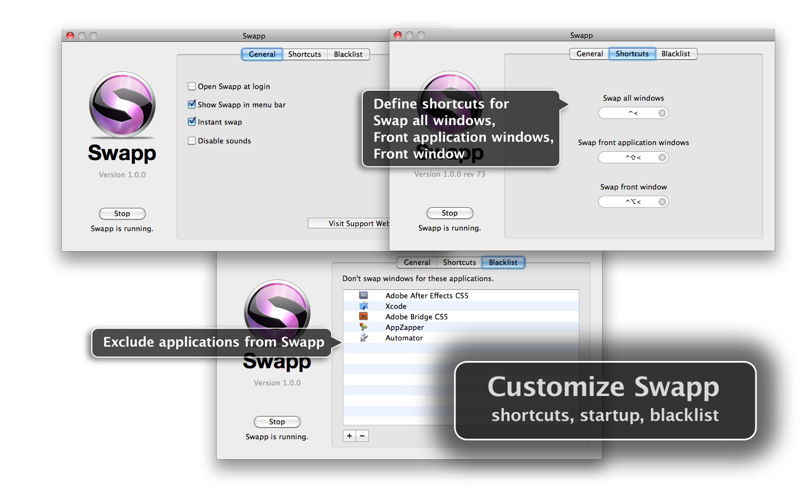
Okay you MacBook Pro plus Cinema Display users, I’ve got an app for you that impresses me more than the balls Tyler Glenn had to wish the USA a happy fourth of july with his pair of patriot boxers at this year’s iTunes Festival. (Can you tell I’m watching the Neon Trees today)? If you’ve ever wanted to swap windows between your MBP and Cinema Display monitors, move the front most window over, or move all of an app’s windows (say all of your open Safari windows) to the next monitor, Swapp for the Mac is impressive.
Posts in Featured
Swapp For Mac is One Impressive App When Working With Multiple Monitors

Access Extra Content and Perks
Founded in 2015, Club MacStories has delivered exclusive content every week for nearly a decade.
What started with weekly and monthly email newsletters has blossomed into a family of memberships designed for every MacStories fan.
Club MacStories: Weekly and monthly newsletters via email and the web that are brimming with apps, tips, automation workflows, longform writing, early access to the MacStories Unwind podcast, periodic giveaways, and more;
Club MacStories+: Everything that Club MacStories offers, plus an active Discord community, advanced search and custom RSS features for exploring the Club’s entire back catalog, bonus columns, and dozens of app discounts;
Club Premier: All of the above and AppStories+, an extended version of our flagship podcast that’s delivered early, ad-free, and in high-bitrate audio.
Inside Google+ Mobile Web App
Two days ago Google launched Google+, the company’s latest effort to get into the social networking space and build a platform to share content and connect people. For those who missed the coverage (you can find some detailed reports here and here), here’s the gist of Plus: it’s a social network connected to your Google account that looks a lot like Facebook but it’s got a cleaner design and a set of different “apps” tied together by the Plus brand. What does it mean for consumers? It means that whilst Circles, Huddle, Hangouts and Sparks could be seen as separate services and concepts, they’re in fact sections of the entire Google+ website. Yesterday, Google started allowing people to send invites to other users, which resulted in a massive explosion of invite requests on Twitter and thousands of new sign-ups. After a few hours, Google was forced to close invites due to “insane demand” and promise more coming in the next few weeks as the service scales to accomodate new users and more content.
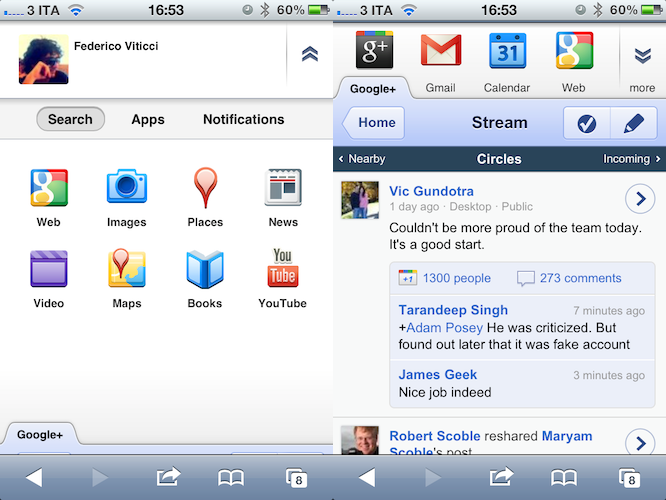
Google+ has a strong mobile counterpart, too. As the service aims at empowering Google users to share and connect at any time from anywhere, Google built native apps for Android and iOS devices to let users enjoy the Google+ experience on the go, and upload media such as photos and videos shot with their phones. Furthermore, the mobile apps get access to Huddle, a group messaging feature built into Google+ that some are already eyeing as Google’s response to iMessage, only it works on both iOS and Android. However, the official iPhone app is not available yet, and Google says it’s “coming soon”. In the meantime though, users can try a mobile optimized web app, which relies on Google’s recent mobile UI changes to lay out a unified interface to access Google+ and switch between various Google services.
Last night, I signed up for Google+ and played around with the website. Today, I decided to take a look at the mobile web app which, surprisingly enough, might just be the nicest thing Google has ever done on iOS’ Mobile Safari. Read more
Access Extra Content and Perks
Founded in 2015, Club MacStories has delivered exclusive content every week for nearly a decade.
What started with weekly and monthly email newsletters has blossomed into a family of memberships designed for every MacStories fan.
Club MacStories: Weekly and monthly newsletters via email and the web that are brimming with apps, tips, automation workflows, longform writing, early access to the MacStories Unwind podcast, periodic giveaways, and more;
Club MacStories+: Everything that Club MacStories offers, plus an active Discord community, advanced search and custom RSS features for exploring the Club’s entire back catalog, bonus columns, and dozens of app discounts;
Club Premier: All of the above and AppStories+, an extended version of our flagship podcast that’s delivered early, ad-free, and in high-bitrate audio.
The iPad: Now With 100,000 Apps Available
At the end of March we ran a story on the iPad App Store reaching the 75,000 apps milestone in less than 365 days since the original iPad came out in April 2010. Considering the competition the iPad had to face in the past year (though some people say there really isn’t a tablet market) and the options given to developers when it came to choosing which platform to develop for, seeing iPad users gaining access to almost 100,000 apps in roughly 12 months was a surprise – looking back at those statements from tech pundits who claimed the iPad was “dead in the water”, the 75,000 milestone surely helped putting things in perspective.
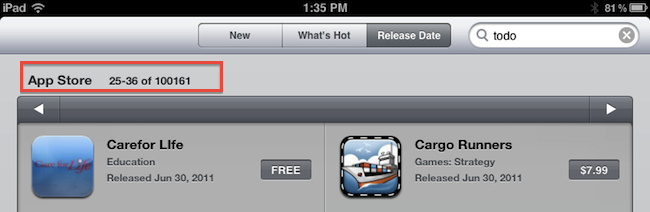
Yet Apple and third-party developers have set a new record: in 453 days since the original iPad came out on April 3, 2010, the App Store has more than 100,000 iPad-exclusive apps available. Either specifically targeting the tablet, or released as universal updates to existing iPhone apps, at the moment of writing this there are 100,161 iPad apps in the Store. How do I know? The App Store app itself on my iPad shows that.
Obviously, one could argue that the iPad’s development scene was “helped” by the success of the iPhone in the previous years. The original iPhone came out with no SDK in 2007, and developers were told to create web apps for it. Apple listened, and months later they released the first developer tools to create native apps for the iPhone. With the release of the iPhone 3G in 2008, Apple also launched the App Store, a unified marketplace to browse and download apps. The rest is history: a few graphical enhancements, sections, and 10 billion downloads later, the App Store is Apple’s crown jewel as far as digital downloads go. A success that has inspired the company to create an OS X version and name it Mac App Store which, unsurprisingly, is once again helping developers sustain their business because of the ease of use of the whole process. On the other hand, users love discovering and buying apps from the App Store because it’s simple, it’s full of apps, and it’s regularly updated. It’s a win-win scenario for Apple (who keeps a 30% cut off every transaction), the developers, and the users.
What’s next for the App Store and, more specifically, apps for the iPad? 100,000 is an important milestone, but don’t expect things to change dramatically in a short period of time. Considering how Apple rolls, the App Store will be slightly tweaked to accomodate new sections as it’s always been, more apps will be released in the next weeks, and users will keep buying apps and games. Don’t expect a revolution because Apple has reached 100,000 apps for the iPad. But that’s not to say the result isn’t remarkable or that new things aren’t coming: with iCloud going public this fall and Automatic Downloads already set in place, Apple wants to make the process of buying and syncing apps to iOS devices even simpler. With Lion approaching its public launch on the Mac App Store in July, it’s clear Apple is betting on the App Store brand as the de-facto solution for downloading software for iOS and OS X devices.
Congratulations, developers. Now onto 200,000 apps.
Access Extra Content and Perks
Founded in 2015, Club MacStories has delivered exclusive content every week for nearly a decade.
What started with weekly and monthly email newsletters has blossomed into a family of memberships designed for every MacStories fan.
Club MacStories: Weekly and monthly newsletters via email and the web that are brimming with apps, tips, automation workflows, longform writing, early access to the MacStories Unwind podcast, periodic giveaways, and more;
Club MacStories+: Everything that Club MacStories offers, plus an active Discord community, advanced search and custom RSS features for exploring the Club’s entire back catalog, bonus columns, and dozens of app discounts;
Club Premier: All of the above and AppStories+, an extended version of our flagship podcast that’s delivered early, ad-free, and in high-bitrate audio.
Postbox 2.5 Released: New UI, Faster, Lots Of New Features
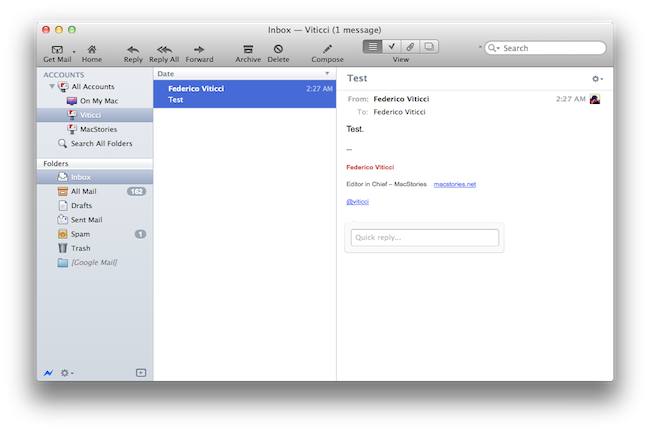
Earlier today, we published an article detailing some of the interface changes set to be introduced in Postbox 2.5, a major update for the popular alternative email application for Mac and Windows that, among other things, was teased by the developers as one of the biggest rewrites of the app to date. With a series of blog posts, the Postbox team had in fact already announced that the client would get an overall improved interface, new toolbar icons on the Mac, a completely re-imagined message view, and a vertical pane view to take advantage of widescreen monitors – admittedly one of the glaring omissions from the previous versions of Postbox. Read more
Access Extra Content and Perks
Founded in 2015, Club MacStories has delivered exclusive content every week for nearly a decade.
What started with weekly and monthly email newsletters has blossomed into a family of memberships designed for every MacStories fan.
Club MacStories: Weekly and monthly newsletters via email and the web that are brimming with apps, tips, automation workflows, longform writing, early access to the MacStories Unwind podcast, periodic giveaways, and more;
Club MacStories+: Everything that Club MacStories offers, plus an active Discord community, advanced search and custom RSS features for exploring the Club’s entire back catalog, bonus columns, and dozens of app discounts;
Club Premier: All of the above and AppStories+, an extended version of our flagship podcast that’s delivered early, ad-free, and in high-bitrate audio.
Apple Announces Q3 2011 Conference Call For July 19
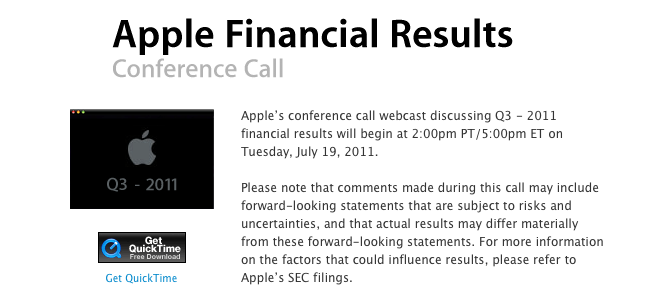
Apple has scheduled its Q3 2011 earnings call for July 19, 2011. The conference call will be streamed live on Apple’s website (audio-only) here.
Apple’s conference call webcast discussing Q3 - 2011 financial results will begin at 2:00pm PT/5:00pm ET on Tuesday, July 19, 2011.
Please note that comments made during this call may include forward-looking statements that are subject to risks and uncertainties, and that actual results may differ materially from these forward-looking statements. For more information on the factors that could influence results, please refer to Apple’s SEC filings.
In Q2 2011, Apple posted revenue of $24.67 billion, with 4.69 million iPads, 18.65 million iPhones and 3.76 million Macs sold. The company also reported quarterly revenue growth of 83% and profit growth of 95% with international sales were 59% for the quarter. In the year-ago quarter, Apple posted record revenue of $15.7 billion with 3.47 million Macs, 8.4 million iPhones, 9.41 million iPods and 3.27 million iPads sold.
The third quarter is set to provide some insight into the sales of the long-awaited white iPhone 4, and whether or not the lack of a new iPhone release this summer has affected the overall sales of the iPhone 4, now a 12-month old device.
We will provide live updates from the call on our site’s homepage on July 19 starting at 2 PM PDT.
[Thanks, Shawn]
Access Extra Content and Perks
Founded in 2015, Club MacStories has delivered exclusive content every week for nearly a decade.
What started with weekly and monthly email newsletters has blossomed into a family of memberships designed for every MacStories fan.
Club MacStories: Weekly and monthly newsletters via email and the web that are brimming with apps, tips, automation workflows, longform writing, early access to the MacStories Unwind podcast, periodic giveaways, and more;
Club MacStories+: Everything that Club MacStories offers, plus an active Discord community, advanced search and custom RSS features for exploring the Club’s entire back catalog, bonus columns, and dozens of app discounts;
Club Premier: All of the above and AppStories+, an extended version of our flagship podcast that’s delivered early, ad-free, and in high-bitrate audio.
Apple Releases Thunderbolt Cable, Sony Unveils Details Of New PC Featuring Thunderbolt

Update: The cable has made its way on to the online US Apple Store and it is indeed US$49.
Following yesterday’s Thunderbolt firmware update that brought “performance and stability fixes”, Apple has released the ‘Apple Thunderbolt cable’ that allows users to connect and daisy chain multiple Thunderbolt capable devices. The 2m long accessory is simply a cable that features the Thunderbolt connector on both ends. It is priced at $55 in Australia, £39.00 in the UK but has not yet made it into the US Apple Store – although based on similarly priced accessories it will be roughly US$49.
Thunderbolt technology supports blazing-fast data transfer with two independent channels of 10Gbit/s each. Use the Apple Thunderbolt cable to connect your Thunderbolt-equipped peripherals to your new iMac or new MacBook Pro.
As explained in our Thunderbolt editorial a few months ago, the Thunderbolt specification works by daisy chaining multiple devices together – allowing just one cable from the Mac to actually connect a number of devices together. This Thunderbolt accessory cable is that cable that can connect multiple Thunderbolt capable devices together.
The other piece of Thunderbolt news is that Sony has announced details of its new 13.1-inch VAIO Z that features Thunderbolt, except they are calling it Light Peak (the old name of the specification). Interestingly it features a ‘Power Media Dock’ that includes an external GPU and optical drive – all connected by Light Peak. It is certainly an interesting use of the Thunderbolt specification, and with its speeds that external GPU will certainly make that laptop much more powerful when connected.
[Via This is my next]
Access Extra Content and Perks
Founded in 2015, Club MacStories has delivered exclusive content every week for nearly a decade.
What started with weekly and monthly email newsletters has blossomed into a family of memberships designed for every MacStories fan.
Club MacStories: Weekly and monthly newsletters via email and the web that are brimming with apps, tips, automation workflows, longform writing, early access to the MacStories Unwind podcast, periodic giveaways, and more;
Club MacStories+: Everything that Club MacStories offers, plus an active Discord community, advanced search and custom RSS features for exploring the Club’s entire back catalog, bonus columns, and dozens of app discounts;
Club Premier: All of the above and AppStories+, an extended version of our flagship podcast that’s delivered early, ad-free, and in high-bitrate audio.
Don’t Be Stupid: Keep App Reviews To Yourself While Using an iOS Beta
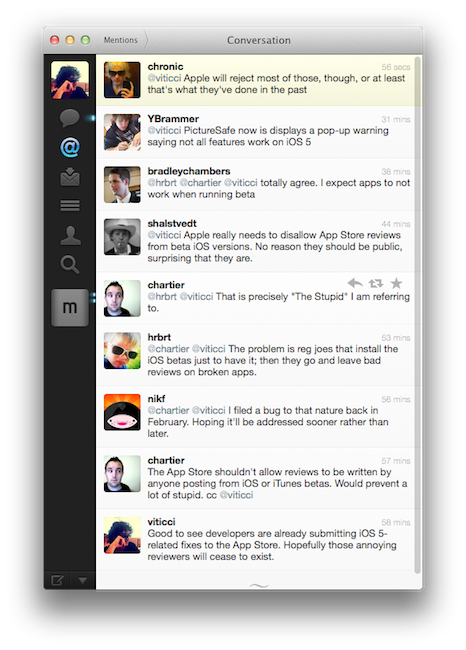
These past few weeks of iOS 5 testing and casual talking with my fellow writers and Twitter followers had me thinking about the fact that some people really don’t get the difference between “public previews” and “developer-only betas”. I’m talking about those people who are leaving negative reviews in iTunes for apps that are allegedly “broken” under iOS 5, which reached the beta 2 status last Friday.
There’s an important difference between previews and developer betas. With previews, like iTunes in the Cloud, Apple feels confident enough to release a new piece of software with new features to the public and let everyone enjoy it until the final version (with more features) comes out. Example: automatic downloads and past purchases. In spite of Apple calling it a “beta”, this is in fact a public preview (that requires iTunes 10.3, also public) of the new iTunes in the Cloud system that will gain the additional Match functionality this Fall. So why is Apple letting regular users mess with a beta? Because it’s not really a “beta”, not in the sense we geeks are used to when seeing the beta label on Apple’s various Dev Centers. iTunes in the Cloud is a public preview of something that will grow even bigger in a matter of a few months. The company knows it’s stable enough for everyone to play with. All the systems are in place. No third-party support is required. All users can benefit from it now, and will get to use more functionalities once the faux beta label goes away. It’s a good deal. Read more
Access Extra Content and Perks
Founded in 2015, Club MacStories has delivered exclusive content every week for nearly a decade.
What started with weekly and monthly email newsletters has blossomed into a family of memberships designed for every MacStories fan.
Club MacStories: Weekly and monthly newsletters via email and the web that are brimming with apps, tips, automation workflows, longform writing, early access to the MacStories Unwind podcast, periodic giveaways, and more;
Club MacStories+: Everything that Club MacStories offers, plus an active Discord community, advanced search and custom RSS features for exploring the Club’s entire back catalog, bonus columns, and dozens of app discounts;
Club Premier: All of the above and AppStories+, an extended version of our flagship podcast that’s delivered early, ad-free, and in high-bitrate audio.
Skype for iPad Is Coming, Video Surfaces Online
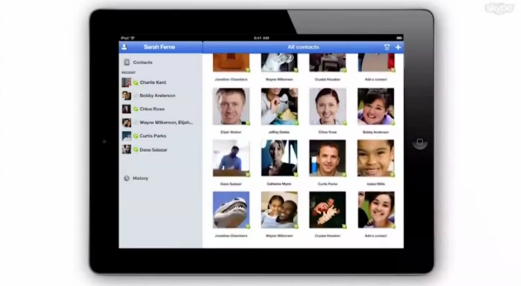
As reported by Italian website iPadevice [Google Translation], a video appeared earlier today on Skype’s official YouTube channel, and was later removed or set to private. The video demonstrates the official Skype application for iPad, which appears to be complete and launching soon. The video has no audio, and iPadevice managed to grab a copy before it was deleted to re-upload it to YouTube. The video says “Skype for iPad, available on the App Store”, though it’s not clear whether or not the app will be released as a universal update to the existing iPhone client, or as a standalone app. However, the video shows that Skype has taken its time to take advantage of the iPad 2 hardware to enable video calls both through the back and front facing camera, with a visual contact list made of profile pic thumbnails you can scroll, as well as the possibility of turning a video call into fullscreen mode.
The app will have options to call, video call and chat with a contact; it will work both on WiFi and 3G as a disclaimer at the beginning of the video says, and it will allow users to chat during a video call session from a popover menu at the bottom.
Skype was recently acquired by Microsoft for $8.5 billion, and although after the acquisition many feared Redmond would make the software exclusive for its devices, Microsoft’s Steve Ballmer was quick to reassure everyone that Skype was still committed to other platforms. Check out the video below.
Update: Here’s the alleged link of the private video, via RazorianFly.
Update #2: Twitter user @trackizmy1 has posted the following photo showing that the video indeed appeared on Skype’s channel:
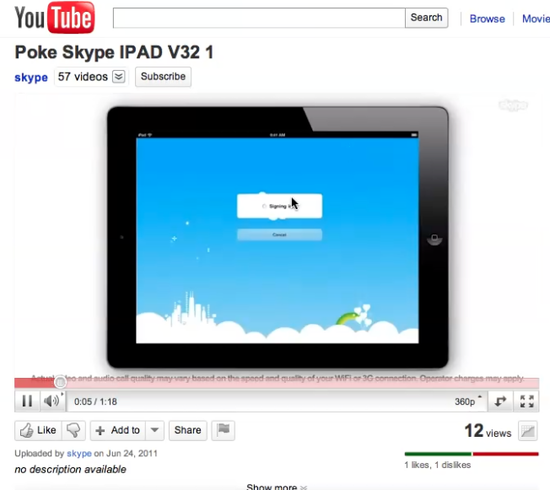
Right now, Skype has 56 uploads on YouTube, whilst the screenshot shows 57 before the video was pulled.
Update #3: TUAW’s Mike Schramm has confirmed with Skype VP of Consumer and Product Design Rick Osterloh that the app is very real and hopefully coming soon depending on Apple’s approval. Skype says some desktop features like file sharing couldn’t be implemented, but called the iPad version a “solid release” and said Apple has been very supportive to them.
Osterloh says that the iPhone version of Skype burst out of the gate quickly, with a big launch and “a userbase that doubled in just a month’s time.” And he said the iPad version should “have a similar success,” especially since it’s basically the same in functionality: chatting, audio and video calling, and all of the other standard actions you can expect from Skype. The current app has been in testing for a few months now, and Osterloh is excited to unleash it on the public.
Access Extra Content and Perks
Founded in 2015, Club MacStories has delivered exclusive content every week for nearly a decade.
What started with weekly and monthly email newsletters has blossomed into a family of memberships designed for every MacStories fan.
Club MacStories: Weekly and monthly newsletters via email and the web that are brimming with apps, tips, automation workflows, longform writing, early access to the MacStories Unwind podcast, periodic giveaways, and more;
Club MacStories+: Everything that Club MacStories offers, plus an active Discord community, advanced search and custom RSS features for exploring the Club’s entire back catalog, bonus columns, and dozens of app discounts;
Club Premier: All of the above and AppStories+, an extended version of our flagship podcast that’s delivered early, ad-free, and in high-bitrate audio.
Apple Posts iCloud Transition Q&A, Confirms iCloud Will Have Web Apps

With iCloud set to replace MobileMe, Apple has just published a transition Q&A to help explain to users of MobileMe what the transition will be like and what will change as they move to iCloud. MobileMe will be discontinued on June 30, 2012, and some services like Gallery, iWeb, and iDisk will no longer be available after that date.
One issue that has been in contention recently is whether or not iCloud would offer web apps with as MobileMe did. Today’s transition Q&A confirms that, yes, there will be iCloud web apps for Mail, Contacts, Calendar and Find My iPhone.
Will I be able to access iCloud services on the web?
Yes. Web access to iCloud Mail, Contacts, Calendar, and Find My iPhone will be available at icloud.com this fall.
In the same transition Q&A, Apple also details the necessary steps to move existing iWeb websites, MobileMe Gallery photos and iDisk files from the old MobileMe infrastructure to different services or a local folder on your Mac. For iWeb, as previously reported the service will be discontinued on June 30, 2012, and if users are willing to keep their websites reachable they’ll need to move files via FTP to a new hosting provider. Instructions are available here.
You will be able to continue publishing iWeb sites to MobileMe through June 30, 2012, even after moving to iCloud.
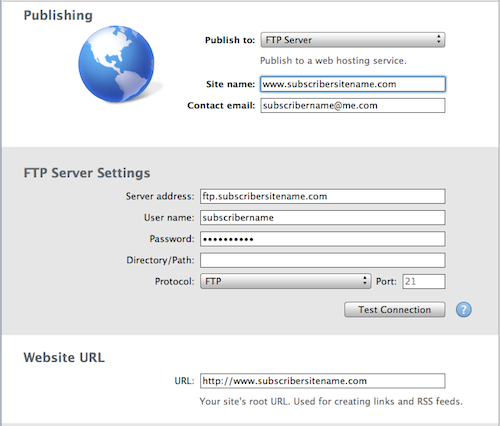
- You need an account with a web hosting provider that supports FTP (File Transfer Protocol) before proceeding.
- When publishing an iWeb site to a web hosting service other than MobileMe, the following features are not available: blog and photo comments, website password, blog search, and hit counter.
iDisk files will simply need to be copied locally on a Mac or PC before June 30, 2012, and no online interface for files will be available.
You will be able to continue using MobileMe iDisk through June 30, 2012, even after moving to iCloud. You should save copies of all files stored on iDisk before that date.
- From the iDisk window, drag and drop the files and folders you want to keep to your desktop or a local folder on your Mac. For larger files, you may see a progress bar indicating download progress.
- Check all of your folders on your iDisk for important files including the Documents, Movies, Music, Pictures, and Public folders as these are places where important files and folders are commonly stored. If they have files you want to keep, download these folders.
Last, MobileMe Gallery photos. Apple says that “it is likely that most of your Gallery photos are already in iPhoto or Aperture”, but if they’re not, detailed steps to download photos from MobileMe before June 30, 2012, are available here.
You will be able to continue using MobileMe Gallery through June 30, 2012, even after moving to iCloud. You should save copies of all photos published to your Gallery before that date.
- Click the “http://gallery.me.com/subscribername…” link at the top right of the page.
- On the page that opens, click the download arrow icon at the top of the page.
- If you are downloading a photo album, Gallery will create a .zip file that contains all of the photos and movie clips in the album. Once processing is complete, click the Download button.
Furthermore, Apple has confirmed in the Q&A syncing of Mac Dashboard widgets, keychains, Dock items, and System Preferences will be discontinued after you move to iCloud, or June 30, 2012. Unlike iWeb publishing, Gallery, and iDisk, syncing of these items will no longer be available even after you move to iCloud.
As for separate iTunes and MobileMe accounts, Apple says you won’t be able to merge them, but you’ll be able to transition an old @me.com account to iCloud, and keep using the iTunes one for iTunes in the Cloud and Store purchases. More storage for mail, documents, and backup will be available at a price that Apple will outline this Fall once iCloud launches publicly. For users with Family accounts from the previous MobileMe offerings, they’ll still be able to create new family accounts and manage them if they already have a Family pack. New family packs can’t be purchased or upgraded. More importantly, Family pack members can move their MobileMe accounts separately to iCloud, meaning there shouldn’t be any confusion with a single iCloud account automatically sending purchases to all devices).
Check out Apple’s full Q&A on the MobileMe transition to iCloud here.
Access Extra Content and Perks
Founded in 2015, Club MacStories has delivered exclusive content every week for nearly a decade.
What started with weekly and monthly email newsletters has blossomed into a family of memberships designed for every MacStories fan.
Club MacStories: Weekly and monthly newsletters via email and the web that are brimming with apps, tips, automation workflows, longform writing, early access to the MacStories Unwind podcast, periodic giveaways, and more;
Club MacStories+: Everything that Club MacStories offers, plus an active Discord community, advanced search and custom RSS features for exploring the Club’s entire back catalog, bonus columns, and dozens of app discounts;
Club Premier: All of the above and AppStories+, an extended version of our flagship podcast that’s delivered early, ad-free, and in high-bitrate audio.