Posts in Featured

OS X Lion USB Thumb Drive Now Available

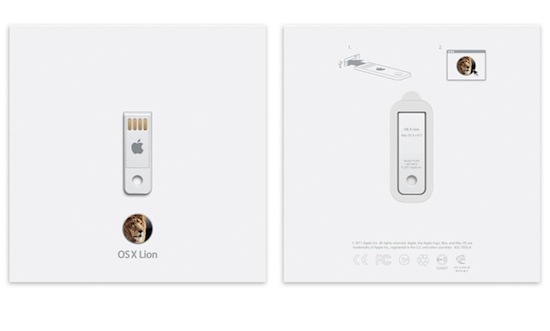
Initially announced on July 20, when OS X Lion was released to the public through the Mac App Store at $29.99, Apple has released the OS X Lion USB Thumb Drive today, allowing customers without a broadband connection – unable to download the 3.49 GB installer from the Store, or willing to keep a physical copy of the OS – to install the latest version of OS X with a USB stick similar to the one Apple shipped with the 2010 MacBook Airs (and didn’t include in the 2011 models, which come with Lion pre-installed but no USB drive in the box).

OS X Lion is available on a USB thumb drive for installation without the need for a broadband Internet connection. Just plug the drive into your USB port and follow the instructions to install. OS X Lion is also available for a lower price as a digital download from the Mac App Store.

As noted by 9to5mac, those who install Lion through the USB Thumb Drive won’t be able to perform re-installs with Lion’s built-in Recovery functionalities, as they will need to use the thumb drive again. The OS X Lion Thumb Drive is shipping in 1-3 business days.

Earlier this month, Apple released a free utility to turn any external drive into a Lion Recovery partition, and a number of unofficial solutions have also surfaced. You can find Apple’s OS X Lion Thumb Drive at $69 in the online store.

Access Extra Content and Perks

Founded in 2015, Club MacStories has delivered exclusive content every week for nearly a decade.

What started with weekly and monthly email newsletters has blossomed into a family of memberships designed for every MacStories fan.

Learn more here and from our Club FAQs.

Club MacStories: Weekly and monthly newsletters via email and the web that are brimming with apps, tips, automation workflows, longform writing, early access to the MacStories Unwind podcast, periodic giveaways, and more;

Club MacStories+: Everything that Club MacStories offers, plus an active Discord community, advanced search and custom RSS features for exploring the Club’s entire back catalog, bonus columns, and dozens of app discounts;

Club Premier: All of the above and AppStories+, an extended version of our flagship podcast that’s delivered early, ad-free, and in high-bitrate audio.

Learn more here and from our Club FAQs.


Preview of Elements 2.0: Revamped Interface and Web Publishing

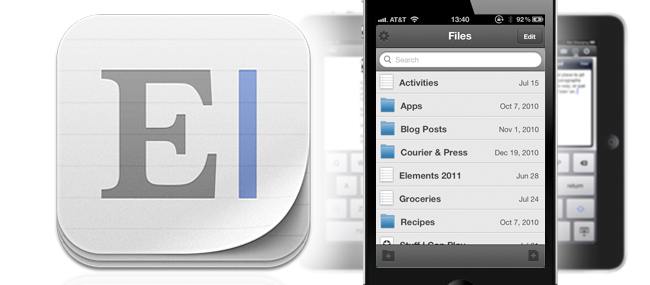
Last August we previewed Second Gear’s Elements 1.0, a Dropbox based text editor for iOS. Since then it has seen a few updates such as an improved UI, sub-folders, Markdown preview and improved file saving - that’s a lot of great improvements from 1.0 to 1.5. Elements is bar none one of the best Dropbox text editors available. Are you ready for a little preview of what Second Gear has in store for Elements 2.0? Read more

Access Extra Content and Perks

Founded in 2015, Club MacStories has delivered exclusive content every week for nearly a decade.

What started with weekly and monthly email newsletters has blossomed into a family of memberships designed for every MacStories fan.

Learn more here and from our Club FAQs.

Club MacStories: Weekly and monthly newsletters via email and the web that are brimming with apps, tips, automation workflows, longform writing, early access to the MacStories Unwind podcast, periodic giveaways, and more;

Club MacStories+: Everything that Club MacStories offers, plus an active Discord community, advanced search and custom RSS features for exploring the Club’s entire back catalog, bonus columns, and dozens of app discounts;

Club Premier: All of the above and AppStories+, an extended version of our flagship podcast that’s delivered early, ad-free, and in high-bitrate audio.

Learn more here and from our Club FAQs.


Introducing Facebook Messenger for iPhone

Facebook posits that it’s hard for us to know when our friends are available at home or on their mobile phones, and that choosing how we want to communicate can be confusing: do we send a text message, an email, or do we try to connect to our friends on Twitter? Facebook has already positioned themselves to be a central hub for communication — you have the choice to choose how you want to talk to your friends on Facebook (through your preferred medium). To make things simpler, Facebook is rolling out Facebook Messenger for iPhone, a separate app with a great icon and streamlined interface for instantly connecting to your friends. We’ll be updating past the break shortly with screenshots, impressions, and more information, but in the meantime you can download the app via the link below.

Facebook Messenger for iPhone

[via TechCrunch]

Read more

Access Extra Content and Perks

Founded in 2015, Club MacStories has delivered exclusive content every week for nearly a decade.

What started with weekly and monthly email newsletters has blossomed into a family of memberships designed for every MacStories fan.

Learn more here and from our Club FAQs.

Club MacStories: Weekly and monthly newsletters via email and the web that are brimming with apps, tips, automation workflows, longform writing, early access to the MacStories Unwind podcast, periodic giveaways, and more;

Club MacStories+: Everything that Club MacStories offers, plus an active Discord community, advanced search and custom RSS features for exploring the Club’s entire back catalog, bonus columns, and dozens of app discounts;

Club Premier: All of the above and AppStories+, an extended version of our flagship podcast that’s delivered early, ad-free, and in high-bitrate audio.

Learn more here and from our Club FAQs.


Twitterrific 4.3 Syncs Timeline Position With Tweet Marker

Twitterrific 4.3 is now available on the iOS App Store and on the Mac App Store, featuring timeline sync via Tweet Marker. Tweet Marker is a service that enables developers to remember where you stopped reading your timeline on one device, so you can start where you left off on another. If you value reading every tweet (and not just what’s happening right now), Tweet Marker gives Twitterrific tremendous value. There’s virtually very little users have to do on their end to enable Tweet Marker, but we’ll break down all the juicy details pertaining the purple bookmark past the break.

Read more

Access Extra Content and Perks

Founded in 2015, Club MacStories has delivered exclusive content every week for nearly a decade.

What started with weekly and monthly email newsletters has blossomed into a family of memberships designed for every MacStories fan.

Learn more here and from our Club FAQs.

Club MacStories: Weekly and monthly newsletters via email and the web that are brimming with apps, tips, automation workflows, longform writing, early access to the MacStories Unwind podcast, periodic giveaways, and more;

Club MacStories+: Everything that Club MacStories offers, plus an active Discord community, advanced search and custom RSS features for exploring the Club’s entire back catalog, bonus columns, and dozens of app discounts;

Club Premier: All of the above and AppStories+, an extended version of our flagship podcast that’s delivered early, ad-free, and in high-bitrate audio.

Learn more here and from our Club FAQs.


Lion Recovery Disk Assistant

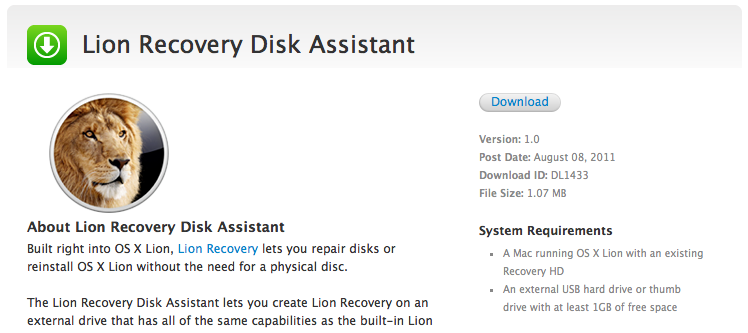
This afternoon, Apple is making available Lion Recovery Disk Assistant — an app available for the desktop that allows you to prepare an external hard drive (or thumb drive with at least 1 GB of space free) for recovery. Lion Recovery Disk Assistant will install the Lion Recovery partition to external media so you can create another boot disk. It requires OS X 10.7 Lion with a Recovery HD. Apple says in order to use the Recovery Disk Assistant, you only need to plug in an (empty) external hard drive, then run the assistant to create the recovery drive. This should make lots of people complaining about the lack of external recovery options very happy.

Download: Lion Recovery Disk Assistant (1.07 MB)

Update: Some additional details from the release notes:

  • If the computer shipped with Lion, the external recovery drive can only be used with the system that created it.
  • If the system was upgraded from Mac OS X v10.6 Snow Leopard to Lion, the external recovery drive can be used with other systems that were upgraded from Snow Leopard to Lion.

Screenshots after the break!

Read more

Access Extra Content and Perks

Founded in 2015, Club MacStories has delivered exclusive content every week for nearly a decade.

What started with weekly and monthly email newsletters has blossomed into a family of memberships designed for every MacStories fan.

Learn more here and from our Club FAQs.

Club MacStories: Weekly and monthly newsletters via email and the web that are brimming with apps, tips, automation workflows, longform writing, early access to the MacStories Unwind podcast, periodic giveaways, and more;

Club MacStories+: Everything that Club MacStories offers, plus an active Discord community, advanced search and custom RSS features for exploring the Club’s entire back catalog, bonus columns, and dozens of app discounts;

Club Premier: All of the above and AppStories+, an extended version of our flagship podcast that’s delivered early, ad-free, and in high-bitrate audio.

Learn more here and from our Club FAQs.


13-inch MacBook Air Review

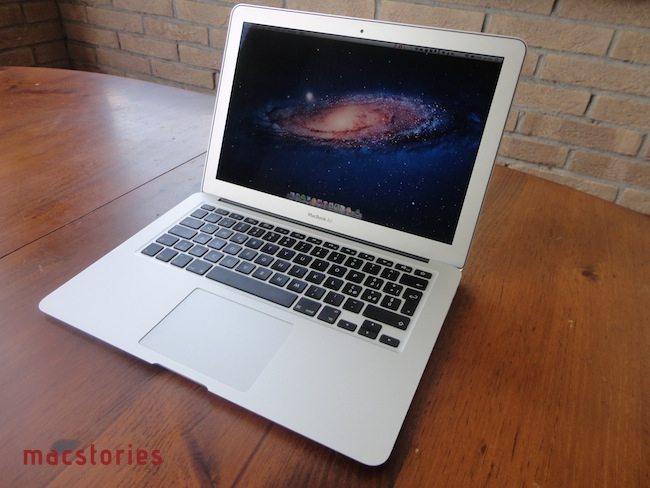
The new MacBook Air is the best Mac I’ve ever owned. This machine is shaping the future of OS X, both as an operating system and a bridge between iOS and the desktop.

In October 2008, I bought my first Mac. I had been a Windows PC user for seven years, and I was accustomed to using a PC at home for my browsing and writing needs, and at work – where my boss demanded we used PCs as he said they were more “reliable” and “fast”. After months of reading and peeking through Apple’s FAQ pages and video tutorials, I decided to buy a MacBook Pro. It was a 15-inch Unibody model with glossy screen, 4 GB of RAM, multi-touch trackpad, and Core 2 Duo processor. Back then, it was my first Mac but also the best computer I ever had. The moment I took it out of the box – and I was immediately impressed by Apple’s attention to detail in packaging and overall presentation – I knew that machine was going to change the way I “did work” on a computer. And it did. A few months later my boss fired me, and I started MacStories.

That MacBook Pro has been with me until last week.

Last year, I bought an iMac. Being the kind of Mac user that travels back and forth every day between his office (where I spend most of my day writing and managing the site) and his home, I was tired of being constantly forced to pack my MacBook Pro inside a bag, carry it around, gently place it on the passenger seat of my car, and pray that the hard drive wouldn’t die because of the terrible roads we have here in Viterbo. In spite of the fact that the MacBook Pro was the best computer I ever had, I slowly came to a point where I couldn’t stand carrying it around anymore. I decided to buy an iMac and make it my “home computer” so that I could offload media on it, backup documents, and do all those other things you’re supposed to do on “a home computer”. I bought a 21.5-inch model – again with a glossy screen – as I thought I wouldn’t ever need anything bigger than that. I was right. I’m happy with my purchase – the iMac is the finest piece of desktop hardware Apple has come up with in the past decade. Sure, my 2009 iMac doesn’t feature a Thunderbolt port and won’t get the performance boost of a Sandy Bridge-enabled machine, but it’s a trusted companion that I plan to keep for at least the next two years (that is, unless something really bad happens to the hardware, or Apple comes out with a desktop computer so revolutionary that it’ll be impossible to say no and don’t buy it).

For me, an iMac is the perfect desktop computer. It sits there, it makes my desk more elegant and classy than it could ever be, and more importantly it never failed me.

But I still had a problem with the MacBook Pro being a clumsy machine I didn’t want to carry around with me all the time. Read more

Access Extra Content and Perks

Founded in 2015, Club MacStories has delivered exclusive content every week for nearly a decade.

What started with weekly and monthly email newsletters has blossomed into a family of memberships designed for every MacStories fan.

Learn more here and from our Club FAQs.

Club MacStories: Weekly and monthly newsletters via email and the web that are brimming with apps, tips, automation workflows, longform writing, early access to the MacStories Unwind podcast, periodic giveaways, and more;

Club MacStories+: Everything that Club MacStories offers, plus an active Discord community, advanced search and custom RSS features for exploring the Club’s entire back catalog, bonus columns, and dozens of app discounts;

Club Premier: All of the above and AppStories+, an extended version of our flagship podcast that’s delivered early, ad-free, and in high-bitrate audio.

Learn more here and from our Club FAQs.


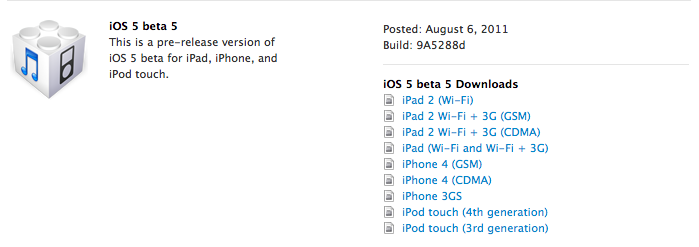
Apple Releases iOS 5 Beta 5

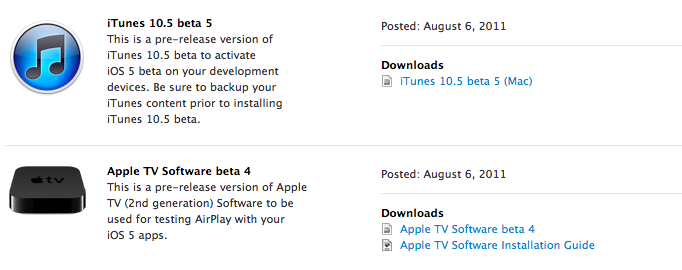
Apple has just released iOS 5 beta 5 in the Dev Center, with build number 9A5288d. Additionally, Apple has also released a new iTunes beta, Xcode 4.2 Developer Preview, and Apple TV beta software.

Read more

Access Extra Content and Perks

Founded in 2015, Club MacStories has delivered exclusive content every week for nearly a decade.

What started with weekly and monthly email newsletters has blossomed into a family of memberships designed for every MacStories fan.

Learn more here and from our Club FAQs.

Club MacStories: Weekly and monthly newsletters via email and the web that are brimming with apps, tips, automation workflows, longform writing, early access to the MacStories Unwind podcast, periodic giveaways, and more;

Club MacStories+: Everything that Club MacStories offers, plus an active Discord community, advanced search and custom RSS features for exploring the Club’s entire back catalog, bonus columns, and dozens of app discounts;

Club Premier: All of the above and AppStories+, an extended version of our flagship podcast that’s delivered early, ad-free, and in high-bitrate audio.

Learn more here and from our Club FAQs.


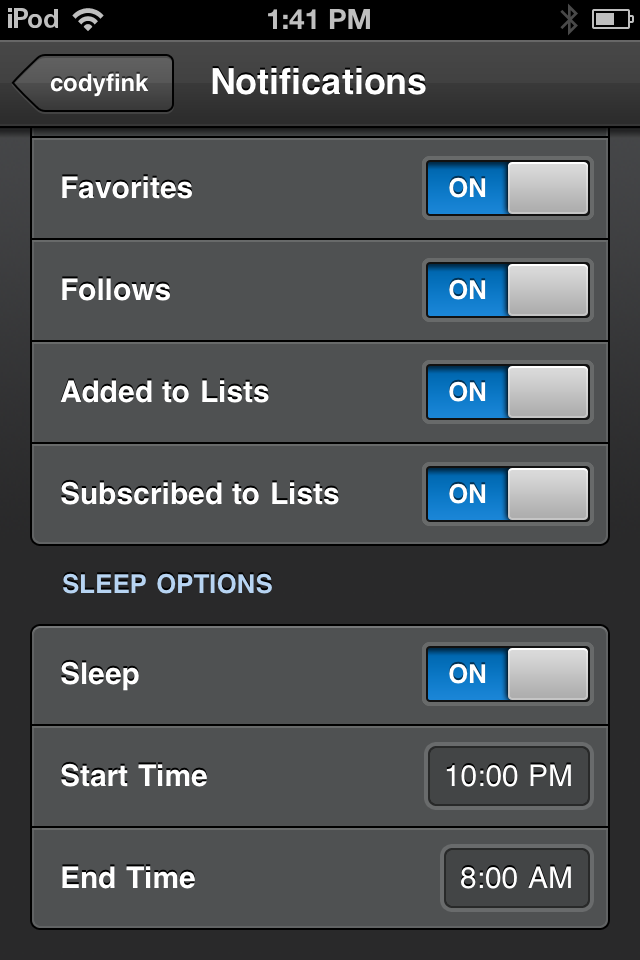
Tweetbot 1.4.3: Sleep Time for Notifications, Hiding Spam, and Mentions from only People You Follow

Tweetbot 1.4.3 has been approved and is now waiting for your loving fingers to tap Update in the App Store. With push notifications now open to everyone who uses Tweetbot (in case you haven’t heard), you’ll now have access to realtime updates for when a tweet is favorited, retweeted, replied to, when you’re mentioned, or when you receive a direct message. With so many notification types available (and our forgetfulness to put our devices on mute before going to sleep), Tweetbot also adds features to help curate what kinds of notifications you receive, and when you receive them.

Read more

Access Extra Content and Perks

Founded in 2015, Club MacStories has delivered exclusive content every week for nearly a decade.

What started with weekly and monthly email newsletters has blossomed into a family of memberships designed for every MacStories fan.

Learn more here and from our Club FAQs.

Club MacStories: Weekly and monthly newsletters via email and the web that are brimming with apps, tips, automation workflows, longform writing, early access to the MacStories Unwind podcast, periodic giveaways, and more;

Club MacStories+: Everything that Club MacStories offers, plus an active Discord community, advanced search and custom RSS features for exploring the Club’s entire back catalog, bonus columns, and dozens of app discounts;

Club Premier: All of the above and AppStories+, an extended version of our flagship podcast that’s delivered early, ad-free, and in high-bitrate audio.

Learn more here and from our Club FAQs.


iCloud Storage: International & Competitor Pricing Comparison

Last night, Apple launched a first developer beta of iCloud.com, a set of web apps based on the iCloud functionality originally introduced in iOS 5 beta that mimic the appearance of Apple’s Lion desktop apps like Address Book and iCal, or the Mail app for iPad. The new web apps, seen as replacements for MobileMe’s existing web offerings, have been completely rewritten to take advantage of iCloud’s faster and invisible sync of content between devices, and they also include a new web-based version of iWork that, however, isn’t live yet. Screenshots (and videos) of the iCloud web apps have surfaced online and partially on Apple’s website too; early screenshots of the login page had been leaked ahead of the WWDC in June.

The iCloud web apps provide an alternative to their iOS and OS X counterparts – being entirely web-based, they can come in handy “if you happen to be away from home without your computer or one of your iOS devices” so that “you can access your mail, contacts, and calendar — ad-free — from any computer at icloud.com”. Read more

Access Extra Content and Perks

Founded in 2015, Club MacStories has delivered exclusive content every week for nearly a decade.

What started with weekly and monthly email newsletters has blossomed into a family of memberships designed for every MacStories fan.

Learn more here and from our Club FAQs.

Club MacStories: Weekly and monthly newsletters via email and the web that are brimming with apps, tips, automation workflows, longform writing, early access to the MacStories Unwind podcast, periodic giveaways, and more;

Club MacStories+: Everything that Club MacStories offers, plus an active Discord community, advanced search and custom RSS features for exploring the Club’s entire back catalog, bonus columns, and dozens of app discounts;

Club Premier: All of the above and AppStories+, an extended version of our flagship podcast that’s delivered early, ad-free, and in high-bitrate audio.

Learn more here and from our Club FAQs.