Posts in Featured

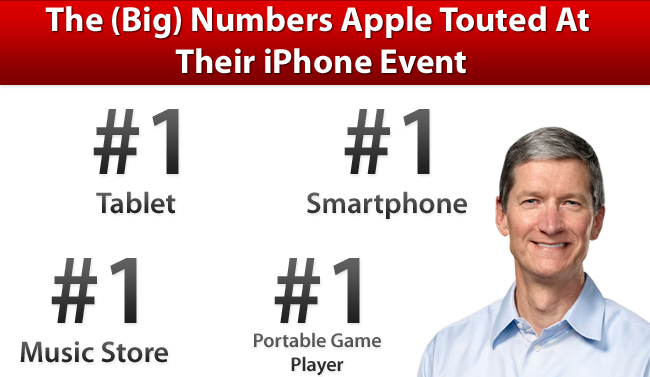
The (Big) Numbers Apple Touted At Their iPhone Event

At yesterday’s iPhone event, Tim Cook took to the stage and as he has done at previous events, he gave the audience an overview of Apple’s business. He ran through various statistics of how the iPhone, iPad, Mac and other aspects of Apple’s business are doing. The numbers he gave were clearly chosen very carefully to shine the best possible light on Apple and were an important premise to the first Apple keynote in which he presides as CEO. But regardless of how carefully chosen, its clear that Apple is doing exceptionally well, virtually across its entire business.

We’ve reviewed the keynote and laid out all the key statistics he showed off into each of Apple’s product categories, so make sure to jump the break to view them all.

Read more

Access Extra Content and Perks

Founded in 2015, Club MacStories has delivered exclusive content every week for nearly a decade.

What started with weekly and monthly email newsletters has blossomed into a family of memberships designed for every MacStories fan.

Learn more here and from our Club FAQs.

Club MacStories: Weekly and monthly newsletters via email and the web that are brimming with apps, tips, automation workflows, longform writing, early access to the MacStories Unwind podcast, periodic giveaways, and more;

Club MacStories+: Everything that Club MacStories offers, plus an active Discord community, advanced search and custom RSS features for exploring the Club’s entire back catalog, bonus columns, and dozens of app discounts;

Club Premier: All of the above and AppStories+, an extended version of our flagship podcast that’s delivered early, ad-free, and in high-bitrate audio.

Learn more here and from our Club FAQs.


iPhone 4S: An Interplay of Hardware and Software

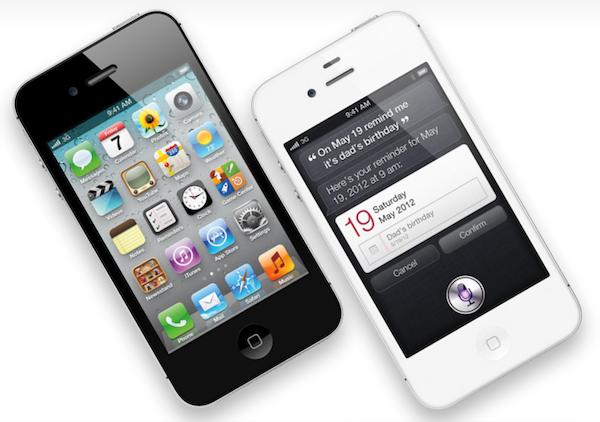
Here’s a quick thought about the new iPhone 4S. There really isn’t much to say about the iPhone 4S as a device: it’s the iPhone 4, only faster. It looks like an iPhone 4. It weighs just like an iPhone 4 (unless you’re going to feel a 3-gram difference). It’s got the same Retina Display of the iPhone 4, and its glass back is just as likely to break as the iPhone 4’s. The iPhone 4 is the foundation of the new iPhone 4S.

But the iPhone 4S is undoubtedly better than the iPhone 4. Thanks to the dual-core A5 CPU and dual-core graphics Apple put into it, the 4S will deliver snappier navigation between apps and webpages, up to seven times faster graphics and an overall more responsive experience. In practical terms, this means the multitasking tray will open faster, launch apps in less time, and Safari will load webpages faster. Game developers will be able to create more impressive games with more complex graphics and texturing techniques; app makers will take advantage of the iPhone 4S’ A5 to develop software with more elaborate actions and architectures.

In day to day usage, the iPhone 4S will be the iPad 2 of hardware upgrades: when compared to an old iPhone 4, it’ll look amazingly fast. Even if I haven’t tried an iPhone 4S yet, this is pure math. The iPhone 4S is faster. Perhaps not every corner of the OS will show that, but the hardware will allow for faster operations out of the box.

The A5 processor (and faster graphics, and presumably more RAM) doesn’t simply make games more powerful and apps quicker to open and use. The A5 processor – a custom-made silicon designed by Apple – has repercussions on a variety of software-related functionalities, and this has enabled Apple to come up with new features that won’t make it to the iPhone 4 once iOS 5 comes out next week.

The iPhone 4S is the finest example of Apple’s interplay of hardware and software yet.

Take the new camera for example. Thanks to a new 8 MP sensor, wider aperture, new lenses and backside illumination, it shoots better, sharper, more vibrant pictures. They look good. The new optics inside the iPhone’s camera have allowed Apple to improve on one of the most popular aspects of the iPhone, which is taking photos everywhere you go. Yet the new camera isn’t just about the optic hardware itself: because of the A5’s processing power, Apple has added face detection for better exposure and focus when a subject is recognized, as well as better white balance. The iPhone 4S’ A5 comes with a new Image Signal Processor designed by Apple. On top of that, the faster 4S also happens to record 1080p video with image stabilization and noise reduction.

This is fairly technical stuff, but you see where this is going. In a demo of the iPhone 4S posted by the BBC earlier today, I noticed something odd about the 4S camera: the swiping animation to switch from the camera view to the Camera Roll (a new feature of iOS 5) looked strangely fast and smooth. I’ve been testing iOS 5 on my iPhone 4, and I can tell you that animation isn’t as nearly as responsive and immediate as the BBC’s demo video. Throughout the day, I’ve looked at other hands-on videos (not many of them are around this time, unfortunately), read first impressions from journalists who were in Cupertino and yes – everyone reported the camera was faster and more responsive. A simple functionality like swiping back to your Camera Roll to see the picture you’ve just taken has been improved thanks to new hardware. These are the details the make the experience better, more balanced and enjoyable as the months roll in and you get used to a device.

At this point, it’s starting to feel like iOS 5 was specifically designed for the iPhone 4S. The most technologically advanced features of iOS 5 are now available on the iPhone: improved camera and HD video recording, AirPlay Mirroring, Siri. That’s not to say Apple didn’t exclude some of these from the iPad due to design compromises (the thinner iPad 2 wouldn’t probably have room for the 4S’ camera) or obvious impracticality (Siri on a tablet?), but on a checklist comparing Apple’s devices running iOS 5, the iPhone 4S gets more. The iPad 2 still has Photo Booth on its side, but I wouldn’t be surprised to see it on the iPhone soon.

The importance of “hardware that enables better software” and “powerful software based on advanced hardware” is best explained by Apple’s own slide. Four hardware-related features (A5, new wireless system, new camera, 1080p HD recording), four software-related functionalities coming to the 4S. And that’s not to count the 200+ features of iOS 5, which will benefit from the improved specs of the iPhone.

The iPhone 4S is a good phone because it’s based on the iPhone 4. But the 4S has got some new stuff that has been made possible by its new hardware, and it will make for a more pleasant experience thanks to iOS 5, for a simple reason: Apple understands that hardware and software together drive innovation and customer satisfaction, not specs alone.

Access Extra Content and Perks

Founded in 2015, Club MacStories has delivered exclusive content every week for nearly a decade.

What started with weekly and monthly email newsletters has blossomed into a family of memberships designed for every MacStories fan.

Learn more here and from our Club FAQs.

Club MacStories: Weekly and monthly newsletters via email and the web that are brimming with apps, tips, automation workflows, longform writing, early access to the MacStories Unwind podcast, periodic giveaways, and more;

Club MacStories+: Everything that Club MacStories offers, plus an active Discord community, advanced search and custom RSS features for exploring the Club’s entire back catalog, bonus columns, and dozens of app discounts;

Club Premier: All of the above and AppStories+, an extended version of our flagship podcast that’s delivered early, ad-free, and in high-bitrate audio.

Learn more here and from our Club FAQs.


Apple to Developers: Submit Your iOS 5 and iCloud Apps Today

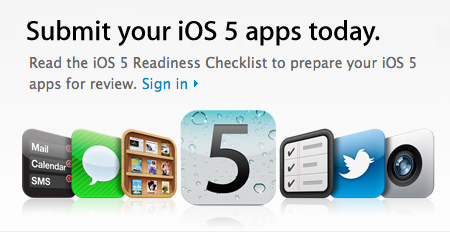
Following the release of the Golden Master seed of iOS 5, Apple has updated its developer portal with a new “iOS 5 Readiness Checklist”, asking developers to start submitting apps written specifically with the iOS 5 SDK. The checklist includes links to the iOS 5 SDK release notes, Xcode 4.2 for developers, and obviously detailed explanations of the various functionalities that will be introduced in iOS 5, such as Twitter integration, Newsstand, iCloud data storage, and more. Developers can head over this page to check out Apple’s resources for developing and submitting iOS 5 apps.

The next generation of the world’s most advanced mobile operating system will soon be in the hands of hundreds of millions of iPhone, iPad and iPod touch customers. Test your existing apps for compatibility and submit your new apps that take advantage of the exciting technologies in iOS 5 today.

The next generation of the world’s most advanced mobile operating system will soon be in the hands of hundreds of millions of iPhone, iPad and iPod touch customers. This major new release features more than 200 new features and an updated SDK with over 1,500 new APIs and developer tools.

Get your apps ready for the next generation of iOS. Install the GM seed of iOS 5 and build your apps with Xcode 4.2 GM seed. Test your existing apps for compatibility, review the iOS Data Storage Guidelines, and submit your new apps that take advantage of the exciting technologies in iOS 5 today.

iOS 5 and iCloud will be officially released on October 12th.

Update: Apple has sent two different email to iOS and Mac developers – the latter asking makers of software for OS X to submit iCloud-compatible apps today. Developers will be able to create apps that keep documents up to date across multiple machines thanks to iCloud, which automatically stores and pushes content to all your devices.

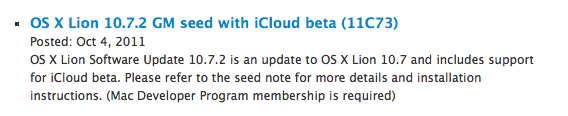
As a Mac Developer Program member you can now download the GM seeds of OS X Lion 10.7.2 and Xcode 4.2 and submit your iCloud enabled apps to the Mac App Store. With iCloud Storage APIs, your apps can store documents and key value data in iCloud. The documents are automatically kept up to date on all devices.


iCloud will be available on the next Lion software update, version 10.7.2, which has been seeded as GM today to developers for final testing.

Access Extra Content and Perks

Founded in 2015, Club MacStories has delivered exclusive content every week for nearly a decade.

What started with weekly and monthly email newsletters has blossomed into a family of memberships designed for every MacStories fan.

Learn more here and from our Club FAQs.

Club MacStories: Weekly and monthly newsletters via email and the web that are brimming with apps, tips, automation workflows, longform writing, early access to the MacStories Unwind podcast, periodic giveaways, and more;

Club MacStories+: Everything that Club MacStories offers, plus an active Discord community, advanced search and custom RSS features for exploring the Club’s entire back catalog, bonus columns, and dozens of app discounts;

Club Premier: All of the above and AppStories+, an extended version of our flagship podcast that’s delivered early, ad-free, and in high-bitrate audio.

Learn more here and from our Club FAQs.


Apple Releases iOS 5, OS X 10.7.2 GM Seeds

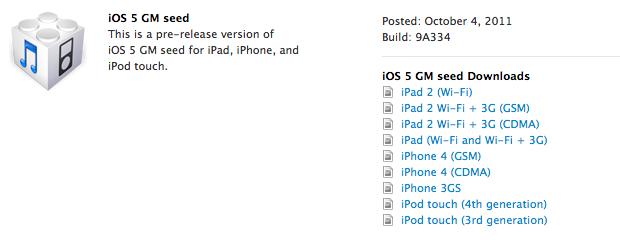
Apple has just released the Golden Master (GM) version of iOS 5 to developers. Build 9A334 is now available in the iOS Dev Center. A Golden Master seed of iOS is usually the same version that will ship to the public within a few weeks.

iOS 5 is the next major release of Apple’s mobile operating system for iPhone, iPad, and iPod touch, bringing new features like PC-Free setup, iCloud, Notification Center and direct Twitter integration to iOS devices. iOS 5 will be released on October 12th. Additionally, Apple has also released the GM seed of OS X 10.7.2, the next software update for OS X Lion that will bring minor features and optimizations and, more importantly, full iCloud support on the desktop.

Access Extra Content and Perks

Founded in 2015, Club MacStories has delivered exclusive content every week for nearly a decade.

What started with weekly and monthly email newsletters has blossomed into a family of memberships designed for every MacStories fan.

Learn more here and from our Club FAQs.

Club MacStories: Weekly and monthly newsletters via email and the web that are brimming with apps, tips, automation workflows, longform writing, early access to the MacStories Unwind podcast, periodic giveaways, and more;

Club MacStories+: Everything that Club MacStories offers, plus an active Discord community, advanced search and custom RSS features for exploring the Club’s entire back catalog, bonus columns, and dozens of app discounts;

Club Premier: All of the above and AppStories+, an extended version of our flagship podcast that’s delivered early, ad-free, and in high-bitrate audio.

Learn more here and from our Club FAQs.


Apple Officially Unveils Siri Voice Assistant - Supports English, French and German

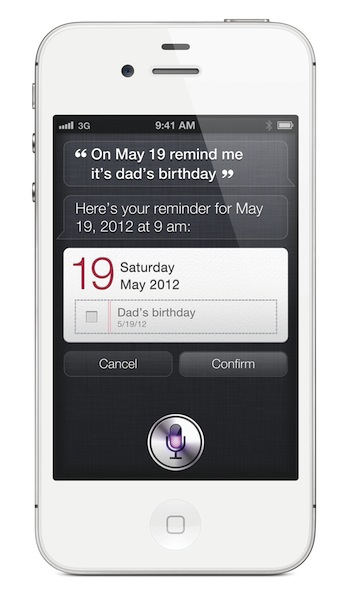
Following the iPhone 4S official announcement at its media event in Cupertino, Apple has formally taken the wraps off Siri, the new voice-based assistant Apple has been rumored to be building for quite some time. Phil Schiller kicked off the Siri demo saying he wished modern devices would understand the things we’re asking them. Natural language, normal questions like “Should I take an umbrella today?” or “Will it rain tomorrow in Cupertino’”. Siri will be able to respond to a user’s questions, and provide information and data in real-time in brand interface. The design looks largely similar to a mockup posted last week.

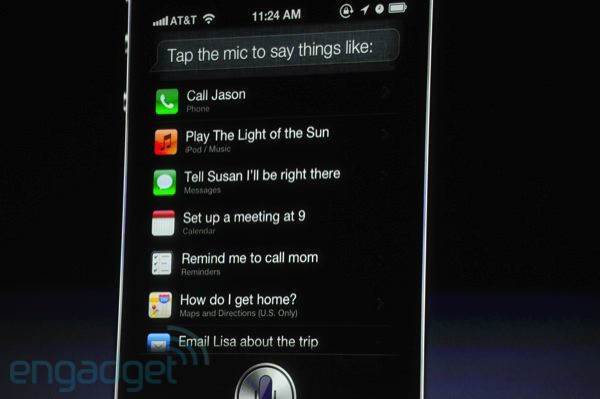
Siri will be able to check the weather, stocks information, find nearby restaurants and places, set alarms and even give you directions. Siri will also be able to send text messages and read them, which can be particularly useful if you have an iPhone in your pocket and using a Bluetooth headset.

Siri knows, and always remembers. For example, Apple gave a demo in which, upon receiving a text message, the user had to know whether he was busy on a specific day. From a single Assistant interface, which was brought up following the new text message, Scott Forstall had a “conversation” with Siri, asking it if he could schedule a meeting on Friday. Siri checked on the upcoming Calendar events, found a free spot, and “replied” a meeting at the previously specified time would indeed be possible. Siri then transcribed a text message, and sent it back in the original SMS conversation.

[images via]

Siri can look up words, currency conversions, email people, set reminders and calendar events, find addresses – it also integrated with Wolfram Alpha to check on information available on the popular online service. The interface uses a mix of linen – judging from some early screenshots – conversation bubbles, and textured paper objects. As previously rumored, systemwide dictation is also available through Siri.

Siri is a new feature of the iPhone 4S. The first “beta” period will support English (US, UK, and Australia), French, and German.

Here’s what Apple says about Siri in the official press release:

iPhone 4S also introduces Siri, an intelligent assistant that helps you get things done just by asking. Siri understands context allowing you to speak naturally when you ask it questions, for example, if you ask “Will I need an umbrella this weekend?” it understands you are looking for a weather forecast. Siri is also smart about using the personal information you allow it to access, for example, if you tell Siri “Remind me to call Mom when I get home” it can find “Mom” in your address book, or ask Siri “What’s the traffic like around here?” and it can figure out where “here” is based on your current location. Siri helps you make calls, send text messages or email, schedule meetings and reminders, make notes, search the Internet, find local businesses, get directions and more. You can also get answers, find facts and even perform complex calculations just by asking.

Read more

Access Extra Content and Perks

Founded in 2015, Club MacStories has delivered exclusive content every week for nearly a decade.

What started with weekly and monthly email newsletters has blossomed into a family of memberships designed for every MacStories fan.

Learn more here and from our Club FAQs.

Club MacStories: Weekly and monthly newsletters via email and the web that are brimming with apps, tips, automation workflows, longform writing, early access to the MacStories Unwind podcast, periodic giveaways, and more;

Club MacStories+: Everything that Club MacStories offers, plus an active Discord community, advanced search and custom RSS features for exploring the Club’s entire back catalog, bonus columns, and dozens of app discounts;

Club Premier: All of the above and AppStories+, an extended version of our flagship podcast that’s delivered early, ad-free, and in high-bitrate audio.

Learn more here and from our Club FAQs.


Apple Announces iPhone 4S: A5, 8 MP Camera, 1080p Video Recording - Available October 14th


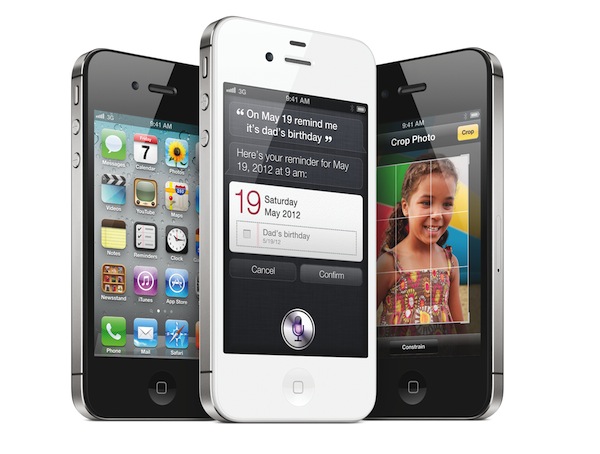
Apple’s Phil Schiller took the stage today at Apple’s media event in Cupertino to officially unveil the iPhone 4S, Apple’s latest entry in the iPhone family. As widely expected, the iPhone 4S looks exactly like the existing iPhone 4 model – industrial design with metal band in the middle, glass front and rear panels.

The iPhone 4S is powered by Apple’s dual-core A5 chip, which will allow for graphics up to 7 times faster. To demonstrate the 4S’ graphic capabilities, Apple invited Epic Games on stage to demo Infinity Blade 2, which will be available on December 1. In spite of the iPhone 4S’ faster processor and dual-core graphics, Apple is guaranteeing 8 hours of 3G talk time, 6 hours of 3G browsing, and up to 10 hours of video/40 hours of music.

The iPhone 4S comes with a new wireless system as well – downloads are faster over 3G with up to 14.4Mbps down. The iPhone 4S is a world-phone as previously rumored, integrating both GSM and CDMA technologies in a single, updated antenna design.

The camera has been improved: the 4S has an 8 megapixel sensor shooting pics at 3264 x 2448 resolution. That’s 60% more pixels that the old iPhone’s camera. The iPhone 4S’ camera has backside illumination, the new sensor will allow the camera to gather 73% more light, and it’s faster than the iPhone 4’s old camera. The new Image Signal Processor Apple designed will also enable face detection and 26% better white balance. Apple has compared the iPhone 4S’ camera loading times to other phones, and it turned out the iPhone 4S shoots the first photo in a second, with the second picture to follow in 0.5 seconds. Apple has touted the iPhone 4S’ camera as one advanced piece of technology producing beautiful shots, which can also be used for macro photography if the user wants.

The iPhone 4S does 1080p video recording with image stabilization and temporal noise reduction. Because the 4S is more powerful than the old iPhone 4, Apple has now enabled AirPlay Mirroring to mirror the display to an Apple TV (just like the iPad 2 already does), as well as video out. Read more

Access Extra Content and Perks

Founded in 2015, Club MacStories has delivered exclusive content every week for nearly a decade.

What started with weekly and monthly email newsletters has blossomed into a family of memberships designed for every MacStories fan.

Learn more here and from our Club FAQs.

Club MacStories: Weekly and monthly newsletters via email and the web that are brimming with apps, tips, automation workflows, longform writing, early access to the MacStories Unwind podcast, periodic giveaways, and more;

Club MacStories+: Everything that Club MacStories offers, plus an active Discord community, advanced search and custom RSS features for exploring the Club’s entire back catalog, bonus columns, and dozens of app discounts;

Club Premier: All of the above and AppStories+, an extended version of our flagship podcast that’s delivered early, ad-free, and in high-bitrate audio.

Learn more here and from our Club FAQs.


“Let’s Talk iPhone” Event Rumor Roundup

Tomorrow morning, Apple will hold a press conference in Cupertino, where CEO Tim Cook is widely expected to introduce the next-generation iPhone, a new iOS 5 feature called “Assistant”, and a refreshed line-up for Apple’s iPod family. However, speculation has been running wild in the past months as to whether Apple will announce not one, but two different iPhone models, or perhaps even an iPhone 4 revision to target the low-end market. With rumors of upcoming Facebook integration, voice-recognition features and cheaper iPhone 4 models, Apple’s “Let’s talk iPhone” may turn out to be bigger than expected. Or, as the name of the event suggests, perhaps the company will only focus on the iPhone, leaving other announcements for press releases and minor store updates in the next weeks.

In this post, we’ve rounded up the most recent October 4th rumors and predictions, some old rumors that haven’t been reported in a while, as well as last-minute speculation on what Apple will introduce tomorrow.

Come back tomorrow at 10 AM Pacific on MacStories for our coverage of Apple announcements.

iPhone 4S: This is the device that Apple is rumored to unveil as the “next-generation iPhone” tomorrow. Initially described as an “iPhone 5 inside an iPhone 4 case” for developers’ testing back in April, the iPhone 4S with codename N94 should pack an A5 processor, 1 GB of RAM, SGX 543MP2 GPU (same as iPad 2), GSM-CDMA dual mode, HSPA+, same 3.5-inch screen and design of the existing iPhone 4. The device will come with a new software featured called Assistant for voice-recognition, and possibly a new panoramic photo functionality, likely related to the (rumored) new 8 MP camera. The iPhone 4S name has been spotted on packaging for third-party cases, carrier websites and even Apple’s iTunes 10.5 beta. In the past months, several leaked parts and components have suggested the 4S will share the same design of the iPhone 4, only with largely improved specs.

iPhone 5: The confusion caused by the “iPhone 5” name is due to the fact that it’s been widely used to generally indicate the new iPhone (iPhone 5 comes after iPhone 4) as well as a “completely redesigned” device, as opposed to the iPhone 4S. In fact, several analysts and industry sources believe Apple will announce two new iPhones tomorrow, a 4S for the low-end, and a “real” iPhone 5 as top-line device. The iPhone 5 was rumored to feature a new design months ago, although over time some of its alleged specs have overlapped with the iPhone 4S (improved camera, A5 CPU, 8 MP camera). The distinctive rumor about the iPhone 5 is a new “teardrop” design with tapered edges and thinner form factor, possibly a bigger screen with edge-to-edge LCD and a new “elongated” Home button.

No parts or internal components of the iPhone 5 have been leaked, suggesting such device hasn’t entered production yet and won’t be announced tomorrow.

More iPhone 4S/5 rumors in our roundup.

Read more

Access Extra Content and Perks

Founded in 2015, Club MacStories has delivered exclusive content every week for nearly a decade.

What started with weekly and monthly email newsletters has blossomed into a family of memberships designed for every MacStories fan.

Learn more here and from our Club FAQs.

Club MacStories: Weekly and monthly newsletters via email and the web that are brimming with apps, tips, automation workflows, longform writing, early access to the MacStories Unwind podcast, periodic giveaways, and more;

Club MacStories+: Everything that Club MacStories offers, plus an active Discord community, advanced search and custom RSS features for exploring the Club’s entire back catalog, bonus columns, and dozens of app discounts;

Club Premier: All of the above and AppStories+, an extended version of our flagship podcast that’s delivered early, ad-free, and in high-bitrate audio.

Learn more here and from our Club FAQs.


Scripting BBEdit - Part I

I was recently listening to an episode of the popular podcast Build and Analyze where Marco Arment was discussing his experience of leaving the comfort of TextMate to test drive BBEdit for a week. The results of his experiment were similar to many others who have attempted the same feat and after that week, according to Marco, he had returned to TextMate. I once did the same experiment. A dedicated TextMate user who switched to BBEdit for no other reason than the lack of updates and BBEdit happened to be in the Mac App Store at a greatly reduced price. I jumped on the opportunity to try the legendary text editor with its newly added fullscreen, auto-save, and resume features.

The humorous part of listening to Marco describe his time with BBEdit was knowing that we shared identical opinions on all of the quirks that differentiate TextMate and BBEdit. I don’t think one is any better than the other, I just think they solve the same problem with two different methods. What features BBEdit lacks, it generally makes up for in scripting ability. It has one of the most detailed and feature-rich AppleScript dictionary I have ever seen. So as I came across quirks that I could change with AppleScript, I wrote a script for them and that is what I would like to share in this mini-series of posts. Please note these articles are intended for people that are familiar enough with BBEdit to be able to add a new script and assign a keyboard shortcut in the preferences.

Wrapping Text

The first thing that drove me absolutely crazy with BBEdit is when hitting the quotes or parentheses key while text is selected, BBEdit doesn’t wrap the text in that punctuation but instead writes over the selection.

To alleviate this issue I wrote six AppleScripts (one for each commonly wrapped punctuation) and I assigned each one a keyboard shortcut. In this situation I think the keyboard shortcut is just as important as the script itself. It has to be easy to remember and close to the position your hand is already in when typing the punctuation key. So in five of the six shortcuts I simply added the command key and it felt as natural as typing the punctuation normally. For the single quotes script I settled with the Option + Command combo because it is on the same key as the double quotes.

  • Wrap in Asterisks: ⇧ + ⌘ + *
  • Wrap in Backticks: ⇧ + ⌘ + `
  • Wrap in Brackets: ⇧ + ⌘ + ]
  • Wrap in Parentheses: ⇧ + ⌘ + )
  • Wrap in Quotes: ⇧ + ⌘ + “
  • Wrap in Single Quotes: ⌥ + ⌘ + ’

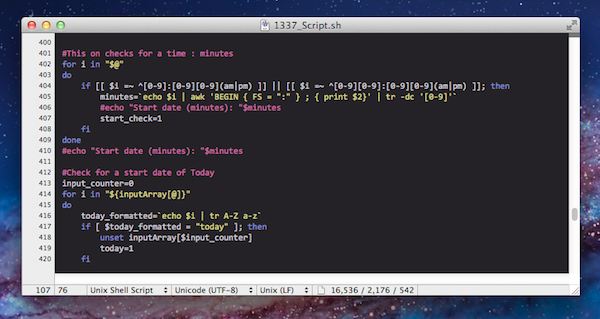
All six scripts are variations of the same code shown below:

Download these scripts here: Wrap Text scripts

Save these scripts to the directory: ~/Library/Application Support/BBEdit/Scripts

Commenting Entire Line

The second feature of BBEdit that bugged me was the way commenting was implemented. Most of the time when I hit the “Comment” keyboard shortcut I actually wanted to comment out the entire line; instead, BBEdit starts the comment wherever the cursor is located. I wrote a script that reads the documents source language and comments out the entire current line using the correct syntax for that language.

For the keyboard shortcut I actually changed BBEdit’s default Un/Comment Selection to ⌥ + ⌘ + / so that I could configure my script with the default combination I was already used to: ⌘ + /

The script is configured to work with but is not limited to these languages:

  • Unix Shell Script
  • Python
  • Perl
  • Ruby
  • Java
  • Javascript
  • PHP
  • Objective-C
  • ANSI C
  • C++
  • HTML

If you don’t see the language you want it is very easy to add your own – just open the script and take a look at the code.

Download the script here: Comment Entire Line

Save these scripts to the directory: ~/Library/Application Support/BBEdit/Scripts

*Stay tuned for more posts on ways to really get the most out of BBEdit!

Access Extra Content and Perks

Founded in 2015, Club MacStories has delivered exclusive content every week for nearly a decade.

What started with weekly and monthly email newsletters has blossomed into a family of memberships designed for every MacStories fan.

Learn more here and from our Club FAQs.

Club MacStories: Weekly and monthly newsletters via email and the web that are brimming with apps, tips, automation workflows, longform writing, early access to the MacStories Unwind podcast, periodic giveaways, and more;

Club MacStories+: Everything that Club MacStories offers, plus an active Discord community, advanced search and custom RSS features for exploring the Club’s entire back catalog, bonus columns, and dozens of app discounts;

Club Premier: All of the above and AppStories+, an extended version of our flagship podcast that’s delivered early, ad-free, and in high-bitrate audio.

Learn more here and from our Club FAQs.


“iPhone 4S” Name Found In Latest iTunes Beta

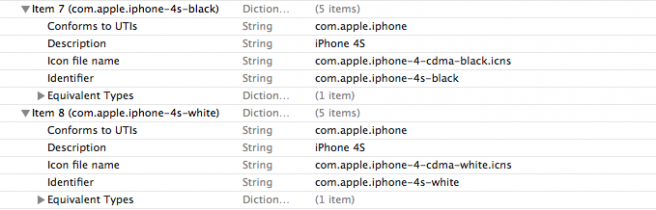
Apple has apparently included the “iPhone 4S” name in a file inside the latest iTunes beta seeded on Friday, 9to5mac reports. As shown in the screenshot above, two strings report “iPhone 4S” in the description, with a link to the same image used by iTunes for the older CDMA iPhone 4. Whilst the iPhone 4 had separate references for colors (black/white) and carrier variations (GSM/CDMA), the “4S” name in iTunes 10.5 beta 9 is only differentiated by color.

Speculation surrounding the next-generation iPhone initially described the “iPhone 4S” as the lower end model with improved specs over the iPhone 4, although recent rumors have suggested the “iPhone 5” may end up being the 4S itself, thus contradicting reports of two different models, one being “completely redesigned”.

The iPhone 4S name recently appeared on packaging for third-party cases and it also supposedly hit Apple’s internal inventory system with the codename N94. The CDMA image associated to the 4S in the iTunes beta may be a placeholder, but the 4S was previously rumored to have dual CDMA-GSM capabilities.

Apple will hold a keynote in Cupertino on Tuesday, October 4th, where it’s widely expected to unveil the next-generation iPhone.

Access Extra Content and Perks

Founded in 2015, Club MacStories has delivered exclusive content every week for nearly a decade.

What started with weekly and monthly email newsletters has blossomed into a family of memberships designed for every MacStories fan.

Learn more here and from our Club FAQs.

Club MacStories: Weekly and monthly newsletters via email and the web that are brimming with apps, tips, automation workflows, longform writing, early access to the MacStories Unwind podcast, periodic giveaways, and more;

Club MacStories+: Everything that Club MacStories offers, plus an active Discord community, advanced search and custom RSS features for exploring the Club’s entire back catalog, bonus columns, and dozens of app discounts;

Club Premier: All of the above and AppStories+, an extended version of our flagship podcast that’s delivered early, ad-free, and in high-bitrate audio.

Learn more here and from our Club FAQs.