Posts in Featured

Instagram’s New Experiment: Open Up The API for Third-Party Uploads

Hipstamatic, a photo sharing app for the iPhone that allows users to apply vintage/analog effects and filters to their photos, has become the first app to directly integrate with Instagram. The popular iPhone-only sharing service, now boasting over 27 million users and on the verge of releasing an Android app, has so far allowed third-party developers to integrate their apps with the Instagram API to only visualize a user’s photos or feed. The API hasn’t allowed for the creation of real Instagram clients for other devices, in that uploading could be done exclusively using Instagram’s own app.

Today, however, an update to Hipstamatic and a collaboration between the two services first reported by Fast Company might signal an important change in Instagram’s direction and nature as a photo sharing service. The new Hipstamatic, available now on the App Store, comes with a redesigned “HipstaShare” system to send photos to various social networks including Facebook, Twitter, and Flickr. Among the supported services, a new Instagram option now enables you to log into your Instagram account, and upload photos directly within Hipstamatic, without leaving the app. There is no “forwarding” of files to the Instagram app, nor does Hipstamatic asks you to download the Instagram app from the App Store – this is true uploading to Instagram done by a third-party, via the API.

Unlike most photo sharing apps these days, Hipstamatic puts great focus on recreating the analog experience of shooting photos and carefully selecting the equipment you’d like to shoot with. With a somewhat accurate representation of vintage films, lenses, camera cases, and flash units, Hipstamatic wants to appeal to that kind of userbase that is not simply interested in capturing a fleeing moment and share it in seconds; rather, as famous appearances on publications like The New York Times confirm, the Hipstamatic crowd is more of a passionate gathering of 4 million users looking to spend minutes, if not hours, trying to achieve the perfect setup for each occasion, spending one dollar at a time on in-app purchases that unlock different filters and “parts” of the cameras supported in Hipstamatic. Unlike Instagram or, say, Camera+, Hipstamatic isn’t built to shoot & share; the ultimate goal is undoubtedly sharing, but it’d be more appropriate to describe Hipstamatic’s workflow as “set up, shoot, then share”.

Hipstamatic seems to have realized, however, that sharing can’t be relegated to a simple accessory  that has a second place behind the app’s custom effects and unlockable items. Whilst in-app purchases and fancy graphics may have played an important role in driving Hipstamatic’s success so far, apps can’t go without a strong sharing and social foundation nowadays, and since its launch two years ago, Instagram has seen tremendous growth for being only an iPhone app. With this update, Instagram and Hipstamatic are doing a favor to each other: Instagram gets to test the waters with an API that now allows for uploading through other clients that support similar feature sets; Hipstamatic maintains its existing functionalities, but it adds a new social layer that plugs natively into the world’s hottest photo sharing startup.
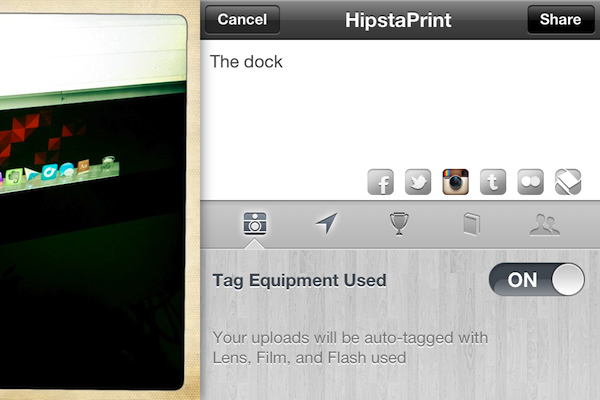
Looking at the terms of the “deal” (I don’t think any revenue sharing is taking place between the two parties), it appears both sides got the perks they wanted. This native integration comes with an Instagram icon in Hipstamatic’s new sharing menu, which, when tapped, will let you log into your account. Once active, each “Hipstaprint” (another fancy name for photos) can be shared on a variety of networks, with Facebook even supporting friend tagging. You can upload multiple photos at once if you want, too. In the sharing panel, you can optionally decide to activate “equipment tagging” – this option will, alongside the client’s information, include #hashtags for the lens, film and other equipment that you use in your Hipstamatic camera.

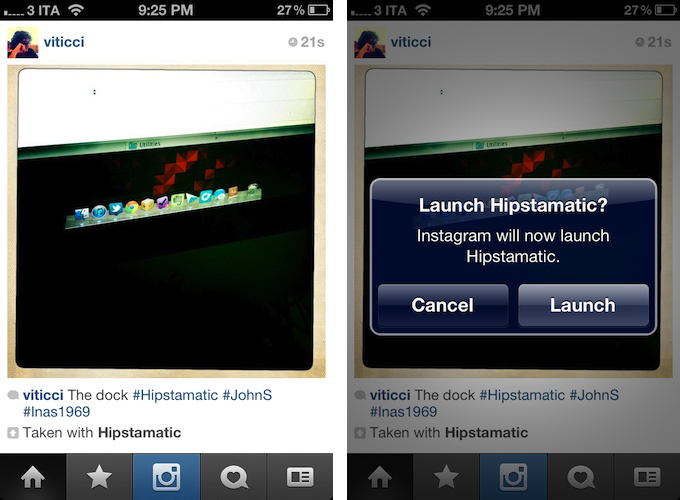
On the Instagram’s side, things get a little more interesting. Hipstamatic photos get uploaded respecting Instagram’s photo sizes, and they get a border around the image to, I guess, indicate their “print” nature. Together with the title, Instagram will display the aforementioned tags for equipment, and a “Taken with Hipstamatic” link that, when tapped, will ask you to launch Hipstamatic. If you don’t have Hipstamatic installed on your iPhone, this link will take you to the App Store page for the app.

Overall, what really intrigues me about this collaboration isn’t the Hipstamatic update per se – version “250” of the app is solid and well-built, but I don’t use Hipstamatic myself on a regular basis, as I prefer more direct tools like Instagram, Camera+, or even the Facebook app for iOS. What I really think could be huge, both for the companies involved and the users, is the API that Hipstamatic is leveraging here. Hipstamatic is doing the right thing: sharing has become a fundamental part of the mobile photo taking process, and it would be foolish to ignore Instagram’s popularity and come up with a whole new network.

Instagram, on the other hand, is taking an interesting path (no pun intended) that, sometime down the road, might turn what was once an iPhone app into a de-facto option for all future social sharing implementations. A few months from now, would it be crazy to think Camera+ could integrate with Instagram to offer antive uploads? Or to imagine built-in support for Instagram photo uploads in, say, iOS, Twitter clients, and other photo apps? I don’t think so. Just as “taken with Hipstamatic” stands out in today’s Instagram feeds, “Upload to Instagram” doesn’t sound too absurd at this point.

Access Extra Content and Perks

Founded in 2015, Club MacStories has delivered exclusive content every week for nearly a decade.

What started with weekly and monthly email newsletters has blossomed into a family of memberships designed for every MacStories fan.

Learn more here and from our Club FAQs.

Club MacStories: Weekly and monthly newsletters via email and the web that are brimming with apps, tips, automation workflows, longform writing, early access to the MacStories Unwind podcast, periodic giveaways, and more;

Club MacStories+: Everything that Club MacStories offers, plus an active Discord community, advanced search and custom RSS features for exploring the Club’s entire back catalog, bonus columns, and dozens of app discounts;

Club Premier: All of the above and AppStories+, an extended version of our flagship podcast that’s delivered early, ad-free, and in high-bitrate audio.

Learn more here and from our Club FAQs.


#MacStoriesDeals - Wednesday

Here are today’s @MacStoriesDeals on iOS, Mac, and Mac App Store apps that are on sale for a limited time, so get them before they end!
Read more

Access Extra Content and Perks

Founded in 2015, Club MacStories has delivered exclusive content every week for nearly a decade.

What started with weekly and monthly email newsletters has blossomed into a family of memberships designed for every MacStories fan.

Learn more here and from our Club FAQs.

Club MacStories: Weekly and monthly newsletters via email and the web that are brimming with apps, tips, automation workflows, longform writing, early access to the MacStories Unwind podcast, periodic giveaways, and more;

Club MacStories+: Everything that Club MacStories offers, plus an active Discord community, advanced search and custom RSS features for exploring the Club’s entire back catalog, bonus columns, and dozens of app discounts;

Club Premier: All of the above and AppStories+, an extended version of our flagship podcast that’s delivered early, ad-free, and in high-bitrate audio.

Learn more here and from our Club FAQs.


Apple Confirms: Three Million iPads Sold In 4 Days

Apple just confirmed with a press release they have sold over 3 million iPads since the device’s debut on March 16.

The new iPad is a blockbuster with three million sold―the strongest iPad launch yet,” said Philip Schiller, Apple’s senior vice president of Worldwide Marketing. “Customers are loving the incredible new features of iPad, including the stunning Retina display, and we can’t wait to get it into the hands of even more customers around the world this Friday.

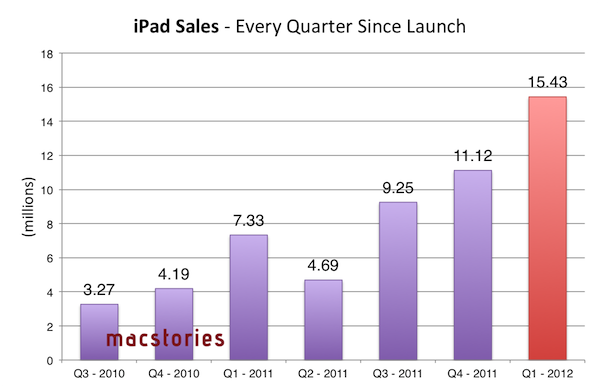
To put these numbers in perspective, let’s take a trip down Apple’s iPad memory lane again and remember how iPad sales evolved over time.

And then, of course, the company kept pushing the iPad quarter after quarter with new software, new apps, and a new version in March 2011, achieving these results:

It is worth noting, however, that the original iPad and iPad 2 went on sale exclusively in the United States on Day One, whilst today’s iPad numbers include sales and pre-orders for the United States and 9 more launch countries from March 16, 2012. This Friday (March 23), the device will go on sale in Austria, Belgium, Bulgaria, Czech Republic, Denmark, Finland, Greece, Hungary, Iceland, Ireland, Italy, Liechtenstein, Luxembourg, Macau, Mexico, The Netherlands, New Zealand, Norway, Poland, Portugal, Romania, Slovakia, Slovenia, Spain and Sweden.

For comparison, the new iPad has sold 3 million units in 4 days, while the iPhone 4S sold 4 million units in 3 days last October (the 4S went on sale in 7 countries on October 14, 2011). The iPhone 4S has been the Apple’s biggest success with the iPhone line so far, reporting over 37 million units sold in the last quarter. If these initial are of any indication, it seems like Apple’s strategy with multiple, international rollouts a week from each other may lead to the biggest iPad launch to date.

Earlier today, Apple CEO Tim Cook said the company saw “record” sales for the new iPad in its opening weekend. The new iPad launched to very positive reviews from the press (which mentioned the device’s Retina display, LTE, and battery life as great selling points) and long lines around the world.

Access Extra Content and Perks

Founded in 2015, Club MacStories has delivered exclusive content every week for nearly a decade.

What started with weekly and monthly email newsletters has blossomed into a family of memberships designed for every MacStories fan.

Learn more here and from our Club FAQs.

Club MacStories: Weekly and monthly newsletters via email and the web that are brimming with apps, tips, automation workflows, longform writing, early access to the MacStories Unwind podcast, periodic giveaways, and more;

Club MacStories+: Everything that Club MacStories offers, plus an active Discord community, advanced search and custom RSS features for exploring the Club’s entire back catalog, bonus columns, and dozens of app discounts;

Club Premier: All of the above and AppStories+, an extended version of our flagship podcast that’s delivered early, ad-free, and in high-bitrate audio.

Learn more here and from our Club FAQs.


Comparing My Favorite iOS Text Editors

Earlier this year, I promised myself that I would get more work done using the iPad. The plan was an ambitious one: after three years of writing, researching, and online communication done exclusively using my MacBook (and, perhaps to an extent, my iPhone) switching to the iPad as my main work machine did indeed seem like a daunting task at first. Yet the more I thought about it, the more I realized the long-term benefits of giving the iPad a fair chance as a full-time writing tool would outnumber the perks of using a device I am accustomed to. With a mature ecosystem of apps that sees great new software coming out every week and a Retina display on the horizon, starting to use the iPad as my main computer was an investment.

The experiment has been a success so far. I use my iPad a lot more, I enjoy it, and, more importantly, the device is helping me work smarter because it lets me focus more on what I do for a living: writing.

If anything, the only negative note is that the iPad has given too much choice when it comes to picking a single writing tool. See, on the Mac, when I need a text editor, I usually fire up Text Edit (rigorously set in plain text mode) and forget about it. But there is no Text Edit for iPad. And all those text editors on the App Store look so tempting.

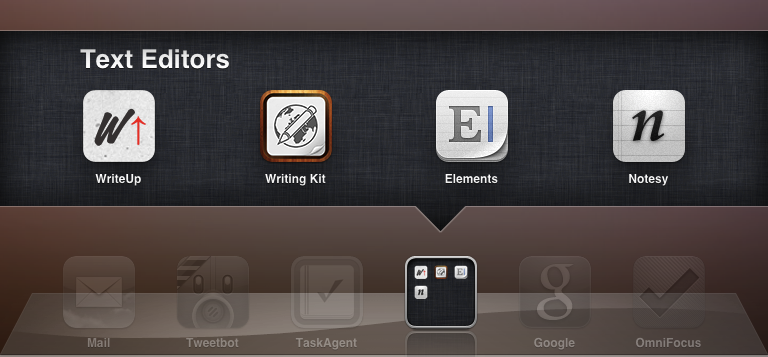
What follows is an overview of the four text editors (for writing, not coding) that I have preferred using in the past three months. Like TJ Luoma, I have bought many of them. Almost too many, to the point where I needed to stop fiddling already, and get the writing done. Because while I’m one for supporting developers and buying apps and paying for the tools I use, there is a line between “trying software” and “using software to work better”, and I had crossed that line with my curiosity for text editors. So I took all of them, tested them, and deleted the ones I didn’t like. I kept the ones with Markdown formatting and Dropbox sync. I didn’t include recent additions to the ecosystem like iA Writer (for iPhone) and Byword, as I need to test them more accurately. Eventually, I picked four apps.

Some smart folks have already written about the note-taking apps/text editors they like and use. Mine doesn’t want to be a comprehensive comparison that takes into account all the possible options from the App Store. It will likely lack the app you like, and yes, it’s also very likely that it’s not here for a reason. In this article, I am just comparing four apps that, taken singularly, allow me to write for the site; these four apps can stand on their own. However, they have their differences, which is why I am, ultimately, going to choose one and stick with it. The apps are universal, and while I am primarily looking at their iPad versions, almost all of the features I mention are also available on the iPhone.

I have no doubt new iOS text editors will come out, activating my curiosity trigger again. Until then, these are the four text editors I was most impressed with. Read more

Access Extra Content and Perks

Founded in 2015, Club MacStories has delivered exclusive content every week for nearly a decade.

What started with weekly and monthly email newsletters has blossomed into a family of memberships designed for every MacStories fan.

Learn more here and from our Club FAQs.

Club MacStories: Weekly and monthly newsletters via email and the web that are brimming with apps, tips, automation workflows, longform writing, early access to the MacStories Unwind podcast, periodic giveaways, and more;

Club MacStories+: Everything that Club MacStories offers, plus an active Discord community, advanced search and custom RSS features for exploring the Club’s entire back catalog, bonus columns, and dozens of app discounts;

Club Premier: All of the above and AppStories+, an extended version of our flagship podcast that’s delivered early, ad-free, and in high-bitrate audio.

Learn more here and from our Club FAQs.


iPad Lines Around the World

As the new iPad begins its international rollout at 8 A.M. (local time) on Friday, March 16th, it’s no surprise Apple fans have started waiting in line at retail stores to get their hands on the device, which, this year, was also made available through online pre-orders.

On March 16th, the new iPad (our overview) goes on sale in 10 countries.

  • US
  • Canada
  • UK
  • France
  • Germany
  • Switzerland
  • Japan
  • Hong Kong
  • Singapore
  • Australia

In this post, we’ll collect photos and videos about the experience of our readers and other folks around the web while waiting in line for the new iPad. Come back later for updates and new images. Read more

Access Extra Content and Perks

Founded in 2015, Club MacStories has delivered exclusive content every week for nearly a decade.

What started with weekly and monthly email newsletters has blossomed into a family of memberships designed for every MacStories fan.

Learn more here and from our Club FAQs.

Club MacStories: Weekly and monthly newsletters via email and the web that are brimming with apps, tips, automation workflows, longform writing, early access to the MacStories Unwind podcast, periodic giveaways, and more;

Club MacStories+: Everything that Club MacStories offers, plus an active Discord community, advanced search and custom RSS features for exploring the Club’s entire back catalog, bonus columns, and dozens of app discounts;

Club Premier: All of the above and AppStories+, an extended version of our flagship podcast that’s delivered early, ad-free, and in high-bitrate audio.

Learn more here and from our Club FAQs.


Sparrow for iPhone Review

Back in 2006, when Apple was still rumored to be working on a revolutionary mobile phone, many wondered if such device would be able to do core tasks like email and messaging as well as RIM’s BlackBerry. Months later, when the iPhone was officially announced at Macworld, the introduction of the device alone led some people to write that it was “already impacting its new competitors” – namely RIM, and its BlackBerry line of phones that had captured a great portion of corporate America. Yet, those people were right: the numbers are speaking for themselves now, and the many issues behind RIM’s poor management and marketing choices can be traced back to the iPhone’s introduction.

At Macworld 2007, a healthy-looking Steve Jobs said: “This is a day I’ve been looking forward to for two and half years. Every once in a while, a revolutionary product comes along that changes everything. […] Today we’re introducing three revolutionary products of this class.

Today Apple is going to reinvent the phone”.

Looking back at that day now, it’s a shared sentiment among those who have been following Apple for the past years that Steve touched his highest point in presentation style and product-unveiling skills with that keynote. Because while Steve may no longer be with us today, his words still resonate stronger than ever. On that day, Apple did reinvent the phone. And as it turns out, the revolution wasn’t just about multitouch and elegant hardware design.

It was about the software.

Later on during that keynote, Steve arrived at the third section of the presentation and iPhone feature set, which was also described as an “Internet communications device”. The first item in that slide was Rich HTML email – “for the first time, really rich email on a mobile device”, he said. Sure enough, the iPhone’s Mail app was demoed on stage to show off its rich HTML-parsing capabilities, which included inline images, rich text, support for phone numbers and web links, and more. When the iPhone went on sale six months later, on June 29, and debuted online to rave reviews from the press, many praised its email capabilities, among other things.

But then something happened in the following months. As Apple kept adding features to iPhone and refining its core apps including Mail, users and developers began wondering when Apple would allow for third-party apps to be installed on the device. For as much as Apple was adding new functionalities and fixes, there are always niches and sub-markets that Apple can’t address in new software releases – corporate email was one of them, as, admittedly, that were still several things Apple wasn’t adding to its email client to please business users from corporate environments. When Apple did confirm its plans to open up iPhone OS and offer an App Store, users wondered if it would be possible, like it still is on a Mac, to install replacements for the “core apps”, such as the browser, email client, or calendar application. In a somewhat unexpected and much criticized turn of events, Apple made it clear to developers that it would not accept third-party apps duplicating the functionality of build-in iPhone applications.

John Gruber has a good recollection of the events from 2008 – case in point MailWrangler, an email app that was rejected at the time.

I have a theory. It is more, well, emotional than logical. But it’s the only theory I can think of that makes any sense at all and fits the available evidence. The theory is that there is an unpublished rule that Apple — and in this case, where by “Apple” I really mean “Steven P. Jobs” — will not publish third-party apps that compete with or replace any of the four apps in the iPhone’s default “dock”: Phone, Mail, Safari, and iPod.

In the following years, in spite of App Store-related controversies showing up every once in a while, developers more or less “understood” how Apple’s approval process worked, and kept working on apps that would be “safe” for sale within Apple’s rules. Publishing a set of guidelines certainly helped in making things clear for everyone, but new apps that belonged to categories not mentioned in the guidelines would still appear in the App Store, forcing Apple to revise its guidelines or impose new limits. This often happens after new iOS technologies are made available to developers – a recent example is the banning of Notification Center utilities. However, one thing has been clear since MailWrangler’s rejection in 2008: full replacements for Apple’s system apps can’t be developed for the App Store. Developers can use the frameworks behind system features to develop third-party apps: Address Book companions, Calendar utilities, photo editing apps – these are all built using APIs and frameworks available publicly. The same has been true for browsers, which have to use Safari’s rendering engine, and alternative mail clients, which haven’t been exactly popular on the App Store, with the exception of Google’s Gmail app – an app that, however, is based on web views.

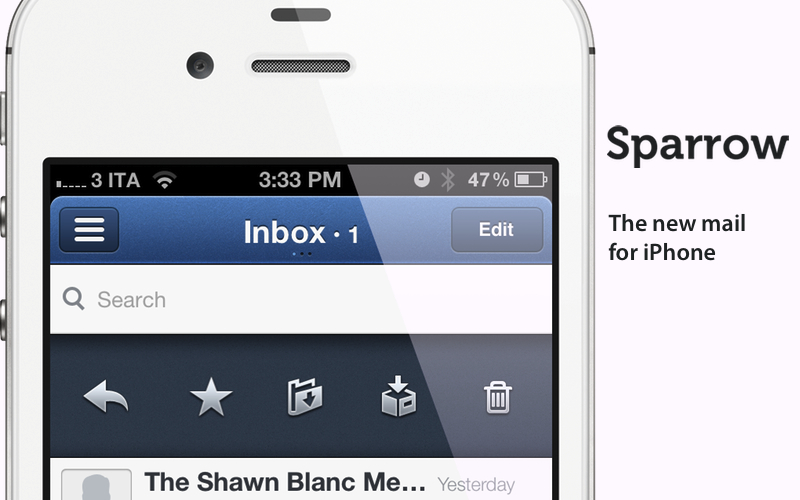
Today marks an important day in the history of the App Store. For the first time, Apple is letting a third-party developer sell a full-featured, custom email client that uses its proprietary email engine to iPhone users. Sparrow, already popular on the Mac and available on the Mac App Store, comes to the iPhone’s App Store today, and it promises to offer a newer, fresh take on email to lure back customers whose only choice since 2007 has been Apple’s Mail.app. Read more

Access Extra Content and Perks

Founded in 2015, Club MacStories has delivered exclusive content every week for nearly a decade.

What started with weekly and monthly email newsletters has blossomed into a family of memberships designed for every MacStories fan.

Learn more here and from our Club FAQs.

Club MacStories: Weekly and monthly newsletters via email and the web that are brimming with apps, tips, automation workflows, longform writing, early access to the MacStories Unwind podcast, periodic giveaways, and more;

Club MacStories+: Everything that Club MacStories offers, plus an active Discord community, advanced search and custom RSS features for exploring the Club’s entire back catalog, bonus columns, and dozens of app discounts;

Club Premier: All of the above and AppStories+, an extended version of our flagship podcast that’s delivered early, ad-free, and in high-bitrate audio.

Learn more here and from our Club FAQs.


Camera+ 3.0 Review

Few iPhone apps have managed to substantially improve on the functionalities offered by Apple in its core system apps. Tap tap tap’s Camera+, a popular alternative to Apple’s Camera app, is one of them, and the 3.0 version released today takes a major leap in turning Camera+ into a more powerful solution to shoot, edit, and share photos online, as well as providing a solid foundation other developers can integrate their apps with.

The thing about Camera+ is that its lead developer and creator, John Casasanta, knows what people want from an iPhone app, and understands the rules behind viral marketing for software sold on the App Store. In spite of a 4-month ban that forced Camera+ out of the App Store due to a functionality the developers shouldn’t have hidden without telling Apple, the app has been an example of modern success in the App Store, granting its developers a renowned position in the top charts with millions of copies sold worldwide. But it’s not just about clever marketing (Casasanta also runs MacHeist, a website dedicated to promoting deals on Mac software that has amassed an incredible amount of followers in the past years). Camera+ is a very well-done app – from the polished user interface to the features it adds on top of Apple’s standard camera-related functionalities, Camera+ has become many users’ go-to camera app thanks to its enhanced view options, filters and effects, and elegant sharing capabilities.

With Camera+ 3.0, a free update for existing users, tap tap tap wants to refine every aspect of the app, whilst opening the door to third-party devs with APIs to offer Camera+’s features into other apps. Read more

Access Extra Content and Perks

Founded in 2015, Club MacStories has delivered exclusive content every week for nearly a decade.

What started with weekly and monthly email newsletters has blossomed into a family of memberships designed for every MacStories fan.

Learn more here and from our Club FAQs.

Club MacStories: Weekly and monthly newsletters via email and the web that are brimming with apps, tips, automation workflows, longform writing, early access to the MacStories Unwind podcast, periodic giveaways, and more;

Club MacStories+: Everything that Club MacStories offers, plus an active Discord community, advanced search and custom RSS features for exploring the Club’s entire back catalog, bonus columns, and dozens of app discounts;

Club Premier: All of the above and AppStories+, an extended version of our flagship podcast that’s delivered early, ad-free, and in high-bitrate audio.

Learn more here and from our Club FAQs.


On Reviewing Apps

Over the past three years, some people have told me they don’t like the way I write software reviews. That I should just tell them whether ”they should buy the damn thing or not”. While I understand their point, with MacStories’ third anniversary quickly approaching I thought it would be appropriate to explain why I don’t do that.

An app is never ”just an app”. There are people behind the bits and buttons we use and touch every day. I have written about this before. When I am reviewing an app, I have to be honest to my reader and provide a careful and insightful analysis of the various features while taking into considerations other factors such as price, usability, and appearance. But at the same time, my writer’s instinct tells me that there’s more than just a checklist of features to mention. I want to tell that story.

There are a lot of sites that decide to focus their software reviews on enumerating features. That’s fine. Sometimes I believe, too, that simply telling our readers ”what’s new” in a specific piece of software is the only way we can cover a subject – otherwise we’d have to provide a disservice to our readers, by not covering it. This is especially true with software updates. And flashlight apps like Flashbot.

At MacStories, we carefully pick the things we want to talk about. We have been guilty of stupid rumors and speculation in the past, and we have learned a precious and invaluable lesson from that behavior: trust is important. Guess what, it’s about people again. You can only put so much of your soul on the Internet, and it can easily get lost somewhere along the line of rumors and linkbait. You’ll spread yourself too thin. You won’t tell a story. Some people excel at news reporting – which is an art by itself. Others, unfortunately, do it because they have to do it.

When I review an app, I want to find the story that needs to be told. I don’t want to be different just for the sake of originality – I genuinely believe that we’re witnessing a revolution of our digital era, and I don’t want to live it writing lists and inflammatory blog posts to drive our page views.

I want to tell this revolution. Or at least find a sweet spot where I, and my team, can contribute to providing a perspective that can make people think. Not just click.

Sometimes you’ll find an app that I love, while you think it’s terrible. That is fine, too. There’s no such thing as objectivity when you are reviewing something and expressing your opinions. There’s only honesty. Honesty and personality conflate in a number of ways, and when I write a review, my goal is to make sure the result is a balanced mix of facts, taste, and opinion. I try to tell the why and the how that are the sinew of my appreciation for fine software. Hopefully disagreements and constructive criticism will lead to a richer, variegate archive of software reviews in the future.

I have wondered if it was easier when our audience was in the order of hundreds, not millions. I ended up concluding that good traffic, besides allowing us to run this site, makes it all more exciting. It means we get to pick what we want to talk about, write it the way we want, and enjoy an intelligent discussion with more people because of it. And it’s getting better every day.

Perhaps we should just tell you whether you have to buy the damn thing or not. But that would take all the fun out of it.

That’s why we write what we write: because innovation never ceases to amaze us – and that’s a story worth telling.

Access Extra Content and Perks

Founded in 2015, Club MacStories has delivered exclusive content every week for nearly a decade.

What started with weekly and monthly email newsletters has blossomed into a family of memberships designed for every MacStories fan.

Learn more here and from our Club FAQs.

Club MacStories: Weekly and monthly newsletters via email and the web that are brimming with apps, tips, automation workflows, longform writing, early access to the MacStories Unwind podcast, periodic giveaways, and more;

Club MacStories+: Everything that Club MacStories offers, plus an active Discord community, advanced search and custom RSS features for exploring the Club’s entire back catalog, bonus columns, and dozens of app discounts;

Club Premier: All of the above and AppStories+, an extended version of our flagship podcast that’s delivered early, ad-free, and in high-bitrate audio.

Learn more here and from our Club FAQs.


The Essence of a Name

Following yesterday’s announcement of the new iPad, a debate has arisen as to whether Apple should have called the new iPad something along the lines of “iPad 3” or “iPad HD” so to give the device a unique name easily understandable by consumers. I think Macworld has the two smartest (and most balanced) takes on the subjects.

Dan Moren thinks going with “iPad” is a good move:

Constantly reinventing a nomenclature is unsustainable. Is every iPad between now and 2022 going to have a different number, letter, or some combination appended? Is Apple going to eventually reach the iPad 13GS+ Extreme? I’d argue that’s exactly what the company doesn’t want.

Lex Friedman disagrees:

I drive a Honda Accord. It’s a 2006 model. If Apple wants to keep the same names for its products each year like car companies do, adding a year to the product name seems like a fine approach. I always know which wipers to get for my 2006 Accord. I think the average consumer ought to know which case fits their iPad, too; making them instead rely on distinctions like third-generation—that aren’t in the official product names, or printed on the devices themselves—just makes things harder.

The first few seconds after Tim Cook was photographed on stage with a big “The new iPad” image behind him, I, too, was slightly confused and disappointed. Why would Apple want to go back to just iPad, after years of iPhone 4, iPad 2, and iPhone 4S? But then I, like Lex, thought about car companies. I am not driving a Polo 13. My mom doesn’t drive a Meriva 2S. Yet, in case of necessity, both my mom and I – the polar opposites on a scale from consumer to nerd – would know how to look up the company’s proper model name – the “version” – of the cars we drive. Mine’s a 2003 Polo. Not every car company does this, but it’s very common (and easy to understand).

I hear the concerns of people like Lex. Not having a unique name for each generation of device does make things harder when it comes to support, referencing a product in an article, or looking up information on Google. It means you have to do more work. It means you have to type a little more to find out – either in manuals or support docs or the Apple Store itself – what generation of device you are talking about. It’s about Apple not giving us a unique way to call the iPad – well, actually they do, it’s iPad, but that makes some people uncomfortable. It’s unsettling at first, because we were used to a different convention.

But here’s the thing: people are not stupid. Sure, some people are geekier than others, but as car companies prove, eventually people find a way to properly retrieve information about the products they use. Eventually, as in more work. Which could mean using Google, reading a manual, asking a friend, or driving to the nearest Apple Store. Apple has the best customer support around, and no tech company beats Apple’s online Support resources. No one ever died from looking up a model name. 1

But why? The trade-off is an increase in simplicity and elegance. Otherwise, we’d end up like Samsung and Square-Enix, naming our products with monickers like “Epic” or “XIV” (good luck telling a 10 year-old kid that’s 14, and not “xiv”).

More importantly, Apple’s new name puts the focus on the essence of the product, not the way it follows its predecessor year after year. It’s iPad, my friend Matthew was told by Apple. And I see the thinking behind such choice: by combining a more elegant name with new features, Apple will, yes, end up having to explain better its model numbers, but they will gain in user-friendliness and overall message. Because, again, our faith in humanity might falter every once in a while, but people know how to refer to a product. If anything, my dad would have a hard time differentiating between 3GS, 4S and 3G. But he sure knows how to say “that new iPad”.

It’s about context. People will understand, and will find a way to explain what they are talking about. And if they want to be precise, hey, Apple has a way for that too.

Peter Cohen writes:

I’d also like to point out that when the first iPad was introduced, its name was the subject of huge controversy in the blogosphere and among the tech punditry, many of whom considered the name silly or likened it to a feminine hygiene product.

I also like to see it this way: by going back to “iPad”, Apple reminds us that is the iPad that should have always been. The realization of a vision. The most advanced display ever seen in a mobile device, the fastest networking available, the most apps to choose from. It’s the new iPad, but it’s also the iPad that should have been here in the first place. Now we have the technology that makes it possible.

I thought the keynote’s theme would have been “the biggest leap since the original iPad”. Tim Cook said it better: “We have redefined, once again, the category that Apple created”.


  1. To those arguing that specific names and version numbers are necessary for support, especially in software: I agree, and indeed Apple has a complete name for the iPad on its site and online Store. I could also argue that it’s harder to describe software (bits) compared to a product (a physical object).

Access Extra Content and Perks

Founded in 2015, Club MacStories has delivered exclusive content every week for nearly a decade.

What started with weekly and monthly email newsletters has blossomed into a family of memberships designed for every MacStories fan.

Learn more here and from our Club FAQs.

Club MacStories: Weekly and monthly newsletters via email and the web that are brimming with apps, tips, automation workflows, longform writing, early access to the MacStories Unwind podcast, periodic giveaways, and more;

Club MacStories+: Everything that Club MacStories offers, plus an active Discord community, advanced search and custom RSS features for exploring the Club’s entire back catalog, bonus columns, and dozens of app discounts;

Club Premier: All of the above and AppStories+, an extended version of our flagship podcast that’s delivered early, ad-free, and in high-bitrate audio.

Learn more here and from our Club FAQs.