

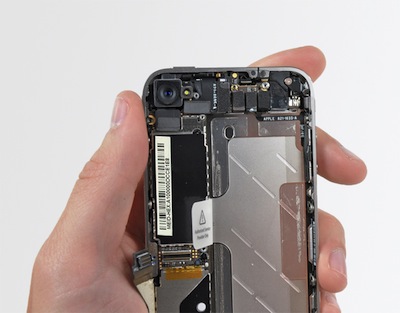
Interesting rumor reported by BGR, whose sources are usually reliable and correct: the mythical Verizon iPhone hit “AP” testing stage, which is the last stage before the product release. Almost ready to go public, with final hardware and almost final operating system.
Posts in Featured
Verizon iPhone Hits Testing Stage, iPhone 5 Goes “EVT”
SweetFM 2.0 - Last.fm Mac Client
Chocomoko has released version 2.0 of their SweetFM Mac application. SweetFM is a Last.fm client and player for Mac OS X Snow Leopard 10.6.4.
Version 2.0 has a completely redesigned UI that is more user-friendly and uses native Mac OS technologies. It also comes with Safari and Chrome browser extensions for Last.fm station control and can open the iTunes store pages from the current track. Other features: supports Media Keys, has an EQ, tagging and social network sharing, device scrobbling, multiple user accounts, hot keys and playlist management. Read more
Review: FLAC Player for iPhone
If you care about your digital music library and you care about quality, I guess you know what the FLAC format is all about. The Free Lossless Audio Codec (FLAC) is an advanced (free and open source) audio compression codec that allows decompression into a perfect copy of the original audio data. Basically, it’s a high-quality compression method that generates state-of-the-art rips and (here’s the downside) huge data files. If you lose a CD you care about but have a FLAC digital copy, you have an exact duplicate.
To give you an example, a standard 13-tracks album can go up to 450MB in size. Now think about encoding that Beatles collection you have in FLAC and you get the idea.
FLAC is great, but isn’t as supported by hardware makers as other standards such as MP3 are. Luckily enough for iPhone owners, there’s an for that (sorry Apple, I know it’s a trademark now). FLAC Player for iPhone (and iPad, it’s a universal app) is a simple way to import your lossless albums and songs on your iDevice and listen to them. Read more
More MacBook Air Speculation: Boxier Design, Upgradeable SSD, Mockup
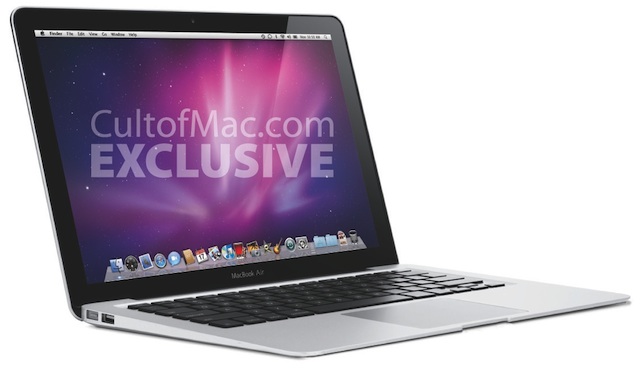
Following last week’s rumors about a new MacBook Air set to be announced by Apple at its “Back to the Mac” media event on Wednesday, Cult of Mac has now posted a mockup of what they think will be the final design of the new model.
MacStories Giveaway: Win A Copy Of The Incident

The Incident is an insanely awesome game from Big Bucket Software which we’ve covered a few times in the past. Addictive gameplay, pixels all over the place, a great 8-bit soundtrack composed by Cabel Sasser. With the latest 1.2 update, the developers introduced an “endless mode”, bug fixes and the possibility to control the game on your iPad directly from your iPhone.
The Incident is a great game. Here’s your chance to win a copy. Read more
FolderEnhancer Updated for 4.1, Still The Best Mod For iOS Folders | Cydia Store
Today is a great day for jailbreakers, in case you haven’t noticed. FolderEnhancer, the great tweak that brings dozens of new features to iOS’ folders, has been updated to include support for iOS 4.1. It’s available in Cydia at $1.99, but if you’re a previous CategoriesSB customer you can get the app at $0.99 until the end of October. Read more
Europe’s Trademark Office Confirms iPad Dual Dock Connectors?
We have already seen pictures of an alleged iPad 2 prototype featuring dual dock connectors, one on each side of the device. Today Patently Apple has found out that the European Trademark Office published a series of designs related to an iPad model featuring multiple 30-pin dock connectors.
The patent was filed in July 2010 and published three days ago. Both Steve Jobs and Jonathan Ive are mentioned in the design credits, so maybe something’s really happening this time? I don’t know - just like every tech company, Apple files a lot of patents - but it’s interesting to notice that the design patent was filed in July, months after the release of the iPad. Perhaps Apple listened to user’s feedback? Read more
Mark Zuckerberg Checks In At Jobs’ House For Dinner
Apple wants to make Ping work. The music-based social network is struggling to gain traction, and Steve Jobs needs to figure out a way to let people engage with the system and share data with their contacts - all in order to collect more data and drive more clicks to the iTunes Store. It’s a good plan, but it’s not working as expected because Apple hasn’t got the social infrastructure Facebook has. So Steve invited Facebook’s CEO over at dinner to discuss some Ping related stuff including Facebook integration, the Los Angeles Times reports:
They are two of Silicon Valley’s most famous founders: Jobs created the world’s must-have gadgets, Zuckerberg the world’s most popular social networking service. These days they are often mentioned in the same breath. Now apparently the two also recently broke bread.
Apparently Jobs invited Zuckerberg for dinner at his house to talk about Ping two weeks ago. That’s when a tipster spotted them on a stroll in Palo Alto.
Noteshelf: A Handwriting App for iPad I Can Actually Use
I remember the iPad launch day. I also remember the grand opening of the iPad App Store - actually, we were the first ones to take a sneak peek inside it. Between the excitement and the geek dreams of a new device that would change the face of computing as we knew it forever, we didn’t really pay attention to the apps that were being submitted for approval. Six months later, it’s very easy to spot one of the best selling categories in the iPad App Store: handwriting apps. Note taking applications that let you write on the iPad’s big screen using your fingers or, if you have one (I do), a stylus. Penultimate was one of the first notable apps to sell zillions of copies.
See, I’m not usually huge on these apps. I’m faster with a keyboard, I never really got myself into a situation where taking notes manually was necessary, most of these apps don’t come with the proper exporting capabilities I need, namely Dropbox, Mail or Evernote. While they’re pretty to look at and cool to show off to your friends, I didn’t really find much value in them besides using them every once in a while to draw some random mockups.