Posts in Featured

Echofon Acquired By PostUp (Who’ve Previously Acquired Twidroyd)

When Tweetie started to fall on the feature front, I immediately switched to Echofon and haven’t looked back. Why would you settle with an old, featureless, and bulky Twitter client like Tweetie when you can have a fast, streamlined, and full fledged app like Echofon? (It looked pretty, but I was never a fan of the original Tweetie.) Once the Streaming APIs hit the client a few months ago, it’s been one of my favorite apps on the Mac. Today, the company who develops Echofon, Naan Studio Inc., has been acquired by PostUp to compliment their previous purchase of Android’s Twidroyd. PostUp has a Twitter search algorithm that’s implemented on many sites to watch topics (our source TechCrunch uses it for example), and we can’t wait to see what exciting changes PostUp plans to make to improve Echofon.

[via TechCrunch]

Access Extra Content and Perks

Founded in 2015, Club MacStories has delivered exclusive content every week for nearly a decade.

What started with weekly and monthly email newsletters has blossomed into a family of memberships designed for every MacStories fan.

Learn more here and from our Club FAQs.

Club MacStories: Weekly and monthly newsletters via email and the web that are brimming with apps, tips, automation workflows, longform writing, early access to the MacStories Unwind podcast, periodic giveaways, and more;

Club MacStories+: Everything that Club MacStories offers, plus an active Discord community, advanced search and custom RSS features for exploring the Club’s entire back catalog, bonus columns, and dozens of app discounts;

Club Premier: All of the above and AppStories+, an extended version of our flagship podcast that’s delivered early, ad-free, and in high-bitrate audio.

Learn more here and from our Club FAQs.


iWork Update 5 Includes iWork.com, Keynote Updates Galore

Time to head over to Software Update iWork users: There’s a huge iWork 5 update in queue with your name on it. Most prominently featured is a major Keynote upgrade which allows you to play presentations over iWork.com with support for fifteen Steve Jobs’ approved animations. Keynote Remote 1.2 gets an upgrade as well, so you can playback hi-def slides on your iPhone during those killer presentation (eyeballs rejoice!). Some improvements have been made to the export of ePub files on Pages, but most importantly we’ll have public and private sharing options available for all iWork documents via iWork.com. You can read more about version 9.0.5 here: http://support.apple.com/kb/HT4386

Access Extra Content and Perks

Founded in 2015, Club MacStories has delivered exclusive content every week for nearly a decade.

What started with weekly and monthly email newsletters has blossomed into a family of memberships designed for every MacStories fan.

Learn more here and from our Club FAQs.

Club MacStories: Weekly and monthly newsletters via email and the web that are brimming with apps, tips, automation workflows, longform writing, early access to the MacStories Unwind podcast, periodic giveaways, and more;

Club MacStories+: Everything that Club MacStories offers, plus an active Discord community, advanced search and custom RSS features for exploring the Club’s entire back catalog, bonus columns, and dozens of app discounts;

Club Premier: All of the above and AppStories+, an extended version of our flagship podcast that’s delivered early, ad-free, and in high-bitrate audio.

Learn more here and from our Club FAQs.


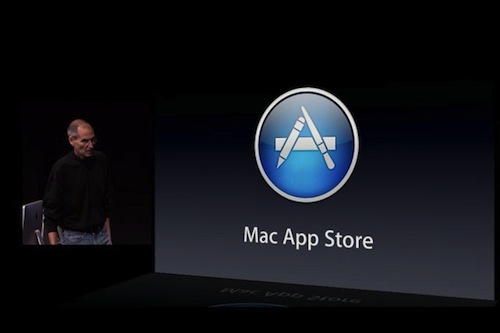
Mac App Store and OS X 10.6.6 Coming Tomorrow at 12 PM ET

We know the Mac App Store is launching tomorrow, on January 6. We also know that Mac OS X 10.6.6 will be required to use the Mac App Store. Jim Dalrymple over at The Loop, however, confirms that according to his sources (and when Jim says “my sources tell me” he always means “someone at Apple told me”) the Mac App Store is launching tomorrow at 12 PM ET, 9 AM Cupertino time.

According to my sources, the Mac App Store will be available at 12:00 pm (noon) ET on Thursday. That puts it at about 9:00 am PT where Apple is headquartered in Cupertino, Calif.

Of course, this means that come 12 PM tomorrow we should fire up Software Update and find a 10.6.6 update that, among fixes, will include the Mac App Store as a new system app. It is still unknown whether or not Apple will also offer a standalone Mac App Store download for 10.6.6 users on its website.

So anyway, get your credit cards ready: we’re 23 hours away from the Mac App Store.

Access Extra Content and Perks

Founded in 2015, Club MacStories has delivered exclusive content every week for nearly a decade.

What started with weekly and monthly email newsletters has blossomed into a family of memberships designed for every MacStories fan.

Learn more here and from our Club FAQs.

Club MacStories: Weekly and monthly newsletters via email and the web that are brimming with apps, tips, automation workflows, longform writing, early access to the MacStories Unwind podcast, periodic giveaways, and more;

Club MacStories+: Everything that Club MacStories offers, plus an active Discord community, advanced search and custom RSS features for exploring the Club’s entire back catalog, bonus columns, and dozens of app discounts;

Club Premier: All of the above and AppStories+, an extended version of our flagship podcast that’s delivered early, ad-free, and in high-bitrate audio.

Learn more here and from our Club FAQs.


Mac App Store Preview: Todolicious, The Simple To Do App

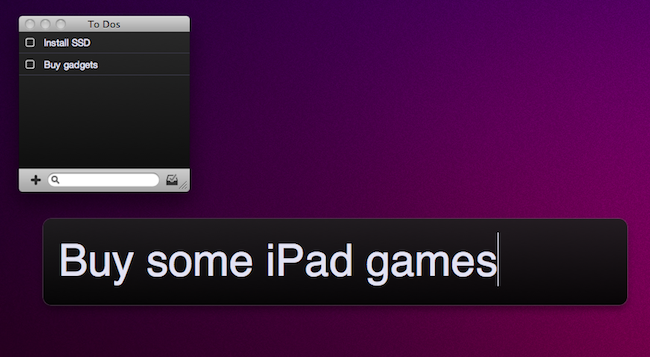
Of all the new apps that are coming out tomorrow in the Mac App Store, Todolicious by Mustacheware is among those we’re most excited about. Created by our friend Steve Streza, who also happens to be the guy behind the great iPhone webapp Swearch.me, Todolicious wants you to stop wasting time organizing your to dos and tasks. Todolicious is a simple app that’s also customizable, and it’s aimed at those people who just want an app to quickly write down the things they need to do. No projects, tags or contexts. Todolicious is a sexy, digital version of the classic sticky notes.

Without giving away all the details just yet (you should be able to play with the app in less than 24 hours), I want to focus on the single most intriguing aspect of the app: the new to do entry field. Instead of displaying a popup window with dozens of options, text fields and buttons, Todolicious provides a simple panel that asks you “What do you need to do?”. It reminds me of Alfred’s straightforward search interface, and you can assign a system-wide shortcut to it so you can enter new to dos no matter what you’re doing with your Mac.

Todolicious will be available tomorrow at $4.99 in the Mac App Store. It’s a simple app we’re really excited about, and we bet that thousands of Mac users who don’t need the functionalities of Things or OmniFocus will give Todolicious a try. Check out the website here, or follow @todolicious for updates.

Access Extra Content and Perks

Founded in 2015, Club MacStories has delivered exclusive content every week for nearly a decade.

What started with weekly and monthly email newsletters has blossomed into a family of memberships designed for every MacStories fan.

Learn more here and from our Club FAQs.

Club MacStories: Weekly and monthly newsletters via email and the web that are brimming with apps, tips, automation workflows, longform writing, early access to the MacStories Unwind podcast, periodic giveaways, and more;

Club MacStories+: Everything that Club MacStories offers, plus an active Discord community, advanced search and custom RSS features for exploring the Club’s entire back catalog, bonus columns, and dozens of app discounts;

Club Premier: All of the above and AppStories+, an extended version of our flagship podcast that’s delivered early, ad-free, and in high-bitrate audio.

Learn more here and from our Club FAQs.


iPad 2 Mockup Spotted at CES

Our friends at Engadget spotted something really interesting while walking around CES booths: another case designed for the rumored iPad 2, with an actual iPad 2 mockup inside, made of aluminum. The case, created by Dexim and admittedly also looking good with its leather and detachable Bluetooth keyboard, sports the usual features we’ve been hearing in the rumors: front and rear-facing cameras, thinner design, bigger speaker. There are some curious new details to be noted as well.

First off, the iPad 2 mockup inside the case has the home button closer to the edge of the unit, and it’s got a flat back. It’s also got tapered edges as we heard last week, and when trying to put a current generation iPad in the case, Engadget was told that it wouldn’t fit because of its size. Accessory makers seem to be pretty sure that the next-generation iPad will be thinner, with a flat back and two cameras – clearly someone in China saw, or at least heard something, about the new iPad and told these manufacturers to follow certain guidelines.

Check out more iPad 2 mockup photos below and the full gallery on Engadget. Read more

Access Extra Content and Perks

Founded in 2015, Club MacStories has delivered exclusive content every week for nearly a decade.

What started with weekly and monthly email newsletters has blossomed into a family of memberships designed for every MacStories fan.

Learn more here and from our Club FAQs.

Club MacStories: Weekly and monthly newsletters via email and the web that are brimming with apps, tips, automation workflows, longform writing, early access to the MacStories Unwind podcast, periodic giveaways, and more;

Club MacStories+: Everything that Club MacStories offers, plus an active Discord community, advanced search and custom RSS features for exploring the Club’s entire back catalog, bonus columns, and dozens of app discounts;

Club Premier: All of the above and AppStories+, an extended version of our flagship podcast that’s delivered early, ad-free, and in high-bitrate audio.

Learn more here and from our Club FAQs.


WebCamera Puts iSight On Your iPhone, iPod For Video Chatting

The iSight is actually pretty darned good when it comes to taking photos and video. My Twitter avatar? That’s totally done with just the iSight. When I was asked to check out WebCamera, I had my doubts about how well it would function as a disembodied iSight. Turns out it works pretty decently, though I can’t see myself deploying WebCamera full-time. It’s handy when you need to show off pics of your family in real time - you’d look kind of silly walking around with a MacBook, prying the lid back, and trying to aim the darned thing everywhere. WebCamera gives you the freedom to move and record over your local network by turning your iPhone into a WebCam, making it useful to revisit all the relatives who already miss you from the Holidays.

Read more

Access Extra Content and Perks

Founded in 2015, Club MacStories has delivered exclusive content every week for nearly a decade.

What started with weekly and monthly email newsletters has blossomed into a family of memberships designed for every MacStories fan.

Learn more here and from our Club FAQs.

Club MacStories: Weekly and monthly newsletters via email and the web that are brimming with apps, tips, automation workflows, longform writing, early access to the MacStories Unwind podcast, periodic giveaways, and more;

Club MacStories+: Everything that Club MacStories offers, plus an active Discord community, advanced search and custom RSS features for exploring the Club’s entire back catalog, bonus columns, and dozens of app discounts;

Club Premier: All of the above and AppStories+, an extended version of our flagship podcast that’s delivered early, ad-free, and in high-bitrate audio.

Learn more here and from our Club FAQs.


Mac App Store Preview: Lyrica

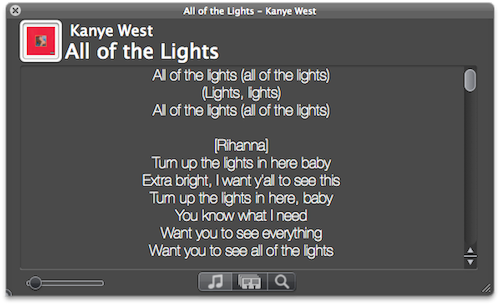
Lyrica is an upcoming new Mac app created by 17 year-old German developer Florian Zand which has been submitted to Apple for approval and should be available on the Mac App Store on January 6. As the name suggests, the app is aimed at fetching and displaying song lyrics – which is a pretty common task, although Lyrica has a few tricks up its sleeve that should grant it a relevant position in the new App Store. First off, the app queries 6 different lyric databases to find the most appropriate lyrics for the songs you’re listening to. Of course, Lyrica automatically takes the music that’s playing in iTunes and contacts the servers on its own. You just have to fire it up and wait a few seconds for the lyrics to show up on screen.

Lyrica can change from a classic OS X grey window to a more unobtrusive translucent black panel that can easily sit on top of any app without getting in the way. If lyrics for a song can’t be found, you can add them manually from the app itself. In addition for “now playing” capabilities, the app can also add lyrics to a specific playlist or your entire iTunes library – that will take a few minutes though, as it’ll have to tag your whole music collection.

We look forward to seeing Lyrica available in the Mac App Store on January 6. More information about the app will be available on the developer’s website here.

Access Extra Content and Perks

Founded in 2015, Club MacStories has delivered exclusive content every week for nearly a decade.

What started with weekly and monthly email newsletters has blossomed into a family of memberships designed for every MacStories fan.

Learn more here and from our Club FAQs.

Club MacStories: Weekly and monthly newsletters via email and the web that are brimming with apps, tips, automation workflows, longform writing, early access to the MacStories Unwind podcast, periodic giveaways, and more;

Club MacStories+: Everything that Club MacStories offers, plus an active Discord community, advanced search and custom RSS features for exploring the Club’s entire back catalog, bonus columns, and dozens of app discounts;

Club Premier: All of the above and AppStories+, an extended version of our flagship podcast that’s delivered early, ad-free, and in high-bitrate audio.

Learn more here and from our Club FAQs.


Remote Conductor: All-in-One OS X Controller for iPad

If you’re that kind of user who has set up a home entertainment system based on a machine running OS X, then probably you’re always looking for the next big thing in remote control. Several users, instead of buying a dedicated set-top box like an Apple TV or a Roku Player, prefer to get a relatively entry-level machine like a Mac Mini and route all their music, movies and photos through it. Because entertainment aside, the thing also happens to be a computer that can backup itself on a daily basis and serve content to other computers or iOS devices in the house. Just think of all the iTunes libraries or Plex installations shared through Mac Minis or, at best, Mac Pros that are powerful enough to be both desktop machines and entertainment systems for when the work is done and all you need is a good movie. A Mac computer set for such tasks, however, needs a good remote control system because, frankly, you just can’t use a mouse and keyboard on your couch.

Sure, you could use an Apple Remote and get most of your things done without having to lift a finger, but what about all those times when you want to use the stuff a computer also comes with – you know, like a web browser and high-def Youtube videos scaled to take all your TV screen? After all, even if geared towards home entertainment purposes, it’s a computer. And it needs to be remotely controlled. You could buy a VNC app like Screens for your iPhone and iPad, and control the computer that’s running on the TV in front of you with the comfort of also having it in your hands, in a portable app. Perhaps, though, you don’t need to have its screen mirrored on an iOS device and you just want a remote app that acts like a touchpad and lets you quickly launch and quit apps, and check on running ones.

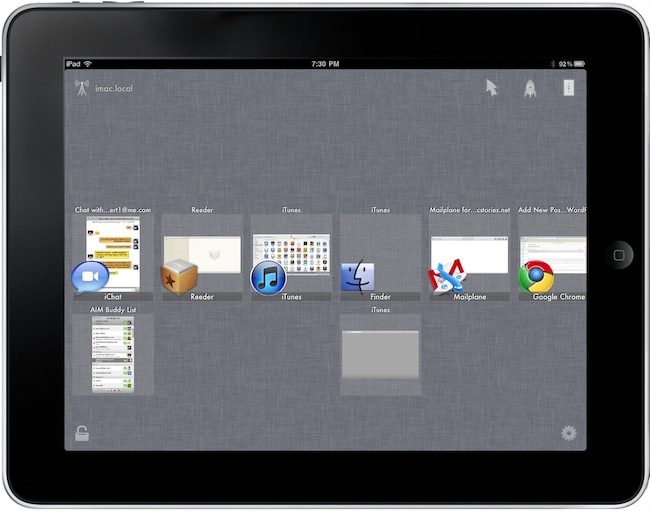
Remote Conductor, a new iPad app by m3me, aims at reinventing the “remote controlling” app genre by combining in a single package features like a touchpad, multi-touch gestures support and some sort of application launcher and OS X-like Exposè to let you easily and effortlessly control your Mac’s screen from anywhere in your room using an iPad. Read more

Access Extra Content and Perks

Founded in 2015, Club MacStories has delivered exclusive content every week for nearly a decade.

What started with weekly and monthly email newsletters has blossomed into a family of memberships designed for every MacStories fan.

Learn more here and from our Club FAQs.

Club MacStories: Weekly and monthly newsletters via email and the web that are brimming with apps, tips, automation workflows, longform writing, early access to the MacStories Unwind podcast, periodic giveaways, and more;

Club MacStories+: Everything that Club MacStories offers, plus an active Discord community, advanced search and custom RSS features for exploring the Club’s entire back catalog, bonus columns, and dozens of app discounts;

Club Premier: All of the above and AppStories+, an extended version of our flagship podcast that’s delivered early, ad-free, and in high-bitrate audio.

Learn more here and from our Club FAQs.


Mac App Store Preview: Tembo, A New Take On Spotlight

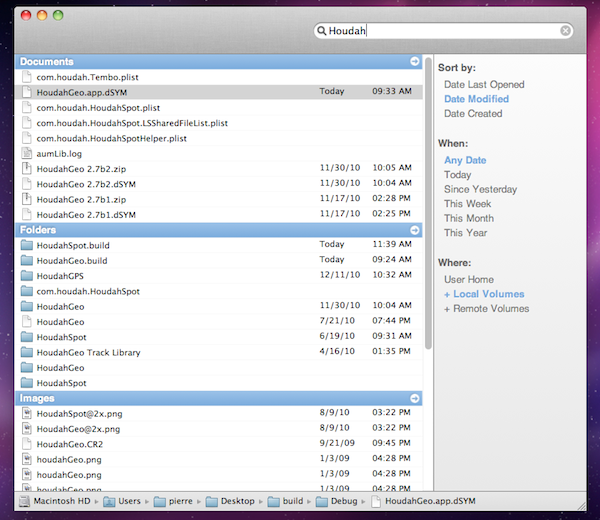
Coming to the Mac App Store this Thursday, Tembo is a new app from the guys behind popular OS X software like HoudahGeo and HoudahSpot that aims at providing a fast, fun and easy interface for Spotlight. Tembo will allow you to easily find music, mail messages, documents and bookmarks through a window that resembles the Spotlight UI you were used to on OS X Tiger.

Search results are grouped by categories, and you can enable, disable or reorder these categories in the app’s Preferences. A top bar for each category in the search results window will let you filter through these results already neatly organized in categories. It’s really powerful, but user-friendly at the same time. Tembo can list up to 2500 items in a single group, and can work as an extension to Mail and iChat to find messages and conversations, or Safari to search through bookmarks and history.

Tembo will be available on January 6 at $20 with a free trial available on the developers’ website.

Access Extra Content and Perks

Founded in 2015, Club MacStories has delivered exclusive content every week for nearly a decade.

What started with weekly and monthly email newsletters has blossomed into a family of memberships designed for every MacStories fan.

Learn more here and from our Club FAQs.

Club MacStories: Weekly and monthly newsletters via email and the web that are brimming with apps, tips, automation workflows, longform writing, early access to the MacStories Unwind podcast, periodic giveaways, and more;

Club MacStories+: Everything that Club MacStories offers, plus an active Discord community, advanced search and custom RSS features for exploring the Club’s entire back catalog, bonus columns, and dozens of app discounts;

Club Premier: All of the above and AppStories+, an extended version of our flagship podcast that’s delivered early, ad-free, and in high-bitrate audio.

Learn more here and from our Club FAQs.