Posts in Featured

iOS 4.2.5 To Be Released With Verizon iPhone?

Here’s another interesting tidbit coming from the first hands-on with the just announced Verizon iPhone, which, as you may know, happens to be a regular iPhone 4 running on CDMA.

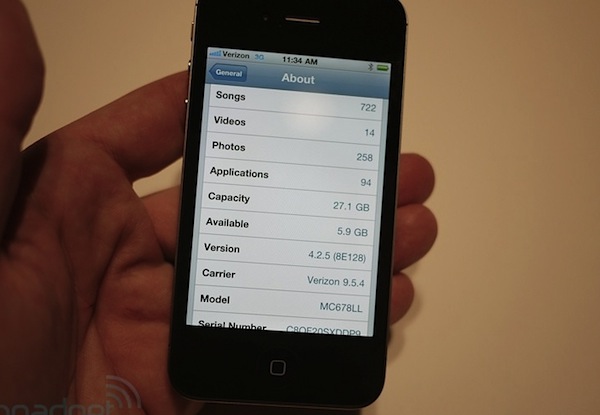
The Personal Hotspot functionality is located in the Settings app, as noted by Engadget. That lead the Engadget folks to wonder if the unit was running a new firmware and, indeed, the Verizon iPhone they’re testing now is running iOS 4.2.5. Probably, it’s a simple update to iOS 4.2 to make it compatible with Verizon’s chip and enable the hotspot functionality.

A major iOS update that includes the “iTunes app subscriptions” system is expected to be released soon together with Murdoch’s iPad app “The Daily”, but we really don’t know about this iOS 4.2.5. Guess it’ll just ship by default on every Verizon iPhone on February 10?
Access Extra Content and Perks

Founded in 2015, Club MacStories has delivered exclusive content every week for nearly a decade.

What started with weekly and monthly email newsletters has blossomed into a family of memberships designed for every MacStories fan.

Learn more here and from our Club FAQs.

Club MacStories: Weekly and monthly newsletters via email and the web that are brimming with apps, tips, automation workflows, longform writing, early access to the MacStories Unwind podcast, periodic giveaways, and more;

Club MacStories+: Everything that Club MacStories offers, plus an active Discord community, advanced search and custom RSS features for exploring the Club’s entire back catalog, bonus columns, and dozens of app discounts;

Club Premier: All of the above and AppStories+, an extended version of our flagship podcast that’s delivered early, ad-free, and in high-bitrate audio.

Learn more here and from our Club FAQs.


It’s Official: The iPhone 4 Comes to Verizon

After years of speculation, it’s now official. At the special media event in New York, Verizon has just announced that Apple’s iPhone is coming to their network. “If the press writes something long enough, eventually it comes true”, said Verizon’s Lowell MacAdam before the announcement. “Today we’re partnering with a giant of the industry, and that’s Apple.”

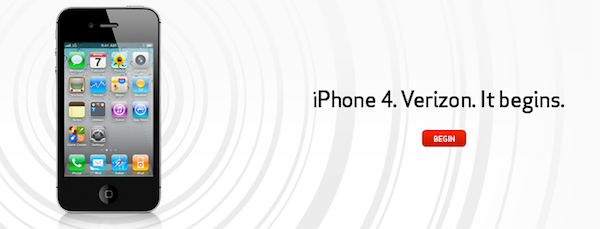
The iPhone 4 is coming to Verizon next month, as the rumors suggested. Apple and Verizon began testing CDMA iPhone in 2008, and Apple then released the iPad on Verizon in 2010. The iPhone is coming in February, it will be CDMA (no LTE) and it’s already listed on Verizon’s website. It’s the same iPhone 4 you know and love, only on Verizon and it connects to CDMA and EvDO networks. Read more

Access Extra Content and Perks

Founded in 2015, Club MacStories has delivered exclusive content every week for nearly a decade.

What started with weekly and monthly email newsletters has blossomed into a family of memberships designed for every MacStories fan.

Learn more here and from our Club FAQs.

Club MacStories: Weekly and monthly newsletters via email and the web that are brimming with apps, tips, automation workflows, longform writing, early access to the MacStories Unwind podcast, periodic giveaways, and more;

Club MacStories+: Everything that Club MacStories offers, plus an active Discord community, advanced search and custom RSS features for exploring the Club’s entire back catalog, bonus columns, and dozens of app discounts;

Club Premier: All of the above and AppStories+, an extended version of our flagship podcast that’s delivered early, ad-free, and in high-bitrate audio.

Learn more here and from our Club FAQs.


iGotYa Takes Photos and GPS Location Of The Guy Who Stole Your iPhone

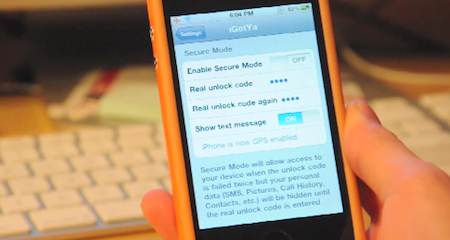
The iGotYa app is one those utilities you don’t know you need until you try it and see its potential. Available in the Cydia Store at $5.99 (Big Boss repo), iGotYa can take a picture of whoever tries to unlock your phone with the wrong passcode, using the front facing camera. We all want to keep an eye on our iPhones, right? iGotYa, combined with Apple’s Find My iPhone remote functionalities, is the ultimate tool to make sure you know who’s trying to mess with your iPhone.

The app requires a front facing camera, meaning that it will only run on the iPhone 4 and iPod touch 4th gen. As a picture is taken in the lockscreen, iGotYa can send it via WiFi or 3G to a specified email address, also attaching GPS information in the email message. So if you ended up losing your iPhone because of someone you took it, not only you’ll know where he is, you’ll also get to see his face. And he won’t know while attempting to unlock the stolen phone.

iGotYa will cost you 6 buck, but it’s that sort of investment you will not regret. Check out the demo video below. [Gizmodo via Redmond Pie] Read more

Access Extra Content and Perks

Founded in 2015, Club MacStories has delivered exclusive content every week for nearly a decade.

What started with weekly and monthly email newsletters has blossomed into a family of memberships designed for every MacStories fan.

Learn more here and from our Club FAQs.

Club MacStories: Weekly and monthly newsletters via email and the web that are brimming with apps, tips, automation workflows, longform writing, early access to the MacStories Unwind podcast, periodic giveaways, and more;

Club MacStories+: Everything that Club MacStories offers, plus an active Discord community, advanced search and custom RSS features for exploring the Club’s entire back catalog, bonus columns, and dozens of app discounts;

Club Premier: All of the above and AppStories+, an extended version of our flagship podcast that’s delivered early, ad-free, and in high-bitrate audio.

Learn more here and from our Club FAQs.


Apptivate Assigns Keyboard Shortcuts To Just About Anything

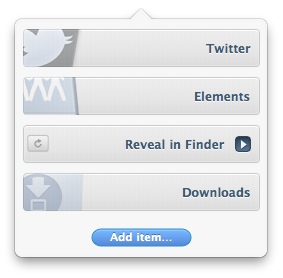
A few days ago, I stumbled upon this new application in the Mac App Store called Apptivate, sold at $2.99. Reading through the app’s description, I learned that it was an easy tool to assign keyboard shortcuts to a variety of things on a Mac: apps, files, folders, Automator workflows and even Applescripts. It was a $2.99 purchase. I clicked the Buy button. Read more

Access Extra Content and Perks

Founded in 2015, Club MacStories has delivered exclusive content every week for nearly a decade.

What started with weekly and monthly email newsletters has blossomed into a family of memberships designed for every MacStories fan.

Learn more here and from our Club FAQs.

Club MacStories: Weekly and monthly newsletters via email and the web that are brimming with apps, tips, automation workflows, longform writing, early access to the MacStories Unwind podcast, periodic giveaways, and more;

Club MacStories+: Everything that Club MacStories offers, plus an active Discord community, advanced search and custom RSS features for exploring the Club’s entire back catalog, bonus columns, and dozens of app discounts;

Club Premier: All of the above and AppStories+, an extended version of our flagship podcast that’s delivered early, ad-free, and in high-bitrate audio.

Learn more here and from our Club FAQs.


The Verizon iPhone Is For App Lovers

Let’s state the obvious, Fink. Geez. I’ll be blunt: this is an, “Should I keep my Android phone or get the new iPhone on my Verizon contract?” post. Specifically, I’m talking to my fellow Android owners who’re on the fence about switching to the Verizon iPhone.

I’ve been sitting on this article all day between five thousand or so words of rant material, iPhone gawking, Android squawking, and just about every title under the sun that would attract more iPhone and Android fanboy rage than my little heart could handle. Good grief! I told Federico that this piece could do me in for a few days – this one was hard to write. “Ticci!” I said. “This is too controversial for the Internetz! They’ll explode!” After much deliberation I decided to focus on one specific aspect of Android and the iPhone, instead of comparing the platforms as a whole (there’s simply too much to talk about). After dramatically toning down the content, today’s topic is all about apps and the phones that have them, but which one is better for you?

As someone on Verizon who’s had a year long matrimony with an Android… do you dare click the read more link? I think you should.

Read more

Access Extra Content and Perks

Founded in 2015, Club MacStories has delivered exclusive content every week for nearly a decade.

What started with weekly and monthly email newsletters has blossomed into a family of memberships designed for every MacStories fan.

Learn more here and from our Club FAQs.

Club MacStories: Weekly and monthly newsletters via email and the web that are brimming with apps, tips, automation workflows, longform writing, early access to the MacStories Unwind podcast, periodic giveaways, and more;

Club MacStories+: Everything that Club MacStories offers, plus an active Discord community, advanced search and custom RSS features for exploring the Club’s entire back catalog, bonus columns, and dozens of app discounts;

Club Premier: All of the above and AppStories+, an extended version of our flagship podcast that’s delivered early, ad-free, and in high-bitrate audio.

Learn more here and from our Club FAQs.


Steve Jobs and Rupert Murdoch To Unveil “The Daily” Next Week?

According to Yahoo’s The Cutline, Steve Jobs will join Rupert Murdoch to unveil the highly anticipated iPad-only digital newspaper, The Daily, at a media event in San Francisco later this month:

Rupert Murdoch will unveil News Corp.’s much-anticipated iPad newspaper onstage this month with Apple chief executive Steve Jobs, The Cutline has learned.

The two media moguls will appear together at the San Francisco Museum of Modern Art, according to a source familiar with preparations for the event. The launch date is expected to be Jan. 19, but that may change.

In December, rumors surfaced that The Daily was set to debut, or at least announced, in the “week of January 17”. The same report by All Things D suggested that Apple may release a new build of iOS to include the rumored app subscription service, the same feature we heard was once set to be made available in December.

Details on News Corp.’s “The Daily” leaked in the past months pointed to the iPad-exclusive nature of the publication, and the fact that Murdoch had assembled a “super-team” of 100 journalists to work on the newspaper. The Daily, according to the rumors, should come with a new iOS functionality that will allow iPad users to get new content every day automatically, in the background, directly from The Daily’s servers.

Access Extra Content and Perks

Founded in 2015, Club MacStories has delivered exclusive content every week for nearly a decade.

What started with weekly and monthly email newsletters has blossomed into a family of memberships designed for every MacStories fan.

Learn more here and from our Club FAQs.

Club MacStories: Weekly and monthly newsletters via email and the web that are brimming with apps, tips, automation workflows, longform writing, early access to the MacStories Unwind podcast, periodic giveaways, and more;

Club MacStories+: Everything that Club MacStories offers, plus an active Discord community, advanced search and custom RSS features for exploring the Club’s entire back catalog, bonus columns, and dozens of app discounts;

Club Premier: All of the above and AppStories+, an extended version of our flagship podcast that’s delivered early, ad-free, and in high-bitrate audio.

Learn more here and from our Club FAQs.


Camera Genius 3.0: New Design, More Social, Lots of DSLR Love

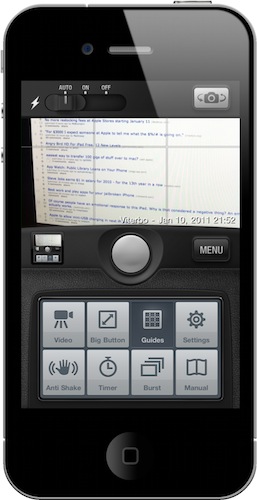
Camera Genius is a photo app for the iPhone that has been around for months, years now I believe. Featured on the New York Times, CNET and just about any other major publication back when photo-taking apps where the novelty on iOS, the app slowly fell back in the garage of App Store apps as more lightweight, beautiful and social applications like Camera+, Hipstamatic or Instagram were released. But the developers of Camera Genius, strong on the sales figures the app had generated, went back to work and crafted Camera Genius 3.0, which is a complete revamp of the original app and it’s available at $0.99 in the App Store.

On first sight, Camera Genius 3.0 looks like another take on the old Camera+ DSLR interface, just when Camera+ itself has ditched the faux canera design with the much-acclaimed 2.0 version. Still: Camera Genius has a DSLR-like design and allows you to choose between two display themes, although I left the default one untouched. Just like in the past, Camera Genius is an app to take photos with more functionalities to play around with, such as shake control, timer, guides and burst mode. Read more

Access Extra Content and Perks

Founded in 2015, Club MacStories has delivered exclusive content every week for nearly a decade.

What started with weekly and monthly email newsletters has blossomed into a family of memberships designed for every MacStories fan.

Learn more here and from our Club FAQs.

Club MacStories: Weekly and monthly newsletters via email and the web that are brimming with apps, tips, automation workflows, longform writing, early access to the MacStories Unwind podcast, periodic giveaways, and more;

Club MacStories+: Everything that Club MacStories offers, plus an active Discord community, advanced search and custom RSS features for exploring the Club’s entire back catalog, bonus columns, and dozens of app discounts;

Club Premier: All of the above and AppStories+, an extended version of our flagship podcast that’s delivered early, ad-free, and in high-bitrate audio.

Learn more here and from our Club FAQs.


Google Goggles for iPhone Gains Ad Recognition and…Sudoku

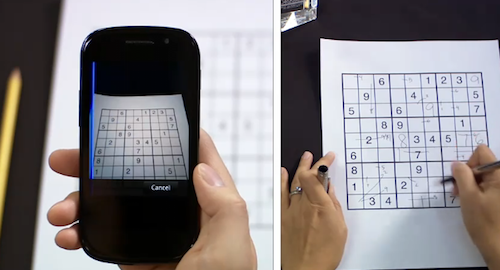
Earlier today, the Google mobile team announced an update to their official Goggles application for Android and the Goggles component in the Google Mobile App for iPhone. While Android users get advanced barcode scanning in version 1.3 of the app, printed ad recognition and Sudoku puzzle solving have been enabled both on iOS and Android. Yes, that’s right: as part of the Google Goggles labs experiments, the app can now solve Sudokuy puzzles. Just take a clear picture and let Goggles provide some help.

As for ad scanning, Goggles for iPhone can now take a look at any printed ad and return web search results for that brand or product.

Goggles will recognize print ad and return web search results about the product or brand. This new feature of Goggles is enabled for print ads appearing in major U.S. magazines and newspapers from August 2010 onwards. This feature is different from the marketing experiment that we announced in November. We’re now recognizing a much broader range of ads than we initially included in our marketing experiment.

The official Google iPhone app doesn’t seem to be updated yet, the new version should be propagating in iTunes in the next hours. In the meantime, check out the promo video for Sudoku support in Google Goggles below. Google Goggles for iPhone was launched in October as part of the Google mobile app. Read more

Access Extra Content and Perks

Founded in 2015, Club MacStories has delivered exclusive content every week for nearly a decade.

What started with weekly and monthly email newsletters has blossomed into a family of memberships designed for every MacStories fan.

Learn more here and from our Club FAQs.

Club MacStories: Weekly and monthly newsletters via email and the web that are brimming with apps, tips, automation workflows, longform writing, early access to the MacStories Unwind podcast, periodic giveaways, and more;

Club MacStories+: Everything that Club MacStories offers, plus an active Discord community, advanced search and custom RSS features for exploring the Club’s entire back catalog, bonus columns, and dozens of app discounts;

Club Premier: All of the above and AppStories+, an extended version of our flagship podcast that’s delivered early, ad-free, and in high-bitrate audio.

Learn more here and from our Club FAQs.


Developer Goes From 7 Sales A Day to 1,500 With Mac App Store

We have already seen what the Mac App Store effect looks like. The new Store for Mac users is providing an easy way to discover and install Mac applications and, together with that, a better way for developers to showcase their software to a larger audience, as the Mac App Store is installed  by default on every system running OS X 10.6.6. Several developers reported good sales for the Mac App Store launch day, but we think LittleFin Software might be the best example of the power of the Mac App Store so far.

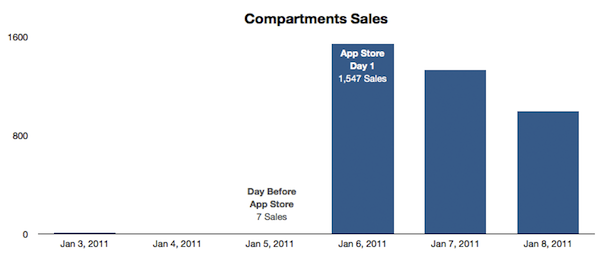
LittleFin was selling between 6 - 10 copies of Compartments, a simple home inventory app for the Mac we reviewed here, a day through their website. The day before the Mac App Store launch, they sold only 7 copies. But as soon as the Store launched on January 6 and Apple featured the app in the Mac App Store homepage and its “Great Mac Apps” webpage, LittleFin saw a terrific increase in sales. In fact, they sold 1,547 copies in the first 24 hours of the Mac App Store. The app, now featured under “Staff Favorites”, is available at $9.99. Before the Mac App Store the app was sold at $24.95; the developers decided to lower the price as an experiment. Since January 6, the app has been selling 1,000 copies a day on average. Read more

Access Extra Content and Perks

Founded in 2015, Club MacStories has delivered exclusive content every week for nearly a decade.

What started with weekly and monthly email newsletters has blossomed into a family of memberships designed for every MacStories fan.

Learn more here and from our Club FAQs.

Club MacStories: Weekly and monthly newsletters via email and the web that are brimming with apps, tips, automation workflows, longform writing, early access to the MacStories Unwind podcast, periodic giveaways, and more;

Club MacStories+: Everything that Club MacStories offers, plus an active Discord community, advanced search and custom RSS features for exploring the Club’s entire back catalog, bonus columns, and dozens of app discounts;

Club Premier: All of the above and AppStories+, an extended version of our flagship podcast that’s delivered early, ad-free, and in high-bitrate audio.

Learn more here and from our Club FAQs.