Posts in Featured

DropVox: Save Voice Memos to Dropbox In Seconds

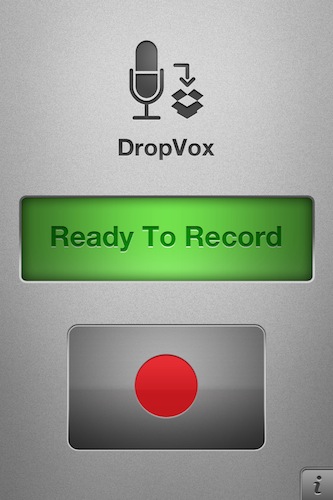
DropVox is an iPhone app I discovered in the App Store over the weekend, it’s incredibly simple yet I wonder why I didn’t think of using something like this before: DropVox uploads voice memos instantly to the cloud, and more specifically to Dropbox – the service I use on a daily basis for almost anything in my workflow, from music to app libraries.

Developed by Irradiated Software (the same folks behind MacStories’ favorite Cinch for Mac), DropVox works like this: you fire it up for the first time and log in with your Dropbox account. Every time you want to record a voice memo, open the app, hit the huge Record button, then stop and wait for the file to land in your Dropbox. Boom, just like that. No file management, no renaming features, no time stamps – just record and upload.

DropVox is a microphone for DropBox. Get it now, while it’s still priced at $0.99 as a limited time offer.

Access Extra Content and Perks

Founded in 2015, Club MacStories has delivered exclusive content every week for nearly a decade.

What started with weekly and monthly email newsletters has blossomed into a family of memberships designed for every MacStories fan.

Learn more here and from our Club FAQs.

Club MacStories: Weekly and monthly newsletters via email and the web that are brimming with apps, tips, automation workflows, longform writing, early access to the MacStories Unwind podcast, periodic giveaways, and more;

Club MacStories+: Everything that Club MacStories offers, plus an active Discord community, advanced search and custom RSS features for exploring the Club’s entire back catalog, bonus columns, and dozens of app discounts;

Club Premier: All of the above and AppStories+, an extended version of our flagship podcast that’s delivered early, ad-free, and in high-bitrate audio.

Learn more here and from our Club FAQs.


The Great Disparity in Global iTunes Prices

Over the weekend I curiously started investigating whether Australians had been getting a progressively worse deal for their iTunes purchases as the Australian dollar rose from USD$0.60 to parity whilst iTunes prices stayed constant. The answer is most definitely a yes but it doesn’t just apply to Australians, and the extent of the price disparity is larger than I had thought.

Whilst Apple is entitled to have different prices for different regions, it doesn’t really need to. Furthermore the extent to which there is price disparity is very extensive for the music section of the store and this article aims to bring the inequity to light. Apple has previously been under similar pressure but the exchange rates reverted back, I would hope Apple again reconsiders their iTunes pricing system now when exchange rates have pushed the disparity to a very high level.

This turned into a bigger article than I had expected so here are the key things I cover and keep reading after the break for a full run down with tables, graphs and more.

  • iTunes uses fixed prices (i.e. $0.99, $1.29 etc.) and for stores outside the US these price levels were converted using a very conservative prediction of the future value of a particular currency
  • The price levels in non-US stores seem not to have been updated in a long time, yet the value of the non-US currencies have mostly appreciated since then. As a result people purchasing from most of the non-US iTunes Stores are now paying more than US customers and Apple is earning more from those customers
  • The conversion rate is different for the App Store and Music store (and likely the other stores too), the App store conversion rates are much more appropriate and the price disparity is less extreme.

Updated on April 27 2011 - see end of article for revised figures and comment.

Read more

Access Extra Content and Perks

Founded in 2015, Club MacStories has delivered exclusive content every week for nearly a decade.

What started with weekly and monthly email newsletters has blossomed into a family of memberships designed for every MacStories fan.

Learn more here and from our Club FAQs.

Club MacStories: Weekly and monthly newsletters via email and the web that are brimming with apps, tips, automation workflows, longform writing, early access to the MacStories Unwind podcast, periodic giveaways, and more;

Club MacStories+: Everything that Club MacStories offers, plus an active Discord community, advanced search and custom RSS features for exploring the Club’s entire back catalog, bonus columns, and dozens of app discounts;

Club Premier: All of the above and AppStories+, an extended version of our flagship podcast that’s delivered early, ad-free, and in high-bitrate audio.

Learn more here and from our Club FAQs.


Mac App Store: Miro Converts Videos for iOS, For Free

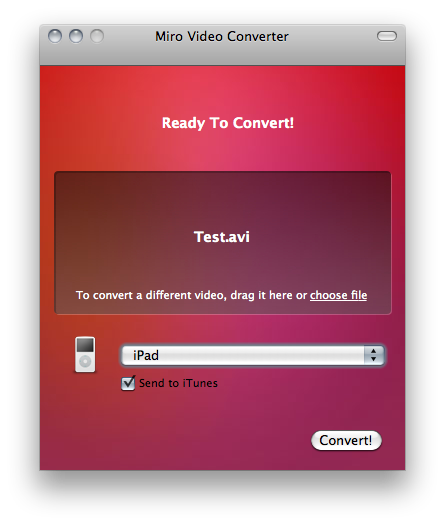
Available for free in the Mac App Store, Miro Video Converter is a little utility that converts almost any kind of video to formats compatible with iOS and other Apple devices, Android handsets, WebM, Theora and a variety of other platforms. As you can guess, Miro Video Converter comes from the creators of Miro, video player and torrent downloader.

The app doesn’t offer all the control and customization possibilities seen, for example, in the popular Handbrake video conversion tool, but it’s got a nice and simple interface where all you have to do is drop a file, select the output and hit Convert.

Miro Video Converter is available here. Check out the list of supported formats and devices below. Read more

Access Extra Content and Perks

Founded in 2015, Club MacStories has delivered exclusive content every week for nearly a decade.

What started with weekly and monthly email newsletters has blossomed into a family of memberships designed for every MacStories fan.

Learn more here and from our Club FAQs.

Club MacStories: Weekly and monthly newsletters via email and the web that are brimming with apps, tips, automation workflows, longform writing, early access to the MacStories Unwind podcast, periodic giveaways, and more;

Club MacStories+: Everything that Club MacStories offers, plus an active Discord community, advanced search and custom RSS features for exploring the Club’s entire back catalog, bonus columns, and dozens of app discounts;

Club Premier: All of the above and AppStories+, an extended version of our flagship podcast that’s delivered early, ad-free, and in high-bitrate audio.

Learn more here and from our Club FAQs.


Woz Says White iPhone 4 Will Be Released Soon

The white iPhone 4 has become the mythical beast in Apple’s product line up. First expected to launch alongside the standard black iPhone 4 last year, the device got delayed multiple times and never came out. At the latest Engadget Show that aired tonight, Apple’s co-founder Steve Wozniak confirmed Apple has fixed the problems with the painting of the white iPhone and that the device is coming out soon. He also said he got custom white parts from the kid who used to sell them online, and indeed those parts lead to light leakage issues and washed-out pictures.

A report surfaced last week suggested a new Japanese paint has fixed the issues with the white iPhone, and the unit was spotted on various international carrier websites. Back in December, another report pointed to the iPhone 4 becoming available in “Spring 2011”.

At this point, we’re pretty confident the white iPhone 4 is real and its production woes a thing of the past. We also believe, though, that a white iPhone 4 on Verizon’s big launch day next would have been perfect.

Access Extra Content and Perks

Founded in 2015, Club MacStories has delivered exclusive content every week for nearly a decade.

What started with weekly and monthly email newsletters has blossomed into a family of memberships designed for every MacStories fan.

Learn more here and from our Club FAQs.

Club MacStories: Weekly and monthly newsletters via email and the web that are brimming with apps, tips, automation workflows, longform writing, early access to the MacStories Unwind podcast, periodic giveaways, and more;

Club MacStories+: Everything that Club MacStories offers, plus an active Discord community, advanced search and custom RSS features for exploring the Club’s entire back catalog, bonus columns, and dozens of app discounts;

Club Premier: All of the above and AppStories+, an extended version of our flagship podcast that’s delivered early, ad-free, and in high-bitrate audio.

Learn more here and from our Club FAQs.


iPad 2: No Retina Display, Anti-Reflection Screen, iPod touch Cameras?

A new report by analyst Ming-Chi Kuo of Concord Securities details the components of the iPad 2 and the features Apple is expected to implement in the next-generation model of the device. The analyst believes the iPad 2 won’t have a 2048x1536 Retina Display, as resolution isn’t what Apple is focusing on at the moment due to production volume and costs. Rather, the iPad 2’s screen will be built with anti-reflection technologies and a thinner form factor to put it in direct competition with Amazon’s ebook reading device, the Kindle. Anti-reflection is indeed one of the key features in Amazon anti-iPad commercials.

According to the report, iPad 2 will also have faster processor, RAM and graphics as previously reported. The new tablet will likely come with an ARM Cortex-A9 dual core processor, Imagination’s SGX543 dual core GPU and 512 MB of RAM. Currently, the iPhone 4 has the same amount of RAM but the original iPad only has 256 MB. The graphic technology Ming-Chi Kuo thinks will go into the iPad 2 should be 200 - 300% more powerful than the iPhone 4.

Last, the report mentions the iPad 2 will feature iPod touch-like cameras, rather than higher-quality ones found on the iPhone 4. Cameras should be 0.3 mega-pixel VGA front-facing one and a 1 MP (iPod touch-like) rear one. Because of the 1024x768 rumored resolution, these cameras should be enough to guarantee good picture quality. Previous rumors suggested the iPad would get cameras similar to the iPod touch’s ones, although earlier reports pointed to Largan Precision as the selected manufacturer for 5 MP camera lenses.

Access Extra Content and Perks

Founded in 2015, Club MacStories has delivered exclusive content every week for nearly a decade.

What started with weekly and monthly email newsletters has blossomed into a family of memberships designed for every MacStories fan.

Learn more here and from our Club FAQs.

Club MacStories: Weekly and monthly newsletters via email and the web that are brimming with apps, tips, automation workflows, longform writing, early access to the MacStories Unwind podcast, periodic giveaways, and more;

Club MacStories+: Everything that Club MacStories offers, plus an active Discord community, advanced search and custom RSS features for exploring the Club’s entire back catalog, bonus columns, and dozens of app discounts;

Club Premier: All of the above and AppStories+, an extended version of our flagship podcast that’s delivered early, ad-free, and in high-bitrate audio.

Learn more here and from our Club FAQs.


Omni Group’s Huge 2011: OmniFocus 2, New OmniPlan, OmniOutliner for iPad


Stronger than ever thanks to an incredibly successful launch of OmniFocus for iPad, the constantly increasing OmniFocus userbase on all platforms and the hype surrounding all their products, Omni Group’s CEO Ken Case gave some details of the company’s roadmap for 2011 at Macworld Expo. The three key products seem to be OmniFocus 2 for Mac, coming later this year and highly inspired by the iPad app, a brand new OmniPlan with cloud sync and collaboration features, a version of OmniOutliner for iPad. Personally, I’m really excited about the overhaul of OmniPlan, which will also get OmniFocus integration:

The new syncing back-end is also designed to work with OmniFocus, which will let individual team members sync tasks assigned to them with either the desktop, iPhone, or iPad versions. “All three versions use the same underlying engine, so once we have that update in place, we’ll be able to roll out OmniPlan syncing to all versions of OmniFocus,” Case told Ars.

The current version of OmniPlan allows syncing via CalDAV, but the new engine will offer much better integration with OmniFocus. For project team members who don’t need to see what all other team members are working on, they’ll be able to see just the tasks assigned to them. When tasks are marked as complete in OmniFocus, the project manager will get a notification of the change in OmniPlan.

We can’t wait to see what will the new OmniPlan look like, and the two-way sync with OmniFocus sounds like a killer feature to me. Not to mention OmniOutliner for iPad, which will be demoed for the first time at Macworld today and is set to ship sometime in the next few months. What you see above is a screenshot of an early build Ars Technica was provided, but I guess the UI will change come the final release (remember the first mockups of OmniFocus for iPad?).

Last, OmniFocus 2 for Mac will be released “later this year”, although the Omni Group (as usual) doesn’t set any deadline. When it’s ready, it’s ready. We just know the feedback for the iOS apps (especially the iPad version) has been huge, and OmniFocus 2 will be built on top of that.

Looks like the Omni Group is off to a great start in 2011.

Access Extra Content and Perks

Founded in 2015, Club MacStories has delivered exclusive content every week for nearly a decade.

What started with weekly and monthly email newsletters has blossomed into a family of memberships designed for every MacStories fan.

Learn more here and from our Club FAQs.

Club MacStories: Weekly and monthly newsletters via email and the web that are brimming with apps, tips, automation workflows, longform writing, early access to the MacStories Unwind podcast, periodic giveaways, and more;

Club MacStories+: Everything that Club MacStories offers, plus an active Discord community, advanced search and custom RSS features for exploring the Club’s entire back catalog, bonus columns, and dozens of app discounts;

Club Premier: All of the above and AppStories+, an extended version of our flagship podcast that’s delivered early, ad-free, and in high-bitrate audio.

Learn more here and from our Club FAQs.


Notational Velocity Update: Horizontal Layout, Tag Sync, New Icon

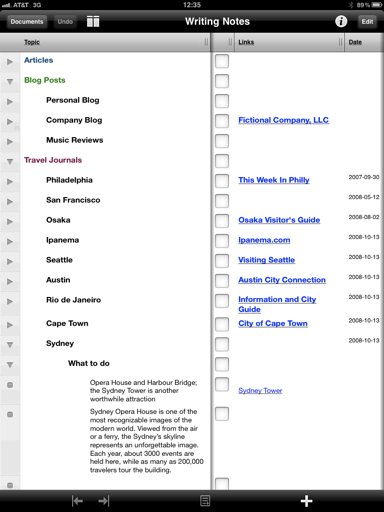
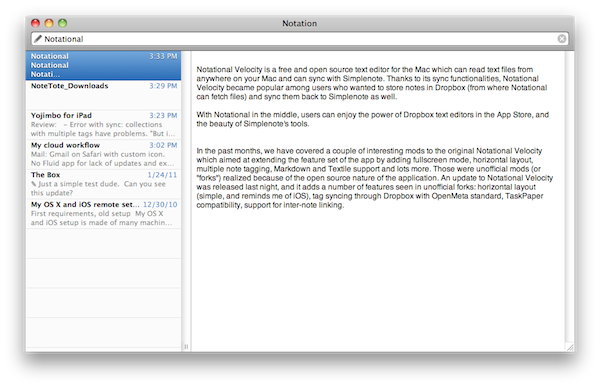
Notational Velocity is a free and open source text editor for the Mac that can read text files from anywhere on your computer and syncs with Simplenote. Thanks to its sync functionalities, Notational Velocity became popular among users who wanted to store notes in Dropbox (from where Notational can fetch files) and sync them back to Simplenote as well. With Notational in the middle, users can enjoy the power of Dropbox text editors in the App Store, and the beauty of Simplenote’s tools.

In the past months, we have covered a couple of interesting mods to the original Notational Velocity which aimed at extending the feature set of the app by adding fullscreen mode, horizontal layout, multiple note tagging, Markdown and Textile support and lots more. Those were unofficial mods (or “forks”) realized because of the open source nature of the application. An update to Notational Velocity was released last night, and it adds a number of features seen in unofficial forks: horizontal layout (simple, reminds me of iOS), tag syncing through Dropbox with OpenMeta standard, TaskPaper compatibility, support for inter-note linking. Tags can be entered in a dedicated column of the vertical view, but I haven’t found a way to show tags while in horizontal mode. These tags have full Spotlight support as they’re based on  OpenMeta (which means they’ll also work with other Mac apps like Tags and Leap). Lots of changes and small fixes are included in this update – I appreciate the fact that notes can now be created with the “nv://make/” URL syntax and AppleScript search support. I also find the new icon more elegant and unobtrusive than the previous one.

Overall, it’s the same Notational you know and love only with a few changes, a new layout and lots of minor improvements you can check out below. Download here. Read more

Access Extra Content and Perks

Founded in 2015, Club MacStories has delivered exclusive content every week for nearly a decade.

What started with weekly and monthly email newsletters has blossomed into a family of memberships designed for every MacStories fan.

Learn more here and from our Club FAQs.

Club MacStories: Weekly and monthly newsletters via email and the web that are brimming with apps, tips, automation workflows, longform writing, early access to the MacStories Unwind podcast, periodic giveaways, and more;

Club MacStories+: Everything that Club MacStories offers, plus an active Discord community, advanced search and custom RSS features for exploring the Club’s entire back catalog, bonus columns, and dozens of app discounts;

Club Premier: All of the above and AppStories+, an extended version of our flagship podcast that’s delivered early, ad-free, and in high-bitrate audio.

Learn more here and from our Club FAQs.


iPhone 4 Cases Now Available On Verizon’s Website

The Verizon iPhone is coming out on February 10th, and ahead of the official launch Verizon Wireless has updated its online store to feature new cases specifically made for the CDMA iPhone. After the announcement of the Verizon iPhone, many noticed some old cases for the GSM iPhone wouldn’t fit on the new unit; case makers were quick to announce CDMA counterparts would be released soon.

You can see some cases for the CDMA iPhone 4 on Verizon’s website here. There are cases from Griffin, Incipio, Belkin and InCase. Average prices seem to be around $24.99 and $29.99, similarly to the Bumpers Apple sells on its online stores. The cases available on Verizon’s website include leather ones, snap-in model and hard cover cases.

Apple is also making a new version of the bumper that fits both the GSM and CDMA iPhone.

[Thanks, Henry!] Read more

Access Extra Content and Perks

Founded in 2015, Club MacStories has delivered exclusive content every week for nearly a decade.

What started with weekly and monthly email newsletters has blossomed into a family of memberships designed for every MacStories fan.

Learn more here and from our Club FAQs.

Club MacStories: Weekly and monthly newsletters via email and the web that are brimming with apps, tips, automation workflows, longform writing, early access to the MacStories Unwind podcast, periodic giveaways, and more;

Club MacStories+: Everything that Club MacStories offers, plus an active Discord community, advanced search and custom RSS features for exploring the Club’s entire back catalog, bonus columns, and dozens of app discounts;

Club Premier: All of the above and AppStories+, an extended version of our flagship podcast that’s delivered early, ad-free, and in high-bitrate audio.

Learn more here and from our Club FAQs.


The AppSumo “Unleash The Beast!” Bundle Giveaway

The month of OS X has to come to an end, but not without a spectacular bang from the vaults of AppSumo awesomeness. Digging deep, they came up blazing with heavy hitters that’ll send non-power users crying over their slow Windows keyboards. The Beast will only strike once, and in its claws you can obtain Yummy FTP, deep discounts on Arq and ScreenFlow, as well as a one year subscription to the magical Skitch. We’re not done just yet: MacStories readers have a chance to win one of five copies of this final bundle in a month of OS X (and don’t forget that AppSumo’s MEGA bundle is still up for grabs).

Read more

Access Extra Content and Perks

Founded in 2015, Club MacStories has delivered exclusive content every week for nearly a decade.

What started with weekly and monthly email newsletters has blossomed into a family of memberships designed for every MacStories fan.

Learn more here and from our Club FAQs.

Club MacStories: Weekly and monthly newsletters via email and the web that are brimming with apps, tips, automation workflows, longform writing, early access to the MacStories Unwind podcast, periodic giveaways, and more;

Club MacStories+: Everything that Club MacStories offers, plus an active Discord community, advanced search and custom RSS features for exploring the Club’s entire back catalog, bonus columns, and dozens of app discounts;

Club Premier: All of the above and AppStories+, an extended version of our flagship podcast that’s delivered early, ad-free, and in high-bitrate audio.

Learn more here and from our Club FAQs.