Posts in Featured

Feedly Launching Pro Version with Evernote Integration and Search

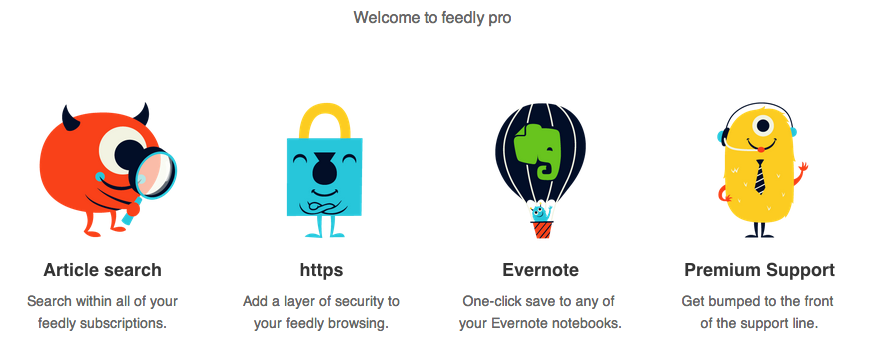
RSS service Feedly, one of the most popular alternatives to Google Reader that quickly hit 12 million users after the shutdown of Google’s service, has today started rolling out a Pro version that, starting at $5 per month, will enable search, Evernote integration, HTTPS navigation, and premium support for users. However, there’s a catch: Feedly Pro’s regular $5/month subscription ($45 annually) will be available publicly for everyone this Fall; today, the company has launched a $99 Feedly Pro lifetime membership that will unlock the Pro features, forever, for the first 5000 users.

As a daily Evernote user and fan of RSS apps that implement full article search, I was curious to try out the initial feature set of Feedly Pro, so I purchased the lifetime membership this morning. My first impression is that, overall, the Pro features will add value to the service for power users, but they will need several improvements and refinements. Feedly says that, in the future, Pro users will be able to directly vote for the features they want to see in the service. Read more

Access Extra Content and Perks

Founded in 2015, Club MacStories has delivered exclusive content every week for nearly a decade.

What started with weekly and monthly email newsletters has blossomed into a family of memberships designed for every MacStories fan.

Learn more here and from our Club FAQs.

Club MacStories: Weekly and monthly newsletters via email and the web that are brimming with apps, tips, automation workflows, longform writing, early access to the MacStories Unwind podcast, periodic giveaways, and more;

Club MacStories+: Everything that Club MacStories offers, plus an active Discord community, advanced search and custom RSS features for exploring the Club’s entire back catalog, bonus columns, and dozens of app discounts;

Club Premier: All of the above and AppStories+, an extended version of our flagship podcast that’s delivered early, ad-free, and in high-bitrate audio.

Learn more here and from our Club FAQs.


Pushpin 2.1 Adds iPad Support and Speed Enhancements

Pushpin

Pushpin

Pushpin already was my favorite Pinboard app on the iPhone: with a great 2.0 update that added a redesigned interface and saved feeds, Pushpin gained a spot on my Home screen as the app I would open to access the full Pinboard experience. From my review:

At $9.99, Pushpin 2.0 is a powerful Pinboard client for users who want to use Pinboard to add bookmarks, manage them, and discover new ones using the service’s (lightweight) social features. Pushpin 2.0 looks great on the Retina display, and new features like Saved Feeds, new tag filtering and suggestions, and improved web browsing strike a good balance between advanced functionality and general usability. Pushpin 2.0 can be used as your only Pinboard client on the iPhone, packing both management and browsing features, and I’m looking forward to an iPad version.

With last night’s 2.1 update, Pushpin is now optimized for the iPad and it looks just as good as the iPhone version. Navigation takes places in a main screen (not a sidebar) where you can find links to your bookmarks, community links, and saved feeds. The iPad version works out of the box with the URL scheme of the iPhone app, and the developer added support for opening links in Dolphin, which is a fine browser with direct Evernote integration (the best of its kind on the App Store).

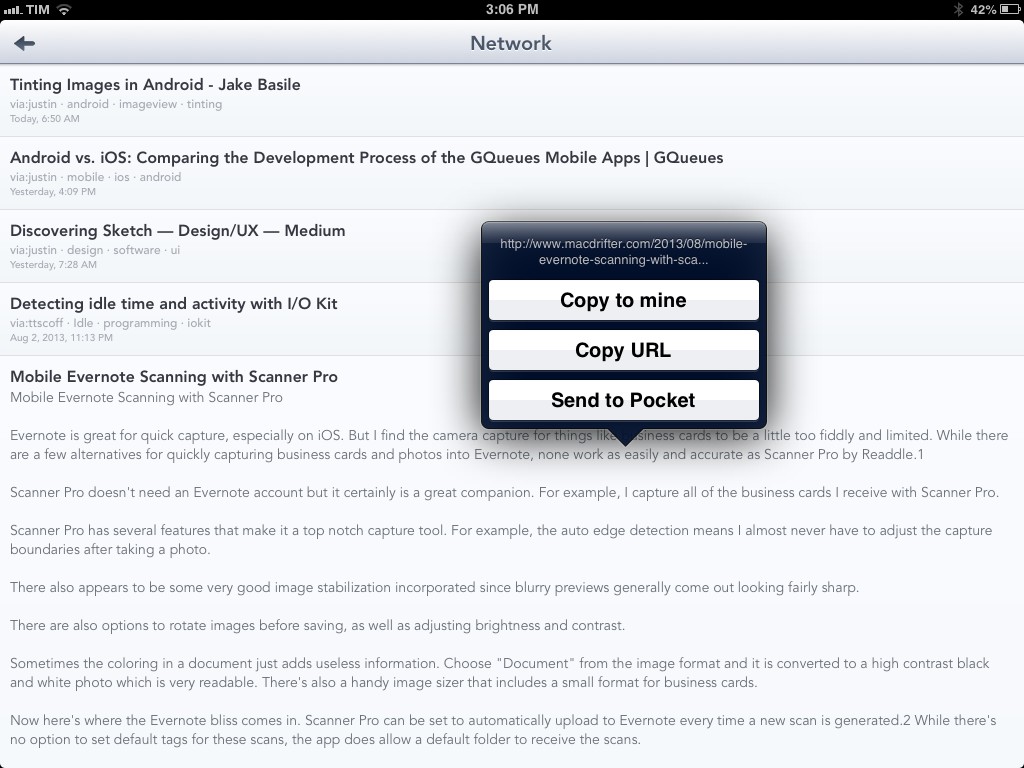
Pushpin benefits from the increased space of the iPad’s larger screen. For one, it’s much nicer to open links in the app’s built-in web view, and tapping & holding links in the list view opens a popover that doesn’t take over the entire screen; from the popover, you can easily copy a URL, copy a link to your account, or save an item to your read later service of choice.

Alongside speed improvements and bug fixes, saved feeds have been enhanced with support for from: tags: by combining these with regular usernames and tags, you’ll be able to see, for instance, what a specific user has saved from email or Twitter favorites – the app’s changelog on iTunes contains the full list of supported from: tags for your perusal.

Pushpin is a powerful all-in-one Pinboard app, and with an iPad version I can now enjoy the same experience on all my devices (I would like the ability to sync saved feeds, though). You can get Pushpin at $9.99 on the App Store.

Access Extra Content and Perks

Founded in 2015, Club MacStories has delivered exclusive content every week for nearly a decade.

What started with weekly and monthly email newsletters has blossomed into a family of memberships designed for every MacStories fan.

Learn more here and from our Club FAQs.

Club MacStories: Weekly and monthly newsletters via email and the web that are brimming with apps, tips, automation workflows, longform writing, early access to the MacStories Unwind podcast, periodic giveaways, and more;

Club MacStories+: Everything that Club MacStories offers, plus an active Discord community, advanced search and custom RSS features for exploring the Club’s entire back catalog, bonus columns, and dozens of app discounts;

Club Premier: All of the above and AppStories+, an extended version of our flagship podcast that’s delivered early, ad-free, and in high-bitrate audio.

Learn more here and from our Club FAQs.


365 Days

Today, when I remembered that exactly one year ago I was hospitalized for 22 days for a series of treatments to save my life, I tweeted about it. And then I opened Day One.

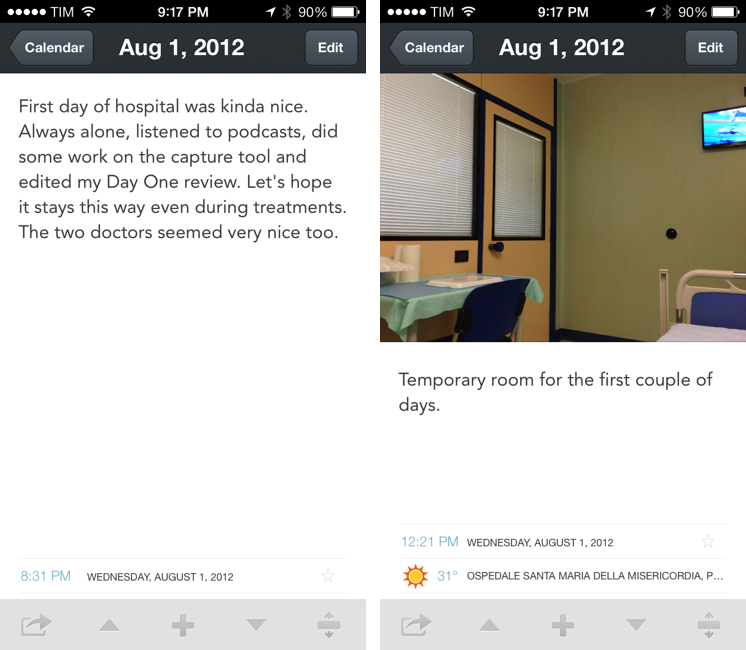
In the app’s Calendar view, I changed the year to “2012” and, sure enough, the “August 1, 2012” entry was there, showing photos of my hospital room; my girlfriend sending a selfie from home; and a note that I wrote about the doctors being “nice”. Bits of life. A combination of old thoughts and visual memories that I still have, in some form, in my brain, but that here, in this app – right now – I can hold and directly look at. It is, indeed, far more powerful than memory alone.

It sounds so trivial because we’re used to it. It’s diary app! Of course it lets you browse old entries in a calendar, and of course it’s got search, and of course it accepts photos as attachments, and, okay, the fact that you can see old weather information is neat – but yes, it’s because of the GPS. Common technology terms for yet another app. But does it have a URL scheme? We often lose track of the magic of software.

Sometimes, on days like today, I like to appreciate the simple things of my job. The fact that somebody out there has made an app that lets me cringe at my mistakes and cherish old moments. The fact that in this very moment I can take these old photos, and send them to my parents with a comment that says, “365 days ago…how things change”.

Isn’t that amazing?

Access Extra Content and Perks

Founded in 2015, Club MacStories has delivered exclusive content every week for nearly a decade.

What started with weekly and monthly email newsletters has blossomed into a family of memberships designed for every MacStories fan.

Learn more here and from our Club FAQs.

Club MacStories: Weekly and monthly newsletters via email and the web that are brimming with apps, tips, automation workflows, longform writing, early access to the MacStories Unwind podcast, periodic giveaways, and more;

Club MacStories+: Everything that Club MacStories offers, plus an active Discord community, advanced search and custom RSS features for exploring the Club’s entire back catalog, bonus columns, and dozens of app discounts;

Club Premier: All of the above and AppStories+, an extended version of our flagship podcast that’s delivered early, ad-free, and in high-bitrate audio.

Learn more here and from our Club FAQs.


Photowerks Enhances Apple’s Photos App with Smart Albums

Apple’s Photos app is often criticized for its lack of organizational features that go beyond a list of photos and screenshots, and the company will bring some improvements in this area with iOS 7 and a Photos app capable of organizing items in Moments and Collections. Photowerks, free on the App Store, enhances Apple’s default solution with sorting options and smart albums available today to iOS 6 users.

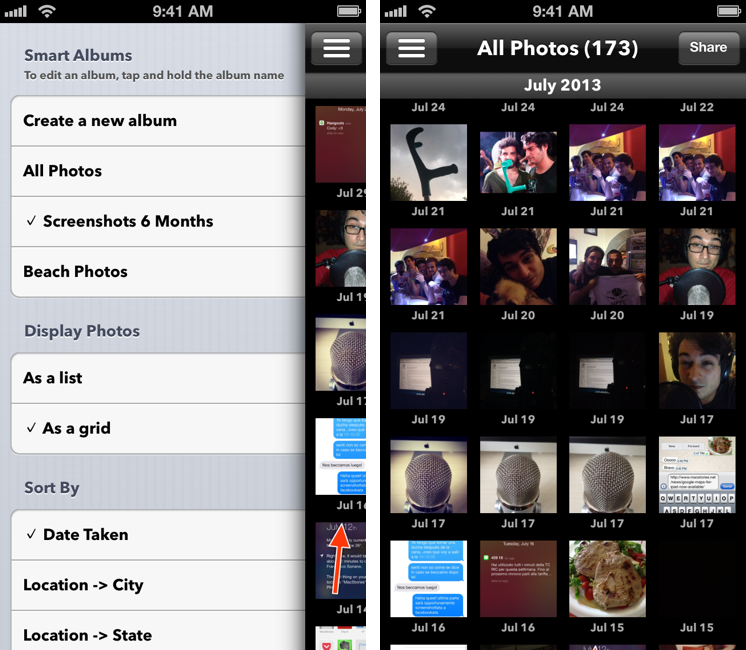
Photowerks comes with two main features: sorting, which is included in the free download, and Smart Albums, which can be unlocked with a $0.99 In-App Purchase. Once you’ve granted Photowerks permission to access your photos, the free version will allow you to load photos from your Camera Roll, show them as thumbnails on a grid or a list, and sort them (in ascending or descending order) by:

  • Date Taken
  • Location > City
  • Location > State
  • Location > Country
  • Camera > Make
  • Camera > Model

Even without unlocking the IAP, these features prove already handy as, in my opinion, they provide a better view of a stream of photos than what Apple has (or, more appropriately, hasn’t) done with the Photos app. Photos can be viewed in full-screen (where the app will display available information at the bottom), shared to Mail, Facebook, and Twitter, and grouped together to create a new album. Alas, there is no Open In support to send photos to other installed apps, like Evernote and Droplr in my case.

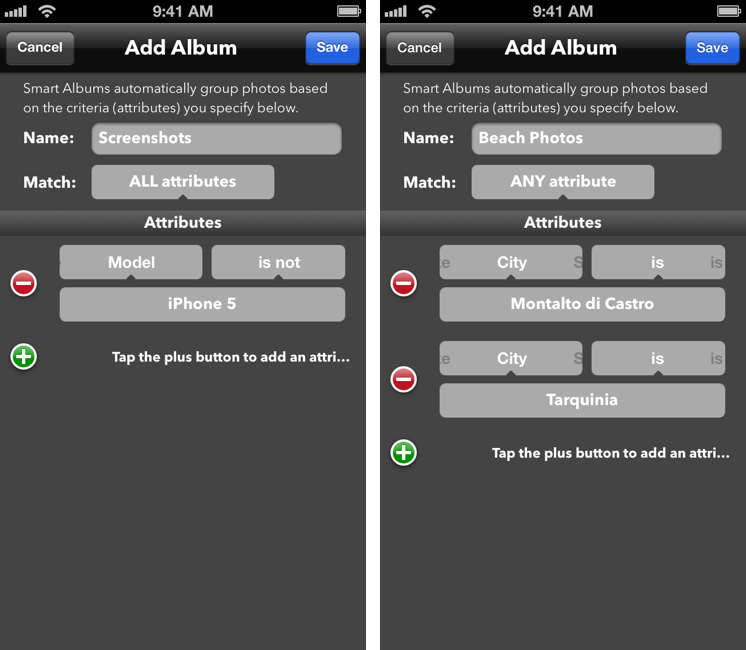
The Smart Albums feature is what really sells Photowerks. As the name suggests, they’re similar to iTunes’ smart playlists in that they let you automatically group photos based on pre-defined criteria that work with the sorting options mentioned above. By using a familiar any/all system for matching rules, Photowerks lets you specify attributes such as “date is after/is not/is/is before” or “model is/is not”; these attributes can be combined to create albums that will be populated with items that match your criteria and that you’ll be able to sort using the same sidebar that you’d use in the IAP-free version of Photowerks. On my iPhone, I have created an album that fetches screenshots taken after June 30 (“date is after June 30, model is not iPhone 5”) and photos taken at the beach (“city is Tarquinia” or “city is Montalto” with Match: Any).

I believe that iOS 7 will reduce the need for Photos.app replacements such as Photowerks, which is why I think the developers should focus on improving the feature that Apple won’t replicate in the short term – smart albums. It would be nice to be able to keep albums in sync across devices (Photowerks is a Universal app) and have access to more attributes for dates (like “past two months” or “this week”), image size, source (like Photo Stream) as well as nested conditions for even smarter filtering. I’m a big fan of the idea of having smart albums based on user-defined criteria, and I hope that the developers will keep on supporting and enhancing Photowerks for iOS 7.

Photowerks is free on the App Store.

Access Extra Content and Perks

Founded in 2015, Club MacStories has delivered exclusive content every week for nearly a decade.

What started with weekly and monthly email newsletters has blossomed into a family of memberships designed for every MacStories fan.

Learn more here and from our Club FAQs.

Club MacStories: Weekly and monthly newsletters via email and the web that are brimming with apps, tips, automation workflows, longform writing, early access to the MacStories Unwind podcast, periodic giveaways, and more;

Club MacStories+: Everything that Club MacStories offers, plus an active Discord community, advanced search and custom RSS features for exploring the Club’s entire back catalog, bonus columns, and dozens of app discounts;

Club Premier: All of the above and AppStories+, an extended version of our flagship podcast that’s delivered early, ad-free, and in high-bitrate audio.

Learn more here and from our Club FAQs.


Realmac Software Releases Ember - A Digital Scrapbook for Your Mac

Realmac Software, makers of great apps such as Clear, Rapidweaver, Analog, and Analog Camera, have released Ember for Mac today. Last month, Realmac detailed in a blog post what the future of LittleSnapper was and the team explained:

Over last few months, we’ve been getting a few emails asking about LittleSnapper - with some folks wondering if the app is still under development.

As it happens we’ve been heads-down-working on LittleSnapper for some time, and I’m absolutely thrilled today to dispel any rumours of the app’s demise and announce today that we’ve been hard at work on the next version of LittleSnapper: Ember for Mac.

Remember the original Ember? It was a great webapp (saved screenshot) that let you browse and add images to collections for inspiration: I used it all the time before Dribbble became so popular. Back in June of 2011, the Realmac team shut down the service and it was a major bummer for me – but it was understandable. Today, Ember is back as a Mac app, and it works great. Users of the old LittleSnapper are going to love Ember because it’s much more than a simple name change, but rather more like a ‘Pro’ version of the old software.

LittleSnapper users can easily import their libraries upon launching the new Ember app. The only thing you need to do to prepare for Ember is to make sure you’re using the most recent version of LittleSnapper, as only LittleSnapper libraries opened with LittleSnapper v1.8.5 can be imported into Ember. After that, Ember will be populated with all your goodies (Ember also supports importing multiple libraries if you need to do so).

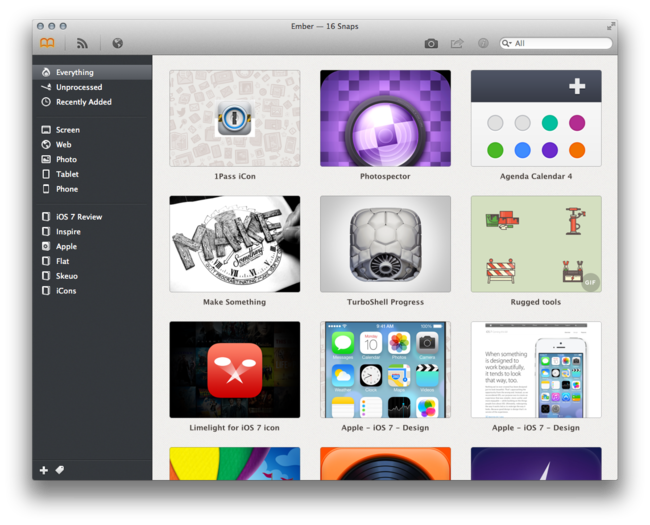
Ember is a great place to store photos, images, drawings, websites, app screenshots, or just about any image that inspires you. Just drag, snap or import the images that you want to keep, then organize them into your own relevant collections. Ember lets you annotate the images you need to give feedback on with drawing and text tools that allow you to give feedback / edits on images; if you need to, you can rotate and crop your images so they are correctly sized and aligned.

Images can be shared via AirDrop, Messages, Twitter, Facebook, Tumblr, Flickr, and CloudApp. In terms of library organization, tags help you sort and projects keep them all neatly organized, while smart projects work just like OS X Smart Folders – you can set the parameters on what they filter and collect.

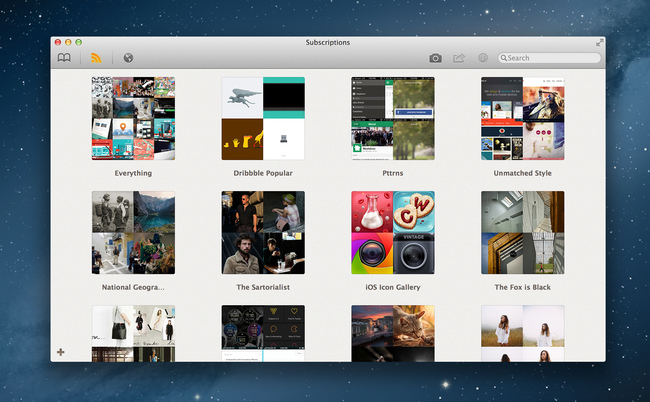
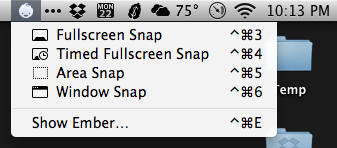
If you’re looking for inspiration and items to add, Ember has a few options. You can use the built-in web browser (it’s responsive!) and snap from there with built-in tools; the browser has a smart element detection that automatically suggests areas to snap as you roll over a webpage. Under the Subscriptions tab, you can subscribe to a site’s RSS (like Dribbble’s popular feed) and the app will refresh the feed on launch (or manually). Ember has browser extensions that will import snaps from Chrome and Safari there is a menu bar tool for quick and easy snaps from anywhere on your Mac.

Ember can also auto-detect iPhone and iPad screenshots. Drag the PNGs from your iOS device and Ember will automatically sort them into “Phone” and “Tablet”. Preferences let you set your image and text editor of choice, plus snap shortcuts, among other things. Ember will let you open images in your default browser, use Notification Center to let you know when you have new subscription images, and many more nice little touches.

When discussing Ember’s release, Federico asked me what I thought about the lack of sync an/or iOS apps and I answered: “For me, it doesn’t come into play at all with this app because I can import iOS screens. Most of my inspiration/design browsing is from my desktop computer and, if I really need to snap a screenshot from iOS, I can save it to Dropbox so when I get home I can import it into Ember. In a way, that’s like having sync.” Now, I do think syncing ember data across Macs (via Dropbox or iCloud) would be nice but that’s not yet available but could be in a future update.

Ember is a very polished app with a fantastic UI, slick animations, full-screen mode and it’s simply a fun app to use and organize images with. If you’re a digital creative person and want to organize your screenshots, inspirational images and reference files, Ember could be what you need. Ember for Mac is available today via the Mac App Store for $49. The price may be a little steep for some, but Ember is powerful, sexy, smart, and worth every penny.

Access Extra Content and Perks

Founded in 2015, Club MacStories has delivered exclusive content every week for nearly a decade.

What started with weekly and monthly email newsletters has blossomed into a family of memberships designed for every MacStories fan.

Learn more here and from our Club FAQs.

Club MacStories: Weekly and monthly newsletters via email and the web that are brimming with apps, tips, automation workflows, longform writing, early access to the MacStories Unwind podcast, periodic giveaways, and more;

Club MacStories+: Everything that Club MacStories offers, plus an active Discord community, advanced search and custom RSS features for exploring the Club’s entire back catalog, bonus columns, and dozens of app discounts;

Club Premier: All of the above and AppStories+, an extended version of our flagship podcast that’s delivered early, ad-free, and in high-bitrate audio.

Learn more here and from our Club FAQs.


VLC for iOS Returns To The App Store

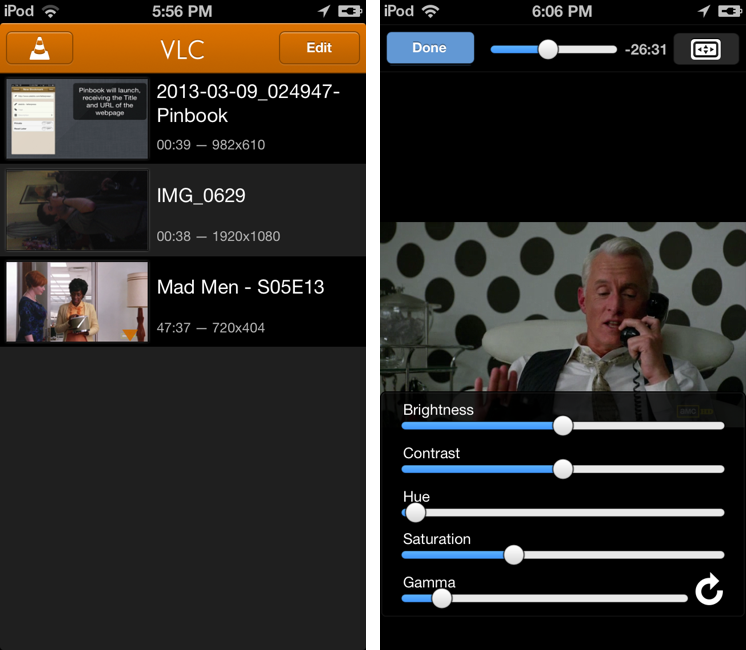
After a two-year absence, popular video player VLC is returning to the App Store with a new app for the iPhone and iPad. The new VLC for iOS will be available later today (it will start propagating at midnight in the various international App Stores) as a free download.

I’ve been able to test the new VLC for iOS for the past few weeks, and, in terms of visual appearances, the app isn’t too dissimilar from the old version that was available on the App Store in 2010. A main screen lists all your media with thumbnail previews, and you can tap on an item to start playback in a full-screen media player. However, in spite of a UI reminiscent of the old version, VLC has been completely rewritten to use modern audio and video output modules, multi-core decoding, and support for any file type supported by VLC on the desktop. In my tests, the app was able to quickly start playing any video file that I threw at it, such as .mp4 and .mkv files. Read more

Access Extra Content and Perks

Founded in 2015, Club MacStories has delivered exclusive content every week for nearly a decade.

What started with weekly and monthly email newsletters has blossomed into a family of memberships designed for every MacStories fan.

Learn more here and from our Club FAQs.

Club MacStories: Weekly and monthly newsletters via email and the web that are brimming with apps, tips, automation workflows, longform writing, early access to the MacStories Unwind podcast, periodic giveaways, and more;

Club MacStories+: Everything that Club MacStories offers, plus an active Discord community, advanced search and custom RSS features for exploring the Club’s entire back catalog, bonus columns, and dozens of app discounts;

Club Premier: All of the above and AppStories+, an extended version of our flagship podcast that’s delivered early, ad-free, and in high-bitrate audio.

Learn more here and from our Club FAQs.


Agenda 4.0 Review

Agenda 4.0

Agenda 4.0

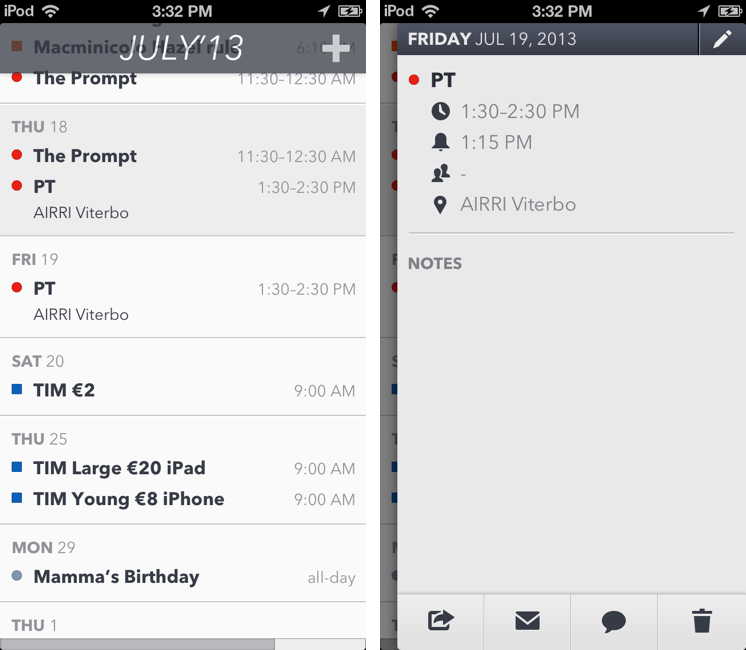
Savvy Apps’ Agenda, one of the most popular third-party calendar apps for iOS that we’ve been covering on MacStories for years, has been updated today to version 4.0, which adds a beautiful new user interface and builds upon the previous version’s app integrations, support for Reminders, and gesture-driven event management. Agenda 4.0 is sold as a separate app for $1.99 on the App Store.

I’ve had the chance to test Agenda 4.0 before today’s public release, and as I kept using the app I noticed how it was turning into a powerful complement to Fantastical, my favorite calendar client for iPhone. As I have discussed this week on The Prompt, in fact, I’m currently going through my annual re-evaluation of my workflow, and, partly because of my curiosity in regard to iOS 7, I’ve started using Apple’s Reminders on a daily basis again. Reminders are easy to use, the app is fast, and, more importantly, it’s one of the Apple apps that can sync in the background all the time with iCloud. I can integrate Reminders with IFTTT for iPhone, and, overall, I have been enjoying the simplicity and deep system-wide integration of Reminders. While I’m a big fan of Fantastical’s Day Ticker (I think it’s one of the best calendar interfaces ever shipped on iOS), Agenda allows me to view calendar events and reminders in the same list (something that Fantastical for iPhone still isn’t capable of), and with version 4.0 this list is even more polished and clear than Agenda 3.0. Read more

Access Extra Content and Perks

Founded in 2015, Club MacStories has delivered exclusive content every week for nearly a decade.

What started with weekly and monthly email newsletters has blossomed into a family of memberships designed for every MacStories fan.

Learn more here and from our Club FAQs.

Club MacStories: Weekly and monthly newsletters via email and the web that are brimming with apps, tips, automation workflows, longform writing, early access to the MacStories Unwind podcast, periodic giveaways, and more;

Club MacStories+: Everything that Club MacStories offers, plus an active Discord community, advanced search and custom RSS features for exploring the Club’s entire back catalog, bonus columns, and dozens of app discounts;

Club Premier: All of the above and AppStories+, an extended version of our flagship podcast that’s delivered early, ad-free, and in high-bitrate audio.

Learn more here and from our Club FAQs.


Bugshot: Simple Screenshot Annotations On iOS

Bugshot

Bugshot

Back in November 2012, I shared my frustration with the sharing mechanism of Skitch for iOS, concluding that:

Read more

Access Extra Content and Perks

Founded in 2015, Club MacStories has delivered exclusive content every week for nearly a decade.

What started with weekly and monthly email newsletters has blossomed into a family of memberships designed for every MacStories fan.

Learn more here and from our Club FAQs.

Club MacStories: Weekly and monthly newsletters via email and the web that are brimming with apps, tips, automation workflows, longform writing, early access to the MacStories Unwind podcast, periodic giveaways, and more;

Club MacStories+: Everything that Club MacStories offers, plus an active Discord community, advanced search and custom RSS features for exploring the Club’s entire back catalog, bonus columns, and dozens of app discounts;

Club Premier: All of the above and AppStories+, an extended version of our flagship podcast that’s delivered early, ad-free, and in high-bitrate audio.

Learn more here and from our Club FAQs.


IFTTT for iPhone: A Different Kind of iOS Automation

IFTTT for iPhone

IFTTT for iPhone

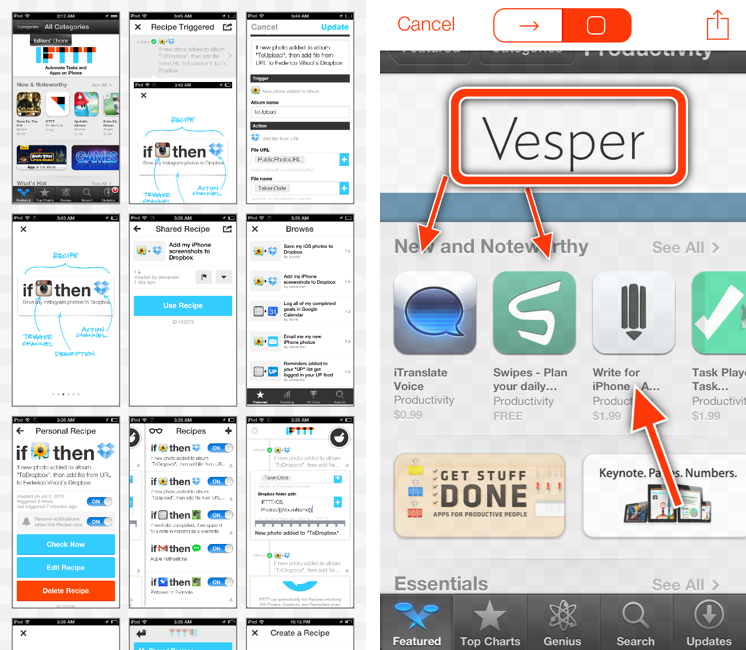
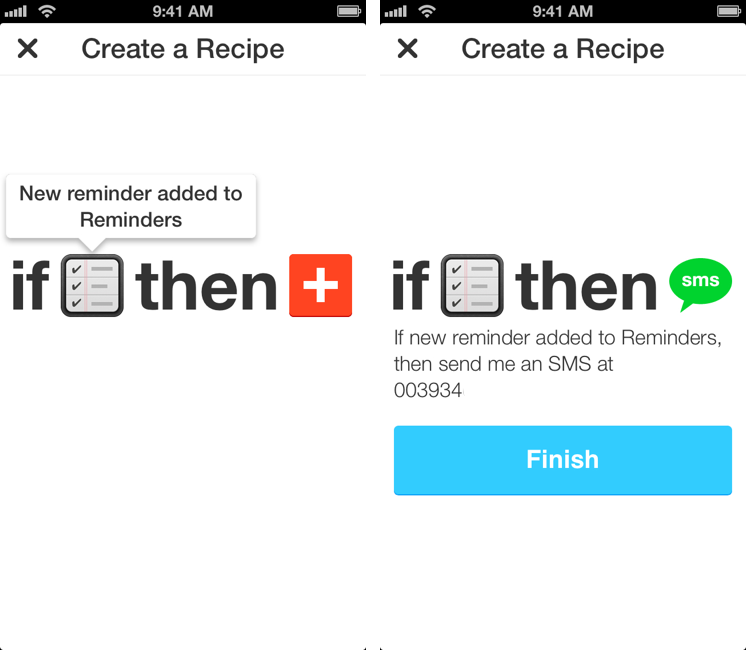
I used to heavily rely on IFTTT for my daily automation workflows that involved appending bits of text to files in my Dropbox, forwarding tweets to my OmniFocus inbox, generating PDFs, or archiving Instagram photos to my Dropbox account. IFTTT, acronym of If This Then That, is a web service that lets you connect other web services together to create automated workflows that run every time a piece of data is triggered: by leveraging a variety of APIs from compatible channels (such as Facebook, Dropbox, Evernote, Feedly, and more), IFTTT lets you automate the web in powerful (and sometimes unexpected) ways. Browsing Popular recipes on the IFTTT website can give you an idea of the scope of web automation that’s made possible by the service, and we’ve covered IFTTT in the past on MacStories as well.[1]

However, I stopped depending on IFTTT because, once I got more comfortable with my own Mac mini server as a remote automation assistant, I wanted to control the pipes of my personal data. I’m still using IFTTT for things like receiving an email if it’s going to rain tomorrow or a new SMS for press releases published by Apple (just an example of the power of IFTTT channels and recipes), but it’s not the primary system that I rely upon for automating daily tasks. The new IFTTT app for iPhone, which I have been testing and has been released today on the App Store, may make me (partially) reconsider my decision. Read more

Access Extra Content and Perks

Founded in 2015, Club MacStories has delivered exclusive content every week for nearly a decade.

What started with weekly and monthly email newsletters has blossomed into a family of memberships designed for every MacStories fan.

Learn more here and from our Club FAQs.

Club MacStories: Weekly and monthly newsletters via email and the web that are brimming with apps, tips, automation workflows, longform writing, early access to the MacStories Unwind podcast, periodic giveaways, and more;

Club MacStories+: Everything that Club MacStories offers, plus an active Discord community, advanced search and custom RSS features for exploring the Club’s entire back catalog, bonus columns, and dozens of app discounts;

Club Premier: All of the above and AppStories+, an extended version of our flagship podcast that’s delivered early, ad-free, and in high-bitrate audio.

Learn more here and from our Club FAQs.