Posts in Featured

Sparrow Launches On The App Store For $9.99

The long awaited and much anticipated Sparrow for OS X just launched in the App Store for $9.99, with an expected launch of $19.99. Merging the elegance of Tweetie with the bravado of Gmail, Sparrow is a beautiful email client whose gorgeous interface enables users to effortlessly manage, label, and compose messages through intuitive actions. With Growl support, multiple accounts, and quick replies to seamlessly manage inbox cruft, Sparrow is a no-brainer if you live in Gmail, but don’t want the heft of a traditional email client. IMAP support for Aol., Yahoo, and MobileMe is promised for a future update. We’ve been following Sparrow for quite a while on MacStories, and I have nothing but good things to say about this sleek client after many Twitter followers turned me on this once public beta project.

You can purchase Sparrow on the Mac App Store via the following link: Sparrow for Mac

Edit: Have I told you how much I love Sparrow’s new icon? It looks great in the menubar too!
Access Extra Content and Perks

Founded in 2015, Club MacStories has delivered exclusive content every week for nearly a decade.

What started with weekly and monthly email newsletters has blossomed into a family of memberships designed for every MacStories fan.

Learn more here and from our Club FAQs.

Club MacStories: Weekly and monthly newsletters via email and the web that are brimming with apps, tips, automation workflows, longform writing, early access to the MacStories Unwind podcast, periodic giveaways, and more;

Club MacStories+: Everything that Club MacStories offers, plus an active Discord community, advanced search and custom RSS features for exploring the Club’s entire back catalog, bonus columns, and dozens of app discounts;

Club Premier: All of the above and AppStories+, an extended version of our flagship podcast that’s delivered early, ad-free, and in high-bitrate audio.

Learn more here and from our Club FAQs.


BBC iPlayer App for iPad Coming This Week

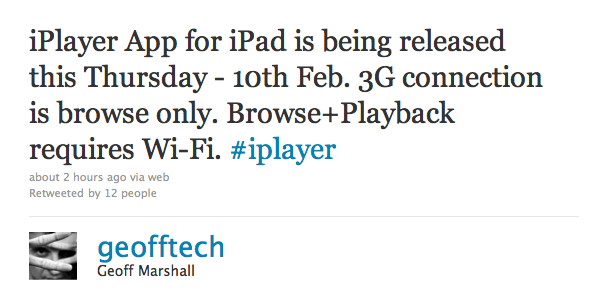
In late January we reported the official BBC iPlayer app for iPad was rumored for a February release; it now appears that the app is real, it’s launching this Thursday and it will require an active WiFi internet connection for full browsing and playback experience.

As tweeted by Interactive Operations Engineer at BBC Geoff Marshall, iPlayer for iPad won’t allow you to stream videos over 3G. Marshall also confirms the UK Radio Player was set to launch this week, but it’s been pushed back to March. It is very likely that the initial version of iPlayer for iPad will be available to UK users only, although some rumors point to BBC Worldwide planning a subscription-based international version for all App Store. The native iPlayer app is expected to bring a much smoother and stable experience to iPad owners who have relied on Mobile Safari for months now.

We will keep you posted as soon as iPlayer for iPad shows up in the App Store.

Access Extra Content and Perks

Founded in 2015, Club MacStories has delivered exclusive content every week for nearly a decade.

What started with weekly and monthly email newsletters has blossomed into a family of memberships designed for every MacStories fan.

Learn more here and from our Club FAQs.

Club MacStories: Weekly and monthly newsletters via email and the web that are brimming with apps, tips, automation workflows, longform writing, early access to the MacStories Unwind podcast, periodic giveaways, and more;

Club MacStories+: Everything that Club MacStories offers, plus an active Discord community, advanced search and custom RSS features for exploring the Club’s entire back catalog, bonus columns, and dozens of app discounts;

Club Premier: All of the above and AppStories+, an extended version of our flagship podcast that’s delivered early, ad-free, and in high-bitrate audio.

Learn more here and from our Club FAQs.


Verizon iPhone Jailbroken

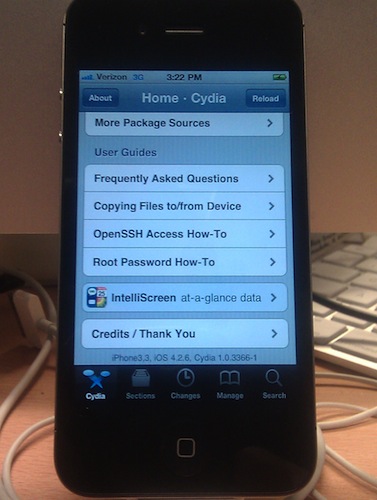
Well, that was fast. The Verizon iPhone has started arriving today to some people who pre-ordered it and it looks like the device has already been jailbroken. As you can see from the photo above, the iPhone is running Cydia and it clearly says “Verizon 3G” in the status bar. We guess the special iOS 4.2.6 version the iPhone is running was jailbroken through Greenpois0n, and a new version of the jailbreak tool with official CDMA iPhone support should come out soon.

So fear not, Verizon iPhone owners: you too can have Cydia. And by the way, here are some apps and tweaks you should install. [via]

Access Extra Content and Perks

Founded in 2015, Club MacStories has delivered exclusive content every week for nearly a decade.

What started with weekly and monthly email newsletters has blossomed into a family of memberships designed for every MacStories fan.

Learn more here and from our Club FAQs.

Club MacStories: Weekly and monthly newsletters via email and the web that are brimming with apps, tips, automation workflows, longform writing, early access to the MacStories Unwind podcast, periodic giveaways, and more;

Club MacStories+: Everything that Club MacStories offers, plus an active Discord community, advanced search and custom RSS features for exploring the Club’s entire back catalog, bonus columns, and dozens of app discounts;

Club Premier: All of the above and AppStories+, an extended version of our flagship podcast that’s delivered early, ad-free, and in high-bitrate audio.

Learn more here and from our Club FAQs.


Why I Started Using Hazel for Mac

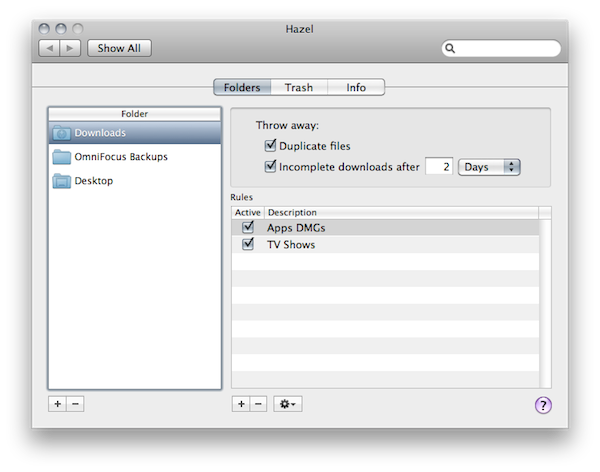
Over the weekend, I have started using an application several MacStories readers and friends of mine suggested for a very long time: Hazel. Following Ben Brooks’ excellent roundup of what can be accomplished with Noodlesoft’s Hazel and a series of great tips I’ve found on the Internet, I decided it was about time to take what many call “the most precious time-saving utility for the Mac” for a spin. The results, even in a short 3-day testing timeframe, are quite impressive.

This is not meant to be a review of Hazel, as I believe the app can go really in-depth with its feature set and I need a few more weeks before writing a proper article. Still, I think I should share my thoughts on why I started using it, especially considering how it’s difficult to find on blogs the reasons why you need Hazel, rather than a list of all the things this utility can do. Last week, when I was not a “Hazel user”, I couldn’t find a single post about getting started with Hazel, and why you should give it a try. So here it is. Read more

Access Extra Content and Perks

Founded in 2015, Club MacStories has delivered exclusive content every week for nearly a decade.

What started with weekly and monthly email newsletters has blossomed into a family of memberships designed for every MacStories fan.

Learn more here and from our Club FAQs.

Club MacStories: Weekly and monthly newsletters via email and the web that are brimming with apps, tips, automation workflows, longform writing, early access to the MacStories Unwind podcast, periodic giveaways, and more;

Club MacStories+: Everything that Club MacStories offers, plus an active Discord community, advanced search and custom RSS features for exploring the Club’s entire back catalog, bonus columns, and dozens of app discounts;

Club Premier: All of the above and AppStories+, an extended version of our flagship podcast that’s delivered early, ad-free, and in high-bitrate audio.

Learn more here and from our Club FAQs.


Gmail’s Priority Inbox Comes To The iPhone

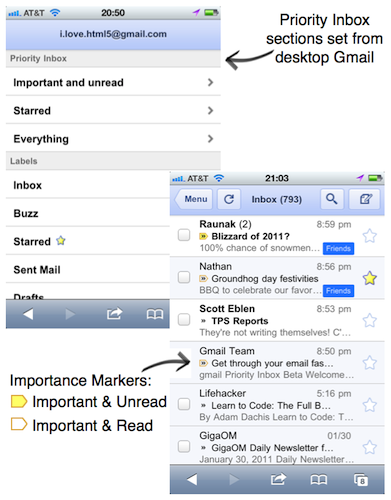
Great news from the Google Mobile team today: the Gmail webapp for iPhone has now Priority Inbox support built-in. Priority Inbox for mobile will import all the sections you have created on the desktop and it will also display the “important and read” or “important and unread” markers you’ve got used to see in Gmail.

Now, once you set up Priority Inbox in the desktop version of Gmail, you’ll see Priority Inbox sections when you visit gmail.com from your phone’s browser and click on the ‘Menu’ screen. You’ll also see importance markers in your inbox, so you can quickly identify which messages are important.

The new feature is available to Android and iOS devices. iOS 3 or later is required.

Access Extra Content and Perks

Founded in 2015, Club MacStories has delivered exclusive content every week for nearly a decade.

What started with weekly and monthly email newsletters has blossomed into a family of memberships designed for every MacStories fan.

Learn more here and from our Club FAQs.

Club MacStories: Weekly and monthly newsletters via email and the web that are brimming with apps, tips, automation workflows, longform writing, early access to the MacStories Unwind podcast, periodic giveaways, and more;

Club MacStories+: Everything that Club MacStories offers, plus an active Discord community, advanced search and custom RSS features for exploring the Club’s entire back catalog, bonus columns, and dozens of app discounts;

Club Premier: All of the above and AppStories+, an extended version of our flagship podcast that’s delivered early, ad-free, and in high-bitrate audio.

Learn more here and from our Club FAQs.


Smartr Twitter App Is Like Flipboard for iPhone

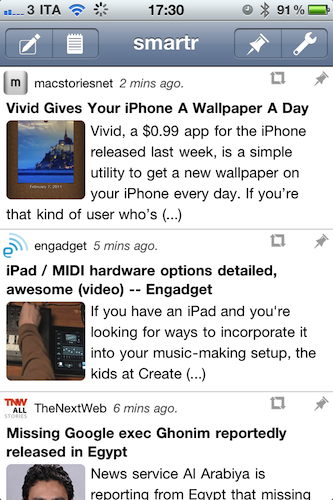
I was surprised when I found this app in the App Store last week. Smartr, a free app by Factyle, is a full-featured Twitter client that, unlike the usual Twitterrific or other Twitter apps, is entirely aimed at letting you read in an uncluttered and mobile-friendly view all the links shared in your timeline or lists. In fact, Smartr might just be the closest thing to a “Flipboard for iPhone” we’ve seen yet. Read more

Access Extra Content and Perks

Founded in 2015, Club MacStories has delivered exclusive content every week for nearly a decade.

What started with weekly and monthly email newsletters has blossomed into a family of memberships designed for every MacStories fan.

Learn more here and from our Club FAQs.

Club MacStories: Weekly and monthly newsletters via email and the web that are brimming with apps, tips, automation workflows, longform writing, early access to the MacStories Unwind podcast, periodic giveaways, and more;

Club MacStories+: Everything that Club MacStories offers, plus an active Discord community, advanced search and custom RSS features for exploring the Club’s entire back catalog, bonus columns, and dozens of app discounts;

Club Premier: All of the above and AppStories+, an extended version of our flagship podcast that’s delivered early, ad-free, and in high-bitrate audio.

Learn more here and from our Club FAQs.


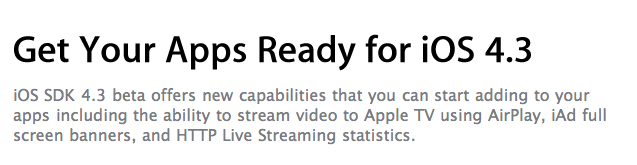
iOS 4.3 To Be Released On February 14th At 10 AM PST?

According to several reports surfaced earlier this week, Apple is targeting a release of the next major iOS update, version 4.3, in two weeks. We just got word from a reliable source that iOS 4.3 should be available on February 14th at 10 AM PST.  Read more

Access Extra Content and Perks

Founded in 2015, Club MacStories has delivered exclusive content every week for nearly a decade.

What started with weekly and monthly email newsletters has blossomed into a family of memberships designed for every MacStories fan.

Learn more here and from our Club FAQs.

Club MacStories: Weekly and monthly newsletters via email and the web that are brimming with apps, tips, automation workflows, longform writing, early access to the MacStories Unwind podcast, periodic giveaways, and more;

Club MacStories+: Everything that Club MacStories offers, plus an active Discord community, advanced search and custom RSS features for exploring the Club’s entire back catalog, bonus columns, and dozens of app discounts;

Club Premier: All of the above and AppStories+, an extended version of our flagship podcast that’s delivered early, ad-free, and in high-bitrate audio.

Learn more here and from our Club FAQs.


Finally: Previous Purchases Coming To iOS App Store

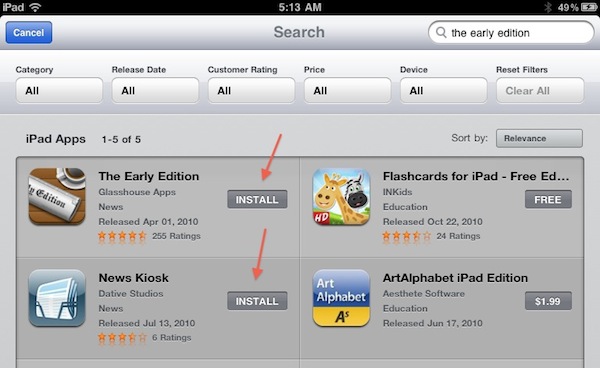
Apple is updating its iOS App Store tonight. After search filters, Apple added a much requested feature: apps already purchased get an “Install” button instead of the usual “Buy” one. Why is this a big deal? Because having the “Buy” button was confusing, as it wasn’t easy to remember which apps you had already bought. Now, if you’re trying to install an app you have already bought one, it’s much easier.

Sure, it’s not as useful as the “Purchases” tab in the Mac App Store (which lets you see all your app purchase history at once), but we think this is a great (and much needed) first step nonetheless. The new feature is only enabled on the iPad App Store right now, but it shouldn’t be a problem for Apple to add it to the iPhone and iPod touch as well (unlike filters, which require some screen space).

Thanks, App Store team.

Access Extra Content and Perks

Founded in 2015, Club MacStories has delivered exclusive content every week for nearly a decade.

What started with weekly and monthly email newsletters has blossomed into a family of memberships designed for every MacStories fan.

Learn more here and from our Club FAQs.

Club MacStories: Weekly and monthly newsletters via email and the web that are brimming with apps, tips, automation workflows, longform writing, early access to the MacStories Unwind podcast, periodic giveaways, and more;

Club MacStories+: Everything that Club MacStories offers, plus an active Discord community, advanced search and custom RSS features for exploring the Club’s entire back catalog, bonus columns, and dozens of app discounts;

Club Premier: All of the above and AppStories+, an extended version of our flagship podcast that’s delivered early, ad-free, and in high-bitrate audio.

Learn more here and from our Club FAQs.


A Great Simplenote Update: Dropbox Integration and Lists

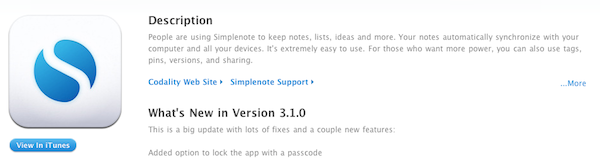
Over the past few weeks I’ve been testing a new version of Simplenote, which just went live in the App Store. The new Simplenote, which reaches version 3.1, is a huge update that adds many requested features and a great surprise from the developers: the app now comes with native Dropbox support, configurable in the Settings. Simplenote can now sync text files back to a “Simplenote” folder in your Dropbox account (you can rename it), and syncing sessions happen every several minutes, but can be triggered manually. Dropbox integration is a feature exclusive to the Premium subscription, which can be purchased for $12 a year. In my tests, Dropbox syncing has been very reliable and now allows me to natively integrate Simplenote with a plethora of other iOS and Mac word processors that support Dropbox. Read more

Access Extra Content and Perks

Founded in 2015, Club MacStories has delivered exclusive content every week for nearly a decade.

What started with weekly and monthly email newsletters has blossomed into a family of memberships designed for every MacStories fan.

Learn more here and from our Club FAQs.

Club MacStories: Weekly and monthly newsletters via email and the web that are brimming with apps, tips, automation workflows, longform writing, early access to the MacStories Unwind podcast, periodic giveaways, and more;

Club MacStories+: Everything that Club MacStories offers, plus an active Discord community, advanced search and custom RSS features for exploring the Club’s entire back catalog, bonus columns, and dozens of app discounts;

Club Premier: All of the above and AppStories+, an extended version of our flagship podcast that’s delivered early, ad-free, and in high-bitrate audio.

Learn more here and from our Club FAQs.