Posts in Featured

With Real-Time API, Instagram Goes Beyond the App Store

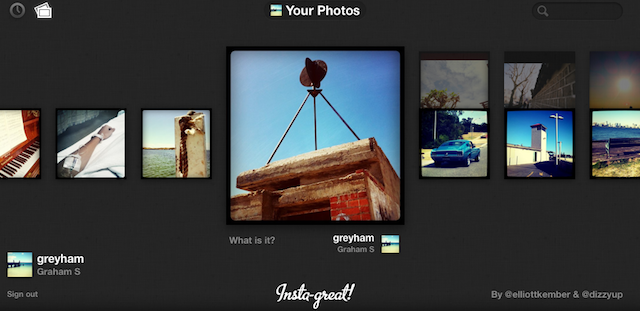
Instagram yesterday released their real-time updates API which allows other developers to integrate Instagram photos, tags and locations in their own apps. The API is already in action on a number of apps including Foodspotting, Momento and Instagre.at.

Over 2000 developers signed up for access to the API and some other popular apps and services such as Flipboard and About.me will soon be adding Instagram API into their products. However at this stage the API is read-only as Instagram works to ensure a smooth implementation of the API, which was only announced earlier this month. Instagram has a demo of what the API can achieve, with a dynamic web page updating as new photos are uploaded to Instagram.

Read more

Access Extra Content and Perks

Founded in 2015, Club MacStories has delivered exclusive content every week for nearly a decade.

What started with weekly and monthly email newsletters has blossomed into a family of memberships designed for every MacStories fan.

Learn more here and from our Club FAQs.

Club MacStories: Weekly and monthly newsletters via email and the web that are brimming with apps, tips, automation workflows, longform writing, early access to the MacStories Unwind podcast, periodic giveaways, and more;

Club MacStories+: Everything that Club MacStories offers, plus an active Discord community, advanced search and custom RSS features for exploring the Club’s entire back catalog, bonus columns, and dozens of app discounts;

Club Premier: All of the above and AppStories+, an extended version of our flagship podcast that’s delivered early, ad-free, and in high-bitrate audio.

Learn more here and from our Club FAQs.


What Is Thunderbolt?

Thunderbolt technology is what was Intel’s Light Peak. It’s not an Apple technology, but rather the culmination of Intel’s handiwork in combination with Apple’s mini DisplayPort. While Light Peak was developed to work over fiber (literally for light speeds), Thunderbolt is implemented over copper. Despite this, you’re still getting bi-directional (in and out as they say), 10 Gbps connection over a cable, plus a 10 Watt feed so you can power heavy equipment on the go (you don’t get that with USB). For comparison, your current USB 2.0 devices only get 480 Mbps through the cable! With this technology, you can drive multiple inputs including monitors, workstations, and audio equipment without a bird’s nest under your desk.

Read more

Access Extra Content and Perks

Founded in 2015, Club MacStories has delivered exclusive content every week for nearly a decade.

What started with weekly and monthly email newsletters has blossomed into a family of memberships designed for every MacStories fan.

Learn more here and from our Club FAQs.

Club MacStories: Weekly and monthly newsletters via email and the web that are brimming with apps, tips, automation workflows, longform writing, early access to the MacStories Unwind podcast, periodic giveaways, and more;

Club MacStories+: Everything that Club MacStories offers, plus an active Discord community, advanced search and custom RSS features for exploring the Club’s entire back catalog, bonus columns, and dozens of app discounts;

Club Premier: All of the above and AppStories+, an extended version of our flagship podcast that’s delivered early, ad-free, and in high-bitrate audio.

Learn more here and from our Club FAQs.


Apple To Preview Lion & Lion Server: Features AirDrop, New Mail [Updating]

Businesswire has lit up with a pair of Apple press releases, one of them being a developer preview for OS X Lion. Mission Control and Launchpad are the prominent features we’ve heard about in the past, and Apple is talking about new gestures to zoom in on web pages and switch between full screen apps. More notably is an overhaul of Mail, and other new Mac features you’ll find after the break.

Update: Apple has updated their Mac OS X Lion page to reveal some of the upcoming features. There’s a lot to sort through, and we’re digging into the details.

Read more

Access Extra Content and Perks

Founded in 2015, Club MacStories has delivered exclusive content every week for nearly a decade.

What started with weekly and monthly email newsletters has blossomed into a family of memberships designed for every MacStories fan.

Learn more here and from our Club FAQs.

Club MacStories: Weekly and monthly newsletters via email and the web that are brimming with apps, tips, automation workflows, longform writing, early access to the MacStories Unwind podcast, periodic giveaways, and more;

Club MacStories+: Everything that Club MacStories offers, plus an active Discord community, advanced search and custom RSS features for exploring the Club’s entire back catalog, bonus columns, and dozens of app discounts;

Club Premier: All of the above and AppStories+, an extended version of our flagship podcast that’s delivered early, ad-free, and in high-bitrate audio.

Learn more here and from our Club FAQs.


Apple Introduces New MacBook Pros

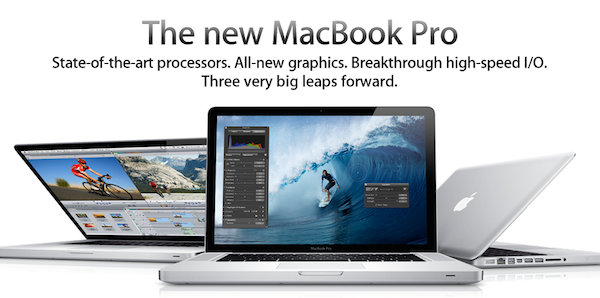
Apple introduced the new MacBook Pro line today with Intel “Sandy Bridge” processors and Light Peak technology renamed “Thunderbolt”, integrated over mini DisplayPort on the 13”, 15” and 17” models. In this year’s update to the line, Apple included quad-core CPUs in the 15” and 17” MacBook Pros, and new AMD Radeon GPUs.

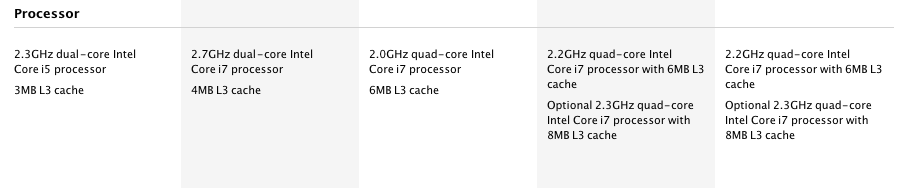
The 13-inch MacBook Pro is available in two configurations: one with a 2.3 GHz Dual-Core Intel Core i5 and 320GB hard drive starting at $1,199; and one with a 2.7 GHz Dual-Core Intel Core i5 and 500GB hard drive starting at $1,499.

The new 15-inch MacBook Pro is available in two models: one with a 2.0 GHz Quad-Core Intel Core i7, AMD Radeon HD 6490M and 500GB hard drive starting at $1,799 and one with a 2.2 GHz Quad-Core Intel Core i7, AMD Radeon HD 6750M and 750GB hard drive starting at $2,199.

The new 17-inch MacBook Pro features a 2.2 GHz Quad-Core Intel Core i7, AMD Radeon HD 6750M and 750GB hard drive and is priced at $2,499.

Press release here. Specs below, full specs here.

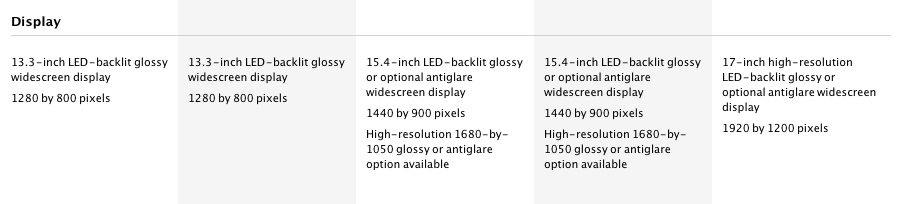
MacBook Pro 13” -  1280x800 screen resolution. 2.3 GHz Intel Core i5, Dual core. 320 GB 5400 rpm hard drive. 4 GB 1333 MHz RAM. Intel HD 3000.

MacBook Pro 13” -  1280x800 screen resolution. 2.7 GHz Intel Core i5, Dual core. 500 GB 5400 rpm hard drive. 4 GB 1333 MHz RAM. Intel HD 3000.

MacBook Pro 15” - 1440x900 screen resolution.  2.0 GHz Intel Core i7, Quad core. 500 GB 5400 rpm hard drive. 4 GB 1333 MHz RAM. AMD Radeon HD 6490M 256 MB.

MacBook Pro 15” - 1440x900 screen resolution.  2.2 GHz Intel Core i7, Quad core. 750 GB 5400 rpm hard drive. 4 GB 1333 MHz RAM. AMD Radeon HD 6750M 1 GB.

MacBook Pro 17” - 1920x1200 screen resolution. 2.2 Ghz Intel Core i7, Quad core. 750 GB 5400 rpm hard drive. 4 GB 1333 MHz RAM. AMD Radeon HD 6750M 1 GB.

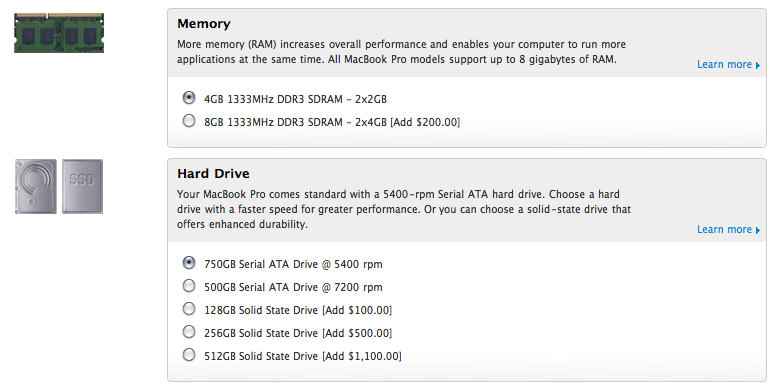
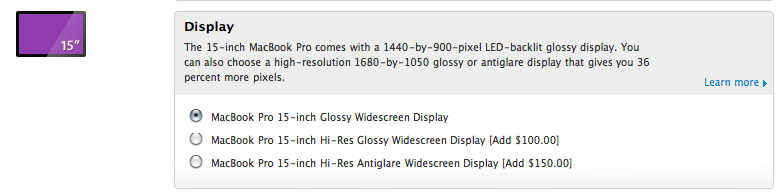
Update: configuration options available for the new MacBook Pros. A few notes: no 7200 rpm drive for MBP 13”, no high-res display option for MBP 13”, SSD up to 512 GB available.

Read more

Access Extra Content and Perks

Founded in 2015, Club MacStories has delivered exclusive content every week for nearly a decade.

What started with weekly and monthly email newsletters has blossomed into a family of memberships designed for every MacStories fan.

Learn more here and from our Club FAQs.

Club MacStories: Weekly and monthly newsletters via email and the web that are brimming with apps, tips, automation workflows, longform writing, early access to the MacStories Unwind podcast, periodic giveaways, and more;

Club MacStories+: Everything that Club MacStories offers, plus an active Discord community, advanced search and custom RSS features for exploring the Club’s entire back catalog, bonus columns, and dozens of app discounts;

Club Premier: All of the above and AppStories+, an extended version of our flagship podcast that’s delivered early, ad-free, and in high-bitrate audio.

Learn more here and from our Club FAQs.


New MacBook Pro 15” Specs Leaked? AMD Radeon, Thunderbolt, No SSD

The Apple Store is down, the new MacBook Pros are only a few hours away at this point, yet Mac4Ever is posting a photo of the specs of the new MacBook Pro 15-inch (although it’s not specified whether it’s a low-end or high-end model).

First off, no SSD. There’s a 500 GB 5400 rpm hard drive in there. The photo also shows the following details:

  • Intel Core i7, quad-core, 2Ghz
  • 4 GB SDRAM DD3

  • Thunderbolt port as seen on the leaked MacBook Pro 13” photos

  • AMD Radeon HD 6490M graphic processor

  • FaceTime HD camera

  • SuperDrive 8x

  • SDXC, two USB ports, ForeWire 800

  • 1440 x 900 screen resolution

Mac4Ever posted a series of leaked shots yesterday, later confirmed by multiple sources, so we’re very confident this photo is real. We’ll find out in a few hours anyway. Read more

Access Extra Content and Perks

Founded in 2015, Club MacStories has delivered exclusive content every week for nearly a decade.

What started with weekly and monthly email newsletters has blossomed into a family of memberships designed for every MacStories fan.

Learn more here and from our Club FAQs.

Club MacStories: Weekly and monthly newsletters via email and the web that are brimming with apps, tips, automation workflows, longform writing, early access to the MacStories Unwind podcast, periodic giveaways, and more;

Club MacStories+: Everything that Club MacStories offers, plus an active Discord community, advanced search and custom RSS features for exploring the Club’s entire back catalog, bonus columns, and dozens of app discounts;

Club Premier: All of the above and AppStories+, an extended version of our flagship podcast that’s delivered early, ad-free, and in high-bitrate audio.

Learn more here and from our Club FAQs.


MacStories Product Giveaway: The AViiQ Portable Laptop Stand

Nothing should be more flexible or more comfortable than your mobile lifestyle. That’s why AViiQ created the Portable Laptop Stand which I had the pleasure of reviewing. It’s designed to be portable, light, yet strong enough to withstand the stress of everyday computing. The AViiQ Portable Laptop Stand compromises on none of these things: imagine slipping a curious fine sheet of aluminum into your laptop bag, only for it to unfold on the table as something uniquely striking. The thin, brushed style of the stand, combined with its sharp looks, simply disappears underneath your MacBook. Inverted or upright, folded opened or closed, we’re giving away a truly fine product from the folks at AViiQ so you too can enjoy the comfort and mobility of the world’s thinnest laptop stand.

Read more

Access Extra Content and Perks

Founded in 2015, Club MacStories has delivered exclusive content every week for nearly a decade.

What started with weekly and monthly email newsletters has blossomed into a family of memberships designed for every MacStories fan.

Learn more here and from our Club FAQs.

Club MacStories: Weekly and monthly newsletters via email and the web that are brimming with apps, tips, automation workflows, longform writing, early access to the MacStories Unwind podcast, periodic giveaways, and more;

Club MacStories+: Everything that Club MacStories offers, plus an active Discord community, advanced search and custom RSS features for exploring the Club’s entire back catalog, bonus columns, and dozens of app discounts;

Club Premier: All of the above and AppStories+, an extended version of our flagship podcast that’s delivered early, ad-free, and in high-bitrate audio.

Learn more here and from our Club FAQs.


New Design for MacBook Pros in 2012? Next Week’s iPad 2 Actually an iPad 1.5?

Following today’s leaks of the upcoming MacBook Pros and the official iPad 2 event announcement by Apple, iLounge has posted more information on the next-generation MBPs and iPads we’re going to see tomorrow and next week. According to iLounge’s sources, this year’s MacBook Pro refresh is turning out to be an incremental upgrade / speed bump, but a major redesign for the line is planned for 2012, and it’s already in development at Apple’s manufacturers in Taiwan.

Next year is the year when Apple will introduce an all new design for the MacBook Pro product family, which is already under development at Quanta in Taiwan. It’s being described as a big, “milestone” release for the Pro family, as compared with the speed bump features that will be introduced in tomorrow’s models.

Read more

Access Extra Content and Perks

Founded in 2015, Club MacStories has delivered exclusive content every week for nearly a decade.

What started with weekly and monthly email newsletters has blossomed into a family of memberships designed for every MacStories fan.

Learn more here and from our Club FAQs.

Club MacStories: Weekly and monthly newsletters via email and the web that are brimming with apps, tips, automation workflows, longform writing, early access to the MacStories Unwind podcast, periodic giveaways, and more;

Club MacStories+: Everything that Club MacStories offers, plus an active Discord community, advanced search and custom RSS features for exploring the Club’s entire back catalog, bonus columns, and dozens of app discounts;

Club Premier: All of the above and AppStories+, an extended version of our flagship podcast that’s delivered early, ad-free, and in high-bitrate audio.

Learn more here and from our Club FAQs.


TaskAgent Syncs ToDos Over Dropbox As Editable Text Files

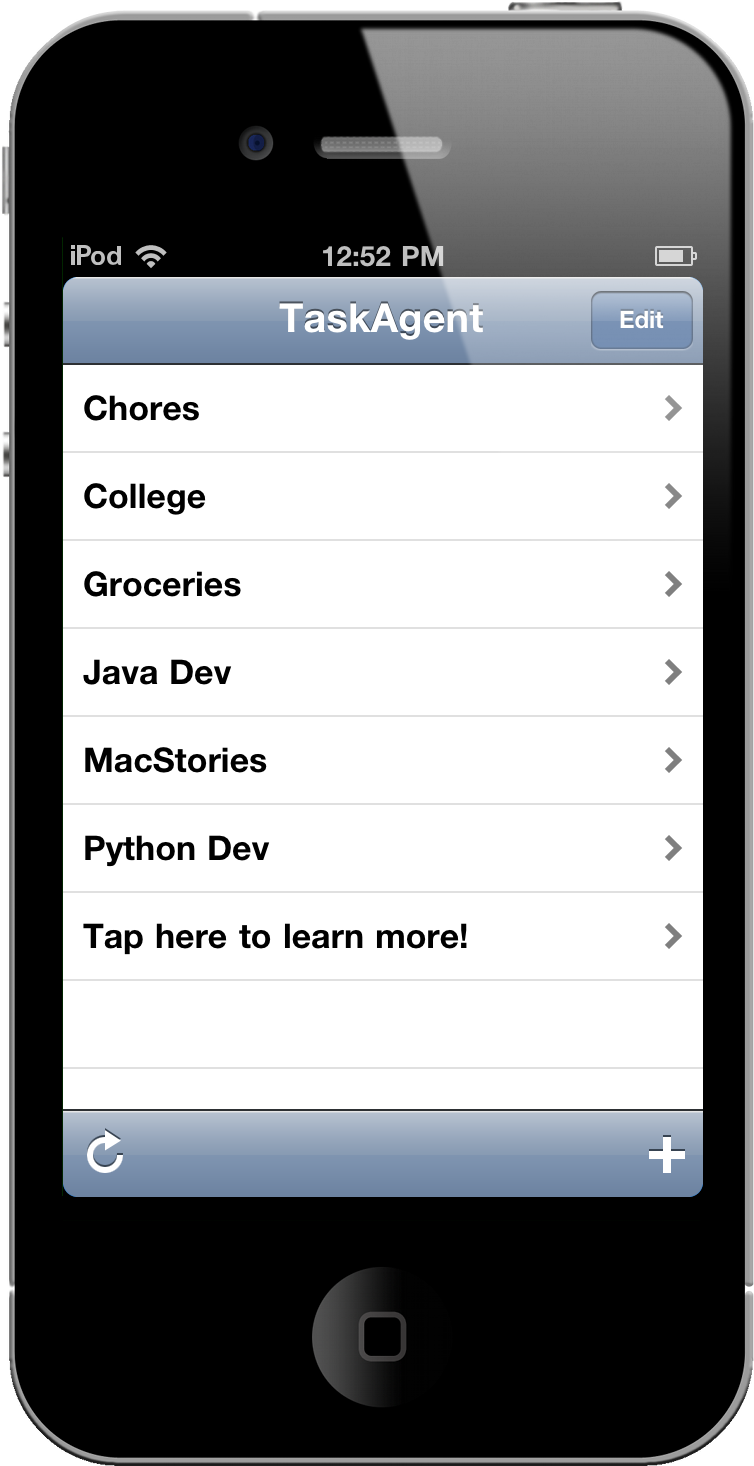
Why think about adding tasks, managing lists, and getting drowned in contexts and tags when you could just have a Dropbox enabled whiteboard for everything you need to get done? TaskAgent is the minimal to-do manager that you’ll want if you’d like the ability to easily share tasks in a readable format via text files (it’s that simple), and you’ll never be outta sync across your iOS devices or Mac.

Read more

Access Extra Content and Perks

Founded in 2015, Club MacStories has delivered exclusive content every week for nearly a decade.

What started with weekly and monthly email newsletters has blossomed into a family of memberships designed for every MacStories fan.

Learn more here and from our Club FAQs.

Club MacStories: Weekly and monthly newsletters via email and the web that are brimming with apps, tips, automation workflows, longform writing, early access to the MacStories Unwind podcast, periodic giveaways, and more;

Club MacStories+: Everything that Club MacStories offers, plus an active Discord community, advanced search and custom RSS features for exploring the Club’s entire back catalog, bonus columns, and dozens of app discounts;

Club Premier: All of the above and AppStories+, an extended version of our flagship podcast that’s delivered early, ad-free, and in high-bitrate audio.

Learn more here and from our Club FAQs.


Desire: An App To Track The Things You Want

In the next few weeks, I think I’m going to buy an iPad 2 and a new MacBook Pro. Not to mention a pair of new headphones, some cool gloves compatible with the iPhone and a bunch of other things I’ve found online. To track these items and the money required to buy them, I might just use this neat new iPhone app by Michal Grossmann and Maros Holly called Desire that’s aimed at letting you keep track “and manage your savings for the things you always wanted so much”.

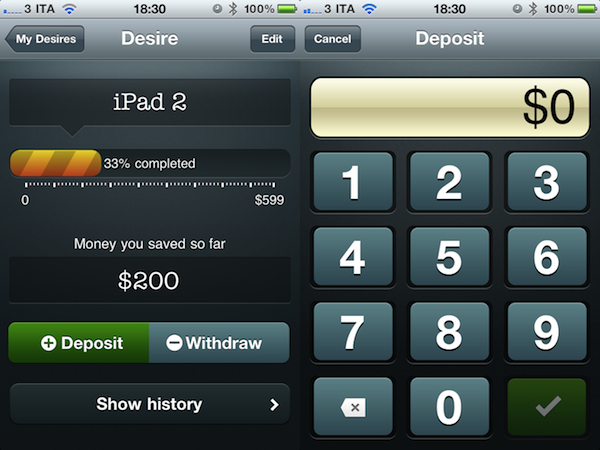
In the main screen of Desire, you can enter the items you want to keep track of. From the “new desire” screen you can choose a name, and set a price. Once you’ve got some desires added in the database, you can deposit and withdraw money to visualize your savings for a specific item. The interface and animations in the single item view are simply beautiful, with a progress bar that display how much money you’ve saved and two buttons to add or remove cash. A “show history” button lets you see your log of withdrawals and deposits in the past weeks. It’s a very simple approach that’s also great to look at.

Desire is available at $0.99 in the App Store. Give it a try if you’re looking for a gorgeous app to manage the things you’re dreaming of.

Access Extra Content and Perks

Founded in 2015, Club MacStories has delivered exclusive content every week for nearly a decade.

What started with weekly and monthly email newsletters has blossomed into a family of memberships designed for every MacStories fan.

Learn more here and from our Club FAQs.

Club MacStories: Weekly and monthly newsletters via email and the web that are brimming with apps, tips, automation workflows, longform writing, early access to the MacStories Unwind podcast, periodic giveaways, and more;

Club MacStories+: Everything that Club MacStories offers, plus an active Discord community, advanced search and custom RSS features for exploring the Club’s entire back catalog, bonus columns, and dozens of app discounts;

Club Premier: All of the above and AppStories+, an extended version of our flagship podcast that’s delivered early, ad-free, and in high-bitrate audio.

Learn more here and from our Club FAQs.