Federico Viticci

10876 posts on MacStories since April 2009

Federico is the founder and Editor-in-Chief of MacStories, where he writes about Apple with a focus on apps, developers, iPad, and iOS productivity. He founded MacStories in April 2009 and has been writing about Apple since. Federico is also the co-host of AppStories, a weekly podcast exploring the world of apps, Unwind, a fun exploration of media and more, and NPC: Next Portable Console, a show about portable gaming and the handheld revolution.

This Week's Sponsor:

Inoreader

Build your own newsfeed and cut through the noise


“Theme It” Store for Jailbroken Devices Released

Right after a major improvement to the Themes section on Cydia, here comes Theme It, a new store for themes iOS users can install on their jailbroken devices. Theme It offers a curated collection of premium, paid themes from designers who have created full replacement for the standard graphic elements on iOS. If you’re familiar with Cydia and Winterboard – the tool to apply themes to the iPhone – starting to use Theme It shouldn’t be really difficult. The store now only has paid themes, and the developers promise free ones will be added soon. To use the store, an account is required, and the app must be downloaded either manually or installed through a dedicated Cydia repository.

A full list of currently available themes can be viewed here. Users can browse themes either on the app or the website, they can vote themes and read through the descriptions provided by the creator. The app’s design looks clean and elegant, although we don’t know the technical details of the app – namely, whether or not it uses the same Winterboard system to apply themes to iOS.

There’s also some controversy in the launch of Theme It. Apparently, Cydia’s owner and main developer Jay Freeman asked the Theme It folks to “back down” and not launch the app, claiming “competition is bad”. After the break, you’ll find the response from Theme It’s developers (courtesy of ReadWriteWeb) and a promotional video for the new Store. Read more


Sparrow Email Client Is Coming To The Mac App Store

Sparrow Email Client Is Coming To The Mac App Store

Here at MacStories, we’ve been following the development of the Sparrow email client for Mac very closely. The app first came out as public beta in October of last year, and many quickly dismissed it as a “clone of Tweetie” built for Gmail. The developers listened, improved the client and fixed bugs. The app really grew to become a full-featured Gmail client for the desktop.

With a blog post this morning, the developers announced Sparrow is coming to the Mac App Store in the next weeks, with the app already submitted to Apple for approval.

2 versions of Sparrow will be released. They’ll both be available in the Mac AppStore and on our website:
Paid: Sparrow will cost $24,99 but early birds will benefit from the $19,99 introductory price.
Free: Sparrow Lite will be ad-supported. Carbon Ads is providing the nice ads you have certainly seen in the latest Beta version. The free version will allow one-account creation only.
We can’t provide any precise release date yet as the application has to be approved by Apple.

We are looking forward to the debut of Sparrow in the Mac App Store. Also, the new application icon you see above looks pretty sweet.

Permalink

MacStories Product Review: Sonos S5 Wireless Music System

I can’t live without my music. Every day, I need to get my “fix” either through iTunes, Youtube (it’s good for rare live performances) or Spotify. I also scrobble the songs I listen to towards last.fm, although I’m no huge fan of the service as a social platform. I just keep an archive of my musical tastes in there. Still, as far as music is concerned, most of the times it’s not the system or the platform that really matters. It’s the quality. And for quality, you need good gear.

Over the years, I’ve always tried to save money and purchase great-quality earbuds to ensure high-fidelity playback while on the go. I’m still happy with my Sennheiser CX 300 bought years ago, but home stereo systems have been a dilemma for me, in spite of my obsession for top-notch hardware. I’ve changed setups too many times, jumped from speakers to stereos and all-in-one solutions without really sticking to one for more than 6 months. When music becomes an obsession, good gear is a necessity. Recently, the audio technologies implemented by Apple in iOS forced me to reconsider everything once again.

See, wireless streaming spoiled all the fun I had accomplished. First came audio via Bluetooth, then Airport Express stations and AirPlay. I changed devices: I went from a classic iPod to an iPod touch to iPhone + iPad. I subscribed to Spotify Premium to use the mobile app (with streaming and offline access), I became addicted to Apple’s own iPod app and third party replacements like My Artists, or external controllers like Coversutra, Bowtie and SongSwiper. Put simply: music became deeply integrated with iOS, and iOS grew at the same time to accomodate features like AirPlay. Music became connected.

So when I was offered the chance to review the Sonos S5, I immediately said “yes” and eagerly started waiting for the two review units to show up at my doorstep. The Sonos S5, for those unaware of this mythical gadget, is a wireless speaker internally powered by a series of amps that a) provides great sound quality and b) is truly connected with iOS, OS X and the Internet. The S5 offers the best of both worlds: local playback backed up by high-quality manufacturing and remote functionalities that allow users to “log into” the speaker and customize the entire experience. After the break, you’ll find my impressions of two months with two Sonos S5 units and a Sonos ZoneBridge connector. Read more


White iPhone 4 Shows Up On AT&T’s Online System

Here we go again. After a brief appearance on Verizon’s website right after the official announcement of the new CDMA iPhone 4, the mythical white iPhone 4 has been spotted on AT&T’s online management system, BGR reports.

It looks like Best Buy isn’t the only retailer with white iPhones popping up in its system. AT&T is now showing two versions of Apple’s unicorn-colored iPhone. The entries appear in AT&T’s Online Account Management system (OLAM), and read as “iPhone 4 – 16GB White” and “iPhone 4 – 32GB White.

Of course, this may just be a mistake or a prank from an AT&T employee – we don’t know what to think about the white iPhone at this point. Still, it keeps showing up. Read more


iPad Retina Display? Maybe With iPad 3…

With the iPad 2 set to come out sometime in April and Apple reportedly about to announce a media event to unveil the new device in February, the Apple rumor mill is in fully-working state. And when it comes to the next-generation iPad, two are the kinds of rumors that blogs and publications are reporting: Retina Display and faster processor. Lately, we have noticed a rapid increase in the presence of “iPad Retina Display” rumors on the Internet. Read more


Woman Tries To Commit Suicide Because She Lost Her iPhone

You can file this in the “just wrong” category we have seen appear from time to time here on MacStories. Mrs. Wong, iPhone 4 owner from Hong Kong, was really happy about her purchase; she was so glad she got an iPhone, in fact, that when she accidentally lost it she went asking her husband to immediately get a new one. Her husband is a bus driver, and the couple has two daughters to think about, too. For an average family, getting two iPhones in the same week might be a little too much.

So her husband said no, and Mrs. Wong went crazy about it. She left home at 6 in the morning, only to try to jump from the 14th floor of the building. All of this because she was upset about the lost iPhone. Luckily, her husband noticed her weird behavior, called the police and went up to the 14th floor to stop her.

Now, I’m not here to judge people, but this is just wrong. Wrong. Committing suicide for an iPhone? For as much as I love Apple device, I would never put my life at risk because I lost one. Also: the free Find My iPhone works great. [iPhoneShine via OrientalDaily]


FolderWatch Monitors and Syncs Folders On Your Mac

Available at $2.99 in the Mac App Store, FolderWatch is an easy-to-use yet powerful utility that can monitor any folder on your Mac and sync it back to a different location. In FolderWatch, you can specify an unlimited amount of “sources” (e.g. folders) that the app will monitor for changes, like new files or folders within them. Once a “destination” is set, FolderWatch will run in the background and make a carbon copy of the source to the other folder, server or external drive you have set.

FolderWatch, indeed, can copy files to any location that can be added to your Mac’s Finder. Any networked drive, local server, FTP location mounted in the Finder can be selected as a destination. Personally, I am sending backups of media and Linkinus chat logs on to an external USB drive connected to the AirPort Extreme that powers my home network. Everything happens automatically, in the background;  you can choose to make these copy sessions persistent on each change in the destination (backup will start as soon as a new or updated file is recognized) or trigger them manually with the “Sync” button.

The app can also skip files through filters you can create / delete when adding a new rule, and delete files in the destination folder that do not exist in the source. This will let you easily achieve some sort of sync between folders on your OS X machine that’s quite handy. It’s not as complex and feature-rich like FileSorter and Hazel, but it all works smoothly and requires  a very few clicks to be set up.

FolderWatch is available at $2.99 here. More screenshots below. Read more


Oh, Satire: An App Store for App Stores

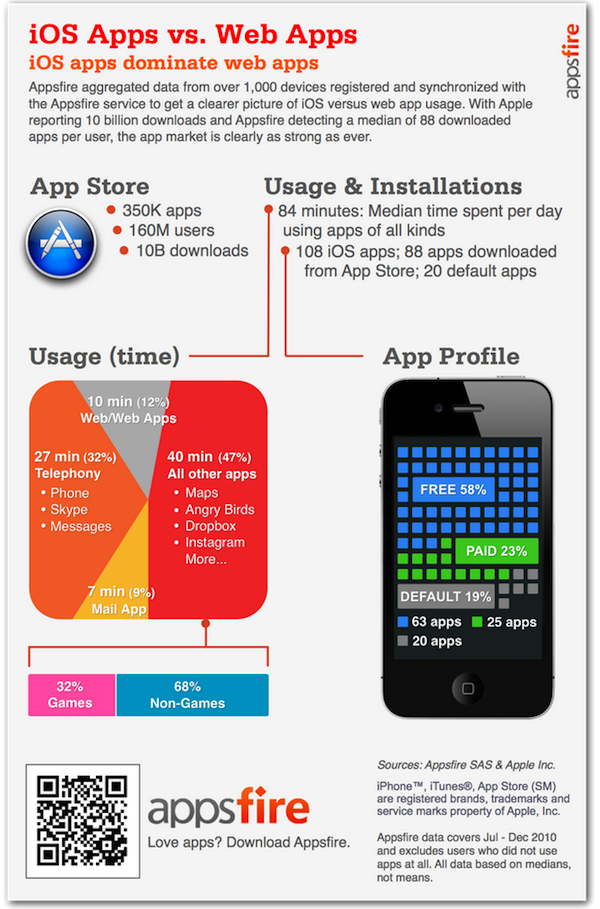
What’s better than Apple’s App Store with its 350,000 apps available for iPhone, iPad and iPod touch? An App Store to download other App Stores. Chris Genetti at Draconum has imagined the following scenario: an App Store for iOS and OS X that lets you download, manage and update a variety of stores like the App Store itself, the Android market and the Kindle store.

The problem is, he may actually be right. We’re surrounded by app stores. Anyway, pretty funny.


This Notification System Would Look Good on iOS 5 [Mockup]

One of the key areas users would like Apple to focus on for iOS 5 is the notification system. Currently, notifications on iOS are far from useful and unobtrusive: they get in the way too much, there’s no way to access a log of past notifications, if you’re playing a game and quickly dismiss a notification’s alert because you’re busy / concentrated, there’s no way to get that notification back. Many says notifications are the less Apple-like feature in iOS.

In the past, we have covered several alternative solutions to improve iOS’ notification system, like Notified. All these tweaks are available for jailbreakers in Cydia, and require a bit of manual hacking and configuration. The following mockup, realized by Youtube user hustn, shows a few ideas that we think might be a good fit for the next major update of iOS. Notifications that don’t get in the way but appear in a bar at the top, even multiple ones; possibility to tweak the settings with quiet times and display order; an additional section above the multitasking tray that shows the most recent notifications from all apps. It looks pretty good and interesting. As the creator explains:

This is a mockup of my current side project of designing an improved iPhone notification system. Unlike other attempts at improving the iPhone’s notification system, my approach is to use design direction from the current iPhone UI to create a seamless interface for the user.

This is purely theoretical. There is no code behind this; I’ve mocked this all up in Flash and Photoshop.

What do you think? The system looks a bit like the notifications seen in Palm’s webOS, and undoubtedly borrowing a few ideas from Palm wouldn’t be so bad for Apple. Especially considering that former Palm Senior UI Designer Rich Dellinger now works at Cupertino. [via Reddit]
Read more