


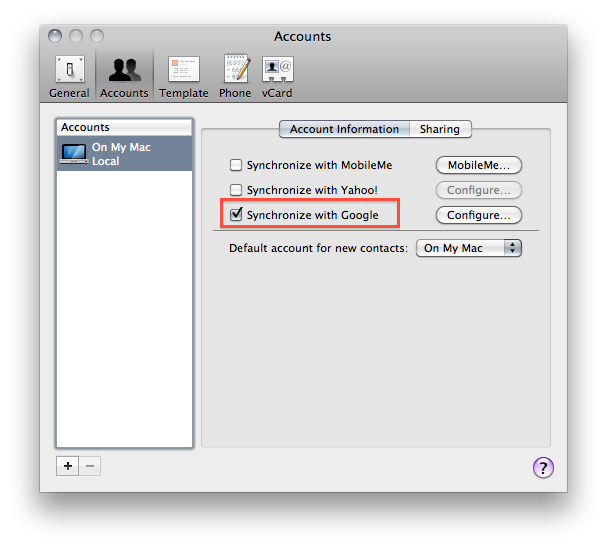
As you might have read if you follow me on Twitter, my MobileMe subscription expired last week. In the past year, I’ve relied on MobileMe’s services (but not the webapp) for syncing all my contacts, calendars, emails and bookmarks from the desktop to the cloud and back to iOS devices such as my iPhone 4 and iPad. But when the subscription was nearing its expiration date (Apple notifies you weeks before with a series of emails and a brief note on Me.com), I was left with a question: should I renew? Considering all the rumors about MobileMe being completely revamped and going free we’ve heard in the past months, I was skeptical about a renewal because I didn’t want to pay for a service that is likely going through some major changes and won’t no longer be supported (at least in its current iteration) a year from now. And even if I still have access to some sections of my old MobileMe account (mail, contacts and Find My iPhone), I decided that renewing wasn’t simply worth it and it was time for me to find an alternative – even a temporary one until MobileMe is updated to include new features and pricing schemes. That alternative is Google Sync, and here’s my experience so far. Read more
This Album Was Recorded Entirely In GarageBand for iPad
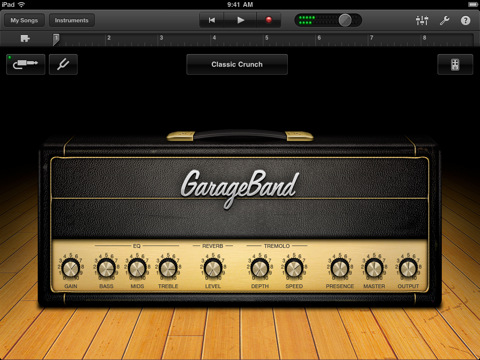
As noted by Jim Dalrymple at The Loop, we knew this was going to happen. Ever since the release of GarageBand for iPad, I have wondered: “when will someone come out with an album recorded entirely using this app?” Well, someone did, and the album is now available for download on iTunes.
This is not the first time musicians have shown interest in Apple’s iPad as a content creation platform for music. The Gorillaz, for example, released last year a new album completely realized using music apps available in the App Store. Similarly, hundreds of videos surfaced on Youtube and other social media websites showing people making music on the iPad or doing live performances with the tablet and other iOS devices. This new experiment from pop punk band The Ultramods relies on Apple’s GarageBand software for the recording of digital instruments, and voice through the iPad’s mic.
Pop punk band The Ultramods on Monday released its latest album that was done using GarageBand for iPad’s eight-track recording studio. All of the instruments used to record the album come bundled in GarageBand, according to the band.
The Ultramods’ “Underwear Party” is available now at $9.99 in the iTunes Store. It’ll be interesting to see whether or not Damon Albarn will consider GarageBand’s features for a new, digital-only Gorillaz record.
MacBook Airs To Generate $2.2 Billion In Annual Revenue
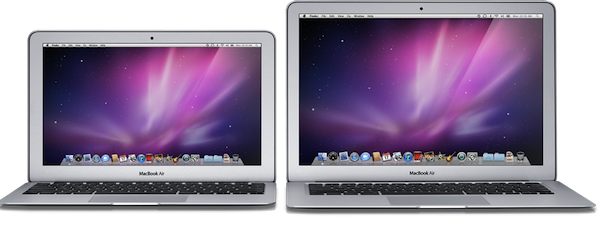
Since the official unveiling at Apple’s “Back to the Mac” event in October 2010, the new MacBook Air family has seen a terrific success among consumers: the incredibly thin design, combined with the durability of aluminum and faster performances have turned the new MacBook Airs into affordable, yet powerful machines that retain the small form factor of the previous line. Moreover, the new 11-inch model has set a new trend with several users considering the machine as a tablet-sized device with the capabilities of a classic desktop computer – such as a physical keyboard, trackpad support and USB connectivity. We knew the Air was selling very well, but J.P. Morgan analyst Mark Moskowitz believes the MacBook Air family could become a $2.2 billion revenue business for Apple if the current pricing model and design is maintained.
Digital Daily reports today that, according to Moskowitz, the “quasi-tablet” MacBook Air is just the beginning of a trend, and if Apple manages to keep “pricing stable” and a 420,000 sales per quarter rate (as seen in Q4 2010) the possibilities for the company to turn this line into the most successful one among Mac computers are huge.
C4Q10 was the first quarter in which the MacBook Air accounted for greater than 10 percent of total Apple PC units. More importantly, the MacBook Air accounted for 15% of total notebook unit sales during the quarter, versus 5 percent in the prior year. Even with the MacBook Air’s strong performance in C4Q10, it represented only roughly 5% of total Apple Mac units and revenues for C2010. We see ample opportunity for this percentage to increase over time, given the improved tech specs and more attractive pricing of the second-generation MacBook Air.
A report by Cnet in February hinted at an upcoming refresh for the MacBook Airs in June to include new Intel Sandy Bridge processors, which should dramatically boost performances of the MBA. Since the release of the new MacBook Pros five weeks ago, many are also speculating Apple will implement the Thunderbolt technology in the next-generation MacBook Airs. A refresh in June would play nice with Apple’s WWDC announcements, although a number of reports in the past week suggested Apple won’t announce new hardware at its developer event, focusing on Lion and an iOS 5 preview. On April 20th, Apple will release its Q2 2011 financial results.
Financial Times Doesn’t Want To Enable iOS Subscriptions In Its iPad App

Following a statement from late February in which Pearson’s CEO Marjorie Scardino expressed her concerns about the Financial Times iPad application having to comply to Apple’s new rules on iTunes subscriptions for apps, managing director of FT.com Rob Grimshaw told Reuters today that the publication won’t give up their “subscriber relationship” to Apple – which has implemented an opt-in policy so users can decide whether or not their personal data should be shared with a publisher. Apple also takes a 30% cut off every subscription sold through the App Store, inside iOS applications. According to a previous report, developers will need to update their existing publishing apps to include subscriptions by June.
Currently, the Financial Times sells subscriptions to the print and digital editions of the paper on their website – a method that allows the publisher to collect subscribers’ data to promote various products and advertisements to the audience. This kind of “relationship” can’t be easily achieved with Apple’s new terms, which are optional for the user in order to protect privacy. The Financial Times says they “have a great relationship with Apple”, too, but if the business model doesn’t work out they are ready to pull the app from the App Store and release it somewhere else. Perhaps as a web app, perhaps on Android.
We don’t want to lose our direct relationship with our subscribers. It’s at the core of our business model,” Rob Grimshaw told Reuters in an interview on Monday.
He said he was hopeful of a positive outcome to negotiations with Apple, but added: “If it turns out that one or another channel doesn’t mix with the way we want to do business, there’s a large number of other channels available to us.
The Financial Times isn’t providing additional details on where the iPad app will end up if subscriptions aren’t implemented by June, but many are speculating Pearson (owner of the FT) will focus on Android and “other tablets”. The situation is interesting as the FT iPad app is generating 20% of the publication’s subscribers and millions in revenue – but they don’t want to comply to Apple’s terms as, in their own words, they “have something to lose”.
Review: Mr. Reader Takes On Reeder For King of iPad RSS Apps
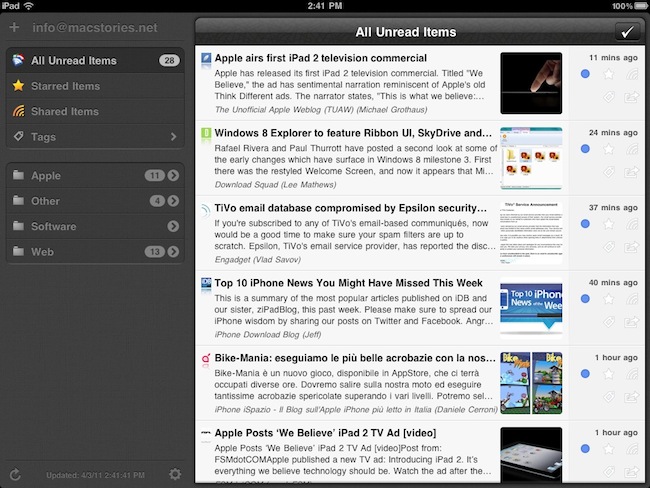
I read a lot on my iPad. Either with Instapaper, Read It Later, Flipboard or iBooks, there’s lots of content to consume and these apps made specifically for the tablet are a real pleasure to use. I don’t reckon I read as many articles saved from the web or discovered through social media on the iPhone as much as I do on the iPad. But of course, Instapaper and Twitter aside, there’s another category of apps I’m constantly going back to: RSS readers. Both for work and personal purposes, RSS plays a huge role in my workflow that requires me to stay on top of news, save items for later, and forward them to my colleagues. Google Reader is my RSS service of choice.
On the iPad, there’s no doubt Silvio Rizzi’s Reeder has become the most popular RSS app currently available on the App Store. I love Reeder, and I use it on the Mac and iPhone as well. Reeder is beautiful, fast, stable, has lots of options and syncs with Google Reader. Ever since it came out on the iPad last year, I haven’t looked back. But you know I’m always curious to try out new things and alternatives, because you never know what might be coming out from the minds (and Xcodes) of thousands of iOS developers out there. Mr. Reader, an iPad app released last week in the App Store, is a new Google Reader client that I’ve been testing for the past 3 weeks. I was impressed by the quality of the app, so I took it for a spin on my homescreen. Read more
Enable Display Mirroring On The iPad 1
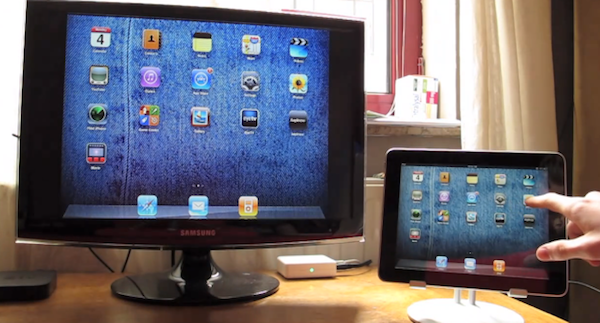
One of the most interesting features of the iPad 2 (cameras and thinner design aside) is the possibility to activate video mirroring: thanks to Apple’s Digital AV Adapter or VGA Adapter, any app on your iPad 2 can be mirrored on the television’s bigger screen with just an additional cable and no setup required. It works out of the box – meaning all your apps, presentations and websites can be sent off to a monitor that supports HDMI or VGA. This has been touted as one great functionality of the iPad 2 especially among teachers and people who always wished to mirror the iPad’s display to an external monitor during business meetings.
Unfortunately, the feature is “officially” iPad 2-only – but thanks to a jailbreak hack it is now possible to enable system-wide display mirroring on the original iPad with a few easy steps. As detailed by Nature’s Eye Studios, you’ll need a jailbroken iPad 1 running iOS 4.3 to modify some system files and activate video mirroring. This can be easily achieved with the latest redsn0w that brought untethered 4.3.1 jailbreak last night. Read more
Companies Considering Cydia As Advertising Platform

Cydia, the alternative App Store that can be installed on iOS by “jailbreaking” a device, has evolved from being an interesting experimentation to distribute software and hacks Apple wouldn’t approve in its official App Store into a full-featured, massive on-device store that hosts thousands of packages created by users or developers and released through custom sources known as “repositories”. According to the latest numbers shared by Cydia’s creator and main developer, Jay Freeman aka saurik, Cydia has been installed on 10-15 million iOS devices accounting for roughly 9% of the total iOS userbase worldwide. Kyle Matthews, founder of ModMyi (a popular Cydia repository and forum for jailbreakers) says 1.5 million users log in Cydia on a daily basis. Cydia isn’t a cool experiment anymore: it’s a growing community and, with the latest 1.1 update, a great piece of software to discover, try and buy tweaks and apps for the iPhone or iPad.
As reported by iPhoneDownloadBlog, large companies like Toyota have seen the potentialities of Cydia and are now keeping an eye on it as a way to promote their brand and products without having to wait for Apple’s approval, or invest thousands of dollars into an iAd campaign. Put simply, they’re coming up with new ways to massively promote products in pure Cydia style: Toyota affiliate Scion created an exclusive theme for jailbroken devices showcasing their 2011 tC vehicle. Read more
Happy Birthday, iPad!

One year ago today, the original iPad went on sale in the United States. It was 365 days ago, and we really didn’t know what to expect from the “magical device” Steve Jobs unveiled on stage roughly two months before, at a special event on January 27th. We just knew that Apple was up to something, and we needed to check out this “new thing”. Then many of us realized an Apple tablet was exactly what they had been looking for: smaller than a laptop but bigger than a smartphone, the iPad was meant to create a new market for all those who didn’t need a physical keyboard anymore, for all those who wanted the simplicity of iOS on a large multitouch screen, for all those who believed technology wasn’t just about the RAM and Gigahertz. That was April 3, 2010.
One year later, the iPad has been a terrific commercial success for Apple. More than 15 million copies sold, over 75,000 native apps available in the App Store, long lines around the globe to get the chance of buying an iPad 2. The iPad has become an iconic device in 12 months; and for those who believe, it’s become more than a simple piece of glass and aluminum. One year of iPad has changed everything for Apple, and the millions of consumers who get things done with it every day. The doctors, the journalists, the school teachers, the students, the writers and the sports fans. A single device with simple hardware features (touch, large screen, thin design) has proved that apps and a well-designed operating system can make a huge difference. And one year later, I still have the feeling we’re just getting started.
So happy birthday, iPad. It’s been a year already, but we know the best has yet to come.
Read more
iFiles 1.9 Can Paste Images and Text Files In The Cloud, Adds SugarSync Support
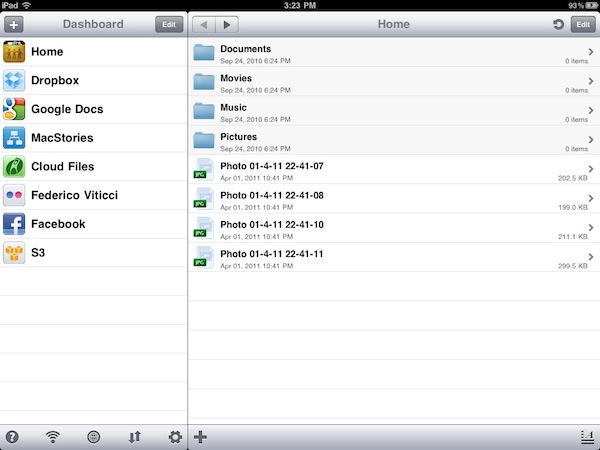
Long-time MacStories readers know that iFiles is one of my favorite apps for iOS: both on the iPhone and iPad, iFiles lets you access all your accounts in the cloud and transfer files between servers and iOS devices, or a local computer. iFiles is a file manager with a cloud workflow that supports Dropbox, MobileMe, Flickr, Facebook, Amazon S3, WebDAV, Google Docs, Rackspace Cloud Files, Picasa and Box.net. Thanks to the excellent integration with all these services, iFiles offers a powerful feature set to manage your files and backups on the go, move files around and even upload them directly to the cloud. The 1.8 update, released in December, added support for the popular Amazon S3 service, AirPrint and text editing in the cloud that made the app more powerful than ever before.
Version 1.9, however, takes another leap forward by adding three new important functionalities: SugarSync integration, FTP support and the possibility of pasting items directly in the cloud from your clipboard. Managing your SugarSync account in iFiles works as expected: once authenticated, you get a list of files and folders on the right and you can do whatever you want with them through the contextual menu that appears once you swipe on an item. FTP support is simply great: web developers and website owners are going to love this, as iFiles can be configured to work with standard FTP, FTPS and SFTP servers. With the lightweight text editor and image previewer, iFiles can now be used as a quick way to manage and edit websites from an iPhone or iPad. And if you need to quickly upload something to the cloud, but you don’t want to create a new document every time, iFiles 1.9 can paste images and text documents in the cloud. This is very convenient if you’re copying a file from a specific service, and you want to send it to another one.
iFiles keeps getting better and better on each release. I can’t recommend this app enough if your life and workflow are in the cloud and you depend on files stored on remote servers on a daily basis. Just go get it in the App Store.