Federico Viticci

10765 posts on MacStories since April 2009

Federico is the founder and Editor-in-Chief of MacStories, where he writes about Apple with a focus on apps, developers, iPad, and iOS productivity. He founded MacStories in April 2009 and has been writing about Apple since. Federico is also the co-host of AppStories, a weekly podcast exploring the world of apps, Unwind, a fun exploration of media and more, and NPC: Next Portable Console, a show about portable gaming and the handheld revolution.

Interview: Tapbots’ Paul Haddad Talks Tweetbot for iPad Launch

Following yesterday’s release of Tweetbot 2.0 for iPhone and Tweetbot for iPad (our reviews here and here, more coverage here), I was able to chat with Tapbots’ co-founder Paul Haddad (@tapbot_paul) about the launch of their first “real” iPad app, the reception of Tweetbot 2.0 for iPhone, and the iPad App Store.

Check out the interview below.

MCSTR: Hi Paul, congratulations again on the launch of Tweetbot 2.0 and Tweetbot for iPad. So how did yesterday go in terms of sales? Was the launch as successful as you hoped?

PH: Yeah I was surprised we hit #1 in the iPad App Store so fast, I was hoping we’d hit it at some point but wasn’t expecting it to happen in 8 hours. It was pretty fast – the Top Paid is a moving average over what I think is 3 days, so to do it in less than one is pretty amazing.

MCSTR: I mean, it’s not easy for a social networking app priced at $2.99 to get the first spot over games and utilities (most of them sold at $0.99), right?

PH: At least in the US I think the iPad market is certainly different than iPhone, not as heavily skewed towards the $.99 games/apps.

MCSTR: Do you think with the current number of downloads you can stay on #1 for many days?

PH: I hope so, but don’t really have any idea. The iPad App Store is virgin territory for us so we don’t have many set expectations both in the short and long term.

I will say that yesterday was our second biggest day ever in terms of revenue.

MCSTR: Nice. I guess your biggest day ever was Tweetbot for iPhone launch? Or perhaps that Tweetbot sale you had last year?

PH: Tweetbot for iPhone launch was the biggest day, but that was also a full day Vs more or less a half day, so who knows what will happen today.

MCSTR: Yeah, it seems you guys are still #1 in the US Store, so that’s promising. Besides the rave reviews, how has general reception been?

PH: Surprisingly good. It’s really hard to gauge these things pre-launch and we’re too close to the app to really get a feel for what other people will think of it. There certainly was a concern that people would dislike the idea of it being a separate app. But there have been very few complaints about that.

Since it was our first large iPad app, I was also worried that people would feel our style wouldn’t translate well on the device. But again – overwhelmingly positive responses.

MCSTR: How about Tweetbot 2.0? Obviously the iPad launch was bigger because it was a completely new app, but Tweetbot 2.0 is pretty sweet too.

PH: It was really cool to be able to do both at the same time. I think Tweetbot 2.0 answers a lot of the criticisms folks have had with the app, while still making it feel like Tweetbot. I’m really happy that we were able to make it look and perform better at the same time.

MCSTR: The obvious question is – now that we have two Tweetbots, will we get to see some sort of iCloud integration between them?

PH: We don’t generally talk about future features because we don’t really know how long things will take, or even if things are possible. I will say it’s one of the things we are looking at.

MCSTR: Sounds good. Last question: Is there anything you would have done differently in Tweetbot 1.0 for iPad?

PH: I’m really happy with the way Tweetbot 1.0 came out. We actually have a very strong set of features planned out for the near future that will make it even cooler. But 1.0 is exactly what we wanted it to be, the best Twitter app for iPad and a solid base to grow from.
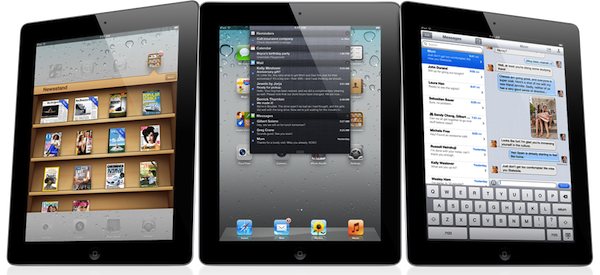
All Things D: Apple Will Announce iPad 3 In Early March

The typically reliable John Paczkowski at All Things D is claiming this morning that Apple’s next iPad, so far unofficially dubbed the iPad 3, will be announced by Apple at a media event in San Francisco in the first week of March. This rumor, if true, will follow last year’s announcement timeframe – the iPad 2 was unveiled on March 2, and went on sale on March 11 in the United States.

Sources say the company has chosen the first week in March to debut the successor to the iPad 2 and will do so at one of its trademark special events. The event will be held in San Francisco, presumably at the Yerba Buena Center for the Arts, Apple’s preferred location for big announcements like these. No word yet on a street date for the iPad 3 (assuming that’s what it’s called), though my guess is retail availability will follow roughly the same schedule as that of the iPad 2: available for purchase a week or so after the event.

In his story, Paczkowski reiterates previous rumors of a device sharing roughly the same form factor of the iPad 2, only carrying a higher resolution display, possibly a “Retina” one with 2048 x 1536 pixels of resolution. This is not the first time a major publication has weighed in to speculate on the features and release date of the next-generation iPad: back in January, a Bloomberg report claimed that the iPad 3 would feature LTE, a Retina Display, and a quad-core Apple-branded processor to power the device’s higher resolution screen. As for other rumors surrounding the device, it’s been speculated that the iPad 3 would be slightly thicker than the iPad 2 to accomodate a bigger battery and different display, with parts floating around China suggesting that the increase in thickness should be around 1 millimiter. Other parts have surfaced as well among Chinese retailers, albeit they simply don’t offer any insight into the possible functionalities of the new iPad.

All Things D has been a very reliable source of Apple information in the past, correctly predicting the iPhone 4S’ October launch and Apple education event of January 2012.


Greed and Entitlements

Nate Boateng has published a very good explanation of why App Store users aren’t entitled to free, universal upgrades of iOS apps:

The thought that a small development team is expected to do months work for free is insane to me. Yes, there are tons of successful apps that are universal (see Instapaper, Due, and Twitteriffic), but the perception that we are entitled to that is not only selfish, it’s just plain wrong. Universal app updates that come for free should be considered a bonus, not a right. A while back Iconfactory developer Craig Hockenberry gave a ballpark on Twitteriffic’s development. He estimated that it cost around $250,000 to develop Twitterrific. Think about that for a second. Still think you’re entitled to free universal updates for the lifetime of an app? I sure don’t.

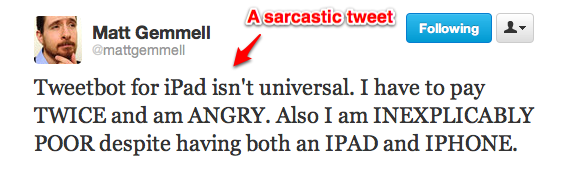
Today’s Tweetbot releases are just another example of a subset of users that think developers should keep on updating their apps, even adding completely new iPad versions, for free, forever. This kind of controversy seems to take place every time a major iPhone app is released as standalone on the iPad, or vice versa. So I’d like to formulate a quick thought on the subject.

I understand those who say “I would have preferred it to be universal”. Sure, sounds reasonable. I would have preferred my iPhone 4S to come for free in the mail, too, but it didn’t. Stuff isn’t free in this world (even when they give you the illusion of free, you’re the one being sold). What I can’t accept is people getting angry and offensive at third-party developers that decide, you know, to make people pay three bucks for an app that’s been in the works for months. Unfortunately, the App Store doesn’t allow for paid upgrades, so if these people’s rhetoric is that it’s not about the price, it’s about the convenience of a universal binary, well, there isn’t much developers can do about it. Ask Apple.

More importantly, I’m baffled when I see people really getting angry because of a standalone app that was always meant to be that way. So here’s a tip for these people: next time you’re about to send a tweet to a developer, claiming that he promised a free and universal update and he’s now “stealing your money”, do your homework. Because if I can’t argue on economics, I sure think I’m pretty good at Google Search, which brought me to this page (screenshot). From the old Tweetbot FAQ, when the iPhone app was first released in 2011:

Will there be an iPad/Mac version?

It’s a possibility, but we have no plans for it at this time. We are focusing on the iPhone version for now. If we do an iPad version, it will not be universal.

Don’t be greedy. Support indie developers and great software.


More Tweetbot

More Tweetbot

With the launch of Tweetbot 2.0 for iPhone and Tweetbot for iPad, the team at Tapbots has once again set new standards for Twitter clients on iOS. We have taken separate looks at the two apps, but you can also check out other in-depth reviews at The Next Web, iMore, and Wind on a Leaf. David Chartier makes a good point:

Speaking of lists, Tweetbot is one of the few clients I’ve used that truly integrates Twitter lists and makes them useful.

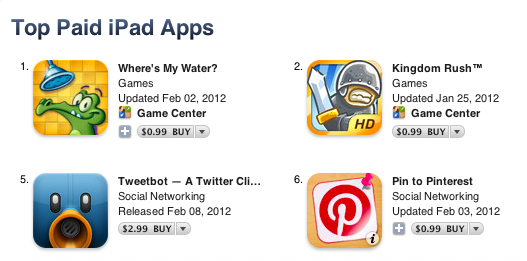
As for the iPad app’s launch, the app is currently #5 in the Top Paid iPad Apps chart, up from #9 only a few minutes ago. Tapbots has already confirmed this is the fastest growing launch of their apps ever:

Tweetbot for iPad is the at #20 in the Top Paid iPad apps. That’s faster than we’ve ever gone on the iPhone side of things.

The Next Web’s Matthew Panzarino has published a great interview with Tapbots’ Paul Haddad. I particularly liked this bit:

I think the biggest problem is that Google chooses to develop iOS apps using web technologies. This might work well on Android but it just makes for a crappy feel on iOS. If you want people to use and love your apps on iOS they should be tailored for iOS and should feel like an iOS app. You can’t just hack together some cross-platform Javascript and HTML and expect it not to feel like something that was hacked together.

On top of this they are an engineering focused company without a great history of design. This works really well on the Web where you just want to go in, search for some results and get out. But on an iPhone the interaction is much more intimate, people want something that looks and feels just right, the front end is more important than the back end.

Last, make sure to check out Rene Ritchie’s fantastic side-by-side comparison of Tweetbot, Twitter for iPad, and Twitterrific over at iMore. Rene goes in great detail to show all the differences between the three apps, and why one of them might be more suitable to your needs. Tweetbot 2.0 and Tweetbot for iPad are available for download on the App Store.

Permalink

Path: Doing the Right Thing

Yesterday, personal social network/smart journal Path was hit by a wave of controversy as a user found out the iPhone app uploaded a device’s entire Address Book (your contacts’ names, emails, phone numbers, and addresses) to the company’s servers without any kind of user consent or notice. Whilst some people claimed this is actually common practice for several iOS apps as Apple doesn’t provide native Address Book access dialogs as they do for location, the fact that Path did it was unequivocally wrong, and in spite of the Path’s CEO quickly responding to comments, the company was still called out to make the right thing, apologize, and remove all user data.

And unlike many web companies nowadays, that’s exactly what Path did. With a blog post published earlier today, Path explains that what they did was simply functional to the service’s contact matching feature, but wrong nonetheless. Path is apologizing for the mistake, and has released a new version of the app that makes the functionality opt-in for all users; they have also removed all data from their servers as many asked today.

We believe you should have control when it comes to sharing your personal information. We also believe that actions speak louder than words. So, as a clear signal of our commitment to your privacy, we’ve deleted the entire collection of user uploaded contact information from our servers. Your trust matters to us and we want you to feel completely in control of your information on Path.

You may like Path or think it’s useless (I, for one, use it and enjoy it quite a bit), but you have to admit we don’t see companies be that honest and transparent to their users that often. In a world where we’re used to see companies hiding particular aspects of their services to their users (sometimes even paying users), it’s refreshing to see Path be an example of clarity and simplicity in communication.

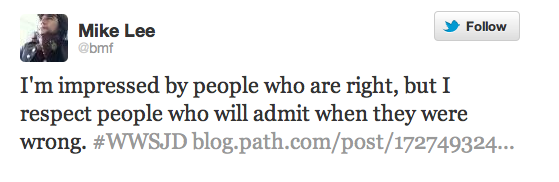
What Path did was wrong, and they have paid (and will continue paying) the consequences for their mistake in bad PR. On the other hand though, Path has shown that there’s nothing wrong about admitting your errors, saying you’re sorry, and trying to turn a bad decision into a precious lesson for future endeavors.

Bravo, Path.


Tweetbot for iPad Review

Since its release two years ago, the iPad has always needed a better Twitter client. Tweetbot for iPad is the better Twitter app I have been waiting for, and it sets a new standard that future Twitter clients will have to be compared with.

From a Twitter power user’s perspective, the iPad came at an interesting point in the history of the platform. Twitter clients for iPhone and Mac had reached a kind of maturity and complexity that enabled users like me to demand a certain grade of efficiency from new Twitter apps for the tablet; Twitter itself was beefing up its first-party app portfolio with acquisitions and a fresh strategy based on making the official clients the go-to apps for the average Twitter user. Some notable Twitter clients came out on the iPad throughout 2010, including the excellent Twitterrific, which we have reviewed several times on MacStories.

In 2010, Twitter also released its very own application for the iPad; developed by Loren Brichter, the man behind Tweetie, Twitter for iPad launched to a (still ongoing) controversy as to whether iPad interfaces should adopt more courageous designs in displaying information and sections to the user. Taking the best features of Twitter for iPhone (fluidity, clean design, pull to refresh) and mixing them up with new interaction schemes such as panels and pinch gestures, Twitter for iPad collected rave reviews and considerable disapprovals because of its interesting use of classic Twitter elements (vertical timeline, separate section for Mentions) alongside a new model for driving users’ taps around the app in the form of sliding panels, modal menus, and popovers. You can read more about it in my original review from 2010.

The problem with Twitter for iPad, I believe, is that it failed to appeal power users in the long term, stalling on the same feature set it had at launch without adding substantial improvement over what could have been a fantastic application. I, for one, used the official Twitter iPad app for months, but then I came at a point where I couldn’t stand seeing decent third-party apps staying on top of new Twitter functionalities and “unofficial” services, and Twitter’s own app left behind with Brichter gone and seemingly no interest from Twitter’s mobile team in keeping it up to date – fixing the bugs and annoyances that were reported on day one. Some improvements and new features eventually found their way to the app, and word is that we are waiting for a major 4.0 redesign of the client which, I believe, will put the app on par with the disastrous iPhone version. Tweetbot for iPad thus arrives in a landscape with no clear leader, but with some very good apps that have caught the attention of both power and average users in the past two years.

I wrote about this before. I wish third-party developers would accept Tweetbot as the de-facto app for power users and move on to innovate on other areas of the service. I’m biased: I love Tweetbot, I use it every day on the iPhone, and I couldn’t wait for an iPad version to be released. Today is kind of a dream come true for a Twitter nerd, but the question is – was it worth the wait? Not just good – is Tweetbot the great app the iPad was waiting for? Let’s dive in. Read more


Tweetbot 2.0 Review

How do you improve something that’s already great? You keep working on it, trying to look at your product from as many perspectives as possible. If you believe in it, you can make something great an even greater product. Last year, I reviewed Tweetbot 1.0 for iPhone, the Twitter client many of us had been impatiently waiting for:

Tweetbot is the app I’ve been waiting for: an excellent innovator of the Twitter platform. My new favorite Twitter client.

Tweetbot is everything I’ve ever wanted from a Twitter app: it looks great, it’s fast on WiFi and 3G, it innovates in several aspects that have been regarded as “standards” from both users and developers for too long. Could Tweetbot be any better? Maybe. The developers could work on improving the speed of animations and refresh times as much as possible, or implement support for Readability and other URL shortening services. But as far as the Twitter experience goes, Tweetbot has got everything I’m looking for.

I have tried many Twitter apps in the past years, as you may know, and I’ve never seen a third-party developer as committed to making their client great as Tapbots did with Tweetbot for iPhone. Iteration. Tapbots listened to feedback, and managed to pull the old trick of implementing features without turning your original vision into a piece a software it wasn’t meant to be. With version 2.0 of Tweetbot for iPhone, Tapbots has improved almost every aspect of the original experience, adding features, bug fixes, and refinements that still make Tweetbot the finest Twitter client available on the iPhone. Now faster, smoother, and more intuitive. Read more


MacBook Air, iMac, MacBook Pro EFI Firmware Updated With Internet Recovery Support for 2010 Models

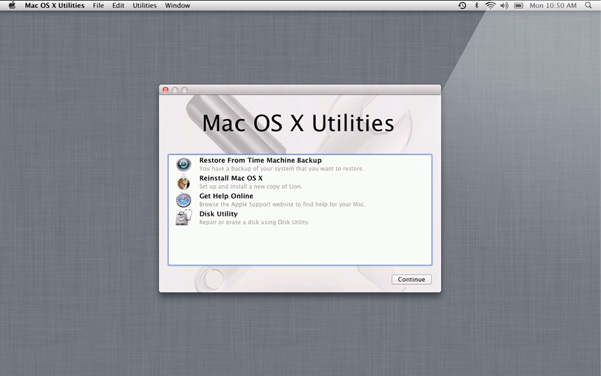
Earlier today Apple published two EFI Firmware updates for its iMac, MacBook Air, and MacBook Pro lines. The updates, available through Software Update or Apple’s website, bring Lion Internet Recovery to more Mac models from 2010 – the mid 2010 iMac, late 2010 MacBook Air, and early 2010 MacBook Pro.

This update enables Lion Recovery from an Internet connection on iMac (Mid 2010) models.

MacBook Air EFI Firmware Update 2.3

This update enables Lion Recovery from an Internet connection on MacBook Air (Late 2010) models and addresses an issue where the system could restart if the power button is pressed immediately after waking from deep sleep.

MacBook Pro EFI Firmware Update 2.6

This update enables Lion Recovery from an Internet connection on MacBook Pro (Early 2010) models.

Lion Internet Recovery was first released last summer alongside OS X 10.7, allowing users to re-download the OS directly from Apple’s servers without the Mac App Store. The feature was initially only available on Mac models refreshed during the summer, but eventually found its way to older models through software updates.


iOS Monitors (And Cursors)

Gabe Weatherhead has an interesting take on my iOS-ification of Apple’s Ecosystem piece:

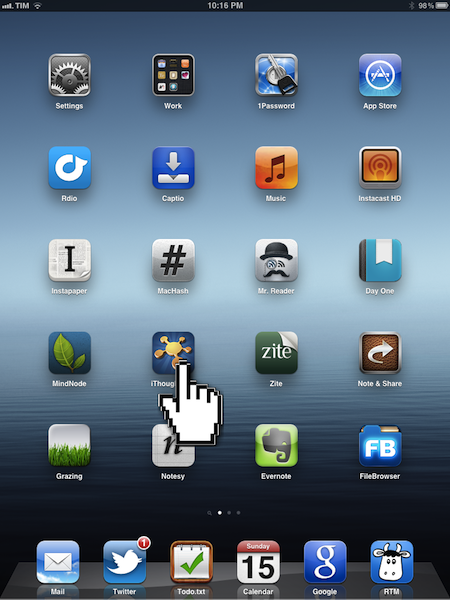
But there is one feature missing from iOS that will prevent it from ever being effective with an external display: a cursor. I know this seems blasphemous but if you have ever tried to us an iPad with mirroring, you know that you must still look at the iPad to get anything done.

To use the iPad as a desktop replacement, mirroring is not enough. I need a cursor displayed where my finger touches the iPad (or iPhone) so that I have context on the external display. Every time I see iOS app demo videos they are accompanied by cursor representations for the touch interactions, and I think “that would be a great feature on the AppleTV.

I have used AirPlay Mirroring with my iPad 2, and I agree that it’s weird to be forced to look down at your iPad’s display if you want to get anything done that’s not sliding presentations and photos. Even games, in spite of their less complex on-screen controls and interfaces than, say, an app like OmniFocus, can be hard to be played without looking down sometimes.

What I’d like to see – and something that likely won’t happen anytime soon – is a series of “desktop accessories” to better take advantage of the iPad when mirrored or connected to an external display. For instance, imagine some sort of Magic Trackpad for iOS that would allow you to retain gestures and multitouch, but have a cursor when the iPad is mirrored to an Apple TV. Something I often hear (and find myself into as well) is that some apps are just better with a cursor in the current state of software offerings – for example, image editing and highlighting text. Imagine if Apple built an official accessory that, through APIs (much like iCade does), allowed developers to enhance their apps with direct support for “cursor mode” when the iPad’s screen is mirrored or even when the device is held by a stand (magnetic latches could inform the system of the current orientation of the device). If I had to put my two cents in it, I’d say this could be a way to market the iPad as a device capable of switching to a more precision control-oriented environment if needed. Video professionals woud sure welcome such a move.

I’m not saying Apple should produce a convertible tablet that switches between iOS and OS X (albeit Apple’s direction seems to be making switching between the two a seamless experience) – I’m arguing that some specific software and functions are better with a cursor in the current state of things. So unless we’ll see revolutionary new touch controls that will obviate the need for such idea, I think cursor controls on an app-by-app basis is something worth considering for the future of iOS’ mirroring and external display connections.

Perhaps Apple is fully committed to multi-touch and we’ll never see new cursor-based interfaces/hardware coming out of Cupertino again. But I think cursor-based controls are still superior for some kind of apps, especially for professional software such as video and image editing.