Federico Viticci

10765 posts on MacStories since April 2009

Federico is the founder and Editor-in-Chief of MacStories, where he writes about Apple with a focus on apps, developers, iPad, and iOS productivity. He founded MacStories in April 2009 and has been writing about Apple since. Federico is also the co-host of AppStories, a weekly podcast exploring the world of apps, Unwind, a fun exploration of media and more, and NPC: Next Portable Console, a show about portable gaming and the handheld revolution.

WSJ: iPad 3 To Feature LTE

WSJ: iPad 3 To Feature LTE

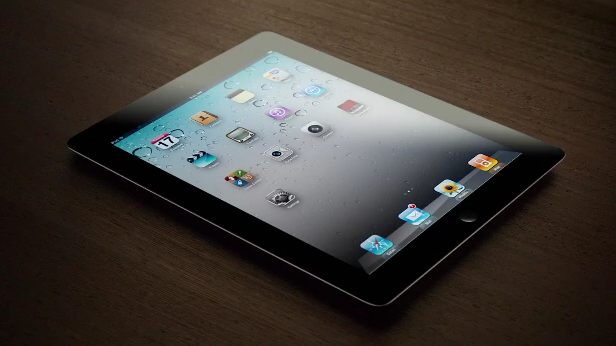
Following a report about a possible iPad 3 announcement on March 7 posted earlier today, The Wall Street Journal is claiming the next-generation iPad will feature 4G LTE connectivity for AT&T and Verizon in the United States.

Verizon Communications Inc. and AT&T Inc. will sell a version of the coming iPad that runs on their newest fourth-generation wireless networks, according to people familiar with the matter, as the battle to cash in on big investments in mobile broadband heats up.

According to The WSJ, the iPad 3 will fall back to 3G where LTE isn’t available, and “it couldn’t be learned” whether other carriers would launch LTE plans for the iPad 3 besides AT&T and Verizon, the two largest carriers by number of subscribers in the US. Back in January, Bloomberg reported that the new iPad would come with a higher-res display, a quad-core processor, and 4G LTE connectivity.

For an overview of the current LTE scenario around the globe, check out our previous story ”2012, The Next iPhone, And LTE” – it’s interesting to notice how The Wall Street Journal says the LTE iPad 3 will provide a good testing opportunity for carriers, whereas most carriers worldwide are still far behind in the LTE rollout for consumers.

Permalink

iMore: iPad 3 Keynote On March 7

iMore: iPad 3 Keynote On March 7

Citing ”sources who have been reliable in the past”, Rene Ritchie at iMore claims that Apple will announce its next-generation iPad at a media event on Wednesday, March 7.

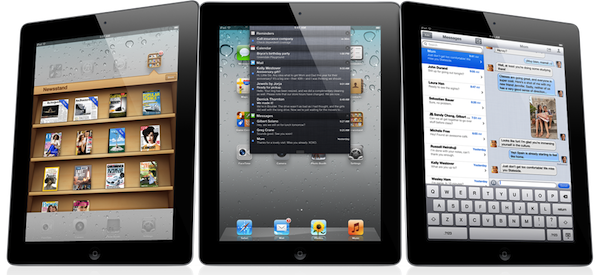
According to sources who have been reliable in the past, Apple currently plans to hold their iPad 3 announcement on Wednesday, March 7, 2012. Along with the 2048×1536 Retina display, the iPad 3 will feature a quad-core Apple 6 system-on-a-chip, and possibly 4G LTE networking.

Whilst we have refrained from reporting every single iPad 3 rumor to date, Ritchie’s report seems to make sense for a couple of reasons. First, well-connected John Paczkowski at All Things D is claiming that Apple will be holding an iPad 3 event in the first week of March. The Loop’s Jim Dalrymple has chimed in confirming AllThingsD’s report with a “Yep”. iMore, previously known as TiPB, doesn’t cover rumors much, but when they did last year, they were only off by a week, and correctly pinpointed the nature of the iPhone 4S (which became available for pre-order on October 7th, went on sale a week later).

The iPad 3 was previously rumored to be feature a high-res Retina Display, faster “A6” processor, and LTE connectivity. Back in August, The Wall Street Journal wrote the iPad 3 would launch in “early 2012” with a high-resolution display.

Permalink

Apple To Stream Tim Cook’s Presentation at Goldman Sachs Conference Tomorrow

setteB.IT notes that Apple will provide a live stream of CEO Tim Cook’s presentation at the Goldman Sachs Technology and Internet Conference tomorrow. Apple has indeed refreshed its Investor page to include a link to the QuickTime audio webcast, which will be live at 12:30 PM PT tomorrow, February 14th.

Welcome to the audio webcast of Tim Cook’s presentation at the Goldman Sachs Technology and Internet Conference. The presentation will begin at approximately 12:30pm PT/3:30pm ET on Tuesday, February 14, 2012. Please note that comments made during the presentation may include forward-looking statements that are subject to risks and uncertainties, and actual results may differ materially from those forward-looking statements.

As it happened in the past when Cook was COO, we should expect interesting details and comments from the presentation. This is the first time Cook is speaking as Apple CEO – make sure to check out reports from the 2010 and 2008 conferences.


iCloud File Sharing

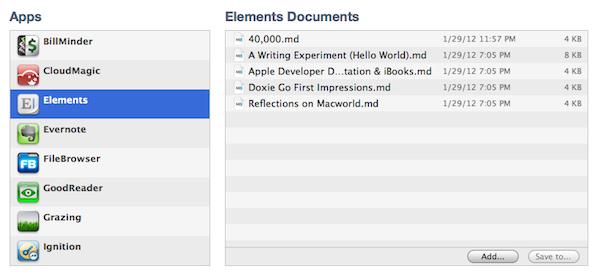
It is often said that Apple doesn’t offer a filesystem for iOS devices. Sure enough, it is indeed not possible to manage documents and folders on an iPhone or iPad as you can on OS X. Apple does, however, offer a very basic file management system that works with iOS apps, and you’ve haven’t probably used it too many times:

Introduced with iOS 3.2 and iTunes 9.1, iTunes File Sharing allows applications to import files copied from a Mac or PC using iTunes, and export to a computer. In iTunes, all you have to do is connect an iOS device, head over the Apps tab, and choose File Sharing below the Home screen app management interface. You can copy almost any kind of file into an app’s internal directory dedicated to file sharing, and several iOS apps use this method to import or backup files and documents such as bookmarks, videos, or spreadsheets. I’ve often used this feature to import .avi files to watch on my iPad.

iTunes File Sharing doesn’t seem to get the attention other iTunes functionalities do, and I believe there are a couple of reasons behind this. First off, it’s quite cumbersome: the interface for File Sharing is buried within an iOS device’s settings in iTunes, and there are no options to, say, automate the process of importing files or setting up favorite sources for documents. Second, iTunes File Sharing only solves a partial problem, in that the majority of iOS users don’t lament the lack of a proper Mac-to-iOS file management system as much as they’re asking for an iOS-to-iOS centralized file storage solution that would also happen to sync back to a Mac.

So, I had an idea. I think the same iTunes File Sharing feature would work a lot better as a dedicated, native iCloud app for iOS devices (and maybe the Mac too). After all, if Apple is providing an iTunes-based file management utility for Mac users, why couldn’t they build an app that enabled any third-party iOS app to save and import files from iCloud? This app would be built into the system and allow users to simply collect documents, like iTunes File Sharing. Developers could easily add options to their apps to import files from “iCloud File Sharing” and export files to it. Users would have the same feature set of the existing iTunes File Sharing, only with an interface they are already familiar with, because iCloud File Sharing would resemble the existing file management workflow of iWork for iOS or iCloud.com. The only difference is that it would be integrated on a system level, work with any iOS app, and basically be an extension of the “Open In” menu that already allows apps to communicate with each other through supported file types.

I wouldn’t call such an app “Dropbox from Apple”, as Dropbox is mainly developed as a solution to sync files between computers, running in the background all the time, whereas this would be more oriented towards giving apps a better file sharing system. In fact, I imagine Apple could go as far as indicating the apps that can receive an iCloud file as they currently do with iTunes File Sharing for better organization and to maintain the app-driven model. iCloud File Sharing would play well with this strategy, and it would offer a basic way for developers to integrate iCloud in their apps.

Apps like GoodReader have already implemented a similar system of iCloud-based file management, and some third-party developers are experimenting with providing standalone apps for file management purposes over iCloud. A default utility from Apple would have the obvious advantage of not requiring any additional download: it would be integrated as a system action in any app for iPhone, iPad (and even the Mac). Apps would still have their own iCloud libraries and synced data; the file sharing part would ditch iTunes and become iCloud-powered (iTunes File Sharing would be kept around as an option for transferring large files such as videos through USB).

You might argue that Apple is trying to eliminate the concept of the filesystem altogether by embracing the app model with data silos that are self-contained and user-friendly. As iTunes File Sharing seems to be suggest, though, I think that Apple knows the app model and iOS only solve so much when it comes to file management – Apple has to deal with the fact that many people still work with files and folders, export them, move them around, and manage them. I believe the real winning scenario for Apple would be to make the management process as lightweight and intuitive as simple by relying on iCloud. Thus, iCloud File Sharing would serve as a better solution than iTunes File Sharing, ans it would strengthen Apple’s offerings requiring no or little effort from developers, ultimately providing an accessible way to manage files atop of Apple’s existing free 5 GB of storage for every iCloud account.

Unfortunately, it doesn’t look like the upcoming iOS 5.1 will introduce such a feature, and I’m not holding my breath for a surprise announcement during the iPad 3 event. But for the next major version of iOS, if Apple doesn’t think a better way to let apps communicate with each other is needed, I believe an evolution of iTunes File Sharing towards iCloud would be a sweet stopgap solution in the PC-free era.


VLC 2.0 for Mac Final Design Previewed, Coming This Week

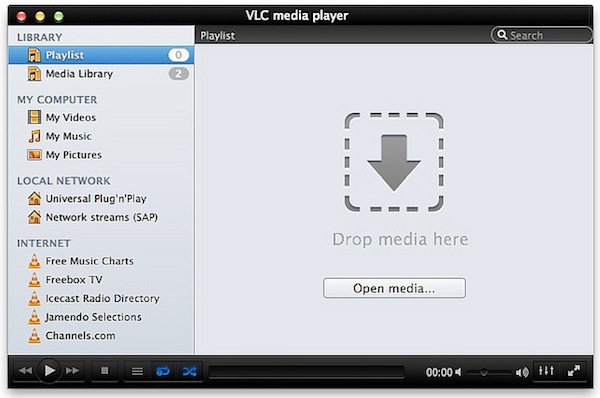
Popular media player VLC is about to reach version 2.0 final and Felix Kühne, current lead developer of VLC’s Mac OS X port, has posted a series of screenshots detailing the final user interface design that we’ll see in the 2.0 update once it goes public “later this week”. The screenshots, available over at Kühne’s blog, show a dramatic change from VLC’s current design on the Mac, with a new sidebar for your playlists, Internet sources, and media on your computer and local network. The new design was created by Damien Erambert, and the first concepts date back to 2008. The interface of VLC 2.0 for Mac will offer a series of advantages over the older version from a functionality standpoint as well:

VLC 2.0’s interface for Mac is dramatically different from its previous revision, both technically and usage-wise. Playlist and video output share the same window, service discovery modules can be easily accessed through a sidebar and various audio + video filters are available through the respective panels. Besides that, the interface is noticeably faster and easily expandable. Speaking of that, we also added support for VLC’s lua-based extensions, which allow you to get info about the current movie from Allociné, post to Twitter, fetch subtitles automatically, etc.

Previously known as VLC 1.2, VLC 2.0 is a major rewrite of the application, which now includes several bug fixes, new features, and a redesigned interface. Alongside improved performances and optimizations for Lion, VLC 2.0 comes with many new features including initial support for Blu-Ray Discs, new subtitle management and blending in video outputs, support for multiple files inside RAR archives, and an all-new 64-bit version for Windows users (VLC 2.0 for Windows won’t feature a new interface as seen on OS X). A complete list of changes from VLC 1.x to VLC 2.0 is available here; the developers didn’t mention anything specific about the “mobile port” for iOS and Android devices.

VLC 2.0 will be available later this week at VideoLAN’s website. More screenshots of the final Mac UI have been posted on Flickr.


MacStories Reading List: February 5 - February 12

The past week has been an interesting one, for a couple of reasons. First, we’ve seen Kickstarter breaking records for its most funded campaign, a record that didn’t last long as a new game by Tim Schafer quickly pulled in $400,000 in 8 hours. Then Path, the cool kids’ alternative to the “evil” Facebook, found itself in the middle of a PR brouhaha as it was caught uploading a user’s Address Book email addresses to its servers. Ouch. Luckily, the company was smart enough to reverse its decision and issue an update in less than a day. There’s more: Apple has started warning developers against manipulating the App Store’s charts, and more people every week are considering using the iPad as their only work machine.

It’s this week’s Reading List, best served with a good cup of coffee. Enjoy. Read more


Instagram 2.1 Released: Updated UI, Lux, New Sierra Filter

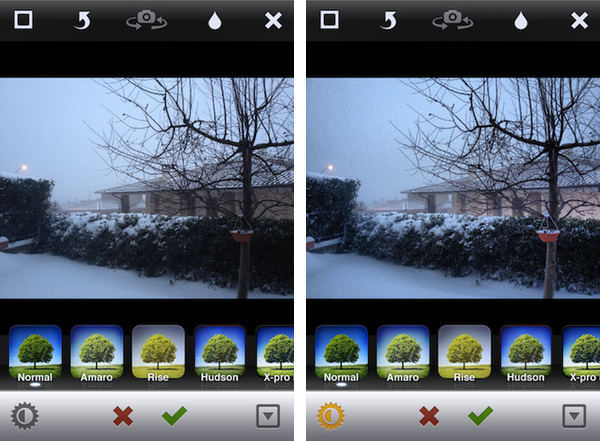
A major update to photo-sharing application Instagram was released today, and for the first time it includes new interface element designed by the extremely talented (and recently hired by Instagram) Tim Van Damme. Whilst the original Instagram launched a trend of “apps with a large action button in the bottom toolbar”, Instagram 2.1 has been refreshed to include a more standard – yet beautiful to look at – toolbar with icons to browse your feed, liked items, profile, and of course take a new picture. You can see more of Instagram’s new pixels over at Tim’s Dribbble.

The new Instagram also features a new filter, Sierra, and a photo enhancing system called Lux that, according to the company, will enable you to make your photos more vibrant with just one touch. This functionality reminds me of Camera+’s Clarity effect, and it’s interesting to see how Lux is meant to enhance the original look of a photo, not apply a vintage effect. I wonder if this will signal a change in the Instagram community’s overall trend towards heavily modified photos.

We’ve given you a new way to instantly transform the look and feel of your photos. In just one tap, Lux works its magic by making your photos more vibrant and bringing out details you couldn’t see before. Use it with a filter or without.

I’ve played around with the update, and it’s solid. The app seems a little faster, the new UI is very elegant, and I think the Lux effect is very promising in that it will help users avoid the need of applying effects to photos just to make them look “different” – I like how Lux focuses on making an iPhone’s default output simply better. Other improvements in this update include the possibility of tapping on a push notification to get directly to a photo, and an option to change your profile photo from your profile page.

Instagram 2.1 is available on the App Store.


“Okay, I’ll Remind You”

A few minutes ago Apple uploaded two new iPhone 4S commercials on its website and official YouTube channel. The ads, as with previous iPhone 4S promotional videos, focus on Siri, and they might just be the best ones about the voice-based assistant yet.

The ads, called “Rock God” and “Road Trip”, share a common theme: people talking to their assistant using natural language and a friendly tone, not simply asking a piece of software to execute commands.

In Road Trip, a guy and his girlfriend are organizing a road trip to California. Look at the initial setting: it’s cold outside, they’re about the get in the car, and they want to get from the cold of East Coast in February to the sunny Santa Cruz in California. The guy asks Siri, and they’re on the road. Camera cuts to the guy’s face in the car. He’s looking for a barbecue in Kansas City. Camera cuts to girl’s face in the car. She’s looking for a rodeo. Camera changes again, this time the couple doesn’t know where they are, and the girl asks “Where are we?”, with the look of someone who knows Siri will have an answer. They’re in Santa Rosa. Change again. How big is the Grand Canyon? Sure enough, Siri can look that up on Wolfram Alpha or Wikipedia. But then the gas runs out: how about finding a station the guys can walk to? Finally, the ad reaches its climax when our two characters have seemingly reached their destination, or are fairly close, and are looking at the stars. She asks: “What does Orion look like?”. Siri displays sky data inline. The video closes with the opposite setting of how it began: sunny California, he’s wearing a t-shirt, looking at the horizon, and she’s telling Siri like you would do with an old friend – Remind me to do this again. Siri, with its human-like voice, replies: Okay, I’ll remind you.

The second commercial, Rock God, has a more “fun” approach. There’s this kid that “has to get a guitar”, and he’s so excited about it he needs to ask Siri now. Why is he so excited about getting a guitar? What’s the story here? Perhaps, I imagine, he has just decided with his friends that it’s time to put a band together and start playing. So, Siri gives him location info about stores selling musical instruments, and in the next scene our kid is learning how to play. How do I play London Calling? Whole Lotta Love? How about that chord? Siri displays information on screen. Fairly regular stuff for now. Then the ad changes – our character is sending a message to Julie and Kate about playing at the garage tonight. Apple’s music stops. The kids are playing – they’re doing rock ‘n’ roll! – and finish their song. “Call me Rock God”, the kid tells Siri, softly.

You see, these aren’t just ads. In 30 seconds, we’re told stories. In 30 seconds, we are not shown technical features and RAM specifications, we’re given real examples of real people we can relate to. We’re shown two young people in love with each other that just want to get to California and see the sunset together. We’re shown a young boy with a simple dream, playing guitar, yet a dream that’s important to him – something that makes his life worth living and enjoying even for those 30 minutes when he gets his band mates together and nothing else matters. Just music. Call me Rock God.

In 30 seconds, we’re shown how technology can make people’s lives better. We’re reminded, once again, that this industry, this love for the latest gadget, doesn’t necessarily have to be about tech specs – it’s the technology married with the liberal arts. It’s about playing London Calling with your friends. It’s about driving to California with the woman you love and watch the stars just for one night.

He would be proud.

Read more


Smartr Contacts

Sometime in the past five years, the Address Book got social. Our contact cards suddenly gained Twitter handles and Facebook links, whilst users more oriented towards business relationships decided to add their LinkedIn pages alongside standard phone numbers and email addresses. More importantly, the Address Book became mobile: adding a new entry to the Contacts app on our iPhones pretty much equals to exchanging business cards now and, unsurprisingly, a new category of apps has arisen from the need of turning old cards into digital reinterpretations of that paper stack full of contacts we’d keep on our desk, but never properly organize.

From this premise, Xobni (that’s Inbox spelled backwards), makers of a popular email plugin for Outlook and Gmail, released Smartr for iPhone a few weeks ago on the App Store. Developed as a mobile companion to Xobni on the desktop, Smartr leverages all the features made possible by a digital interface (search, social integration, slick design, APIs) to provide you with a social address book that’s always up to date and keeps tracks of your communication with friends, family, and work contacts over time. It is very smart indeed.

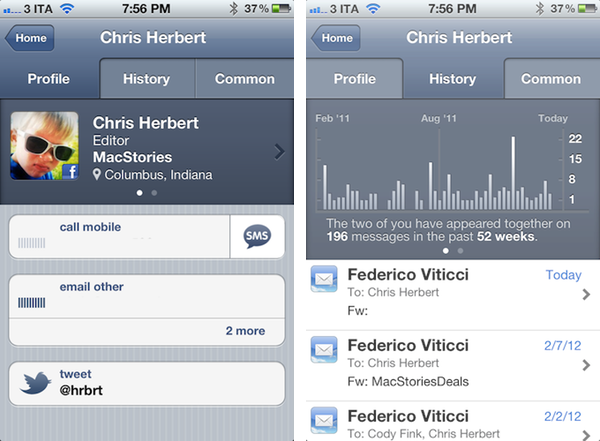
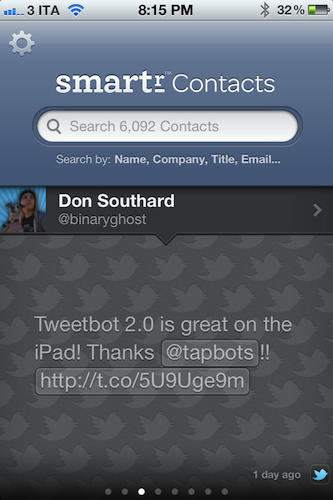
Smartr basically creates rich profiles for all your contacts, aggregating data from Twitter, Facebook, LinkedIn, and email to form a complete overview of someone you might have communicated with in the past. In pulling this data from various social networks, Smartr uses its proprietary matching technology (the “Xobni Cloud”) to analyze and compare your contacts (from your Address Book, an interesting subject following Path’s recent PR fiasco) against conversation history from email (Gmail is fully supported), usernames from Twitter and Facebook, status updates, and so forth. Once a contact is matched, a rich profile view is created featuring name, photo, phone number, and email addresses. Smartr even allows you to swipe across the top section of a profile view to switch between a person’s various social profiles, which upon tap will correctly launch the official Twitter and Facebook apps (if installed).

But what to do with these rich, automatic and integrated profiles? Well, Smartr is largely focused on search, unlike, say, a tool like Friends that’s more geared towards interacting with people from your Address Book found on other social networks. Smartr’s prominent interface element is, in fact, a search box that lets you look up contacts by name, company, title, or email. I wish the app supported @username-based look-ups, as I might remember exchanging a message or two with @hrbrt, but I can’t recall his full name from further email communications. Smartr is fast: Searching more than 6,000 contacts on my iPhone takes seconds and the information is always up to date, as Smartr is also web-based in that Xobni’s servers are constantly analyzing and matching your contacts to provide the best results. You can read more about Xobni’s privacy policy here.

Once you’ve found a contact (I managed to retrieve contact information and conversation history from messages dating back to 2008), you can interact with the profile view to compose new emails, call a phone number, or send a new message. The History tab in the top toolbar will give you access to a nicely designed graph showing how many times you’ve appeared in a conversation with a contact, with the actual messages listed below and available for inline viewing if the associated email address is also configured in Smartr (the app will use the standard iOS mail view to enable this). The third tab, Common, shows a list of common contacts between you and the contact you previously looked up.

Smartr is very fast, reliably accurate, and has proven to be a nice addition to my workflow, especially for those times I want to look up an old contact (typically developers) that I want to get in touch with again. I wouldn’t mind paying for Smartr, but the app is free, and available on the App Store. If mail integration is your thing, make sure to check out Xobni’s popular Gmail plugin as well.