


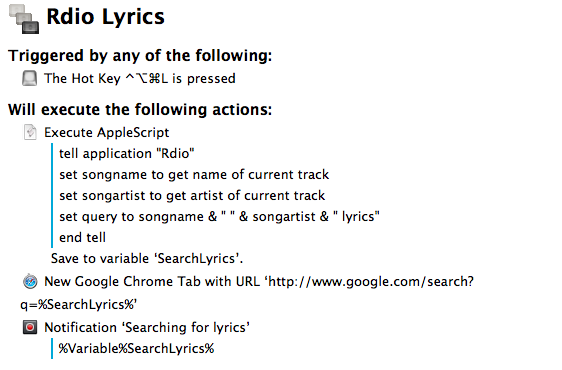
In spite of the existence of various Mac apps to display lyrics of a song that’s currently playing in iTunes or Rdio, I often find myself having to manually look them up through a web browser. It’s not uncommon to see a dedicated lyrics app being unable to fetch lyrics for a certain song, and, unsurprisingly, that always seems to happen when I’m in the mood for learning new lyrics. Having to Google lyrics and type a song’s name is a tedious process that ought to be automated, so that’s what I did. Read more
Change→
Matt Alexander has a good piece on the hypocrisy behind some people’s reactions to iOS 7:
One of the most trite and oft-spoken philosophies in the technology world — originating from hockey’s Wayne Gretzky and popularized in our community by Steve Jobs in 2007 — is that companies ought not to skate to wear the puck is, but where it will be. That is what both Apple and Microsoft have sought to do in recent weeks.
We responded, however, with premature dismissals and cries that our technology is changing.
It’s embarrassing.
And Harry Marks has some solid counterarguments, but especially this bit:
Apple may or may not pay attention to the complaining about the icons in the beta. It may or may not read all the scathing editorials about how Helvetica Nueue Light was the wrong font choice because something something zzzzzz…sorry, I dozed off for a second. What it will do is make iOS better. It will change the way we use our phones and tablets whether we like it or not.
So, you can either upload your alternate stock icon designs to Dribbble, or you can adapt your app to better suit the coming change. Which will it be?
The Origin of Tweet→
If you’ve ever wondered how the world started using the word “tweet”, read Craig’s post for a great piece of Internet history.
Quickly Append Browser URLs To Evernote with Keyboard Maestro
I often come across webpages and interesting links that I can’t check out right away, but that I also don’t want to send to Instapaper, Pinboard, or my OmniFocus inbox. They are, put simply, “stuff to check out”; I append these URLs to an Evernote note carrying the same name:

As I detailed in my review of Drafts 3.0 for iOS, appending text from an iPhone or iPad is easy with Agile Tortoise’s app and a combination of Evernote actions and browser bookmarklets, but I had to think of an equally straightforward workflow for the Mac. Unfortunately, the lack of a Drafts app for OS X forced me to resort to AppleScript to achieve the same kind of functionality, but the deal was (partially) sweetened by the new features introduced in Keyboard Maestro 6.0, released back in May.
Feed Wrangler’s Smart Streams→
Shawn Blanc:
Anyone who has been subscribing to RSS feeds for longer than a few months will know your subscription list regularly needs pruning and adjusting. Well, I want my RSS reader to help me with that task. Smart Streams can help by making it easier to wrangle my feeds based on more than just which website they came from. I expect in the long run that they will prove very accommodating and useful as my interests change and as my attention ebbs and flows.
A good overview of Feed Wrangler’s best feature. I’ve been using Feed Wrangler since April and I’m very happy with it.
ReadKit and Slow Feeds Updated with Feed Wrangler Support
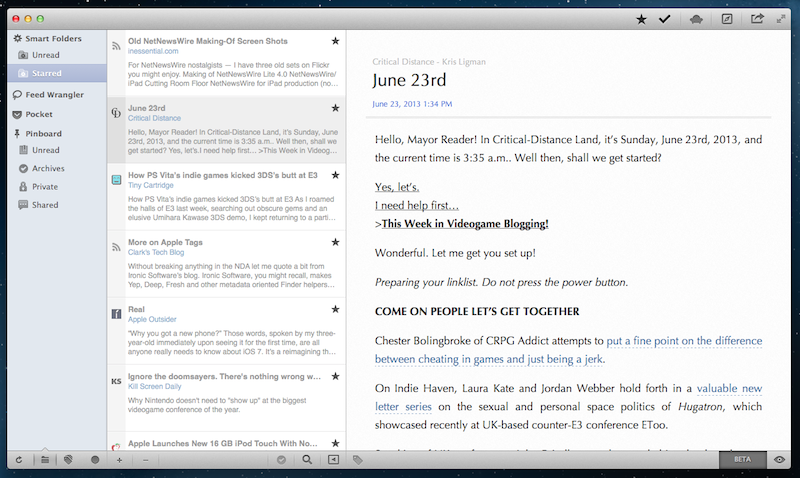
As I noted yesterday with Mr. Reader’s update, the upcoming shutdown of Google Reader has resulted in a fast uptake of third-party RSS services by existing clients for iOS and OS X, leading to a more variegate, rich ecosystem of apps that sync to different web services that aim at replacing Google Reader. Among the new contenders for the RSS throne there’s David Smith’s Feed Wrangler, which has become my favorite alternative to Google Reader and that, after Mr. Reader and the upcoming Reeder for iPhone update, is now supported by Slow Feeds and ReadKit. Read more
The Prompt, Episode 2: “Explode Into a Pile of Stars”→
This week, the 5by5 delegates to the UN from England, Italy and Tennessee gather to discuss some follow up, Windows and the Apple cult.
I also got to talk about Nintendo and Steve Ballmer. You can get the episode here, or subscribe via iTunes.
Responding To iOS 7→
Winning apps won’t merely take Apple’s default look and mimic it. Think about how boring it would be if all of our apps looked like iOS 7 Calendar or Settings. It would get old really fast. But that’s nothing new. Think about if all the apps on iOS 6 looked like iOS 6 Calendar and settings… Yep, it would be really boring.
Jeremy Olson has some great thoughts on how designers and developers should respond to iOS 7 in the coming months. From what I’ve seen so far, this summer will be an interesting one.
Apple Details iOS 7 Business and Education Improvements→
Last night, Apple updated its iOS 7 mini-site to include links to two webpages that detail improvements coming for Business and Education users.
For Business, the biggest additions are Per app VPN, more controls on “Open In”, third-party app data protection, and more options coming to MDM with streamlined enrollment. New MDM options are also coming for Education users, alongside single sign-on for an institution’s apps, App Store license management, and more.
Macworld has a good overview of the changes coming in iOS 7 for Business and Education. As noted by Bradley Chambers, the new Apple ID features for students under age 13 are a notable addition.