

Following yesterday’s release of the Apple TV Tech Talks videos, I came across this project by Aaron Stephenson that lets you watch WWDC sessions and Tech Talks on the Apple TV itself. You’ll need Xcode to install it, but, if you’re a developer, it’s a good way to watch videos on the big screen and take notes/try code on a Mac – WWDC sessions go back to 2011 and you can mark videos as favorites, too.
Spark Launches on iPad
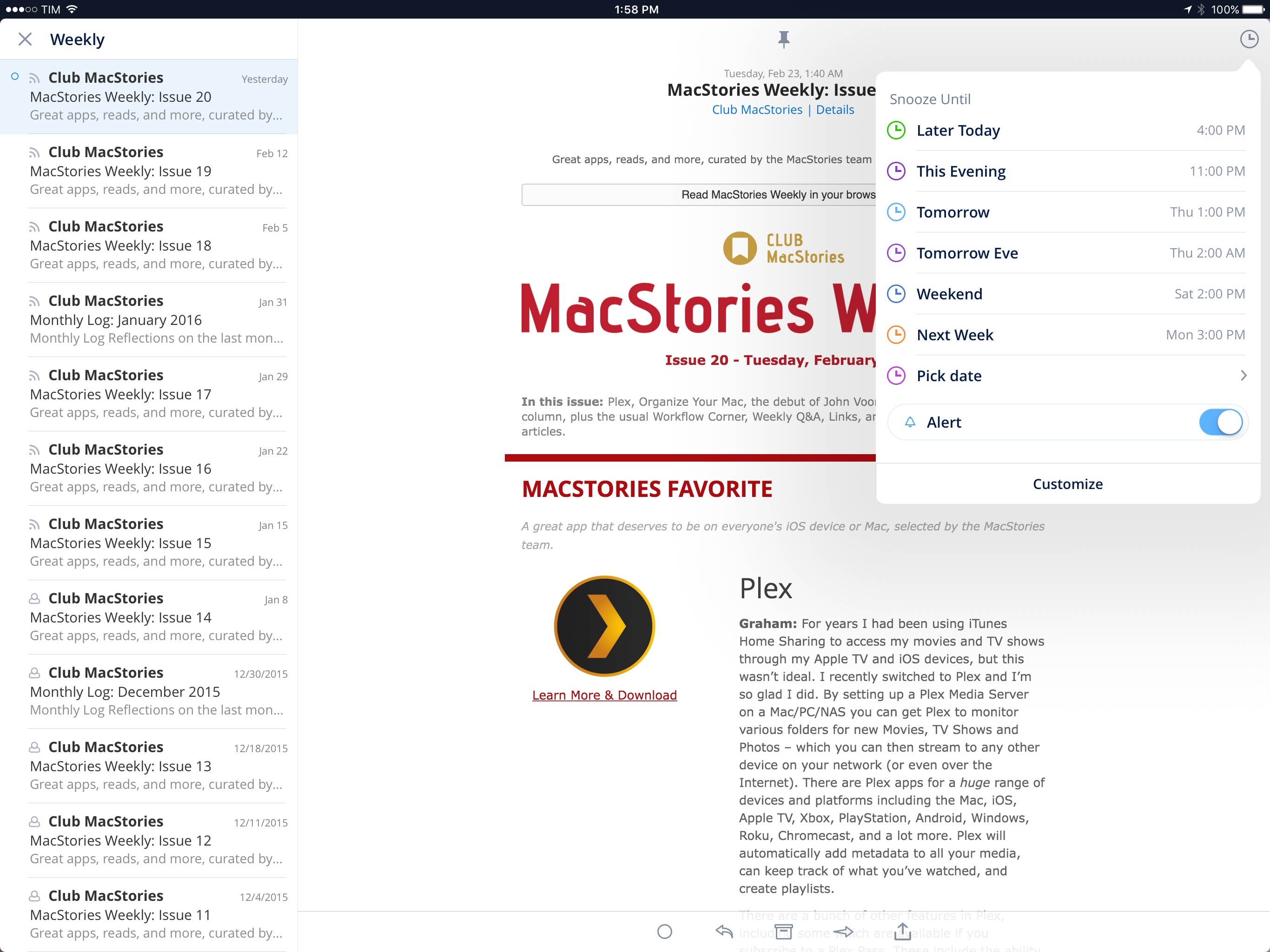
Since my original review in May 2015, Readdle has been steadily improving their email client for iPhone, Spark, with changes that addressed many of my initial complaints. Over the past 10 months, Spark has received support for HTML signatures, the ability to select multiple messages and send multiple attachments; it’s even been updated with customizable swipe gestures and better handling of attachments from cloud services. And in the aftermath of Mailbox’s demise, Readdle (cleverly) rushed to update Spark with full-featured snooze options reminiscent of Dropbox’s email client.
What Spark hasn’t gained over the past year is a clear business model and an iPad version. The good news is that at least one of these omissions is being rectified today with the launch of Spark for iPad, an expansion to the bigger screen that I’ve been testing on my iPad for the past month.
The Apple Case Will Grope Its Way Into Your Future→
Farhad Manjoo, writing for The New York Times:
Consider all the technologies we think we want — not just better and more useful phones, but cars that drive themselves, smart assistants you control through voice or household appliances that you can monitor and manage from afar. Many will have cameras, microphones and sensors gathering more data, and an ever more sophisticated mining effort to make sense of it all. Everyday devices will be recording and analyzing your every utterance and action.
This gets to why tech companies, not to mention we users, should fear the repercussions of the Apple case. Law enforcement officials and their supporters argue that when armed with a valid court order, the cops should never be locked out of any device that might be important in an investigation.
But if Apple is forced to break its own security to get inside a phone that it had promised users was inviolable, the supposed safety of the always-watching future starts to fall apart. If every device can monitor you, and if they can all be tapped by law enforcement officials under court order, can anyone ever have a truly private conversation? Are we building a world in which there’s no longer any room for keeping secrets?
ABC News Interviews Tim Cook on FBI iPhone Case→
Candid interview with Tim Cook by David Muir on the iPhone encryption case and the FBI’s requests. Easily Tim Cook’s most important interview to date, and I believe he did a good job at presenting Apple’s argument.
Don’t read the transcripts – go ahead and watch the whole video. Even Apple is featuring it on the front page of the Apple TV App Store.
Apple Posts Apple TV Tech Talks Videos→
Apple:
Over the past few months, developers around the world learned how to design and develop apps and games for Apple TV directly from Apple experts. Now you can share in the experience by watching all the session videos from the Apple TV Tech Talks.
Good starting point for developers who are considering tvOS apps, and useful for
those who have already launched TV apps, too. You can watch the videos here.
iOS Tip: Export PDFs from Print Preview with 3D Touch
Note: this tip was first shared with Club MacStories members over a month ago in issue 16 of MacStories Weekly. We are sharing it today as a one-off sample. Subscribe now and don’t miss out on more iOS tips and workflows.
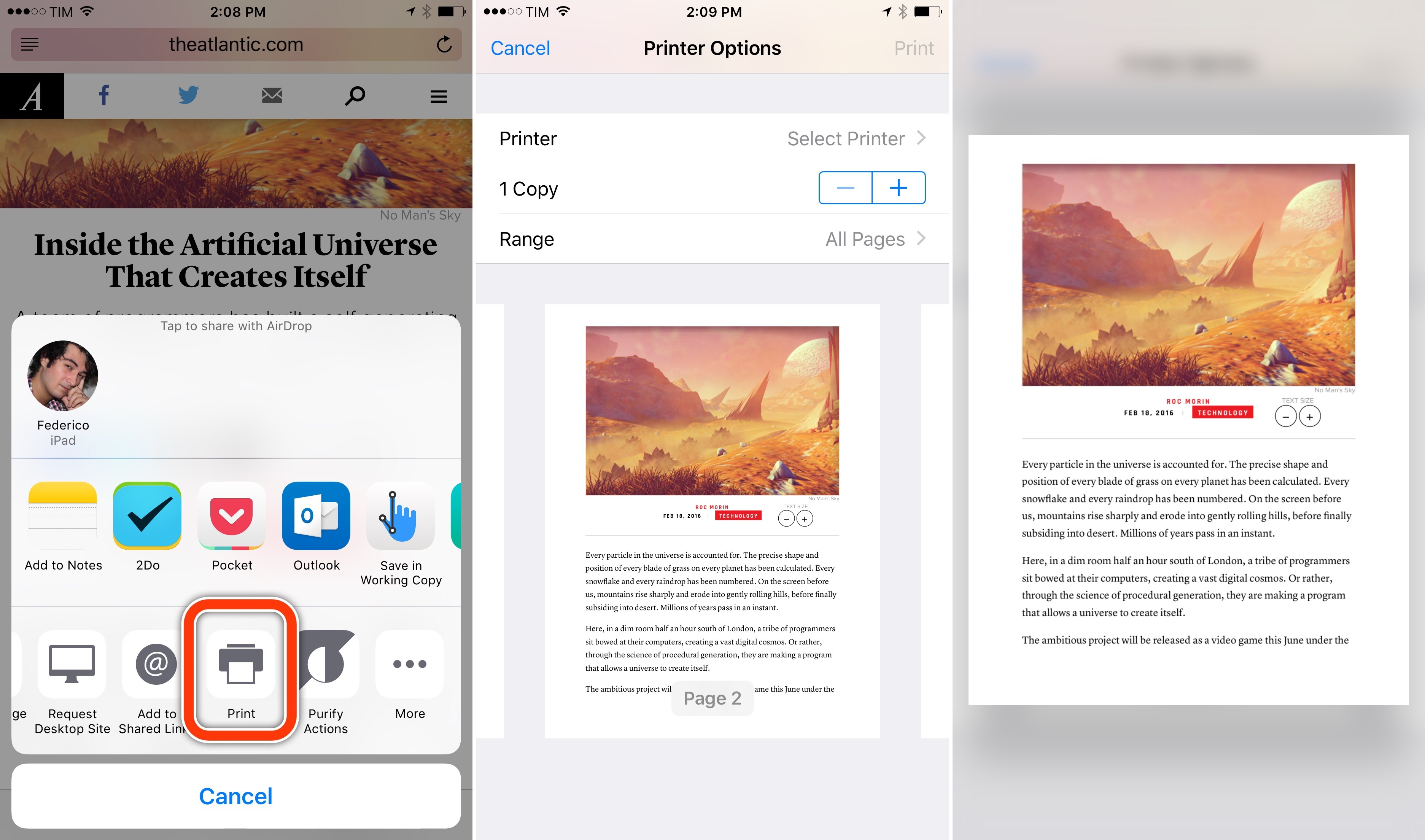
A hidden option of iOS’ Print feature I’ve recently discovered is a way to export a PDF file from the Print preview screen using 3D Touch. I haven’t been able to replicate it without 3D Touch on the iPad, which makes the option available exclusively on the latest iPhones.
When viewing a page you want to save as PDF – say, a webpage in Safari or a note in the Notes app – open the share sheet, find the Print extension at the bottom, and tap it. This will open a Printer Options screen with a page preview in the lower half. You can swipe on pages to scroll through them, but what I didn’t know is that you can also press lightly on a page and then pop it open to get a Quick Look preview of the PDF file that’s going to be printed. Because it’s a PDF file, you can share it with other apps and action extensions, saving it elsewhere.
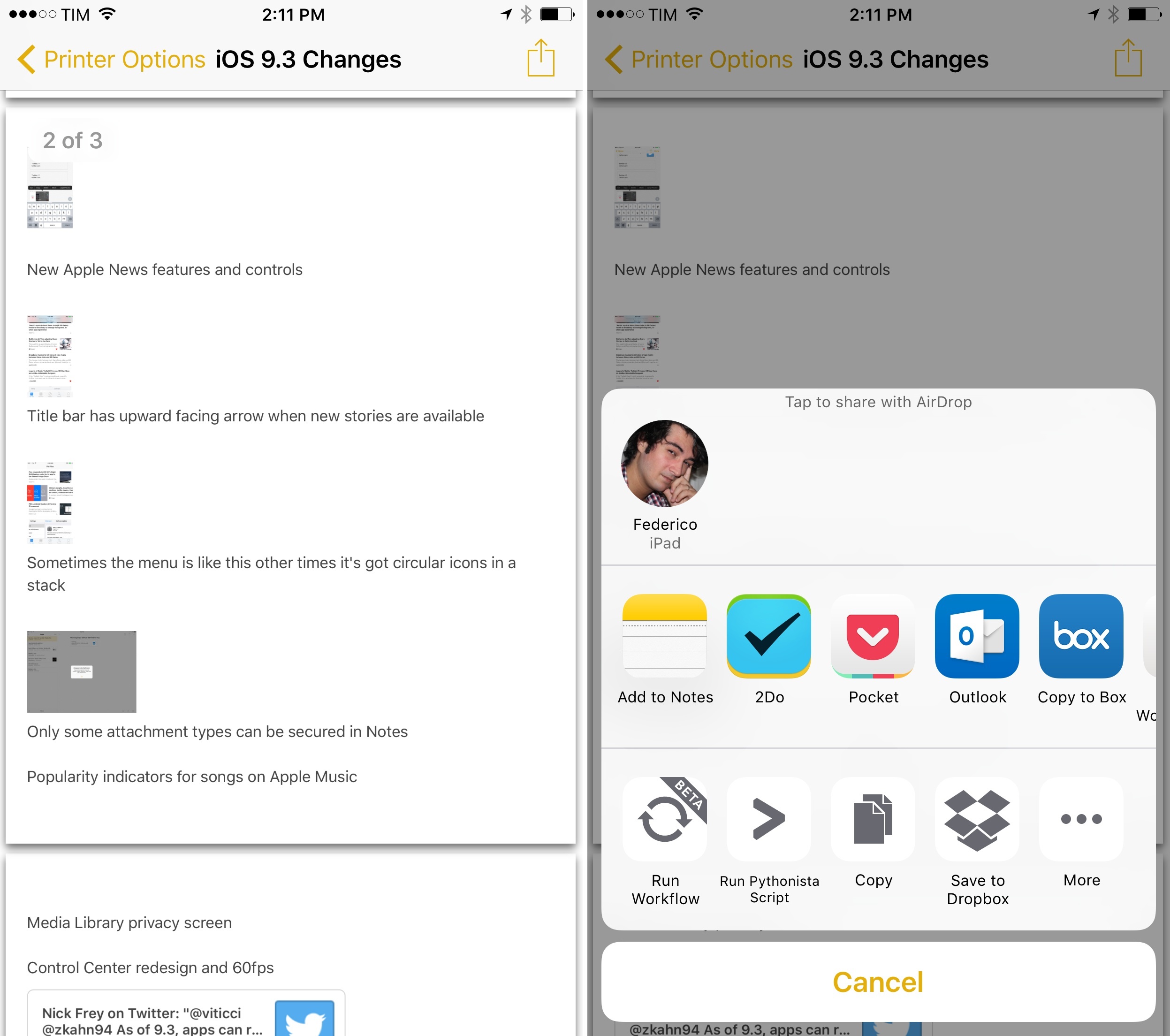
Thanks to this hidden feature, you’ll be able to share PDF files generated natively by iOS with other apps, including Dropbox and Workflow, without having to save the PDF to iBooks. I wish this could also be done on an iPad.
AfterPad’s Apple TV App Catalog→
We all love our Apple TVs, but nobody loves searching for apps and games on it. The Apple TV is a box with a tremendous amount of power, but it often feels like that power is locked behind a confusing and inaccessible app store.
This catalog aims to change that. AfterPad provides a web frontend for searching and browsing the Apple TV store, as well as curating the best of the best into an Editor’s Choice section geared towards power users.
Terrific work by Kevin MacLeod at AfterPad. Until Apple comes up with a solution to link to tvOS apps and browse its App Store on the web, the Apple TV App Catalog will be useful to look up app details, prices, and screenshots.
(And I’m pretty sure he coded all of this on an iPad Pro, which is even better.)
Apple to Restore Pencil Navigation in Next iOS 9.3 Beta→
Following reactions from around the web this week on iOS 9.3 betas losing Pencil navigation features, Apple has now confirmed to The Verge that full Pencil support will return in the next iOS 9.3 beta:
Thankfully, Apple has no plans to cripple its Pencil accessory for the iPad Pro. After the most recent iOS 9.3 beta removed the ability to navigate around iOS with the $99 add-on — marketed as a drawing tool more than a stylus — Apple has confirmed with The Verge that all of those features will soon make a comeback. “We believe a finger will always be the primary way users navigate on an iPad, but we understand that some customers like to use Apple Pencil for this as well and we’ve been working on ways to better implement this while maintaining compatibility during this latest beta cycle,” a spokesperson said. “We will add this functionality back in the next beta of iOS 9.3.”
This has to be my favorite #MykeWasRight so far. I’m glad Apple listened on this one.
Apple Pencil and Navigation in iOS 9.3 Beta→
Serenity Caldwell, writing for iMore on an Apple Pencil regression in the iOS 9.3 beta:
Unfortunately, whether by bug or intentional design, the Pencil’s navigational prowess appears to have vanished in the iOS 9.3 public betas. With 9.3, you can no longer scroll or manipulate text; the only places the Pencil works are on canvas or when pressing digital buttons.
Normally, I don’t write about beta bugs and features, because it’s a beta: There are always bugs, and features change. But this functionality is important enough that I wanted to talk about it before Apple submits its final 9.3 release. It could be a bug, yes: But several betas in, we’ve seen fixes for Smart Connector keyboards and new features, and the Pencil remains crippled. Which makes me think, more and more, that this is a conscious decision on the part of Apple’s engineering team. (I did reach out to the company about the issue, and will update if and when I receive a response.)
Like Serenity, I refrained from bringing it up due to the beta nature of iOS 9.3, but, as I mentioned earlier today in my iPad story, this is starting to feel like a conscious decision on Apple’s part.
I think it would be a mistake to remove general Pencil navigation features from iOS 9 at this point. While Apple may have not envisioned the Pencil to be used for tasks beyond drawing and sketching, owners of an iPad Pro have gotten used to the functionality four months into owning the device. Using a Pencil to scroll lists and interact with menus has serious benefits for people with RSI problems, and, I have to say, it’s just convenient if you don’t want to switch back and forth between touch and Pencil all the time.
I hope that Apple will listen and restore the full Pencil functionality as seen in iOS 9.2 when the final version of iOS 9.3 ships.