Federico Viticci

10917 posts on MacStories since April 2009

Federico is the founder and Editor-in-Chief of MacStories, where he writes about Apple with a focus on apps, developers, iPad, and iOS productivity. He founded MacStories in April 2009 and has been writing about Apple since. Federico is also the co-host of AppStories, a weekly podcast exploring the world of apps, Unwind, a fun exploration of media and more, and NPC: Next Portable Console, a show about portable gaming and the handheld revolution.

Connected, Episode 172: Shazamalo→

Myke was surprised by Apple’s Shazam acquisition, Ticci is living that 4K life and Stephen is thinking about an iMac Pro.

A fun episode of Connected this week with a good variety of topics. You can listen here.

Sponsored by:

  • Balance Open: Find out more about Balance Open and get $2 in Ethereum.
  • Squarespace: Make your next move. Enter offer code WORLD at checkout to get 10% off your first purchase.
  • Incapsula: Secure and accelerate your website. Connected listeners get one month free.
Permalink

Bear 1.4 Brings Tag and Note Autocomplete, True Black Theme for iPhone X, and More

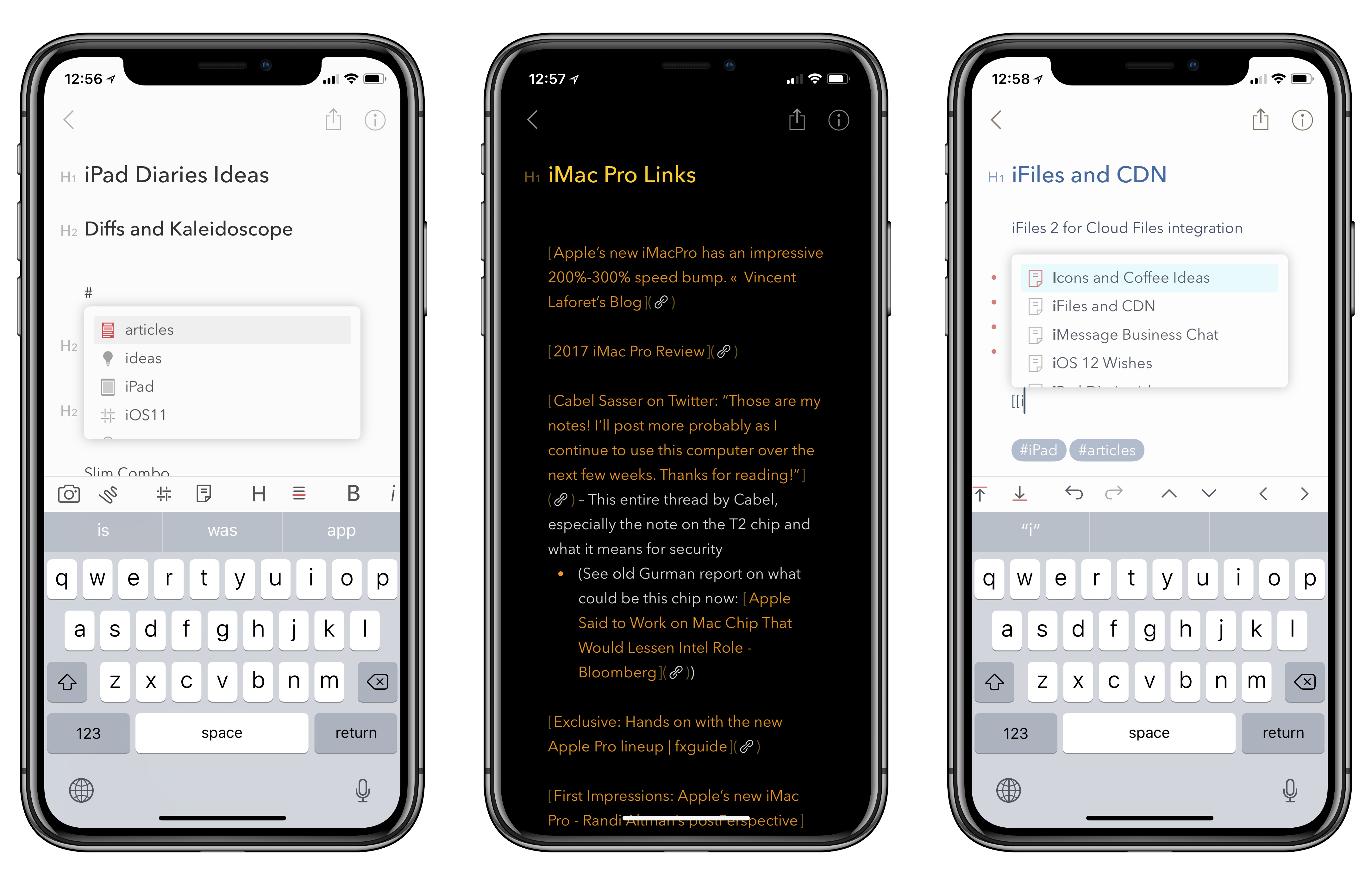
As I noted last month in my iPad Diaries column, I’ve started using Bear in addition to Apple Notes to research articles in Markdown and later convert them to drafts in Ulysses. I was impressed with Shiny Frog’s work on iOS 11 and how they brought advanced drag and drop to Bear, but I’m even more positively surprised by the improvements to tagging they released today as part of Bear’s 1.4 update.

Read more


How to Design for iPhone X (Without an iPhone X)→

Great analysis by Sebastiaan de With on how they redesigned Halide for the iPhone X (the app indeed turned out to be one of the best iPhone X app updates we’ve seen so far):

Design for ergonomics. On regular iPhones, you have to do much less as a designer to optimize ergonomics. The iPhone X requires you to think about comfortable button placement and usability. Ergonomics is more than just tapping, but also swiping and other gestures. Lay out your UI so all actions are accessible and as comfortably usable as possible.

It’s a whole new device: Design for it. Everyone can stretch an app out to a larger screen, but just like the iPad, a fresh approach is not only welcomed but helps you stand out in the App Store. This is a great time to validate your current design. Are your approaches still valid? Is there a better solution possible? You might come to some valuable insights that you can apply to all your designs, not just the ones for the shiny new device.

If you’re a developer working on iPhone X UI updates, don’t miss Sebastiaan’s map visualization of the device’s display.

Permalink

Twitter Rolling Out Official Support for Threads→

Twitter’s latest feature – which is rolling out “in the coming weeks” – is another that’s been inspired by something users have been doing for a few years now: threads.

From the Twitter blog:

At Twitter, we have a history of studying how people use our service and then creating features to make what they’re doing easier. The Retweet, ‘@reply’, and hashtag are examples of this. A few years ago we noticed people creatively stitching Tweets together to share more information or tell a longer story – like this. We saw this approach (which we call “threading”) as an innovative way to present a train of thought, made up of connected but individual elements.

Now, hundreds of thousands of threads are Tweeted every day! But this method of Tweeting, while effective and popular, can be tricky for some to create and it’s often tough to read or discover all the Tweets in a thread. That’s why we’re thrilled to share that we’re making it simpler to thread Tweets together, and to find threads, so it’s easier to express yourself on Twitter and stay informed.

We’ve made it easy to create a thread by adding a plus button in the composer, so you can connect your thoughts and publish your threaded Tweets all at the same time. You can continue adding more Tweets to your published thread at any time with the new “Add another Tweet” button. Additionally, it’s now simpler to spot a thread – we’ve added an obvious “Show this thread” label.

As far as I can tell, this is a prettier interface for the original method of creating a thread by replying to yourself. Twitter has integrated a multi-post feature into the app’s compose box, and there doesn’t seem to be a new API endpoint for threading. It seems like a nice workflow with a ‘Tweet All’ button at the end. In theory, popular third-party clients could replicate the same behavior (and design) in their own compose UIs – just like various tweetstorm utilities create “threads” by posting multiple replies in a row.

Permalink


Pixure 3.0 with PanelKit 2.0→

I first linked to Louis D’hauwe’s pixel art editor for iOS, Pixure, in March, when he introduced PanelKit in the iPad version of the app. If you’ve never played around with Pixure and PanelKit, imagine the ability to grab iPad popovers or sidebar panels and detach them so they’re floating onscreen like tool palettes would on macOS. I was skeptical of this idea initially – I feared it would overcomplicate the iPad’s UI – but it works surprisingly well on the 12.9-inch iPad Pro. I know that after using PanelKit months ago, I tried a few times to grab popovers in iPad apps like Omni’s, realizing that they didn’t support PanelKit.

D’hauwe is back today with Pixure 3.0, another excellent update that, among various enhancements, brings a version browser (a feature more apps should offer on iOS), drag and drop, and advanced export options. With today’s release, Pixure also includes PanelKit 2.0, a major update of the framework that now supports pinning multiple panels to the side of the screen as well as resizing them. Plus, your custom panel configuration is now saved across multiple app launches, so once you set up your workspace in Pixure, the app always remembers it.

Even if you’re not interested in editing pixel art graphics, I recommend checking out Pixure 3.0 just to play around with PanelKit 2.0. Support for multiple panels on the side is particularly impressive – try, for instance, to resize and stack the Color Picker and Layers panels on top of each other. It’s fun and intuitive, and I bet you’re going to wish more pro iPad apps offered this kind of flexible, customizable UI. You can find Pixure 3.0 on the App Store and read more about PanelKit 2.0 here.

Permalink

An Interview with Christian Selig, Creator of Reddit Client Apollo

AppStories+ Deeper into the world of apps

AppStories Episode 35 - An Interview with Christian Selig, Creator of Reddit Client Apollo

0:00
28:36

↓

AppStories+ Deeper into the world of apps

Federico and John interview Christian Selig, the creator of the popular iOS Reddit client Apollo about the development and design of the app, incorporating Redditors’ feedback, the complexities inherent in building a Reddit app, and working in Swift.

Read more


On Ive’s Return to Design Team Management→

Bloomberg’s Mark Gurman and Alex Webb reported yesterday on a change in Apple’s design team, confirmed by Apple PR with a statement:

Apple Inc.’s Jony Ive, a key executive credited with the look of many of the company’s most popular products, has re-taken direct management of product design teams.

Ive, 50, was named Apple’s chief design officer in 2015 and subsequently handed off some day-to-day management responsibility while the iPhone maker was building its new Apple Park headquarters in Cupertino, California. “With the completion of Apple Park, Apple’s design leaders and teams are again reporting directly to Jony Ive, who remains focused purely on design,” Amy Bessette, a company spokeswoman, said Friday in a statement.

I don’t know what to think about this. I never assumed Ive would leave Apple after Apple Park was completed. From the outside, we can only infer that his return to managing the design team is important enough for Apple to issue an official statement and remove Design VPs Dye and Howarth from the Leadership page.

Benjamin Mayo also raises a good point:

It’s hard to parse what this means because nobody on the outside really has a good idea of what the title change two years ago meant. Jony Ive’s elevation to Chief Design Officer felt like the first steps to his retirement with Howarth and Dye taking up the posts of lead hardware and software design.

Yet, Apple never tipped its hand that Ive was on the way out. I expected Howarth and Dye to slowly start appearing in keynote presentation videos, in interviews, and new product marketing. Ive would slowly fade from relevance in Apple’s public relations before he left for real. That simply didn’t happen. If anything, Ive became even more intertwined into Apple’s public image. He has done countless interviews and photo shoots in the intervening years.

Permalink

TechCrunch: Apple Is Acquiring Shazam→

Ingrid Lunden, writing for TechCrunch:

As Spotify continues to inch towards a public listing, Apple is making a move of its own to step up its game in music services. Sources tell us that the company is close to acquiring Shazam, the popular app that lets people identify any song, TV show, film or advert in seconds, by listening to an audio clip or (in the case of, say, an ad) a visual fragment, and then takes you to content relevant to that search.

We have heard that the deal is being signed this week, and will be announced on Monday, although that could always change.

Assuming that Apple keeps Shazam’s standalone app around in the short term, I wonder if the built-in Spotify integration for streaming and saving songs will remain (I wouldn’t be surprised if it gets pulled). I’m a fan of Shazam’s iPhone and Watch apps, but it’d be great to have Shazam baked into Siri without having to ask any special song recognition command. Shazam’s discovery and recommendation features could also tie in nicely with Apple Music.

Permalink