

Developed by the creators of FitPort, a third-party HealthKit dashboard for iPhone, Zones is a workout utility that lets you visualize four different heart rate zones and the intensity of your workouts. Using heart rate data logged by the Apple Watch (or a third-party heart rate monitor paired with the Watch), Zones breaks workouts...
Connected, Episode 184: They Perfected It, Mum→
WWDC is announced, Apple acquires a digital magazine service, and Myke and Federico discuss some ‘iOS Little Wonders’, because Stephen is away.
On this week’s Connected, we talked at length about Apple’s acquisition of Texture and what it might mean for the future of Apple News. You can listen here.
Sponsored by:
- Linode: High performance SSD Linux servers for all of your infrastructure needs. Get a $20 credit with promo code ‘connected2018’
- Squarespace: Make your next move. Enter offer code WORLD at checkout to get 10% off your first purchase.
- Pingdom: Start monitoring your websites and servers today. Use offer code CONNECTED to get 30% off.
Leaving the “Series 0” Apple Watch Behind→
I’ve been keeping an eye on the adoption of the Apple Watch Series 3 since its introduction last fall. From a development perspective the Series 3 is a delight to work with. It is fast, capable and LTE allows a wide variety of new applications (for example, the podcast support I added to Workouts++).
This stands in contrast to the challenges of working with the Series 0 (or Apple Watch (1st generation) as Apple would call it). It is just slow and honestly a bit painful to develop for. Even basic things like deploying your application to the watch can take uncomfortably long amounts of time. In daily use the Series 0 is probably “good enough” for many customers, especially with the speed/stability improvements added in watchOS 4, but as a developer I can’t wait until I no longer have to support it.
Which is why I’ve been watching the Apple Watch adoption curve within my apps (specifically Pedometer++ for this analysis) quite carefully. My personal hope is that this summer when we get watchOS 5 it will drop support for the Series 0 and free Apple to really push forward on what is possible for developers. But in order for that wish to be realistic I imagine Apple will need the daily use of those first watches to have died down significantly.
These are fascinating numbers about the adoption of different Apple Watch models by David Smith, who makes some of the best apps for the platform.
I’ve been wondering about when Apple could drop support for the original Apple Watch in new versions of watchOS. For context, the original iPhone, launched in 2007, couldn’t be updated to iOS 4 in 2010, three years later. The Apple Watch will have its official third anniversary next month. I suppose that Apple Watch owners hold onto their devices for longer, but if old hardware is stifling innovation for the developer community who wants to push Watch apps forward (as much as that is possible with the current tools), then maybe it is time for Apple to move on.
The Menu Bar: Being Balanced Is Not Sexy→
I was a guest on The Menu Bar podcast last week, and I had fun talking with my friend Zac about my recent experiments with HomeKit, Apple’s approach to privacy and ethics, and the modern era of music streaming services. You can listen here.
See also: my original appearance on The Menu Bar almost five years ago, which has been made available again to Menu Bar supporters on Patreon.
App Culture: Health, Fitness, and Quantified Self Apps
 John
AppStories Episode 46 - App Culture: Health, Fitness, and Quantified Self Apps
0:00
0:00
0:00
Federico and John look back at where health, fitness, and quantified self apps have been, where they’re going, and how hardware and software advancements are changing the way we track and gain insights about our health and fitness.
A More Friendly and Motivational Health App→
I love this concept by 9to5Mac’s Michael Steeber, who imagined how Apple’s Health app could become a friendly, useful motivational tool instead of being just a pretty collection of charts and data points:
The majority of people using iPhones and Apple Watches to track their health have the simple wish to reach their goals and monitor their wellness. While today’s Health app is rich with data points and charts, it takes valuable time to dive in and parse the information. Even more challenging is drawing accurate and informed conclusions from the data without a medical background.
The Health app of the future could be a dashboard for your body, filled with daily insights into your wellness. Helpful tips for living a better life could be drawn from the treasure trove of data synced from your Apple Watch and connected apps, tailored to your specific health history and needs. Rather than just a data aggregator, Health could become a proactive and motivational tool.
Not only is Michael exactly right about the features missing from the Health app – his mockups are beautiful, and I could see the card-style UI fitting nicely within Health.
As I was reading Michael’s article, I was reminded of something I wrote three years ago in my iPhone health story, after I spent months tracking everything about myself:
What I’m missing, however, is advanced and intelligent connections between the pieces of data I’m tracking about myself. I’ve spent months logging all I could about my body and daily activity using my iPhone. I’d love to see a smart AI capable of understanding actual patterns about my lifestyle and that could give me more detailed insights about my habits. What happened in the week I ate more vegetables than meat – did I lose weight and sleep better? What are the locations where I tend to walk more and when during the week? I can see how steps taken correlate with sleep quality, but how about something more practical such as, for instance, caffeine and food plotted against sleep?
This was published in March 2015, before I got an Apple Watch. Three years later, the Health app is still largely the same. I think it’s time for Apple to consider how data tracked in the Health app could be used in meaningful, practical ways going forward. I hope something similar to Micheal’s ideas is in the works.
 DEVONmenu: Saving Multiple Files in DEVONthink (with Things Integration)
For the past several months, I’ve been refining a DEVONthink workflow I previously covered in a couple of issues of MacStories Weekly as well as MacStories. The workflow, which I called “DEVONmenu” then “DEVONmenu Plus”, was originally shared here and perfected in the Q&A section of MacStories Weekly #118. My DEVONmenu workflow was designed...
Connected, Episode 183: PodStorm→
Stephen’s family staged a HomePod intervention, Myke names his favorite Apple Watch apps, Apple kills off iTunes LP and Federico has some news.
We discussed a variety of fun and interesting topics on Connected this week, but MacStories readers shouldn’t miss the final part of the show. You can listen here.
Sponsored by:
HomePass Can Store All Your HomeKit Setup Codes
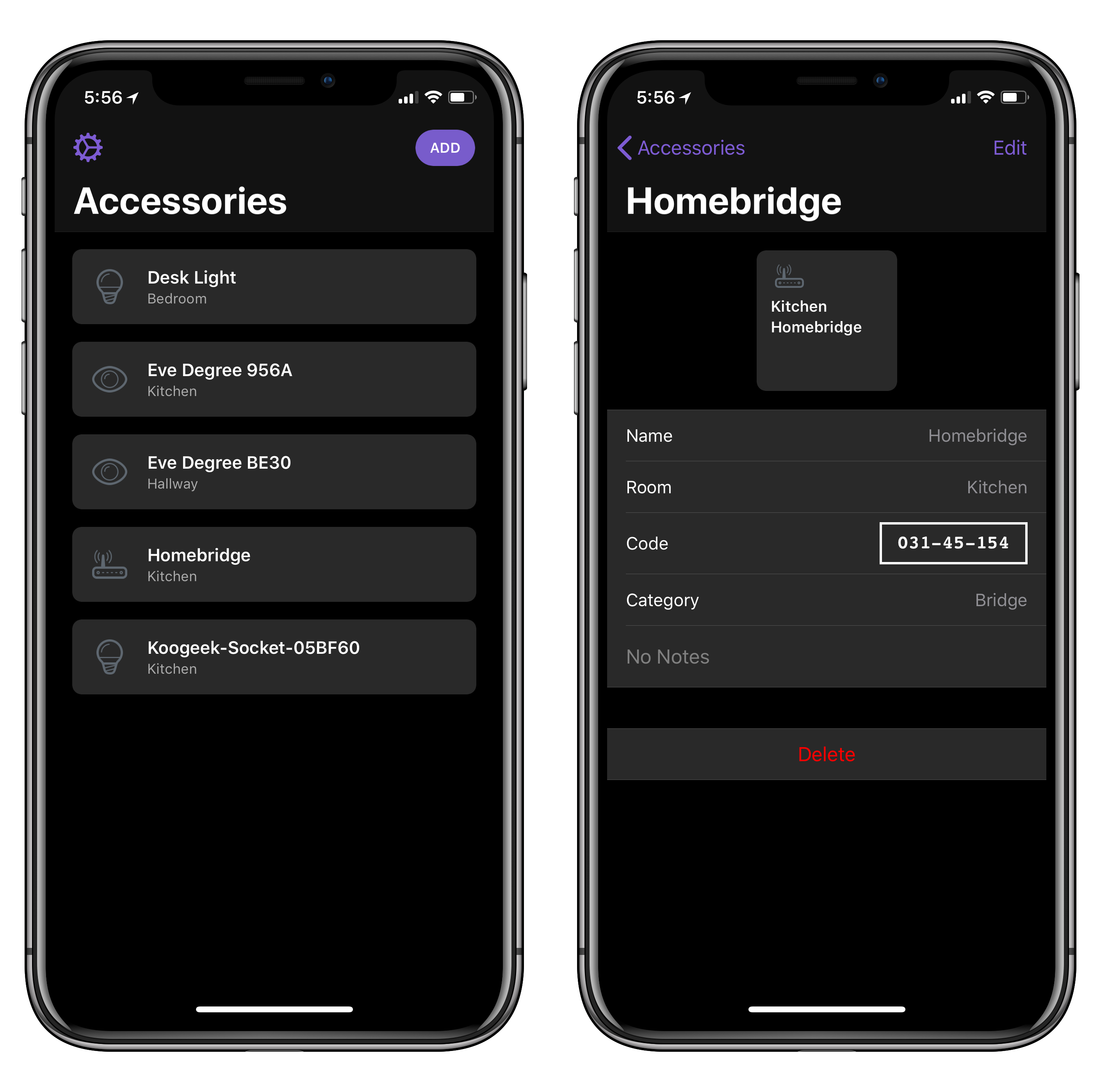
Developed by Aaron Pearce (the creator of Homecam, one of my favorite iOS apps this year), HomePass is a handy utility for iPhone and iPad to store HomeKit setup codes.
If you’ve been playing around with home automation on iOS, you know that managing accessory pairing codes isn’t exactly fun or convenient. While iOS 11 added support for QR codes and special NFC pairing tags, most accessory makers still stick basic alphanumeric codes on the back or at the bottom of accessories and essentially require you not to lose them. That’s not ideal. HomePass aims to be a single repository where you can easily keep track of all your setup codes, sync them across devices with iCloud, and even protect them with Face ID. Instead of taking pictures of your codes and storing them in Apple Notes (which is what I’ve been doing), you can collect every HomeKit code in HomePass, where they’ll be presented alongside device names, HomeKit rooms they belong to, and custom icons.
I’ve been testing HomePass for the past couple of weeks, and there are some nice touches I want to point out. First, if you grant the app access to your HomeKit data, it’ll be able to see existing accessories and allow you to simply enter the code without choosing a device name or icon (you can also create new accessories from scratch). In addition, the code displayed in the Code field of a device’s detail view is formatted with the same shape and font used on physical setup codes; this means you can open HomePass on your iPad and scan a code directly with the Home app on your iPhone. Lastly, you can add notes to your accessories and export everything as CSV if you prefer to have an additional backup of your accessory database.
One of the many shortcomings of Apple’s native Home app is the lack of deeper organizational tools for users who own dozens of HomeKit accessories and need a better way to store their codes. Ideally, such a feature shouldn’t be needed, but in my experience things sometimes go wrong and you may need to reset an accessory and add it to HomeKit again. When that happens, you don’t want to go hunting for the setup code on the back of a thermostat. I highly recommend using HomePass instead, which is available at $2.99 on the App Store.