John Voorhees

5821 posts on MacStories since November 2015

John is MacStories' Managing Editor, has been writing about Apple and apps since joining the team in 2015, and today, runs the site alongside Federico. John also co-hosts four MacStories podcasts: AppStories, which covers the world of apps, MacStories Unwind, which explores the fun differences between American and Italian culture and recommends media to listeners, Ruminate, a show about the weird web and unusual snacks, and NPC: Next Portable Console, a show about the games we take with us.

This Week's Sponsor:

Crickets

The first alarm app for families.


Game Day: RunGunJumpGun

RunGunJumpGun, by Canadian indie studio ThirtyThree Games, may be the hardest game I’ve played so far this year. The game requires precise timing and quick reflexes, which is something I’m not great at, but it balances the difficulty and gameplay so well, it’s more fun than frustrating. Instead of quitting the game exasperated, I found myself trying segments again and again each time my character died.

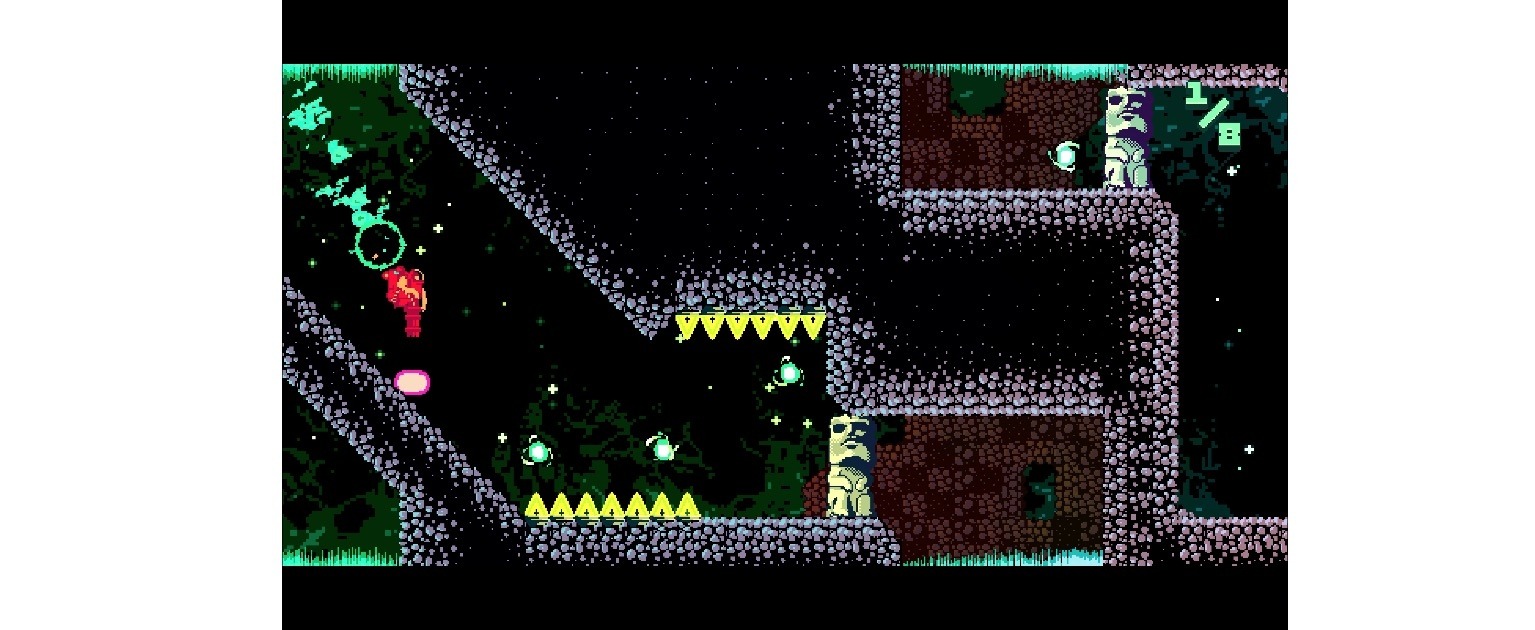
RunGunJumpGun has a crazy, colorful pixel art style straight out of a 90s platformer. You can tell that a lot of care has gone into every detail of each of the 120 levels. Everything around you is in constant, colorful motion, which adds to RunGunJumpGun’s complexity.
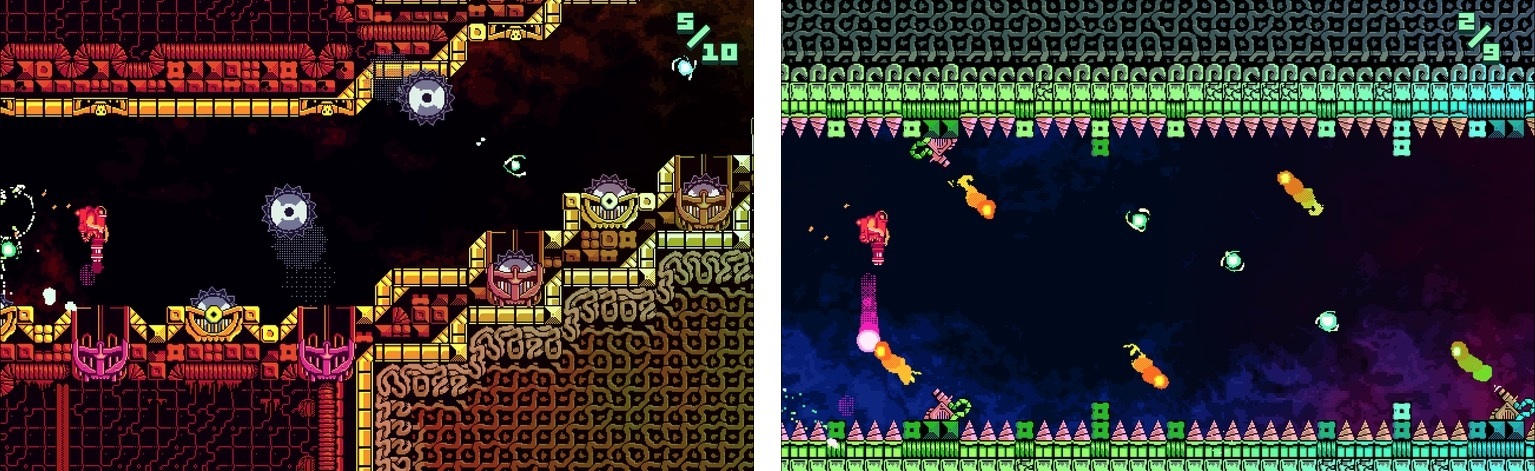
The game is an interesting synthesis of genres. Like an endless runner, your character moves to the right automatically. Get hung up on a wall and the scene overtakes you and you die. But RunGunJumpGun is more involved than a typical endless runner, adding elements of classic platformer games. Instead of just avoiding obstacles, you have to collect items to advance through the three worlds, fly to avoid things, and shoot your way through others.

You tap the left side of the screen to fly and the right side to shoot. It’s simple, but the fact that you can’t fly and shoot at the same time makes it hard to master the controls. Fly up avoid spikes and you can’t shoot. Start shooting at a barrier while you’re flying and you begin to fall. It requires a careful balance of both controls to make it through each level.

If you do hit a barrier, you die immediately. There is no concept of health, but dying doesn’t take you back to the beginning, just the last checkpoint you reached. That happens with a cool rewind animation that is so fast that it hardly feels like you died at all. You’re immediately thrown back into the game to try to advance further. The process is so seamless that I found I wasn’t bothered by having to repeat segments over and over until I made it to the next checkpoint or the end of the level.

RunGunJumpGun started life as a PC and Mac game on Steam. Developer Logan Gilmour told Engadget:

“We weren’t out to just make an infinite runner mobile game that’s run-of-the-mill,” said programmer Logan Gilmour. “We were hoping it would stand more among PC games than mobile games, but then play equally well on mobile.”

I haven’t played RunGunJumpGun on my Mac, but having played on my iPhone and iPad, ThirtyThree Games has definitely succeeded on mobile. I particularly liked playing on my iPad where I could tap on the far lower edges of the screen making it easier to see what was happening in the game.

RunGunJumpGun stands out among recent iOS game releases for its attention to detail and frantic pace. The game is undeniably hard, but also easy to get lost in for long periods. Even if twitchy, fast-paced games are not your thing, RunGunJumpGun is worth trying because it’s an example of one of the best games of its genre.

RunGunJumpGun is available on the App Store for $2.99. The Mac App Store version is $7.99.


Tips

I use AirDrop to share files between my iOS devices and Mac all the time. I know it hasn’t always worked perfectly for some people, but it’s been rock-solid for me, which makes it a convenient and fast way to share files. When I’m away from home, though, I usually don’t want my MacBook...


Alfred

At its simplest, Alfred is an app launcher not unlike Spotlight, which is built into macOS. However, Alfred is much more than an app launcher. Spotlight does other tricks too, but Alfred beats it hands-down. In addition, because Alfred learns the way you work over time, the more you use it, the better it works....


Q&A

Question: What note-taking app do you recommend between Evernote, Bear, Apple Notes, and other alternatives? (Manu Olavarriaga, @1manuo)

As I wrote in my story about Bear, I’m trying to see if this app can replace Apple Notes for me because of its power user features and Markdown support. I’ve been a heavy Notes user...


Album

HUSKy Lots of stickers for husky lovers with a super cute main character displayed in different contexts and expressions. Some of the stickers are animated, too. The Little Ones Fun and cute creatures by Renaud Forestié, who has worked for years as an illustrator and art director at companies like Ubisoft and Danone. The...


App Debuts

Another Voice Fun new iMessage app to send voice messages with a variety of built-in effects. There have been a few apps like this on the iMessage App Store, but Another Voice is fast, the design is clean, and you can also browse popular voice messages from the community and share them with friends....


Apple Releases ‘Bulbs’ Video→

Apple posted a video on YouTube promoting the new Touch Bar MacBook Pros. The video cuts frenetically between a long line of Edison bulbs exploding down a darkened street and into the countryside, and scenes of human inventions from the discovery of fire to a robot walking down a street. The spot concludes with ‘Ideas push the world forward,’ echoing the line ‘They push the human race forward’ from Apple’s famous 1997 ‘Crazy Ones’ ad.

The ad then cuts to the line ‘Introducing a tool for all the ideas to come.’ A MacBook Pro comes into view with an Edison bulb on the screen. A hand scrubs back and forth across a slider on the Touch Bar making the video of the exploding bulb fast forward and rewind. The video does a nice job demonstrating the marquee feature of the new MacBook Pros, but an even better job, through its use of pacing, music, and editing, of giving a sense of the speed at which technology advances in what feels like an oblique response to critics of the changes made to Apple’s laptop line.

Permalink

Apple Creates Special Swift Playgrounds Challenge for the ‘Hour of Code’→

Apple has participated in Code.org’s Hour of Code challenge for the past three years. Apple announced today that it will participate again this year with a series of workshops for kids from December 5 - 11, 2016, which coincides with Computer Science Education Week.

Angela Ahrendts, Apple’s senior vice president of Retail had this to say:

Hour of Code embodies our vision for Apple stores as a place for the community to gather, learn and be entertained…. We’re proud to introduce the Swift Playgrounds app into the workshops and honored to again work side-by-side with Code.org on this incredibly important initiative. Hour of Code is one of the absolute highlights of the year for both our teams and the families that visit our stores.

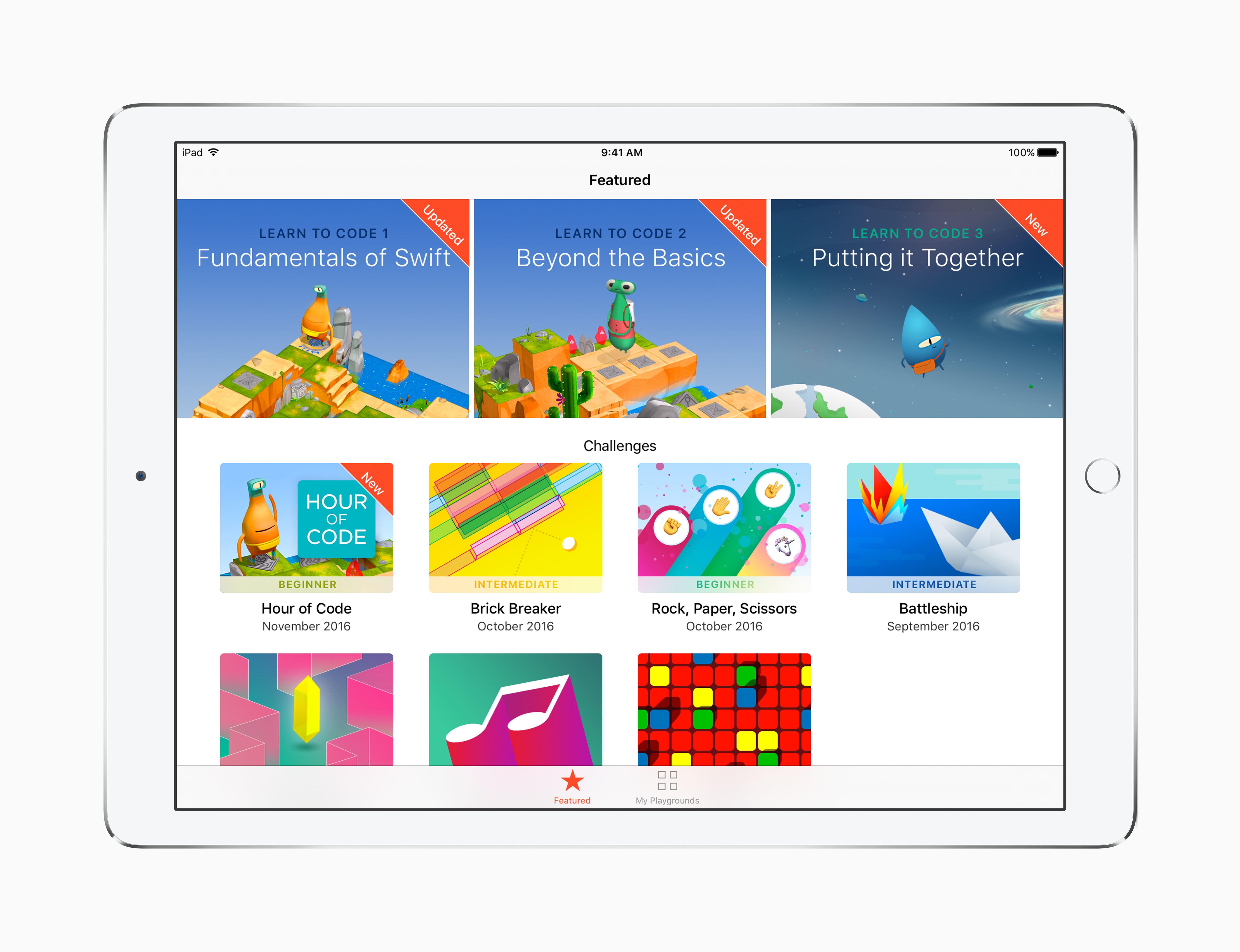
In addition to using Swift Playgrounds in the workshops for the first time, Apple is adding a new Hour of Code challenge to Swift Playgrounds called ‘Putting it Together.’ Apple’s press release explains that:

A new Hour of Code challenge in Swift Playgrounds makes it easy for anyone to set up their own one-hour coding event, and for those continuing to build their coding skills on iPad, Swift Playgrounds adds a new Learn to Code 3 set of lessons and a companion Teacher Guide.

Signup for the workshops is not yet live, but should be available here soon.

Permalink

Google Play Newsstand Redesigned→

Google has been on a tear with new and updated iOS apps. The latest is a redesign of Google Play Newsstand, a free app for browsing news outlets and magazines similar to Apple News.

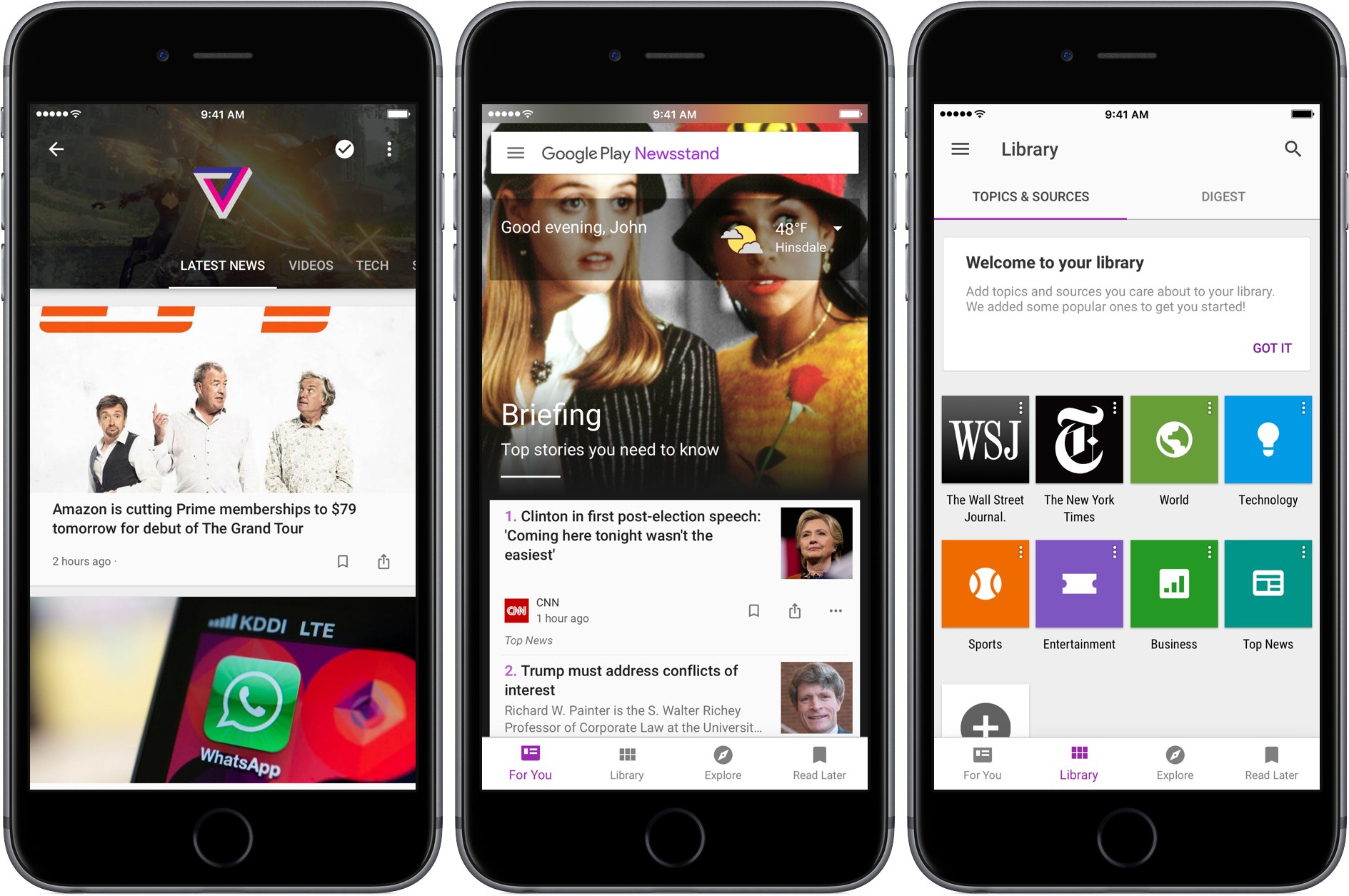
Blending a variety of national and local news with article recommendations based on your personal interests using machine learning, Newsstand creates a media-rich ‘For You’ page divided into two sections. The ‘Briefing’ includes a handful of what Google deems the most important and relevant stories to you. Below the Briefing is ‘Highlights,’ a longer list of articles culled from you favorite sources and topics. Each article in Highlights helpfully explains why it was suggested.

Tapping the three dot menu button below any article lets you hide stories from its source, have fewer articles of that type suggested (I took advantage of this immediately with CNN’s report on a Parmesan cheese recall), or jump directly to the source or topic of the article. I’ve found the last two options a great way to quickly build a database of topics and sources that I want to follow.

Newsstand is built on an AMP foundation:

We have improved our support for multimedia content building on the AMP support we launched earlier this year. Scroll through your feed, and you will see autoplay videos, easy podcast controls, and high-resolution, full-bleed images. Every story and topic in Newsstand now comes to life in a more engaging, beautiful presentation.

I’m not a fan of autoplay anything, but Newstand’s articles look terrific and load fast.

Finally, Google also touts Newsstand’s new web app as a way to access news wherever you are. It’s broad claim that needs to be qualified. The unstated assumption seems to be that the web app is for desktop use only because it doesn’t work on iOS even if you use Google’s Chrome browser. Moreover, on macOS, Newsstand doesn’t work with Safari, instead directing you to download Chrome.

Newsstand's web app does not work on Safari for iOS or macOS.

Newsstand’s web app does not work on Safari for iOS or macOS.

In some ways Google Play Newsstand feels like a modern implementation of Google Reader, which was shuttered in 2013 around the same time that Newsstand was introduced. I wonder how much better my recommendations would be if Newsstand had the benefit of all the years I used Google Reader. Maybe it does have access to that data, but using Newsstand feels too much like starting over for that to be the case. In any event, Google Play Newsstand is a worthy competitor to Apple News. Perhaps 2017 will see competition among news services similar to what we’ve seen with photo services this year.

Permalink