

 Federico
x2y Joe Cieplinski has released a Mac version of his iOS app to calculate aspect ratios. The desktop app has support for the Touch Bar on the new MacBook Pro and, like the iOS counterpart, it’ll calculate values automatically with a simple interface. Shapego This new app by Italian developer Libero Spagnolini generates beautiful...
Game Day Holiday Bonus: Don’t Grind
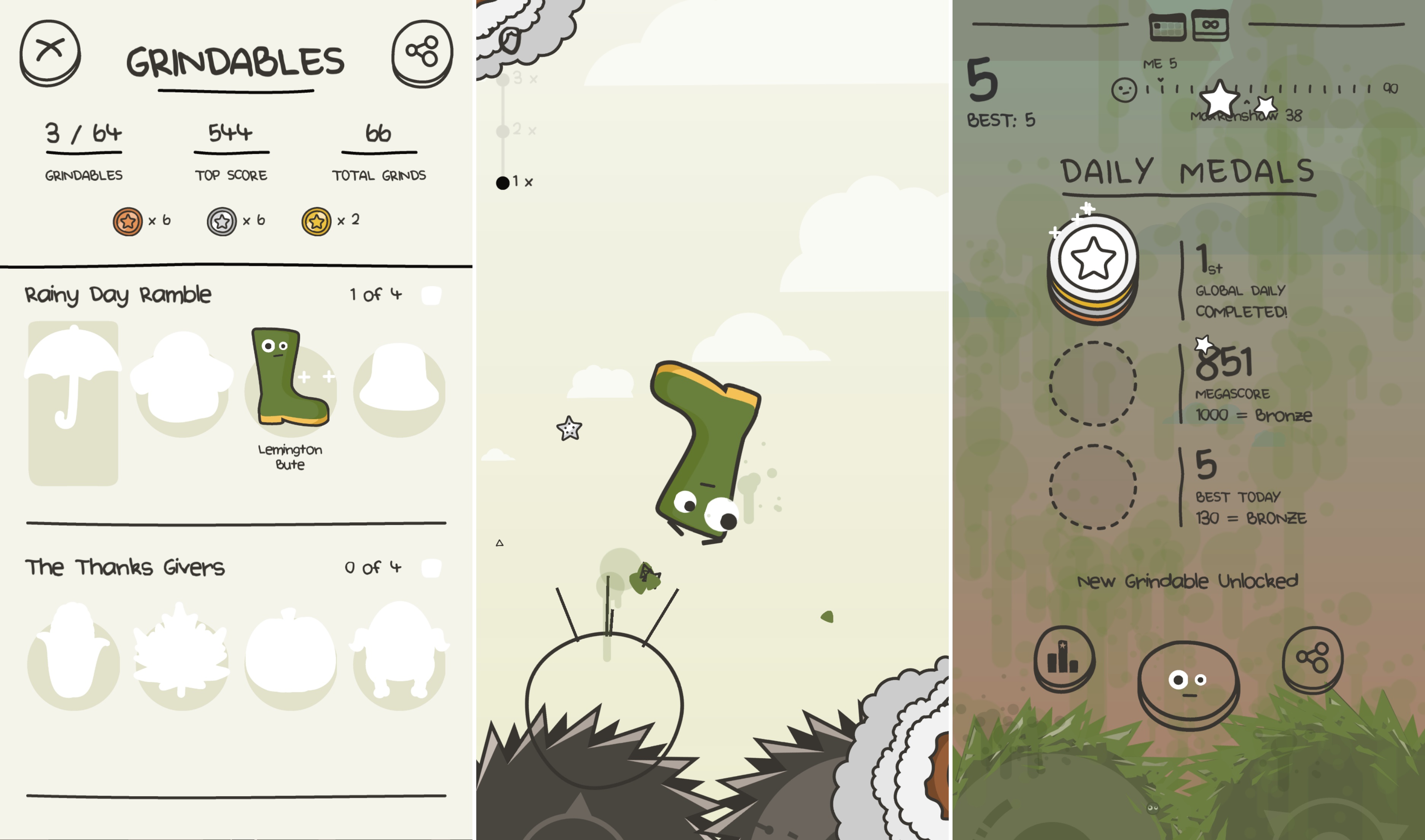
It’s Thanksgiving Day in the US and there are games to play. Sure, those celebrating Thanksgiving should probably put their iPhones away and spend time with their families. But not everyone celebrates Thanksgiving, and even if you do, who doesn’t need a break at some point over a long weekend?
Don’t Grind by Laser Dog Games is the perfect game for just such a break. It’s easy to get the hang of, playable in short bursts, and a whole lot of fun. The goal of Don’t Grind is to keep a character bouncing in the air above two rotating blades. You do that by tapping and swiping on the screen. How high you bounce with each tap depends on the length of the tap. Swiping sends your character in the direction of the swipe. Fail to stay aloft and you are ground up by the blades ending the game.

As you bounce around in the air above two blades, you collect stars, which are converted into medals when the round ends with your character’s inevitable death. While you collect the stars though, you also need to avoid lasers, rockets, blades, and other obstacles that can hasten your demise. After collecting a certain number of medals you unlock additional characters to use in the game. There are dozens to collect.
https://soundcloud.com/roballison/dont-grind-me-away`
A game where your character is inevitably ground up between saw blades sounds gruesome, but it isn’t. Laser Dog has kept the tone light and fun. That’s accomplished through a bouncy, pop soundtrack and using silly inanimate objects as characters like a donut, banana, and boot. Each character has googly eyes that do a remarkable job of conveying dread and fear as the characters approach the blades. There are other nice touches such as the background scenery that matches the time of day you are playing, haptic feedback on the iPhone 7, and the ability to record and share gameplay.
Casual games that can be played one-handed are great for short breaks that can easily become long breaks as you try to beat your high score and climb the Game Center leaderboard. Don’t Grind succeeds with a challenging game that immediately endears itself to you with its quirky sensibilities and cute characters that have kept me coming back try to collect them all.
Don’t Grind is available as a free download on the App Store. A $1.99 In-App Purchase removes advertisements from between rounds of the game.
Instagram is Rolling Out Live Video and Enhanced Direct Messages→
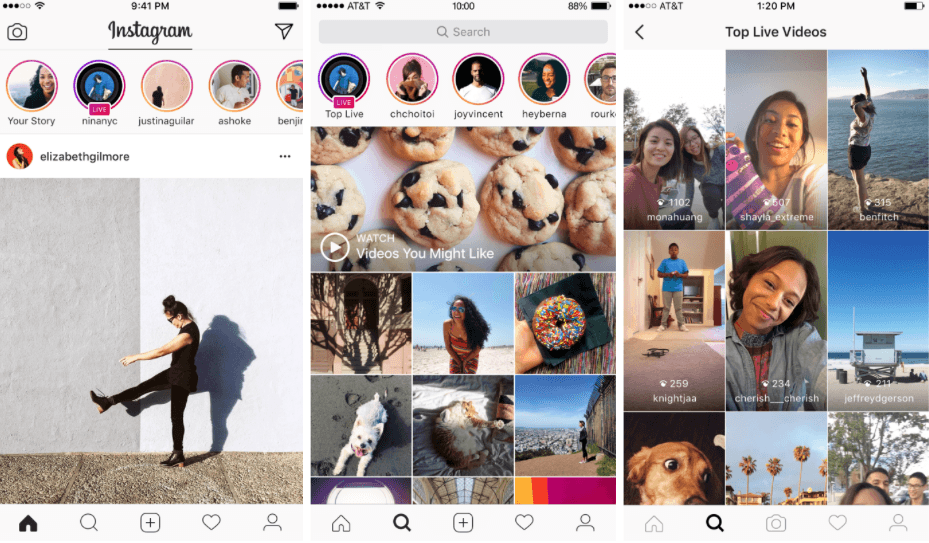
Instagram announced two new features today. The first is live video in stories. Swiping right opens stories mode, a feature similar to Snapchat stories, which was introduced in August. Instagram is rolling out live worldwide video over the next few weeks. When you begin broadcasting live, your followers may receive a notification that you are live. In addition, Instagram says that:
When someone you follow starts a live story, you’ll see “Live” under their profile photo in the stories bar. During the broadcast, you can comment and like as much as you want. You can also check out new live stories on Explore. Tap “Top Live” to see exciting live stories happening at that moment and swipe right and left to easily skip around.
Comments can also be turned off altogether. When you are finished recording, your live story disappears.
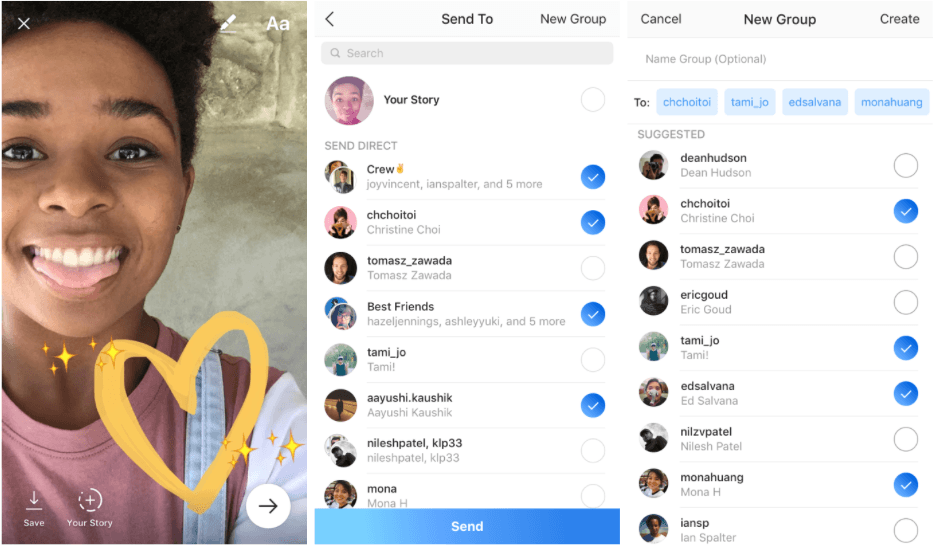
The second feature rolled out by Instagram is disappearing photos and videos in Instagram Direct. Regular direct messages, which have been around since last year, will continue to work as they have in the past, but now you can also take a picture or video from within the stories UI and tap the right-facing arrow button to send it to a friend or group. After the photo or video has been viewed, it disappears. If the recipient takes a screenshot, you are sent a notification.
A Profile of Apple’s Impact on Employment in the US, Starring Austin→
Many of Apple’s hardware products are built overseas, but that’s only part of the story. The New York Times takes a look at Apple’s impact on jobs in the United States, focusing special attention on Austin, Texas where Apple fills a seven-building complex of tech support specialists, microchip engineers, supply chain managers, and people who work in Apple Music, the App Store, and Maps:
Apple’s overall contribution to the American economy is significant. Beyond the 80,000 people it directly employs in the United States, it says 69 supplier facilities in 33 states manufacture parts that go into its products. Hundreds of thousands of software developers also write apps for iPhones and iPads.
Technical support call center employees earn around $30,000 per year, but the average in Austin is around $77,000. Asked by The New York Times whether it planned to expand operations in Austin, Apple said:
“Apple has created over two million jobs in the United States since the introduction of the iPhone nine years ago, including explosive growth in iOS developers, thousands of new supplier and manufacturing partners, and a 400 percent increase in our employee teams,” the company said in a statement. “We made the unique decision to keep and expand our contact centers for customers in the Americas in the United States, and Austin is home to many of those employees. We plan to continue to invest and grow across the U.S.”
Apple’s Austin offices have grown a lot over time, but don’t get much attention despite their size. The New York Times’ article is an interesting overview of the breadth of Apple’s impact on the US economy and peek inside Apple’s Texas offices.
Six Months with CarPlay
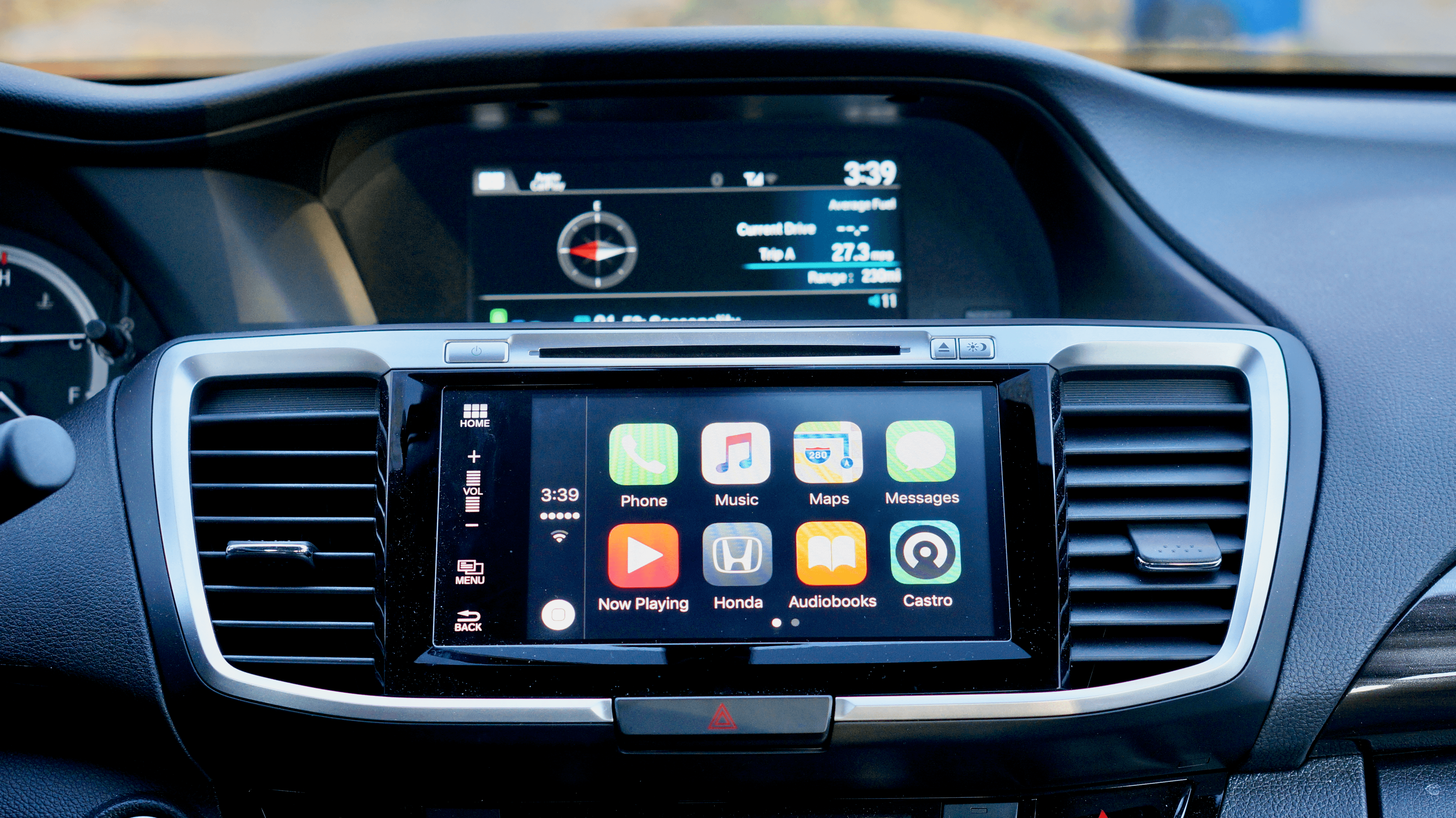
One hallmark of most Apple products is the tight integration between hardware and software. By controlling everything from the device to the apps running on it, Apple can design unique experiences that competitors have a hard time matching. Nothing highlights the advantage of that hardware/software interplay better than one of the few products where it’s missing – CarPlay. It’s the exception that proves the rule.
Don’t get me wrong – I prefer CarPlay to any auto manufacturer’s entertainment system that I’ve used, but the projection of a custom iOS interface onto my Honda’s laggy touchscreen reminds me every time I poke at it that I’m seeing a mirage. It looks like an Apple product on the surface, but the resemblance is only skin deep. As soon as you interact with CarPlay on Honda’s hardware, the spell is broken. Siri goes a long way to help maintain the illusion, but it’s a bridge too far that makes me long for an integrated solution that isn’t hamstrung by the Honda’s hardware.
Apple Holiday Ad 2016: Frankie’s Holiday→

Apple holiday ads have become a tradition and some of the best spots each year. Who can forget the Emmy-award-winning ‘Misunderstood’ from 2013, featuring what appeared to be a sulking teenager who was really making a movie about his family’s Christmas gathering? This year, Apple has released ‘Frankie’s Holiday’ featuring Brad Garrett, one of the stars on the hit TV show ‘Everybody Loves Raymond.’
Garrett who is over 6’8” plays Frankenstein, not a character that jumps to mind when you think about Christmas. The spot opens with Frankenstein recording a music box playing a holiday tune using Apple’s Voice Memos app. Frankenstein leaves his mountain home for the town in the valley below. As he leaves, he picks up a package that he takes with him.
A large group is gathered in the town square around a Christmas tree. They are startled to see Frankenstein who walks to the base of the tree, opens up the package he brought along with him, and removes Christmas lights that he screws into his neck. As the bulbs light up, Frankenstein plays the music he recorded on his iPhone, ‘There’s No Place Like Home for the Holidays, and begins to sing. One of the bulbs goes out and it seems like Frankenstein is going to give up on his performance when a little girl helps him by fixing the misbehaving light and joining Frankenstein and the rest of the crowd in singing the song.
Frankie’s Holiday starts out unsettling and confusing because of the unusual choice of a lead character, but when the scene switches to the town square the ad quickly becomes funny, concluding with a heart-warming message of acceptance and inclusion and the message “Open your hearts to everyone.’
Apple Will Replace iPhone 6s Batteries in Phones That Unexpectedly Shut Down→

Apple has determined that a ‘very small number of iPhone 6s devices may unexpectedly shut down.’ The problem affects a limited range of serial numbers manufactured between September and October, 2015. If you’ve experienced unexpected shutdowns, contact an Apple Store, authorized service provider, or technical support. If your iPhone qualifies Apple will replace the battery free of charge. If, however, your iPhone needs other repairs that would impair the replacement of the battery, like a cracked screen, those repairs must be completed for the standard applicable fees before the battery is replaced. In addition, if you paid to have your battery replaced before the replacement program began, you can request a refund from Apple.
This is the second repair program announced in the recent past. Less than a week ago, Apple instituted an iPhone 6 Plus repair program for phones that lose touch sensitivity. That program carries a $149 repair fee because Apple says the problem is caused, at least in part, by dropping the phone repeatedly on a hard surface.
Earn a Special Workout Achievement with a 5K on Thanksgiving Day
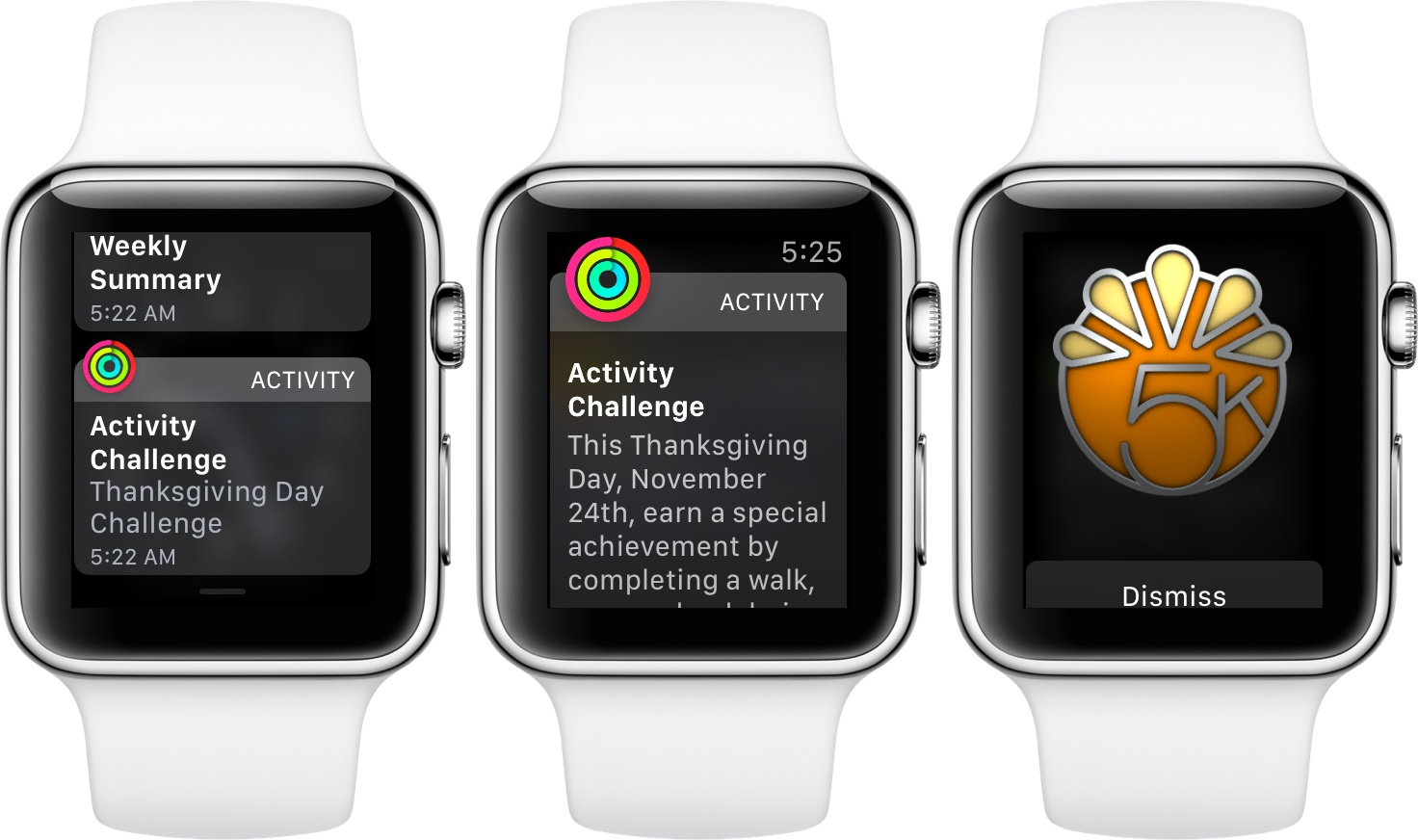
If you woke up and put on your Apple Watch this morning, you may have received a notification about a new Activity Challenge. The notification explains that you will be awarded a special achievement if you complete a run, walk, or wheelchair workout of at least 5k on November 24th, Thanksgiving Day in the US. The workout can be recorded using the Apple Watch’s Workout app or any third-party app that records workouts to the Health app. According to 9to5Mac.com, the new Activity Challenge appears to be US-only.
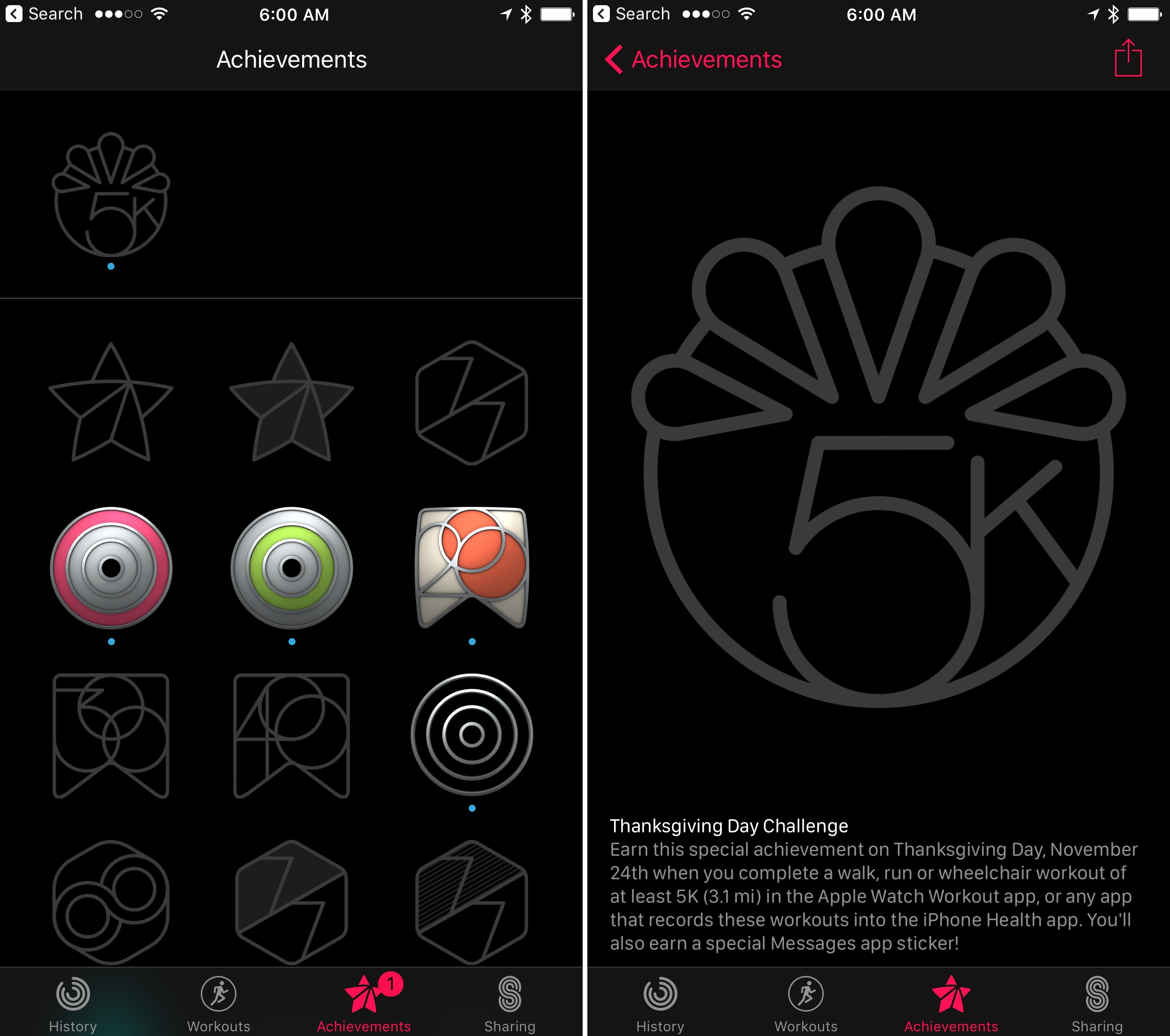
In addition to receiving a special 3D achievement badge, the Activity app on iOS adds that if you complete the challenge, you will get an iMessage sticker that you can share with others. This is the first time that Apple has created a special activity challenge around a holiday or other event. I’m excited to see Apple introduce new workout challenges and try new perks like iMessage stickers for completing challenges. By mixing it up and keeping the achievements fresh, it should encourage Apple Watch users to use the Workout app more frequently.
‘Designed by Apple in California’ Brought to Life→
Stephen Hackett of 512 Pixels has created a beautiful video dubbed “Designed by Apple in California” Book: With Acutal Products, showcasing a wide variety of the hardware in Apple’s new book, Designed by Apple in California. Hackett, who owns an extensive collection of Apple hardware, filmed the gear side-by-side with the photographs in Apple’s book, bringing it to life in a way that the photos alone cannot.