

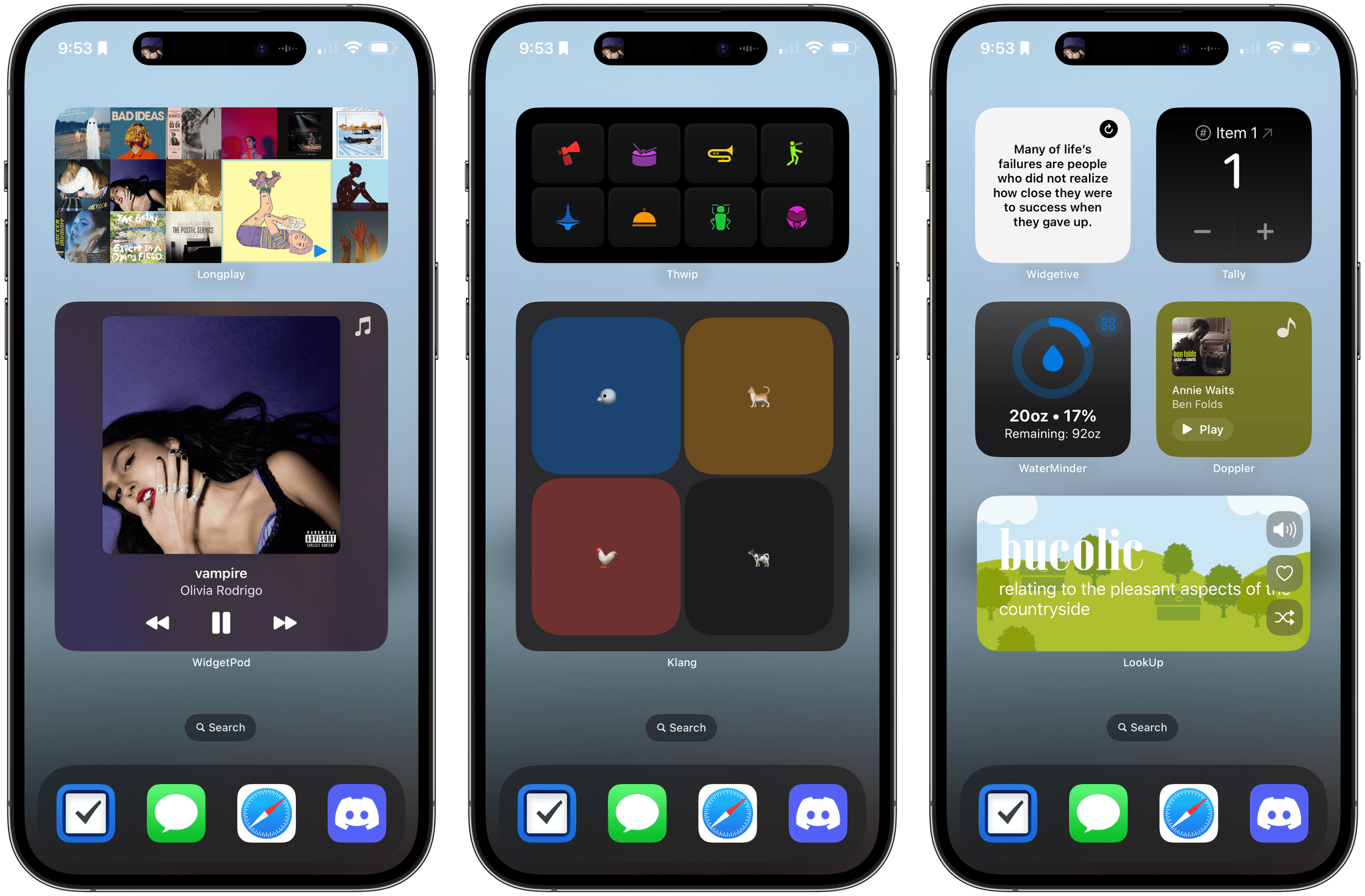
Ever since Apple updated its OSes, I’ve been trying a long list of widgets. We’ve written about a lot of them, but there are always more, so I gathered up some additional favorites that are worth trying if you haven’t yet. Let’s have a look.
Garage Access as a Service: The Chamberlain Group’s Anti-Consumer Approach to the Smart Home→

When you install a garage door in your home, you expect to have full access to how it works – at least, that’s how it worked historically. As Jennifer Pattison Touhy explains for The Verge, that’s not at all the case with The Chamberlain Group, which has built its myQ smart garage door controller technology into many of the doors it sells and has systematically removed ways for consumers to use the tech:
The move breaks the smart home integrations of thousands of users who relied on platforms such as Homebridge and Home Assistant to do things like shut the garage door when they lock their front door or flash a light if they leave their door open for 10 minutes, or whatever other control or automation they wanted to do with the device they bought and paid for.
The move comes a year after Chamberlain discontinued its official Apple HomeKit integration and a few months after it finally killed support for Google Assistant. It’s sadly another example of how the company continues to be hostile to the interoperable smart home.
The result is that many people who purchased garage doors with myQ’s smart controller technology built in now have a less capable door. The only way to restore smart home interoperability is to buy a new door controller or one of the devices covered in The Verge’s story.
What I find most galling about this story is that The Chamberlain Group is removing these features from its doors while simultaneously expanding its partnerships with auto manufacturers and security companies. Think of it as GaaaS: Garage Access as a Service. Instead of offering consumers control directly, The Chamberlain Group ironically has set itself up as the gatekeeper of your garage. Rather than allowing consumers convenient access to their garage doors, The Chamberlain Group is steering them through paid services, which stinks.
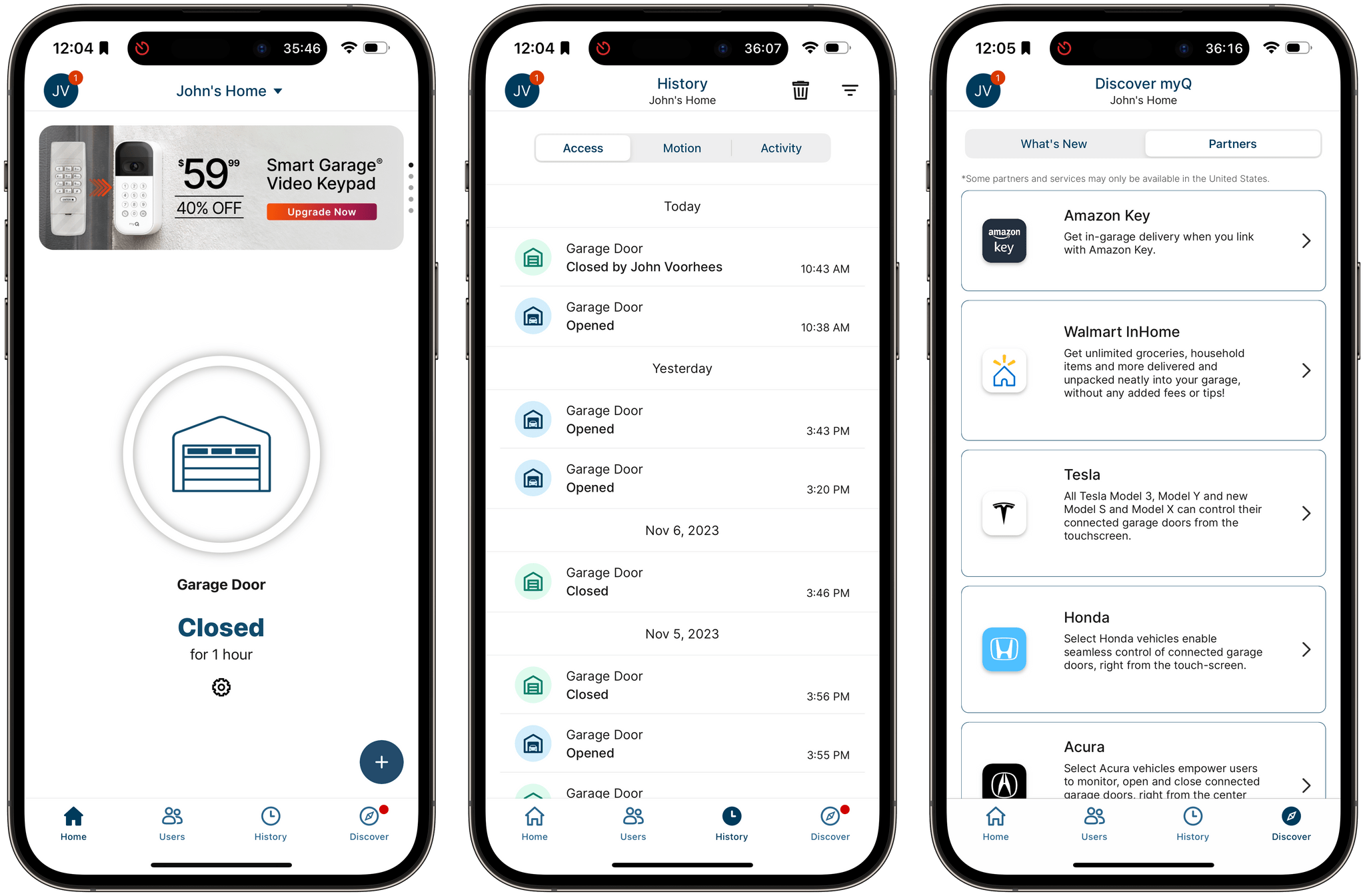
I have a Chamberlain garage door at home and haven’t decided yet what to do in light of this news. The myQ app is garbage – it’s literally just a big button to open and close the door without access via a widget, the Home app, or Shortcuts. Oh, and it has ads too. I had been planning to go the Home Assistant route after The Chamberlain Group removed HomeKit access last fall, but instead, I expect I’ll buy the Meross Smart Wi-Fi Garage Door Opener that Stephen Hackett has used for a while.
Apple Announces the Swift Student Challenge Will Begin in February 2024 and New Everyone Can Code Resources

It’s hard to believe that it has been over nine years since Apple announced the Swift programming language at WWDC. From the day it debuted, one of the pillars of Swift has been Apple’s education efforts, which have included Swift Playgrounds, materials for teachers and students, events, coding centers, and of course, the annual Swift Student Challenge at WWDC. So, with Swift’s 10th anniversary around the corner, it’s not surprising that Apple is updating its Swift Student Challenge program and releasing new resources for educators.
Today, the company announced that the next Swift Student Challenge will begin in February 2024, a break from the past WWDC schedule. The competition will name 350 winners in total, 50 of whom will be named Distinguished Winners whose projects stand out from the other submissions. Distinguished Winners will be invited to Apple’s headquarters in Cupertino in the summer to meet with Apple engineers and other winners, and all winners will receive a one-year membership to the Apple Developer Program.
The Swift Student Challenge will run for three weeks in February 2024, and students can sign up to be notified of when the competition will begin here.
Apple is also expanding its Everyone Can Code program with four new projects providing additional resources for students to learn to build apps. The projects, which provide educators with resources to guide students, include the following:
- Design a Simple App: Students can create an app prototype in Keynote to learn the fundamentals of app design, practice rapid prototyping, and collect feedback, following the same steps as professional developers.
- Build with Stacks and Shapes: Students can take the first steps of building an app in Swift Playgrounds and code a self-portrait or a work of art using SwiftUI to learn the fundamentals of user interface design.
- Build Custom Shapes: Students can bring an app interface to the next level by designing a shape, learning how to plot the coordinates, and coding their custom shape using SwiftUI and the About Me sample app within Swift Playgrounds.
- Design an App Icon: Students can learn and apply app design principles to create a unique and memorable app icon that communicates an idea; practice rapid prototyping; collect feedback; and upload the icon to Swift Playgrounds to become part of an app.
The projects can be accessed by educators from the Apple Education Community website.
The expansion of the Swift Student Challenge and other announcements today are great to see. It’s a fantastic way to get students excited about coding, as we’ve seen first-hand based on the growing number of apps we write about at MacStories that were built by former Challenge participants. I’m looking forward to seeing what students come up with this year.
AppStories, Episode 358 – The Trouble with Task Management→
This week on AppStories, we explore why there are so many good task managers, but none is a perfect fit with the way we work.






Sponsored by:
- Zocdoc – Find the right doctor, right now with Zocdoc. Sign up for free.
- Vitally – A new era for customer success productivity. Get a free pair of AirPods Pro when you book a qualified meeting.
](https://cdn.macstories.net/banneras-1629219199428.png)
On AppStories+, I explore screen maximalism while Federico heads the other direction into screen minimalism.
We deliver AppStories+ to subscribers with bonus content, ad-free, and at a high bitrate early every week.
To learn more about the benefits included with an AppStories+ subscription, visit our Plans page, or read the AppStories+ FAQ.
Apple Updates Logic Pro for iPad and Mac
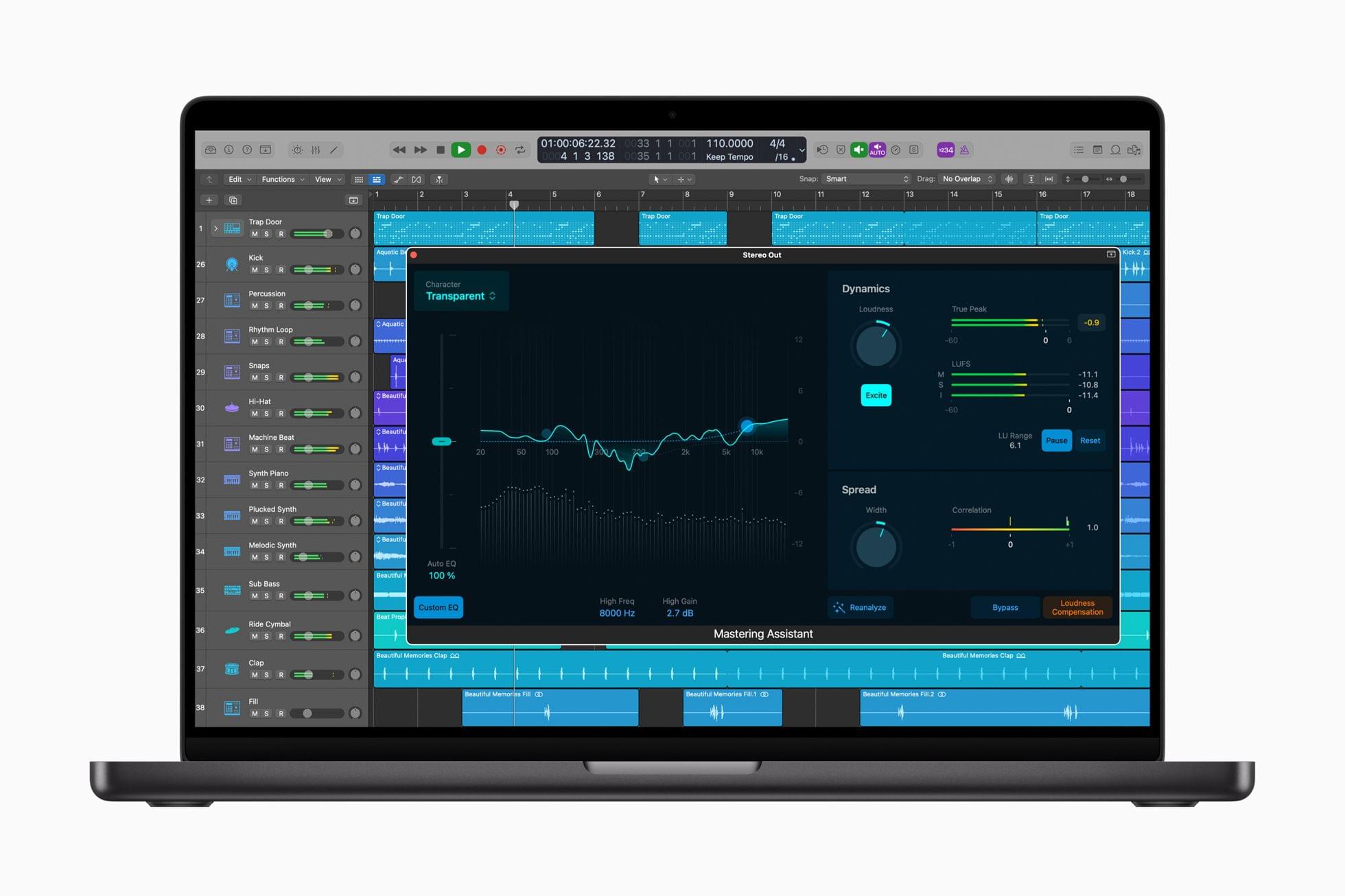
Today, Apple announced updates to Logic Pro for the iPad and Mac. Both platforms gain support for 32-bit float recording and Mastering Assistant, which the company says “can instantly analyze the audio and make expert refinements to the sound, adjusting elements such as the dynamics, frequency balance, timbre, and loudness.” Mastering Assistant’s processing can be manually tweaked by musicians, too.
The update to Logic Pro for Mac adds Sample Alchemy and Beat Breaker, two tools that debuted on Logic Pro for iPad when it was introduced earlier this year. Apple also added new sound packs to Logic Pro for Mac:
The Hybrid Textures sound pack includes a collection of 70 patches, as well as over 80 Apple Loops featuring Sample Alchemy, while the Vox Melodics sound pack contains a diverse collection of over 475 lyrical phrases, hooks, layered harmonies, FX, and one-shots.
On the iPad, Logic Pro now supports Split View and Stage Manager, allowing musicians to work in multiple apps at once and take advantage of drag and drop between them. The app also has a new Recorder mode for recording sounds with the iPad’s microphone and a Quick Sampler plugin to create instruments from sounds. Samples can be previewed with gestures in Logic Pro’s Browser, and new in-app Lessons are available to help users learn the app’s new features and more.
It’s great to see Apple continue to expand Logic Pro’s capabilities and bring the Mac and iPad’s feature set closer together. More than anything, though, I’d like to see iPadOS-level audio routing added to enable the iPad to handle multiple audio inputs and outputs so I could participate in a Zoom call and simultaneously record a separate microphone input.
 The Trouble with Task Management
 Federico
MacStories Unwind: You Know I Have a Problem with Controllers
This week, John tries to convince Federico that Things’ Inbox should be at the heart of his universal capture system, a song 50 years in the making, and in a twist that will surprise no one, John bought another controller.
Sponsored By:
- Kolide – It ensures that if a device isn’t secure it can’t access your apps. It’s Device Trust for Okta. Watch the demo today!
Links and Show Notes
- Capturing ideas and tasks with Things
- Things by Cultured Code
- Connected, Episode 474, Redesigned Into a Butterfly
- Federico’s Pick:
- Now and Then by The Beatles
- John’s Pick:
- Crkd Nitro Deck, Purple Limited Edition with carrying case
Follow us on Mastodon
MacStories Unwind+

We deliver MacStories Unwind+ to Club MacStories subscribers ad-free and early with high bitrate audio every week.
To learn more about the benefits of a Club MacStories subscription, visit our Plans page.
 Interesting Links
[[John]] Jennifer Pattison Touhy of The Verge has a fascinating look at Matic, an upcoming $1800 robot vacuum from ex-Google engineers. (Link) Engadget reports that Netflix will begin allowing users of its ad-supported tier to download videos and will encourage binge-watching by making every fourth episode of a show ad-free. (Link) Belkin introduced a nightstand-friendly...
App Debuts
[[John]] ControlBar I’m constantly impressed by what can be done with Live Activities. ControlBar is a simple utility that adds additional music controls to your Lock Screen. The controls are customizable, too. Open the main app and pick among controls that include skipping forward and back by set amounts of time, volume controls, repeat modes,...