



If you didn’t already know, we’ve set up a new twitter account for Deals, it’s @MacStoriesDeals. We’ll tweet the daily deals there as well as exclusive weekend deals too. Help spread the word! Here are today’s deals on iOS, Mac, and Mac App Store apps that are on sale for a limited time, so get ‘em while they’re hot!
Flare: Photo Editing with Style

The Iconfactory, makers of apps such as Twitterrific, CandyBar, xScope, IconBuilder, iPulse, and Frenzic, are the “World leaders in icon design, custom design services, software, royalty-free stock icons and much more.”
So what app niche could they fill next? How about photo editing. Unless you’re a pixel pro who uses Photoshop, Lightroom or Aperture, there are few options for the semi-pro and amateur out there to dabble in image effects. That’s where Iconfactory’s new app, Flare, comes into play. The Iconfactory worked together with ARTIS Software to bring Flare to the Mac. Read more
Major Publishers in Support of Inklings iPad Textbooks
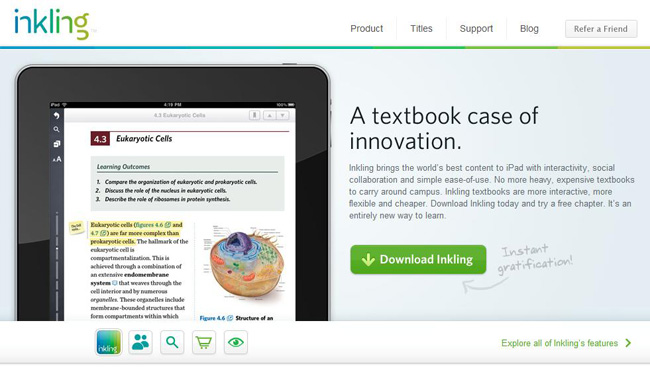
Inkling, an iPad textbook startup, has just announced that it has won financial backing from McGraw-Hill and Pearson, the two biggest names in the textbook business. The exact amount was not disclosed, except that it was a “multimillion dollar” financing.
Matt MacInnis, the Founder and chief executive of Inkling, said their goal involves using the content of an existing textbook then adding multimedia and interactive content for the iPad. Inkling started up right after the announcement of the iPad in January of last year. Based in San Francisco, the startup has now released 14 textbooks and more than 100 titles by this fall.
There is other competition building iPad textbooks, MacInnis acknowledged. Competitors like ScrollMotion, and Kno but he argued that everyone else is adding ‘limited’ features to a PDF of the textbook and that competitors e-books are developed by the publishers’ business divisions without very much input from the original textbook creators. Alternately, Inkling wants to publish apps that feel like they were built for the iPad, which means working with the books’ authors to create new content.
Video after the break. Read more
#MacStoriesDeals - Wednesday

If you didn’t already know, we’ve set up a new twitter account for Deals, it’s @MacStoriesDeals - please follow for Deals-only posts. We’ll tweet the daily deals there as well as exclusive weekend deals too. Help spread the word! Here are today’s deals on iOS, Mac, and Mac App Store apps that are on sale for a limited time, so get ‘em while they’re hot!
#MacStoriesDeals - Tuesday

If you didn’t already know, we’ve set up a new twitter account for Deals, it’s @MacStoriesDeals - please follow for Deals-only posts. We’ll tweet the daily deals there as well as exclusive weekend deals too. Help spread the word! Here are today’s deals on iOS, Mac, and Mac App Store apps that are on sale for a limited time, so get ‘em while they’re hot!
The Kitchen iLand

Tim Thaler has maximized the floor space in his kitchen, and also found a solution for an island - he hid the island in the floor. Tim’s island raisies up and down with an iPhone app and a tap.
Video after the break. Read more
#MacStoriesDeals - Monday

If you didn’t already know, we’ve set up a new twitter account for Deals, it’s @MacStoriesDeals - please follow for Deals-only posts. We’ll tweet the daily deals there as well as exclusive weekend deals too. Help spread the word! Here are today’s deals on iOS, Mac, and Mac App Store apps that are on sale for a limited time, so get ‘em while they’re hot!
Clocky - A Beautiful World Clock App for Mac: Review & Giveaway
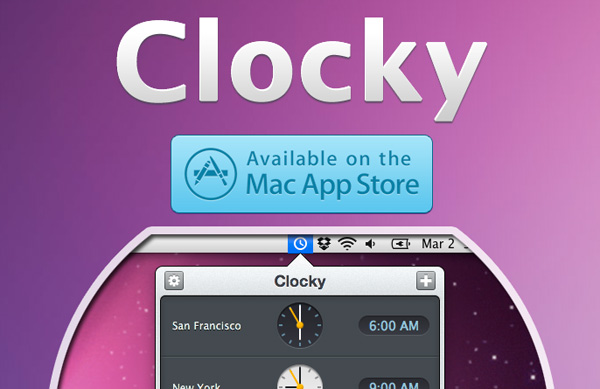
Yesterday I was browsing the new apps in the Mac App Store and came across Clocky, a world clock app that sits in your menu bar. Clocky was developed by Studio Dalton, who also did Lighty for iPhone, a very nice flashlight app. Clocky is already in the Top 100 apps in the Mac App Store and number 12 in Utilities.
Clocky shows the current time in the cities you’ve added, there are 479 to choose from. To add a city, click the ‘+’ sign and use the drop down menu or start typing. Even with almost 500 cities, I found some cities, such as Federico’s town of Viterbo, not on the list. If you want to delete a city, simply select and delete, or drag the clock out of the app. You can also click and drag the clocks to rearrange them. Read more
How to Use An iPhone and a DIY IR Trigger to Control Your DSLR

Camera junkies rejoice! The iPhone Guru has a neat little DIY post on how to create a homemade IR trigger capable of firing your DSLR camera from a couple dollars worth of parts. He also shows you how to use DSLR.bot (an iPhone app) to trigger your camera, record GPS locations, and shoot time lapse sequences.
Matthew makes note that the reason he’s doing this and not buying a branded IR or cabled remote is this:
DSLR.bot app has some pretty compelling features that allow you to do GPS tagging with a Map Log and synchronized timing that you can then merge with your image data to create Geo-located images shot with your DSLR among some other nice features like HDR bracketing, time lapse shooting and an Intervalometer. It will do far more than even Canon’s $120 timer remote will do and the whole thing will cost you less than $20.
Video and more pictures after the break… Read more