

Earlier today, Kerry Provenzano released the latest episode of Paper Places, a Relay show that features interviews with writers about writing. This month, Kerry interviewed me all about how I got into tech writing, running MacStories, and my writing process. It was a lot of fun, and covered a lot of ground that I haven’t talked about much elsewhere.
Posts tagged with "writing"
A Behind-the-Scenes Look at Writing at and Running MacStories→
Terminology 5: Rebuilt and Better than Ever
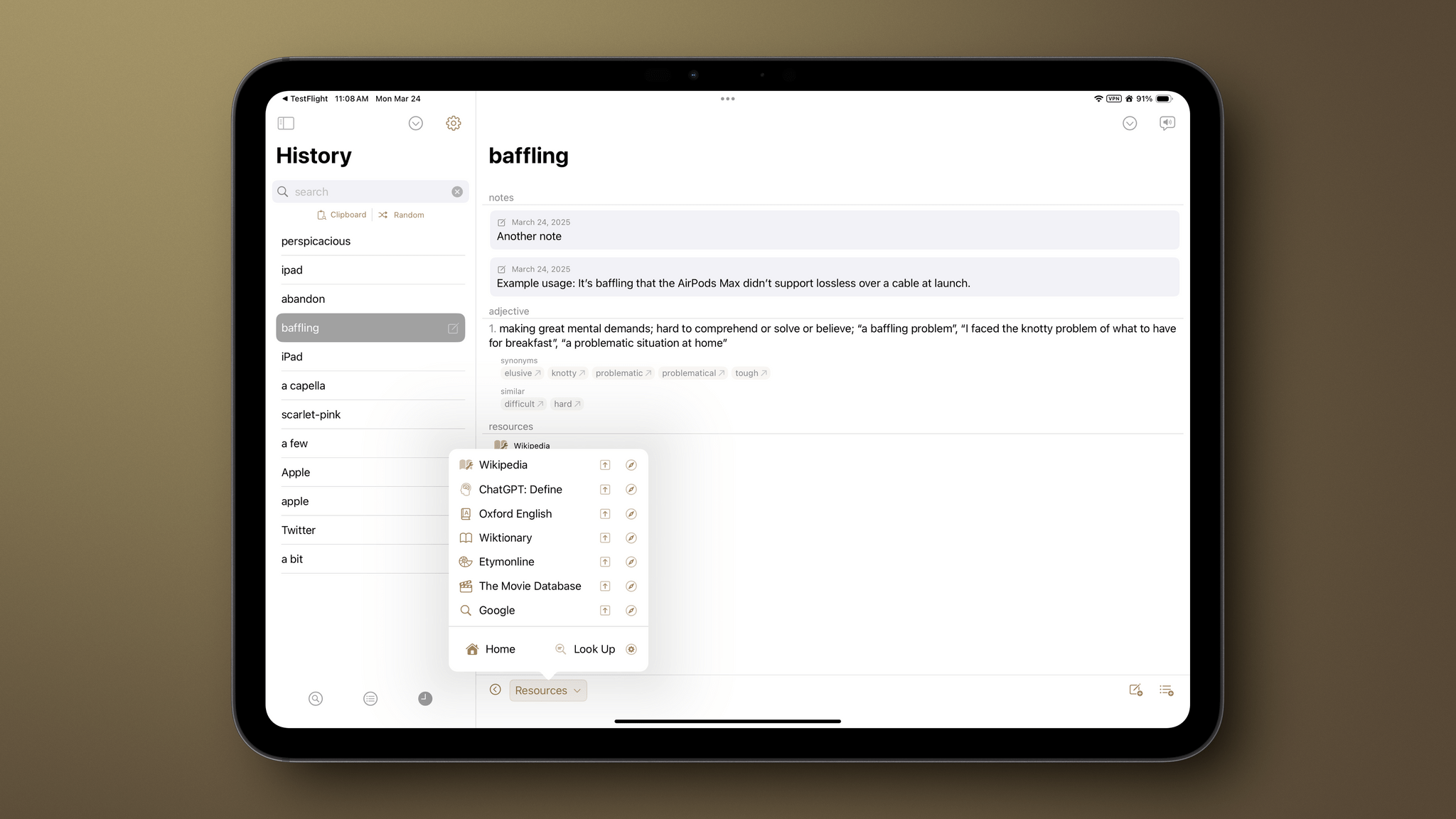
It’s been quite a while since I did a full review of Agile Tortoise’s Terminology, an extensible dictionary and reference tool for the iPhone and iPad. It’s hard to believe the app has been around for 15 years now, but with today’s release of version 5.0, Greg Pierce has introduced a thoroughly modern ground-up rewrite of the app that is richer and more extensible than ever, making it one of my favorite research tools.
Let’s take a look at what’s new.

Access Extra Content and Perks
Founded in 2015, Club MacStories has delivered exclusive content every week for nearly a decade.
What started with weekly and monthly email newsletters has blossomed into a family of memberships designed for every MacStories fan.
Club MacStories: Weekly and monthly newsletters via email and the web that are brimming with apps, tips, automation workflows, longform writing, early access to the MacStories Unwind podcast, periodic giveaways, and more;
Club MacStories+: Everything that Club MacStories offers, plus an active Discord community, advanced search and custom RSS features for exploring the Club’s entire back catalog, bonus columns, and dozens of app discounts;
Club Premier: All of the above and AppStories+, an extended version of our flagship podcast that’s delivered early, ad-free, and in high-bitrate audio.
Apple’s Commitment to AI Is Clear, But Its Execution Is Uneven
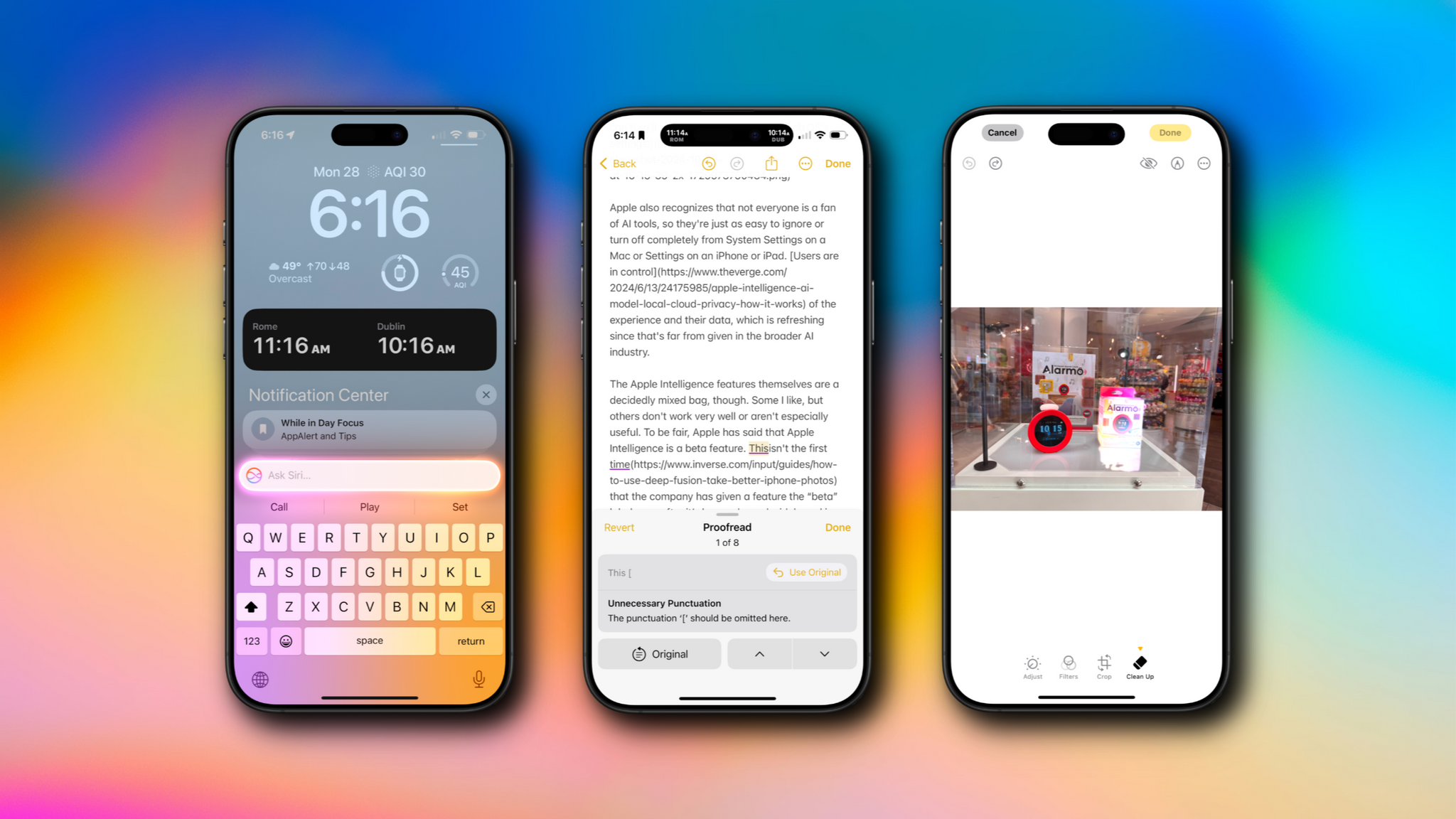
The day has finally arrived. iOS 18.1, iPadOS 18.1, and macOS 15.1 are all out and include Apple’s first major foray into the world of artificial intelligence. Of course, Apple is no stranger to AI and machine learning, but it became the narrative that the company was behind on AI because it didn’t market any of its OS features as such. Nor did it have anything resembling the generative AI tools from OpenAI, Midjourney, or a host of other companies.
However, with today’s OS updates, that has begun to change. Each update released today includes a far deeper set of new features than any other ‘.1’ release I can remember. Not only are the releases stuffed with a suite of artificial intelligence tools that Apple collectively refers to as Apple Intelligence, but there are a bunch of other new features that Niléane has written about, too.
The company is tackling AI in a unique and very Apple way that goes beyond just the marketing name the features have been given. As users have come to expect, Apple is taking an integrated approach. You don’t have to use a chatbot to do everything from proofreading text to summarizing articles; instead, Apple Intelligence is sprinkled throughout Apple’s OSes and system apps in ways that make them convenient to use with existing workflows.
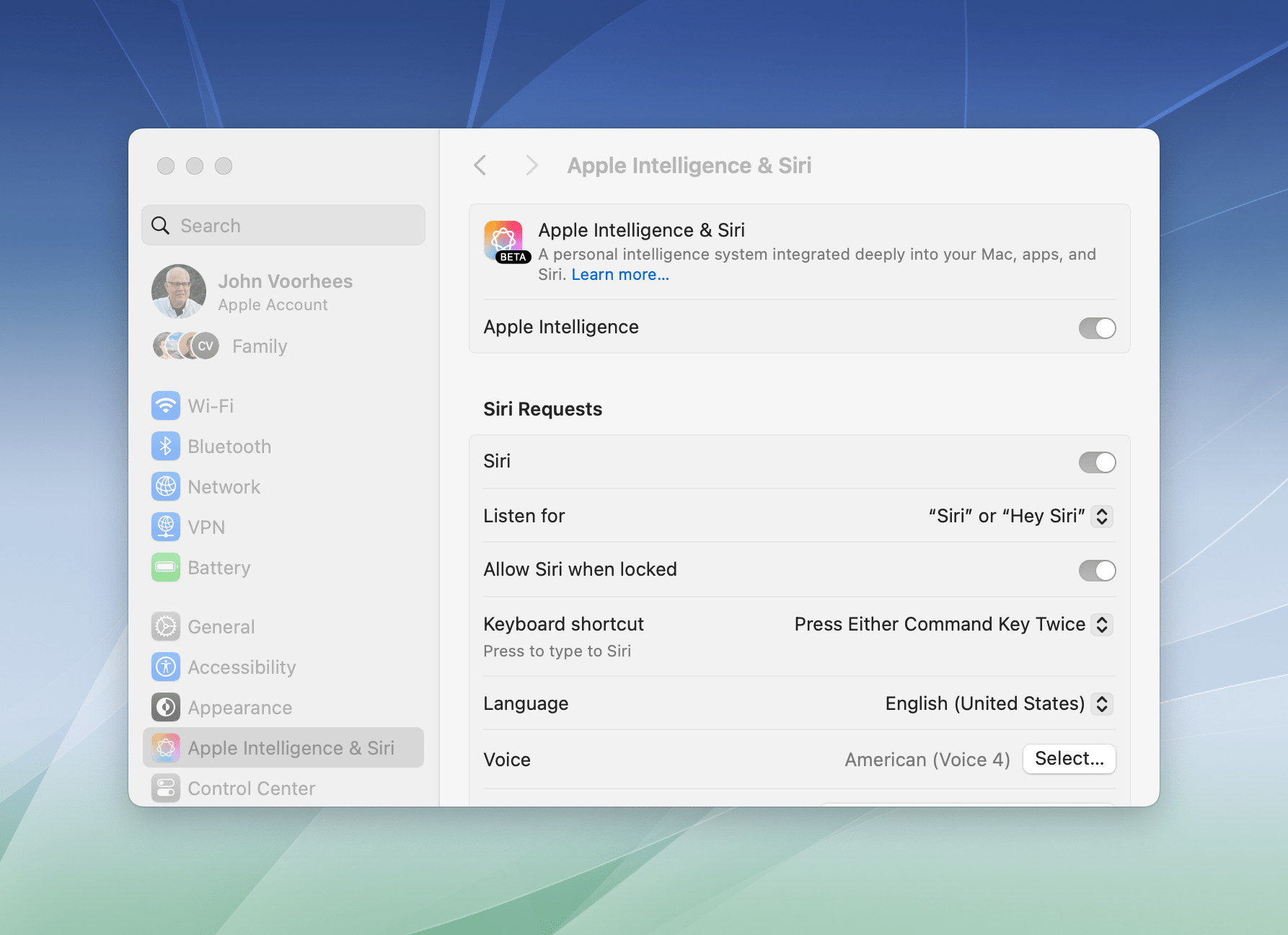
If you don’t want to use Apple Intelligence, you can turn it off with a single toggle in each OS’s settings.
Apple also recognizes that not everyone is a fan of AI tools, so they’re just as easy to ignore or turn off completely from System Settings on a Mac or Settings on an iPhone or iPad. Users are in control of the experience and their data, which is refreshing since that’s far from given in the broader AI industry.
The Apple Intelligence features themselves are a decidedly mixed bag, though. Some I like, but others don’t work very well or aren’t especially useful. To be fair, Apple has said that Apple Intelligence is a beta feature. This isn’t the first time that the company has given a feature the “beta” label even after it’s been released widely and is no longer part of the official developer or public beta programs. However, it’s still an unusual move and seems to reveal the pressure Apple is under to demonstrate its AI bona fides. Whatever the reasons behind the release, there’s no escaping the fact that most of the Apple Intelligence features we see today feel unfinished and unpolished, while others remain months away from release.
Still, it’s very early days for Apple Intelligence. These features will eventually graduate from betas to final products, and along the way, I expect they’ll improve. They may not be perfect, but what is certain from the extent of today’s releases and what has already been previewed in the developer beta of iOS 18.2, iPadOS 18.2, and macOS 15.2 is that Apple Intelligence is going to be a major component of Apple’s OSes going forward, so let’s look at what’s available today, what works, and what needs more attention.
Access Extra Content and Perks
Founded in 2015, Club MacStories has delivered exclusive content every week for nearly a decade.
What started with weekly and monthly email newsletters has blossomed into a family of memberships designed for every MacStories fan.
Club MacStories: Weekly and monthly newsletters via email and the web that are brimming with apps, tips, automation workflows, longform writing, early access to the MacStories Unwind podcast, periodic giveaways, and more;
Club MacStories+: Everything that Club MacStories offers, plus an active Discord community, advanced search and custom RSS features for exploring the Club’s entire back catalog, bonus columns, and dozens of app discounts;
Club Premier: All of the above and AppStories+, an extended version of our flagship podcast that’s delivered early, ad-free, and in high-bitrate audio.
OutlineEdit 3 Offers a Fast, Keyboard-Driven Way to Outline Your Thoughts
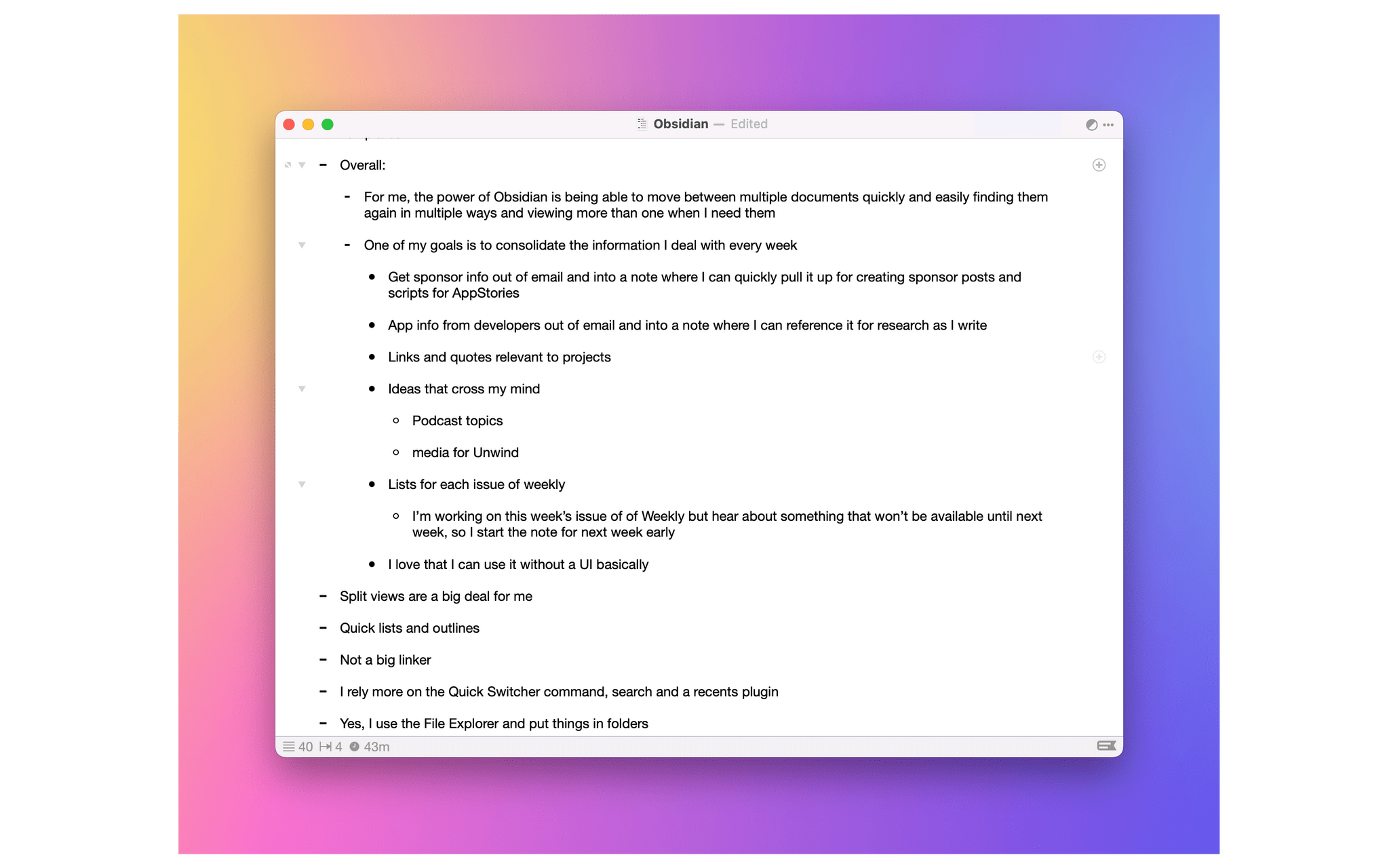
One of my earliest MacStories reviews was of OutlineEdit 1.0, a Mac-only outlining app that caught my eye with its attention to the kind of details that are a must for creating carefully structured outlines quickly. Version 3.0 recently landed on the Mac App Store and at its core, OutlineEdit is just as capable as ever at effortlessly turning ideas into outlines. The changes introduced with version 3.0 include refinements to existing features, as well as a handful of new features that extend OutlineEdit’s capabilities. Let’s take a look.
Access Extra Content and Perks
Founded in 2015, Club MacStories has delivered exclusive content every week for nearly a decade.
What started with weekly and monthly email newsletters has blossomed into a family of memberships designed for every MacStories fan.
Club MacStories: Weekly and monthly newsletters via email and the web that are brimming with apps, tips, automation workflows, longform writing, early access to the MacStories Unwind podcast, periodic giveaways, and more;
Club MacStories+: Everything that Club MacStories offers, plus an active Discord community, advanced search and custom RSS features for exploring the Club’s entire back catalog, bonus columns, and dozens of app discounts;
Club Premier: All of the above and AppStories+, an extended version of our flagship podcast that’s delivered early, ad-free, and in high-bitrate audio.
Text Case Adds Siri Shortcut Support for Text Transformations
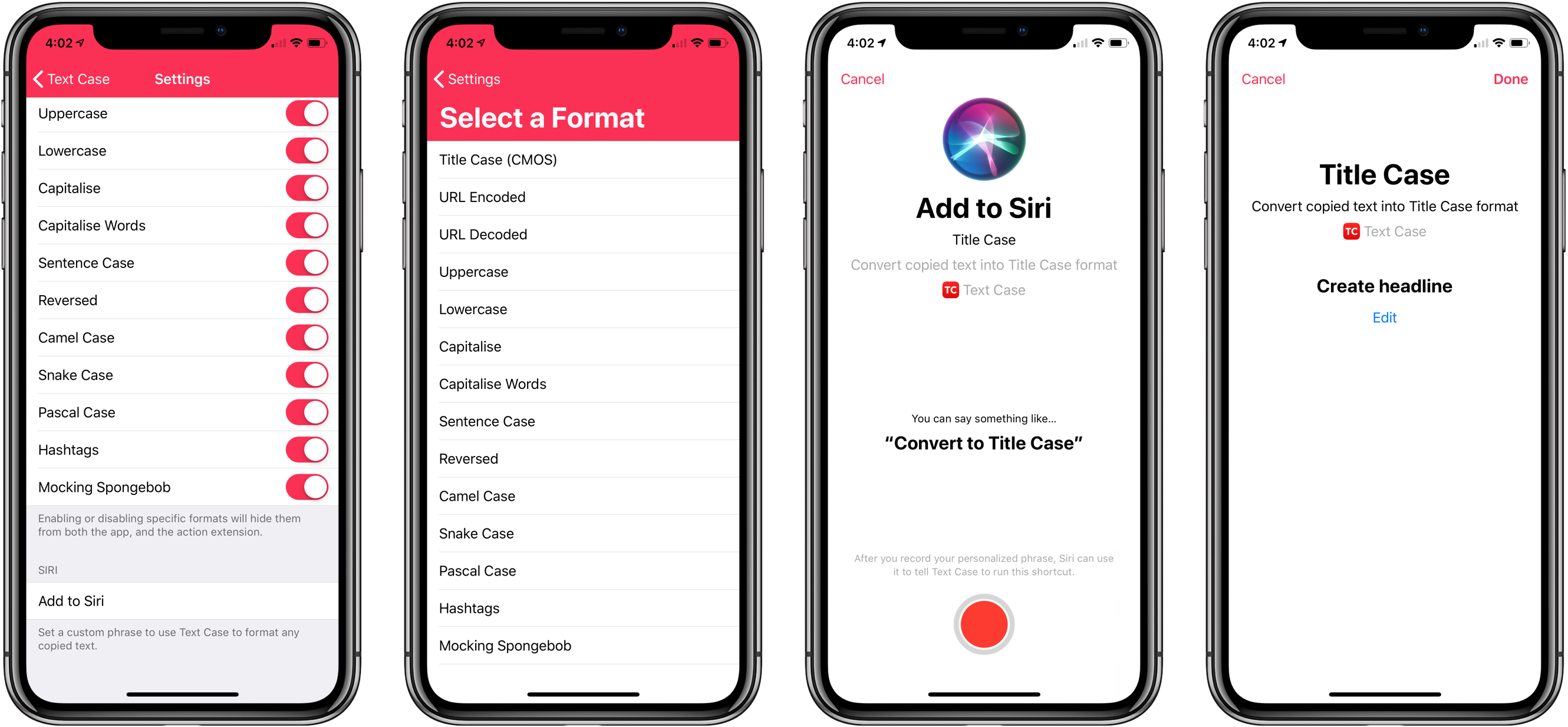
Not long ago, I reviewed an update to a new text transformation utility for iOS by Chris Hannah called Text Case. That update added support for title casing text according to popular style guides including the Chicago Manual of Style that we use here at MacStories. The app can do 13 other text transformations too like URL encoding and decoding, all caps, sentence capitalization, and many more.
I have the title casing rules of the style guide internalized for the most part, but every now and I want to check on a headline to be sure. In the past, I used an online service, which works well, but switching to a browser is an interruption. It’s a small interruption, but it’s one that may lead me to check another open tab or do something else that distracts me from completing an article. When I’m writing, I’d rather stay immersed in my text editor.
With Text Case’s extension, I can run a headline conversion right inside my text editor from the share sheet that’s accessible from the contextual popup menu that appears when you select text. With version 1.3 out today, Hannah takes the app a step further by adding Siri Shortcut support too.
Access Extra Content and Perks
Founded in 2015, Club MacStories has delivered exclusive content every week for nearly a decade.
What started with weekly and monthly email newsletters has blossomed into a family of memberships designed for every MacStories fan.
Club MacStories: Weekly and monthly newsletters via email and the web that are brimming with apps, tips, automation workflows, longform writing, early access to the MacStories Unwind podcast, periodic giveaways, and more;
Club MacStories+: Everything that Club MacStories offers, plus an active Discord community, advanced search and custom RSS features for exploring the Club’s entire back catalog, bonus columns, and dozens of app discounts;
Club Premier: All of the above and AppStories+, an extended version of our flagship podcast that’s delivered early, ad-free, and in high-bitrate audio.
Text Case for iOS Adds Title Case Text Transformations Based on Popular Style Guides
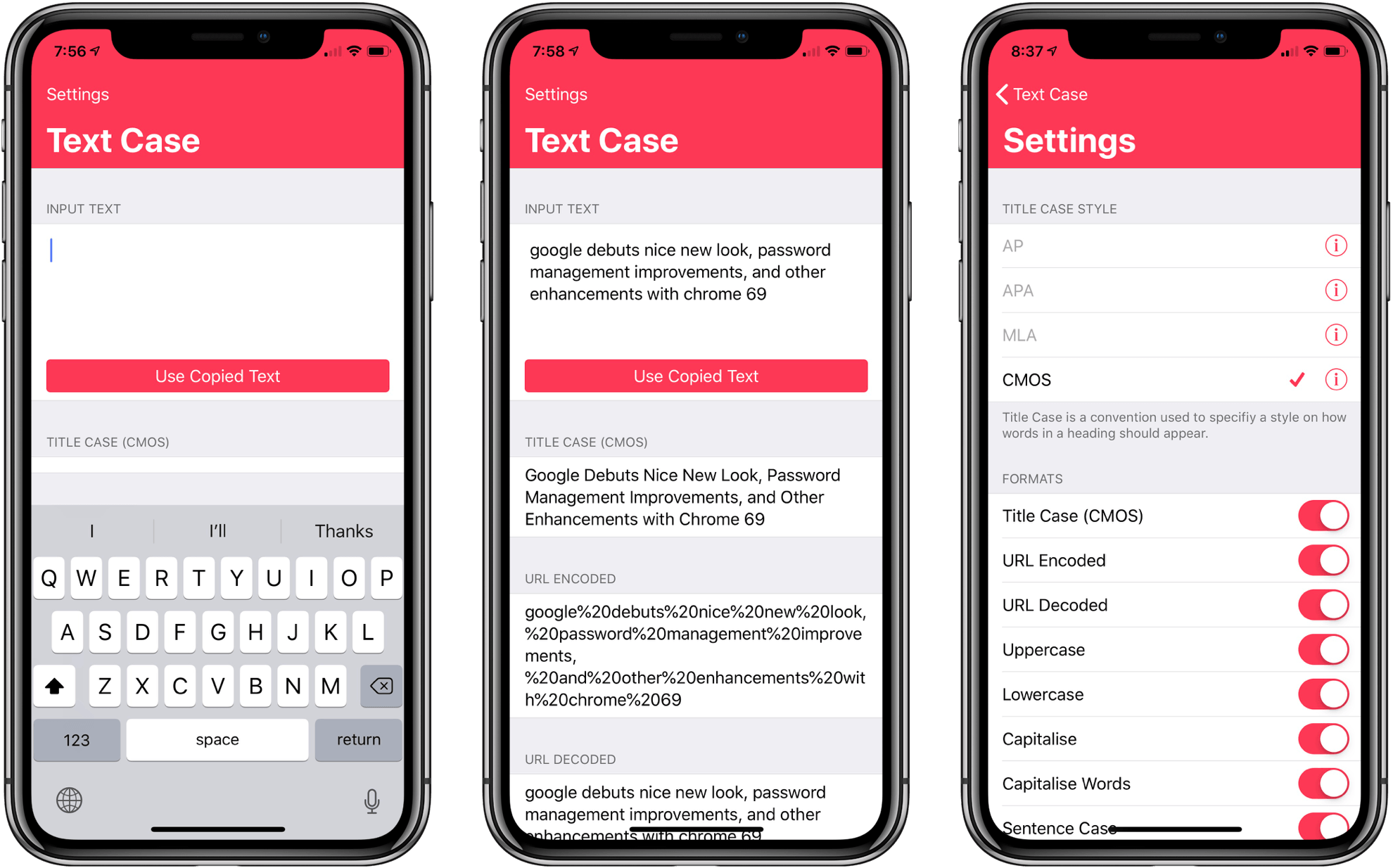
Several weeks ago I mentioned Chris Hannah’s recently-released iOS text transformation utility Text Case in the Club MacStories weekly newsletter. The app has a simple, utilitarian design that uses the big, bold header text popularized by Apple apps like News and Music. Version 1.0 included a long list of built-in text transformations. Some, like URL encoding and decoding, are useful, and others, like ‘Mocking SpongeBob,’ are just for fun. By and large though, the transformations in version 1.0 were geared more towards developers than writers. That’s changed with version 1.2 of the app, which should make it appeal to a wider audience.
The latest update adds Title Case, which can transform headlines according to the style guides for the Associated Press, American Psychology Association, Modern Language Association, or Chicago Manual of Style. The update also adds sentence case and Pascal case.
Access Extra Content and Perks
Founded in 2015, Club MacStories has delivered exclusive content every week for nearly a decade.
What started with weekly and monthly email newsletters has blossomed into a family of memberships designed for every MacStories fan.
Club MacStories: Weekly and monthly newsletters via email and the web that are brimming with apps, tips, automation workflows, longform writing, early access to the MacStories Unwind podcast, periodic giveaways, and more;
Club MacStories+: Everything that Club MacStories offers, plus an active Discord community, advanced search and custom RSS features for exploring the Club’s entire back catalog, bonus columns, and dozens of app discounts;
Club Premier: All of the above and AppStories+, an extended version of our flagship podcast that’s delivered early, ad-free, and in high-bitrate audio.
Ulysses 13 Brings Upgrades to Writing Goals, Keywords, and Code Blocks
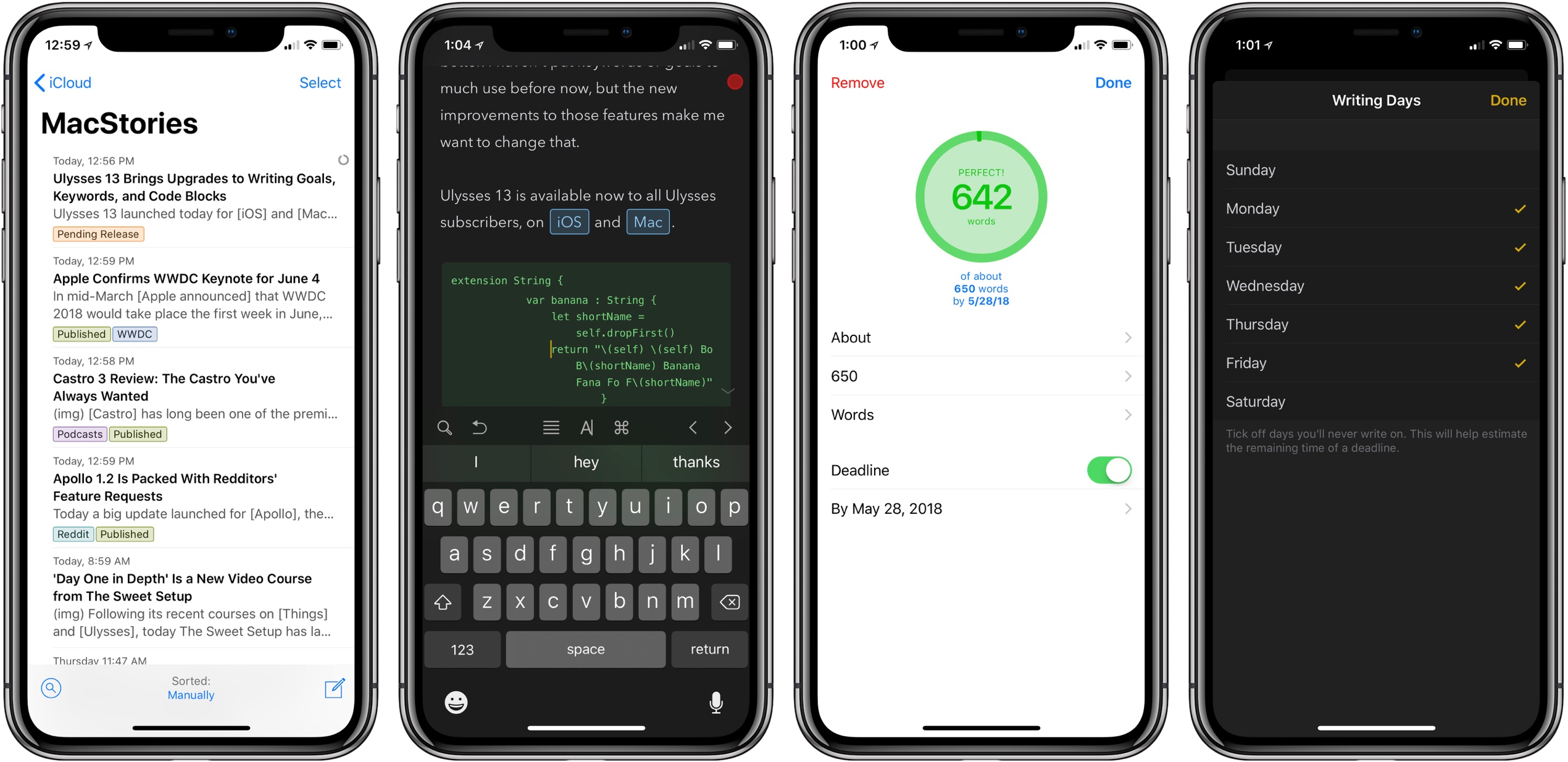
Ulysses 13 launched today for iOS and Mac, and it’s all about putting more writing tools in your arsenal. It takes existing features of the app and makes them all better, leaving the app no more cluttered, but notably more useful. Improvements are in three areas: deadlines and daily writing goals, colored keywords, and syntax highlighting for code blocks.
Access Extra Content and Perks
Founded in 2015, Club MacStories has delivered exclusive content every week for nearly a decade.
What started with weekly and monthly email newsletters has blossomed into a family of memberships designed for every MacStories fan.
Club MacStories: Weekly and monthly newsletters via email and the web that are brimming with apps, tips, automation workflows, longform writing, early access to the MacStories Unwind podcast, periodic giveaways, and more;
Club MacStories+: Everything that Club MacStories offers, plus an active Discord community, advanced search and custom RSS features for exploring the Club’s entire back catalog, bonus columns, and dozens of app discounts;
Club Premier: All of the above and AppStories+, an extended version of our flagship podcast that’s delivered early, ad-free, and in high-bitrate audio.
‘Day One in Depth’ Is a New Video Course from The Sweet Setup

Following its recent courses on Things and Ulysses, today The Sweet Setup has launched a new ‘Day One in Depth’ video course aimed at helping you become an expert of the popular journaling app.
A major strength of Day One is its flexibility – it’s full-featured on both iOS and Mac, supports a host of both system-based and web-based methods for saving content, and therefore it can be used in a way that serves you best at any given moment. There’s a lot to cover about the app, and The Sweet Setup hits all the bases well in the eight videos of its new course, which are titled:
- Walkthrough of Day One on Mac
- Walkthrough of Day One on iPad & iPhone
- Elements of a Journal Entry
- All the Ways to Create New Entries
- How to Filter and Search in Day One
- How and Why to Use Multiple Journals
- Cloud Sync, Back Up, and Security
- Getting Things Out of Your Journal(s)
In addition to these videos, Day One in Depth provides access to nine exclusive articles from The Sweet Setup’s team, covering a wide range of subjects such as how journaling can change your life, a guide to all of Day One’s keyboard shortcuts, ideas for how you may want to use Day One, a 30-day journaling challenge, and much more. While the video course is presented as the main attraction, I found the articles included here invaluable.
I’ve used Day One only casually in my life for the most part – I knew the app had a lot of power to it, but I never took the time to dive in and get the most out of it. If you’re in a similar place and want to change that, this new course is an excellent way to equip yourself for a deeper investment into digital journaling.
‘Day One in Depth’ will normally be priced at $29, but it’s available now at a special launch week price of $23. You can purchase the course here.
Access Extra Content and Perks
Founded in 2015, Club MacStories has delivered exclusive content every week for nearly a decade.
What started with weekly and monthly email newsletters has blossomed into a family of memberships designed for every MacStories fan.
Club MacStories: Weekly and monthly newsletters via email and the web that are brimming with apps, tips, automation workflows, longform writing, early access to the MacStories Unwind podcast, periodic giveaways, and more;
Club MacStories+: Everything that Club MacStories offers, plus an active Discord community, advanced search and custom RSS features for exploring the Club’s entire back catalog, bonus columns, and dozens of app discounts;
Club Premier: All of the above and AppStories+, an extended version of our flagship podcast that’s delivered early, ad-free, and in high-bitrate audio.
Bear 1.5: New Tag Icons, Note Archiving, an Additional Export Option, and More
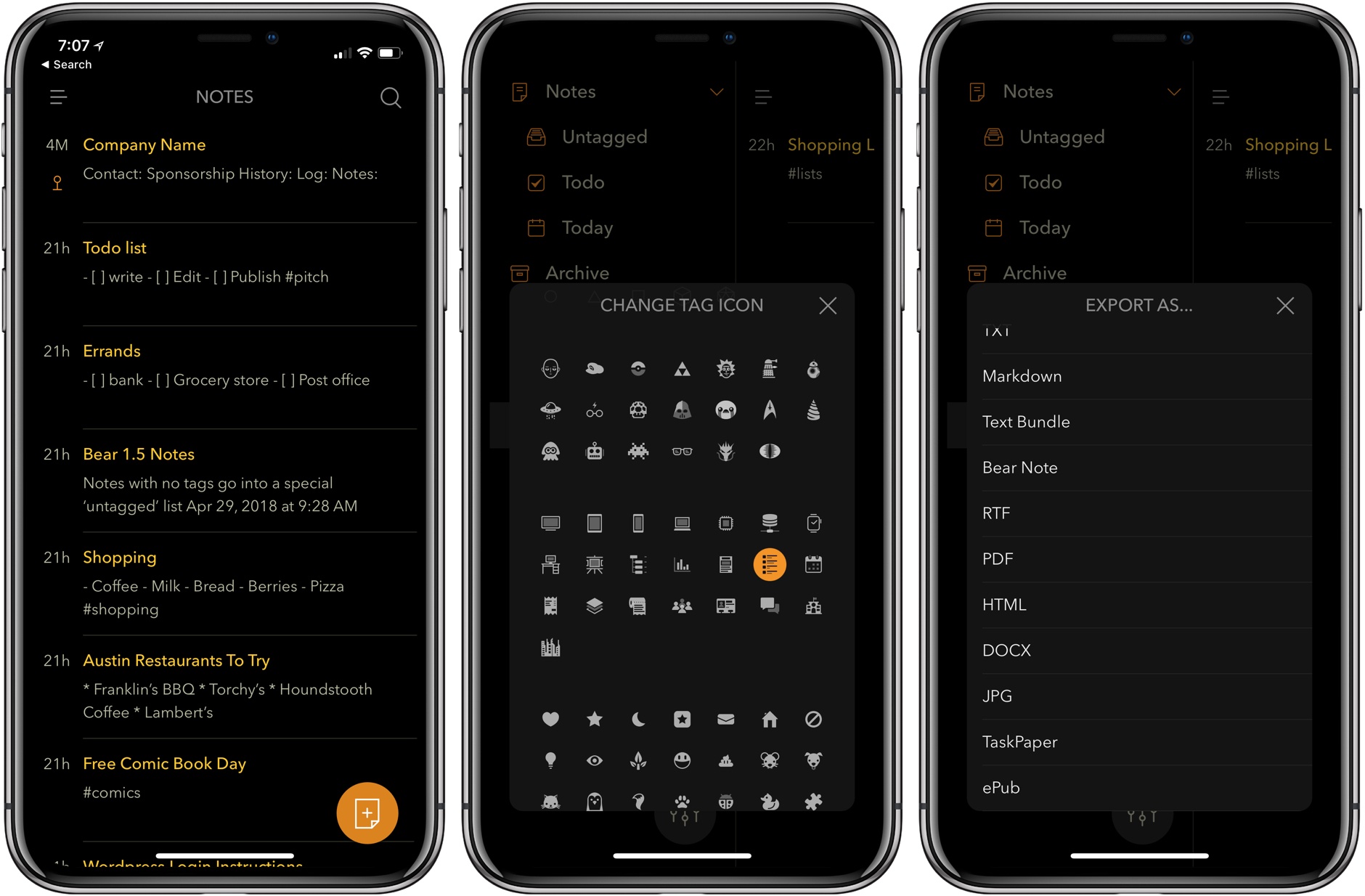
Bear debuted in 2016. That’s given users plenty of time to accumulate large collections of notes, which has made managing them more difficult. With Bear 1.5, Shiny Frog takes note management head-on with an update that significantly improves the way users interact with their note libraries.
Access Extra Content and Perks
Founded in 2015, Club MacStories has delivered exclusive content every week for nearly a decade.
What started with weekly and monthly email newsletters has blossomed into a family of memberships designed for every MacStories fan.
Club MacStories: Weekly and monthly newsletters via email and the web that are brimming with apps, tips, automation workflows, longform writing, early access to the MacStories Unwind podcast, periodic giveaways, and more;
Club MacStories+: Everything that Club MacStories offers, plus an active Discord community, advanced search and custom RSS features for exploring the Club’s entire back catalog, bonus columns, and dozens of app discounts;
Club Premier: All of the above and AppStories+, an extended version of our flagship podcast that’s delivered early, ad-free, and in high-bitrate audio.