Posts tagged with "videogames"

The iPad Finally Becomes a Gaming Console with CloudGear

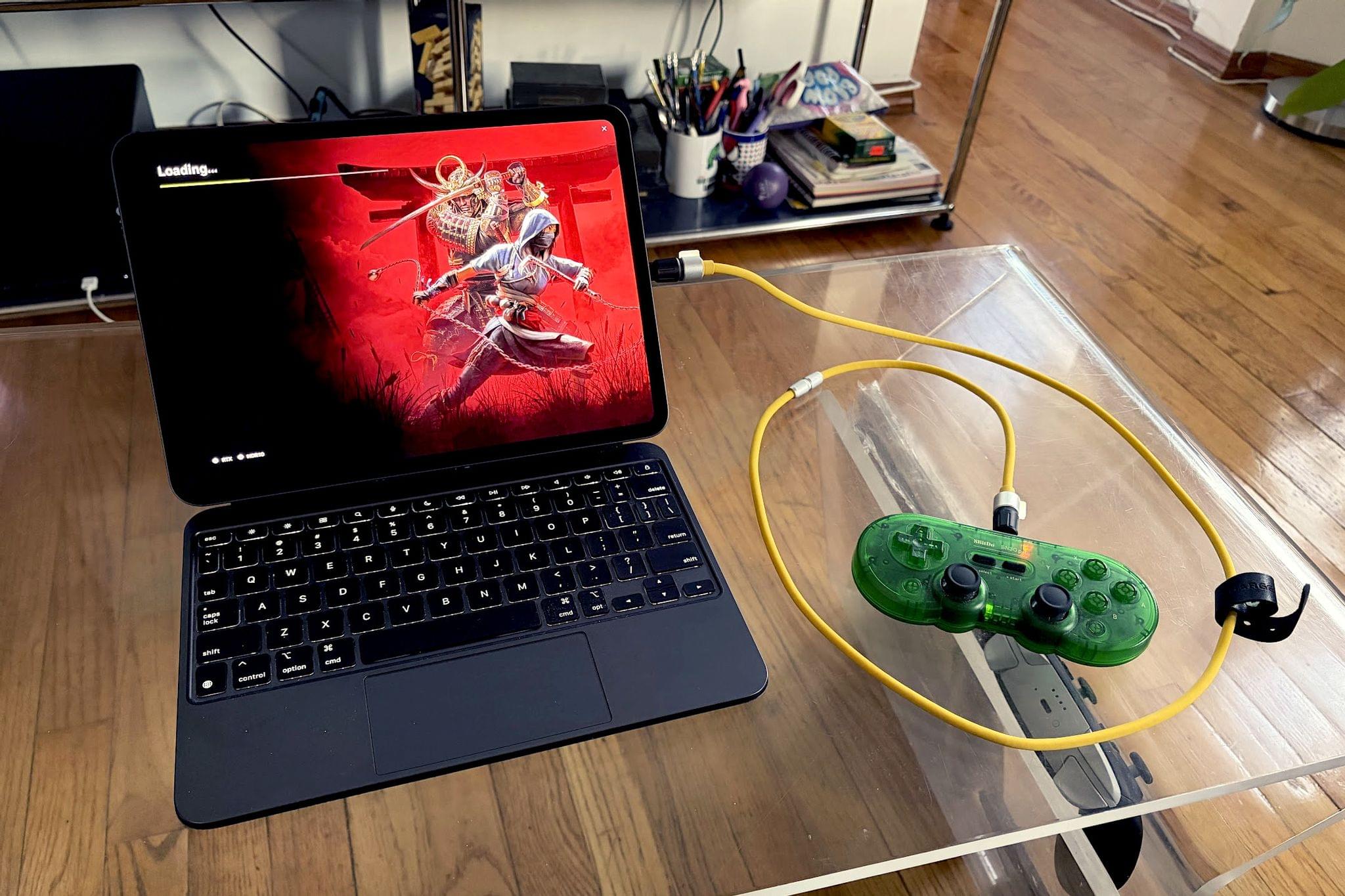
My iPad has been gathering dust. I bought it last May – an 11” M4 iPad Pro with 512GB of storage and a Magic Keyboard – mostly for writing, photo and video editing, and experimenting with Apple’s seemingly renewed focus on gaming.

On paper, it excels at all of these things.

While the M4 chip is overkill for the iPad’s possibility space, the ever-present specter of the shortcomings inherent in iPadOS tends to loom over more intensive tasks. There’s a clear disconnect between what Apple states the iPad is for in a post-iPadOS 26 world and what the hardware itself is allowed to do when constrained by software limitations. Quinn Nelson of Snazzy Labs explored this from multiple angles in a recent video that ended with a poignant sentiment:

There are still days that I reach for my $750 MacBook Air because my $2,000 iPad Pro can’t do what I need it to. Seldom is the reverse true.

As a person who also owns a MacBook Pro with an M4 Pro chip stashed away inside, I’ve found the moments I choose my iPad to be few and far between. Despite the ease with which I could fit it into most of my small sling bags when I leave the house and the fact that it’s “good enough” at accomplishing most tasks I could throw at it, I still tend to pack the MacBook instead.

Just in case.

Read more


Our Final 2025 MacStories Setups Update

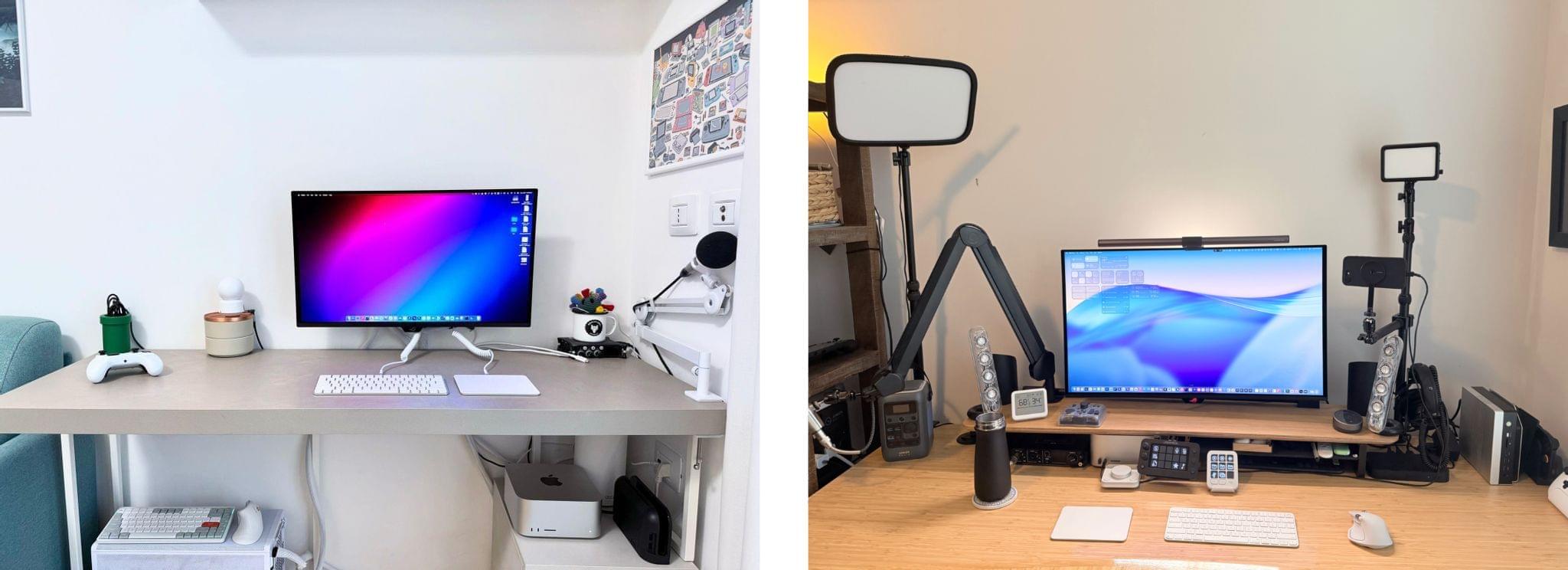
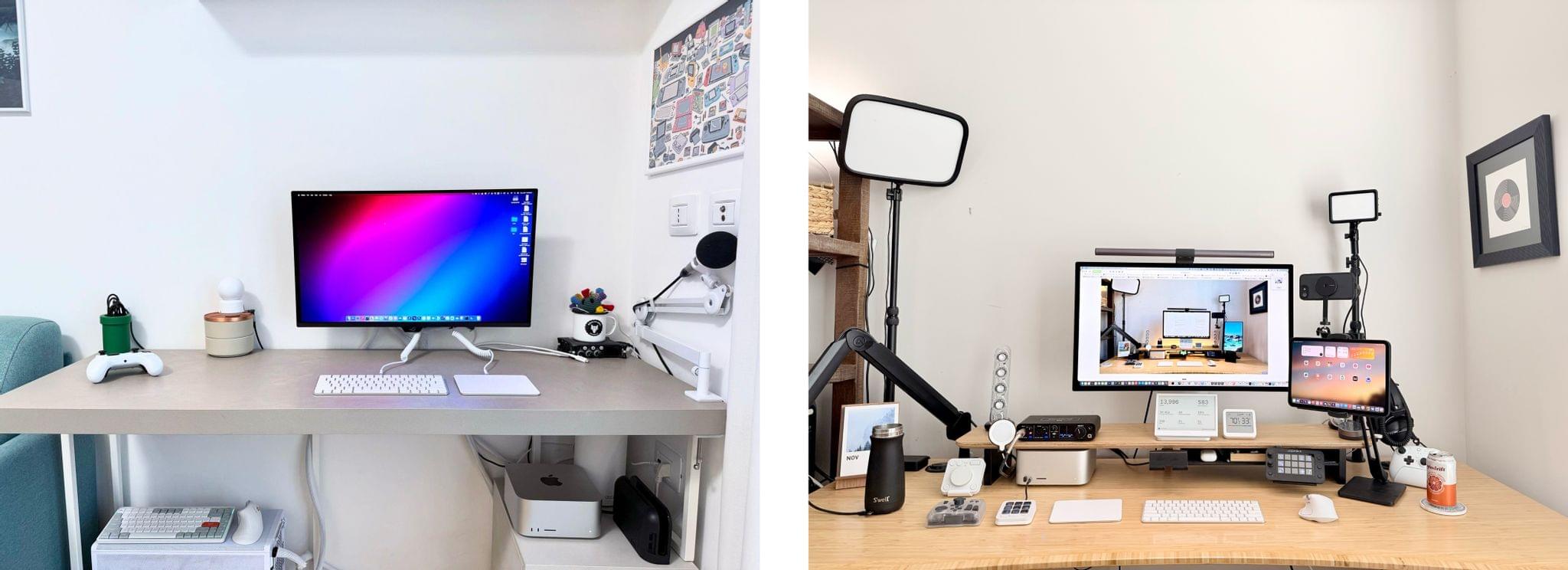
Our desk setups. Federico (left) and John (right).

Our desk setups. Federico (left) and John (right).

John: As 2025 comes to an end, Federico and I thought we’d cap off the year with a final update on our setups. We just went through this in November, but both Federico and I decided to take advantage of Black Friday sales to improve our setups in very different ways. Let’s take a look.

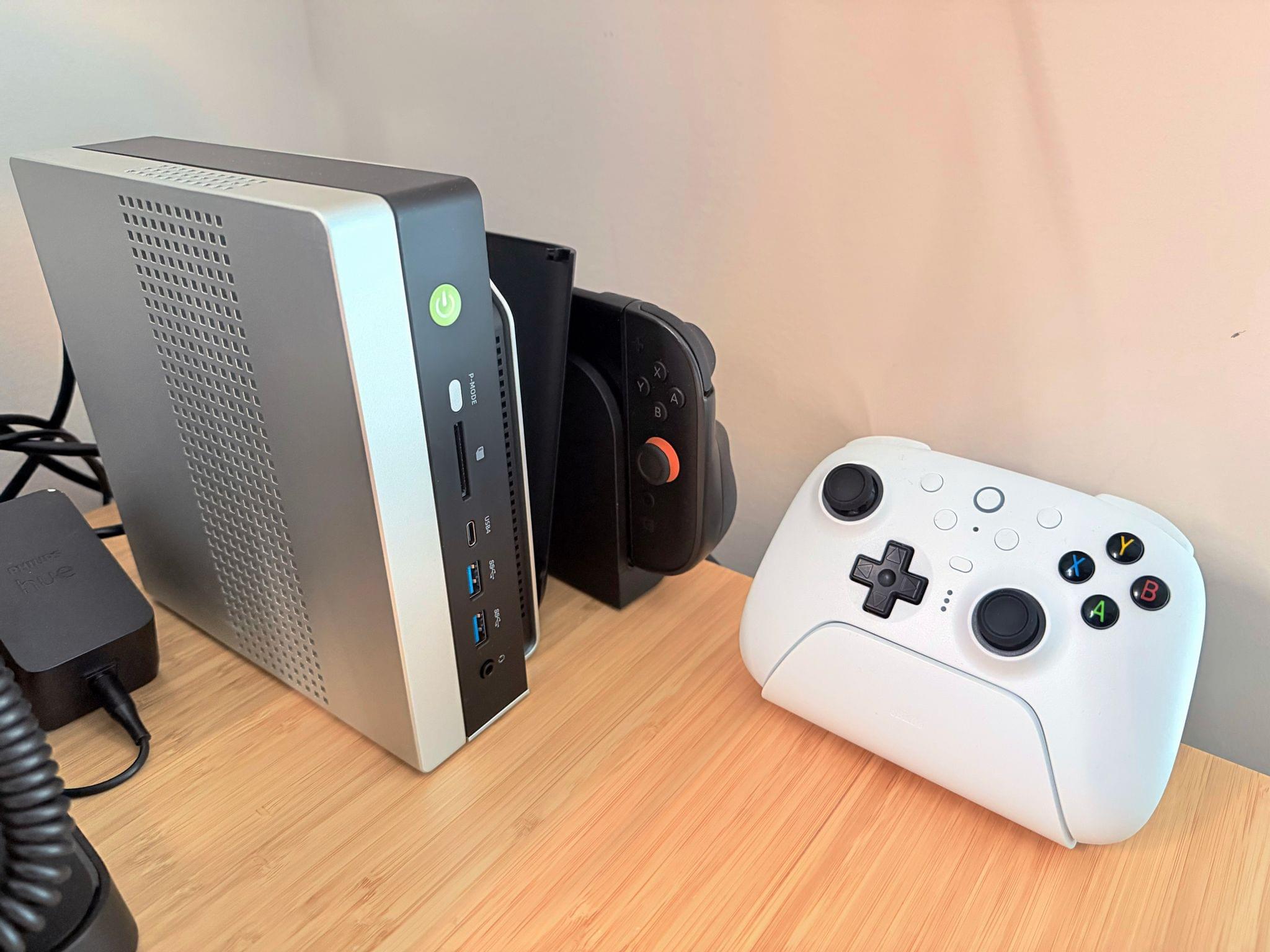
My changes were primarily to my office setup. I’ve wanted a gaming PC for a long time, but I never had a good place to set one up. The solution was to go with a high-end mini PC, the GMKtec EVO-X2, which features a Strix Halo processor, 64GB of RAM, and a 2TB SSD. It came with Windows installed, but after a few days, I installed Bazzite, an open-source version of SteamOS, which makes it dead simple to access my Steam videogame library.

Two things kept me from getting a PC earlier. The first was space, which the EVO-X2 takes care of nicely because it’s roughly the size of the Mac mini before its recent redesign.

The second and bigger issue, though, was my Studio Display. It’s an excellent screen, but it’s showing its age with its 60Hz refresh rate and 600 nits of brightness. Plus, with one Thunderbolt port for connecting to your Mac and three USB-C ports, the Studio Display is limiting. Without HDMI or DisplayPort, connecting it to other video sources like a PC or game console is nearly impossible.

The GMKtec EVO-X2 mini PC, Switch 2, and 8BitDo Ultimate 2 controller

The GMKtec EVO-X2 mini PC, Switch 2, and 8BitDo Ultimate 2 controller

So I also bought a deeply discounted ASUS ROG Swift 32” 4K OLED Gaming Monitor, which is attached to my desk using a VIVO VESA desk mount. I’d wanted a bigger screen for work anyway, and with its 240Hz refresh rate and bright OLED panel, the ASUS has been excellent. However, the ASUS display really shines when connected to my GMKtec and Nintendo Switch 2. As I covered on NPC: Next Portable Console recently, the mini PC combined with a great monitor, which also allows me to stream games to my handhelds over my local network, was the missing link in my setup, delivering a flexibility I just didn’t have before.

Along with the gaming part of my desktop setup, I updated my desktop lighting with two Philips Hue Play Wall Washer lights and a Hue Play HDMI Sync Box 8K, which casts light against the wall behind my desk that’s synced with what’s onscreen. In fact, the Sync Box 8K works with all the Hue lights in my office, allowing me to create a more immersive environment when I’m gaming.

I’ve been using a handful of other accessories lately, too, including:

That’s it from me for 2025, folks. Enjoy the holidays! Things will be a little quieter at MacStories over the next couple of weeks as we unwind and spend the time with family and friends over the holidays, but we’ll be back with lots more before long.

Federico: For this final update to my setup before the end of the year, I focused on two key areas: audio and my living room TV setup.

The biggest – literally – upgrade for me this month has been switching from my previous LG 65” TV to a flagship LG G5 77” model. I’d been keeping an eye on this TV for a while: it’s LG’s first model to use Tandem OLED technology, and it boasts higher brightness in both SDR and HDR with reduced reflections thanks to the new panel. I took advantage of an incredible Black Friday deal in Italy to buy it at 50% off, and we love it. The TV rests almost flush against the wall thanks to its compact design, but since it’s not completely flush, it allowed us to re-install our Philips Hue Gradient Light Strip behind it. Since I was in a renovation mood and I also wanted to future-proof my setup for the Steam Machine in 2026, I also upgraded to a Hue Bridge Pro and replaced my previous Hue Sync Box with the latest 8K edition that is certified for HDMI 2.1 connections. Speaking of gaming: as I discussed this week on NPC, I got a Beelink SER9 Pro mini PC and installed Bazzite on it to get a taste for SteamOS in the living room; this one will eventually be replaced by a more powerful Steam Machine.

The other area of improvement was audio. I recently realized that I wanted to fully take advantage of Apple Music and Spotify’s support for lossless playback with wireless headphones, which is something that, alas, Apple’s AirPods Max do not support. So after much research, I decided to treat myself to a pair of Bowers & Wilkins Px8 S2, which are widely considered some of the best Bluetooth headphones that you can buy right now. But you may be wondering: how do you even connect these headphones to Apple devices that do not support Qualcomm’s aptX Lossless or Adaptive codecs? That’s where the BT-W6 Bluetooth dongle comes in. In researching this field, I came across this relatively new category of small Bluetooth adapters that plug into an iPhone’s USB-C port (they work on a Mac or iPad, too) and essentially override the device’s built-in Bluetooth chip. Once headphones are paired with the dongle rather than the phone, wireless streaming from Apple Music or Spotify will use aptX Lossless instead of Apple’s legacy SBC protocol. The difference in audio quality is outstanding, and it makes me appreciate the Px8 S2 for all they have to offer.

While I was at it, I also took advantage of another deal for a Sonos Move 2 portable speaker; we’ll have to decide whether this one will be permanently docked on my desk or next to a record player that Silvia is getting me for Christmas. (We don’t like surprises for each other, especially when it comes to furniture-adjacent shopping.)

So that’s my update before we go on break for a couple of weeks. I can already feel that, when I’m back, I’ll have some changes to cover on the software front. But we’ll talk about those in 2026.

Permalink

Just the Best: MacStories’ Black Friday 2025 Picks

Black Friday deals started very early this year, and we’ve covered a lot of ground on the MacStories Deals Mastodon and Bluesky accounts since publishing our Early Black Friday Picks. A lot of those deals are ongoing, so it’s worth revisiting that story as you start your holiday shopping in earnest.

However, today, I wanted to hit the highlights of what we’ve covered over the past week on MacStories Deals and add some new deals to the mix that you probably haven’t seen yet, so buckle up, it’s time to go shopping.

MacStories Pixel Icons

All three MacStories Pixel Icon sets are 40% off until Monday, December 1.

Two of the icon sets are specially-designed for Shortcuts. We’ve all been there. You work hard on a shortcut and want to give it the perfect icon, only to realize that Apple doesn’t offer what you want in the Shortcuts app. The MacStories Pixel Icons fill that gap with an extensive set of painstakingly hand-crafted icons with multiple color options created by MacStories’ long-time designer, Silvia Gatta. We also offer a set of Perspective icons that are perfect for OmniFocus Pro and other uses.

Visit our dedicated MacStories Pixel page today to preview all three icon sets and purchase them for 40% off until Monday, December 1.

Apple Hardware

There are a lot of Black Friday deals on Apple hardware, but most of them are good, not great. I’m picky, so I’m only going to focus on just the great deals.

One of the best deals on Apple hardware during Black Friday is the M4 13” MacBook Air with 16GB of memory and 256GB of storage. If you want more memory or storage than that, you’ll have to settle for a smaller percentage discount, but even with more memory and more storage, you’re still doing better than any other deal this year. The 15” M4 MacBook Air with 16GB of memory and a 256GB SSD is a good deal, too.

Among the many iPad deals, the best is on the 128GB iPad mini with an A17 Pro chip. I’ve had a mini since they were released and love it. The size makes it an excellent reading and video-watching device.

AirPods 4 are also heavily discounted for Black Friday. Apple’s most affordable wireless earbuds come with active noise cancellation and without. The model with no active noise cancellation slightly edges out the model with ANC as far as the discounts are concerned, but both models are a bargain.

However, the very best deals available from Apple in terms of the percentage discount are a 4-pack of AirTags and the Apple Pencil Pro. If you need either, now is the perfect time to buy them.

Smart Home

The holiday season is a great time to catch up on projects and start new ones. For me, that’s often tuning up my smart home setup and setting up some new devices thanks to Black Friday sales. Here are the best ones I’ve seen:

Aqara already makes some of the most affordable smart home devices out there, so you really can’t go wrong with their Black Friday deals. One of my favorites is the FP2 Presence Sensor. It’s far more sophisticated than a simple motion sensor. To start with, it can tell when you’ve left a room, which motion sensors can’t do. I’ve used an FP2 Sensor in my office to control lighting for a couple of years, wrote about it for Club members, and have been really happy with it.

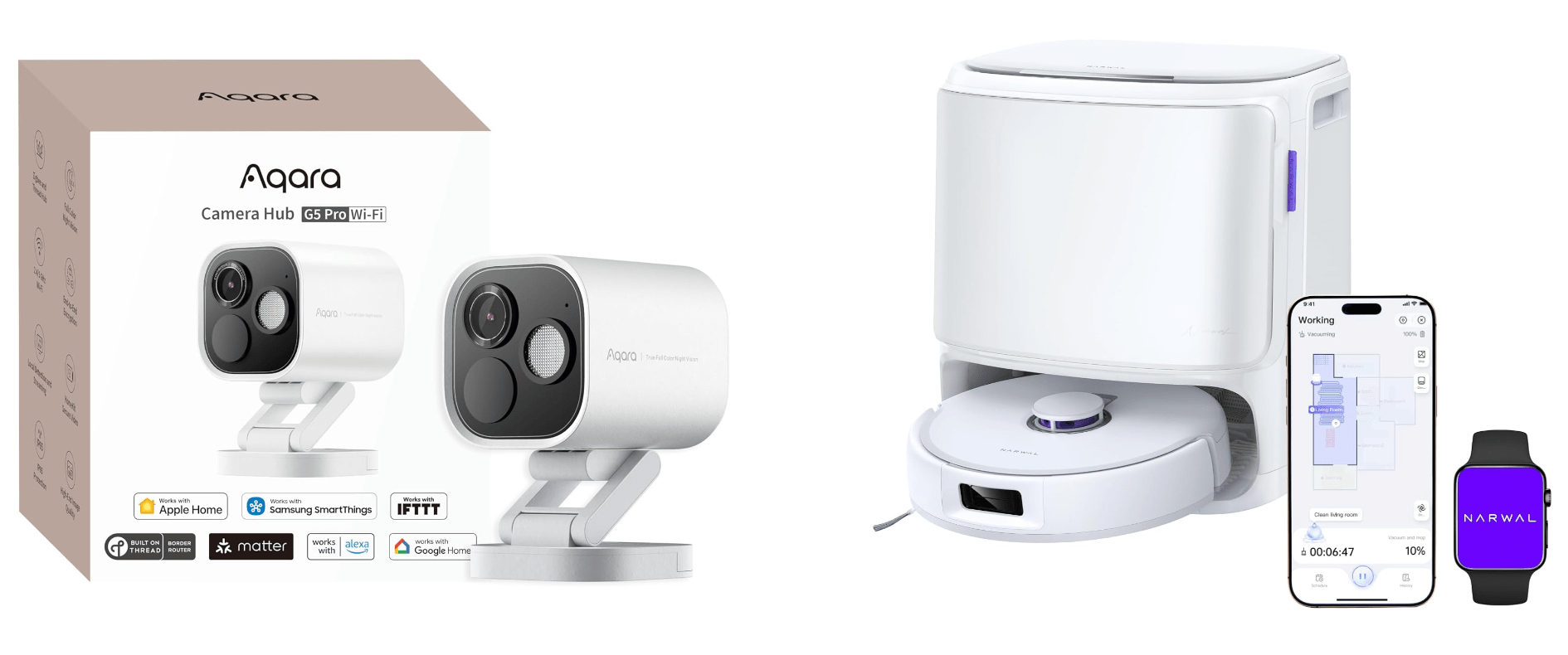
Other great deals from Aqara include its U100 Smart Lock that works with Apple Home Key and HomeKit, the Aqara M3 Home Hub that I recently set up at home and love, and 4MP Camera Hub G5 Pro, an outdoor HomeKit camera that I reviewed earlier this year.

My Aqara 4MP Camera Hub G5 Pro is paired with an Ecobee Smart Video Doorbell, which is also on sale for Black Friday. I’ve used various Ecobee smart home products for years and have never been disappointed. The same goes for its smart doorbell. I’ve had it installed for over a year, and it’s been reliable despite facing the sun on some very hot summer days.

Black Friday is also a great time to buy a robot vacuum and mop. There are lots of deals, but the model I’ve tested for the past couple of months and love is the Narwal Freo X10 Pro. It handles vacuuming and mopping, navigating via LiDAR and does an excellent job compared to other robot vacuums I’ve tried. I’ll be reviewing the Freo X10 Pro about it soon, but now’s the time to get it at a steep discount.

Read more


MacStories Setups Update: An Apple Gear Refresh, Dual-Screen Gaming, and HomeKit

Our desk setups. Federico (left) and John (right).

Our desk setups. Federico (left) and John (right).

As we head into the final weeks of 2025, Federico and I figured it would be a good time to update the MacStories Setups page. There’s an ebb and flow to the gear and apps we test each year, and as the fall OS update season fades into the past, it’s not unusual for one or both of us to take stock of our setup and make changes. That’s been very true for both of us this year, but in different ways.

Federico has been focused on simplifying his hardware setup and testing a long list of apps and services. In contrast, I’ve made fewer gear cuts, focusing more on strategic changes to the gadgets I use and settling on a core set of work apps.

The result is that Federico’s hardware setup changes have primarily been updates to his Apple and portable gaming gear. He made the transition from the iPhone 16 Pro Max to the iPhone Air, and couldn’t be happier with the result. He also replaced the M4 iPad Pro with the latest M5 model and moved from the AirPods 4 to the AirPods Pro 3.

Both of us ditched our previous Apple Vision Pro head strap solutions for the Apple Dual Knit Band, which has been a big upgrade. It’s comfortable, and having one dial to adjust both bands is both clever and far simpler than other solutions I’ve tried.

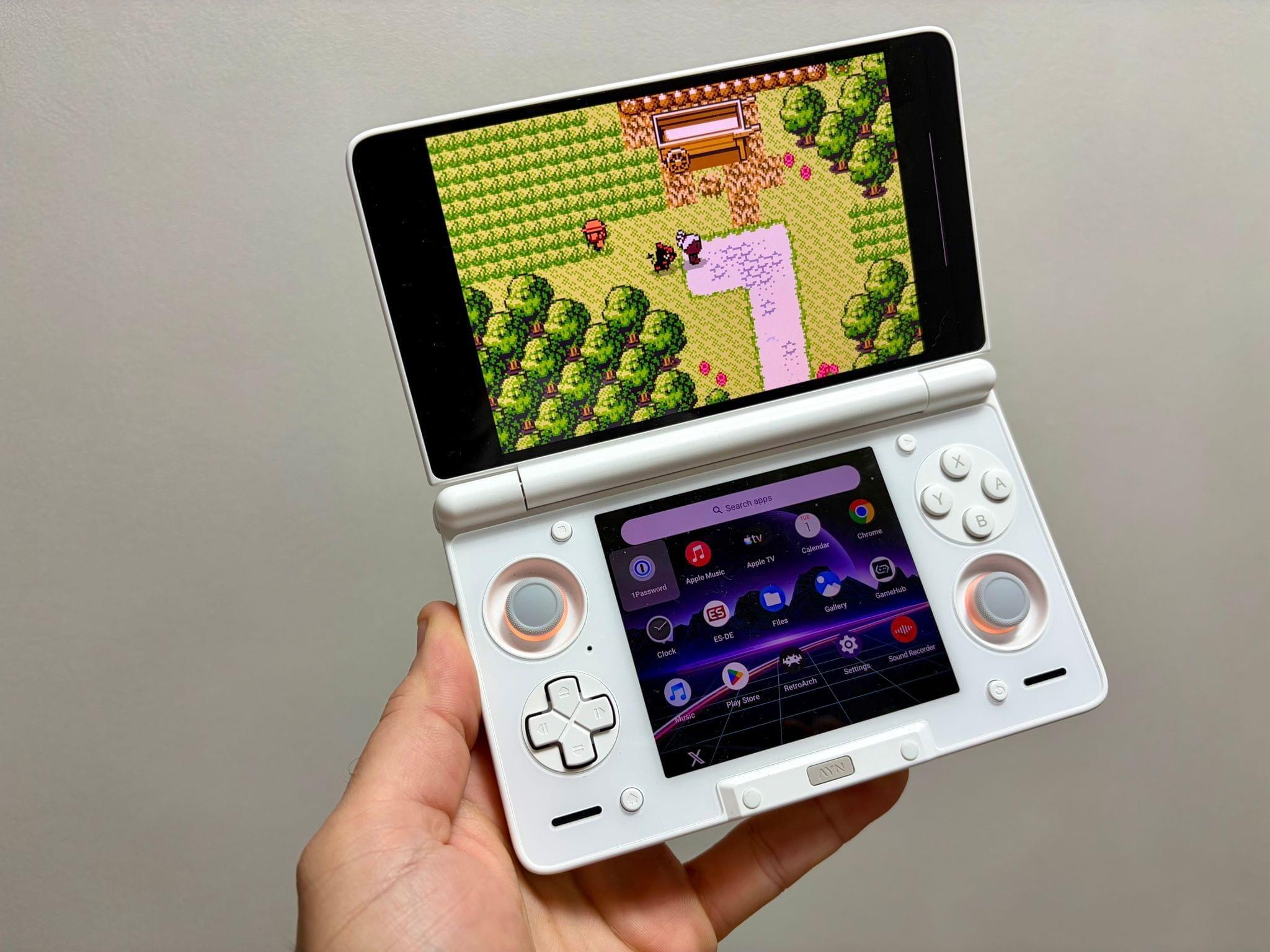
Ayn Thor.

Ayn Thor.

Federico also added the Ayn Thor to his handheld gaming lineup. The Thor, which I also bought this fall, is a dual-screen OLED gaming handheld that runs Android. It’s perfect for emulating dual-screen systems like the Nintendo DS and 3DS, but it has also been excellent for game streaming and testing the emerging world of emulating SteamOS on Android. If game tinkering is your thing and this sounds intriguing, we have two episodes of NPC: Next Portable Console that go in-depth on the Ayn Thor.

Read more


The Clickwheel Games Preservation Project Completes Its Efforts to Preserve All 54 iPod Games

Almost a year ago, Federico linked to a story on Ars Technica by Kyle Orland about efforts to preserve iPod games; now, the process has been completed. Yes, iPod games, not iPad. For a brief period of time in the late 2000s, Apple offered a selection of 54 iPod games for sale through the iTunes Store. The collection included titles from notable developers like Square Enix (Crystal Defenders and Song Summoner), Sega (Sonic the Hedgehog), and Namco (Pac-Man). Those games are long since gone, having been removed from the iTunes store in 2011, and are just one of many examples of a part of videogame history becoming inaccessible to fans and researchers due to neglect.

However, thanks to the efforts of the Clickwheel Games Preservation Project led by GitHub user Olsro, every iPod game has been preserved. As Orland explains:

[Olsro] lucked into contact with three people who had large iPod game libraries in the first month or so after the project’s launch last October.

After that, though, things got tough:

Getting working access to the final unpreserved game, Real Soccer 2009, was “especially cursed,” Olsro tells Ars. “Multiple [people] came to me during this summer and all attempts failed until a new one from yesterday,” he said. “I even had a situation when someone had an iPod Nano 5G with a playable copy of Real Soccer, but the drive was appearing empty in the Windows Explorer. He tried recovery tools & the iPod NAND just corrupted itself, asking for recovery…”

Not only has the project preserved the entire library of games, but now, they’re available to anyone who still has a working iPod that supports them. Sonic on iPod will never be considered the definitive version of Sega’s classic, but if you ask me, it’s still worth preserving the memories of people like Reddit user Mahboishk for whom, “The iPod version of Sonic the Hedgehog was my introduction to the franchise as a kid, and it got me into speedrunning.” That 2000s version of Sonic is an important link in the story that has helped Sonic endure as a franchise from its ’90s origins to today. Now you too can try your hand at navigating the Green Hill Zone with a click wheel.

Permalink

CD PROJEKT RED Publishes Mac System Requirements for Cyberpunk 2077

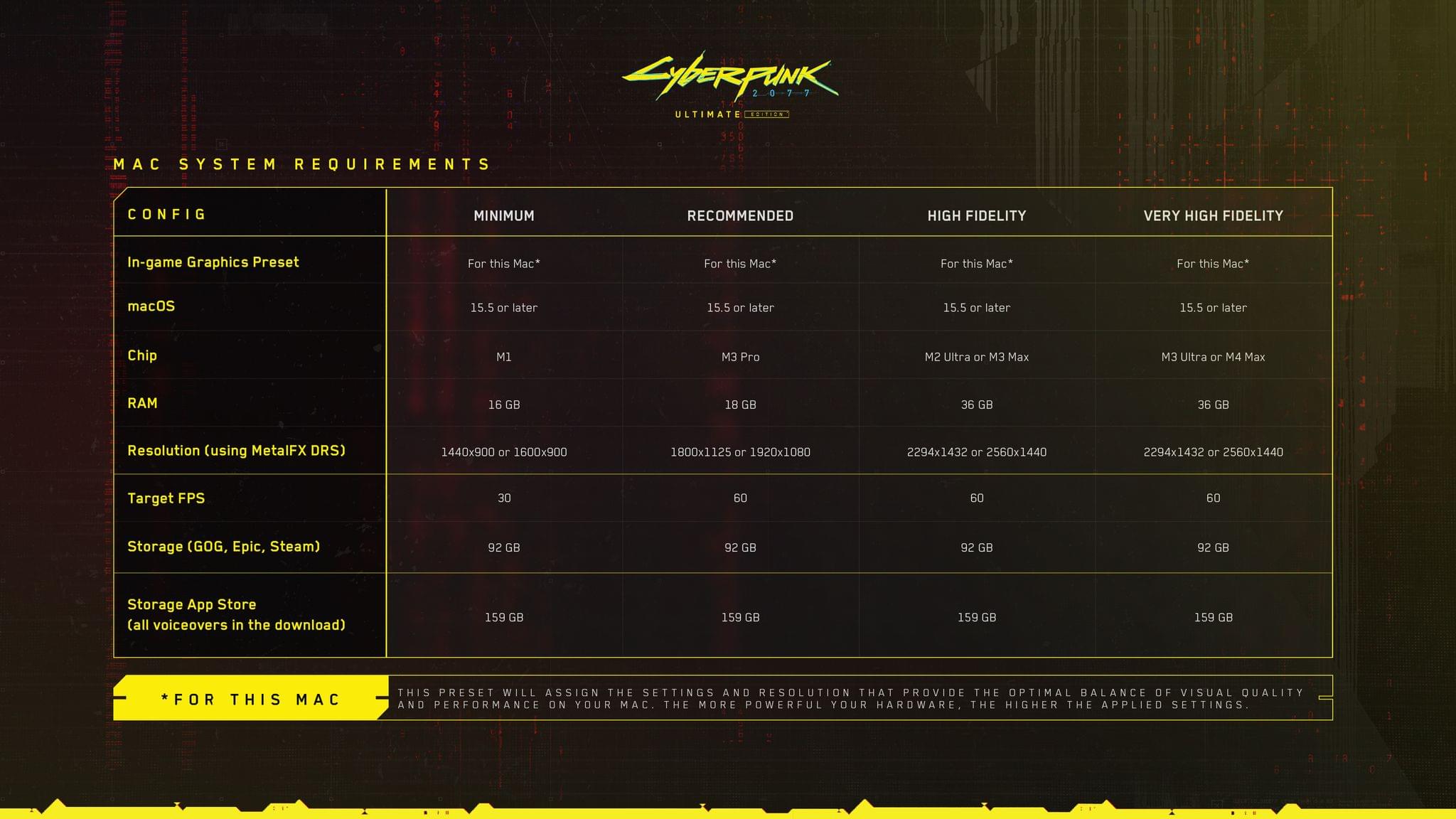
Yesterday, I wrote about the upcoming release of Cyberpunk 2077: Ultimate Edition on the Mac. Today, CD PROJEKT RED published a support document, listing the game’s Mac system requirements. As I wrote yesterday, the company says the game will work on all Apple silicon Macs; however, the beefier your CPU and memory, the better.

As reported by Tom Warren at The Verge today, the support document summarizes the game’s system requirements in four categories: Minimum, Recommended, High Fidelity, and Very High Fidelity. It’s worth checking out the support document and Warren’s coverage before buying Cyberpunk 2077, which still hasn’t shown up on the Mac App Store for pre-order, because if you want the Very High Fidelity experience, you’ll need at least an M3 Ultra or M4 Max with at least 36 GB of memory.

Permalink

Cyberpunk 2077 for Mac Arrives Thursday

Source: CD PROJEKT RED.

Source: CD PROJEKT RED.

Last fall, alongside the announcement of the M4 MacBook Pro, Apple and CD PROJEKT RED said that Cyberpunk 2077 was coming to the Mac in early 2025. But when WWDC rolled around last month with no more news about when the game would come to the Mac, I thought it might slip to the fall when macOS Tahoe is expected to be released with Metal 4 and other game-friendly features.

So it was a pleasant surprise to find out that Cyberpunk 2077: Ultimate Edition, which includes the Phantom Liberty DLC, will be out this Thursday on the Mac App Store, as well as on GOG.com, Steam, and the Epic Games Store. Cyberpunk, a notoriously demanding game when it comes to system resources, will run on any Apple silicon Mac with 16GB of memory that is running macOS Sequoia (or the Tahoe developer beta).

Source: CD PROJEKT RED.

Source: CD PROJEKT RED.

To support every 16GB Apple silicon Mac since the M1 MacBook Air, Cyberpunk relies on the latest Metal technologies, including Tile-Based Deferred Rendering and tools like Metal’s C++ interface and the Metal Shader Converter, to optimize for Apple GPUs. The game also takes advantage of Apple’s MetalFX Upscaling.

CD PROJEKT RED has gone all out with other compatibility features to make its game feel at home on the Mac, too, including:

  • “For This Mac” graphics presets that are optimized for the Apple silicon hardware running the game, which promises to take the guess work out of configuring graphics settings;
  • AMD FSR upscaling and frame generation optimized for Apple silicon Macs;
  • Support for Spatial Audio and head tracking for those playing with AirPods;
  • HDR support that is dynamically optimized for Apple’s XDR displays and HDR output for calibrated external displays;
  • Magic Mouse, Magic Trackpad, and controller support; and
  • Cross-progression across all platforms.

In the fall, Apple says Cyberpunk will get a boost from the videogame technologies announced at WWDC 2025. Those include MetalFX Frame Interpolation to increase and stabilize frame rates, which Apple says will allow the game to hit 120 fps using the game’s Ultra settings when combined with MetalFX Upscaling. Cyberpunk will utilize MetalFX Frame Denoising to clean up the noise produced by its path-tracing renderer, too.

Source: CD PROJEKT RED.

Source: CD PROJEKT RED.

I’m looking forward to trying Cyberpunk on the Mac. I already own it on Steam and have played it on the Steam Deck and the Nintendo Switch 2, both of which should be excellent points of comparison to the wide range of Macs that Apple says will run Cyberpunk 2077.

The Mac version of Cyberpunk 2077 will debut this Thursday, July 17. There is no additional charge for the Mac version if you already purchased the game from one of the stores that offers it. Alternatively, you can purchase the game from the Mac App Store, where Cyberpunk 2077 is making its debut.


MacStories Setups Update: Fresh Approaches, Wi-Fi Upgrades, and Handhelds

Our setups.

Our setups.

It’s time for another update to the MacStories Setups page, where you’ll find all the gear and apps that Federico and I use for work and play. With Prime Day upon us, it’s a great time to revisit our setups and see what’s on sale. Plus, there’s a handy changelog at the top of the page for those of you who are only interested in what’s new. If you want to hear more about what drove the latest changes to our setups, we’ll be discussing them in more detail on this week’s episode of MacStories Unwind, too.

Federico's PC accessories.

Federico’s PC accessories.

It’s been a little while since we last heard from Federico about his setup, which took a recent turn with the developer beta of iPadOS 26. The iPad Pro is back at the center of Federico’s workflow, but he’s been able to keep everything as streamlined as ever with the help of his ASUS ROG PG27UCDM monitor that features a built-in KVM switch. That display lets him easily switch between the iPad, an M4 Max Mac Studio, his custom-built gaming PC, and the Nintendo Switch 2. When he’s not at his work and gaming monitor, Federico has the latest Viture Pro XR glasses that serve as a USB-C connected external display.

One highlight of both of our setup updates is the TP-Link WiFi 7 Deco BE85 routers. Federico got a two-pack, and I have a three-pack, thanks to my three-story condo. Home Wi-Fi 7 mesh networks are still on the expensive side, but they are much faster than Wi-Fi 6 and 6E in my experience, and the models that Federico and I each installed earlier this year are discounted during Prime Day.

My 11" iPad Pro and GL.iNet portable Wi-Fi 7 router.

My 11” iPad Pro and GL.iNet portable Wi-Fi 7 router.

My setup has been simplified a bit with my latest update. I’m carrying a smaller tomtoc bag when I’m away from home (which I’ve been loving), I upgraded my travel router to Wi-Fi 7 with the GL.iNet GL-BE3600 (Slate 7) Portable Travel Router, and I’m a big fan of the compact elegance of the MOFT Invisible Laptop Stand that I reviewed earlier this year.

At my desk, I swapped a Belkin AirPlay 2 receiver for the more powerful Arylic LP10 AirPlay 2 Wireless Music Streamer, which drives my Harmon Kardon SoundSticks III speakers. I also replaced a pair of broken podcasting headphones with the inexpensive but very comfortable CCZ Yinyoo Melody In Ear Monitors. And I recently started using the Kensington SD5000T5 Thunderbolt 5 Docking Station to expand my Mac Studio’s peripheral options.

Finally, you’ll notice I’ve trimmed down my handheld console setup. There’s still a lot there, but I’ve been focused on flip-style handhelds and picking a favorite of each form factor instead of jumping endlessly from one handheld to the next. With this update, the big additions are the Retroid Pocket Flip 2 and the Miyoo Flip.

Both of us have added other apps and gear, too, so be sure to browse through the Setups page to find the complete listing of our current setups.

Permalink

How Does This Keep Happening?

Today, Blue Prince, a critically acclaimed videogame appeared on Apple’s App Store. The trouble was, it wasn’t offered for sale by its developer, Dogubomb, or its publisher, Raw Fury. The real Blue Prince is only available on the Xbox, PlayStation, and PC.

What appeared on the App Store, and has since been removed, was an opportunistic scam as Jay Peters explained for The Verge:

Before it was removed, I easily found one iOS copy of the game just by searching Blue Prince on the App Store – it was the first search result. The icon looked like it would be the icon for a hypothetical mobile version of the game, the listing had screenshots that looked like they were indeed from Blue Prince, and the description for the game matched the description on Steam.

The port was available long enough for Blue Prince’s developer and publisher to post about it on Bluesky and, according to Peters, for the fake to reach #8 in the App Store Entertainment category. I feel for anyone who bought the game assuming it was legit given Peters’ experience:

I also quickly ran into a major bug: when I tried to walk through one of the doors from the Entrance Hall, I fell through the floor.

This isn’t the first time this sort of thing has happened. As Peters points out it happened to Palworld and Wordle too. Other popular games that have appeared on the App Store as janky scam ports include Cuphead, a version of Balatro that appeared before its official release on iOS, and Unpacking.

This seems like the sort of thing that could be fixed through automation. Scammers want users to find these games, so they can make a quick buck. As a result, the name of the game is often identical to what you’d find on the Steam, Xbox, or PlayStation stores. It strikes me that a combination of automated searching for the top games on each store, combined with an analysis of how quickly a game is moving up the charts would catch a lot of this sort of thing, flagging it for reviewers who could take a closer look.


By the way, if you haven’t tried Blue Prince, you should. It’s an amazing game and early contender for game of the year. You can learn more about the game and find links to where to buy it here. Also, Brendon Bigley, my NPC co-host, has an excellent written and video review of Blue Prince on Wavelengths.

Permalink