Posts tagged with "safari"

Tap-Translate Does Inline Mobile Safari Translations

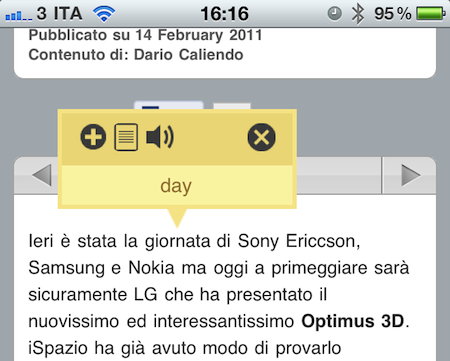
Tap-Translate, a $1.99 universal app by developer Ronen Drihem, brings an interesting approach to translations on iOS, and more specifically in Mobile Safari. Tap-Translate, in fact, isn’t exactly an “app”: it’s an app whose only function is to let you install a bookmarklet in Safari that will let you tap on a word on any webpage to get an instant translation inside a cute yellow popup menu.

It works like this: once you’ve followed the steps provided by the app to install the bookmarklet (which allows you to choose from a variety of languages), you’ll find the bookmarklet in Mobile Safari (works on any iOS device, but I’ve also tested it in Chrome and Safari on the desktop) ready to give you inline translations on tap. The translation’s popup allows you to “speak” a selected word, or jump directly to the Google Translation page. Tap-Translate can also do entire paragraphs, and be dismissed at any time. It’s fast, easy to use and convenient.

At $1.99 you could argue you’re spending money to install a bookmarklet. The thing is, Tap-Translate works really well and, most of all, it’s integrated with Safari and it’s unobtrusive. Recommended.


The New Readability Has Ambitious Future

Readability, the Javascript library that stripped websites of unnecessary graphics and elements to provide the user with a simple, easier to read page, has today revealed the next step in it’s future. The ambition plan includes fundamental new advancements including; usage on mobile devices, saving Readability-enhanced pages, social features, a subscription service that supports writers and a partnership with Marco Arment’s Instapaper.

One of the biggest new features of the new Readability is it’s subscription service which is a new model that aims to give back to the writers and publishers that you read from. The subscription starts from $5 but can be as high as you want to pay, and 70% go back to writers and publishers, so obviously the more you pay the more goes back to the content creators. There will still be the basic Readability which does not require a subscription.

Jump the break for full details.

Read more


Google Rolling Out “Instant Previews” for iOS Devices

In the past months, Google has been very busy improving the experience of iOS users on products like Gmail, Google Docs and the Google homepage: Google Docs editing came to Mobile Safari, then Google launched Instant for Mobile, which similarly to the desktop lets you see search results as you type. Most recently, Google has enabled Cloud Print support for Gmail in iOS Safari and improved the mobile weather widget on its homepage.

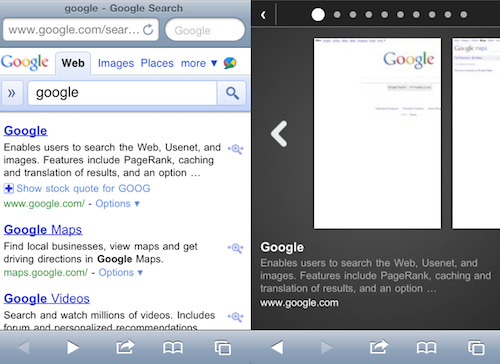
As noted by 9to5mac, Google has also begun testing a new feature for iOS browsers (and Android as well, we guess) which hasn’t been officially announced yet but was spotted by some users. Google “Instant Previews” will let you have a quick preview of a website by tapping on the magnifying glass icon – again, just like on desktop browsers you get a preview inside a popup menu on google.com. On iOS though, it looks like the feature will really be redesigned to sport a much better touch interaction: previews will open in a dedicated window that reminds of Safari’s tabs and you can flick through them to quickly preview search results.

It is unclear at this moment whether the feature is being tested among some users in the United States or worldwide, and when Google plans to launch it or at least announce it.


Google Improves Weather Results on Mobile Safari

There is no shortage of weather apps on the iPhone, from the most professional ones to beautiful user-friendly software like Outside, but Google thinks you should just head over google.com and check out their new, mobile-optimized weather forecast view. The feature, which should work both on iOS and Android phones, will be activated once you open google.com on your browser and search for “weather”. The browser will ask you to give location permissions to Google, and you’ll be presented this neat search result page with fancy graphics for your location’s weather on top of everything. Fortunately, you can also enter a location manually inside a dropdown menu (Google got my location wrong, and I don’t know why).

The information displayed on screen are pretty useful and well designed. Google even bothered to add a slider that flicks through hourly updates and changes the background gradient from darker (night) to lighter blue (day). You can visualize temperature in Celsius or Fahrenheit degrees, check on humidity and wind strength.

Well done, Google. We look forward to better Twitter integration in your search results now.


Google Launching Cloud Print with iOS Support

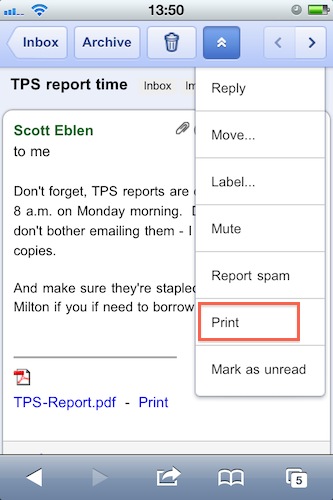
With an official post on the Gmail blog, Google has announced that in the next few days they will launch the Google Cloud Print online service with initial support for iOS devices and Windows operating system. Cloud Print allows you to print any kind of document and supported Gmail attachment by configuring a local printer with Google’s remote system. Once a printer is connected to Cloud Print, an iOS device can remotely send a document to the printer from the Gmail webapp in Mobile Safari. Support for Mac OS X and Linux is coming “soon.

To get started, you’ll first need to connect your printer to Google Cloud Print. For now, this step requires a Windows PC but Linux and Mac support are coming soon. Once you’re set up, just go to gmail.com from your iPhone or Android browser and choose “Print” from the dropdown menu in the top right corner. You can also print eligible email attachments (such as .pdf or .doc) by clicking the “Print” link that appears next to them.

It all sounds fairly interesting, especially considering that it happens in the cloud, in the background. Will Google manage to pull off real driver-less, wireless printing?


iTunes To Become Part Of Safari? We Don’t Believe It

According to website Three Guys and a Podcast, Apple has been working on a major redesign of its iTunes software that will see the music manager / app organizer / media hub become part of Safari. The new system is rumored to be announced at Apple’s music event that should take place (as every year) in September and will be the evolution of Apple’s original plans during the lala acquisition.

Apple may be preparing a massive move that will propel Safari from niche browser to market leader. The move to merge Safari and iTunes into one software solution appears long in the works, which may arrive this fall at Apple’s usual iPod special event.

It is believed that Safari will be the only browser able to access iTunes, as iTunes is built into the browser itself. “Moving iTunes organizational side-bar into Safari isn’t a monumental task” claimed a source, adding “Safari would skyrocket in use as a result of integrating the software titles together.

Read more


Browser+ for iPad Aims To Reinvent Safari

I have been trying a lot of alternative browsers for the iPad over the past months. Since my good friend @kenyarmosh suggested me to give a spin to iCab Mobile (for iPhone and iPad), my interest for well-crafted, feature rich and innovative third-party browsers reached a new level. And while I’m still digging into all the features offered by iCab (which is, without a doubt, the most powerful alternative to Apple’s default browser), I have also been testing other simpler, minimal browsers that aim at offering a different take on browsing the Internet on the tablet.

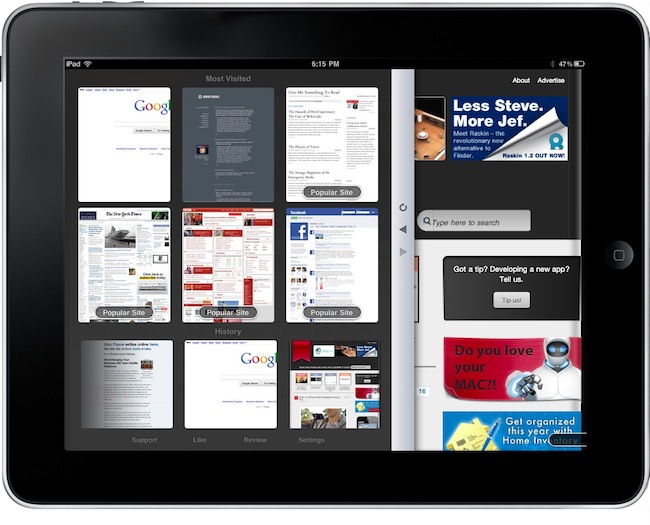
Browser+ HD for iPad, in spite of its not-so-appealing name, is the freshest and simplest browser I have found in the App Store so far. What Browser+ does is simple: it takes standard elements of web browsing such as tabs, address bar and history and completely re-imagines them as if they were built from scratch for the iPad. Pretty much like Flipboard did for web content that has to be consumed on a tablet’s screen. Browser+, sold at $0.99 in the App Store, doesn’t come with all the functionalities found in Apple’s Safari or iCab Mobile, but what’s there has been recreated to fit better on the iPad. Read more


twttr.mediaTypes - A Great Safari Extension For #NewTwitter

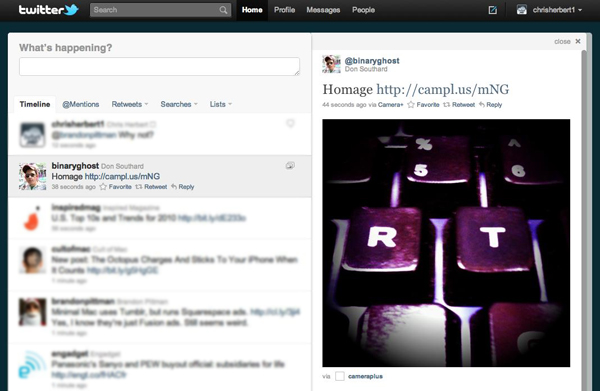
A while back I stumbled upon a few Safari extensions by Norio Nomura that embedded extra image service viewing into newtwitter that it didn’t yet support. There was originally one for dribbble and another for Instagram when it was still unsupported. I am a dribbble member and use Instagram so they were no brainers for me. I use the twitter.com website with Safari when I am at work (and sometimes at home), so it’s always open. Last week I visited Nomura’s github page and noticed he had combined the 2 extensions and added even more including post.ly, withings, moby.to and a few more, it’s now called twttr.mediaTypes. I tweeted a few days ago that this extension was my Safari extension of the day and it had a very good response and was retweeted a lot.

After yesterday’s huge Camera+ news / update, I wondered how easy it would be for him to add Camera+’s image hosting service to this already great extension. It took him less than an hour to get back to me with an updated version supporting Camera+, it even interested him enough that he bought the app as well. It works fantastic, just like it did before, placing the image into the details pane of twitter.com’s timeline.

twttr.mediaTypes is not a must-have for everyone but anyone that uses twitter.com as their client of choice with Safari or Chrome (yeah, he has a version for that too) should really check it out. I have also asked him to add img.ly support as well, but no word back yet.


Occipital Showcases Gyroscope Support In MobileSafari

360 Panorama is a neat iPhone app by Occipital which, thanks to some cool augmented reality features such as a real-time on screen grid view, allows you to take panoramic photos on your iPhone. We reviewed the app here, and you can go grab it here.

Today the Occipital developers are launching a brand new version of their panoramic browser for pictures shared online. The new browser, when used on MobileSafari for iPhone running on iOS 4.2, takes advantage of Apple’s gyroscope to let you move panoramas around by just holding your device upright. Once you load a link like this one, Occipital’s browser will detect the device running iOS 4.2 and will ask you to hold your iPhone upright if you want to use gyroscope. Otherwise, you’ll just be able to swipe to view the entire panorama.

Gyroscope support enables you to move the iPhone around to view the entire content of a webpage, and it works really well. When iOS 4.2 came out in November, developers noted that MobileSafari received new features such as improved HTML5 support and “accelerometer integration”. The benefits of augmented reality apps using the gyroscope instead of a compass were also showcased in July.