This Week's Sponsor:

Halide

Unlock Your iPhone Camera


Posts tagged with "music"

Ecoute 2.1 Adds Up Next, Queue Management

Ecoute 2.1

Ecoute 2.1

In my review of Ecoute 2 for iPhone, I noted how the app lacked a proper queue management system to replicate the Up Next feature of iTunes for Mac:

Ecoute has a “Play next” feature, but, alas, there’s no Up Next-like queue management: adding a song to the queue will put it at the top of the queue, not at the bottom after songs you’ve already queued up. On iTunes for Mac, you can either play a song next or add it to Up Next, but Ecoute can only “play next”. Furthermore, the Play Next button is based on another workaround that’s a byproduct of playback managed by the Music app: Ecoute can’t create a real queue in Music, and therefore every time you’ll add a song to the queue you’ll hear a brief interruption as the currently playing song stops and resumes itself. This is a hack, and it works, but it’s not elegant and the app doesn’t have all the queue-related features of iTunes 11, which is unfortunate.

In an otherwise excellent update that made Ecoute 2 my favorite alternative to Apple’s Music app, the lack of Up Next stood out. Fortunately, developers Louka Desroziers and Julien Sagot were already working on improvements to the queue functionality, which are available today in version 2.1 of Ecoute, released on the App Store.

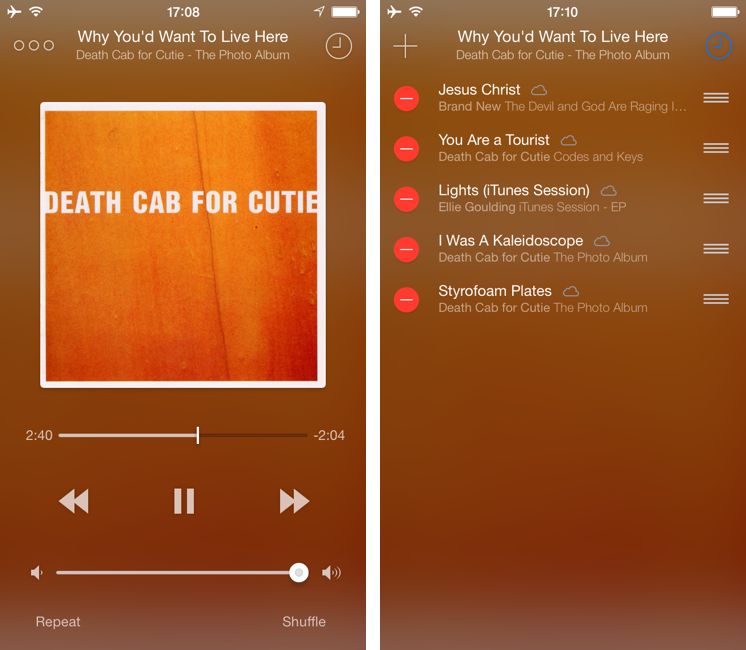
When playing music in Ecoute, you can now choose between “Play Next” and “Add Up Next” from the tap & hold menu; this works for individual songs as well as entire albums or playlists. The way Ecoute’s queue works mirrors iTunes 11: you can play a song immediately after the currently playing one, or you can stack songs at the bottom of the queue.

Up Next can be accessed by tapping the clock icon in the Now Playing screen (which has been redesigned to show blurred album art in the background, like Apple’s Remote app). Songs can be removed and rearranged in the queue, and you can add more through the “+” button in the top left corner. Right now, Ecoute uses the default Music picker to add songs manually to the queue, but the developers confirmed they are working on their own solution.

There are still some bugs and hacks that Ecoute has to employ to work around Apple’s limitations for iTunes Match and queue management on iOS. Overall, though, Up Next is a solid addition to an app that I already considered superior to Music for navigation and responsiveness of the interface. Ecoute is $2.99 on the App Store.


The Prompt: Too Long; Didn’t Listen

This week, the boys talk about music consumption.

Specifically, we talked about iTunes Match, Rdio, Spotify, and the differences between these services and apps in terms of sound quality, user experience, and royalties paid to artists. I had a lot of fun doing research for this episode and putting together links for the show notes – which I recommend checking out.

We’re not done discussing music but this is a good start. Get the episode here.

Permalink

Ecoute 2 Review

Ecoute 2

Ecoute 2

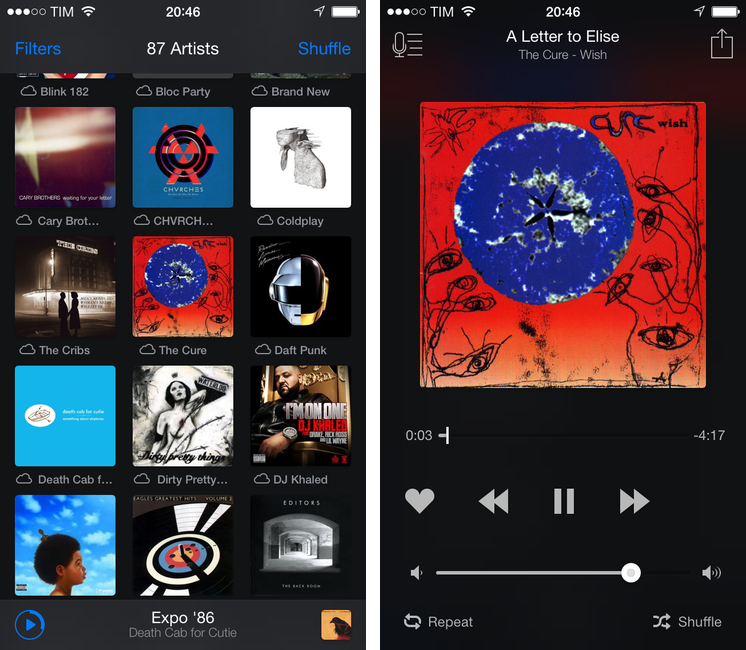
Last year, when we reviewed Ecoute, we called it the best music player for iOS. Apple’s Music app has never been packed with features when compared to iTunes on the Mac, but it’s the app that the majority of people use because it’s free and built into the operating system.

With iOS 7, Apple redesigned the Music app with some questionable choices for artist and album navigation and more advantages over third-party clients through the inclusion of iTunes Radio streaming and a special widget in Control Center to like songs and add them to your wish list. The Music app is, effectively, irreplaceable if you care about iTunes Radio and managing your music and playlists, but I think that the new Ecoute for iOS 7 does several things better than Apple’s app. Read more


iPod Eclipse

Benedict Evans:

As music has moved on from the iPod, it has actually become much less important to the tech industry. With streaming and the decline of ownership, there are fewer barriers to switching service, and every device has a choice of music services, both from the platform owner (i.e. Apple/Google/Microsoft/Nokia etc) and as third-party apps. In effect,  music has become a commodity.

Compare this to dedicated eBook readers, which still have a feature that smartphones haven’t replicated (E Ink). The iPod didn’t have exclusive features that tied music (and customers) to the device; the built-in WiFi and cellular options of iPhones facilitated the rise of streaming services and access over ownership. The only iPod-only feature I can think about is storage in the 160 GB iPod Classic; millions of people just don’t need an iPod anymore.

For further evidence, look at Apple’s upcoming launches: iTunes Radio can be used on iPod touches connected to WiFi, but iPhones (and cellular iPads) can use it all the time.

Permalink

Apple Airs New iPhone 5 Commercial: “Music Every Day”

Following the “Photos Every Day” commercial first aired last month, Apple today posted a new iPhone 5 ad called “Music Every Day”. As the name suggests, it is a follow-up to the previous commercial, this time with a focus on music.

Music Every Day doesn’t show music apps – instead it puts the spotlight on people enjoying music with their iPhones and Apple’s distinctive white earbuds. The commercial includes a variety of everyday situations – from exercising and waiting in line to a DJ set and a group of friends listening to music in their car. It’s not about the playback feature itself, it’s about music as a life companion.

Apple only briefly shows the iOS Music app in the commercial. The spotlight, unlike the Photos commercial, isn’t strictly on the iPhone’s display itself – rather, it emphasizes how music can seamlessly fit in our lives thanks to a device that’s often carried in a pocket, put on a table or outside of the shower, or shared with friends. The protagonist of the ad isn’t the iPhone per se: it’s people relying on it to enjoy their music.

The iPhone qualities that Apple subtly implies (intuitiveness of the interface, sound quality, portability) are important, but secondary. The voiceover sums it up at the end: “Every day, more people enjoy their music on the iPhone than any other phone”. With an elegant juxtaposition, the ad fades to black.

Apple hasn’t uploaded the new commercial to its website yet, but you can watch the official YouTube version below.

Read more


Thoughts On Twitter #music

Music

Music

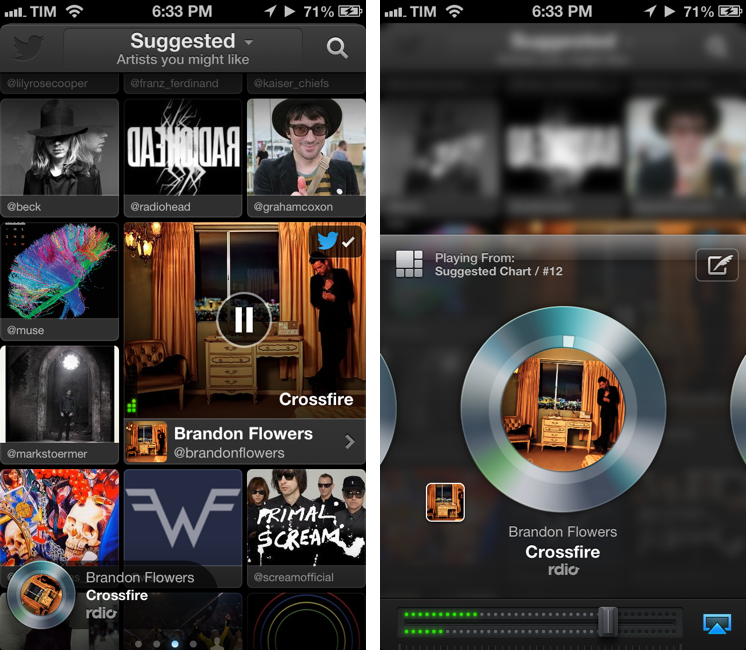
Earlier today, Twitter released its official #music app.[1] This first release, like Vine before, is iPhone-only with a web counterpart. I believe that Music, more than Vine, can give an indication of the direction Twitter may take in regards to its media strategy. But first, I’d like to highlight two excerpts from Twitter’s blog post announcing Music:

Twitter and music go great together. People share and discover new songs and albums every day. Many of the most-followed accounts on Twitter are musicians, and half of all users follow at least one musician. This is why artists turn to Twitter first to connect with their fans — and why we wanted to find a way to surface songs people are tweeting about.

Today, we’re releasing Twitter #music, a new service that will change the way people find music, based on Twitter. It uses Twitter activity, including Tweets and engagement, to detect and surface the most popular tracks and emerging artists. It also brings artists’ music-related Twitter activity front and center: go to their profiles to see which music artists they follow and listen to songs by those artists. And, of course, you can tweet songs right from the app.

“Tweets and engagement” are key factors of the algorithm Twitter is using to “detect and surface” tracks, both popular and emerging. The fact that half of all users (active or not) follow at least one musician on Twitter is an important metric to keep in mind. Read more


Twitter Announces #music App

From the Twitter blog:

Today, we’re releasing Twitter #music, a new service that will change the way people find music, based on Twitter. It uses Twitter activity, including Tweets and engagement, to detect and surface the most popular tracks and emerging artists. It also brings artists’ music-related Twitter activity front and center: go to their profiles to see which music artists they follow and listen to songs by those artists. And, of course, you can tweet songs right from the app.

The new app isn’t available on the App Store yet (tip: to check, refresh Twitter’s page in iTunes using CMD+R). Twitter #music will launch with direct support for iTunes previews, plus Rdio and Spotify streaming for users who have accounts on those service. I’m interested to see how Twitter will handle the login process for Rdio and Spotify, but based on what I’m reading, it sounds like a good idea. Maybe Twitter does have the network infrastructure and willingness to do social music right.

I’ll leave more thoughts for a review. In the meantime, check out Twitter’s official #music landing page, and Joanna Stern’s preview of the app at ABC News.

Permalink

Status Board’s Samba de Setup

Cabel Sasser:

One of the things we wanted to make truly excellent in our brand-new Status Board iPad app was the setup process. Setup assistants are never fun, always annoying, and kill that “new app” buzz faster than anything. The only thing worse is that giant overlay some apps do that draw arrows all over your screen pointing to all the buttons and things like some demented football coach.

In my review, I likened the illustrations and tone of the QuickGuide Manual to Portal’s GLaDOS, but I forgot to mention the music. Now you can listen to it on Cabel’s blog. I want to make this my new iPhone ringtone.

Permalink

Nasturtium Player

Nasturtium Player

I first mentioned the public beta of Nasturtium Player back in November 2012. Nasturtium is an interesting take on an “iTunes mini player” mixed with a queuing system and a way to play videos from YouTube within a single interface. I wrote:

The concept of combining local music with YouTube videos resonates with my music workflow. While I tend to listen to music on Rdio, there are some older albums and songs that I need to keep locally either in iTunes or, most recently, Plex with PlexSync; similarly, there are YouTube videos of older demoes or live concerts of my favorite bands that I want to access every once in a while. I like how Nasturtium unifies search of local media and YouTube videos in a single interface.

Nasturtium has been out on the App Store for a few weeks now, and I like the improvements that went into the final version. There are keyboard shortcuts to control playback and playlists, and YouTube videos (while not resizable) now have preview thumbnails. Adding items to the queue is still as easy as hitting Enter, but you can also drag a song (from either iTunes or YouTube search results) into the main playlist interface, or use a “+” button. I particularly appreciate the possibility to collapse headers in search results to filter down results to Tracks or Albums (sorting options are also available).

As usual when trying new apps, it’s the care about small details that stands out to me. I like the thinking process that went into Nasturtium. The amount of minutes “remaining” in a playlist is available in the status bar at the bottom, but you can click it to show total minutes; similarly, while you can click the Play/Pause buttons to trigger playback, you can double-click the Play one to skip a track. As detailed in the app’s Help page, you can search by rating and genre as well simply by typing the information you need. I recommend reading more about the design process of the app here.

Nasturtium Player is $5 on the App Store.

Permalink