
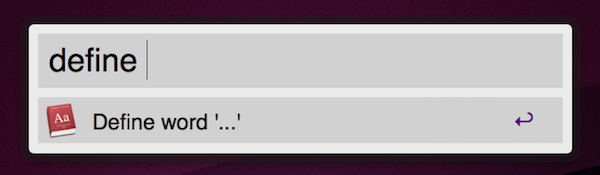
Alfred, the application launcher for Mac we covered a couple of times in the past, got a huge update this weekend: the public 0.7.2 beta introduced support for clipboard history, better file system navigation, better iTunes mini player support (for Powerpack users) and lots of bug fixes and new little features that are making Alfred the most powerful, yet lightweight and unobtrusive, app launcher for OS X.
Posts tagged with "mac"
Alfred Adds Clipboard History, Improved Navigation, Lots Of New Features
RIM Releases SDK and PlayBook Simulator for Mac
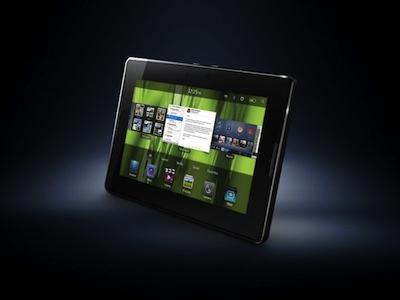
If you’re a developer, you have a Mac and you happen to have some interest in RIM’s future plans for its Tablet OS and the first product that will support it, the PlayBook, then you might want to check what we have here: a Tablet OS SDK and Simulator to build and test apps for the PlayBook on OS X.
Don’t get yourself all excited just yet, though: this first release of the SDK allows you to build apps based on Adobe’s AIR technology, as support for Flash and HTML5 is “coming soon”. Anyway, I assume the PlayBook does exist now.
Press release below. Read more
Twitterrific 4 for Mac: A Sneak Peek
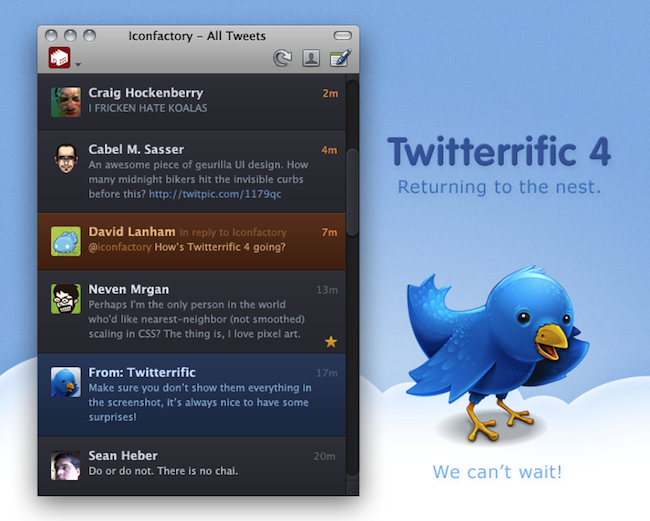
As promised last weekend on Twitter, the Iconfactory has just posted the very first sneak peek of Twitterrific 4.0 for Mac, a major new version of the popular Twitter client.
There’s no release date or pricing info yet, but the app will require Snow Leopard due to some of its new features and, from the looks of it, it appears that Twitterrific for iOS highly inspired the development of this new version.
Back to the Mac, indeed.
iPad Vs. Mac - Le Graphique
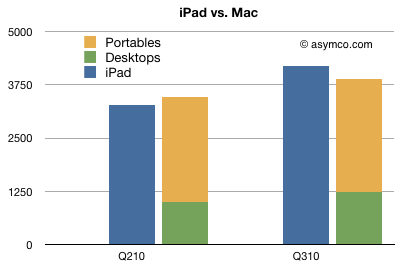
So how well is the iPad doing, exactly? Apple sold 7.46 million units since the release date through September 25th; analysts regard the iPad as the fastest selling consumer electronic device in history. How about the Mac? It outsold Apple’s computers too, in just two quarters.
Take a look at the chart below, courtesy of Horace Dediu. The iPad has been around for 6 months; Macs have been on the market for 322 months. Oh, and it’s not that Macs have slowed down: they’ve grown faster than the overall PC industry.
Middle East Countries Not Officially Supported In FaceTime for Mac
I don’t know what to think anymore, but to me it seems like this is just a big and confused mess over some carrier restrictions. Oh, and lots of PR gone wrong. Anyway, FaceTime in the Middle East countries: does it work? Yes and no. Yes, you can find a way to make it work, like buying a European iPhone unit. No, Apple doesn’t support it and it’s doing everything they can to remove FaceTime mentions and features from certain countries. Why? “Carrier issues”, or so they say.
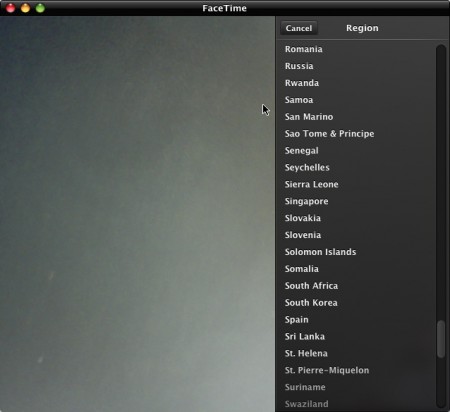
How about FaceTime for Mac? You guess: Apple didn’t include Saudi Arabia, United Arab Emirates, Kuwait and Egypt in the preferences, SaudiMac reports. What’s interesting is that Jordan and Qatar made the list, even though they don’t support FaceTime on the iPhone and iPod Touch. Heh. Still, if you change your country to United States you’ll be able to use FaceTime for mac even from one of the countries not officially supported.
What a mess.
“Mac Developers Are Laughing at the Mac App Store Guidelines”→
“Mac Developers Are Laughing at the Mac App Store Guidelines”
Jonathan Rentzsch:
Studying the details of Apple’s current implementation, it becomes clear Apple crafted the Mac App Store policies primarily with its own interests in mind, not of its customers and certainly not its developers.
My fellow Mac developers are laughing at the Mac App Store guidelines. They’re reporting that apps they’ve been shipping for years — a number of them Apple Design Award-winning — would be rejected from the Mac App Store. These are proven apps, beloved by their users. The current guidelines are clearly out-of-touch.
Maybe not just its own interests in mind, but there’s no doubt Apple has something to fix here. Does the 90-day timeframe sound like a “let’s gather feedback before the thing goes live” strategy to anyone else? How long before revised guidelines?
A Tale Of Two Mac App Stores
In our previous Mac App Store coverage we focused on how, among other things, it will be very likely that Apple won’t allow the release of “trials” and “demos” in the new Store for Mac. As Mac developers also noticed and wrote in blog posts, it’s unknown at this point whether Apple will introduce new rules for volume licensing, educational discounts and other purchase systems Mac developers have been using for years on their websites.
The fears and doubts of Mac developers are worth our consideration as Apple has a huge deal on its hands, and nobody wants to see Apple “screw up” with an App Store on the Mac. So let’s just consider this: what if Apple doesn’t change the rules and understands that the Mac is ultimately different from iOS when it comes to customer experience? What if the first version of the Mac App Store that will roll out in January will be a simple “copy” of the one seen on iOS? In that case, there’s a chance for developers’ websites to stay in the game and become the real alternative to the Mac App Store, and not a “system from the past” headed to disappear. Read more
Apple Confirms Macs Won’t Come with Flash Pre-Installed In The Future
So, about the new MacBook Airs shipping without Flash pre-installed: Apple PR just confirmed to Engadget that the same will happen with other Macs in the future, in order to allow customers to go download the most recent version of Flash on Adobe’s website on their own.
We’re happy to continue to support Flash on the Mac, and the best way for users to always have the most up to date and secure version is to download it directly from Adobe.
Simple answer. Of course Apple cares about its customers and computers running software up to date, but there’s clearly more than ” the best way for users” in this story. By keeping Macs Flash-free out of the box, Apple wants users to lack the need of installing Flash, as the web is slowly moving to a broader HTML5 adoption.
Perhaps this won’t happen in a matter of a few months, but that’s a first step.
Tip: Emptying iPhoto ‘11 Trash Doesn’t Delete Items Permanently
So I’m playing around with iLife ‘11 (which I consider a great update so far, both graphically and feature-wise) and I just noticed this: unlike iPhoto ‘09, if you delete a file from iPhoto ‘11 library and then empty iPhoto’s trash, that item won’t be deleted permanently. In fact, you’ll still be able to restore it from OS X trash. Read more