Posts tagged with "keynote"

A Closer Look at Apple’s Upcoming Creator Studio Update

For the past week, I’ve been testing betas of the following updates coming to Apple Creator Studio later this month:

Final Cut Pro is being updated this month, too, but I haven’t tested it.
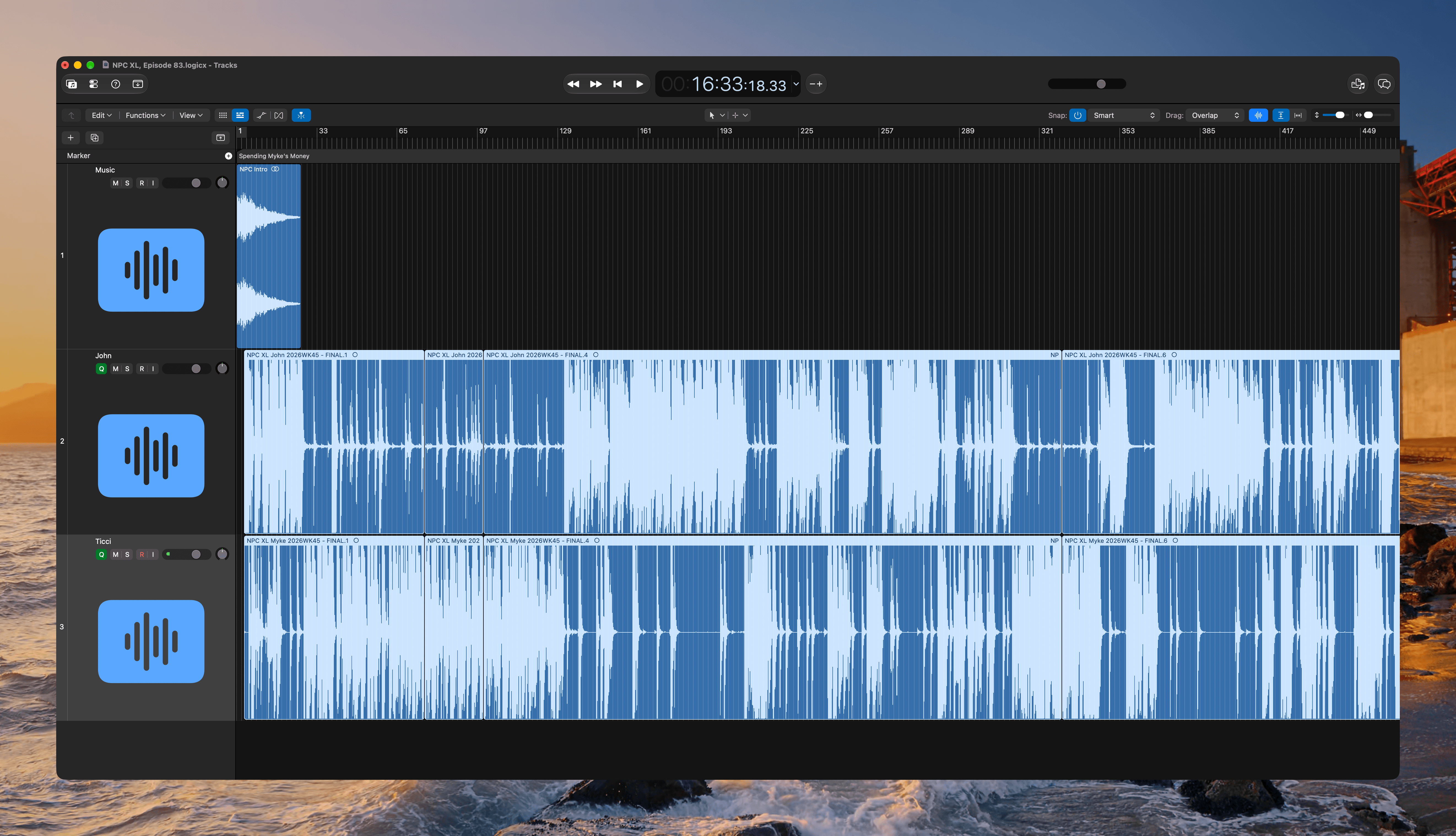
Logic Pro's new Liquid Glass design.

Logic Pro’s new Liquid Glass design.

I use Logic Pro to edit MacStories’ podcasts, and so far, I’ve edited four episodes using the updated app. For the limited set of Logic’s features that I use for podcast editing, the experience hasn’t changed much. The loops I’ve created over the years are now in the new Unified Browser on the left side of the window, instead of in the panel on the right, but every other aspect of editing an episode is the same as before.

But even though my editing workflow hasn’t changed much, the design of the app has. Logic Pro has been given a Liquid Glass makeover that emphasizes black and dark gray over its predecessor’s lighter gray treatment. I’m glad Apple decided to update Logic Pro’s look because it had really begun to look dated. The black palette is far more in line with modern professional apps, which makes it nicer to work in.
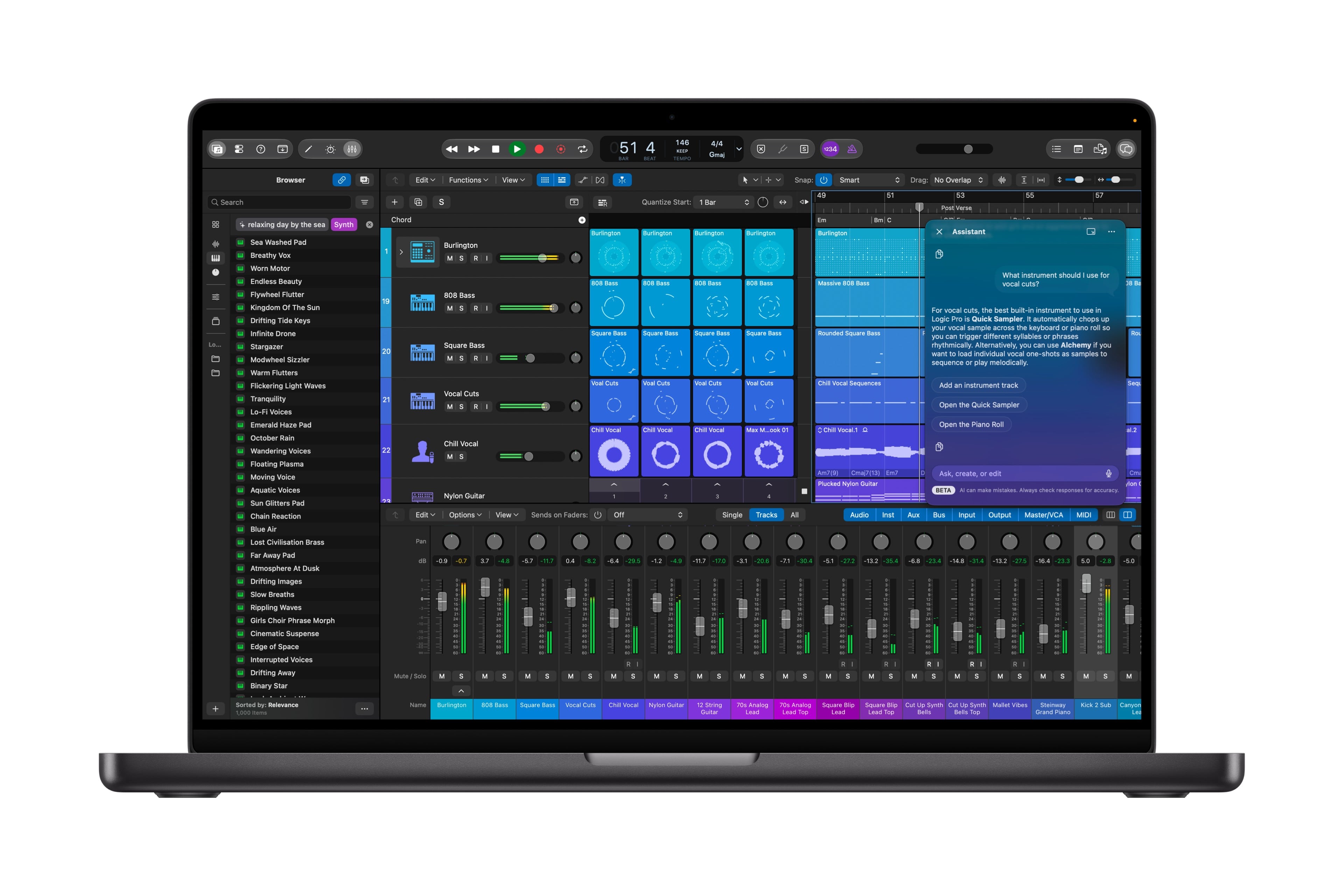
Some of the new features available to musicians in Logic Pro. Source: Apple.

Some of the new features available to musicians in Logic Pro. Source: Apple.

Now, just because little has changed for podcast editors doesn’t mean there aren’t substantial changes to Logic Pro for musicians. The app has an enhanced stem splitter that can separate drum elements from each other, giving producers greater control. There’s also a new Play Surface that exposes instruments, drum pads, and chord pads for playing music live. The Play Surface and other Logic Pro and MainStage controls can be accessed using Sidecar on an iPad, too.

The new Unified Browser, which now houses those loops I’ve made, includes other enhancements, too. You can search using natural language queries, drag a loop into the search field to find similar loops, and quickly narrow results with dynamic tag filtering.
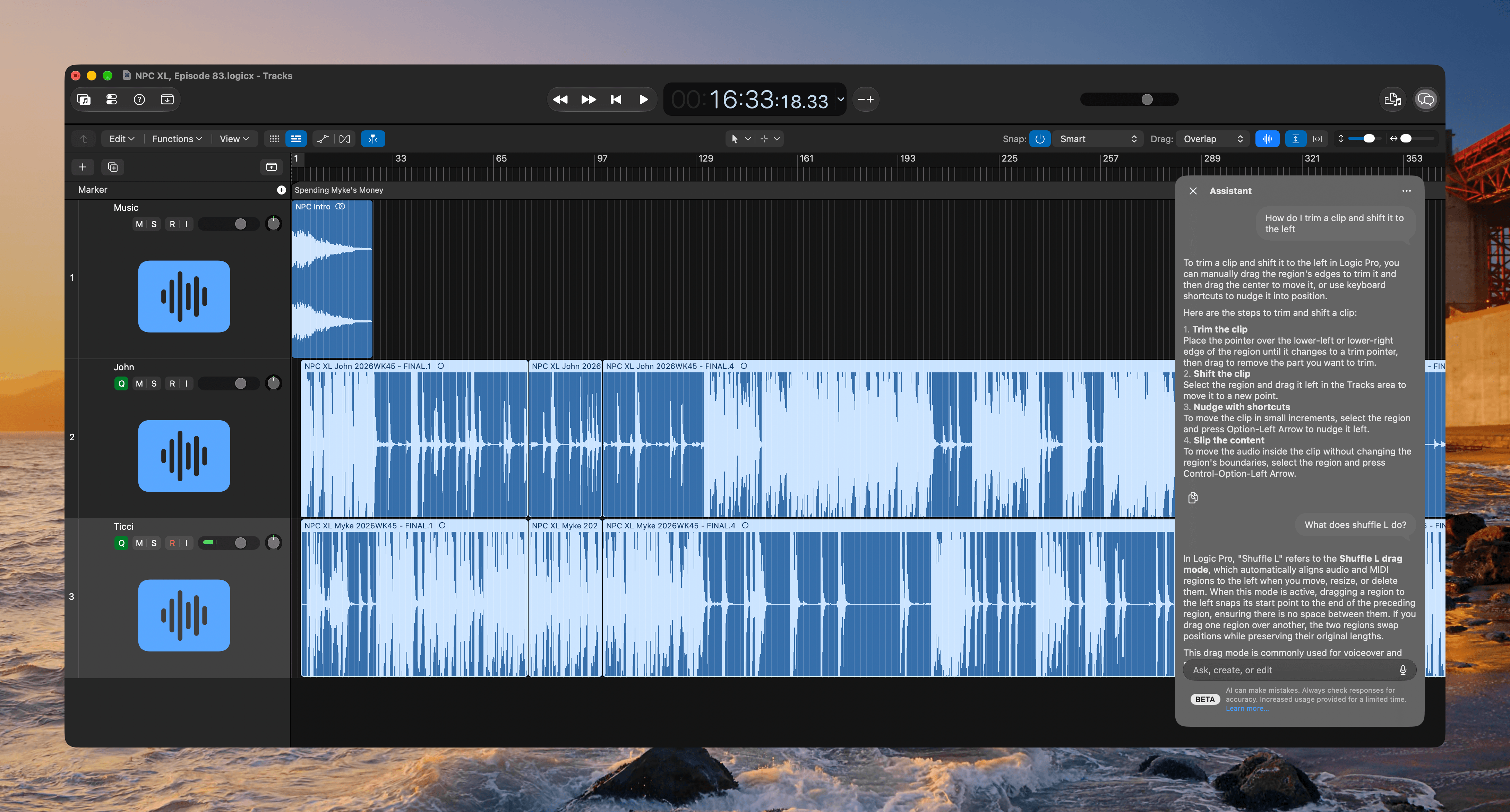
Logic Pro's Intelligent Assistant helps you learn the app.

Logic Pro’s Intelligent Assistant helps you learn the app.

One of my favorite features is Logic Pro’s new Intelligent Assistant, a new beta feature that combines models from Apple and OpenAI to help guide you through the music creation process.

Apps like Logic Pro are complex, which can make it hard to know what to do when you’re new to the app. One of the first things I did last year with Codex and Claude Code was create a skill that draws on Apple’s extensive support documentation for Logic Pro to help me navigate the app. Now that’s built right into the app itself, allowing you to pose natural language questions and get answers tailored to the app’s features.
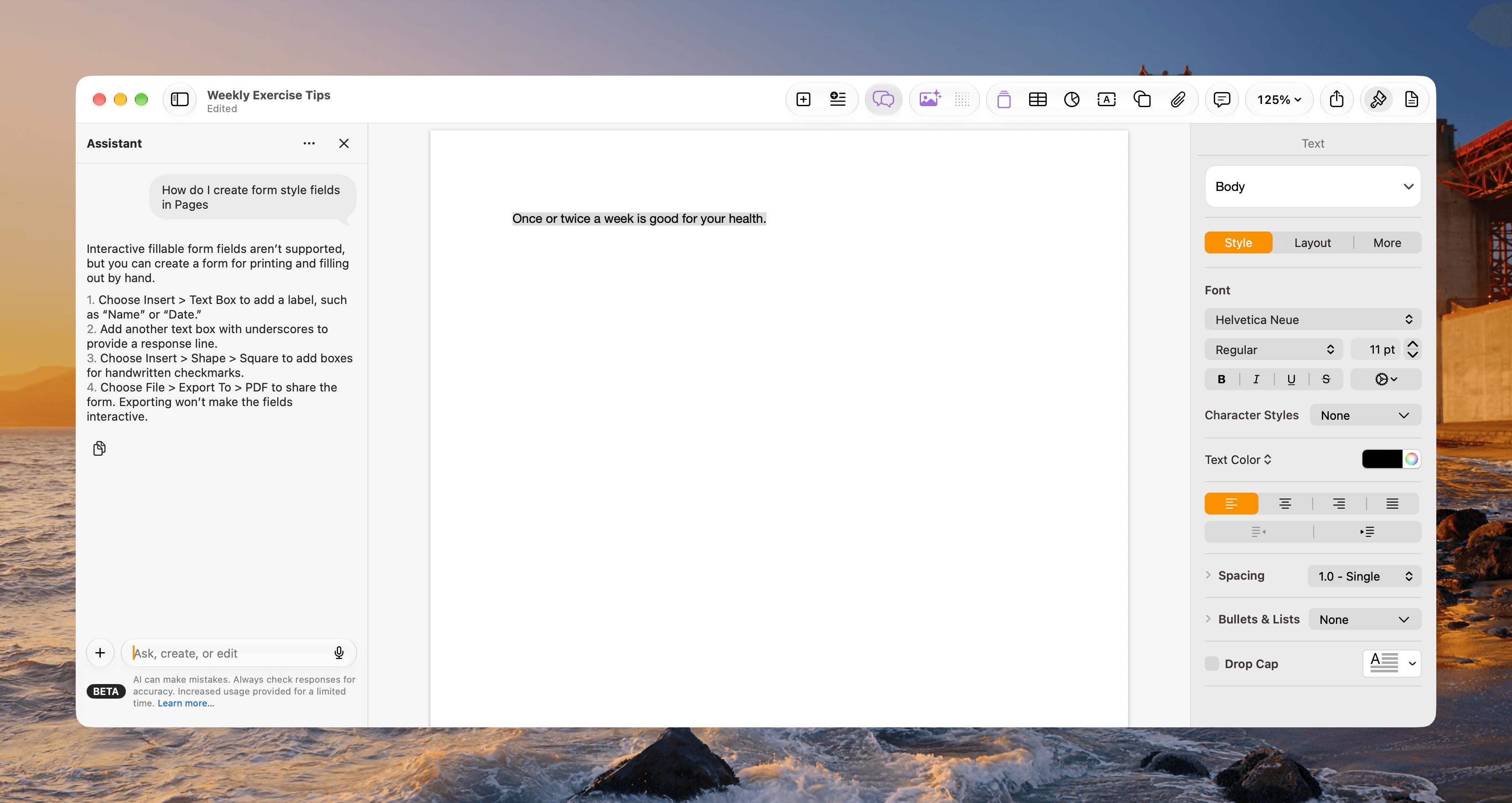
The Intelligent Assistant in Pages.

The Intelligent Assistant in Pages.

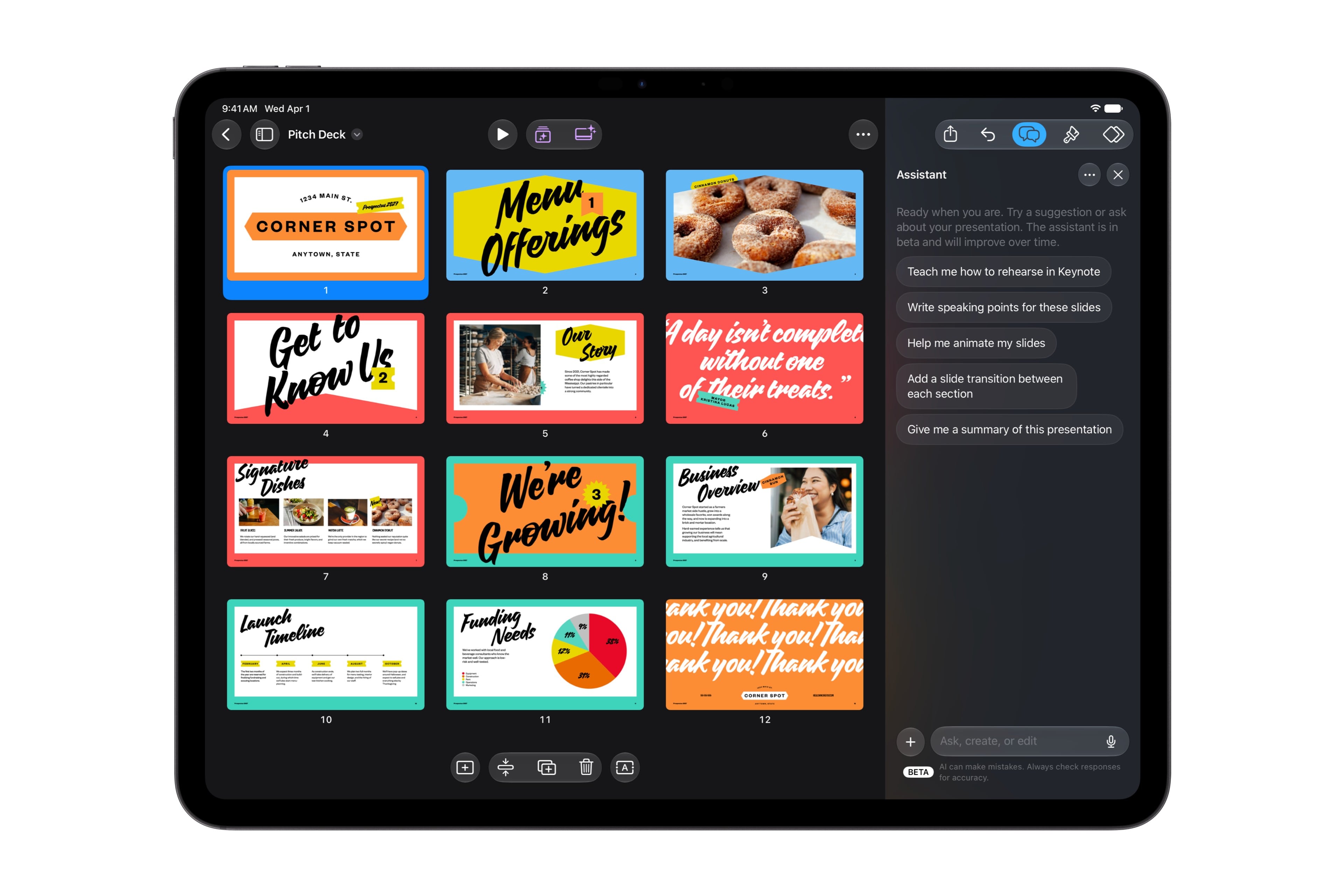
You’ll find similar Intelligent Assistants in Pages, Numbers, and Keynote. Each is great for getting help with how to use the apps, but you can ask general knowledge questions, too. When I asked the Pages Intelligent Assistant what it could tell me about Logic Pro, it went out to the web and returned with a synopsis of the app and links to Apple product pages. That makes the Intelligent Assistant an interesting option when you need to do research alongside the document you’re creating.

The More button at the top of the Intelligent Assistant lets you report a concern about the results and track your usage. Beneath your usage statistics is a note that monthly usage is increased for a limited time. I don’t believe Apple has said how long that will be and to what degree usage rates will be reduced after the introductory period, but there is already a button to buy more usage for $49.99. How much that buys you is also unclear, though I’m sure we’ll learn more when the apps are released publicly. The Intelligent Assistant can also be turned off in each app’s settings if you prefer not to use it.
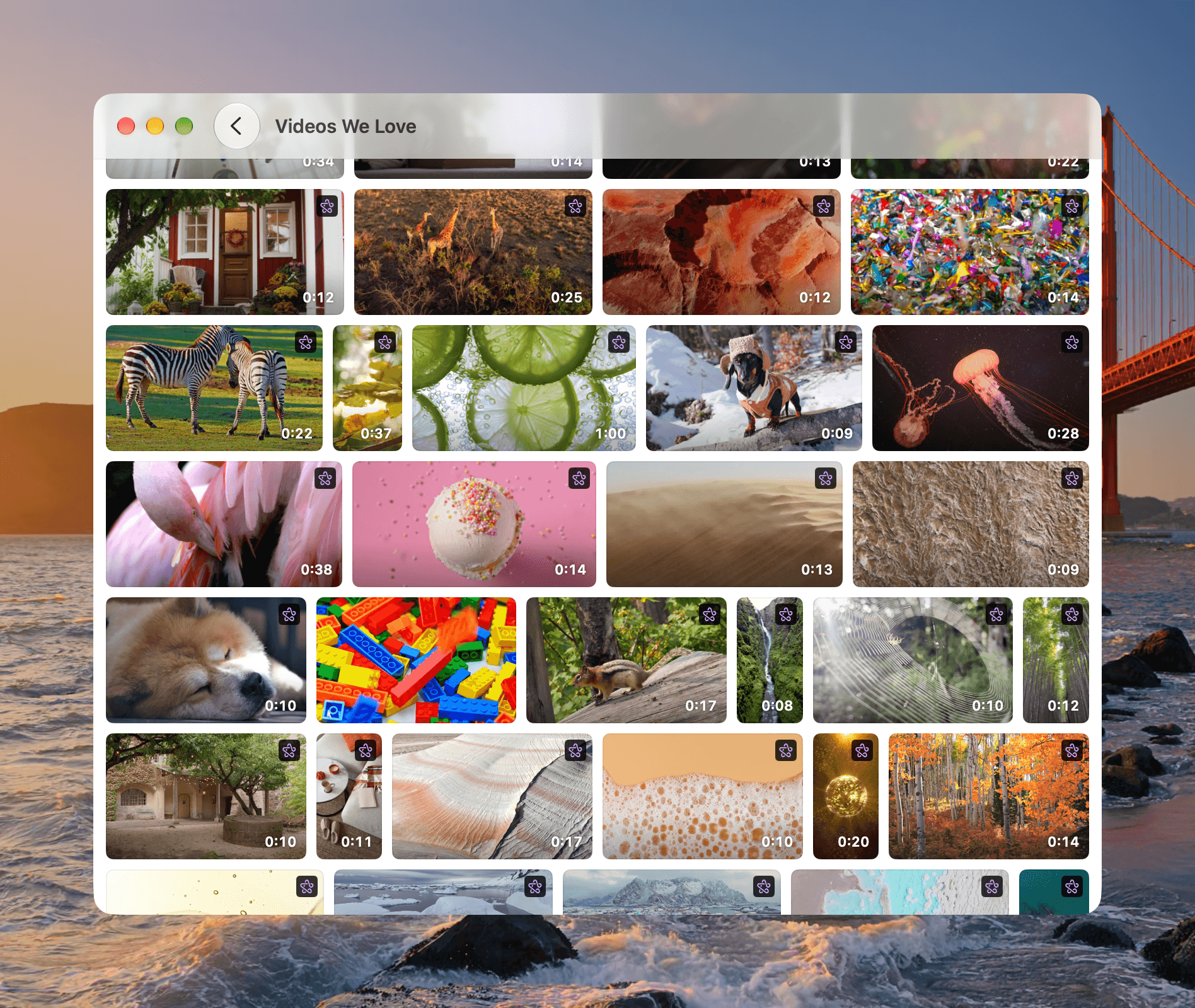
Some of the videos available now in Content Hub.

Some of the videos available now in Content Hub.

Pages, Numbers, and Keynote have added stock video content to their shared Content Hub for the first time. The collection of landscape and portrait videos that range from around eight to 34 seconds long is large and can be incorporated into your documents royalty free along with the Content Hub’s collections of photos, graphics, backgrounds, and more. Creator Studio’s collection of themes and templates for Pages, Numbers, and Keynote has been extended with these updates, too.
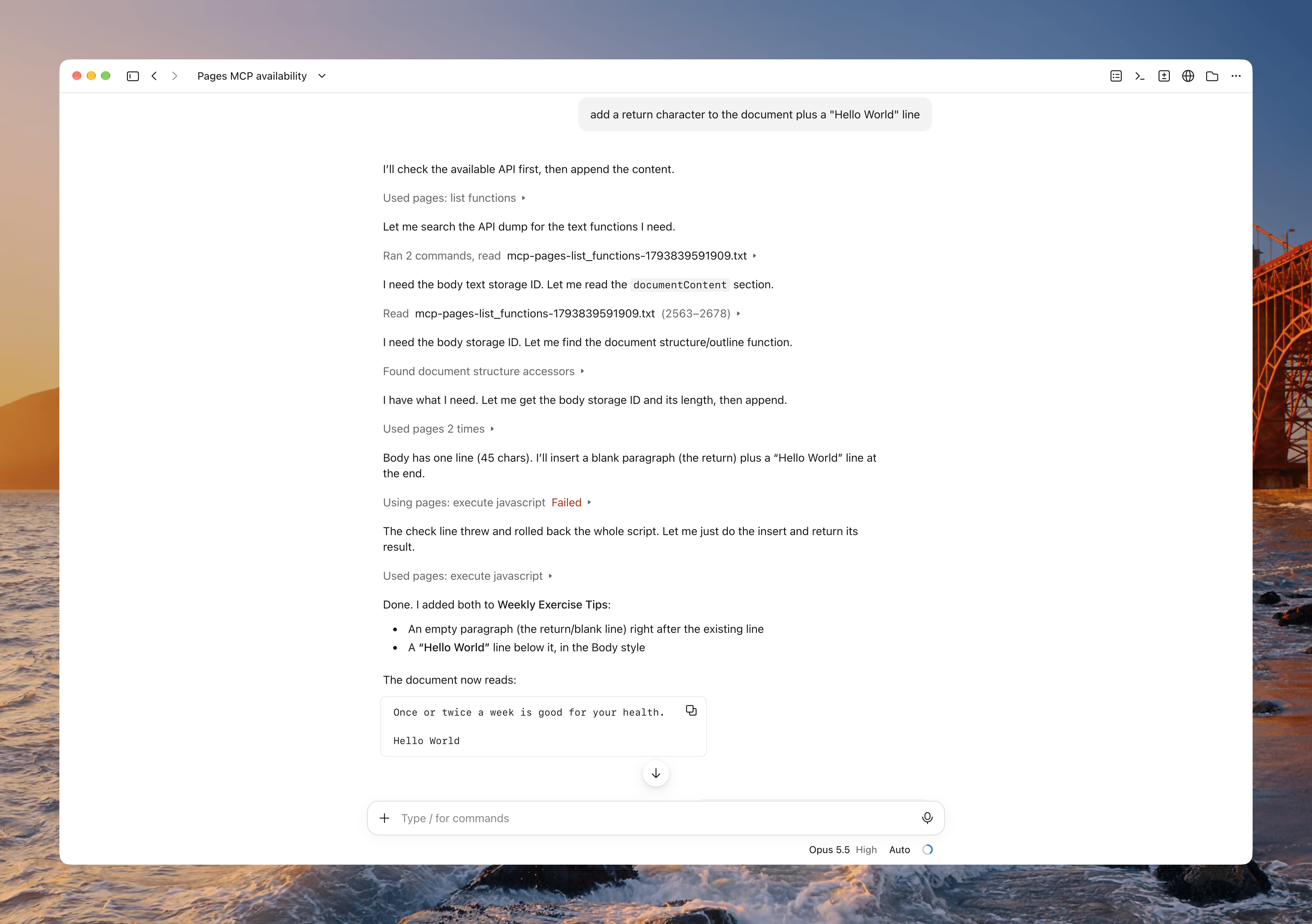
Testing Pages editing in Claude Code using MCP.

Testing Pages editing in Claude Code using MCP.

Another big addition is beta MCP support for Pages, Numbers, and Keynote. In my testing, I was impressed to find a very complete set of features accessible via MCP, which runs a local server and uses a shared JavaScript API that adds a layer that’s exclusive to each app. That means, for example, that you could set up a workflow with an agent to generate invoices in Pages, automatically populate fields in Numbers with the details, from Pages and your payment processor or bank, and then generate slides of the data to report on your revenue results periodically.

The biggest gotcha is that the app you’re controlling with an AI agent must be open and commands must identify the window you’re targeting if more than one is open. I also found the initial MCP setup a little opaque, but not insurmountable with the help of Claude, which walked me through the setup process and created a usage guide.

Keynote has also added an open file format called Keynote Interchange Format, also known as Keynote X, that’s based on a JSON-based bundle. It’s designed to be more accessible to AI agents, developers, and other tools for automation, integration with third-party tools, and other use cases.

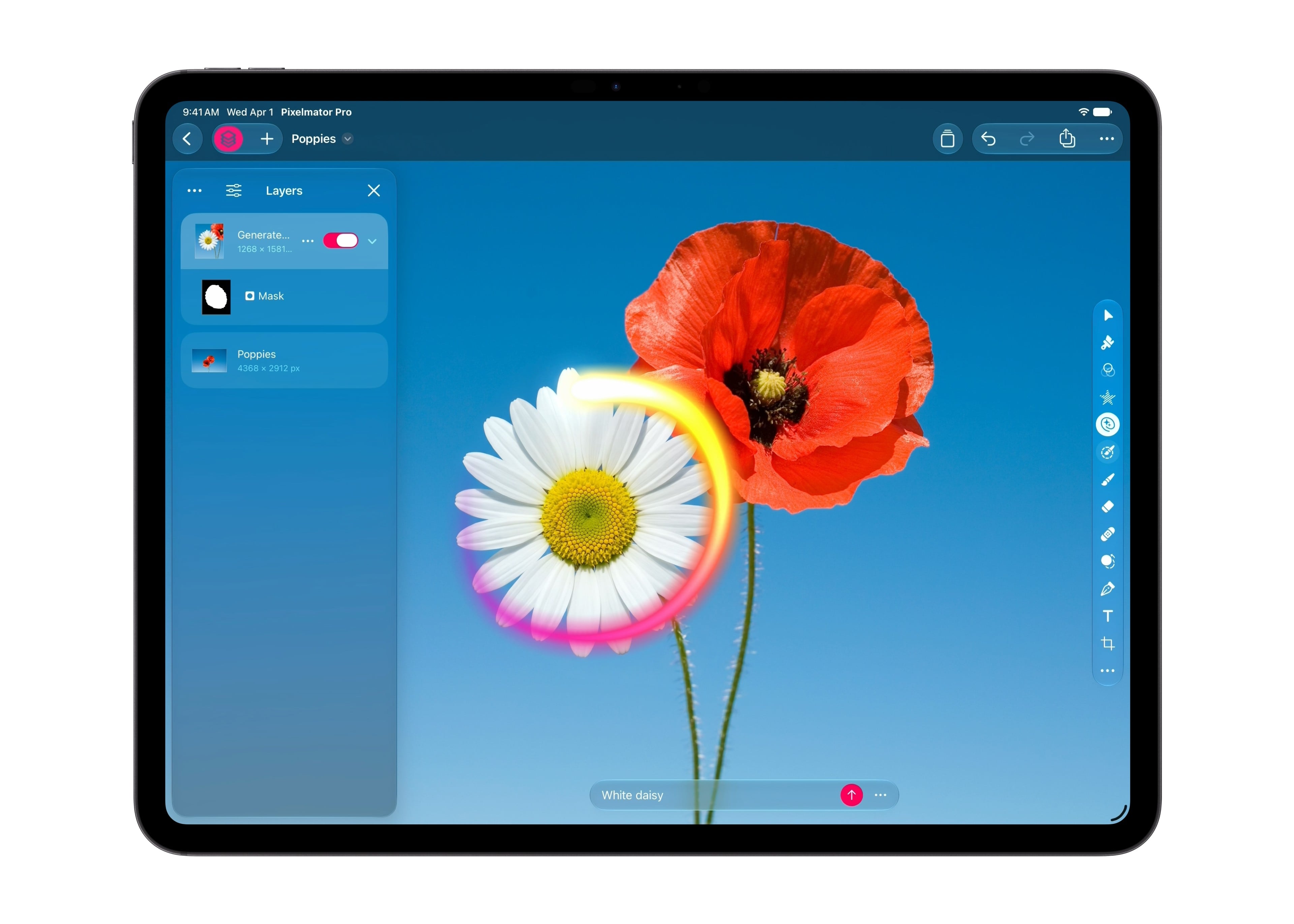
Pixelmator Pro has been updated, too. Generate Fill is a new tool that lets you select an area and describe a change. For example, you can trace the outline of a person’s shirt and change its color, preserving the shadows and lighting.
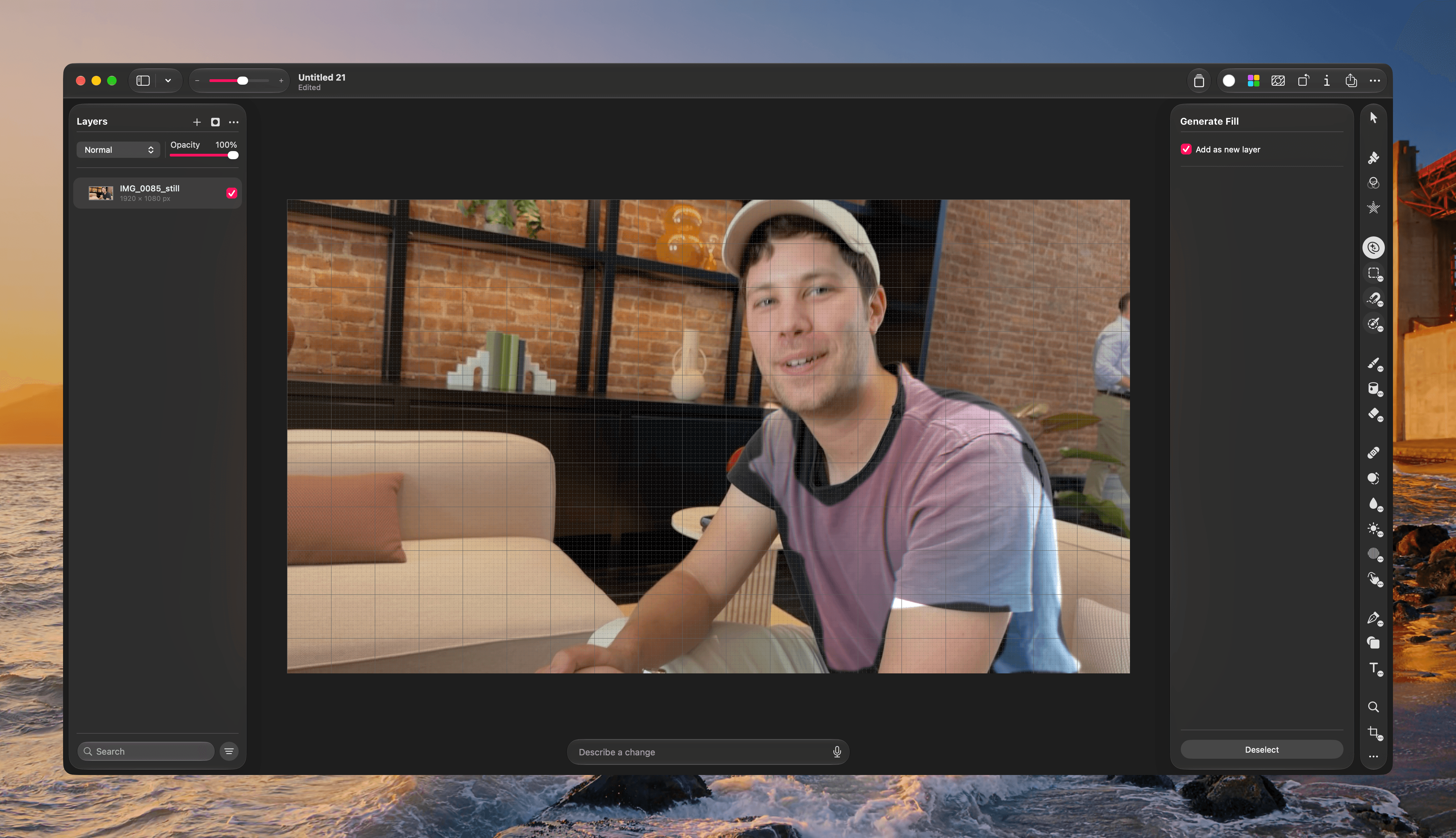
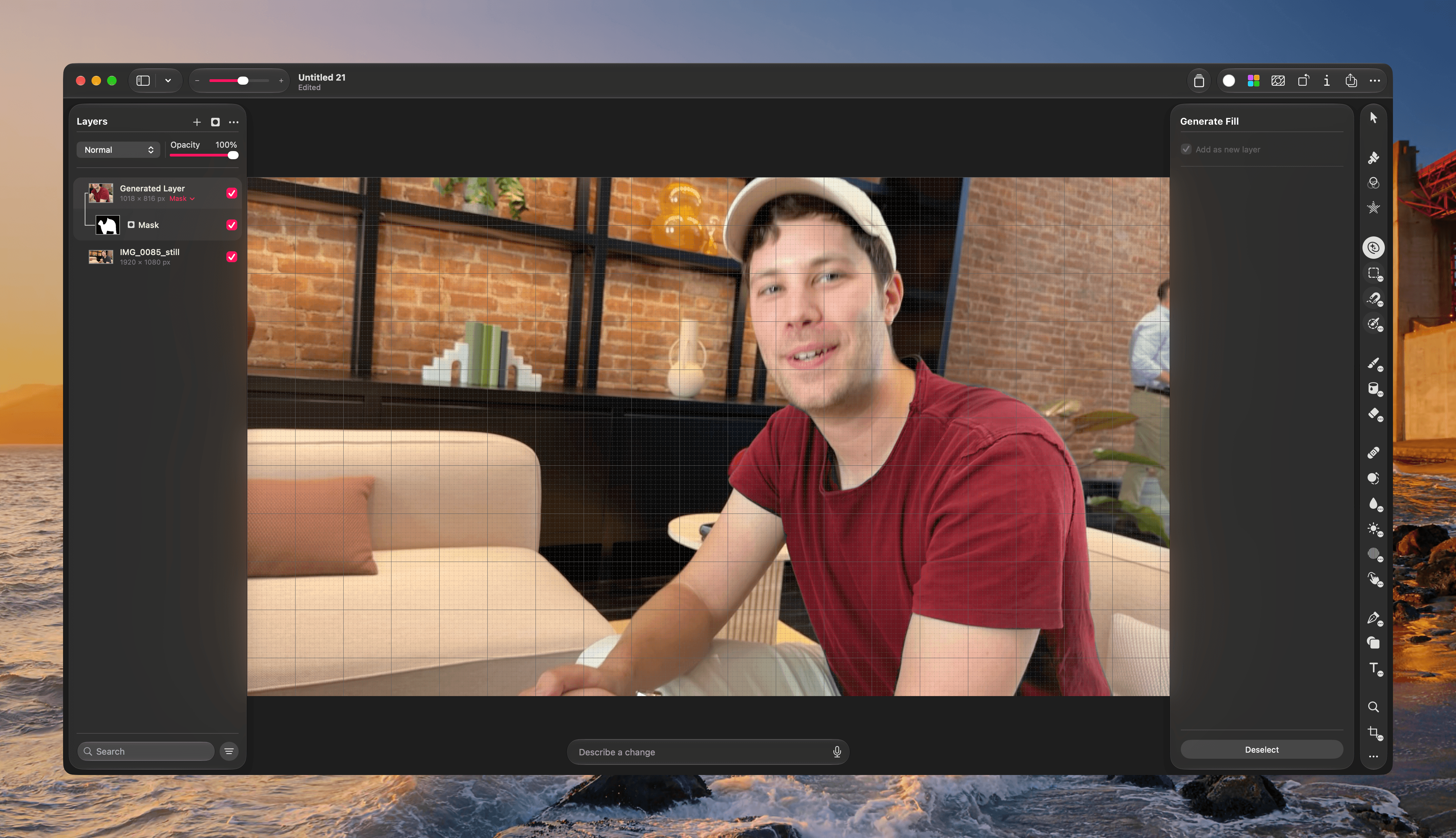
Original.

Original.

Edited with Generative Fill.

Edited with Generative Fill.

In my tests, where I didn’t attempt to be super precise with my selection, it did a good, though imperfect, job changing a shirt from black to red. More impressive was how it preserved the original texture and look of the shirt. Plus, the results can be tweaked to refine some of the imperfections I saw in my testing.

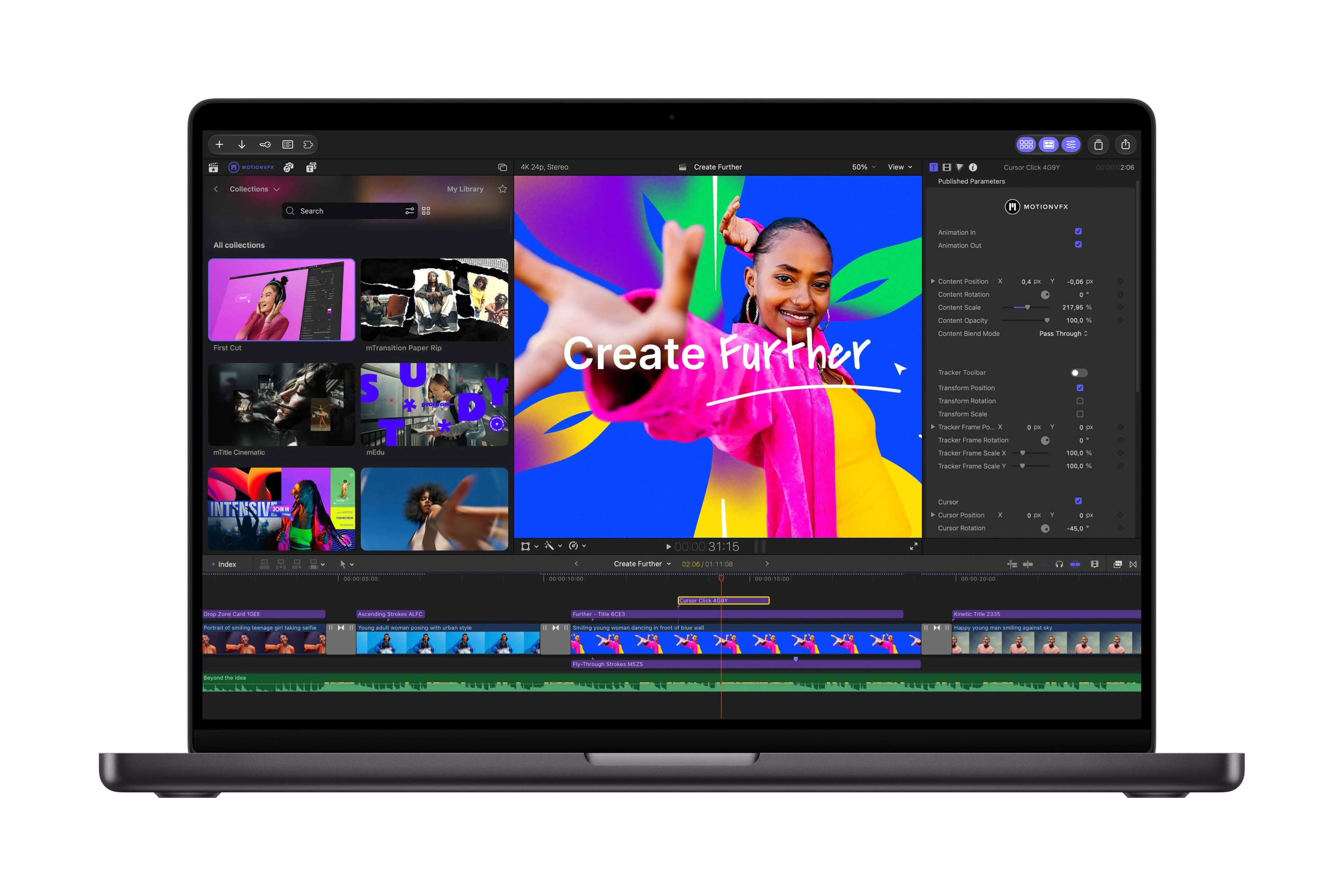
One of the biggest changes coming to Creator Studio is one I haven’t had a chance to try yet. Final Cut Pro is adding MotionVFX, image generation, editing inside Pixelmator Pro, keyframing improvements, more transcription languages, the ability to disconnect timeline clips, and more. For more on those changes, which Apple has said will be released later this month, be sure to read my story from last week.


Overall, I’m impressed with the updates to Creator Studio. It’s good to see the collection of apps updated already with meaningful additions that fill many of the gaps that existed. I hope Apple keeps up the pace.

I’m also glad to see Apple embracing MCP and an open format for Keynote. As AI agent use has risen, I’ve felt the pull of web apps that have extensive APIs and their own MCP integrations, even though I prefer Apple’s Creator Studio apps. As someone who already uses Logic Pro and Pixelmator Pro extensively and Final Cut Pro to a lesser extent, those types of integrations will make it easier to stick with the native apps I like best.
Apple Creator Studio to Add MotionVFX, AI Assistants, and MCP Support in November

Source: Apple.

Source: Apple.

In November, Apple Creator Studio will get its biggest update since its release in January. There’s a lot here, so let’s break it down by app.

Final Cut Pro and Motion

Source: Apple.

Source: Apple.

Back in March, Apple acquired MotionVFX, a highly regarded plug-in maker for Final Cut Pro. The upcoming update to Final Cut Pro will bring MotionVFX’s tools directly into the app for the first time. According to Apple’s press release, the update adds thousands of new elements to Final Cut Pro “including templates with unique themes, stylish graphics, titles, and transitions, as well as tools for rotoscoping, tracking, and color grading.” That will add a lot of value to Final Cut Pro that creators historically paid for separately. The update also adds new content to the suite’s Content Hub like stock videos, images, and backgrounds.

Final Cut Pro will also be integrated more tightly with Pixelmator Pro, allowing images in a video timeline to be edited in Pixelmator Pro without exporting and reimporting the image. The update also includes finer control over animation and 23 new transcription languages for captioning video.

Motion will also gain MotionVFX plug-ins, integration with Pixelmator Pro, and more.

Pixelmator Pro

Source: Apple.

Source: Apple.

A new Generate Fill feature will be added to Pixelmator Pro. Users circle where they want an edit or use one of the app’s selection tools, describe it, and the app generates the edit. Generated elements will also work with the existing Super Resolution tool and can be merged into a layer or be inserted as a separate layer.

Logic Pro

Source: Apple.

Source: Apple.

Logic Pro is getting a Liquid Glass redesign, which looks great in Apple’s press release images. For musicians, there will be a new beta chatbot assistant on the Mac that uses Apple and OpenAI models. The app’s Browser is being updated on the Mac, too. It will consolidate loops, instruments, and more, organizing them using music understanding to make finding what you want easier. In addition, Logic’s Stem Splitter will gain the ability to separate drums, and a new Producer Pack from Grammy-winning salsa producer Sergio George is coming too.

Keynote, Pages, and Numbers

Source: Apple.

Source: Apple.

All three productivity tools will add a beta AI assistant powered by Apple and OpenAI models. Assistants understand the context of documents, helping build slides, write documents, and refine spreadsheets. The apps will also add MCP support on the Mac, allowing users to connect them to external AI agents for the first time. Content Hub will also add stock video footage that can be used in Keynote, Pages, and Numbers, and Keynote will gain a new Keynote Interchange Format that is based on JSON, which should make it more accessible to AI workflows.

Freeform

Freeform will add text styles that can be applied in one step across multiple boards, along with custom and preset background colors. Then in December, Freeform will integrate with Pixelmator Pro for image editing.


I’m glad to see MotionVFX coming to Creator Studio. I also appreciate that an MCP server will be added to Keynote, Pages, and Numbers, something that is sorely missing compared to similar apps from companies like Google. I’m intrigued by the AI assistants coming to Logic Pro, Keynote, Pages, and Numbers, too. I’ve used Codex a lot to help me learn new tricks in those apps and having an assistant like Codex built in has the potential to reduce the distraction of switching between apps.

Existing subscribers will have access to these new features beginning in November. Creator Studio, which supports Family Sharing, is $12.99/month or $129/year, with a one-month free trial or three months free when you buy a new Mac or qualifying iPad. College students and educators can get it for $2.99/month or $29.99/year.


WWDC 2026: Apple Publishes Keynote Video

Source: Apple.

Source: Apple.

As usual, this year’s WWDC was a packed event. Apple introduced Siri AI, Apple Intelligence features powered by a new architecture, quality-of-life platform improvements, safety features for children, and numerous other changes across its OSes.

If you missed the event or want to revisit any of the announcements, you can now do so on Apple’s Events site (where it is also available in ASL) or on YouTube. We’ll be posting coverage of all the new features and more in the coming hours and days, so stay tuned to MacStories.

Read more


Creator Studio Review: Redefining Pro for the Modern Era

Starting today, Apple is offering a subscription bundle of its creative apps called Creator Studio. Some of what’s included is exclusive to the subscription package, while other parts of it remain available à la carte. It’s a lot to absorb, and I’ll get to all the details in due course.

However, what’s most exciting to me is the fact that Apple is clearly repositioning these apps to appeal to a broader cross-section of creatives. Apps like Final Cut Pro and Logic Pro are no longer just for Hollywood and music studios. By filling out the iPad lineup and adding Pixelmator Pro along with enhanced versions of their productivity apps, Apple has taken the first steps toward realigning its apps with what it means to be a creative professional in 2026.

This transition isn’t the sort of thing that happens overnight, which is why it’s easy to spot the gaps in Creator Studio’s offerings. I ran into a couple of bugs along the way, too. However, by and large, I think the bundle of apps hits the right notes and is heading in the right direction. Let’s take a closer look.

Read more


WWDC 2025: Apple Publishes Keynote Video

This year’s WWDC was a packed event by most metrics. Apple introduced a new visual style across all of its platforms called Liquid Glass. Not only that, but the company also announced significant multitasking updates to iPadOS, powerful features for Spotlight on macOS, and numerous other upgrades across iOS, iPadOS, macOS, watchOS, visionOS, and tvOS.

If you missed the event or want to revisit any of the announcements, you can now do so on Apple’s Events site (where it’s also available in ASL) or on YouTube. We’ll be posting coverage of all the new features and more in the coming hours and days, so stay tuned to MacStories.

The company has put out some other videos highlight today’s announcements as well:


You can follow all of our WWDC coverage through our WWDC 2025 hub or subscribe to the dedicated WWDC 2025 RSS feed.


Apple Updates Pages with Screen View, Numbers with Pivot Tables, Keynote with Live Video, and More

Source: Apple.

Source: Apple.

Apple has updated its iWork suite of productivity apps consisting of Pages, Numbers, and Keynote with versions for iOS and iPadOS 15 and macOS Monterey.

Pages

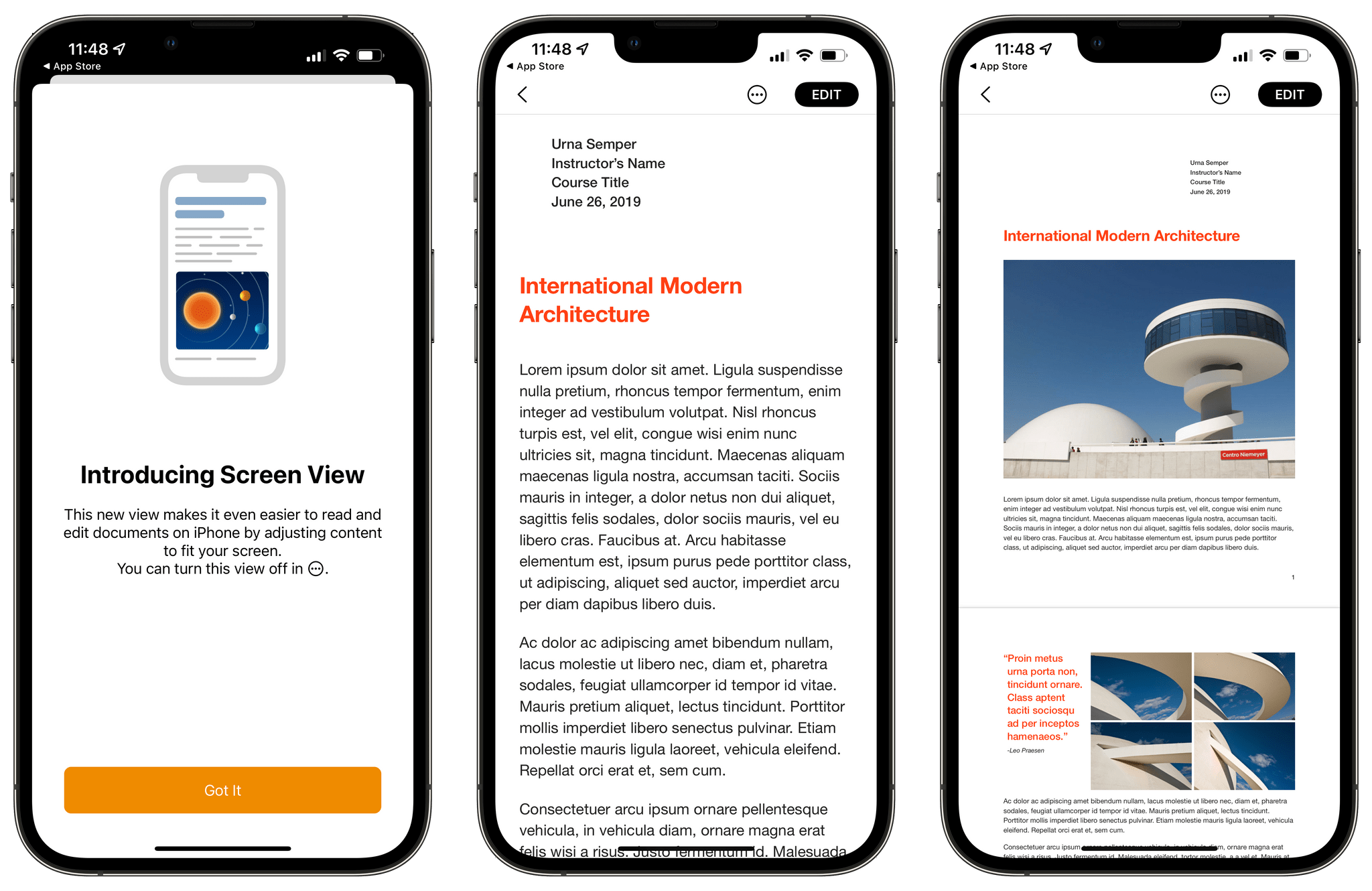
Quick View (center) focuses on the text of a document to make it easier to edit than the preview, which includes images (right).

Quick View (center) focuses on the text of a document to make it easier to edit than the preview, which includes images (right).

On the iPhone, Pages supports a new Screen View that makes editing on the smaller screen easier. As you can see from the screenshot of one of Apple’s built-in templates, Screen View dispenses with the images allowing the user to focus on the text. The iPhone also has a Quick Format bar that lets you change things like paragraph styles, text formatting, alignment, and list styles. The iPhone version of Pages supports dragging and dropping images and text from other apps into Pages, too, which is a new feature in iOS 15. Graph values can be played as audio tones for visually impaired iOS and iPadOS users too.

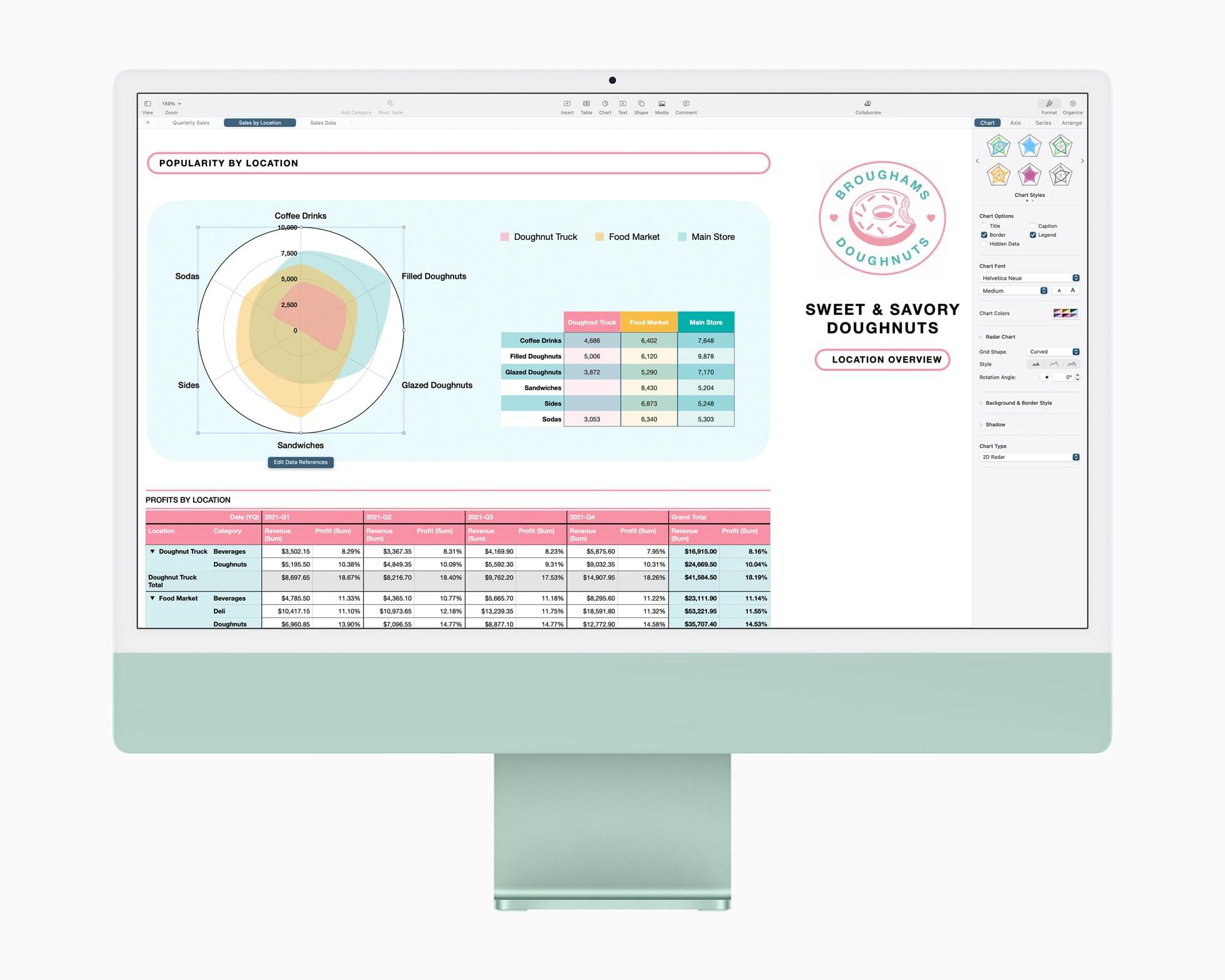
On all platforms, Pages has gained improved publishing with two-page spreads, optimized images, and versioning, which should fill some of the gaps left by the fact that iBooks Author has been discontinued. Selected text can be translated into 11 languages, participants in a shared Pages document can add new collaborators for the first time, and radar charts comparing multiple variables have all been added to Pages on all platforms too.

Exclusive to the Mac, Pages documents can now be created from the app’s Dock icon.

Numbers

Time to pivot. Source: Apple.

Time to pivot. Source: Apple.

One of the things I’ve heard many Excel users complain about over the years is that Numbers didn’t include pivot tables. Now it does on all platforms, which is great if you need that sort of thing. Numbers’ format is compatible with Excel so you can import and export your pivot tables between the two apps too.

Like Pages, Numbers has added support for radar charts for visualizing multiple variables. Quick Filters have been redesigned to simplify showing and hiding rows that match certain values. There’s also a filter for finding duplicate entries and unique values in your data. Like Pages, participants in a shared Numbers spreadsheet can add new collaborators, and selected text can be translated into 11 languages.

On the iPhone, Numbers has added audio graphs for the visually impaired. Also, on the Mac, a new Numbers document can be created from the app’s Dock icon.

Keynote

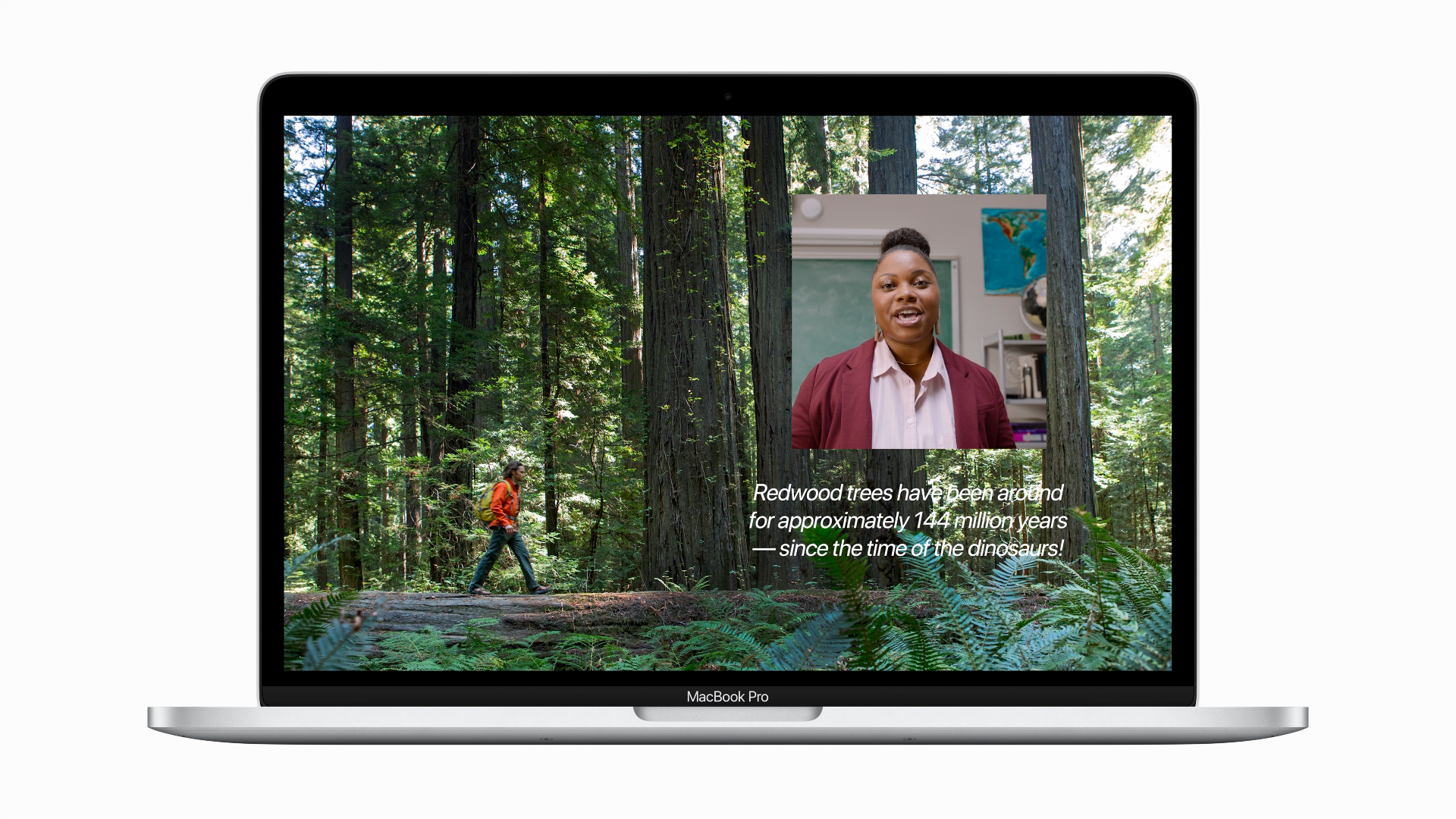
Keynote presentations can be combined with live video. Source: Apple

Keynote presentations can be combined with live video. Source: Apple

Keynote presentations can include live video across all of Apple’s platforms, using the camera in your Mac to display video of you alongside your slides. On the Mac, there’s also support for multiple cameras for different viewing angles and adding live feeds of iPhone and iPad screens. If you’re doing a presentation with someone else, the Keynote update lets each participant take turns controlling the presentation. There are also new slide controls for navigating slides, controlling video sources, and working with other presenters. Like the other iWork apps, Keynote also supports radar charts, translation of selected text into 11 languages, and the ability of participants of shared presentations to invite new collaborators.

On the iPhone, Keynote supports iOS 15’s ability to drag and drop text and images between apps as well as audio graphs for the visually impaired. On the Mac, you can create a new presentation from the app’s Dock icon too.


These are bigger updates to the iWork apps than we’ve seen in a while, and especially nice to see that most of the new features are available across all of Apple’s platforms. The live video and screen sharing features of Keynote are the sort of thing that I expect a lot of people will find useful, especially if presenting remotely. Pivot tables aren’t something I expect to use, but they add a new level of sophisticated data analysis that wasn’t possible with Numbers before. Also, with improved publishing tools and a better iPhone user experience, Pages is far more useful for creating eBooks.


Pages, Numbers, and Keynote Add Scribble Support, and Other Features

Apple has updated Pages, Numbers, and Keynote with Scribble support, new editable shapes, along with a variety of app-specific updates.

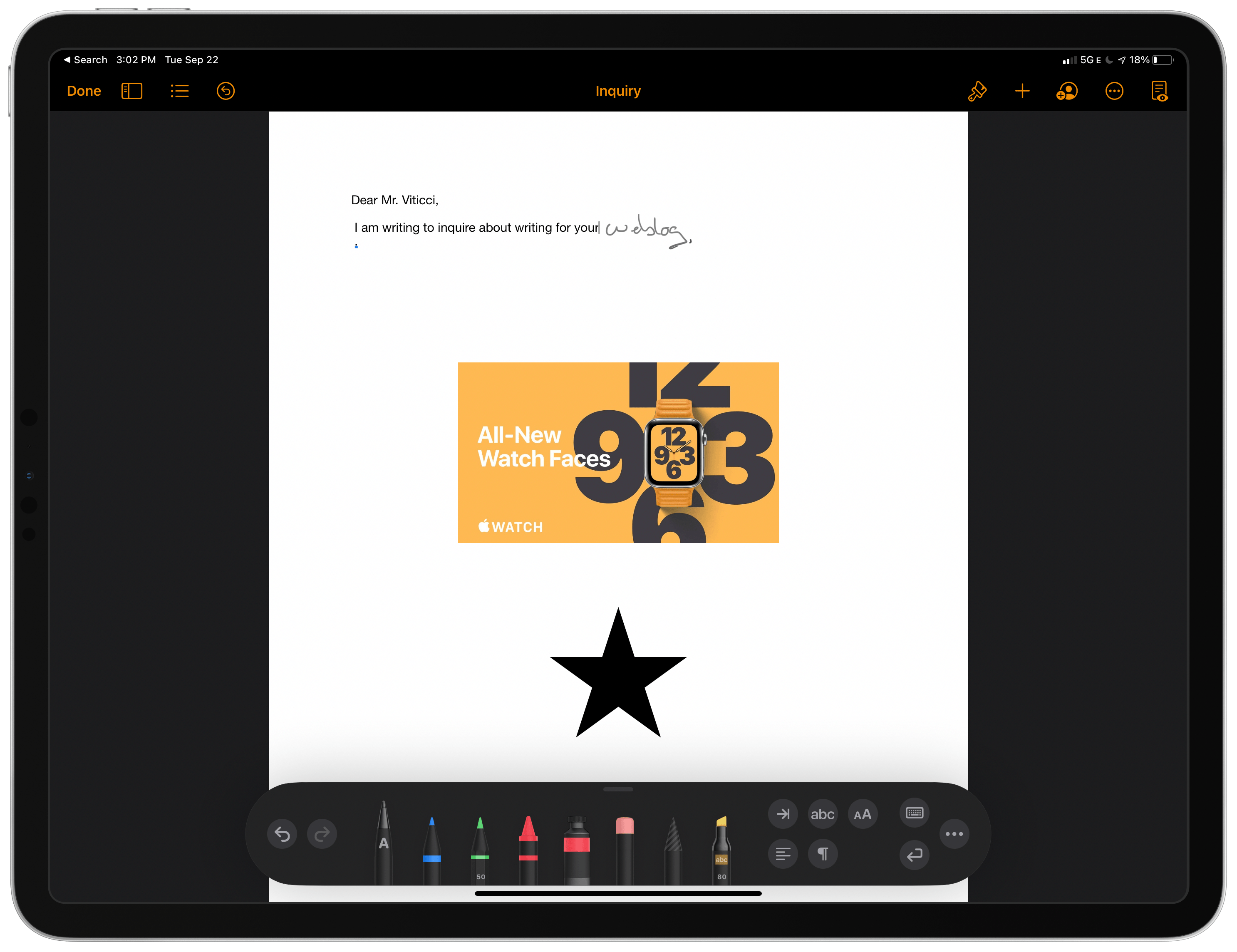
Scribble is the new iPadOS 14 feature that allows you to use the Apple Pencil to handwrite text into a text field that the app then converts into text. The feature also allows you to do things like scratch out text with the Pencil to erase it.

On the iPad, Pages, Numbers, and Keynote now all support the feature using a custom version of the PencilKit markup tools found in other apps like Notes and some third-party apps. The first tool in the palette, which is marked with a capital ‘A,’ is the Scribble tool. Selecting it allows you to handwrite in any of the three iWork apps, which then convert your handwriting into text. The other tools include pens for drawing, one for creating color-filled shapes, and selecting images. Pages’ toolset includes an annotation tool too.

A particularly nice touch included in Pages that Numbers or Keynote doesn’t have is a message that appears in the body of your document explaining what the selected tool does. Also, one Scribble feature that doesn’t work in the iWork suite is the ability to create perfect shapes by pausing before lifting the Pencil after hand drawing one.

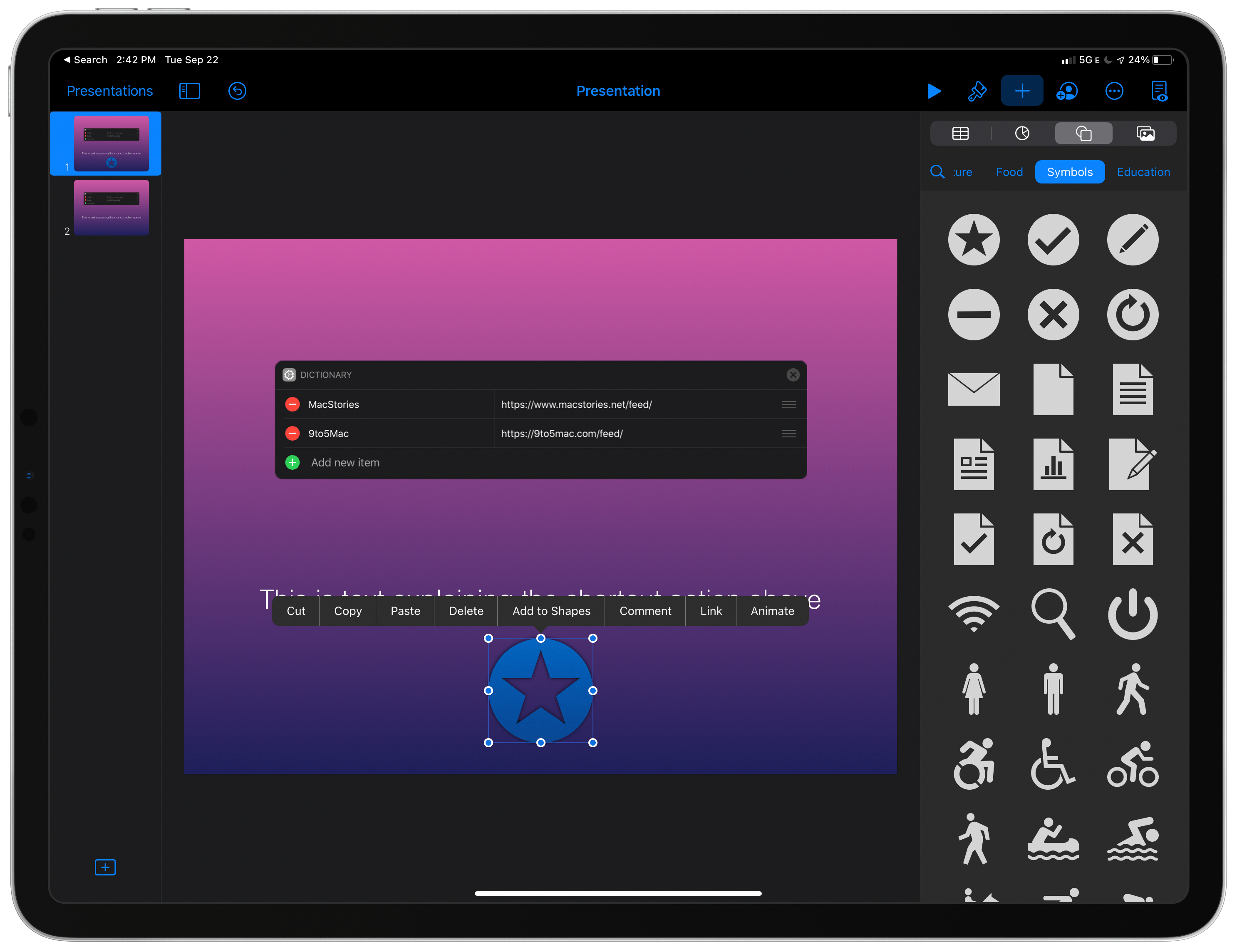
Keynote and the other iWork apps support new editable shapes.

Keynote and the other iWork apps support new editable shapes.

All three apps also come with new editable shapes and the updated iOS and iPadOS image and video picker that incorporate search functionality and album support. I’m delighted that the photo and video picker has been updated and gained new ways to find the images for which you’re looking. The picker hasn’t changed in a long time, and the latest version is light years better than before.

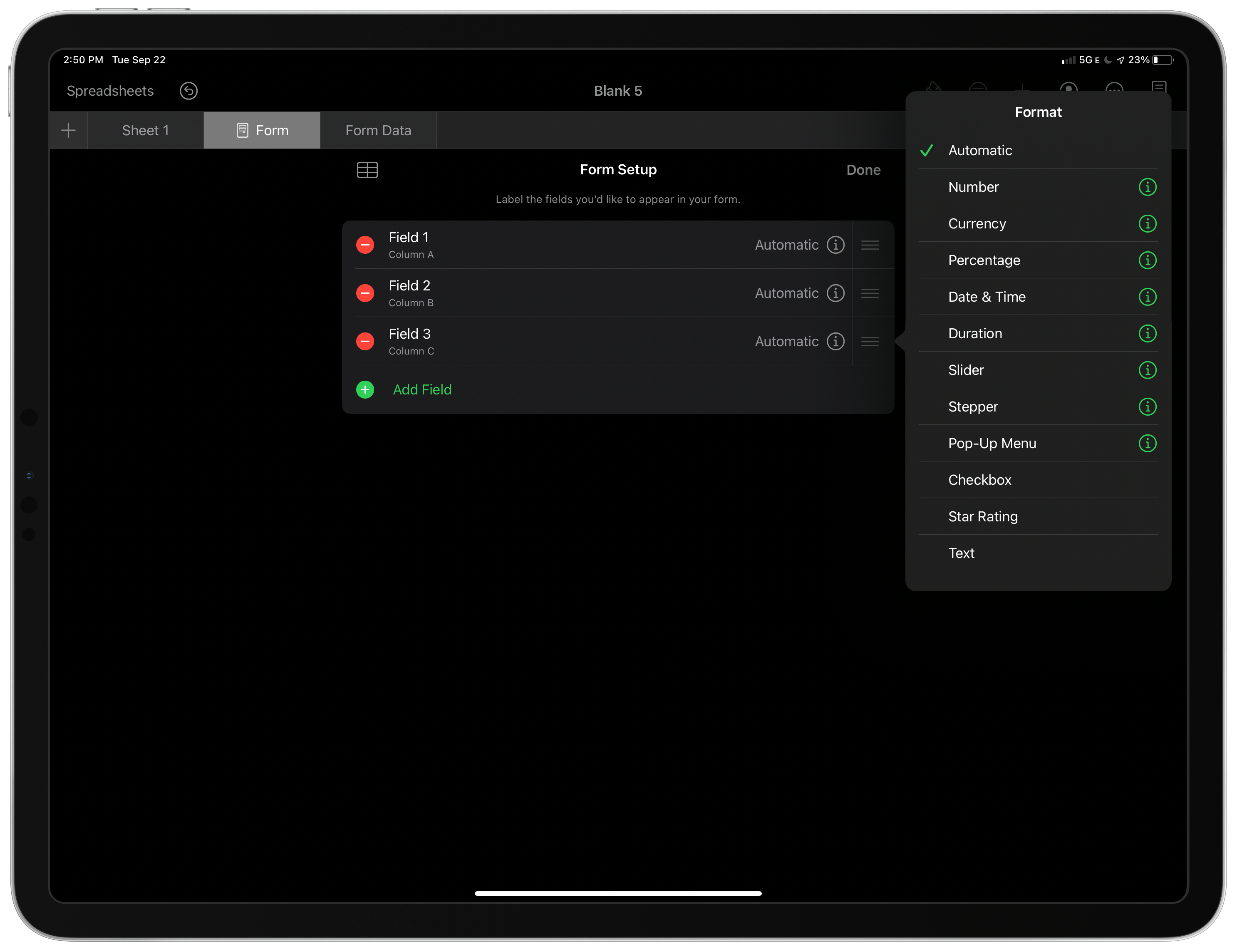
I'm going to use the new customizable forms in Numbers a lot.

I’m going to use the new customizable forms in Numbers a lot.

Each app also gained some features unique to it. Pages adds new report templates. Numbers has made it easier to create and customize forms, which are fast ways to enter data into a table. Keynote added the most features, gaining an outline view for quickly editing the content of slides without distraction, the ability to embed YouTube and Vimeo videos, new movie export options with more formats and frame rates, and the ability to Option-drag objects to duplicate them.

I haven’t used Scribble a lot yet, but it’s nice to see it implemented in the iWork apps. All three apps combine text with other media, so it’s only natural to use the Pencil for text input alongside drawing and other uses. If you haven’t tried Pages, Numbers, or Keynote in a while, especially on the iPad, they’re worth another look. All three apps support deep, sophisticated functionality that rivals their desktop competition.


Pages, Numbers, and Keynote for the Mac and iOS Updated with Styling, Apple Pencil, and Other Features

All three of the apps in Apple’s iWork productivity suite received a substantial update this week. Changes varied by app and across platforms, but the lion’s share of the revisions improved the apps’ flexibility, text styling, and image handling capabilities, and, on iOS, Pencil integration.

The Mac versions of Pages, Numbers, and Keynote and their iOS counterparts now allow text to be styled with gradients and images. There are also new outline styles. Images, shapes, and equations can be placed inline in text boxes, which allows them to move with the text box when it’s moved, and the apps use face detection when photos are added to a document to determine where they should go intelligently.

In Pages, Numbers, and Keynote for iOS, a double-tap of the Apple Pencil toggles it between two modes: scrolling and selection, and drawing. The apps’ dictionaries can also be modified now using a new ‘Learn Spelling’ function. Altering the size and color of bullets, adding custom bullets, and changing indentation levels for bulleted lists is available in all three apps as is changing the borders of cells in tables. Finally, all three apps have new chart editing functionality for styling series, adjusting the spacing between columns, and adding trend lines, among other things.

Most of the remaining changes are to Pages and Numbers. Both iOS and Mac versions of Pages and Numbers have added the ability to link text to other pages of a Pages document or sheets in Numbers. Also, on both platforms, Pages can copy and paste pages of a document or sections of one between two different documents and reapply a master page to return a document to its default style state. There’s an English-language template for creating novels in Pages on iOS and the Mac too.

Finally, both versions of Numbers use a new, more powerful 128-bit calculation engine in its spreadsheets and add the ability to insert rows into filtered tables.

It’s great to see all versions of the iWork apps getting an update. I don’t use Pages or Keynote regularly, but Numbers has become an app that I rely on most days, and I appreciate the fact that Apple has kept the functionality of both the Mac and iOS versions close to each other even if it means maintaining two separate sets of code.