Posts tagged with "iOS"

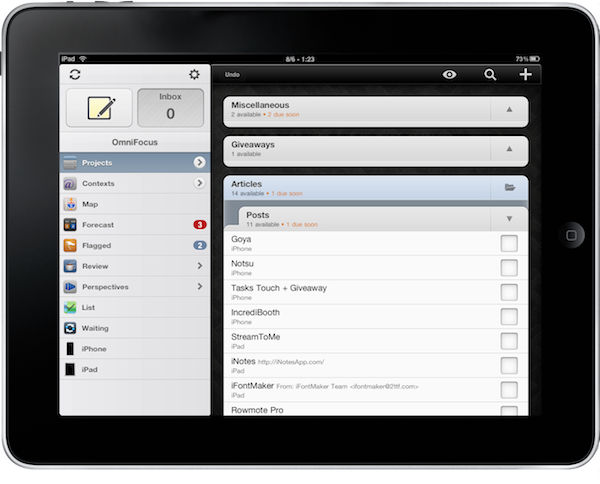
OmniFocus for iPad Updated for iOS 4.2 Multitasking

OmniFocus, my GTD app of choice on OS X and iOS, is now compatible with multitasking on the iPad. Although iOS 4.2 isn’t officially out and it looks like it won’t be at least until sometime next week, users running the latest iOS 4.2 GM can enjoy fast app switching, background sync and local notifications in OmniFocus for iPad.

The latest 1.2 update, released a few minutes ago in iTunes, adds a bunch of new features and lots of improvements, too. The changelog is really huge, so I suggest you go check it out below. Notable new features include the possibility to receive local notifications without the need of a sync server, seven new languages, a revamped editing panel and more geolocation functionalities.

Seriously, great update. The one users already on iOS 4.2 have been waiting for. Go get it. Then read why we love OmniFocus. Read more


From Apple’s Newton to Evernote

From Apple’s Newton to Evernote

The company was founded by Stepan Pachikov, who was kind of this brilliant mad scientist from Russia. He and his team were behind a lot of the pioneering work that went into the Apple Newton, fifteen years ago. The handwriting recognition engine was built by these guys. They had a company called ParaGraph, which Apple licensed.
So the original idea really started in the Newton days.

Evernote for iOS also got a nice update today with iOS 4.2 support, audio note improvements and printing.

Permalink

Apple Releases New iOS 4.2 GM Build For iPad (8C134b)

As we previously reported, Apple just released a second GM build of iOS 4.2 for iPad to deal with the WiFi issues. It’s available in the iOS Developer Center. Build number is 8C134b, and it’s a 551MB download.

This build is meant to address the WiFi issues experienced by several users. From what we’re hearing, Apple wants to get testing done as fast as possible – iOS 4.2 might drop next week.

Apple didn’t change the date of the original GM build, you’ll still see “November 1” on the dev center. The iPad build, however, is new.


AirPlay Disappears From iOS 4.2 GM on iPhone 3G

As noted by 9to5mac last night, AirPlay went missing on the iOS 4.2 GM for iPhone 3G. The feature was there in the previous betas and was working fine, allowing users to stream audio (no video to Apple TV yet, it needs an update) to AirPlay-compatible devices.

Apple apparently removed the feature when releasing the GM build on November 1st:

After speaking to multiple developers and users testing out the iOS 4.2 betas, we have determined that AirPlay did in fact work on the iPhone 3G at one point, meaning the AirPlay functionality was definitely removed from Apple’s two-year-old iPhone at its GM stage. The reason this is an issue is because Apple states, even on their own website, that AirPlay is supported on ALL iOS 4 devices.

Read more


iOS 4.2 “Delayed” Due to iPad WiFi Issues, New GM Build Coming [Updated]

Two days ago we reported Mac OS X 10.6.5 and iTunes 10.1 were set to come out on Wednesday, with iOS 4.2 for iPhone, iPad and iPod Touch to follow on Friday Nov. 12th – tomorrow. Mac OS X 10.6.5 indeed came out, without AirPrint functionality for shared printers as previously reported as well. iTunes 10.1 didn’t come out.

Basing on the information we got from a reliable source, it appears that iOS 4.2 won’t come out on Nov. 12th due to last-minute WiFi connection issues experienced by many users running the GM build on the iPad. The issues have been widely documented on MacRumors forums (here and here), Twitter and Apple’s own discussion boards, both by users and developers. You can check out a video of the bug in action below. Read more


Mac OS X 10.6.5 and AirPrint: Not Found

Just like we previously reported, it looks like Apple removed AirPrint support from 10.6.5. Available to developers in previous beta versions, the feature allowed iPad, iPhone and iPod Touch users on iOS 4.2 to print documents to printers shared via Mac OS X or Windows.

It turns out AirPrint now only works with supported HP printers, as noted by Macworld and Ars Technica. We’re also getting reports from readers who have already installed 10.6.5 (which came out a few minutes ago) confirming that, indeed, AirPrint to shared printers from iOS 4.2 GM isn’t working. Read more


Rumor: Apple Has Cancelled Support for AirPrint Through Mac and Windows

Update: Unlike many other blogs that linked to this post claim, the rumor isn’t about AirPrint being cancelled. It’s about AirPrint through shared printers on Macs and PCs.

When Apple released the first beta of iOS 4.2 for iPhone, iPod Touch and iPad, they also officially announced AirPrint, the wireless printing system that would work with specific HP printers and shared printers on Macs and PCs:

AirPrint is Apple’s powerful new printing architecture that matches the simplicity of iOS—no set up, no configuration, no printer drivers and no software to download,” said Philip Schiller, Apple’s senior vice president of Worldwide Product Marketing. “iPad, iPhone and iPod touch users can simply tap to print their documents or photos wirelessly to an HP ePrint printer or to a printer shared on a Mac or PC.

We have been told from a few Mac developers that a few days ago Apple removed all the references to printing via OS X 10.6.5 and PCs both from Readme files and other online documentation posted in the iOS developer center. It seems like all that’s now mentioned in the release notes are the aforementioned HP networked printers, as if the shared printing option never existed. See here, here and here.

Read more


MacJournal for the iPad

It used to hold true that I’d occasionally coordinate my nefarious plans for world domination inside of the iPad’s very own Notes application. I don’t like using Simplenote (as many will tell me to do) for such radical means, which is its own whitespace dedicated for short bursts of random prose. The only solace I could find was with MacJournal, though for a while, it only existed on OS X. And MacJournal is appealing not as a blogging solution, but as a database solution for maintaing multiple journals with optional encryption and password protection. When I can avoid it, I don’t like maintaining multiple files in the Finder.

Read more