Posts tagged with "google"

Google Rolling Out “Instant Previews” for iOS Devices

In the past months, Google has been very busy improving the experience of iOS users on products like Gmail, Google Docs and the Google homepage: Google Docs editing came to Mobile Safari, then Google launched Instant for Mobile, which similarly to the desktop lets you see search results as you type. Most recently, Google has enabled Cloud Print support for Gmail in iOS Safari and improved the mobile weather widget on its homepage.

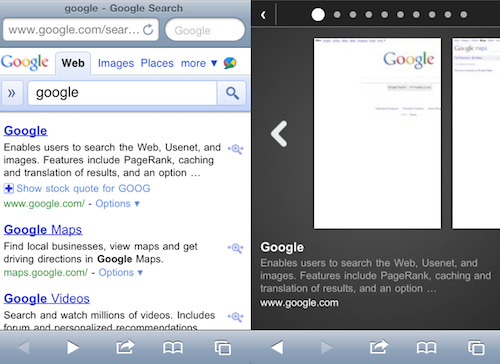
As noted by 9to5mac, Google has also begun testing a new feature for iOS browsers (and Android as well, we guess) which hasn’t been officially announced yet but was spotted by some users. Google “Instant Previews” will let you have a quick preview of a website by tapping on the magnifying glass icon – again, just like on desktop browsers you get a preview inside a popup menu on google.com. On iOS though, it looks like the feature will really be redesigned to sport a much better touch interaction: previews will open in a dedicated window that reminds of Safari’s tabs and you can flick through them to quickly preview search results.

It is unclear at this moment whether the feature is being tested among some users in the United States or worldwide, and when Google plans to launch it or at least announce it.


Eric Schmidt: “Steve Jobs Is Absolutely Brilliant”

Eric Schmidt: “Steve Jobs Is Absolutely Brilliant”

Soon-to-be-ex Google’s CEO Eric Schmidt has some nice words about Apple, iOS and Steve Jobs:

Schmidt also took on Google’s competition with Apple. Google partners with Apple, he said, on search, maps and YouTube. It competes, of course, on phones. Google also might in theory compete with Apple’s Macintosh computer business with its Chrome OS hardware that Google hopes “to announce later this year,” Schmidt said.

“Steve is absolutely brilliant,” said Schmidt, referring to Steve Jobs, CEO of Apple, where Schmidt was a longtime board member. “(He’s) the most successful CEO in the world anywhere.” Comparing Apple’s iPhone and iPad platform to Android, he said: “They managed to build an elegant, scalable, closed system. Google is attempting to do something with a completely different approach.

Permalink

Gmail Notifications Come To The Desktop with Chrome

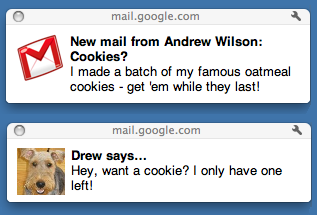
A few minutes ago Google rolled out a new feature for Gmail and Chrome users: native Gmail notifications. These notifications are only available to Google Chrome users for now, and they’re very similar to Growl in the way they appear on your computer on top of any window you’re currently on. Unlike Growl, though, it all runs natively within Chrome and Gmail.

These notifications, however, seem to be in need of some serious tweaking. Testing them briefly, I’ve noticed that they stick on the desktop, there’s no timeout option (Growl offers this functionality in its preferences) and they’re definitely slower then Growl associated to, say, Mailplane. Also, they don’t work in Safari and Firefox – just Chrome. They work both with new email messages, new “important” messages (in Priority Inbox) and IMs.

To activate Gmail notifications, head over your inbox, then Settings and enable as you can see in the screenshot below.


Google Improves Weather Results on Mobile Safari

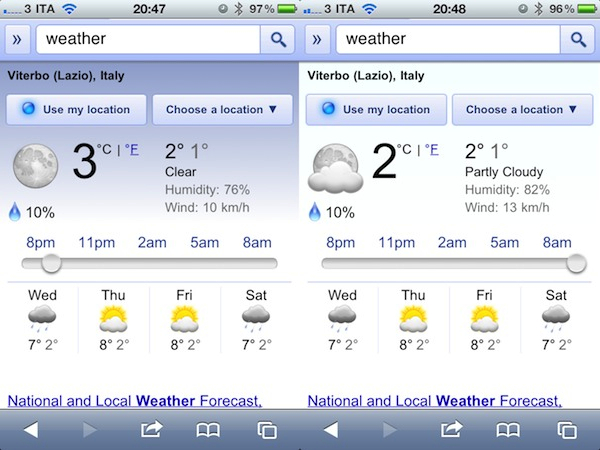
There is no shortage of weather apps on the iPhone, from the most professional ones to beautiful user-friendly software like Outside, but Google thinks you should just head over google.com and check out their new, mobile-optimized weather forecast view. The feature, which should work both on iOS and Android phones, will be activated once you open google.com on your browser and search for “weather”. The browser will ask you to give location permissions to Google, and you’ll be presented this neat search result page with fancy graphics for your location’s weather on top of everything. Fortunately, you can also enter a location manually inside a dropdown menu (Google got my location wrong, and I don’t know why).

The information displayed on screen are pretty useful and well designed. Google even bothered to add a slider that flicks through hourly updates and changes the background gradient from darker (night) to lighter blue (day). You can visualize temperature in Celsius or Fahrenheit degrees, check on humidity and wind strength.

Well done, Google. We look forward to better Twitter integration in your search results now.


Google Launching Cloud Print with iOS Support

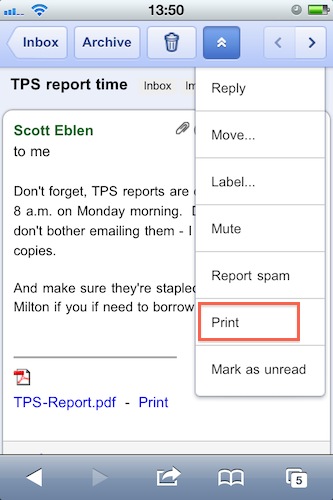
With an official post on the Gmail blog, Google has announced that in the next few days they will launch the Google Cloud Print online service with initial support for iOS devices and Windows operating system. Cloud Print allows you to print any kind of document and supported Gmail attachment by configuring a local printer with Google’s remote system. Once a printer is connected to Cloud Print, an iOS device can remotely send a document to the printer from the Gmail webapp in Mobile Safari. Support for Mac OS X and Linux is coming “soon.

To get started, you’ll first need to connect your printer to Google Cloud Print. For now, this step requires a Windows PC but Linux and Mac support are coming soon. Once you’re set up, just go to gmail.com from your iPhone or Android browser and choose “Print” from the dropdown menu in the top right corner. You can also print eligible email attachments (such as .pdf or .doc) by clicking the “Print” link that appears next to them.

It all sounds fairly interesting, especially considering that it happens in the cloud, in the background. Will Google manage to pull off real driver-less, wireless printing?


Google Places App for iPhone Now Available

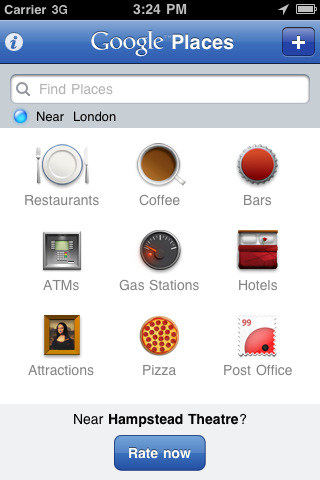
Earlier today, Google released its official Places app for the iPhone and iPod touch. The app is already live in iTunes and available for free here. Just like on Android, Google Places with Hotpot service helps you discover nearby places such as restaurants and cafes you might like. Google Places, though, not only does find nearby places, it also does take a guess at the best place for you with personalized search results.

You can rate places and build custom searches so the app will learn from your preferences; rating a place is easy and fast thanks to a Rate Now button that you can tap on at any time. The more places you rate and the more Hotpot reviews you write, the more Google Places will learn from your tastes and habits and send personalized recommendations to you. As for social features built into the app:

If you want to make things even tastier, just visit google.com/hotpot from your desktop computer. Here you can add friends to the mix and quickly rate all the places you already know. Once you’ve added friends, you’ll find your results seasoned not just with reviews from around the web and recommendations based on your own personal taste, but also with your friends’ opinions too.

Google Places for iPhone seems like a nice first version of a service that Google is testing to bring custom, personalized search results and recommendations to the web and mobile devices. The interface design of the app seems to be based on the usual schemes adopted by Google in all their iOS clients. If you feel like giving Places and Hotpot for iPhone a try, the app is available here.


Google Goggles for iPhone Gains Ad Recognition and…Sudoku

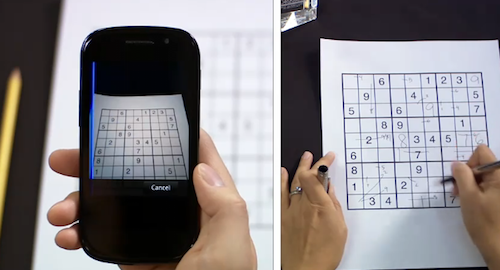
Earlier today, the Google mobile team announced an update to their official Goggles application for Android and the Goggles component in the Google Mobile App for iPhone. While Android users get advanced barcode scanning in version 1.3 of the app, printed ad recognition and Sudoku puzzle solving have been enabled both on iOS and Android. Yes, that’s right: as part of the Google Goggles labs experiments, the app can now solve Sudokuy puzzles. Just take a clear picture and let Goggles provide some help.

As for ad scanning, Goggles for iPhone can now take a look at any printed ad and return web search results for that brand or product.

Goggles will recognize print ad and return web search results about the product or brand. This new feature of Goggles is enabled for print ads appearing in major U.S. magazines and newspapers from August 2010 onwards. This feature is different from the marketing experiment that we announced in November. We’re now recognizing a much broader range of ads than we initially included in our marketing experiment.

The official Google iPhone app doesn’t seem to be updated yet, the new version should be propagating in iTunes in the next hours. In the meantime, check out the promo video for Sudoku support in Google Goggles below. Google Goggles for iPhone was launched in October as part of the Google mobile app. Read more


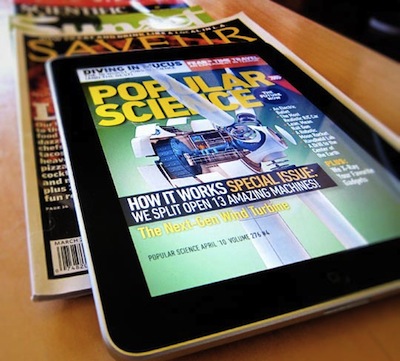
Google Planning Digital Newsstand, Apple To Launch Subscriptions “Early This Year”

According to the sources close to the Wall Street Journal, Google is in talks with major publishers like Time Inc., Condé Nast and Hearst Corp. to discuss the launch of a digital newsstand for magazines and newspapers that would run on the Android mobile operating system. The move, still in its early planning stages, would be Google’s direct answer to Apple, which has long been at the center of digital newsstand rumors and iTunes recurring subscription speculations. Google’s newsstand, either based on the existing Market or a new infrastructure, would allow Android users to read digital content on the go. Rumors point out to Google willing to share subscribers’ data with publishers. Read more


Why Apple Doesn’t Care About The $75 Android Phone

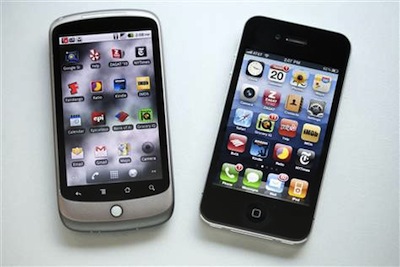
An article published by Seth Weintraub over at Fortune last week made the rounds of the Internet detailing how the Android platform will “explode” next year thanks to relatively low-cost components. Broadcom has announced a new 3G HSDPA chipset called BCM2157 that allows for popular specs like Bluetooth, GPS, dual core ARM processors, 5MP cameras and capacitive displays. Broadcom is marketing this new chipset to Android OEMs. And the best part, according to Handset Line of Business for Broadcom Jim Tran? Phones built on the new chipset will retail under $100, possibly even touching the $75 price point. And we’re talking about retail prices of unsubsidized phones. That would allow “average users” who don’t normally spend hundreds of dollars on smartphone to buy a high-end Android phone and runs apps on it. Read more