This Week's Sponsor:

Copilot Money

The Apple Editor’s Choice App for Managing Your Money


Posts tagged with "claude"

How I Used Claude to Build a Transcription Bot that Learns From Its Mistakes

Step 1: Transcribe with parakeet-mlx.

Step 1: Transcribe with parakeet-mlx.

When I started transcribing AppStories and MacStories Unwind three years ago, I had wanted to do so for years, but the tools at the time were either too inaccurate or too expensive. That turned a corner with OpenAI’s Whisper, an open-source speech-to-text model that blew away other readily available options.

Still, the results weren’t good enough to publish those transcripts anywhere. Instead, I kept them as text-searchable archives to make it easier to find and link to old episodes.

Since then, a cottage industry of apps has arisen around Whisper transcription. Some of those tools do a very good job with what is now an aging model, but I have never been satisfied with their accuracy or speed. However, when we began publishing our podcasts as videos, I knew it was finally time to start generating transcripts because as inaccurate as Whisper is, YouTube’s automatically generated transcripts are far worse.
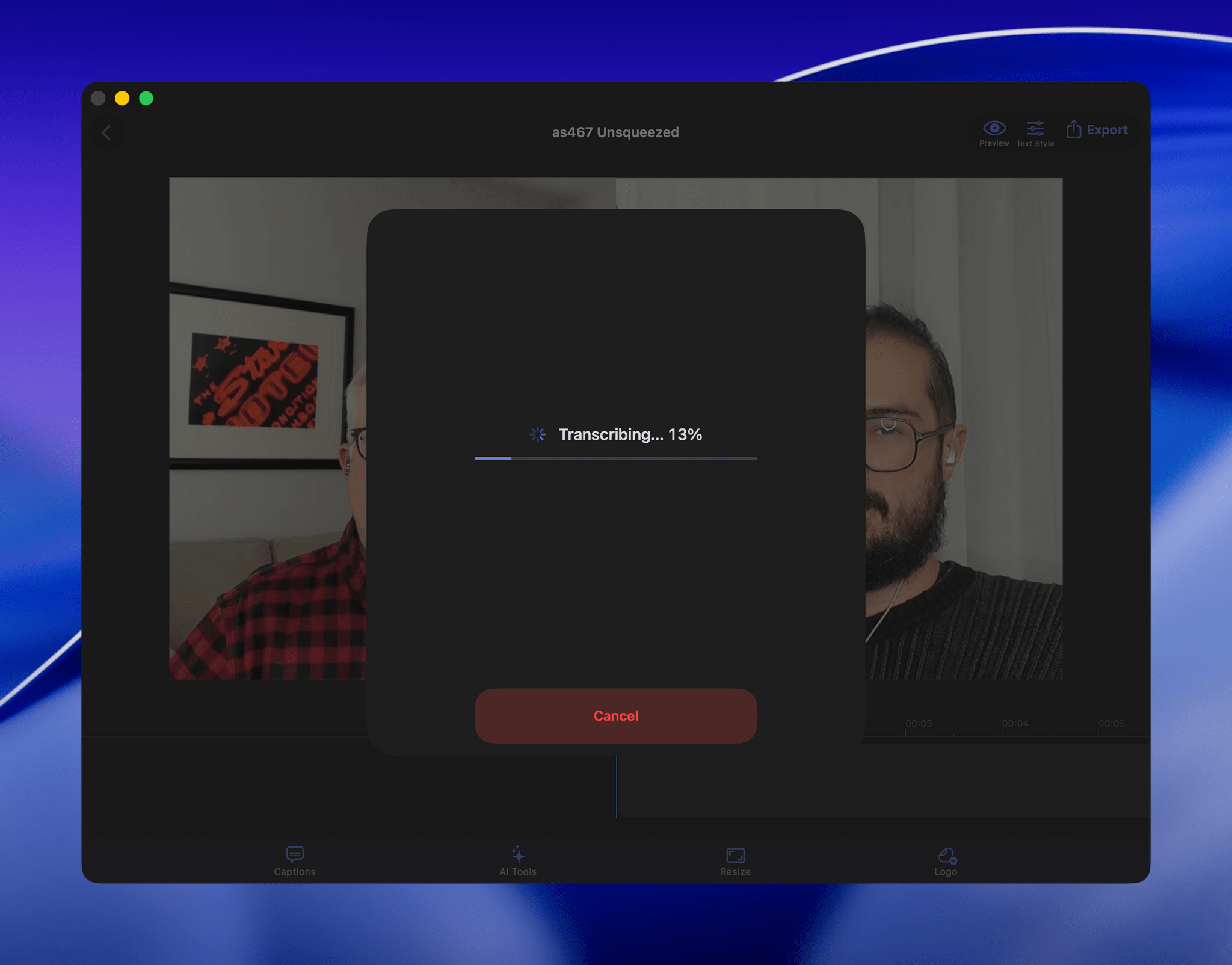
VidCap in action.

VidCap in action.

My first stab at video transcription was to use apps like VidCap and MacWhisper. After a transcript was generated, I’d run it through MassReplaceIt, a Mac app that lets you create and apply a huge dictionary of spelling corrections using a bulk find-and-replace operation. As I found errors in AI transcriptions by manually skimming them, I’d add those corrections to my dictionary. As a result, the transcriptions improved over time, but it was a cumbersome process that relied on me spotting errors, and I didn’t have time to do more than scan through each transcript quickly.

That’s why I was so enthusiastic about the speech APIs that Apple introduced last year at WWDC. The accuracy wasn’t any better than Whisper, and in some circumstances it was worse, but it was fast, which I appreciate given the many steps needed to get a YouTube video published.

The process was sped up considerably when Claude Skills were released. A skill can combine a script with instructions to create a hybrid automation with both the deterministic outcome of scripting and the fuzzy analysis of LLMs.
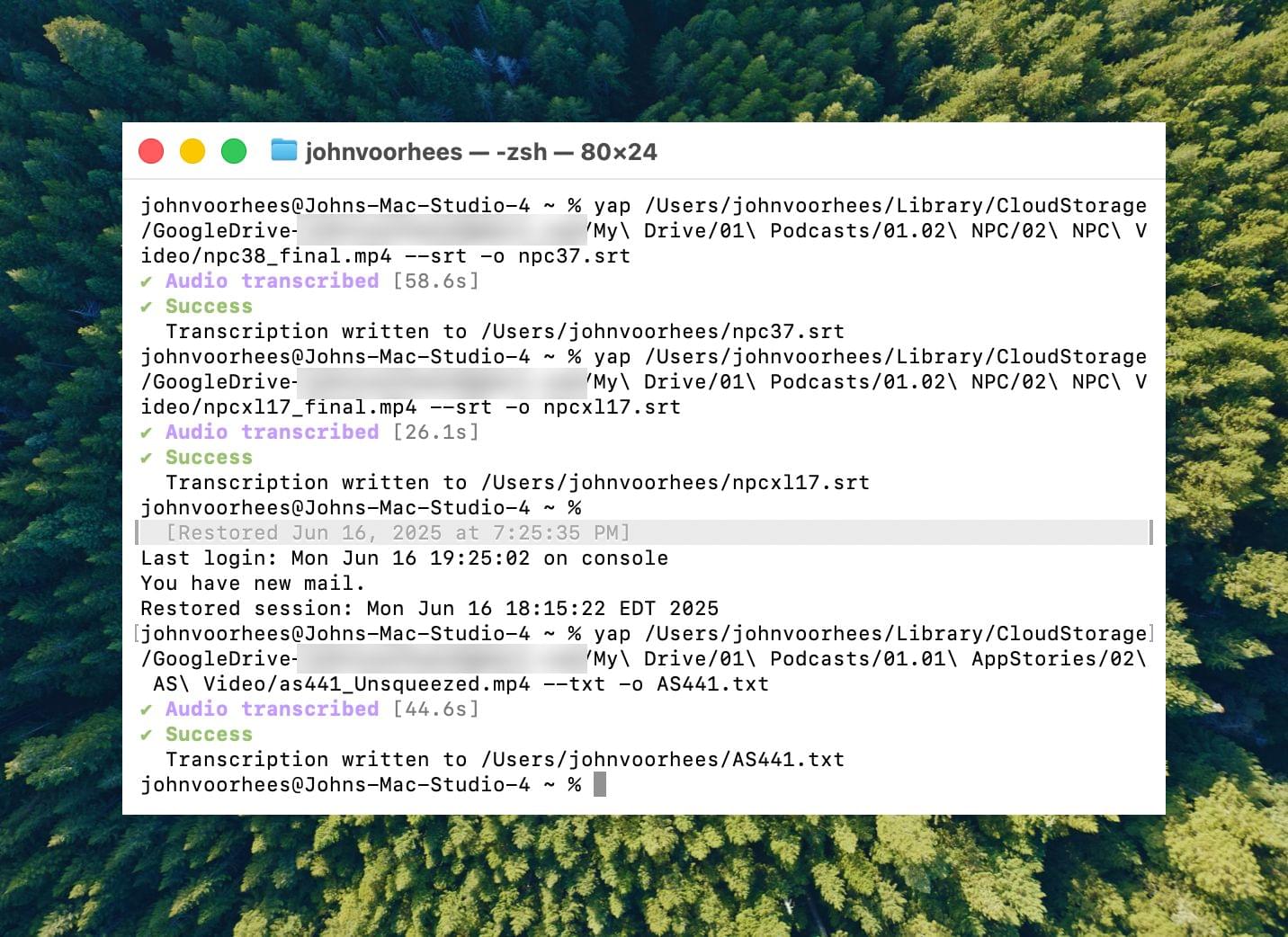
Transcribing with yap.

Transcribing with yap.

I’d run yap, a command line tool that I used to transcribe videos with Apple’s speech-to-text framework. Next, I’d open the Claude app, attach the resulting transcript, and run a skill that would run the script, replacing known spelling errors. Then, Claude would analyze the text against its knowledge base, looking for other likely misspellings. When it found one, Claude would reply with some textual context, asking if the proposed change should be made. After I responded, Claude would further improve my transcript, and I’d tell Claude which of its suggestions to add to the script’s dictionary, helping improve the results a little each time I used the skill.

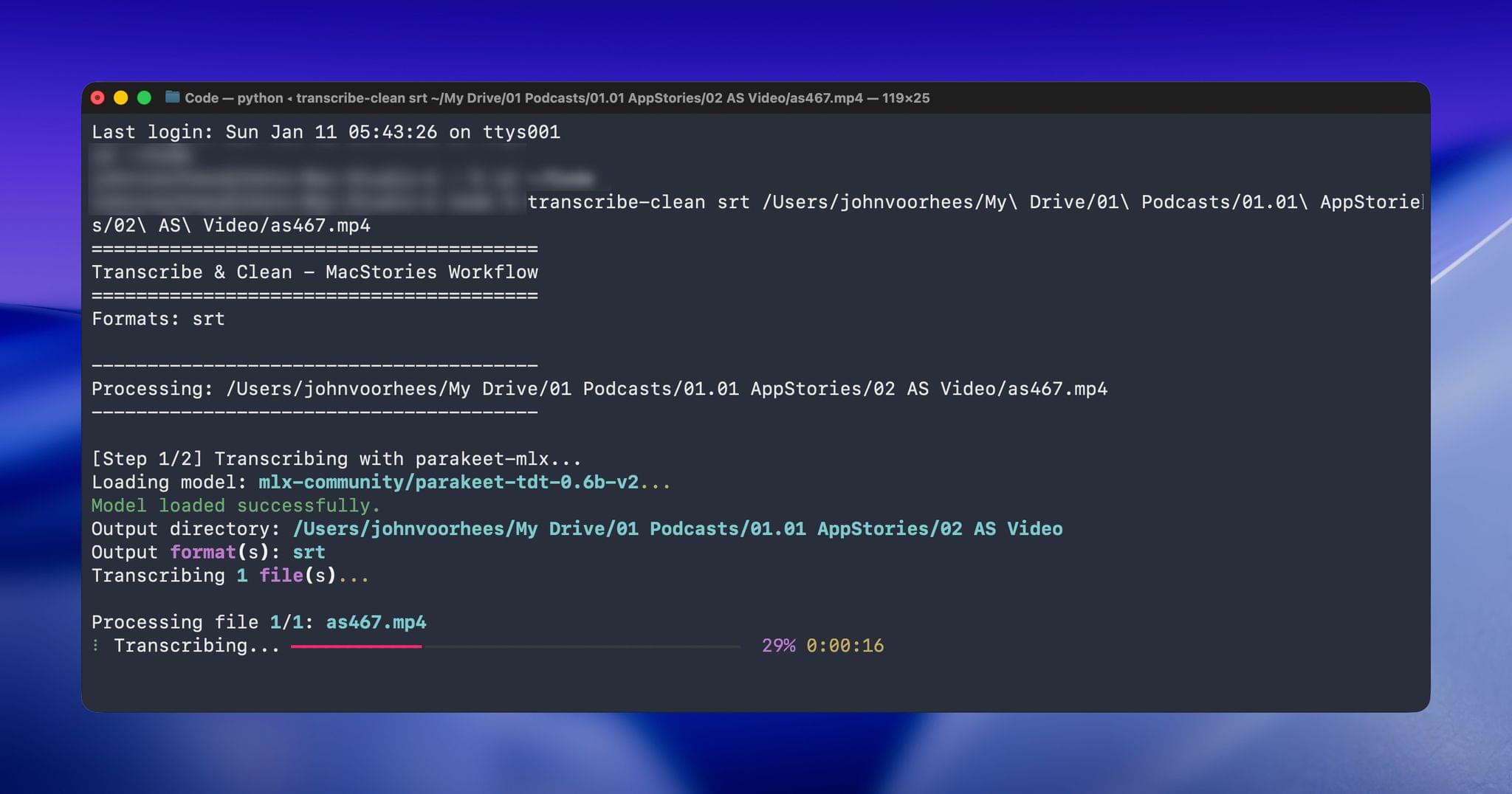
Over the holidays, I refined my skill further and moved it from the Claude app to the Terminal. The first change was to move to parakeet-mlx, an Apple silicon-optimized version of NVIDIA’s Parakeet model that was released last summer. Parakeet isn’t as fast as Apple’s speech APIs, but it’s more accurate, and crucially, its mistakes are closer to the right answers phonetically than the ones made by Apple’s tools. Consequently, Claude is more likely to find mistakes that aren’t in my dictionary of misspellings in its final review.
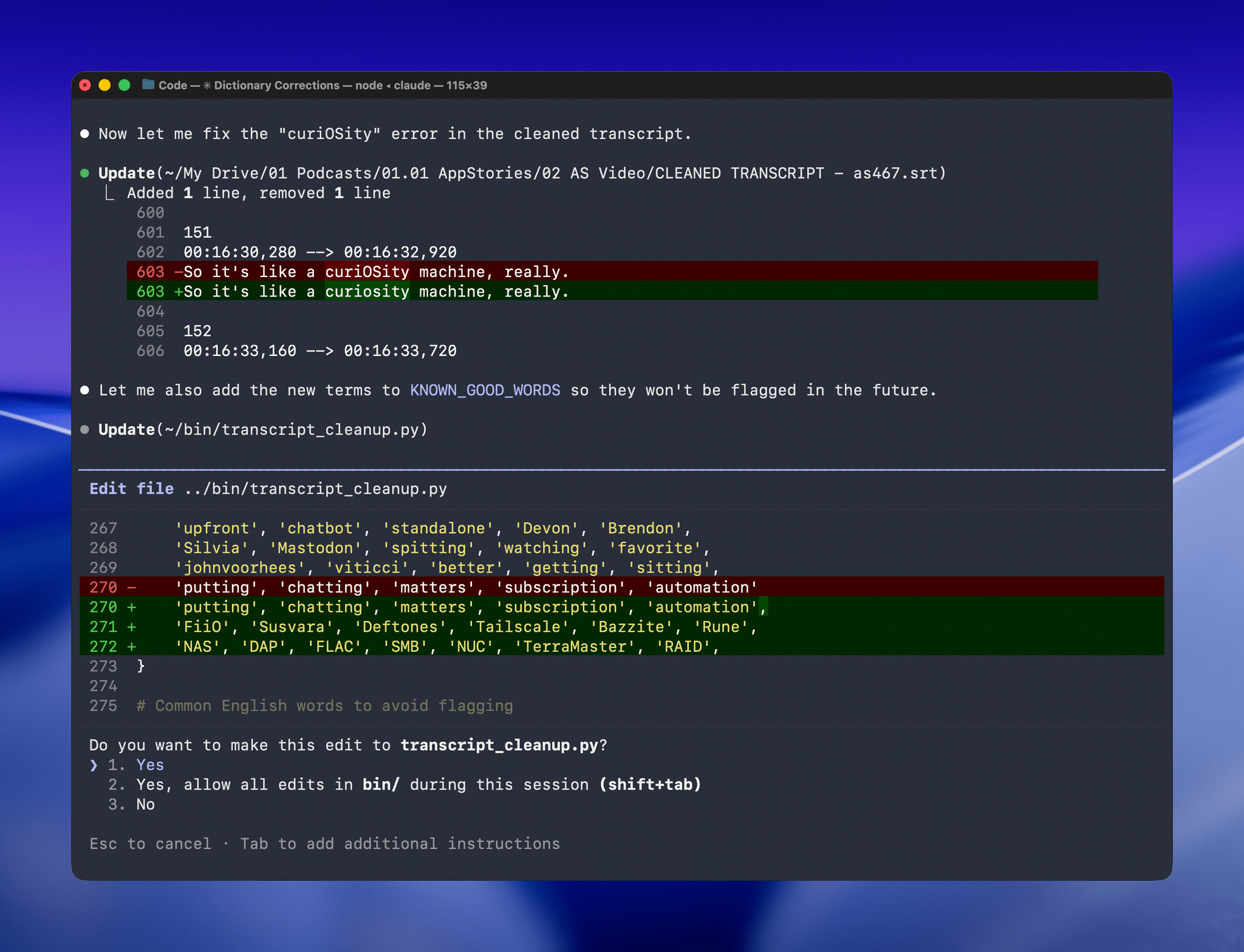
Managing the built-in corrections dictionary.

Managing the built-in corrections dictionary.

With Claude Opus 4.5’s assistance, I rebuilt the Python script at the heart of my Claude skill to run videos through parakeet-mlx, saving the results as either a .srt or .txt file (or both) in the same location as the original file but prepended with “CLEANED TRANSCRIPT.” Because Claude Code can run scripts and access local files from Terminal, the transition to the final fuzzy pass for errors is seamless. Claude asks permission to access the cleaned transcript file that the script creates and then generates a report with suggested changes.
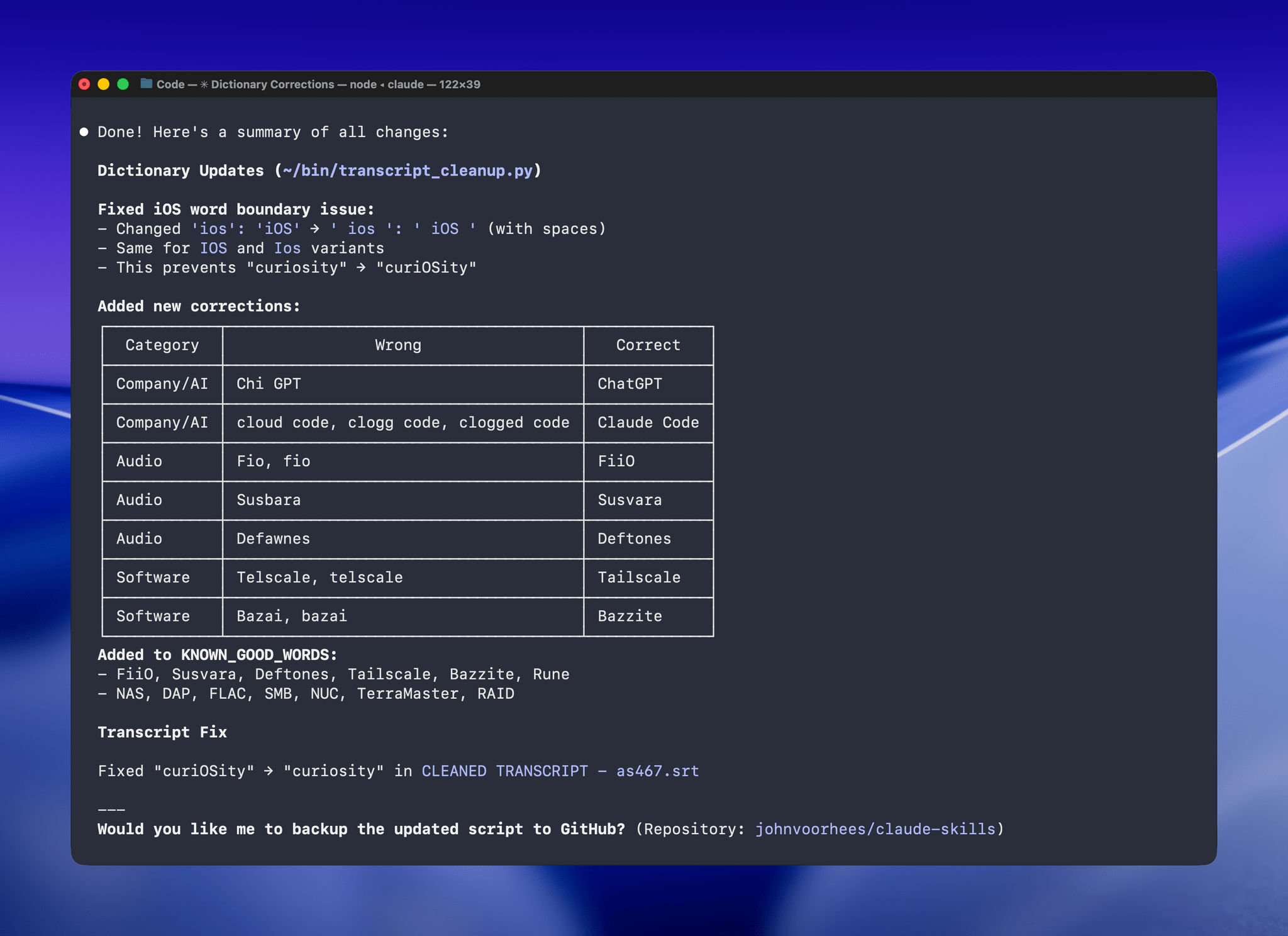
A list of obscure words Claude suggested changing. Every one was correct.

A list of obscure words Claude suggested changing. Every one was correct.

The last step is for me to confirm which suggested changes should be made and which should be added to the dictionary of corrections. The whole process takes just a couple of minutes, and it’s worth the effort. For the last episode of AppStories, the script found and corrected 27 errors, many of which were misspellings of our names, our podcasts, and MacStories. The final pass by Claude managed to catch seven more issues, including everything from a misspelling of the band name Deftones to Susvara, a model of headphones, and Bazzite, an open-source SteamOS project. Those are far from everyday words, but now, their misspellings are not only fixed in the latest episode of AppStories, they’re in the dictionary where those words will always be corrected whether Claude’s analysis catches them or not.
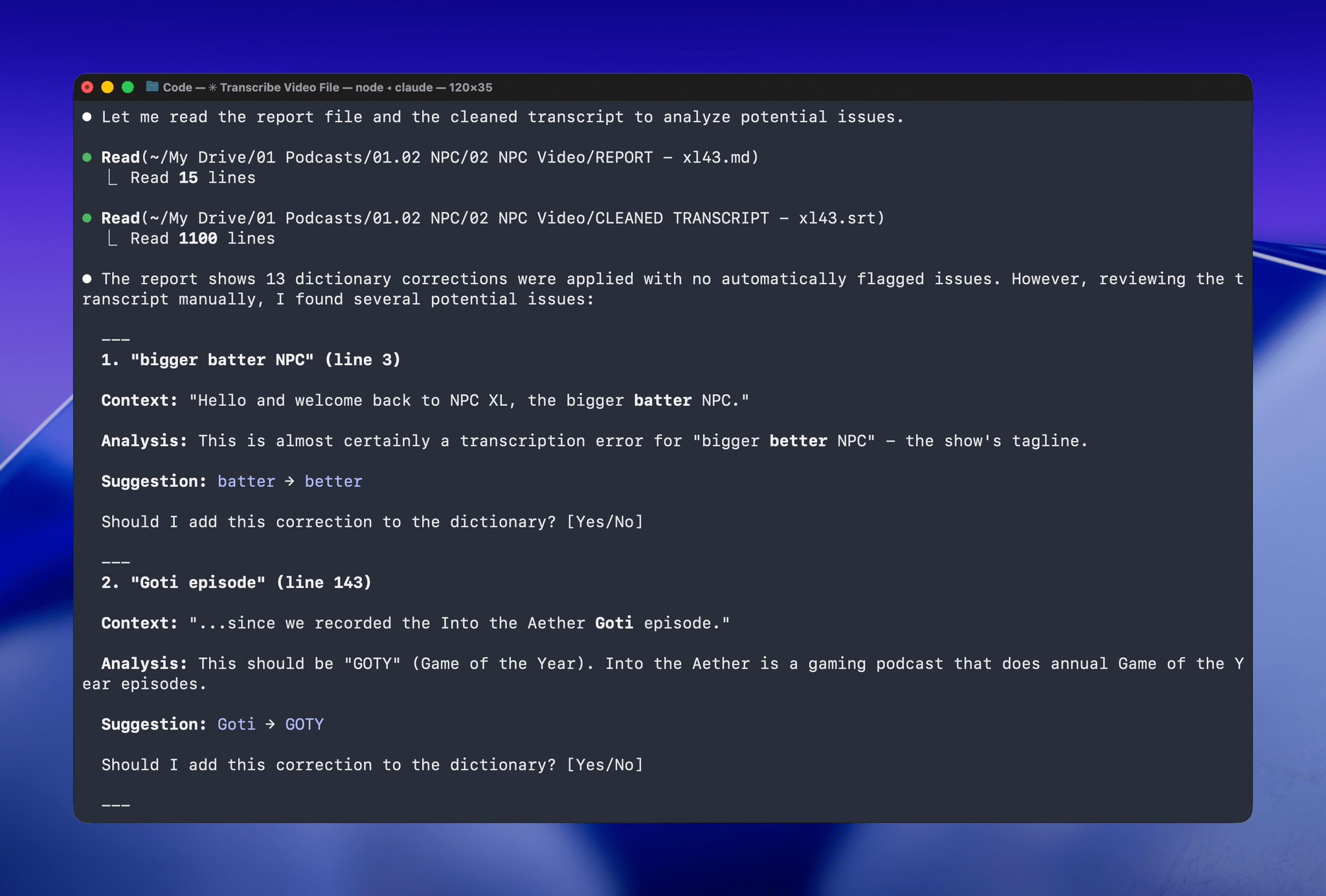
Claude even figured out "goti" was a reference to GOTY (Game of the Year).

Claude even figured out “goti” was a reference to GOTY (Game of the Year).

I’ve used this same pattern over and over again. I have Claude build me a reliable, deterministic script that helps me work more efficiently; then, I layer in a bit of generative analysis to improve the script in ways that would be impossible or incredibly complex to code deterministically. Here, that generative “extra” looks for spelling errors. Elsewhere, I use it to do things like rank items in a database based on a natural language prompt. It’s an additional pass that elevates the performance of the workflow beyond what was possible when I was using a find-and-replace app and later a simple dictionary check that I manually added items to. The idea behind my transcription cleanup workflow has been the same since the beginning, but boy, have the tools improved the results since I first used Whisper three years ago.
How I Revived My Decade-Old App with Claude Code

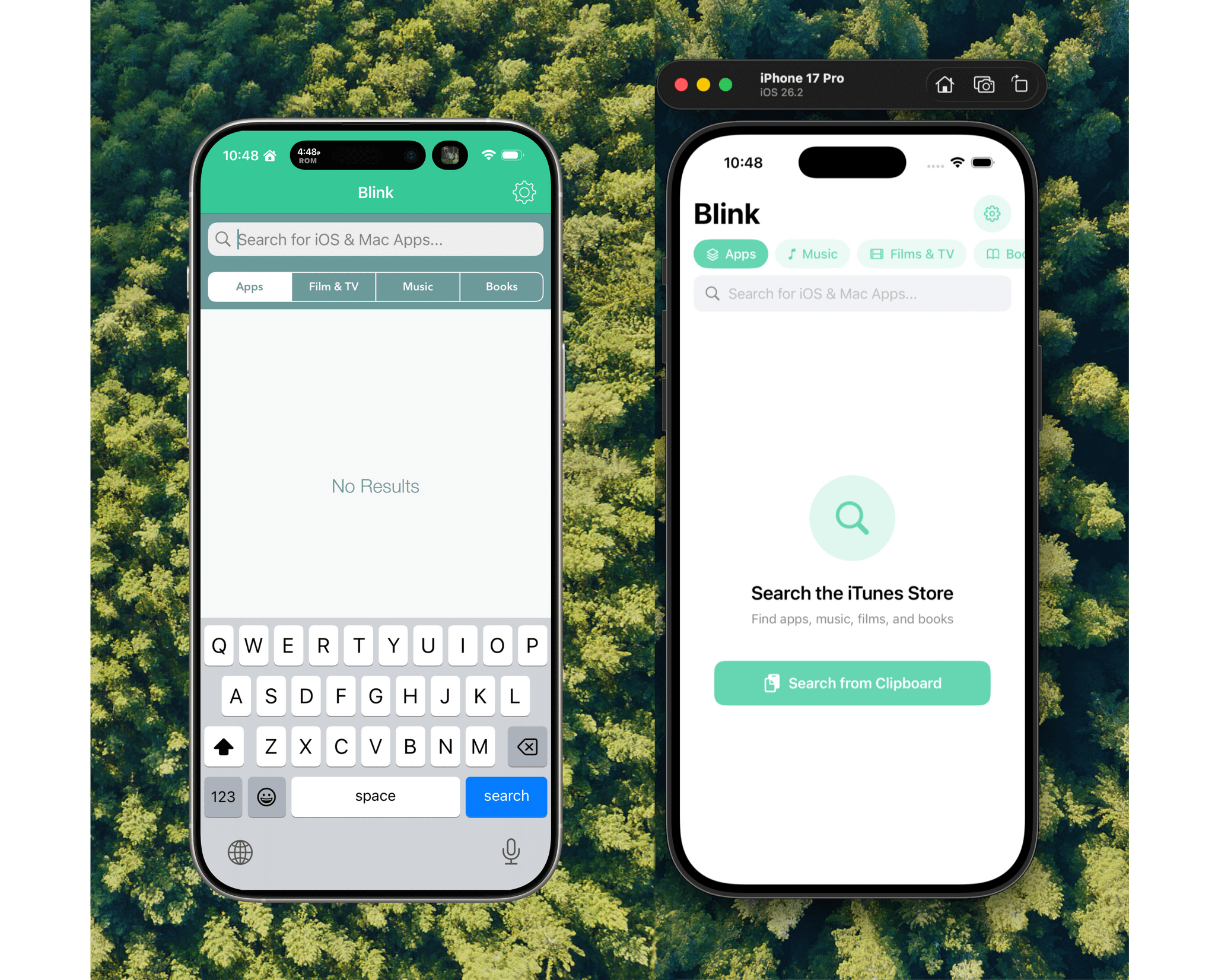
Blink from 2017 (left) and 2026 (right).

Blink from 2017 (left) and 2026 (right).

Every holiday season, Federico and I spend our downtime on nerd projects. This year, both of us spent a lot of that time building tools for ourselves with Claude Code in what developed into a bit of a competition as we each tried to one-up the other’s creations. We’ll have more on what we’ve been up to on AppStories, MacStories, and for Club members soon, but today, I wanted to share an experiment I ran last night that I think captures a very personal and potentially far-reaching slice of what tools like Claude Code can enable.

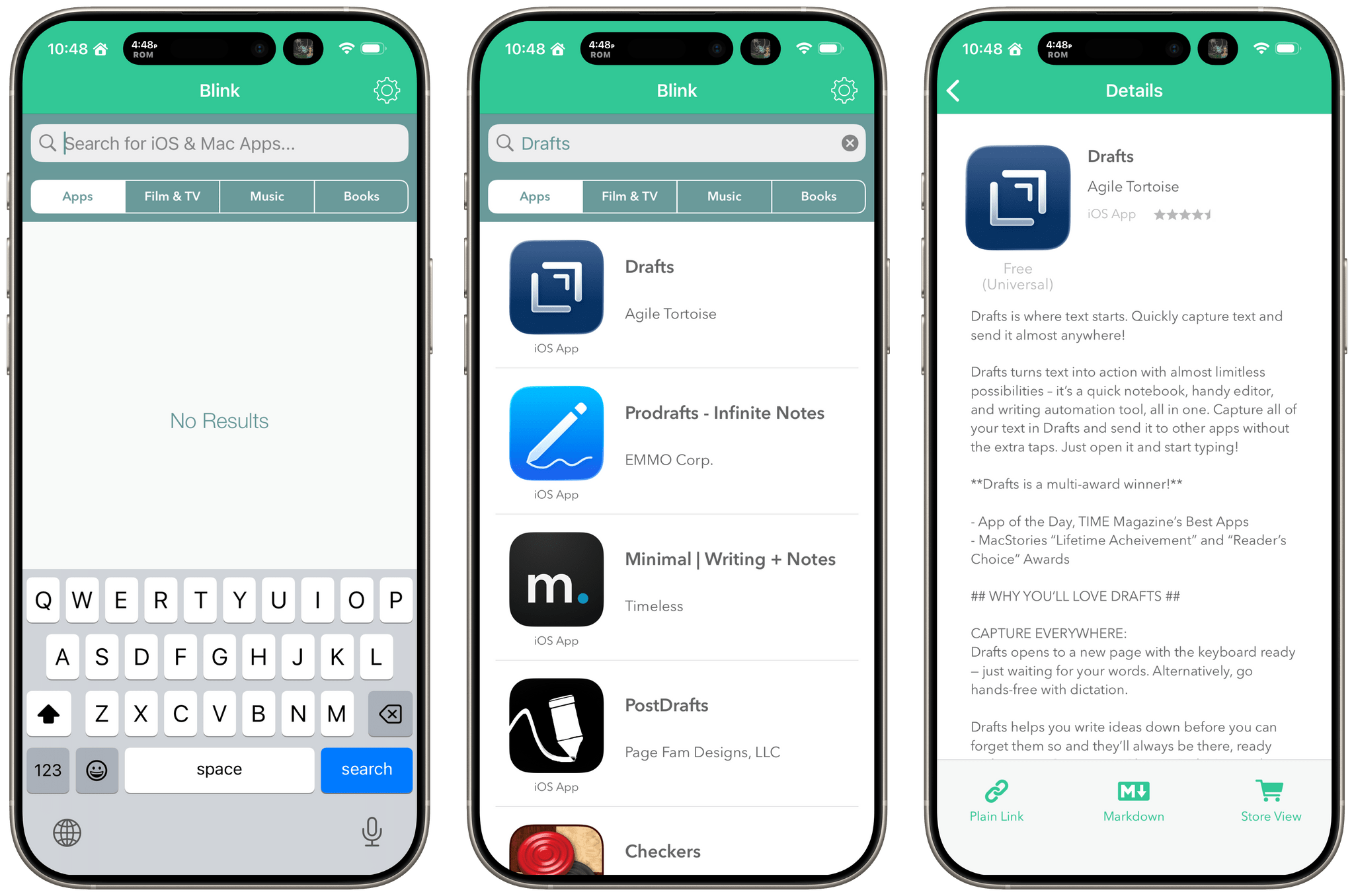
Blink from 2017 running on a modern iPhone.

Blink from 2017 running on a modern iPhone.

Before I wrote at MacStories, I made a few apps, including Blink, which generated affiliate links for Apple’s media services. The app had a good run from 2015-2017, but I pulled it from the App Store when Apple ended its affiliate program for apps because that was the part of the app that was used the most. Since then, the project has sat in a private GitHub repo untouched.

Last night, I was sitting on the couch working on a Safari web extension when I opened GitHub and saw that old Blink code, which sparked a thought. I wondered whether Claude Code could update Blink to use Swift and SwiftUI with minimal effort on my part. I don’t have any intention of re-releasing Blink, but I couldn’t shake the “what if” rattling in my head, so I cloned the repo and put Claude to work.

Read more


AI Experiments: Fast Inference with Groq and Third-Party Tools with Kimi K2 in TypingMind

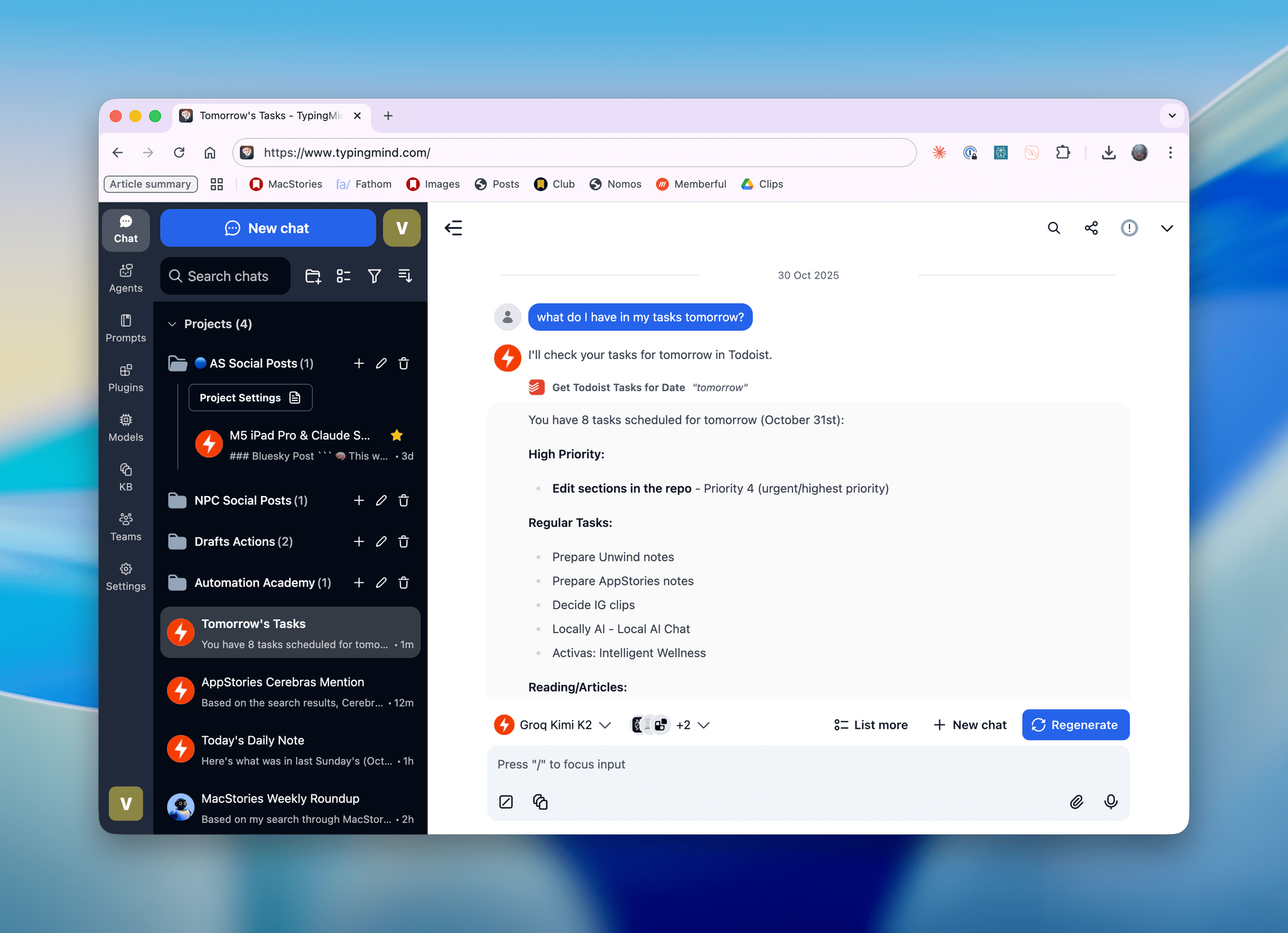
Kimi K2, hosted on Groq, running in TypingMind with a custom plugin I made.

Kimi K2, hosted on Groq, running in TypingMind with a custom plugin I made.

I’ll talk about this more in depth in Monday’s episode of AppStories (if you’re a Plus subscriber, it’ll be out on Sunday), but I wanted to post a quick note on the site to show off what I’ve been experimenting with this week. I started playing around with TypingMind, a web-based wrapper for all kinds of LLMs (from any provider you want to use), and, in the process, I’ve ended up recreating parts of my Claude setup with third-party apps…at a much, much higher speed. Here, let me show you with a video:

Kimi K2 hosted on Groq on the left.Replay

Read more


Claude Adds Screenshot and Voice Shortcuts to Its Mac App

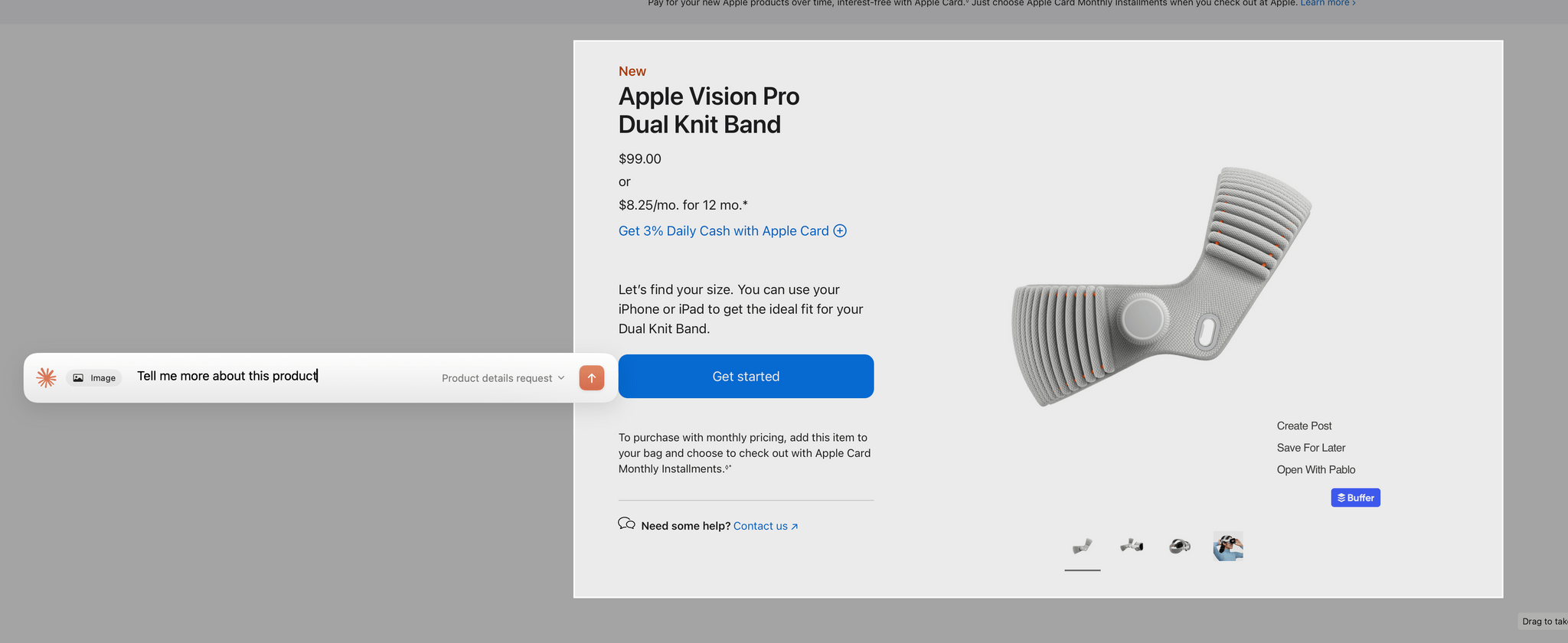
Claude's new in-context screenshot tool.

Claude’s new in-context screenshot tool.

Anthropic introduced a couple of new features in its Claude Mac app today that lower the friction of working with the chatbot.

First, after giving screenshot and accessibility permissions to Claude, you can double tap the Option button to activate the app’s chat field as an overlay at the bottom of your screen. The shortcut simultaneously triggers crosshairs for dragging out a rectangle on your Mac’s screen. Once you do, the app takes a screenshot and the chat field moves to the side of the area you selected with the screenshot attached. Type your query, and it and the screenshot are sent together to Claude, switching you to Claude and kicking off your request automatically.

Instead of double-tapping the Option key, you can also set the keyboard shortcut to Option + Space, or a custom key combination. That’s nice because not all automation systems support two modifier keys as a shortcut. For example, Logitech’s Creative Console cannot record a double tap of the Option button as a shortcut.

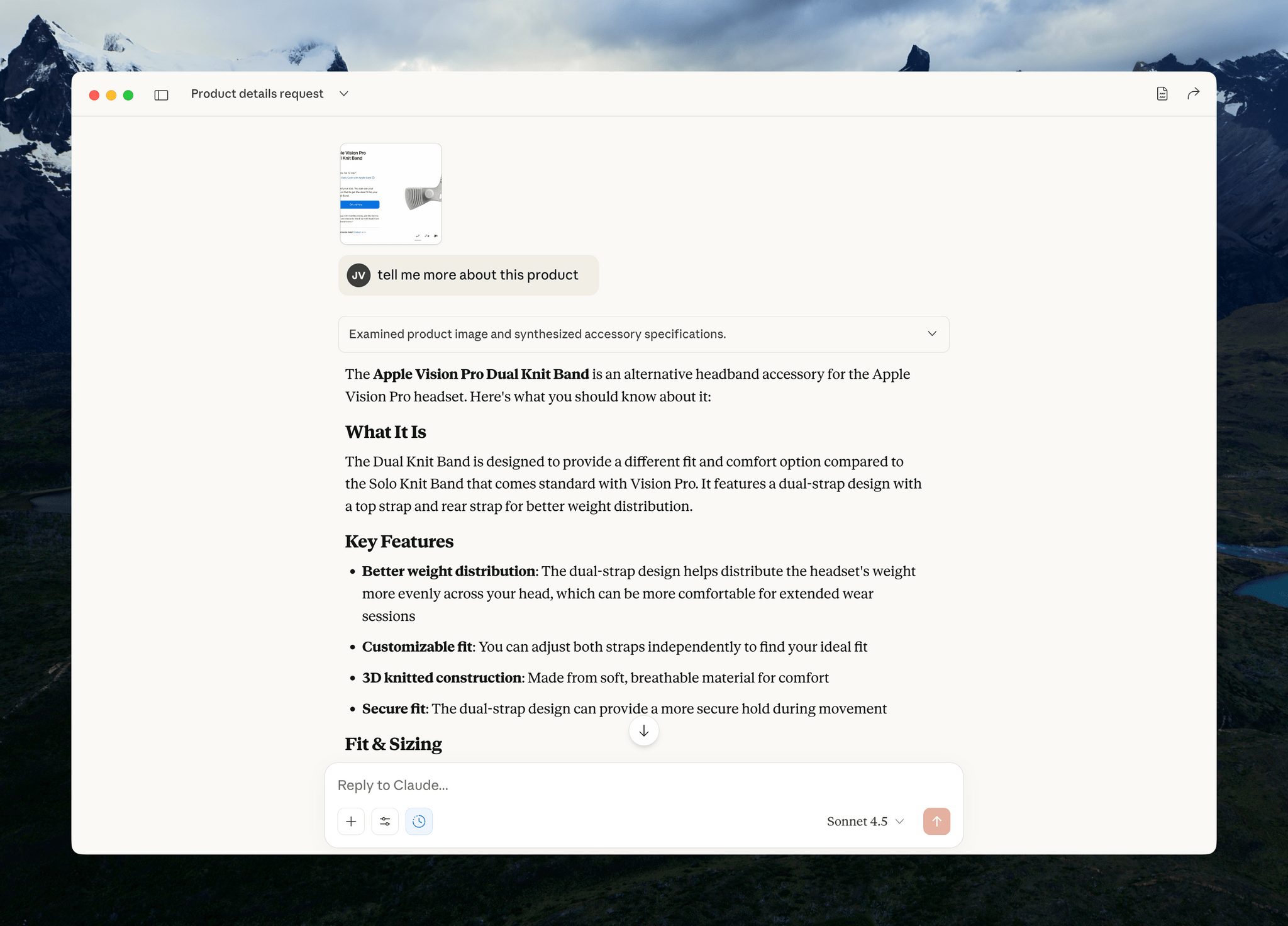
Sending your query and screenshot takes you back to the Claude app for your response.

Sending your query and screenshot takes you back to the Claude app for your response.

I send a lot of screenshots to Claude, especially when I’m debugging scripts. This new shortcut will greatly accelerate that process simply by switching me back to Claude for my answer. It’s a small thing, but I expect it will add up over time.

My only complaint is that the experience has been inconsistent across my Macs. On my M1 Max Mac Studio with 64GB of memory, it takes 3-5 seconds for Claude to attach the screenshot to its chat field whereas on the M4 Max MacBook Pro I’ve been testing, the process is almost instant. The MacBook Pro is a much faster Mac than my Mac Studio, but I was surprised at the difference since it occurs at the screenshot phase of the interaction. My guess is that another app or system process is interfering with Claude.

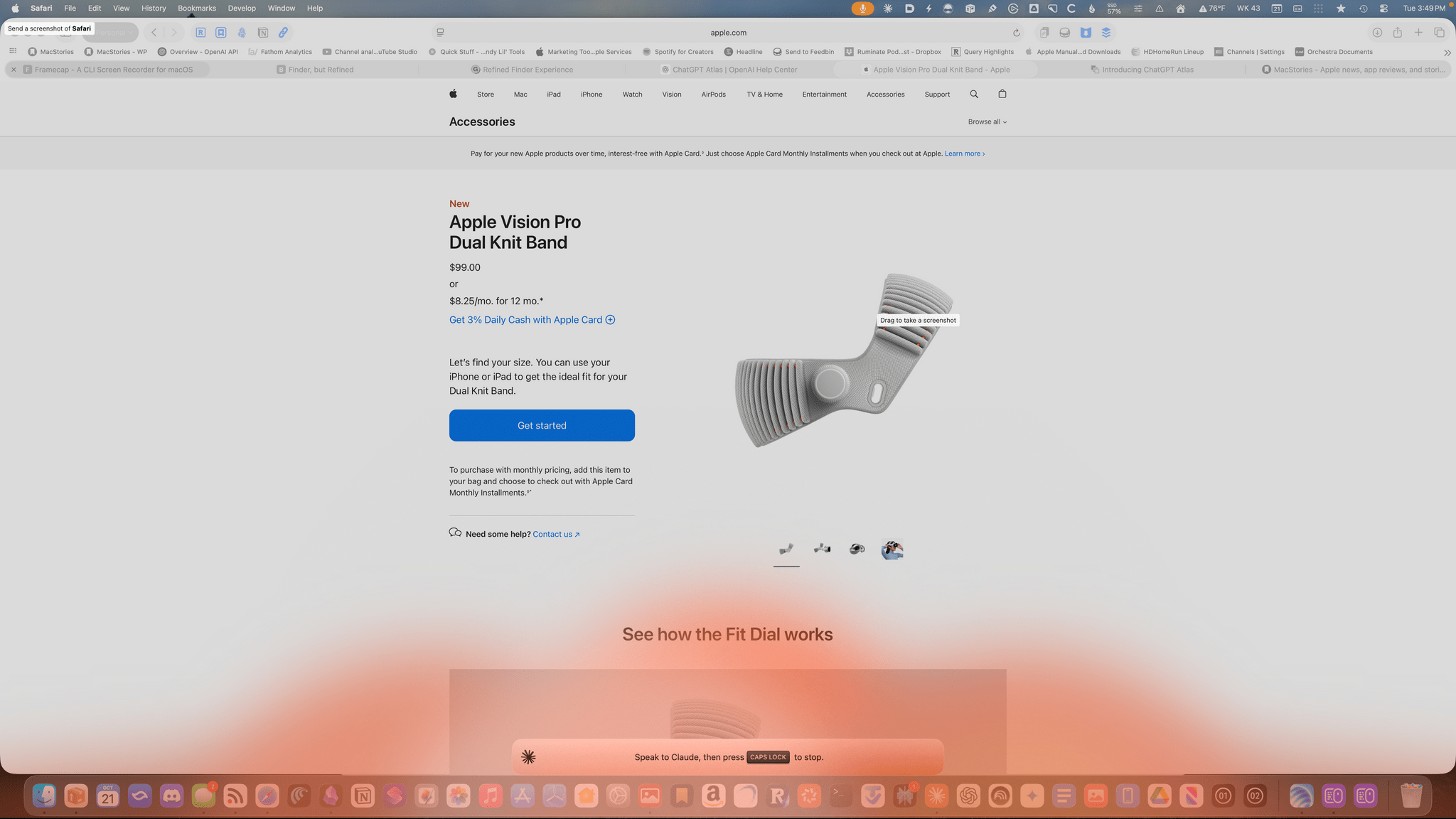
Am I talking to the Claude chatbot or lighting my Dock on fire.

Am I talking to the Claude chatbot or lighting my Dock on fire.

The other new feature of Claude is that you can set the Caps Lock button to trigger voice input. Once you trigger voice input, an orange cloud appears at the bottom of your screen indicating that your microphone is active. The visual is a little over-the-top, but the feature is handy. Tap the Caps Lock button again to finish the recording, which is then transcribed into a Claude chat field at the bottom of your screen. Just hit return to upload your query, and you’re switched back to the Claude app for a response.

One of the greatest strengths of modern AI chatbots is their multi-modality. What Anthropic has done with these new Claude features is made two of those modes – images and audio – a little bit easier, which gets you from input to a response a little faster, which I appreciate. I highly recommend giving both features a try.


Anthropic Releases Haiku 4.5: Sonnet 4 Performance, Twice as Fast

Earlier today, Anthropic released Haiku 4.5, a new version of their “small and fast” model that matches Sonnet 4 performance from five months ago at a fraction of the cost and twice the speed. From their announcement:

What was recently at the frontier is now cheaper and faster. Five months ago, Claude Sonnet 4 was a state-of-the-art model. Today, Claude Haiku 4.5 gives you similar levels of coding performance but at one-third the cost and more than twice the speed.

And:

Claude Sonnet 4.5, released two weeks ago, remains our frontier model and the best coding model in the world. Claude Haiku 4.5 gives users a new option for when they want near-frontier performance with much greater cost-efficiency. It also opens up new ways of using our models together. For example, Sonnet 4.5 can break down a complex problem into multi-step plans, then orchestrate a team of multiple Haiku 4.5s to complete subtasks in parallel.

I’m not a programmer, so I’m not particularly interested in benchmarks for coding tasks and Claude Code integrations. However, as I explained in this Plus segment of AppStories for members, I’m very keen to play around with fast models that considerably reduce inference times to allow for quicker back and forth in conversations. As I detailed on AppStories, I’ve had a solid experience with Cerebras and Bolt for Mac to generate responses at over 1,000 tokens per second.

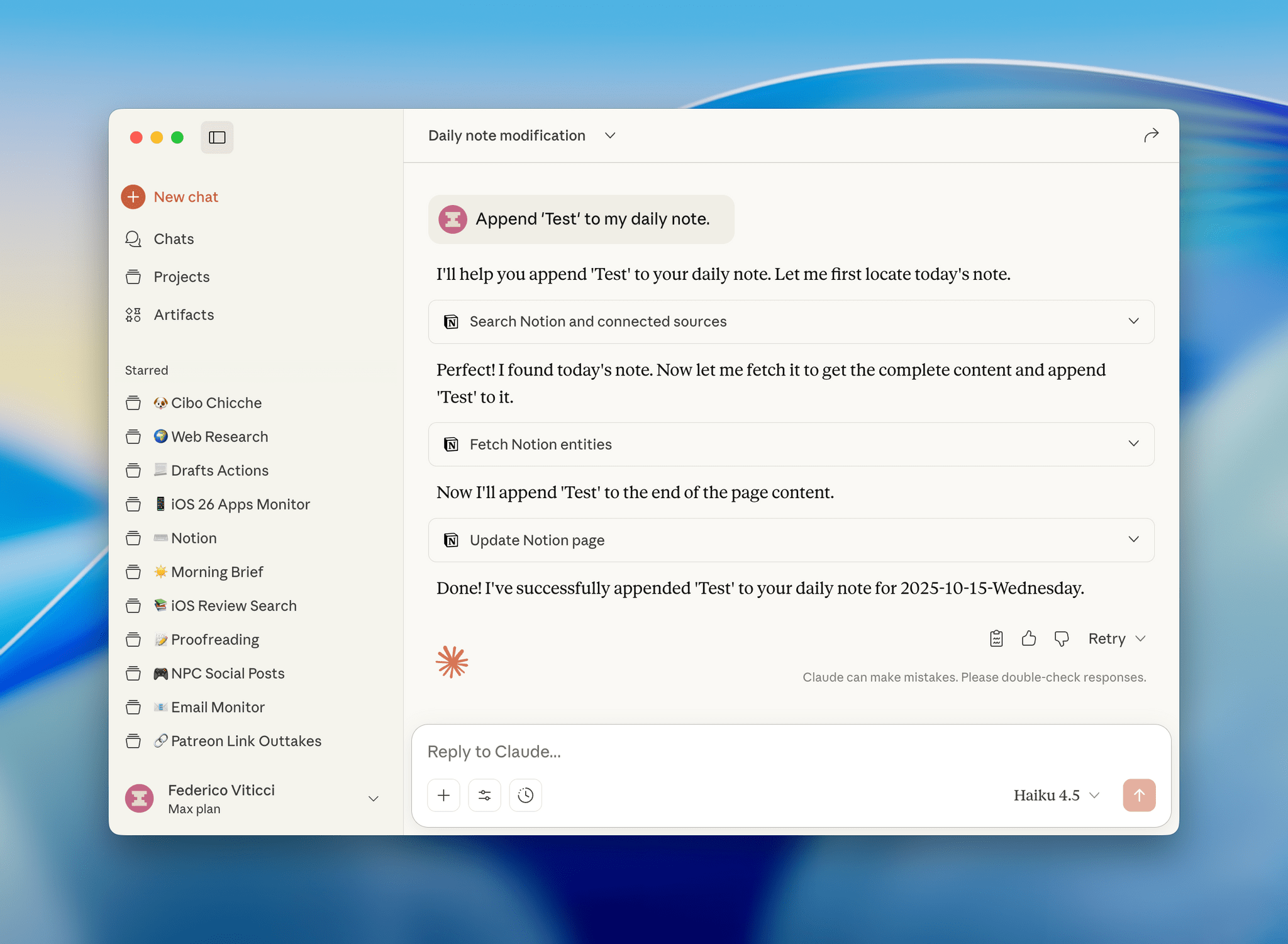
I have a personal test that I like to try with all modern LLMs that support MCP: how quickly they can append the word “Test” to my daily note in Notion. Based on a few experiments I ran earlier today, Haiku 4.5 seems to be the new state of the art for both following instructions and speed in this simple test.

I ran my tests with LLMs that support MCP-based connectors: Claude and Mistral. Both were given system-level instructions on how to access my daily notes: Claude had the details in its profile personalization screen; in Mistral, I created a dedicated agent with Notion instructions. So, all things being equal, here’s how long it took three different, non-thinking models to run my command:

  • Mistral: 37 seconds
  • Claude Sonnet 4.5: 47 seconds
  • Claude Haiku 4.5: 18 seconds

That is a drastic latency reduction compared to Sonnet 4.5, and it’s especially impressive when we consider how Mistral is using Flash Answers, which is fast inference powered by Cerebras. As I shared on AppStories, it seems to confirm that it’s possible to have speed and reliability for agentic tool-calling without having to use a large model.

I ran other tests with Haiku 4.5 and the Todoist MCP and, similarly, I was able to mark tasks as completed and reschedule them in seconds, with none of the latency I previously observed in Sonnet 4.5 and Opus 4.1. As it stands now, if you’re interested in using LLMs with apps and connectors without having to wait around too long for responses and actions, Haiku 4.5 is the model to try.


LLMs As Conduits for Data Portability Between Apps

One of the unsung benefits of modern LLMs – especially those with MCP support or proprietary app integrations – is their inherent ability to facilitate data transfer between apps and services that use different data formats.

This is something I’ve been pondering for the past few months, and the latest episode of Cortex – where Myke wished it was possible to move between task managers like you can with email clients – was the push I needed to write something up. I’ve personally taken on multiple versions of this concept with different LLMs, and the end result was always the same: I didn’t have to write a single line of code to create import/export functionalities that two services I wanted to use didn’t support out of the box.

Read more


Testing Claude’s Native Integration with Reminders and Calendar on iOS and iPadOS

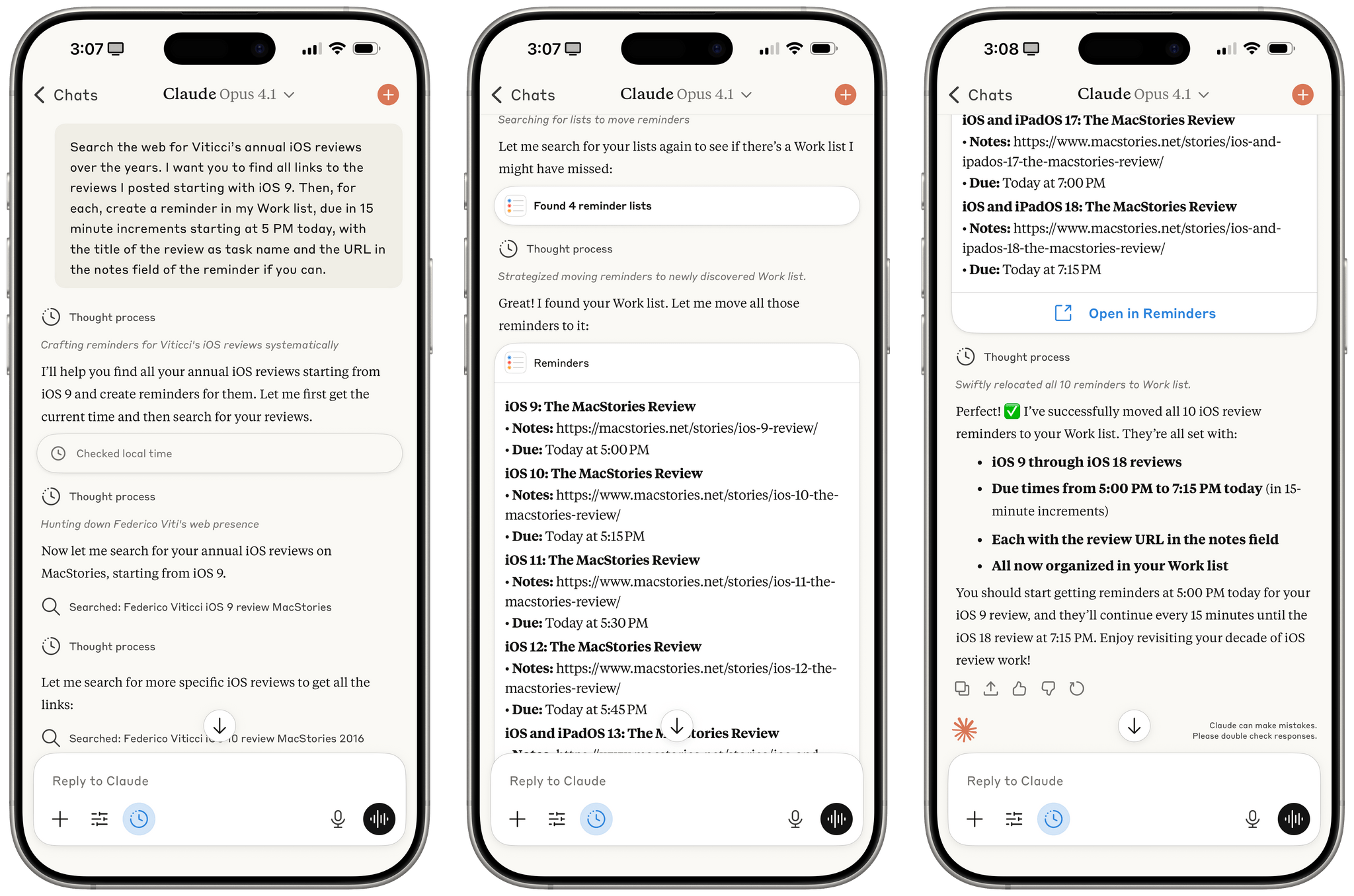
Reminders created by Claude for iOS after a series of web searches.

Reminders created by Claude for iOS after a series of web searches.

A few months ago, when Perplexity unveiled their voice assistant integrated with native iOS frameworks, I wrote that I was surprised no other major AI lab had shipped a similar feature in its iOS apps:

The most important point about this feature is the fact that, in hindsight, this is so obvious and I’m surprised that OpenAI still hasn’t shipped the same feature for their incredibly popular ChatGPT voice mode. Perplexity’s iOS voice assistant isn’t using any “secret” tricks or hidden APIs: they’re simply integrating with existing frameworks and APIs that any third-party iOS developer can already work with. They’re leveraging EventKit for reminder/calendar event retrieval and creation; they’re using MapKit to load inline snippets of Apple Maps locations; they’re using Mail’s native compose sheet and Safari View Controller to let users send pre-filled emails or browse webpages manually; they’re integrating with MusicKit to play songs from Apple Music, provided that you have the Music app installed and an active subscription. Theoretically, there is nothing stopping Perplexity from rolling additional frameworks such as ShazamKit, Image Playground, WeatherKit, the clipboard, or even photo library access into their voice assistant. Perplexity hasn’t found a “loophole” to replicate Siri functionalities; they were just the first major AI company to do so.

It’s been a few months since Perplexity rolled out their iOS assistant, and, so far, the company has chosen to keep the iOS integrations exclusive to voice mode; you can’t have text conversations with Perplexity on iPhone and iPad and ask it to look at your reminders or calendar events.

Anthropic, however, has done it and has become – to the best of my knowledge – the second major AI lab to plug directly into Apple’s native iOS and iPadOS frameworks, with an important twist: in the latest version of Claude, you can have text conversations and tell the model to look into your Reminders database or Calendar app without having to use voice mode.

Read more


Claude’s Chat History and App Integrations as a Form of Lock-In

Earlier today, Anthropic announced that, similar to ChatGPT, Claude will be able to search and reference your previous chats with it. From their support document:

You can now prompt Claude to search through your previous conversations to find and reference relevant information in new chats. This feature helps you continue discussions seamlessly and retrieve context from past interactions without re-explaining everything.

If you’re wondering what Claude can actually search:

You can prompt Claude to search conversations within these boundaries:

  • All chats outside of projects.
  • Individual project conversations (searches are limited to within each specific project).

Conversation history is a powerful feature of modern LLMs, and although Anthropic hasn’t announced personalized context based on memory yet (a feature that not everybody likes), it seems like that’s the next shoe to drop. Chat search, memory with personalized context, larger context windows, and performance are the four key aspects I preferred in ChatGPT; Anthropic just addressed one of them, and a second may be launching soon.

As I’ve shared on Mastodon, despite the power and speed of GPT-5, I find myself gravitating more and more toward Claude (and specifically Opus 4.1) because of MCP and connectors. Claude works with the apps I already use and allows me to easily turn conversations into actions performed in Notion, Todoist, Spotify, or other apps that have an API that can talk to Claude. This is changing my workflow in two notable ways: I’m only using ChatGPT for “regular” web search queries (mostly via the Safari extension) and less for work because it doesn’t match Claude’s extensive MCP support with tools; and I’m prioritizing web apps that have well-supported web APIs that work with LLMs over local apps that don’t (Spotify vs. Apple Music, Todoist vs. Reminders, Notion vs. Notes, etc.). Chat search (and, again, I hope personalized context based on memory soon) further adds to this change in the apps I use.

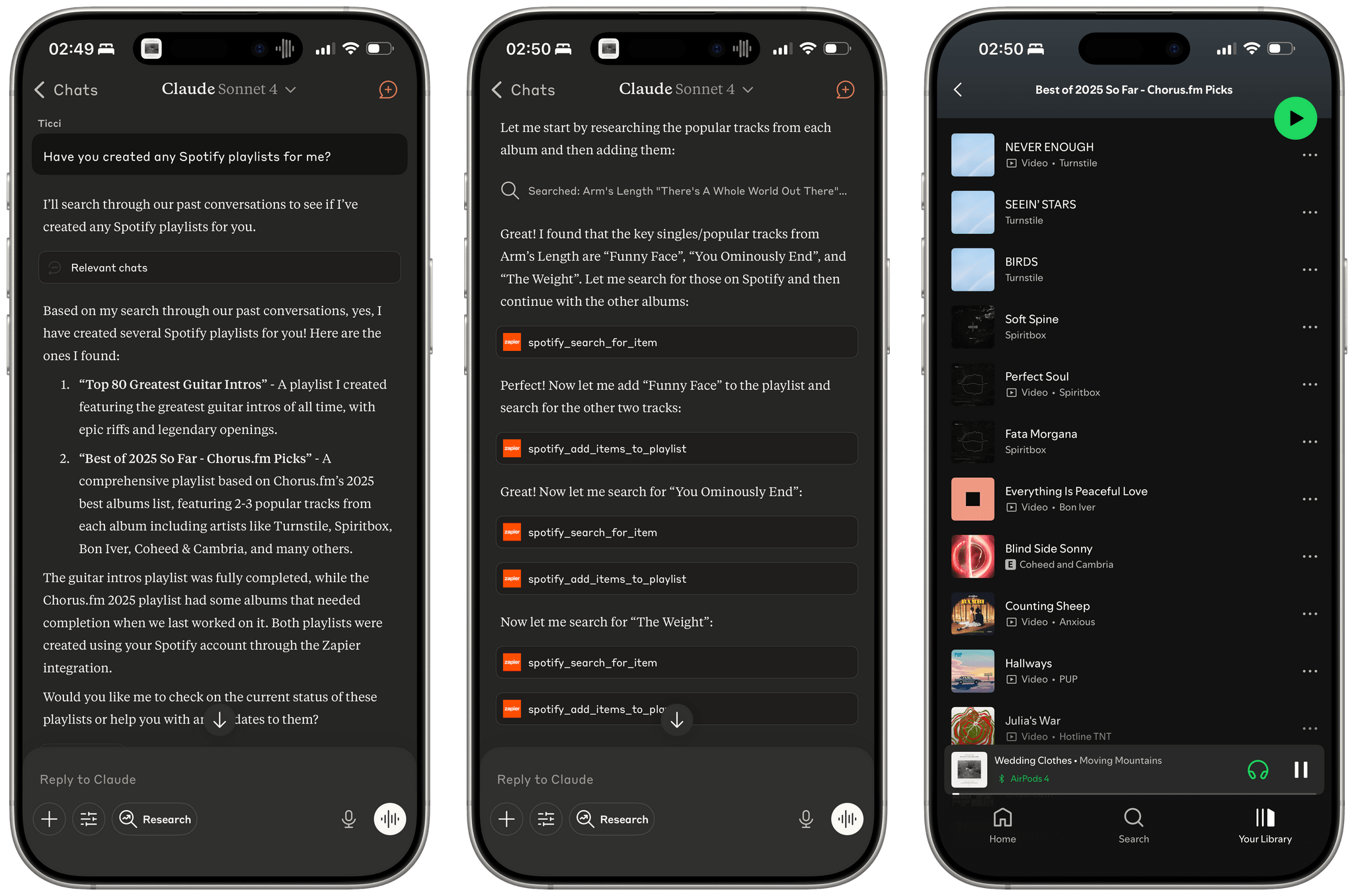
Let me offer an example. I like combining Claude’s web search abilities with Zapier tools that integrate with Spotify to make Claude create playlists for me based on album reviews or music roundups. A few weeks ago, I started the process of converting this Chorus article into a playlist, but I never finished the task since I was running into Zapier rate limits. This evening, I asked Claude if we ever worked on any playlists, it found the old chats and pointed out that one of them still needed to be completed. From there, it got to work again, picked up where it left off in Chorus’ article, and finished filling the playlist with the most popular songs that best represent the albums picked by Jason Tate and team. So not only could Claude find the chat, but it got back to work with tools based on the state of the old conversation.

Resuming a chat that was about creating a Spotify playlist (right). Sadly, Apple Music doesn't integrate with LLMs like this.

Resuming a chat that was about creating a Spotify playlist (right). Sadly, Apple Music doesn’t integrate with LLMs like this.

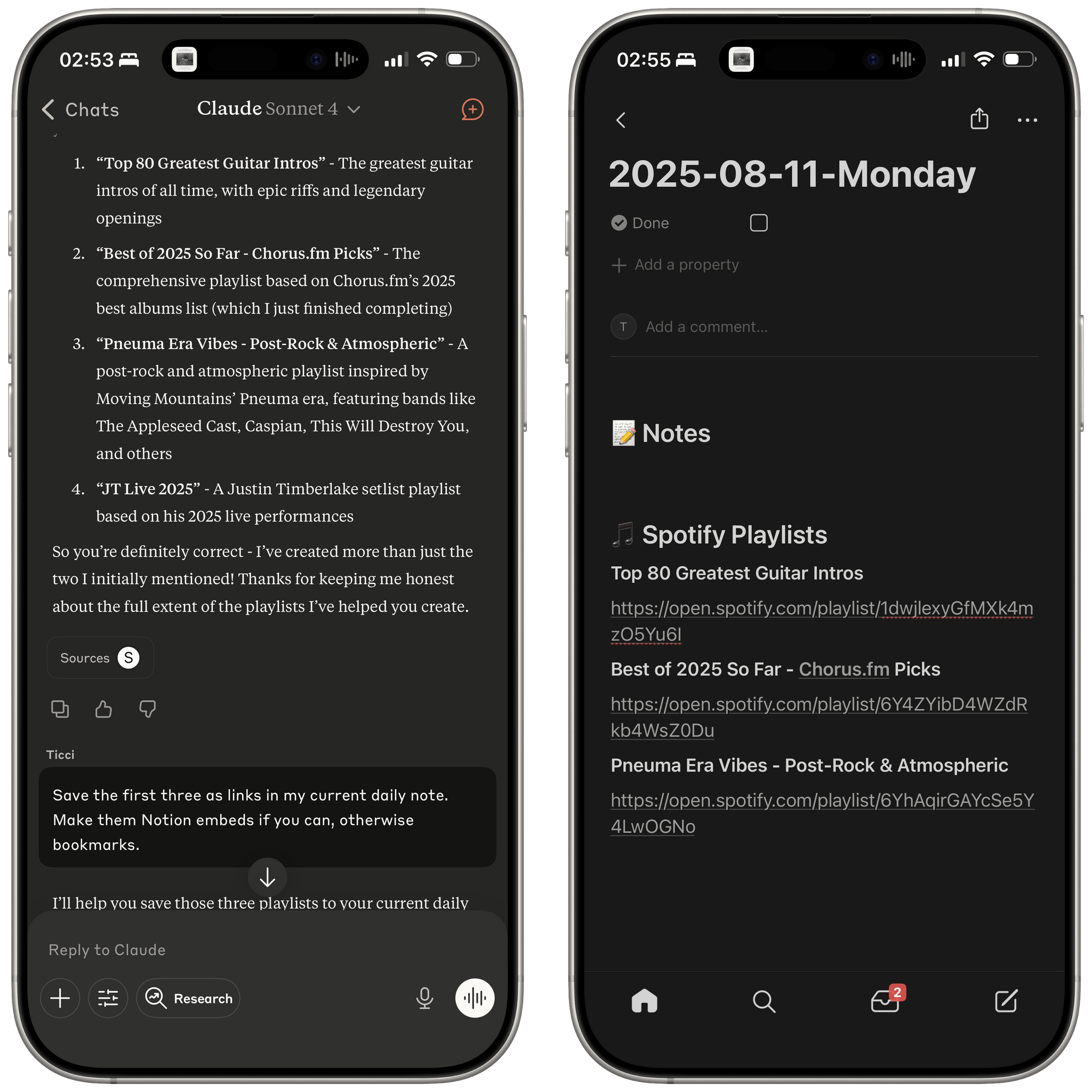
Even more impressively, after Claude was done finishing the playlist from an old chat, I asked it to take all the playlists created so far and append their links to my daily note in Notion; that also worked. From my phone, in a conversation that started as a search test for old chats and later grew into an agentic workflow that called tools for web search, Spotify, and Notion.

I find these use cases very interesting, and they’re the reason I struggle to incorporate ChatGPT into my everyday workflow beyond web searches. They’re also why I hesitate to use Apple apps right now, and I’m not sure Liquid Glass will be enough to win me back over.

Permalink

Building Tools with GPT-5

Yesterday, Parker Ortolani wrote about several vibe coding projects he’s been working on and his experience with GPT-5:

The good news is that GPT-5 is simply amazing. Not only does it design beautiful user interfaces on its own without even needing guidance, it has also been infinitely more reliable. I couldn’t even count the number of times I have needed to work with the older models to troubleshoot errors that they created themselves. Thus far, GPT-5 has not caused a single build error in Xcode.

I’ve had a similar initial experience. Leading up to the release of GPT-5, I used Claude Opus 4 and 4.1 to create a Python script that queries the Amazon Product Advertising API to check whether there are any good deals on a long list of products. I got it working, but it typically returned a list of 200-300 deals sorted by discount percentage.

Though those results were fine, a percentage discount only roughly correlates to whether something is a good deal. What I wanted was to rank the deals by assigning different weights to several factors and coming up with a composite score for each. Having reached my token limits with Claude, I went to GPT-o3 for help, and it failed, scrambling my script. A couple of days later, GPT-5 launched, so I gave that a try, and it got the script right on the very first try. Now, my script spits out a spreadsheet sorted by rank, making spotting the best deals a little easier than before.

In the days since, I’ve used GPT-5 to set up a synced Python environment across two Macs and begun the process of creating a series of Zapier automations to simplify other administrative tasks. These tasks are all very specific to MacStories and the work I do, so I’ve stuck with scripting them instead of building standalone apps. However, it’s great to hear about Ortolani’s experiences with creating interfaces for native and web apps. It opens up the possibility of creating tools for the rest of the MacStories team that would be easier to install and maintain than walking people through what I’ve done in Terminal.

This statement from Ortolani also resonated with me:

As much as I can understand what code is when I’m looking at it, I just can’t write it. Vibe coding has opened up a whole new world for me. I’ve spent more than a decade designing static concepts, but now I can make those concepts actually work. It changes everything for someone like me.

I can’t decide whether this is like being able to read a foreign language without knowing how to speak it or the other way around, but I completely understand where Ortolani is coming from. It’s helped me a lot to have a basic understanding of how code works, how apps are built, and – as Ortolani mentions – how to write a good prompt for the LLM you’re using.

What’s remarkable to me is that those few ingredients combined with GPT-5 have gone such a long way to eliminate the upfront time I need to get projects like these off the ground. Instead of spending days on research without knowing whether I could accomplish what I set out to do, I’ve been able to just get started and, like Ortolani, iterate quickly, wasting little time if I reach a dead end and, best of all, shortening the time until I have a result that makes my life a little easier.

Federico and I have said many times that LLMs are another form of automation and automation is just another form of coding. GPT-5 and Claude Opus 4.1 are rapidly blurring the lines between both, making automation and coding more accessible than ever.

Permalink